chapter 5
interaction design
basics
interaction design basics
• design:
– what it is, interventions, goals, constraints
• the design process
– what happens when
• users
– who they are, what they are like …
• scenarios
– rich stories of design
• iteration and prototypes
– never get it right first time!
what is
design?
what is
design?
achieving goals within constraints
• goals - purpose
– who is it for, why do they want it
• constraints
– materials, platforms
• trade-offs
golden rule of design
understand your materials
for Human–Computer Interaction
understand your materials
• understand computers
– limitations, capacities, tools, platforms
• understand people
– psychological, social aspects
– human error
• and their interaction …
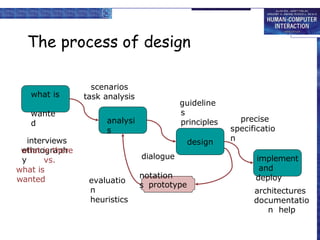
The process of design
analysi
s
design
implement
and
deploy
prototype
what is
wante
d
interviews
ethnograph
y
what is there
vs.
what is
wanted
guideline
s
principles
dialogue
notation
s
precise
specificatio
n
architectures
documentatio
n help
evaluatio
n
heuristics
scenarios
task analysis
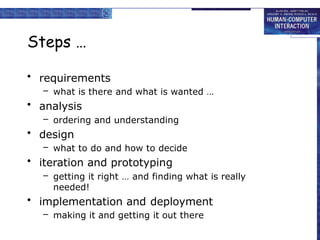
Steps …
• requirements
– what is there and what is wanted …
• analysis
– ordering and understanding
• design
– what to do and how to decide
• iteration and prototyping
– getting it right … and finding what is really
needed!
• implementation and deployment
– making it and getting it out there
user focus
know your user
personae
know your user
• who are they?
• probably not like you!
• talk to them
• watch them
• use your imagination
persona
• description of an ‘example’ user
– not necessarily a real person
• use as surrogate user
– what would Betty think
• details matter
– makes her ‘real’
example persona
Betty is 37 years old, She has been Warehouse Manager for five
years and worked for Simpkins Brothers Engineering for twelve
years. She didn’t go to university, but has studied in her
evenings for a business diploma. She has two children aged 15
and 7 and does not like to work late. She did part of an
introductory in-house computer course some years ago, but it
was interrupted when she was promoted and could no longer
afford to take the time. Her vision is perfect, but her right-hand
movement is slightly restricted following an industrial accident 3
years ago. She is enthusiastic about her work and is happy to
delegate responsibility and take suggestions from her staff.
However, she does feel threatened by the introduction of yet
another new computer system (the third in her time at SBE).
scenarios
stories for design
use and reuse
scenarios …
• what will users want to do?
• step-by-step walkthrough
– what can they see (sketches, screen
shots)
– what do they do (keyboard, mouse etc.)
– what are they thinking?
• use and reuse throughout design
scenario – movie player
Brian would like to see the new film “Moments of Significance”
and wants to invite Alison, but he knows she doesn’t like “arty”
films. He decides to take a look at it to see if she would like it
and so connects to one of the movie sharing networks. He uses
his work machine as it has a higher bandwidth connection, but
feels a bit guilty. He knows he will be getting an illegal copy of
the film, but decides it is OK as he is intending to go to the
cinema to watch it. After it downloads to his machine he takes
out his new personal movie player. He presses the ‘menu’
button and on the small LCD screen he scrolls using the arrow
keys to ‘bluetooth connect’ and presses the select button. On
his computer the movie download program now has an icon
showing that it has recognised a compatible device and he drags
the icon of the film over the icon for the player. On the player
the LCD screen says “downloading now”, a percent done
indicator and small whirling icon. … … …
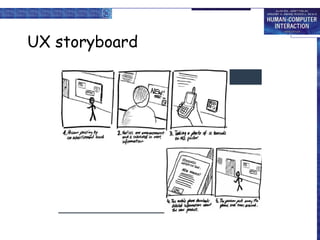
UX storyboard
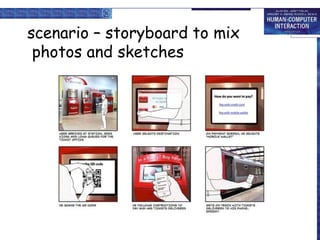
scenario – storyboard to mix
photos and sketches
… explore the depths
• explore interaction
– what happens when
• explore cognition
– what are the users thinking
• explore architecture
– what is happening inside
use scenarios to ..
• communicate with others
– designers, clients, users
• validate other models
– ‘play’ it against other models
• express dynamics
– screenshots – appearance
– scenario – behaviour
linearit
y
Scenarios – one linear path through system
Pros:
– life and time are linear
– easy to understand (stories and narrative are natural)
– concrete (errors less likely)
Cons:
– no choice, no branches, no special conditions
– miss the unintended
• So:
– use several scenarios
– use several methods
IG1 Element Element 2.pptx (part-1)_4.pptx

  • 1.
  • 2.
    interaction design basics •design: – what it is, interventions, goals, constraints • the design process – what happens when • users – who they are, what they are like … • scenarios – rich stories of design • iteration and prototypes – never get it right first time!
  • 3.
  • 4.
    what is design? achieving goalswithin constraints • goals - purpose – who is it for, why do they want it • constraints – materials, platforms • trade-offs
  • 5.
    golden rule ofdesign understand your materials
  • 6.
    for Human–Computer Interaction understandyour materials • understand computers – limitations, capacities, tools, platforms • understand people – psychological, social aspects – human error • and their interaction …
  • 7.
    The process ofdesign analysi s design implement and deploy prototype what is wante d interviews ethnograph y what is there vs. what is wanted guideline s principles dialogue notation s precise specificatio n architectures documentatio n help evaluatio n heuristics scenarios task analysis
  • 8.
    Steps … • requirements –what is there and what is wanted … • analysis – ordering and understanding • design – what to do and how to decide • iteration and prototyping – getting it right … and finding what is really needed! • implementation and deployment – making it and getting it out there
  • 10.
    user focus know youruser personae
  • 11.
    know your user •who are they? • probably not like you! • talk to them • watch them • use your imagination
  • 12.
    persona • description ofan ‘example’ user – not necessarily a real person • use as surrogate user – what would Betty think • details matter – makes her ‘real’
  • 13.
    example persona Betty is37 years old, She has been Warehouse Manager for five years and worked for Simpkins Brothers Engineering for twelve years. She didn’t go to university, but has studied in her evenings for a business diploma. She has two children aged 15 and 7 and does not like to work late. She did part of an introductory in-house computer course some years ago, but it was interrupted when she was promoted and could no longer afford to take the time. Her vision is perfect, but her right-hand movement is slightly restricted following an industrial accident 3 years ago. She is enthusiastic about her work and is happy to delegate responsibility and take suggestions from her staff. However, she does feel threatened by the introduction of yet another new computer system (the third in her time at SBE).
  • 14.
  • 15.
    scenarios … • whatwill users want to do? • step-by-step walkthrough – what can they see (sketches, screen shots) – what do they do (keyboard, mouse etc.) – what are they thinking? • use and reuse throughout design
  • 16.
    scenario – movieplayer Brian would like to see the new film “Moments of Significance” and wants to invite Alison, but he knows she doesn’t like “arty” films. He decides to take a look at it to see if she would like it and so connects to one of the movie sharing networks. He uses his work machine as it has a higher bandwidth connection, but feels a bit guilty. He knows he will be getting an illegal copy of the film, but decides it is OK as he is intending to go to the cinema to watch it. After it downloads to his machine he takes out his new personal movie player. He presses the ‘menu’ button and on the small LCD screen he scrolls using the arrow keys to ‘bluetooth connect’ and presses the select button. On his computer the movie download program now has an icon showing that it has recognised a compatible device and he drags the icon of the film over the icon for the player. On the player the LCD screen says “downloading now”, a percent done indicator and small whirling icon. … … …
  • 17.
  • 18.
    scenario – storyboardto mix photos and sketches
  • 19.
    … explore thedepths • explore interaction – what happens when • explore cognition – what are the users thinking • explore architecture – what is happening inside
  • 20.
    use scenarios to.. • communicate with others – designers, clients, users • validate other models – ‘play’ it against other models • express dynamics – screenshots – appearance – scenario – behaviour
  • 21.
    linearit y Scenarios – onelinear path through system Pros: – life and time are linear – easy to understand (stories and narrative are natural) – concrete (errors less likely) Cons: – no choice, no branches, no special conditions – miss the unintended • So: – use several scenarios – use several methods