Idram Payment System merchant interface description
Idram Payment System merchant interface description ....................................................1
1. Requirements....................................................................................................1
2. Payment via Idram Wallet (Web) ......................................................................1
3. Payment via Idram Wallet (Mobile app) ............................................................3
4. Order Confirmation............................................................................................3
5. Example of response to order confirmation.......................................................4
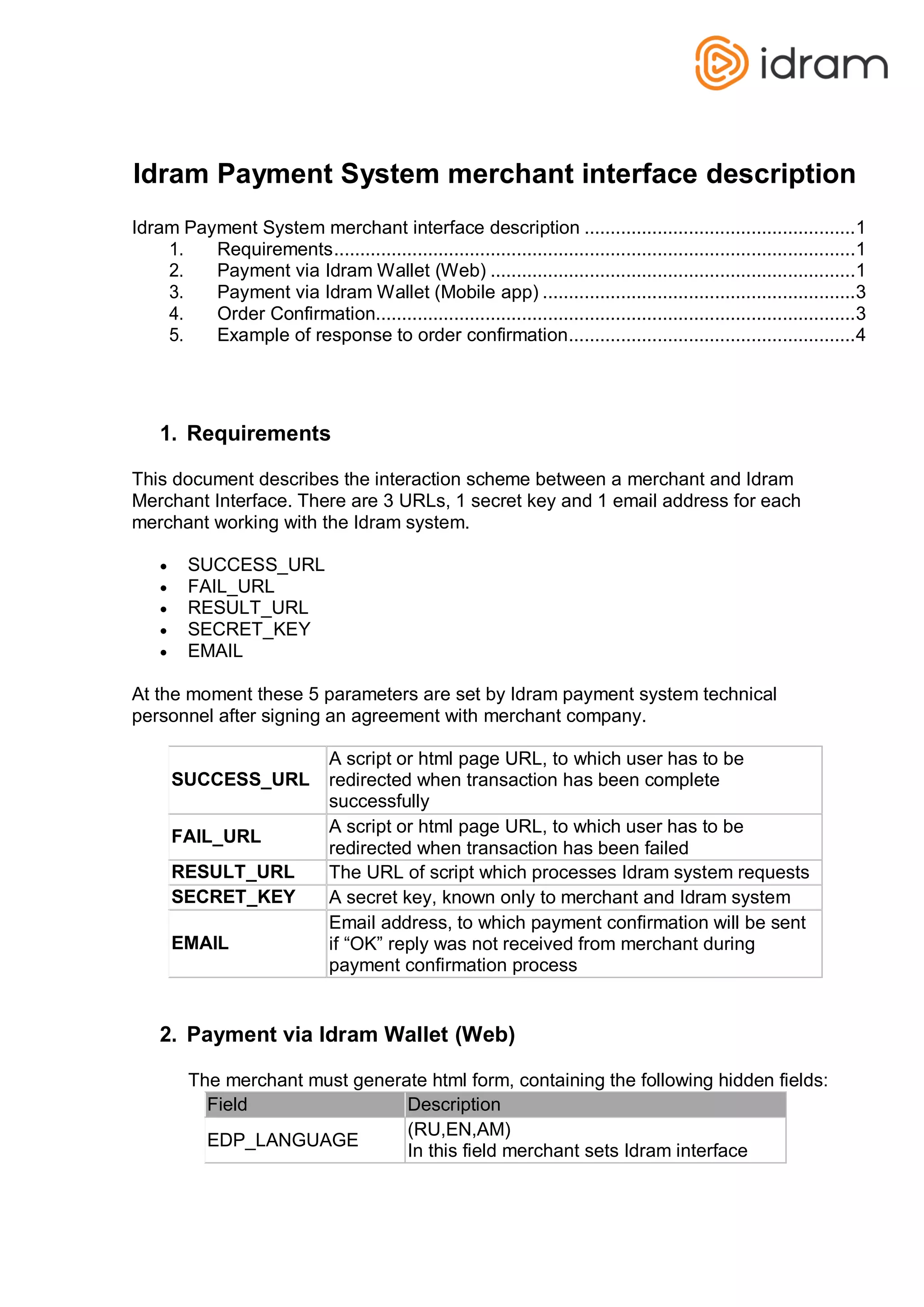
1. Requirements
This document describes the interaction scheme between a merchant and Idram
Merchant Interface. There are 3 URLs, 1 secret key and 1 email address for each
merchant working with the Idram system.
 SUCCESS_URL
 FAIL_URL
 RESULT_URL
 SECRET_KEY
 EMAIL
At the moment these 5 parameters are set by Idram payment system technical
personnel after signing an agreement with merchant company.
SUCCESS_URL
A script or html page URL, to which user has to be
redirected when transaction has been complete
successfully
FAIL_URL
A script or html page URL, to which user has to be
redirected when transaction has been failed
RESULT_URL The URL of script which processes Idram system requests
SECRET_KEY A secret key, known only to merchant and Idram system
EMAIL
Email address, to which payment confirmation will be sent
if “OK” reply was not received from merchant during
payment confirmation process
2. Payment via Idram Wallet (Web)
The merchant must generate html form, containing the following hidden fields:
Field Description
EDP_LANGUAGE
(RU,EN,AM)
In this field merchant sets Idram interface
language
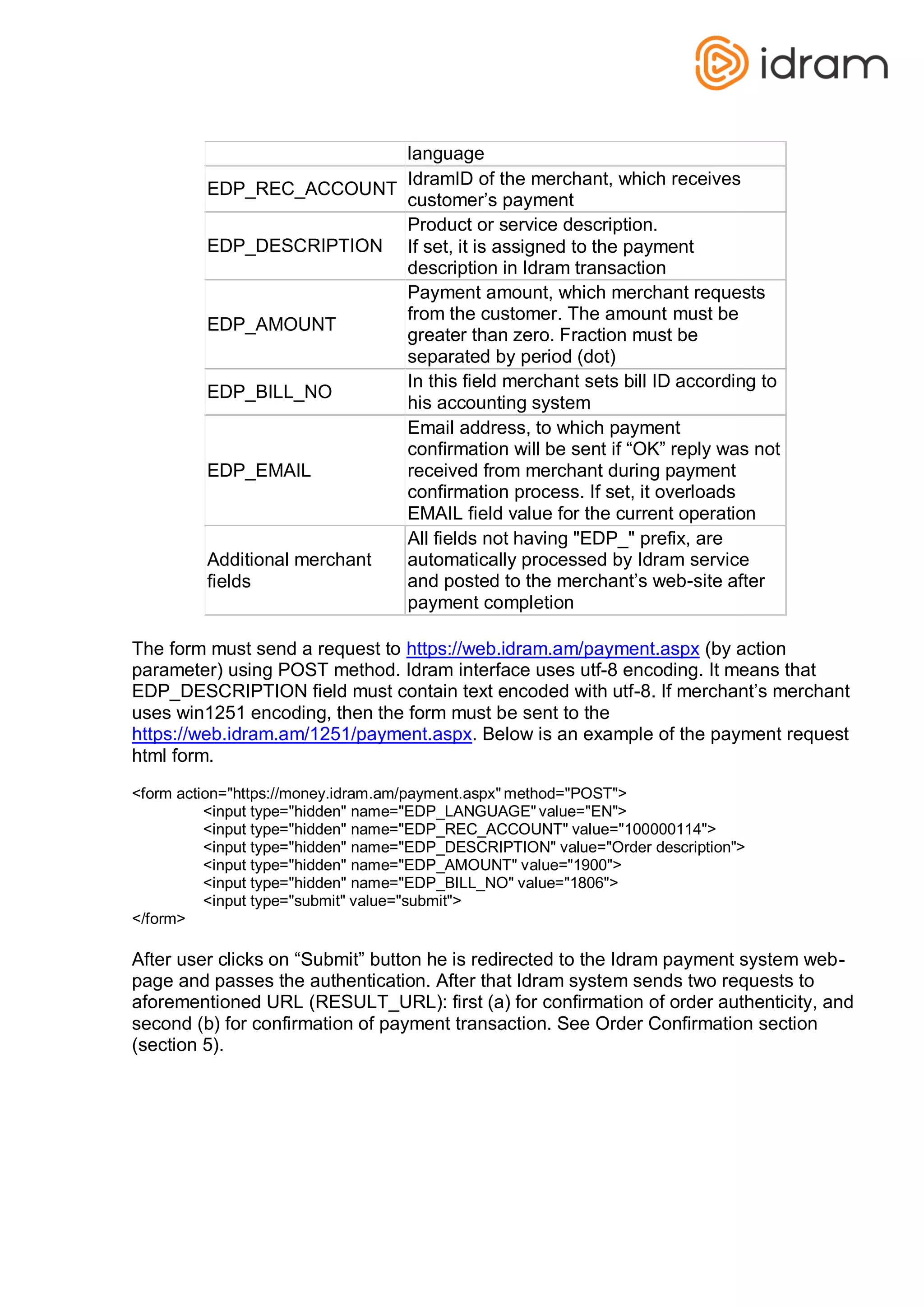
EDP_REC_ACCOUNT
IdramID of the merchant, which receives
customer’s payment
EDP_DESCRIPTION
Product or service description.
If set, it is assigned to the payment
description in Idram transaction
EDP_AMOUNT
Payment amount, which merchant requests
from the customer. The amount must be
greater than zero. Fraction must be
separated by period (dot)
EDP_BILL_NO
In this field merchant sets bill ID according to
his accounting system
EDP_EMAIL
Email address, to which payment
confirmation will be sent if “OK” reply was not
received from merchant during payment
confirmation process. If set, it overloads
EMAIL field value for the current operation
Additional merchant
fields
All fields not having "EDP_" prefix, are
automatically processed by Idram service
and posted to the merchant’s web-site after
payment completion
The form must send a request to https://web.idram.am/payment.aspx (by action
parameter) using POST method. Idram interface uses utf-8 encoding. It means that
EDP_DESCRIPTION field must contain text encoded with utf-8. If merchant’s merchant
uses win1251 encoding, then the form must be sent to the
https://web.idram.am/1251/payment.aspx. Below is an example of the payment request
html form.
<form action="https://money.idram.am/payment.aspx" method="POST">
<input type="hidden" name="EDP_LANGUAGE" value="EN">
<input type="hidden" name="EDP_REC_ACCOUNT" value="100000114">
<input type="hidden" name="EDP_DESCRIPTION" value="Order description">
<input type="hidden" name="EDP_AMOUNT" value="1900">
<input type="hidden" name="EDP_BILL_NO" value="1806">
<input type="submit" value="submit">
</form>
After user clicks on “Submit” button he is redirected to the Idram payment system web-
page and passes the authentication. After that Idram system sends two requests to
aforementioned URL (RESULT_URL): first (a) for confirmation of order authenticity, and
second (b) for confirmation of payment transaction. See Order Confirmation section
(section 5).
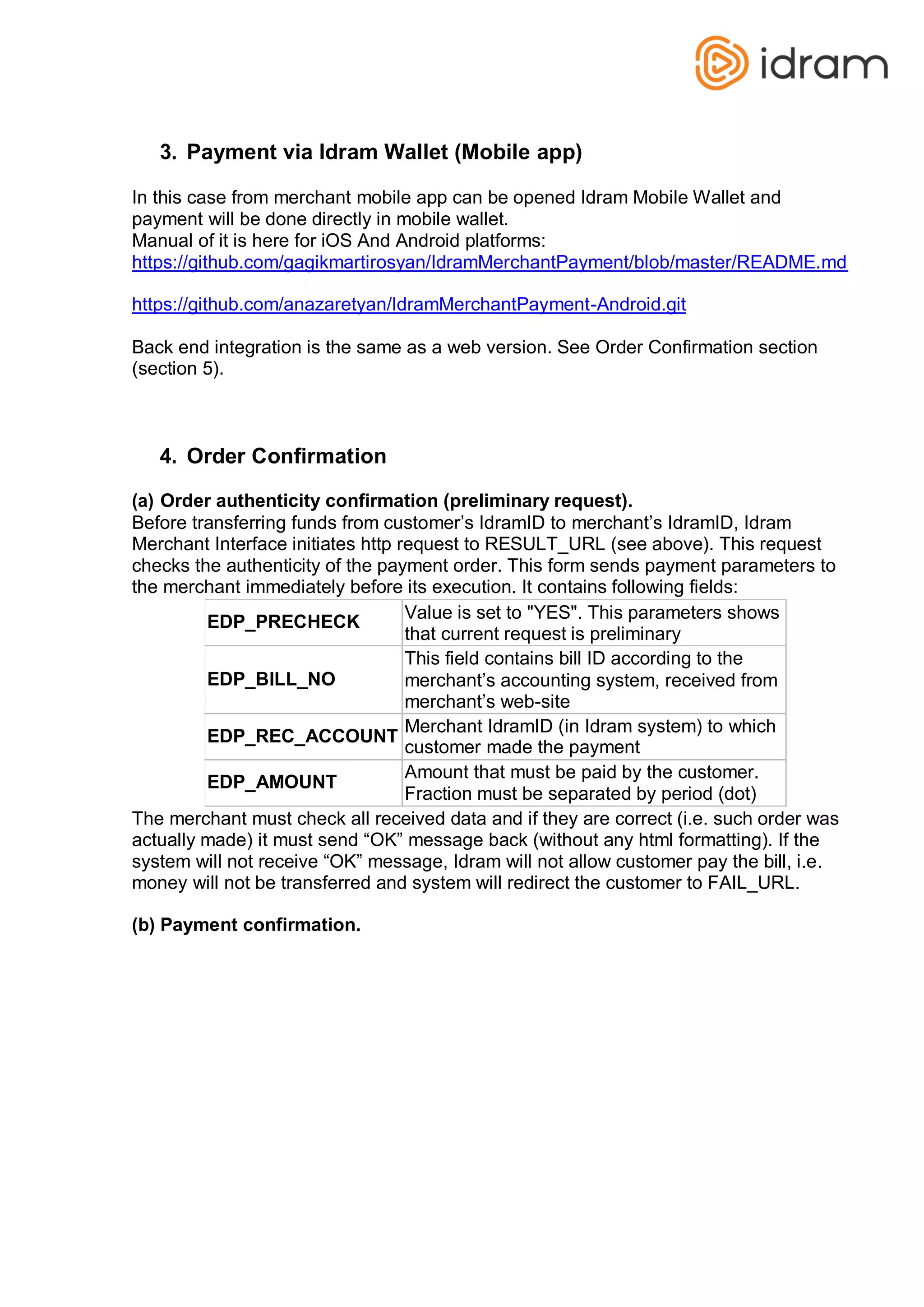
3. Payment via Idram Wallet (Mobile app)
In this case from merchant mobile app can be opened Idram Mobile Wallet and
payment will be done directly in mobile wallet.
Manual of it is here for iOS And Android platforms:
https://github.com/gagikmartirosyan/IdramMerchantPayment/blob/master/README.md
https://github.com/anazaretyan/IdramMerchantPayment-Android.git
Back end integration is the same as a web version. See Order Confirmation section
(section 5).
4. Order Confirmation
(a) Order authenticity confirmation (preliminary request).
Before transferring funds from customer’s IdramID to merchant’s IdramID, Idram
Merchant Interface initiates http request to RESULT_URL (see above). This request
checks the authenticity of the payment order. This form sends payment parameters to
the merchant immediately before its execution. It contains following fields:
EDP_PRECHECK
Value is set to "YES". This parameters shows
that current request is preliminary
EDP_BILL_NO
This field contains bill ID according to the
merchant’s accounting system, received from
merchant’s web-site
EDP_REC_ACCOUNT
Merchant IdramID (in Idram system) to which
customer made the payment
EDP_AMOUNT
Amount that must be paid by the customer.
Fraction must be separated by period (dot)
The merchant must check all received data and if they are correct (i.e. such order was
actually made) it must send “OK” message back (without any html formatting). If the
system will not receive “OK” message, Idram will not allow customer pay the bill, i.e.
money will not be transferred and system will redirect the customer to FAIL_URL.
(b) Payment confirmation.
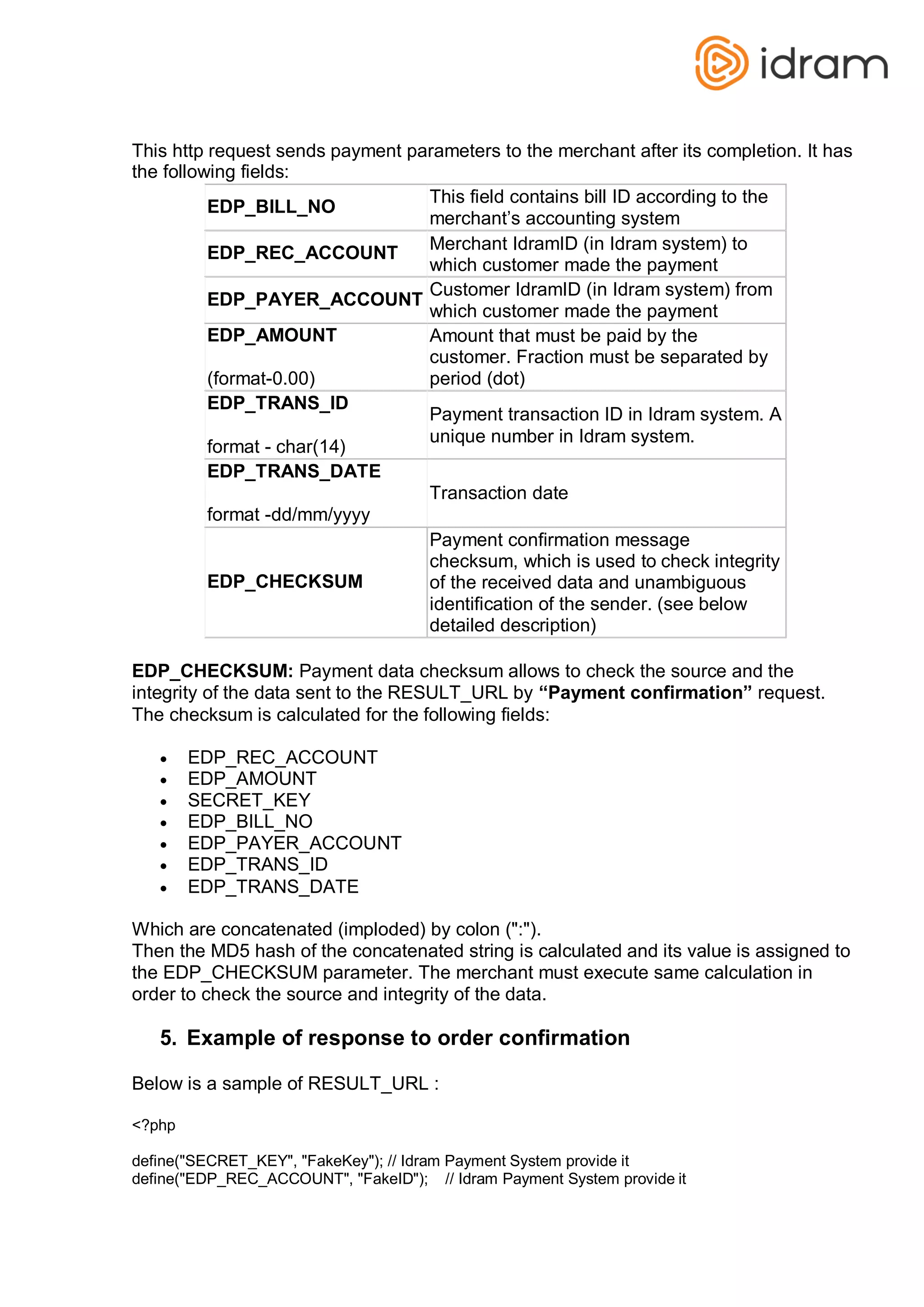
This http request sends payment parameters to the merchant after its completion. It has
the following fields:
EDP_BILL_NO
This field contains bill ID according to the
merchant’s accounting system
EDP_REC_ACCOUNT
Merchant IdramID (in Idram system) to
which customer made the payment
EDP_PAYER_ACCOUNT
Customer IdramID (in Idram system) from
which customer made the payment
EDP_AMOUNT
(format-0.00)
Amount that must be paid by the
customer. Fraction must be separated by
period (dot)
EDP_TRANS_ID
format - char(14)
Payment transaction ID in Idram system. A
unique number in Idram system.
EDP_TRANS_DATE
format -dd/mm/yyyy
Transaction date
EDP_CHECKSUM
Payment confirmation message
checksum, which is used to check integrity
of the received data and unambiguous
identification of the sender. (see below
detailed description)
EDP_CHECKSUM: Payment data checksum allows to check the source and the
integrity of the data sent to the RESULT_URL by “Payment confirmation” request.
The checksum is calculated for the following fields:
 EDP_REC_ACCOUNT
 EDP_AMOUNT
 SECRET_KEY
 EDP_BILL_NO
 EDP_PAYER_ACCOUNT
 EDP_TRANS_ID
 EDP_TRANS_DATE
Which are concatenated (imploded) by colon (":").
Then the MD5 hash of the concatenated string is calculated and its value is assigned to
the EDP_CHECKSUM parameter. The merchant must execute same calculation in
order to check the source and integrity of the data.
5. Example of response to order confirmation
Below is a sample of RESULT_URL :
<?php
define("SECRET_KEY", "FakeKey"); // Idram Payment System provide it
define("EDP_REC_ACCOUNT", "FakeID"); // Idram Payment System provide it
if(isset($_REQUEST['EDP_PRECHECK']) && isset($_REQUEST['EDP_BILL_NO']) &&
isset($_REQUEST['EDP_REC_ACCOUNT']) && isset($_REQUEST['EDP_AMOUNT']))
{
if($_REQUEST['EDP_PRECHECK'] == "YES")
{
if($_REQUEST['EDP_REC_ACCOUNT'] == EDP_REC_ACCOUNT)
{
otherwise nothing
}
}
}
$bill_no = $_REQUEST['EDP_BILL_NO'];
// check if $bill_no exists in your system orders if exists then echo OK
echo("OK");
if(isset($_REQUEST['EDP_PAYER_ACCOUNT']) && isset($_REQUEST['EDP_BILL_NO']) &&
isset($_REQUEST['EDP_REC_ACCOUNT']) && isset($_REQUEST['EDP_AMOUNT'])
&& isset($_REQUEST['EDP_TRANS_ID']) && isset($_REQUEST['EDP_CHECKSUM']))
{
$txtToHash =
EDP_REC_ACCOUNT . ":" .
$_REQUEST['EDP_AMOUNT'] . ":" .
SECRET_KEY . ":" .
$_REQUEST['EDP_BILL_NO'] . ":" .
$_REQUEST['EDP_PAYER_ACCOUNT'] . ":" .
$_REQUEST['EDP_TRANS_ID'] . ":" .
$_REQUEST['EDP_TRANS_DATE'];
if(strtoupper($_REQUEST['EDP_CHECKSUM']) != strtoupper(md5($txtToHash)))
{
}
else
{
}
}
// code to handling payment fail
// code to handling payment success
echo("OK");

Idram merchant api- Idram Payment System merchant interface description

  • 1.
    Idram Payment Systemmerchant interface description Idram Payment System merchant interface description ....................................................1 1. Requirements....................................................................................................1 2. Payment via Idram Wallet (Web) ......................................................................1 3. Payment via Idram Wallet (Mobile app) ............................................................3 4. Order Confirmation............................................................................................3 5. Example of response to order confirmation.......................................................4 1. Requirements This document describes the interaction scheme between a merchant and Idram Merchant Interface. There are 3 URLs, 1 secret key and 1 email address for each merchant working with the Idram system.  SUCCESS_URL  FAIL_URL  RESULT_URL  SECRET_KEY  EMAIL At the moment these 5 parameters are set by Idram payment system technical personnel after signing an agreement with merchant company. SUCCESS_URL A script or html page URL, to which user has to be redirected when transaction has been complete successfully FAIL_URL A script or html page URL, to which user has to be redirected when transaction has been failed RESULT_URL The URL of script which processes Idram system requests SECRET_KEY A secret key, known only to merchant and Idram system EMAIL Email address, to which payment confirmation will be sent if “OK” reply was not received from merchant during payment confirmation process 2. Payment via Idram Wallet (Web) The merchant must generate html form, containing the following hidden fields: Field Description EDP_LANGUAGE (RU,EN,AM) In this field merchant sets Idram interface
  • 2.
    language EDP_REC_ACCOUNT IdramID of themerchant, which receives customer’s payment EDP_DESCRIPTION Product or service description. If set, it is assigned to the payment description in Idram transaction EDP_AMOUNT Payment amount, which merchant requests from the customer. The amount must be greater than zero. Fraction must be separated by period (dot) EDP_BILL_NO In this field merchant sets bill ID according to his accounting system EDP_EMAIL Email address, to which payment confirmation will be sent if “OK” reply was not received from merchant during payment confirmation process. If set, it overloads EMAIL field value for the current operation Additional merchant fields All fields not having "EDP_" prefix, are automatically processed by Idram service and posted to the merchant’s web-site after payment completion The form must send a request to https://web.idram.am/payment.aspx (by action parameter) using POST method. Idram interface uses utf-8 encoding. It means that EDP_DESCRIPTION field must contain text encoded with utf-8. If merchant’s merchant uses win1251 encoding, then the form must be sent to the https://web.idram.am/1251/payment.aspx. Below is an example of the payment request html form. <form action="https://money.idram.am/payment.aspx" method="POST"> <input type="hidden" name="EDP_LANGUAGE" value="EN"> <input type="hidden" name="EDP_REC_ACCOUNT" value="100000114"> <input type="hidden" name="EDP_DESCRIPTION" value="Order description"> <input type="hidden" name="EDP_AMOUNT" value="1900"> <input type="hidden" name="EDP_BILL_NO" value="1806"> <input type="submit" value="submit"> </form> After user clicks on “Submit” button he is redirected to the Idram payment system web- page and passes the authentication. After that Idram system sends two requests to aforementioned URL (RESULT_URL): first (a) for confirmation of order authenticity, and second (b) for confirmation of payment transaction. See Order Confirmation section (section 5).
  • 3.
    3. Payment viaIdram Wallet (Mobile app) In this case from merchant mobile app can be opened Idram Mobile Wallet and payment will be done directly in mobile wallet. Manual of it is here for iOS And Android platforms: https://github.com/gagikmartirosyan/IdramMerchantPayment/blob/master/README.md https://github.com/anazaretyan/IdramMerchantPayment-Android.git Back end integration is the same as a web version. See Order Confirmation section (section 5). 4. Order Confirmation (a) Order authenticity confirmation (preliminary request). Before transferring funds from customer’s IdramID to merchant’s IdramID, Idram Merchant Interface initiates http request to RESULT_URL (see above). This request checks the authenticity of the payment order. This form sends payment parameters to the merchant immediately before its execution. It contains following fields: EDP_PRECHECK Value is set to "YES". This parameters shows that current request is preliminary EDP_BILL_NO This field contains bill ID according to the merchant’s accounting system, received from merchant’s web-site EDP_REC_ACCOUNT Merchant IdramID (in Idram system) to which customer made the payment EDP_AMOUNT Amount that must be paid by the customer. Fraction must be separated by period (dot) The merchant must check all received data and if they are correct (i.e. such order was actually made) it must send “OK” message back (without any html formatting). If the system will not receive “OK” message, Idram will not allow customer pay the bill, i.e. money will not be transferred and system will redirect the customer to FAIL_URL. (b) Payment confirmation.
  • 4.
    This http requestsends payment parameters to the merchant after its completion. It has the following fields: EDP_BILL_NO This field contains bill ID according to the merchant’s accounting system EDP_REC_ACCOUNT Merchant IdramID (in Idram system) to which customer made the payment EDP_PAYER_ACCOUNT Customer IdramID (in Idram system) from which customer made the payment EDP_AMOUNT (format-0.00) Amount that must be paid by the customer. Fraction must be separated by period (dot) EDP_TRANS_ID format - char(14) Payment transaction ID in Idram system. A unique number in Idram system. EDP_TRANS_DATE format -dd/mm/yyyy Transaction date EDP_CHECKSUM Payment confirmation message checksum, which is used to check integrity of the received data and unambiguous identification of the sender. (see below detailed description) EDP_CHECKSUM: Payment data checksum allows to check the source and the integrity of the data sent to the RESULT_URL by “Payment confirmation” request. The checksum is calculated for the following fields:  EDP_REC_ACCOUNT  EDP_AMOUNT  SECRET_KEY  EDP_BILL_NO  EDP_PAYER_ACCOUNT  EDP_TRANS_ID  EDP_TRANS_DATE Which are concatenated (imploded) by colon (":"). Then the MD5 hash of the concatenated string is calculated and its value is assigned to the EDP_CHECKSUM parameter. The merchant must execute same calculation in order to check the source and integrity of the data. 5. Example of response to order confirmation Below is a sample of RESULT_URL : <?php define("SECRET_KEY", "FakeKey"); // Idram Payment System provide it define("EDP_REC_ACCOUNT", "FakeID"); // Idram Payment System provide it
  • 5.
    if(isset($_REQUEST['EDP_PRECHECK']) && isset($_REQUEST['EDP_BILL_NO'])&& isset($_REQUEST['EDP_REC_ACCOUNT']) && isset($_REQUEST['EDP_AMOUNT'])) { if($_REQUEST['EDP_PRECHECK'] == "YES") { if($_REQUEST['EDP_REC_ACCOUNT'] == EDP_REC_ACCOUNT) { otherwise nothing } } } $bill_no = $_REQUEST['EDP_BILL_NO']; // check if $bill_no exists in your system orders if exists then echo OK echo("OK"); if(isset($_REQUEST['EDP_PAYER_ACCOUNT']) && isset($_REQUEST['EDP_BILL_NO']) && isset($_REQUEST['EDP_REC_ACCOUNT']) && isset($_REQUEST['EDP_AMOUNT']) && isset($_REQUEST['EDP_TRANS_ID']) && isset($_REQUEST['EDP_CHECKSUM'])) { $txtToHash = EDP_REC_ACCOUNT . ":" . $_REQUEST['EDP_AMOUNT'] . ":" . SECRET_KEY . ":" . $_REQUEST['EDP_BILL_NO'] . ":" . $_REQUEST['EDP_PAYER_ACCOUNT'] . ":" . $_REQUEST['EDP_TRANS_ID'] . ":" . $_REQUEST['EDP_TRANS_DATE']; if(strtoupper($_REQUEST['EDP_CHECKSUM']) != strtoupper(md5($txtToHash))) { } else { } } // code to handling payment fail // code to handling payment success echo("OK");