MEDJACKET PROPOSAL
FOR
DIGITAL HEALTH INITIATIVES
FOR Ministry Of Health & Family Welfare
Government of Telangana
ABOUT MEDJACKET
Medjacket India Private Limited an associated entity of Medjacket Private Limited Australia established in 2014 a medical research and
development company.
Medjacket India Private Limited Accreditations:
Medjacket project won top 10 of Capstone Projects (Harvard University) 2019
ISO & Other Certifications and Patents
1. Design Patent: No: 335563-001 (Controller of Patents & Designs/Kolkata)
2. ISO 9001:2015
3. ISO 20000-1:2018
4. ISO 13485:2016
5. CE Certification of Compliance- QVA-MIPL-Z1-122906
Trademarks- Trademarks Registry Mumbai: 1. 4676837
2. 4676838
3. 4676839
4. 4676840
Pilot Projects Conducted and In progress In India:
1. Sri Venkateswara Institute of Research and Rehabilitation for The Disabled (VIRRD Hospital),
Thimmapuram, Dwarakatirumala, West Godavari District, Andhra Pradesh.
2. Dr. Patnam Mahender Reddy Institute of Medical Sciences, Chevella Village, Ranga Reddy Dist., Telangana.
3. Osmania General Hospital, Afzal Gunj, Hyderabad, Telangana (Presently in Progress)
Letters of Product & Project Endorsement:
1. Harvard Medical School
2. Chairman APMSIDC product appraisal.
MEDJACKET WEB ARCHITECTURE
Super/Admin
Server
Hospital Server
Device Device Device Device
MEDJACKET DATABASE ARCHITECTURE OVERVIEW
MEDJACKET ARCHITECTURE OVERVIEW
SUPER/ADMIN
SERVER
DEVICE
PATHOLOGY &
RADIOLOGY
SERVER
HOSPITAL
SERVER
HOSPITAL CREATION
MEDJACKET DEVICE REGISTRATION
REPORT INTEGRATION
TWO WAY DATA INTEGRATION
MEDJACKET MODULAR OVERVIEW
HOSPITAL SERVER
ALL PATIENTS NURSING STATION USERS HOSPITALS
MEDJACKET E-ICU MODULAR OVERVIEW
ALL PATIENTS MAIN MODULE OVERVIEW
PATIENT
REGISTRATION
All patient> enroll a new
patient
OUTPATIENT
REGISTRATION MODULE
IN PATIENT MODULE
Modify the patient details
ENTER PATIENT DATA
ASSIGN OUTPATIENT
REGISTRATION NUMBER
PATIENT
VISIT
MODULE
ASSIGN IN PATIENT
REGISTRATION NUMBER
IF ADMITTED AS INPATIENT
NOTE: ALL INFORMATION RECEIVED IS
STORED IN PATIENT DATA FILE
ICU MODULE
MEDJACKET DEVICE OVERVIEW
MEDJACKET DEVICE MODULE
ONLINE PHYSIOLOGICAL
PARAMETER
INTEGRATION
BLOOD GAS
INTEGRATION
GLUCO METER,
HEMOGLOBIN METER
INTEGRATION
OXYGEN FLOW &DRIP
FLOW INTEGRATION
HEALTH MONITOR
IN
MEDJACKET DEVICE
THIRD PARTY
PERIPHERAL
INTEGRATION
(ON PROVISION OF
COMMUNICATION PROTOCOLS)
NOTE: ALL INFORMATION RECEIVED IS
STORED IN PATIENT DATA FILE
OPEN LOCAL HOST
LOGIN TO LOCAL HOST> ALL
PATIENTS >CHOOSE THE PATIENT>
CLICK ON LIVE MONITORING
MEDJACKET DEVICE OVERVIEW
This page shows
the main view of
medjacket pro
device it contains
of both localhost
and health
monitor.
NURSING STATION MODULE OVERVIEW
To enter health
monitor double
click on the icon it
popups a dialog box
in which select
execute in terminal
NURSING STATION MODULE OVERVIEW
On successful execution
it opens mono tab in
which the status of the
peripherals will be
displayed and then it
redirects to the main
screen of the health
monitor
NURSING STATION MODULE OVERVIEW
This is the idle screen of the
health monitor before
connecting the peripherals
to the patient.
NURSING STATION MODULE OVERVIEW
Open settings tab and
navigate to network and
cross verify that the
device is connected to
localhost.
NURSING STATION MODULE OVERVIEW
• In General settings
select the device type
and verify the
connection status of
the peripherals.
• In case of external
peripherals go to the
particular peripheral
tab and click on
dropdown menu and
select the particular
usb.
NURSING STATION MODULE OVERVIEW
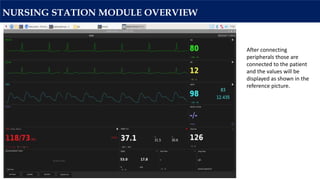
After connecting
peripherals those are
connected to the patient
and the values will be
displayed as shown in the
reference picture.
NURSING STATION MODULE OVERVIEW
To login into localhost
double click on
medjacket logo and
select execute in
terminal option.
NURSING STATION MODULE OVERVIEW
Here the device should
be registered to the
hospital using the
register the device
option. This should only
be done once.
NURSING STATION MODULE OVERVIEW
Login using the hospital
credentials to register the
device
NURSING STATION MODULE OVERVIEW
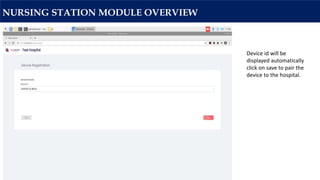
Device id will be
displayed automatically
click on save to pair the
device to the hospital.
NURSING STATION MODULE OVERVIEW
Using the credentials
login into localhost.
NURSING STATION MODULE OVERVIEW
To connect the
device to live
monitoring click on
all patients and
select the patient
and click on live
monitoring.
NURSING STATION MODULE OVERVIEW
In localhost it indicates
that the session is active
for the particular
patient and the live
monitor icon will blink
as an indication.
NURSING STATION MODULE OVERVIEW
In health monitor it
indicates as NS this
shows that the live
monitoring is
successfully connected
to the nursing station
Connected patient
name will be displayed
at the top left corner
of the health monitor.
MEDJACKET MODULAR OVERVIEW
HOSPITAL SERVER
(hospital domain)
ALL PATIENTS NURSING STATION USERS HOSPITALS
NURSING STATION MODULE OVERVIEW
Using the same
credentials login into
hospital domain to
monitor the connected
patients.
NURSING STATION MODULE OVERVIEW
Click on nursing station
to monitor the
connected patients.
NURSING STATION MODULE OVERVIEW
All connected
parameters will be
displayed, medications
from doctors are visible
here and can also
update the food intake
of the patient
Monitoring people
can add urine history
as per the time line
by clicking on add
urine button in urine
section.
Doctors can add the
notes i.e. the health
condition, treatment
or any other
information regarding
the patient
MEDICATIONS MODULE
To add medications go
to all patients tab in
hospital domain and
select the patient and
click in medications.
MEDICATIONS MODULE
After clicking on
medication icon this
page will appear, here
doctors can add
medications, timing and
intake and course
duration of the
medicine and save to
update
Note:
• In Medication Enter
“Symptom,nature,manfac
ture” for medicine search.
• In Time “Enter when
medication should be
used. If more than once,
use coma to separate
time(like 12:00,18:30)”
REPORTS MODULE
HOSPITAL SERVER
(login to hospital)
REPORTS
ALL PATIENTS
(choose the patient)
REPORTS MODULE
To generate the
reports of the
patient go to all
patients tab and
select the patient
and click on reports
icon
REPORTS MODULE
Time range provides the
flexibility to generate the
reports from desired date
to date.
User can generate the
reports for even one
parameter or all
parameters by selecting
them and click on generate
report,it instantly
generates the reports of
the selected parameters.
REPORTS MODULE
To download the
reports go to the
end of the page
and click on
export to PDF
button then the
reports will be
downloaded in
PDF format
REPORTS MODULE

ICU Presentation

  • 1.
    MEDJACKET PROPOSAL FOR DIGITAL HEALTHINITIATIVES FOR Ministry Of Health & Family Welfare Government of Telangana
  • 2.
    ABOUT MEDJACKET Medjacket IndiaPrivate Limited an associated entity of Medjacket Private Limited Australia established in 2014 a medical research and development company. Medjacket India Private Limited Accreditations: Medjacket project won top 10 of Capstone Projects (Harvard University) 2019 ISO & Other Certifications and Patents 1. Design Patent: No: 335563-001 (Controller of Patents & Designs/Kolkata) 2. ISO 9001:2015 3. ISO 20000-1:2018 4. ISO 13485:2016 5. CE Certification of Compliance- QVA-MIPL-Z1-122906 Trademarks- Trademarks Registry Mumbai: 1. 4676837 2. 4676838 3. 4676839 4. 4676840 Pilot Projects Conducted and In progress In India: 1. Sri Venkateswara Institute of Research and Rehabilitation for The Disabled (VIRRD Hospital), Thimmapuram, Dwarakatirumala, West Godavari District, Andhra Pradesh. 2. Dr. Patnam Mahender Reddy Institute of Medical Sciences, Chevella Village, Ranga Reddy Dist., Telangana. 3. Osmania General Hospital, Afzal Gunj, Hyderabad, Telangana (Presently in Progress) Letters of Product & Project Endorsement: 1. Harvard Medical School 2. Chairman APMSIDC product appraisal.
  • 3.
  • 4.
  • 5.
    MEDJACKET ARCHITECTURE OVERVIEW SUPER/ADMIN SERVER DEVICE PATHOLOGY& RADIOLOGY SERVER HOSPITAL SERVER HOSPITAL CREATION MEDJACKET DEVICE REGISTRATION REPORT INTEGRATION TWO WAY DATA INTEGRATION
  • 6.
    MEDJACKET MODULAR OVERVIEW HOSPITALSERVER ALL PATIENTS NURSING STATION USERS HOSPITALS
  • 7.
    MEDJACKET E-ICU MODULAROVERVIEW ALL PATIENTS MAIN MODULE OVERVIEW PATIENT REGISTRATION All patient> enroll a new patient OUTPATIENT REGISTRATION MODULE IN PATIENT MODULE Modify the patient details ENTER PATIENT DATA ASSIGN OUTPATIENT REGISTRATION NUMBER PATIENT VISIT MODULE ASSIGN IN PATIENT REGISTRATION NUMBER IF ADMITTED AS INPATIENT NOTE: ALL INFORMATION RECEIVED IS STORED IN PATIENT DATA FILE ICU MODULE
  • 8.
    MEDJACKET DEVICE OVERVIEW MEDJACKETDEVICE MODULE ONLINE PHYSIOLOGICAL PARAMETER INTEGRATION BLOOD GAS INTEGRATION GLUCO METER, HEMOGLOBIN METER INTEGRATION OXYGEN FLOW &DRIP FLOW INTEGRATION HEALTH MONITOR IN MEDJACKET DEVICE THIRD PARTY PERIPHERAL INTEGRATION (ON PROVISION OF COMMUNICATION PROTOCOLS) NOTE: ALL INFORMATION RECEIVED IS STORED IN PATIENT DATA FILE OPEN LOCAL HOST LOGIN TO LOCAL HOST> ALL PATIENTS >CHOOSE THE PATIENT> CLICK ON LIVE MONITORING
  • 9.
    MEDJACKET DEVICE OVERVIEW Thispage shows the main view of medjacket pro device it contains of both localhost and health monitor.
  • 10.
    NURSING STATION MODULEOVERVIEW To enter health monitor double click on the icon it popups a dialog box in which select execute in terminal
  • 11.
    NURSING STATION MODULEOVERVIEW On successful execution it opens mono tab in which the status of the peripherals will be displayed and then it redirects to the main screen of the health monitor
  • 12.
    NURSING STATION MODULEOVERVIEW This is the idle screen of the health monitor before connecting the peripherals to the patient.
  • 13.
    NURSING STATION MODULEOVERVIEW Open settings tab and navigate to network and cross verify that the device is connected to localhost.
  • 14.
    NURSING STATION MODULEOVERVIEW • In General settings select the device type and verify the connection status of the peripherals. • In case of external peripherals go to the particular peripheral tab and click on dropdown menu and select the particular usb.
  • 15.
    NURSING STATION MODULEOVERVIEW After connecting peripherals those are connected to the patient and the values will be displayed as shown in the reference picture.
  • 16.
    NURSING STATION MODULEOVERVIEW To login into localhost double click on medjacket logo and select execute in terminal option.
  • 17.
    NURSING STATION MODULEOVERVIEW Here the device should be registered to the hospital using the register the device option. This should only be done once.
  • 18.
    NURSING STATION MODULEOVERVIEW Login using the hospital credentials to register the device
  • 19.
    NURSING STATION MODULEOVERVIEW Device id will be displayed automatically click on save to pair the device to the hospital.
  • 20.
    NURSING STATION MODULEOVERVIEW Using the credentials login into localhost.
  • 21.
  • 22.
    NURSING STATION MODULEOVERVIEW To connect the device to live monitoring click on all patients and select the patient and click on live monitoring.
  • 23.
    NURSING STATION MODULEOVERVIEW In localhost it indicates that the session is active for the particular patient and the live monitor icon will blink as an indication.
  • 24.
    NURSING STATION MODULEOVERVIEW In health monitor it indicates as NS this shows that the live monitoring is successfully connected to the nursing station Connected patient name will be displayed at the top left corner of the health monitor.
  • 25.
    MEDJACKET MODULAR OVERVIEW HOSPITALSERVER (hospital domain) ALL PATIENTS NURSING STATION USERS HOSPITALS
  • 26.
    NURSING STATION MODULEOVERVIEW Using the same credentials login into hospital domain to monitor the connected patients.
  • 27.
    NURSING STATION MODULEOVERVIEW Click on nursing station to monitor the connected patients.
  • 28.
    NURSING STATION MODULEOVERVIEW All connected parameters will be displayed, medications from doctors are visible here and can also update the food intake of the patient Monitoring people can add urine history as per the time line by clicking on add urine button in urine section. Doctors can add the notes i.e. the health condition, treatment or any other information regarding the patient
  • 29.
    MEDICATIONS MODULE To addmedications go to all patients tab in hospital domain and select the patient and click in medications.
  • 30.
    MEDICATIONS MODULE After clickingon medication icon this page will appear, here doctors can add medications, timing and intake and course duration of the medicine and save to update Note: • In Medication Enter “Symptom,nature,manfac ture” for medicine search. • In Time “Enter when medication should be used. If more than once, use coma to separate time(like 12:00,18:30)”
  • 31.
    REPORTS MODULE HOSPITAL SERVER (loginto hospital) REPORTS ALL PATIENTS (choose the patient)
  • 32.
    REPORTS MODULE To generatethe reports of the patient go to all patients tab and select the patient and click on reports icon
  • 33.
    REPORTS MODULE Time rangeprovides the flexibility to generate the reports from desired date to date. User can generate the reports for even one parameter or all parameters by selecting them and click on generate report,it instantly generates the reports of the selected parameters.
  • 34.
    REPORTS MODULE To downloadthe reports go to the end of the page and click on export to PDF button then the reports will be downloaded in PDF format
  • 35.