Languages, Office 365,
and PointFire 365
MARTIN LAPLANTE
CEO, ICEFIRE STUDIOS, CANADA
SUMMARY
• Historical background
• Language & MUI in SharePoint 2016 & O365
• User Language Settings
• PointFire on-prem and PointFire 365
• Brief Demo
• Machine Translation & other topics if time allows
Tower of Babel: Quick Recap
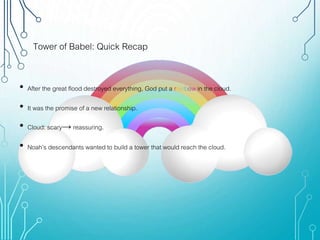
• After the great flood destroyed everything, God put a rainbow in the cloud.
• It was the promise of a new relationship.
• Cloud: scary→ reassuring.
• Noah’s descendants wanted to build a tower that would reach the cloud.
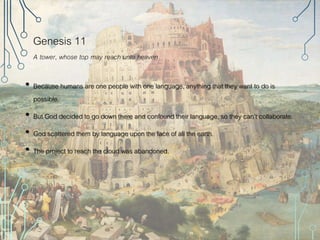
Genesis 11
A tower, whose top may reach unto heaven
• Because humans are one people with one language, anything that they want to do is
possible.
• But God decided to go down there and confound their language, so they can’t collaborate.
• God scattered them by language upon the face of all the earth.
• The project to reach the cloud was abandoned.
2016/O365 and Languages
• Variations
• Managed Metadata
• MUI (Multilingual User Interface)
• Machine Translation
Change Default Language
of an O365 Site Collection?
• MSFT support:
• “If the requirement is strong for your organization, from our back end, we can help change it. However,
we need to delete all site collections and re-create them, which also means all data will be deleted.”
• For My Site, this will also delete every user’s OneDrive for Business documents.
• Ouch! Easier to segregate users by language?
• Your choice: great flood that destroys all, or scatter your users upon the face of all the earth?
• Or you can use PointFire
USER LANGUAGE SETTINGS
What Sets User MUI Language?
• 2007: Site’s base language only, no alternate languages
• 2010: Menu toggle sets cookie
• 2013: Browser or user profile.
• O365: It’s complicated
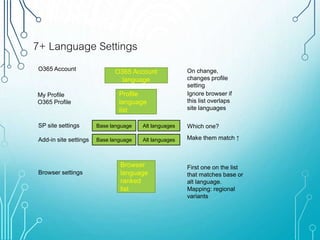
7+ Language Settings
Base language Alt languages
Browser
language
ranked
list
Profile
language
list
Base language Alt languages
O365 Account
language
SP site settings
Browser settings
Add-in site settings
O365 Account
My Profile
O365 Profile
Which one?
First one on the list
that matches base or
alt language.
Mapping: regional
variants
Ignore browser if
this list overlaps
site languages
On change,
changes profile
setting
Make them match ↑
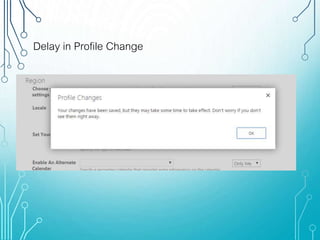
Delay in Profile Change
Changes Propagate
at Different Rates
English → Spanish → German
OneDrive UI Language Behaves Like
SharePoint
The Instant Toggle Trick
1. Account setting that has no overlap with base + alt languages
2. Profile setting blank, or no overlap with base + alt languages
3. Go home, come back tomorrow
4. Now change browser settings
• Effect is instantaneous, but training needed
PointFire On Premise
• For SharePoint 2007, 2010, 2013, 2016
• Ensures that 2 different users going to the same URL will each see it be entirely in
their own language
• Does not segregate users and content on separate sites
• Solution includes feature, http module, web parts
• Runs on the server, interacts with SharePoint and IIS
• Modifies and filters text on the server
• None of those techniques work in Office 365
PointFire 365 v 1.1 functionality
• SharePoint-hosted app
• None of your content goes to our server
• Configures SharePoint MUI & localization
• Shows/hides web parts according to language
• Filters content of lists, libraries, calendars according to language
• User can turn off filtering
• Filters other web parts including search
• Redirects pages according to language
• “Manage Variations” interface to set relationship between pages, items
DEMO
PF 365 version 2 functionality
• Language toggle
• Slow but steady
• Change date, number, currency formatting with language
• Machine Translation of items & documents
• Translate UI customizations using combination of user-defined translations list and machine
translation
• Better support of Modern Libraries
• More admin & provisioning features
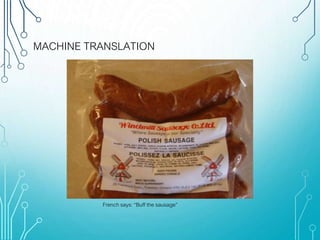
MACHINE TRANSLATION
French says: “Buff the sausage”
SharePoint’s
Machine Translation Service
• SharePoint Service Application
• Connects to Microsoft Translator
• Similar back end to Bing translation engine
• Custom version for SharePoint users
• Statistical engine, now with deep learning
• On-premise – you can set it up to train with your own documents
• Used in Variations
• Used in Managed Metadata
• Available through API
Machine Translation
Has Some Risks
Machine Translation Service
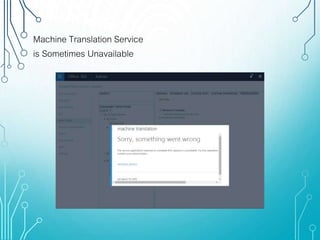
is Sometimes Unavailable
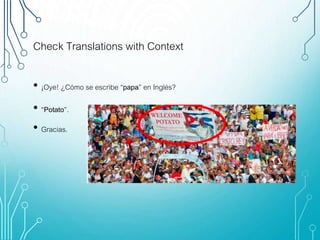
Check Translations with Context
• ¡Oye! ¿Cómo se escribe “papa” en Inglés?
• “Potato”.
• Gracias.
Machine Translation:
Write for Translation
• Microsoft Global English experiment
• Microsoft Manual of Style
• Global English Syntax
• Use short sentences
• Avoid sentence fragments
• Use optional pronouns – that, who
• Use optional articles – the
• Use optional punctuation
• Keep adjectives & adverbs close,
watch “only”
• Machine Translation Syntax
• But not too short
• Present participle vs. gerunds
• Past participles vs adjectives
• Limit coordinate conjunctions – and, or, but
• Capitalize correctly
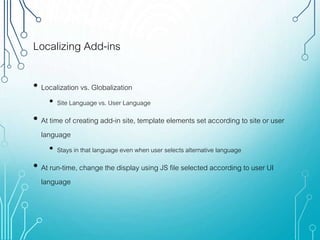
Localizing Add-ins
• Localization vs. Globalization
• Site Language vs. User Language
• At time of creating add-in site, template elements set according to site or user
language
• Stays in that language even when user selects alternative language
• At run-time, change the display using JS file selected according to user UI
language
Globalize Add-ins
• SharePoint-hosted or injected branding JS files
• Language-specific “Resources.nn-NN.js” file solutions
• Remote components: Request.QueryString["SPLanguage"]
• Add-in domain has no easy access to user language in host domain (JS XSS security)
• However, if alternate languages match, then user language matches
• Note: add-in domain may not have same alternate languages activated
• {add-in web name} /_layouts/15/muisetng.aspx
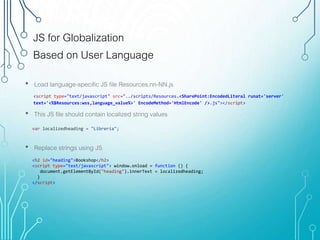
JS for Globalization
Based on User Language
<script type="text/javascript" src="../scripts/Resources.<SharePoint:EncodedLiteral runat='server'
text='<%$Resources:wss,language_value%>' EncodeMethod='HtmlEncode' />.js"></script>
• Load language-specific JS file Resources.nn-NN.js
• This JS file should contain localized string values
• Replace strings using JS
<h2 id="heading">Bookshop</h2>
<script type="text/javascript"> window.onload = function () {
document.getElementById("heading").innerText = localizedheading;
}
</script>
var localizedheading = "Librería";
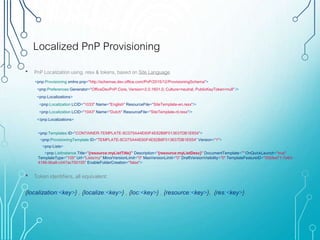
Localized PnP Provisioning
<pnp:Provisioning xmlns:pnp="http://schemas.dev.office.com/PnP/2015/12/ProvisioningSchema">
<pnp:Preferences Generator="OfficeDevPnP.Core, Version=2.0.1601.0, Culture=neutral, PublicKeyToken=null" />
<pnp:Localizations>
<pnp:Localization LCID="1033" Name="English" ResourceFile="SiteTemplate-en.resx"/>
<pnp:Localization LCID="1043" Name="Dutch" ResourceFile="SiteTemplate-nl.resx"/>
</pnp:Localizations>
• PnP Localization using .resx & tokens, based on Site Language
<pnp:Templates ID="CONTAINER-TEMPLATE-8C075A44E60F4E82B8F013637DB1E654">
<pnp:ProvisioningTemplate ID="TEMPLATE-8C075A44E60F4E82B8F013637DB1E654" Version="1">
<pnp:Lists>
<pnp:ListInstance Title="{resource:myListTitle}" Description="{resource:myListDesc}" DocumentTemplate="" OnQuickLaunch="true"
TemplateType="105" Url="Lists/my" MinorVersionLimit="0" MaxVersionLimit="0" DraftVersionVisibility="0" TemplateFeatureID="00bfea71-7e6d-
4186-9ba8-c047ac750105" EnableFolderCreation="false">
• Token identifiers, all equivalent:
{localization:<key>} , {localize:<key>} , {loc:<key>} , {resource:<key>}, {res:<key>}.
More questions?
Martin.Laplante@icefire.ca
Thank You For Coming To aOS

IceFire Presentation for Aos Canada tour

  • 1.
    Languages, Office 365, andPointFire 365 MARTIN LAPLANTE CEO, ICEFIRE STUDIOS, CANADA
  • 2.
    SUMMARY • Historical background •Language & MUI in SharePoint 2016 & O365 • User Language Settings • PointFire on-prem and PointFire 365 • Brief Demo • Machine Translation & other topics if time allows
  • 3.
    Tower of Babel:Quick Recap • After the great flood destroyed everything, God put a rainbow in the cloud. • It was the promise of a new relationship. • Cloud: scary→ reassuring. • Noah’s descendants wanted to build a tower that would reach the cloud.
  • 4.
    Genesis 11 A tower,whose top may reach unto heaven • Because humans are one people with one language, anything that they want to do is possible. • But God decided to go down there and confound their language, so they can’t collaborate. • God scattered them by language upon the face of all the earth. • The project to reach the cloud was abandoned.
  • 6.
    2016/O365 and Languages •Variations • Managed Metadata • MUI (Multilingual User Interface) • Machine Translation
  • 7.
    Change Default Language ofan O365 Site Collection? • MSFT support: • “If the requirement is strong for your organization, from our back end, we can help change it. However, we need to delete all site collections and re-create them, which also means all data will be deleted.” • For My Site, this will also delete every user’s OneDrive for Business documents. • Ouch! Easier to segregate users by language? • Your choice: great flood that destroys all, or scatter your users upon the face of all the earth? • Or you can use PointFire
  • 8.
    USER LANGUAGE SETTINGS WhatSets User MUI Language? • 2007: Site’s base language only, no alternate languages • 2010: Menu toggle sets cookie • 2013: Browser or user profile. • O365: It’s complicated
  • 9.
    7+ Language Settings Baselanguage Alt languages Browser language ranked list Profile language list Base language Alt languages O365 Account language SP site settings Browser settings Add-in site settings O365 Account My Profile O365 Profile Which one? First one on the list that matches base or alt language. Mapping: regional variants Ignore browser if this list overlaps site languages On change, changes profile setting Make them match ↑
  • 10.
  • 11.
    Changes Propagate at DifferentRates English → Spanish → German
  • 12.
    OneDrive UI LanguageBehaves Like SharePoint
  • 13.
    The Instant ToggleTrick 1. Account setting that has no overlap with base + alt languages 2. Profile setting blank, or no overlap with base + alt languages 3. Go home, come back tomorrow 4. Now change browser settings • Effect is instantaneous, but training needed
  • 14.
    PointFire On Premise •For SharePoint 2007, 2010, 2013, 2016 • Ensures that 2 different users going to the same URL will each see it be entirely in their own language • Does not segregate users and content on separate sites • Solution includes feature, http module, web parts • Runs on the server, interacts with SharePoint and IIS • Modifies and filters text on the server • None of those techniques work in Office 365
  • 15.
    PointFire 365 v1.1 functionality • SharePoint-hosted app • None of your content goes to our server • Configures SharePoint MUI & localization • Shows/hides web parts according to language • Filters content of lists, libraries, calendars according to language • User can turn off filtering • Filters other web parts including search • Redirects pages according to language • “Manage Variations” interface to set relationship between pages, items
  • 16.
  • 17.
    PF 365 version2 functionality • Language toggle • Slow but steady • Change date, number, currency formatting with language • Machine Translation of items & documents • Translate UI customizations using combination of user-defined translations list and machine translation • Better support of Modern Libraries • More admin & provisioning features
  • 18.
    MACHINE TRANSLATION French says:“Buff the sausage”
  • 19.
    SharePoint’s Machine Translation Service •SharePoint Service Application • Connects to Microsoft Translator • Similar back end to Bing translation engine • Custom version for SharePoint users • Statistical engine, now with deep learning • On-premise – you can set it up to train with your own documents • Used in Variations • Used in Managed Metadata • Available through API
  • 20.
  • 21.
    Machine Translation Service isSometimes Unavailable
  • 22.
    Check Translations withContext • ¡Oye! ¿Cómo se escribe “papa” en Inglés? • “Potato”. • Gracias.
  • 23.
    Machine Translation: Write forTranslation • Microsoft Global English experiment • Microsoft Manual of Style • Global English Syntax • Use short sentences • Avoid sentence fragments • Use optional pronouns – that, who • Use optional articles – the • Use optional punctuation • Keep adjectives & adverbs close, watch “only” • Machine Translation Syntax • But not too short • Present participle vs. gerunds • Past participles vs adjectives • Limit coordinate conjunctions – and, or, but • Capitalize correctly
  • 24.
    Localizing Add-ins • Localizationvs. Globalization • Site Language vs. User Language • At time of creating add-in site, template elements set according to site or user language • Stays in that language even when user selects alternative language • At run-time, change the display using JS file selected according to user UI language
  • 25.
    Globalize Add-ins • SharePoint-hostedor injected branding JS files • Language-specific “Resources.nn-NN.js” file solutions • Remote components: Request.QueryString["SPLanguage"] • Add-in domain has no easy access to user language in host domain (JS XSS security) • However, if alternate languages match, then user language matches • Note: add-in domain may not have same alternate languages activated • {add-in web name} /_layouts/15/muisetng.aspx
  • 26.
    JS for Globalization Basedon User Language <script type="text/javascript" src="../scripts/Resources.<SharePoint:EncodedLiteral runat='server' text='<%$Resources:wss,language_value%>' EncodeMethod='HtmlEncode' />.js"></script> • Load language-specific JS file Resources.nn-NN.js • This JS file should contain localized string values • Replace strings using JS <h2 id="heading">Bookshop</h2> <script type="text/javascript"> window.onload = function () { document.getElementById("heading").innerText = localizedheading; } </script> var localizedheading = "Librería";
  • 27.
    Localized PnP Provisioning <pnp:Provisioningxmlns:pnp="http://schemas.dev.office.com/PnP/2015/12/ProvisioningSchema"> <pnp:Preferences Generator="OfficeDevPnP.Core, Version=2.0.1601.0, Culture=neutral, PublicKeyToken=null" /> <pnp:Localizations> <pnp:Localization LCID="1033" Name="English" ResourceFile="SiteTemplate-en.resx"/> <pnp:Localization LCID="1043" Name="Dutch" ResourceFile="SiteTemplate-nl.resx"/> </pnp:Localizations> • PnP Localization using .resx & tokens, based on Site Language <pnp:Templates ID="CONTAINER-TEMPLATE-8C075A44E60F4E82B8F013637DB1E654"> <pnp:ProvisioningTemplate ID="TEMPLATE-8C075A44E60F4E82B8F013637DB1E654" Version="1"> <pnp:Lists> <pnp:ListInstance Title="{resource:myListTitle}" Description="{resource:myListDesc}" DocumentTemplate="" OnQuickLaunch="true" TemplateType="105" Url="Lists/my" MinorVersionLimit="0" MaxVersionLimit="0" DraftVersionVisibility="0" TemplateFeatureID="00bfea71-7e6d- 4186-9ba8-c047ac750105" EnableFolderCreation="false"> • Token identifiers, all equivalent: {localization:<key>} , {localize:<key>} , {loc:<key>} , {resource:<key>}, {res:<key>}.
  • 28.

Editor's Notes