Watson Assistant
with Slack
Upkar Lidder, IBM
Bear Douglas, Slack
Jason Roche, Slack
Build a Chatbot and Deploy It to Slack, July 09, 2018 / © 2018 IBM Corporation
Add a though
provoking question or
statement, and
highlight key words
2DOC ID / Month XX, 2018 / © 2018 IBM Corporation
Meet Jill Watson – Georgia Tech (Fall 2015)
3Build a Chatbot and Deploy It to Slack, July 09, 2018 / © 2018 IBM Corporation
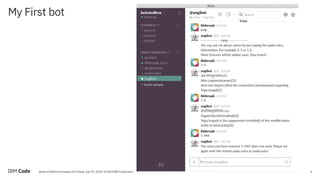
My First bot
4Build a Chatbot and Deploy It to Slack, July 09, 2018 / © 2018 IBM Corporation
Code Pattern - https://developer.ibm.com/code/patterns/
5Build a Chatbot and Deploy It to Slack, July 09, 2018 / © 2018 IBM Corporation
Cognitive banking chatbot
6Build a Chatbot and Deploy It to Slack, July 09, 2018 / © 2018 IBM Corporation
7Build a Chatbot and Deploy It to Slack, July 09, 2018 / © 2018 IBM Corporation
Code Pattern - https://developer.ibm.com/code/patterns/
Watson Assistant
8Build a Chatbot and Deploy It to Slack, July 09, 2018 / © 2018 IBM Corporation
9Build a Chatbot and Deploy It to Slack, July 09, 2018 / © 2018 IBM Corporation
Workshop Time
9
http://ibm.biz/slackchatbot
http://ibm.biz/slackchatbot070918
10Build a Chatbot and Deploy It to Slack, July 09, 2018 / © 2018 IBM Corporation
Workspace
10
Collection of artifacts – Intents,
Entities and Dialogs
Build
Deploy
Improve / Metrics
11Build a Chatbot and Deploy It to Slack, July 09, 2018 / © 2018 IBM Corporation
Intents
11
An intent is the goal or purpose of the user's
input. Adding examples to intents helps your
virtual assistant understand different ways in
which people would say them.
Provide at least five examples for each intent.
12Build a Chatbot and Deploy It to Slack, July 09, 2018 / © 2018 IBM Corporation
Content Catalog
12
Get started faster by
adding existing intents
from the content catalog.
These intents are trained
on common questions that
users may ask.
13Build a Chatbot and Deploy It to Slack, July 09, 2018 / © 2018 IBM Corporation
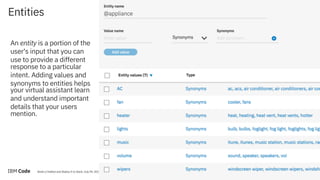
Entities
13
An entity is a portion of the
user's input that you can
use to provide a different
response to a particular
intent. Adding values and
synonyms to entities helps
your virtual assistant learn
and understand important
details that your users
mention.
14Build a Chatbot and Deploy It to Slack, July 09, 2018 / © 2018 IBM Corporation
System Entities
System entities are
common entities
created by IBM that
could be used across
any use case. They are
ready to use as soon as
you add them.
15Build a Chatbot and Deploy It to Slack, July 09, 2018 / © 2018 IBM Corporation
Dialog
15
A dialog uses intents, entities, and context
from your application to define a response to
each user's input.
Creating a dialog defines how your virtual
assistant will respond to what your users are
saying.
16Build a Chatbot and Deploy It to Slack, July 09, 2018 / © 2018 IBM Corporation
Dialog
16
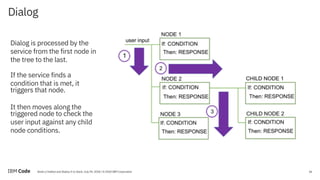
Dialog is processed by the
service from the first node in
the tree to the last.
If the service finds a
condition that is met, it
triggers that node.
It then moves along the
triggered node to check the
user input against any child
node conditions.
17Build a Chatbot and Deploy It to Slack, July 09, 2018 / © 2018 IBM Corporation
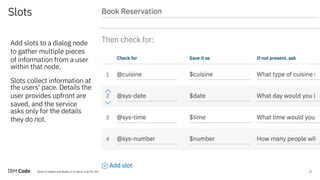
Slots
17
Add slots to a dialog node
to gather multiple pieces
of information from a user
within that node.
Slots collect information at
the users' pace. Details the
user provides upfront are
saved, and the service
asks only for the details
they do not.
18DOC ID / Month XX, 2018 / © 2018 IBM Corporation
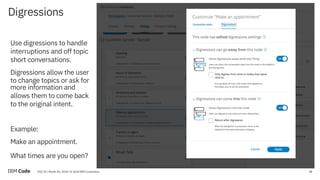
Digressions
18
Use digressions to handle
interruptions and off topic
short conversations.
Digressions allow the user
to change topics or ask for
more information and
allows them to come back
to the original intent.
Example:
Make an appointment.
What times are you open?
19Build a Chatbot and Deploy It to Slack, July 09, 2018 / © 2018 IBM Corporation
Handlers
19
Use handlers to
- provide responses to
questions users might
ask during the
interaction that are
tangential to the
purpose of the node
- provide exit route
Example: I need to talk to
an agent.
20Build a Chatbot and Deploy It to Slack, July 09, 2018 / © 2018 IBM Corporation
Some tips before you start
20
• Start on paper and have a conversation with a friend (discover intents, entities and create dialog).
• Don’t repeat yourself too many times - unless the information is absolutely necessary to meet the
goal or help the end user (slots).
• Keep it natural - let the users digress and come back to finish the current conversation (digressions).
• Give the users a way out ! (handlers)
• Remember details about the users (context)
• Forget details when the user starts again (empty out context)
• Confirm details in a natural way “I have booked a table for two at 7pm tonight”.
• Enable Fuzzy logic – beta feature
Deployment
21Build a Chatbot and Deploy It to Slack, July 09, 2018 / © 2018 IBM Corporation
1. Deploy to Slack from within
Watson Assistant using the
Watson Assistant Connector.
2. Publish to Slack with Botkit and
botkit-middleware.
3. Use API with existing App.
4. Starter apps (Nodejs, Python)
[https://console.bluemix.net/dev
eloper/appservice/starter-kits]
22Build a Chatbot and Deploy It to Slack, July 09, 2018 / © 2018 IBM Corporation
Workshop Time
22
http://ibm.biz/slackchatbot
http://ibm.biz/slackchatbot070918
developer.ibm.com/code
ibm.biz/code-AI
23Build a Chatbot and Deploy It to Slack, July 09, 2018 / © 2018 IBM Corporation
24
Thank you
ulidder@us.ibm.com
twitter.com/lidderupk
github.com/lidderupk
developer.ibm.com/code
Build a Chatbot and Deploy It to Slack, July 09, 2018 / © 2018 IBM Corporation
25Build a Chatbot and Deploy It to Slack, July 09, 2018 / © 2018 IBM Corporation
26DOC ID / Month XX, 2018 / © 2018 IBM Corporation
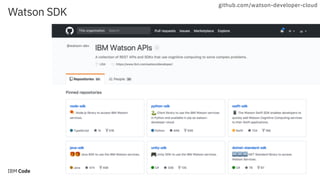
Watson SDK
26
github.com/watson-developer-cloud
27Build a Chatbot and Deploy It to Slack, July 09, 2018 / © 2018 IBM Corporation
JSON Response
27
Intent
Entity
User Input
Response
28DOC ID / Month XX, 2018 / © 2018 IBM Corporation
BotKit Middleware
28
github.com/watson-developer-cloud
c
29Build a Chatbot and Deploy It to Slack, July 09, 2018 / © 2018 IBM Corporation
developer.ibm.com/code/exchanges/bots
IBM Bot Asset Exchange
30Build a Chatbot and Deploy It to Slack, July 09, 2018 / © 2018 IBM Corporation
Connecting Third-Party APIs via Client
Application
1.C
apture
userinput
Third-party
API
Watson
Assistant
2.Parse
Intents
and
Entities
3.Application
decides
if
furtheraction
is
needed
4. Make API call to get data or
perform third-party action
5. Return dynamic data
6.U
pdate
contextand
send
to
W
atson
7.R
eturn
a
response
w
ith
dynam
ic
data
inserted
into
response.
3b/8.R
eturn
response
back
to
user
and
w
aitforanotheruserinputto
repeatprocess
Messaging
Platform
31Build a Chatbot and Deploy It to Slack, July 09, 2018 / © 2018 IBM Corporation
Calling an
IBM Cloud Function
31
{
"context": {
"variable_name" : "variable_value"
},
"actions": [
{
"name":"<actionName>",
"type":"client | server",
"parameters": {
"<parameter_name>": "<parameter_value>",
"<parameter_name>": "<parameter_value>"
},
"result_variable": "<result_variable_name>",
"credentials": "<reference_to_credentials>"
}
],
"output": {
"text": "response text"
}
}
Define actions that can
make programmatic calls to
external applications or
services and get back a
result as part of the
processing that occurs
within a dialog turn.
32DOC ID / Month XX, 2018 / © 2018 IBM Corporation

IBM Watson Assistant - Build Chatbot and Deploy to Slack

  • 1.
    Watson Assistant with Slack UpkarLidder, IBM Bear Douglas, Slack Jason Roche, Slack Build a Chatbot and Deploy It to Slack, July 09, 2018 / © 2018 IBM Corporation
  • 2.
    Add a though provokingquestion or statement, and highlight key words 2DOC ID / Month XX, 2018 / © 2018 IBM Corporation
  • 3.
    Meet Jill Watson– Georgia Tech (Fall 2015) 3Build a Chatbot and Deploy It to Slack, July 09, 2018 / © 2018 IBM Corporation
  • 4.
    My First bot 4Builda Chatbot and Deploy It to Slack, July 09, 2018 / © 2018 IBM Corporation
  • 5.
    Code Pattern -https://developer.ibm.com/code/patterns/ 5Build a Chatbot and Deploy It to Slack, July 09, 2018 / © 2018 IBM Corporation
  • 6.
    Cognitive banking chatbot 6Builda Chatbot and Deploy It to Slack, July 09, 2018 / © 2018 IBM Corporation
  • 7.
    7Build a Chatbotand Deploy It to Slack, July 09, 2018 / © 2018 IBM Corporation Code Pattern - https://developer.ibm.com/code/patterns/
  • 8.
    Watson Assistant 8Build aChatbot and Deploy It to Slack, July 09, 2018 / © 2018 IBM Corporation
  • 9.
    9Build a Chatbotand Deploy It to Slack, July 09, 2018 / © 2018 IBM Corporation Workshop Time 9 http://ibm.biz/slackchatbot http://ibm.biz/slackchatbot070918
  • 10.
    10Build a Chatbotand Deploy It to Slack, July 09, 2018 / © 2018 IBM Corporation Workspace 10 Collection of artifacts – Intents, Entities and Dialogs Build Deploy Improve / Metrics
  • 11.
    11Build a Chatbotand Deploy It to Slack, July 09, 2018 / © 2018 IBM Corporation Intents 11 An intent is the goal or purpose of the user's input. Adding examples to intents helps your virtual assistant understand different ways in which people would say them. Provide at least five examples for each intent.
  • 12.
    12Build a Chatbotand Deploy It to Slack, July 09, 2018 / © 2018 IBM Corporation Content Catalog 12 Get started faster by adding existing intents from the content catalog. These intents are trained on common questions that users may ask.
  • 13.
    13Build a Chatbotand Deploy It to Slack, July 09, 2018 / © 2018 IBM Corporation Entities 13 An entity is a portion of the user's input that you can use to provide a different response to a particular intent. Adding values and synonyms to entities helps your virtual assistant learn and understand important details that your users mention.
  • 14.
    14Build a Chatbotand Deploy It to Slack, July 09, 2018 / © 2018 IBM Corporation System Entities System entities are common entities created by IBM that could be used across any use case. They are ready to use as soon as you add them.
  • 15.
    15Build a Chatbotand Deploy It to Slack, July 09, 2018 / © 2018 IBM Corporation Dialog 15 A dialog uses intents, entities, and context from your application to define a response to each user's input. Creating a dialog defines how your virtual assistant will respond to what your users are saying.
  • 16.
    16Build a Chatbotand Deploy It to Slack, July 09, 2018 / © 2018 IBM Corporation Dialog 16 Dialog is processed by the service from the first node in the tree to the last. If the service finds a condition that is met, it triggers that node. It then moves along the triggered node to check the user input against any child node conditions.
  • 17.
    17Build a Chatbotand Deploy It to Slack, July 09, 2018 / © 2018 IBM Corporation Slots 17 Add slots to a dialog node to gather multiple pieces of information from a user within that node. Slots collect information at the users' pace. Details the user provides upfront are saved, and the service asks only for the details they do not.
  • 18.
    18DOC ID /Month XX, 2018 / © 2018 IBM Corporation Digressions 18 Use digressions to handle interruptions and off topic short conversations. Digressions allow the user to change topics or ask for more information and allows them to come back to the original intent. Example: Make an appointment. What times are you open?
  • 19.
    19Build a Chatbotand Deploy It to Slack, July 09, 2018 / © 2018 IBM Corporation Handlers 19 Use handlers to - provide responses to questions users might ask during the interaction that are tangential to the purpose of the node - provide exit route Example: I need to talk to an agent.
  • 20.
    20Build a Chatbotand Deploy It to Slack, July 09, 2018 / © 2018 IBM Corporation Some tips before you start 20 • Start on paper and have a conversation with a friend (discover intents, entities and create dialog). • Don’t repeat yourself too many times - unless the information is absolutely necessary to meet the goal or help the end user (slots). • Keep it natural - let the users digress and come back to finish the current conversation (digressions). • Give the users a way out ! (handlers) • Remember details about the users (context) • Forget details when the user starts again (empty out context) • Confirm details in a natural way “I have booked a table for two at 7pm tonight”. • Enable Fuzzy logic – beta feature
  • 21.
    Deployment 21Build a Chatbotand Deploy It to Slack, July 09, 2018 / © 2018 IBM Corporation 1. Deploy to Slack from within Watson Assistant using the Watson Assistant Connector. 2. Publish to Slack with Botkit and botkit-middleware. 3. Use API with existing App. 4. Starter apps (Nodejs, Python) [https://console.bluemix.net/dev eloper/appservice/starter-kits]
  • 22.
    22Build a Chatbotand Deploy It to Slack, July 09, 2018 / © 2018 IBM Corporation Workshop Time 22 http://ibm.biz/slackchatbot http://ibm.biz/slackchatbot070918
  • 23.
    developer.ibm.com/code ibm.biz/code-AI 23Build a Chatbotand Deploy It to Slack, July 09, 2018 / © 2018 IBM Corporation
  • 24.
    24 Thank you ulidder@us.ibm.com twitter.com/lidderupk github.com/lidderupk developer.ibm.com/code Build aChatbot and Deploy It to Slack, July 09, 2018 / © 2018 IBM Corporation
  • 25.
    25Build a Chatbotand Deploy It to Slack, July 09, 2018 / © 2018 IBM Corporation
  • 26.
    26DOC ID /Month XX, 2018 / © 2018 IBM Corporation Watson SDK 26 github.com/watson-developer-cloud
  • 27.
    27Build a Chatbotand Deploy It to Slack, July 09, 2018 / © 2018 IBM Corporation JSON Response 27 Intent Entity User Input Response
  • 28.
    28DOC ID /Month XX, 2018 / © 2018 IBM Corporation BotKit Middleware 28 github.com/watson-developer-cloud c
  • 29.
    29Build a Chatbotand Deploy It to Slack, July 09, 2018 / © 2018 IBM Corporation developer.ibm.com/code/exchanges/bots IBM Bot Asset Exchange
  • 30.
    30Build a Chatbotand Deploy It to Slack, July 09, 2018 / © 2018 IBM Corporation Connecting Third-Party APIs via Client Application 1.C apture userinput Third-party API Watson Assistant 2.Parse Intents and Entities 3.Application decides if furtheraction is needed 4. Make API call to get data or perform third-party action 5. Return dynamic data 6.U pdate contextand send to W atson 7.R eturn a response w ith dynam ic data inserted into response. 3b/8.R eturn response back to user and w aitforanotheruserinputto repeatprocess Messaging Platform
  • 31.
    31Build a Chatbotand Deploy It to Slack, July 09, 2018 / © 2018 IBM Corporation Calling an IBM Cloud Function 31 { "context": { "variable_name" : "variable_value" }, "actions": [ { "name":"<actionName>", "type":"client | server", "parameters": { "<parameter_name>": "<parameter_value>", "<parameter_name>": "<parameter_value>" }, "result_variable": "<result_variable_name>", "credentials": "<reference_to_credentials>" } ], "output": { "text": "response text" } } Define actions that can make programmatic calls to external applications or services and get back a result as part of the processing that occurs within a dialog turn.
  • 32.
    32DOC ID /Month XX, 2018 / © 2018 IBM Corporation