Vienna, October 16-17 2017
IBM Connections Adminblast
Nico Meisenzahl, panagenda
Christoph Stoettner, panagenda
PLATINUM SPONSORS
GOLD SPONSORS
SILVER SPONSORS
BRONZE SPONSORS
• Consultant at panagenda
• IBM Connections since version 3.0 / 2010
• IBM Notes / Domino since 2008
• Focusing in ICS
– Deployment & consulting
– Optimization and migration
• “panagendian” since 2016
• IBM Champion
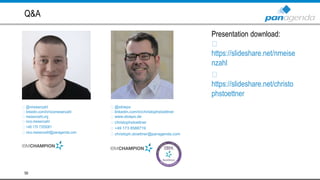
Nico Meisenzahl
3
@nmeisenzahl
linkedin.com/in/nicomeisenzahl
meisenzahl.org
nico.meisenzahl
+49 170 7355081
nico.meisenzahl@panagenda.com
• Senior Consultant at panagenda
– IBM Notes / Domino since 1999
– IBM Connections since version 2.5 / 2009
• Experience in
– Migrations
– Deployments
– Administration
– Performance Analysis
• Focusing in
– Deployment and Optimizing IBM Connections
– Monitoring / panagenda ConnectionsExpert
• Husband and father
• Beer or Wine?
Christoph Stoettner
4
@stoeps
linkedin.com/in/christophstoettner
www.stoeps.de
christophstoettner
+49 173 8588719
christoph.stoettner@panagenda.com
Make Your Data Work for You
Let’s get started!
#1 Are your iOS push notifications working?
• APNS (Apple Push Notification Service) certificates expired on September 20!
• iFix is available for 4.5 CR5, 5.0 CR4, 5.5 CR3, 6.0 (June Fix)
– http://www-
01.ibm.com/support/docview.wss?uid=swg22008484&myns=swglotus&mynp=OCSSYGQH&mync=E&c
m_sp=swglotus-_-OCSSYGQH-_-
6
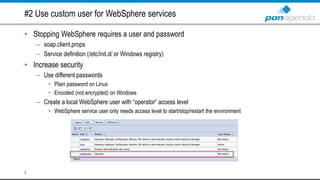
#2 Use custom user for WebSphere services
• Stopping WebSphere requires a user and password
– soap.client.props
– Service definition (/etc/init.d/ or Windows registry)
• Increase security
– Use different passwords
• Plain password on Linux
• Encoded (not encrypted) on Windows
– Create a local WebSphere user with “operator” access level
• WebSphere service user only needs access level to start/stop/restart the environment
7
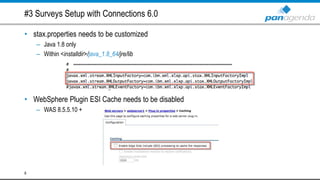
#3 Surveys Setup with Connections 6.0
• stax.properties needs to be customized
– Java 1.8 only
– Within <installdir>/java_1.8_64/jre/lib
• WebSphere Plugin ESI Cache needs to be disabled
– WAS 8.5.5.10 +
8
#4 globalSenderEmailAddress is not working completely
• <property name="globalSenderEmailAddress">mail@mail.com</property>
<property name="alwaysUseGlobalSender">true</property>
<property name="globalSenderName">Connections Newsletter</property>
• If you use globalSenderEmailAddress (notification-config.xml)
– Mails contain reply-to address “news-admin@example.com”
– So replies of users can’t be delivered
• You need to configure all mail addresses one by one
– RegEx is your friend: w*-admin@example.com
9
#5: Orient Me Installation Cheat Sheet
• Define mount points
– /pv
– /var/lib
– /opt
• Don’t use Hosts entries!
– If you need them startup a small bind container instead
• Installation is possible using sudo but you will need the root password
• Setup needs direct internet access
– Customize Installation to allow proxy usage
• Change your admin user password!
– Some manually tasks are needed
• More information
– https://meisenzahl.org/2017/06/02/social-connections-11-need-know-
orient/
10
#6 WAS & 4096-bit SSL keys
• Will not work out of the box if using 4096-bit key
• On IBM HTTP Server
• With any third-party integration (iNotes, …)
• You need to copy the unrestricted java policy to every node
– Download here https://www14.software.ibm.com/webapp/iwm/web/preLogin.do?source=jcesdk
– Copy to <was_home>/<java_version>/jre/lib/security
– You need to redo this every WebSphere Java update ;-)
• WebSphere Application Server is now able to connect to those hosts
11
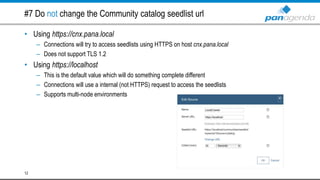
#7 Do not change the Community catalog seedlist url
• Using https://cnx.pana.local
– Connections will try to access seedlists using HTTPS on host cnx.pana.local
– Does not support TLS 1.2
• Using https://localhost
– This is the default value which will do something complete different
– Connections will use a internal (not HTTPS) request to access the seedlists
– Supports multi-node environments
12
#8 Do not trigger seedlist validation regularly
• Seedlist validation does not delete temp files
– New seedlist data will be created every time
– Could cause full disk space
• <localdata>/search/persistence/seedlist*.attempted.xml
• Amount depends on environment
• Happens when
– Accessing /search/serverStatus
– Calling SearchService.validateSeedlist("")
13
#9 Configure Textbox.io using JVM generic properties
• You can use JVM generic properties instead of the application.conf file
– -Dephox.allowed-origins.origins.0=https://cnx.pana.local
-Dephox.allowed-origins.origins.1=http://cnx.pana.local
-Dephox.allowed-origins.url=https://cnx.pana.local/ephox-allowed-origins/cors
– Skip the last line for 5.5 CR2 / 6.0 and later.
• It prevents new code to be loaded
14
#10 You’re using SPNEGO and don’t know LimitRequestFieldSize?
• If so, some of your users may be unable to use SSO
– Users with many group memberships
– Mostly VIPs ;-)
• SPNEGO authentication header can have up to 12392 bytes
– Default LimitRequestFieldSize size is 8192 bytes
• Add LimitRequestFieldSize 16384 into your httpd.conf
– Will prevent: HTTP 400 - Bad Request (Request header too long)
– The whole group membership is stored within the header
15
#11 Tuning your database
• Heavily increase performance by running DB2 maintenance tasks
• Scripts available within <cnxroot>/xkit/connections.sql/
• Run in following order:
– Runstat
– Reorg
– Runstat
• Run them regularly
• You need to build own scripts for custom databases
– https://meisenzahl.org/2017/02/25/connections-database-performance-tuning/
16
#12: Download Connections 6.0 software
• This list of part numbers will help you
– http://www-01.ibm.com/support/docview.wss?uid=swg24043485
– Unfortunately, not everything is included, but it‘s a good starting point
17
#13 “TLS 1.2 only” environments
• Possible, but you need:
– Connections 6.0
– Connections 5.5 CR2 +
• including latest Textbox.io, FEB
• WebSphere 8.5.5.9
• FileNet Config Manager will not work
• Docs/Viewer 2 CR1 IF7 +
• You need to configure some more stuff (Documentation)
• Java 1.8 (6.0 only): Customize JVM Generic Properties
– -Dcom.ibm.jsse2.overrideDefaultTLS=true
• Please do not try this with a previous Connections version!
– You will find the whole story here https://meisenzahl.org/2016/10/26/using-tls-1-2-only-configuration-
with-ibm-connections/
18
#14 Tuning search index
• Only use one search dictionary!
– Issues since Connections 2.5
• Enable “Accent-insensitive search”
– You will find “René” when searching for ”Rene”
• Enable “1 to 2 matching”
– You will find “Stoettner” when searching for “Stöttner”
• Integrate Connections type ahead search (Apache Solr)
• “Ignore Punctuation” setting is not working
– Searching for “IBM” will not display “I.B.M” within results
19
#15 Orient Me sizing
• CFC Master, Boot, Proxy node
– 4 CPU, 2.x GHZ, 8GB memory, and at least 100GB disk
• Worker node
– 8 CPU, 2.x GHZ, 24GB memory, and 100GB disk
• Storage (for MongoDB and Solr indexes)
– 100GB disk
• You would like to run a small Orient Me development environment?
– 6.0.0.1+ will not run with less than 8 Cores
– Downsizing Orient Me is possible but not supported!
– More information:
• https://meisenzahl.org/2017/07/06/downsizing-orient-me/
20
#16 How-to: Set EMPLOYEE_EXTENED role for all users
• Export all user mail addresses using a SQL export
• Change role using a wsadmin call
– ProfilesService.setBatchRole(EMPLOYEE_EXTENDED, "mail.txt")
• More information
– http://www.stoeps.de/adding-employee_extended-to-all-users/
• Changing role directly within the database is not supported!
21
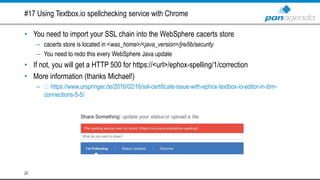
#17 Using Textbox.io spellchecking service with Chrome
• You need to import your SSL chain into the WebSphere cacerts store
– cacerts store is located in <was_home>/<java_version>/jre/lib/security
– You need to redo this every WebSphere Java update
• If not, you will get a HTTP 500 for https://<url>/ephox-spelling/1/correction
• More information (thanks Michael!)
– https://www.urspringer.de/2016/02/16/ssl-certificate-issue-with-ephox-textbox-io-editor-in-ibm-
connections-5-5/
22
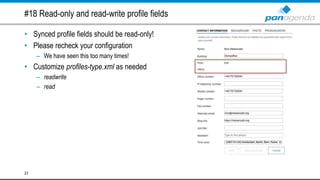
#18 Read-only and read-write profile fields
• Synced profile fields should be read-only!
• Please recheck your configuration
– We have seen this too many times!
• Customize profiles-type.xml as needed
– readwrite
– read
23
#19 ACCE (FileNet Admin Interface) login isn’t working
• Exclude /acce from mod_deflate (httpd.conf)
– SetEnvIf Request_URI ^/acce(.*) no-gzip dont-vary
• Use English as browser language
24
#20 Surveys setup: Browser language
• Launches on new installation or upgrade when access /surveys
• Will not work with non-English browser languages
– UI is only available in English
• Tip: Use portable Firefox
25
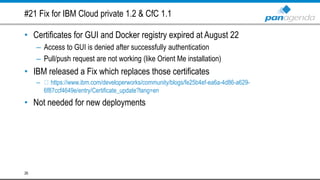
#21 Fix for IBM Cloud private 1.2 & CfC 1.1
• Certificates for GUI and Docker registry expired at August 22
– Access to GUI is denied after successfully authentication
– Pull/push request are not working (like Orient Me installation)
• IBM released a Fix which replaces those certificates
– https://www.ibm.com/developerworks/community/blogs/fe25b4ef-ea6a-4d86-a629-
6f87ccf4649e/entry/Certificate_update?lang=en
• Not needed for new deployments
26
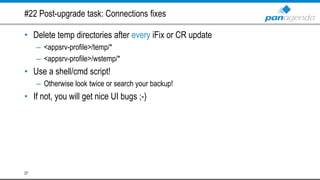
#22 Post-upgrade task: Connections fixes
• Delete temp directories after every iFix or CR update
– <appsrv-profile>/temp/*
– <appsrv-profile>/wstemp/*
• Use a shell/cmd script!
– Otherwise look twice or search your backup!
• If not, you will get nice UI bugs ;-)
27
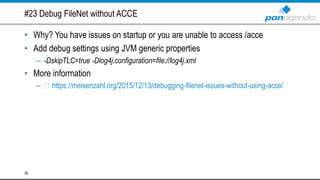
#23 Debug FileNet without ACCE
• Why? You have issues on startup or you are unable to access /acce
• Add debug settings using JVM generic properties
– -DskipTLC=true -Dlog4j.configuration=file://log4j.xml
• More information
– https://meisenzahl.org/2015/12/13/debugging-filenet-issues-without-using-acce/
28
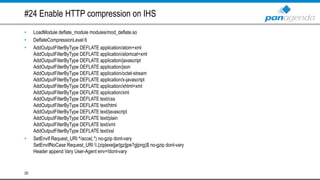
#24 Enable HTTP compression on IHS
• LoadModule deflate_module modules/mod_deflate.so
• DeflateCompressionLevel 6
• AddOutputFilterByType DEFLATE application/atom+xml
AddOutputFilterByType DEFLATE application/atomcat+xml
AddOutputFilterByType DEFLATE application/javascript
AddOutputFilterByType DEFLATE application/json
AddOutputFilterByType DEFLATE application/octet-stream
AddOutputFilterByType DEFLATE application/x-javascript
AddOutputFilterByType DEFLATE application/xhtml+xml
AddOutputFilterByType DEFLATE application/xml
AddOutputFilterByType DEFLATE text/css
AddOutputFilterByType DEFLATE text/html
AddOutputFilterByType DEFLATE text/javascript
AddOutputFilterByType DEFLATE text/plain
AddOutputFilterByType DEFLATE text/xml
AddOutputFilterByType DEFLATE text/xsl
• SetEnvIf Request_URI ^/acce(.*) no-gzip dont-vary
SetEnvIfNoCase Request_URI .(zip|exe|jar|gz|jpe?g|png)$ no-gzip dont-vary
Header append Vary User-Agent env=!dont-vary
29
#25 When doing a FileNet or Docs upgrade…
• …do not forget to remap applications
– FileNet & Navigator
– Docs, Viewer & Conversion
• Without they will not be accessible through IHS
30
#26 Recheck /docs and /viewer interservice URL
• There were some issues in previous versions
– Missing interservice URLs
– Double entries
• Some stuff isn’t working properly without
– CCM integration
– Access file preview via Activity Stream
31
#27 New Orient Me deployments
• Use latest fix version (6.0.0.3)
• 6.0.0.2 fixes a Docker version issue
– Older versions will not install successfully!
• Every fix release needs a complete uninstall & reinstall
– This may change in the future
• Check your mountpoints
32
#28 How-to: Delete Communities using REST
• First REST call will put the Community into the trash
• Second call will purge the Community completely
• Tip: When creating Communities within monitoring checks you should execute the REST
call twice!
• More information
– https://www-
10.lotus.com/ldd/lcwiki.nsf/xpAPIViewer.xsp?lookupName=IBM+Connections+5.5+API+Documentation
#action=openDocument&res_title=Deleting_communities_programmatically_ic55&content=apicontent
33
#29 Post-upgrade task: Connections database scripts (DB2)
• Recheck NUMDB value after every Connections database upgrade
– db2 get dbm cfg | grep NUMDB
• SQL update scripts sometimes include NUMDB settings
• If not, you will get issues when using integrations like Docs, FEB or third-
party
34
#30 Oracle: Check user password expiration
• Oracle database users are created through the Connections Wizard SQL
scripts
• Oracle default user password expiration value is 365 days
– ALTER PROFILE DEFAULT LIMIT PASSWORD_LIFE_TIME UNLIMITED
35
#31 Debug user synchronization
• Profile & user synchronization (<tdisol>/etc/profiles_tdi.properties)
– source_ldap_debug=true
– debug_*=true (update profile, collect, managers, …)
– trace_profile_tdi_javascript=* (debug, fine, finer, all)
• TDI issues (<tdisol>/etc/log4j.properties)
– log4j.rootCategory=DEBUG, Default
• sync_updates_clean_temp_files=false
– This will force TDI not to delete the temp files
• LDAP export
• Database export
36
#32 Connections and Docs with UNC share access
• Recheck your configuration after installing Connections or Docs UNC share
access
– WebSphere variables - Slashes have to be forward slashes
– sib-engine.xml - Slashes have to be backward slashes
• Alternatively use ${MESSAGE_STORE_PATH}
• More information (Thanks Victor!)
– https://notesbusters.com/2016/02/22/connections-5-5-install-problem-for-
websphere-cluster-settings-with-unc-shares/
37
#33 Don’t miss to import the DB2
• DB2 will work 90 days without a license
• You can check your license status using db2licm –l
– Expiry date: "Permanent“
• Tip: You will need a new TSAMP license when using DB2 HADR with TSAMP
after upgrading to DB2 10.5 FP8 (Connections 5.5)
38
#34 Debug Windows Connections plugin
• Launch DITrace.exe (<installpath>/Connections Desktop Plugins)
• Reproduce issues
• Save traces using DITrace.exe
• More information
– https://www-01.ibm.com/support/docview.wss?uid=swg21681420
39
#35 Connections & Google Chrome 60
• Chrome 60 breaks some stuff in nearly all Connections versions (4.0, 4.5, 5,
5.5 6.0)
– Commenting status updates will not work
– Community events functionally is broken
• IBM released fixes for 5.5 CR1+ and 6.0
– http://www-01.ibm.com/support/docview.wss?uid=swg22007236
40
#36 Strong ciphers configuration (SSL LABS A)
• SSLCipherSpec ALL NONE
• SSLCipherSpec ALL +TLS_ECDHE_RSA_WITH_AES_128_CBC_SHA256
SSLCipherSpec ALL +TLS_ECDHE_RSA_WITH_AES_128_GCM_SHA256
SSLCipherSpec ALL +TLS_ECDHE_RSA_WITH_AES_256_CBC_SHA384
SSLCipherSpec ALL +TLS_ECDHE_RSA_WITH_AES_256_GCM_SHA384
SSLCipherSpec ALL +TLS_RSA_WITH_AES_128_GCM_SHA256 SSLCipherSpec
ALL +TLS_RSA_WITH_AES_256_GCM_SHA384 SSLCipherSpec ALL
+TLS_RSA_WITH_AES_128_CBC_SHA256 SSLCipherSpec ALL
+TLS_RSA_WITH_AES_256_CBC_SHA256
• Notes 8.5.x and < TLS 1.2 support (SSL LABS A-)
– SSLCipherSpec ALL +TLS_RSA_WITH_AES_128_CBC_SHA
– SSLCipherSpec ALL +TLS_RSA_WITH_AES_256_CBC_SHA
41
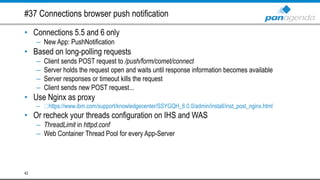
#37 Connections browser push notification
• Connections 5.5 and 6 only
– New App: PushNotification
• Based on long-polling requests
– Client sends POST request to /push/form/comet/connect
– Server holds the request open and waits until response information becomes available
– Server responses or timeout kills the request
– Client sends new POST request...
• Use Nginx as proxy
– https://www.ibm.com/support/knowledgecenter/SSYGQH_6.0.0/admin/install/inst_post_nginx.html
• Or recheck your threads configuration on IHS and WAS
– ThreadLimit in httpd.conf
– Web Container Thread Pool for every App-Server
42
#38 Customize log language
• WAS: Customize JVM generic properties for all JVMs
– -Duser.language=en -Duser.region=US
– Non-English logs are causing issues
• TDI: Customize ibmdisrv.sh/bat
– LOG_4J="-Dlog4j.configuration=file:etc/log4j.properties”
-Duser.language=en -Duser.region=US
43
#39 Secure your mod_proxy configuration
• LoadModule proxy_module modules/mod_proxy.so
LoadModule proxy_http_module modules/mod_proxy_http.so
• ProxyRequests Off
• <Proxy *>
Order deny,allow
Allow from all
</Proxy>
• ProxyPass /abc http://<fqdn>/abc
ProxyPassReverse /abc http://<fqdn>/abc
44
#40 Configure log rotation
• WAS
– Within JVM settings
– Don't forget to configure all JVMs
– Issues within Connections installer (5.5 only)
• Recheck settings after installation!
• DB2
– db2 update dbm cfg using diagsize 256
– Delete logs after X days (crontab, scheduled task)
• TDI
– Customize <tdisol>/etc/log4j.properties
• log4j.appender.Default=org.apache.log4j.RollingFileAppender
log4j.appender.Default.MaxFileSize=10MB
log4j.appender.Default.MaxBackupIndex=10
• IHS
– Customize httpd.conf
• ErrorLog "|/<ihsroot>/bin/rotatelog –l /opt/IBM/HTTPServer/log/error_log.%Y.%m.%d 10M"
• CustomLog"|/<ihsroot>/bin/rotatelog –l /opt/IBM/HTTPServer/log/access_log.%Y.%m.%d 10M" common
– Delete logs after X days using crontab or scheduled task
45
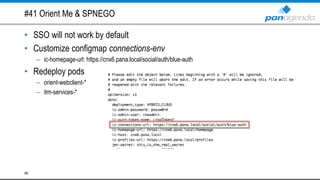
#41 Orient Me & SPNEGO
• SSO will not work by default
• Customize configmap connections-env
– ic-homepage-url: https://cnx6.pana.local/social/auth/blue-auth
• Redeploy pods
– orient-webclient-*
– itm-services-*
46
#42 Monitoring WAS
• Using PMI
– Analyze WebSphere related stuff (Connections pool size, Heap size)
– Included
– More information
• http://www.ibm.com/support/knowledgecenter/SS7K4U_8.5.5/com.ibm.websphere.nd.multiplatform.doc/ae/c
prf_pmidata.html
• Using Health Center
– Full stack (CPU, I/O, Java runtime, Threads)
– Eclipse IDE Plugin
– More information
• http://www.ibm.com/support/knowledgecenter/SS3KLZ/com.ibm.java.diagnostics.healthcenter.doc/topics/intr
oduction.html
47
#43 How-to: Add customized profile types
• Why?
– Customize displayed/available profile fields
– Enable or disable profile widgets
• Configure “profileType” within map_dbrepos_from_source.properties
• Customize profiles-types.xml
• Customize widgets-config.xml
– <layout resourceSubType=”<customprofile>”>
…
</layout>
– profileType default needs to be the last one!
48
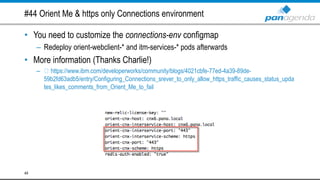
#44 Orient Me & https only Connections environment
• You need to customize the connections-env configmap
– Redeploy orient-webclient-* and itm-services-* pods afterwards
• More information (Thanks Charlie!)
– https://www.ibm.com/developerworks/community/blogs/4021cbfe-77ed-4a39-89de-
59b2fd63adb5/entry/Configuring_Connections_srever_to_only_allow_https_traffic_causes_status_upda
tes_likes_comments_from_Orient_Me_to_fail
49
#45 How-to: Configure mobile push using forward proxy
• Connections environment is unable to connect to Apple/Google push
gateway directly
• Customize mobile-config.xml
– <ProxyHost> </ProxyHost>
<ProxyPort> </ProxyPort>
• Configure authentication alias if needed
– proxyMobilePushNotificationJAASAuth
50
#46 WebSphere & DH key size
• WAS supports only 2048 bit or less
• Enforce a specific DH key size
– <washome>/<java_version>/jre/lib/security/java.security
• jdk.tls.disabledAlgorithms=DH keySize <768
• Define DH key size on Domino
– Default DH key size was increased to 4096 bit with Domino 9.0.1 FP4 IF2
– SSL_DH_KEYSIZE=2048 (notes.ini)
• Requires at least Domino 9.0.1 FP3 IF2
– Mail integration!
• More information (Thanks Ben!)
– https://collaborationben.com/2016/07/12/ibm-connections-mail-and-ephemeral-diffie-hellman-key-
size-error/
51
#47 Post-upgrade task: 5.5 CR2 Surveys
• Rewrite /forms to prevent broken links/bookmarks
– RewriteRule ^/forms/(.*)$ https://%{SERVER_NAME}/surveys/$1 [NE,L,R]
• Tip: Recheck your environment!
52
#48 Extend wsadmin on Linux
• rlwrap will allow you to use command history and arrow keys within wsadmin
– https://github.com/hanslub42/rlwrap
• rlwrap ./wsadmin –lang jython
• This is also working for other command line based tools
– db2
– SQLPLUS
53
#49 Enable LDAP groups with two or more Domino directories
• Enable your Connections environment to use more than one Domino directory
– Internal and external users
– Special directory topology
• Define your repositories with their Base DN
• You need to edit the wimconfig.xml
– These changes are not supported within ISC
• Customize following lines (one line for every repository)
– OLD: <config:baseEntries name="o=pana" nameInRepository="o=pana"/>
NEW: <config:baseEntries name="o=pana" nameInRepository=""/>
– No need to customize other lines!
54
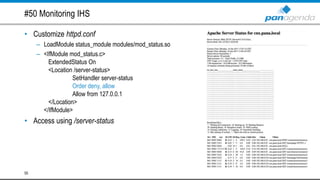
#50 Monitoring IHS
• Customize httpd.conf
– LoadModule status_module modules/mod_status.so
– <IfModule mod_status.c>
ExtendedStatus On
<Location /server-status>
SetHandler server-status
Order deny, allow
Allow from 127.0.0.1
</Location>
</IfModule>
• Access using /server-status
55
#51 connectionsAdmin J2C role
• Do not use a local WebSphere repository user
• Many problems are related to this
– Thumbnail generation in Gallery (3.0)
– CCM and Docs stop working after some time (5.5)
– Easier CCM migration (side-by-side)
• Changing the connectionsAdmin user is possible
– https://www-10.lotus.com/ldd/lcwiki.nsf/dx/Change_password_of_connectionsAdmin
56
#52: Use variables in widgets-config.xml
• Widget documentations often show path names in widgets-config.xml
• Or even worse copies files to application ear
• Better move the files to
{CONNECTIONS_CUSTOMIZATION_PATH}/communities
• Use {communitiesSvcRef} as a replacement in widgets-config.xml
• If you want to change the PATH, just change the WebSphere variable
57
#53 Orient Me: Indices cleaner job
• Indicies will not be deleted which could cause full disk space
• /var/lib/elasticsearch/
• Solution #1: Create a short script and schedule it using cronjob
– More information
• http://www.stoeps.de/orient-me-elasticsearch-and-disk-space/
• Solution #2: Change Docker storage driver to Devicemapper
– Devicemapper is the recommended one for RHEL/CentOS (by Docker)
– Will be official supported by IBM in future Orient Me releases
– More information
• https://meisenzahl.org/2017/09/04/orient-me-rethink-your-docker-
storage-driver-configuration/
58
59
Q&A
Presentation download:
https://slideshare.net/nmeise
nzahl
https://slideshare.net/christo
phstoettner
@nmeisenzahl
linkedin.com/in/nicomeisenzahl
meisenzahl.org
nico.meisenzahl
+49 170 7355081
nico.meisenzahl@panagenda.com
@stoeps
linkedin.com/in/christophstoettner
www.stoeps.de
christophstoettner
+49 173 8588719
christoph.stoettner@panagenda.com
Headquarters, Austria:
panagenda GmbH (Ltd.)
Schreyvogelgasse 3/10
AT 1010 Vienna
Phone: +43 1 89 012 89
Fax: +43 1 89 012 89-15
E-Mail: info@panagenda.com
Headquarters, Germany:
panagenda GmbH (Ltd.)
Lahnstraße 17
DE 64646 Heppenheim
Phone: +49 6252 67 939-00
Fax: +49 6252 67 939-16
E-Mail: info@panagenda.com
USA:
panagenda Inc.
60 State Street, Suite 700
MA 02109 Boston
Phone: +1 617 855 5961
Fax: +1 617 488 2292
E-Mail: info@panagenda.com
Germany:
panagenda Consulting GmbH (Ltd.)
Donnersbergstraße 1
DE 64646 Heppenheim
Phone: +49 6252 67 939-86
Fax: +49 6252 67 939-16
E-Mail: info@panagenda.com
The Netherlands:
Trust Factory B.V.
11th Floor,
Koningin Julianaplein 10
NL 2595 AA The Hague
Phone: +31 70 80 801 96
E-Mail: info@trust-factory.com
© 2007-2015 panagenda
Make Your Data Work for You
Social Connections 11 Chicago, June 1-2 2017Social Connections 12 Vienna, October 16-17 2017
PLATINUM SPONSORS
GOLD SPONSORS
SILVER SPONSORS
BRONZE SPONSORS

IBM Connections Adminblast - Soccnx 12 Edition

  • 1.
    Vienna, October 16-172017 IBM Connections Adminblast Nico Meisenzahl, panagenda Christoph Stoettner, panagenda
  • 2.
  • 3.
    • Consultant atpanagenda • IBM Connections since version 3.0 / 2010 • IBM Notes / Domino since 2008 • Focusing in ICS – Deployment & consulting – Optimization and migration • “panagendian” since 2016 • IBM Champion Nico Meisenzahl 3 @nmeisenzahl linkedin.com/in/nicomeisenzahl meisenzahl.org nico.meisenzahl +49 170 7355081 nico.meisenzahl@panagenda.com
  • 4.
    • Senior Consultantat panagenda – IBM Notes / Domino since 1999 – IBM Connections since version 2.5 / 2009 • Experience in – Migrations – Deployments – Administration – Performance Analysis • Focusing in – Deployment and Optimizing IBM Connections – Monitoring / panagenda ConnectionsExpert • Husband and father • Beer or Wine? Christoph Stoettner 4 @stoeps linkedin.com/in/christophstoettner www.stoeps.de christophstoettner +49 173 8588719 christoph.stoettner@panagenda.com
  • 5.
    Make Your DataWork for You Let’s get started!
  • 6.
    #1 Are youriOS push notifications working? • APNS (Apple Push Notification Service) certificates expired on September 20! • iFix is available for 4.5 CR5, 5.0 CR4, 5.5 CR3, 6.0 (June Fix) – http://www- 01.ibm.com/support/docview.wss?uid=swg22008484&myns=swglotus&mynp=OCSSYGQH&mync=E&c m_sp=swglotus-_-OCSSYGQH-_- 6
  • 7.
    #2 Use customuser for WebSphere services • Stopping WebSphere requires a user and password – soap.client.props – Service definition (/etc/init.d/ or Windows registry) • Increase security – Use different passwords • Plain password on Linux • Encoded (not encrypted) on Windows – Create a local WebSphere user with “operator” access level • WebSphere service user only needs access level to start/stop/restart the environment 7
  • 8.
    #3 Surveys Setupwith Connections 6.0 • stax.properties needs to be customized – Java 1.8 only – Within <installdir>/java_1.8_64/jre/lib • WebSphere Plugin ESI Cache needs to be disabled – WAS 8.5.5.10 + 8
  • 9.
    #4 globalSenderEmailAddress isnot working completely • <property name="globalSenderEmailAddress">mail@mail.com</property> <property name="alwaysUseGlobalSender">true</property> <property name="globalSenderName">Connections Newsletter</property> • If you use globalSenderEmailAddress (notification-config.xml) – Mails contain reply-to address “news-admin@example.com” – So replies of users can’t be delivered • You need to configure all mail addresses one by one – RegEx is your friend: w*-admin@example.com 9
  • 10.
    #5: Orient MeInstallation Cheat Sheet • Define mount points – /pv – /var/lib – /opt • Don’t use Hosts entries! – If you need them startup a small bind container instead • Installation is possible using sudo but you will need the root password • Setup needs direct internet access – Customize Installation to allow proxy usage • Change your admin user password! – Some manually tasks are needed • More information – https://meisenzahl.org/2017/06/02/social-connections-11-need-know- orient/ 10
  • 11.
    #6 WAS &4096-bit SSL keys • Will not work out of the box if using 4096-bit key • On IBM HTTP Server • With any third-party integration (iNotes, …) • You need to copy the unrestricted java policy to every node – Download here https://www14.software.ibm.com/webapp/iwm/web/preLogin.do?source=jcesdk – Copy to <was_home>/<java_version>/jre/lib/security – You need to redo this every WebSphere Java update ;-) • WebSphere Application Server is now able to connect to those hosts 11
  • 12.
    #7 Do notchange the Community catalog seedlist url • Using https://cnx.pana.local – Connections will try to access seedlists using HTTPS on host cnx.pana.local – Does not support TLS 1.2 • Using https://localhost – This is the default value which will do something complete different – Connections will use a internal (not HTTPS) request to access the seedlists – Supports multi-node environments 12
  • 13.
    #8 Do nottrigger seedlist validation regularly • Seedlist validation does not delete temp files – New seedlist data will be created every time – Could cause full disk space • <localdata>/search/persistence/seedlist*.attempted.xml • Amount depends on environment • Happens when – Accessing /search/serverStatus – Calling SearchService.validateSeedlist("") 13
  • 14.
    #9 Configure Textbox.iousing JVM generic properties • You can use JVM generic properties instead of the application.conf file – -Dephox.allowed-origins.origins.0=https://cnx.pana.local -Dephox.allowed-origins.origins.1=http://cnx.pana.local -Dephox.allowed-origins.url=https://cnx.pana.local/ephox-allowed-origins/cors – Skip the last line for 5.5 CR2 / 6.0 and later. • It prevents new code to be loaded 14
  • 15.
    #10 You’re usingSPNEGO and don’t know LimitRequestFieldSize? • If so, some of your users may be unable to use SSO – Users with many group memberships – Mostly VIPs ;-) • SPNEGO authentication header can have up to 12392 bytes – Default LimitRequestFieldSize size is 8192 bytes • Add LimitRequestFieldSize 16384 into your httpd.conf – Will prevent: HTTP 400 - Bad Request (Request header too long) – The whole group membership is stored within the header 15
  • 16.
    #11 Tuning yourdatabase • Heavily increase performance by running DB2 maintenance tasks • Scripts available within <cnxroot>/xkit/connections.sql/ • Run in following order: – Runstat – Reorg – Runstat • Run them regularly • You need to build own scripts for custom databases – https://meisenzahl.org/2017/02/25/connections-database-performance-tuning/ 16
  • 17.
    #12: Download Connections6.0 software • This list of part numbers will help you – http://www-01.ibm.com/support/docview.wss?uid=swg24043485 – Unfortunately, not everything is included, but it‘s a good starting point 17
  • 18.
    #13 “TLS 1.2only” environments • Possible, but you need: – Connections 6.0 – Connections 5.5 CR2 + • including latest Textbox.io, FEB • WebSphere 8.5.5.9 • FileNet Config Manager will not work • Docs/Viewer 2 CR1 IF7 + • You need to configure some more stuff (Documentation) • Java 1.8 (6.0 only): Customize JVM Generic Properties – -Dcom.ibm.jsse2.overrideDefaultTLS=true • Please do not try this with a previous Connections version! – You will find the whole story here https://meisenzahl.org/2016/10/26/using-tls-1-2-only-configuration- with-ibm-connections/ 18
  • 19.
    #14 Tuning searchindex • Only use one search dictionary! – Issues since Connections 2.5 • Enable “Accent-insensitive search” – You will find “René” when searching for ”Rene” • Enable “1 to 2 matching” – You will find “Stoettner” when searching for “Stöttner” • Integrate Connections type ahead search (Apache Solr) • “Ignore Punctuation” setting is not working – Searching for “IBM” will not display “I.B.M” within results 19
  • 20.
    #15 Orient Mesizing • CFC Master, Boot, Proxy node – 4 CPU, 2.x GHZ, 8GB memory, and at least 100GB disk • Worker node – 8 CPU, 2.x GHZ, 24GB memory, and 100GB disk • Storage (for MongoDB and Solr indexes) – 100GB disk • You would like to run a small Orient Me development environment? – 6.0.0.1+ will not run with less than 8 Cores – Downsizing Orient Me is possible but not supported! – More information: • https://meisenzahl.org/2017/07/06/downsizing-orient-me/ 20
  • 21.
    #16 How-to: SetEMPLOYEE_EXTENED role for all users • Export all user mail addresses using a SQL export • Change role using a wsadmin call – ProfilesService.setBatchRole(EMPLOYEE_EXTENDED, "mail.txt") • More information – http://www.stoeps.de/adding-employee_extended-to-all-users/ • Changing role directly within the database is not supported! 21
  • 22.
    #17 Using Textbox.iospellchecking service with Chrome • You need to import your SSL chain into the WebSphere cacerts store – cacerts store is located in <was_home>/<java_version>/jre/lib/security – You need to redo this every WebSphere Java update • If not, you will get a HTTP 500 for https://<url>/ephox-spelling/1/correction • More information (thanks Michael!) – https://www.urspringer.de/2016/02/16/ssl-certificate-issue-with-ephox-textbox-io-editor-in-ibm- connections-5-5/ 22
  • 23.
    #18 Read-only andread-write profile fields • Synced profile fields should be read-only! • Please recheck your configuration – We have seen this too many times! • Customize profiles-type.xml as needed – readwrite – read 23
  • 24.
    #19 ACCE (FileNetAdmin Interface) login isn’t working • Exclude /acce from mod_deflate (httpd.conf) – SetEnvIf Request_URI ^/acce(.*) no-gzip dont-vary • Use English as browser language 24
  • 25.
    #20 Surveys setup:Browser language • Launches on new installation or upgrade when access /surveys • Will not work with non-English browser languages – UI is only available in English • Tip: Use portable Firefox 25
  • 26.
    #21 Fix forIBM Cloud private 1.2 & CfC 1.1 • Certificates for GUI and Docker registry expired at August 22 – Access to GUI is denied after successfully authentication – Pull/push request are not working (like Orient Me installation) • IBM released a Fix which replaces those certificates – https://www.ibm.com/developerworks/community/blogs/fe25b4ef-ea6a-4d86-a629- 6f87ccf4649e/entry/Certificate_update?lang=en • Not needed for new deployments 26
  • 27.
    #22 Post-upgrade task:Connections fixes • Delete temp directories after every iFix or CR update – <appsrv-profile>/temp/* – <appsrv-profile>/wstemp/* • Use a shell/cmd script! – Otherwise look twice or search your backup! • If not, you will get nice UI bugs ;-) 27
  • 28.
    #23 Debug FileNetwithout ACCE • Why? You have issues on startup or you are unable to access /acce • Add debug settings using JVM generic properties – -DskipTLC=true -Dlog4j.configuration=file://log4j.xml • More information – https://meisenzahl.org/2015/12/13/debugging-filenet-issues-without-using-acce/ 28
  • 29.
    #24 Enable HTTPcompression on IHS • LoadModule deflate_module modules/mod_deflate.so • DeflateCompressionLevel 6 • AddOutputFilterByType DEFLATE application/atom+xml AddOutputFilterByType DEFLATE application/atomcat+xml AddOutputFilterByType DEFLATE application/javascript AddOutputFilterByType DEFLATE application/json AddOutputFilterByType DEFLATE application/octet-stream AddOutputFilterByType DEFLATE application/x-javascript AddOutputFilterByType DEFLATE application/xhtml+xml AddOutputFilterByType DEFLATE application/xml AddOutputFilterByType DEFLATE text/css AddOutputFilterByType DEFLATE text/html AddOutputFilterByType DEFLATE text/javascript AddOutputFilterByType DEFLATE text/plain AddOutputFilterByType DEFLATE text/xml AddOutputFilterByType DEFLATE text/xsl • SetEnvIf Request_URI ^/acce(.*) no-gzip dont-vary SetEnvIfNoCase Request_URI .(zip|exe|jar|gz|jpe?g|png)$ no-gzip dont-vary Header append Vary User-Agent env=!dont-vary 29
  • 30.
    #25 When doinga FileNet or Docs upgrade… • …do not forget to remap applications – FileNet & Navigator – Docs, Viewer & Conversion • Without they will not be accessible through IHS 30
  • 31.
    #26 Recheck /docsand /viewer interservice URL • There were some issues in previous versions – Missing interservice URLs – Double entries • Some stuff isn’t working properly without – CCM integration – Access file preview via Activity Stream 31
  • 32.
    #27 New OrientMe deployments • Use latest fix version (6.0.0.3) • 6.0.0.2 fixes a Docker version issue – Older versions will not install successfully! • Every fix release needs a complete uninstall & reinstall – This may change in the future • Check your mountpoints 32
  • 33.
    #28 How-to: DeleteCommunities using REST • First REST call will put the Community into the trash • Second call will purge the Community completely • Tip: When creating Communities within monitoring checks you should execute the REST call twice! • More information – https://www- 10.lotus.com/ldd/lcwiki.nsf/xpAPIViewer.xsp?lookupName=IBM+Connections+5.5+API+Documentation #action=openDocument&res_title=Deleting_communities_programmatically_ic55&content=apicontent 33
  • 34.
    #29 Post-upgrade task:Connections database scripts (DB2) • Recheck NUMDB value after every Connections database upgrade – db2 get dbm cfg | grep NUMDB • SQL update scripts sometimes include NUMDB settings • If not, you will get issues when using integrations like Docs, FEB or third- party 34
  • 35.
    #30 Oracle: Checkuser password expiration • Oracle database users are created through the Connections Wizard SQL scripts • Oracle default user password expiration value is 365 days – ALTER PROFILE DEFAULT LIMIT PASSWORD_LIFE_TIME UNLIMITED 35
  • 36.
    #31 Debug usersynchronization • Profile & user synchronization (<tdisol>/etc/profiles_tdi.properties) – source_ldap_debug=true – debug_*=true (update profile, collect, managers, …) – trace_profile_tdi_javascript=* (debug, fine, finer, all) • TDI issues (<tdisol>/etc/log4j.properties) – log4j.rootCategory=DEBUG, Default • sync_updates_clean_temp_files=false – This will force TDI not to delete the temp files • LDAP export • Database export 36
  • 37.
    #32 Connections andDocs with UNC share access • Recheck your configuration after installing Connections or Docs UNC share access – WebSphere variables - Slashes have to be forward slashes – sib-engine.xml - Slashes have to be backward slashes • Alternatively use ${MESSAGE_STORE_PATH} • More information (Thanks Victor!) – https://notesbusters.com/2016/02/22/connections-5-5-install-problem-for- websphere-cluster-settings-with-unc-shares/ 37
  • 38.
    #33 Don’t missto import the DB2 • DB2 will work 90 days without a license • You can check your license status using db2licm –l – Expiry date: "Permanent“ • Tip: You will need a new TSAMP license when using DB2 HADR with TSAMP after upgrading to DB2 10.5 FP8 (Connections 5.5) 38
  • 39.
    #34 Debug WindowsConnections plugin • Launch DITrace.exe (<installpath>/Connections Desktop Plugins) • Reproduce issues • Save traces using DITrace.exe • More information – https://www-01.ibm.com/support/docview.wss?uid=swg21681420 39
  • 40.
    #35 Connections &Google Chrome 60 • Chrome 60 breaks some stuff in nearly all Connections versions (4.0, 4.5, 5, 5.5 6.0) – Commenting status updates will not work – Community events functionally is broken • IBM released fixes for 5.5 CR1+ and 6.0 – http://www-01.ibm.com/support/docview.wss?uid=swg22007236 40
  • 41.
    #36 Strong ciphersconfiguration (SSL LABS A) • SSLCipherSpec ALL NONE • SSLCipherSpec ALL +TLS_ECDHE_RSA_WITH_AES_128_CBC_SHA256 SSLCipherSpec ALL +TLS_ECDHE_RSA_WITH_AES_128_GCM_SHA256 SSLCipherSpec ALL +TLS_ECDHE_RSA_WITH_AES_256_CBC_SHA384 SSLCipherSpec ALL +TLS_ECDHE_RSA_WITH_AES_256_GCM_SHA384 SSLCipherSpec ALL +TLS_RSA_WITH_AES_128_GCM_SHA256 SSLCipherSpec ALL +TLS_RSA_WITH_AES_256_GCM_SHA384 SSLCipherSpec ALL +TLS_RSA_WITH_AES_128_CBC_SHA256 SSLCipherSpec ALL +TLS_RSA_WITH_AES_256_CBC_SHA256 • Notes 8.5.x and < TLS 1.2 support (SSL LABS A-) – SSLCipherSpec ALL +TLS_RSA_WITH_AES_128_CBC_SHA – SSLCipherSpec ALL +TLS_RSA_WITH_AES_256_CBC_SHA 41
  • 42.
    #37 Connections browserpush notification • Connections 5.5 and 6 only – New App: PushNotification • Based on long-polling requests – Client sends POST request to /push/form/comet/connect – Server holds the request open and waits until response information becomes available – Server responses or timeout kills the request – Client sends new POST request... • Use Nginx as proxy – https://www.ibm.com/support/knowledgecenter/SSYGQH_6.0.0/admin/install/inst_post_nginx.html • Or recheck your threads configuration on IHS and WAS – ThreadLimit in httpd.conf – Web Container Thread Pool for every App-Server 42
  • 43.
    #38 Customize loglanguage • WAS: Customize JVM generic properties for all JVMs – -Duser.language=en -Duser.region=US – Non-English logs are causing issues • TDI: Customize ibmdisrv.sh/bat – LOG_4J="-Dlog4j.configuration=file:etc/log4j.properties” -Duser.language=en -Duser.region=US 43
  • 44.
    #39 Secure yourmod_proxy configuration • LoadModule proxy_module modules/mod_proxy.so LoadModule proxy_http_module modules/mod_proxy_http.so • ProxyRequests Off • <Proxy *> Order deny,allow Allow from all </Proxy> • ProxyPass /abc http://<fqdn>/abc ProxyPassReverse /abc http://<fqdn>/abc 44
  • 45.
    #40 Configure logrotation • WAS – Within JVM settings – Don't forget to configure all JVMs – Issues within Connections installer (5.5 only) • Recheck settings after installation! • DB2 – db2 update dbm cfg using diagsize 256 – Delete logs after X days (crontab, scheduled task) • TDI – Customize <tdisol>/etc/log4j.properties • log4j.appender.Default=org.apache.log4j.RollingFileAppender log4j.appender.Default.MaxFileSize=10MB log4j.appender.Default.MaxBackupIndex=10 • IHS – Customize httpd.conf • ErrorLog "|/<ihsroot>/bin/rotatelog –l /opt/IBM/HTTPServer/log/error_log.%Y.%m.%d 10M" • CustomLog"|/<ihsroot>/bin/rotatelog –l /opt/IBM/HTTPServer/log/access_log.%Y.%m.%d 10M" common – Delete logs after X days using crontab or scheduled task 45
  • 46.
    #41 Orient Me& SPNEGO • SSO will not work by default • Customize configmap connections-env – ic-homepage-url: https://cnx6.pana.local/social/auth/blue-auth • Redeploy pods – orient-webclient-* – itm-services-* 46
  • 47.
    #42 Monitoring WAS •Using PMI – Analyze WebSphere related stuff (Connections pool size, Heap size) – Included – More information • http://www.ibm.com/support/knowledgecenter/SS7K4U_8.5.5/com.ibm.websphere.nd.multiplatform.doc/ae/c prf_pmidata.html • Using Health Center – Full stack (CPU, I/O, Java runtime, Threads) – Eclipse IDE Plugin – More information • http://www.ibm.com/support/knowledgecenter/SS3KLZ/com.ibm.java.diagnostics.healthcenter.doc/topics/intr oduction.html 47
  • 48.
    #43 How-to: Addcustomized profile types • Why? – Customize displayed/available profile fields – Enable or disable profile widgets • Configure “profileType” within map_dbrepos_from_source.properties • Customize profiles-types.xml • Customize widgets-config.xml – <layout resourceSubType=”<customprofile>”> … </layout> – profileType default needs to be the last one! 48
  • 49.
    #44 Orient Me& https only Connections environment • You need to customize the connections-env configmap – Redeploy orient-webclient-* and itm-services-* pods afterwards • More information (Thanks Charlie!) – https://www.ibm.com/developerworks/community/blogs/4021cbfe-77ed-4a39-89de- 59b2fd63adb5/entry/Configuring_Connections_srever_to_only_allow_https_traffic_causes_status_upda tes_likes_comments_from_Orient_Me_to_fail 49
  • 50.
    #45 How-to: Configuremobile push using forward proxy • Connections environment is unable to connect to Apple/Google push gateway directly • Customize mobile-config.xml – <ProxyHost> </ProxyHost> <ProxyPort> </ProxyPort> • Configure authentication alias if needed – proxyMobilePushNotificationJAASAuth 50
  • 51.
    #46 WebSphere &DH key size • WAS supports only 2048 bit or less • Enforce a specific DH key size – <washome>/<java_version>/jre/lib/security/java.security • jdk.tls.disabledAlgorithms=DH keySize <768 • Define DH key size on Domino – Default DH key size was increased to 4096 bit with Domino 9.0.1 FP4 IF2 – SSL_DH_KEYSIZE=2048 (notes.ini) • Requires at least Domino 9.0.1 FP3 IF2 – Mail integration! • More information (Thanks Ben!) – https://collaborationben.com/2016/07/12/ibm-connections-mail-and-ephemeral-diffie-hellman-key- size-error/ 51
  • 52.
    #47 Post-upgrade task:5.5 CR2 Surveys • Rewrite /forms to prevent broken links/bookmarks – RewriteRule ^/forms/(.*)$ https://%{SERVER_NAME}/surveys/$1 [NE,L,R] • Tip: Recheck your environment! 52
  • 53.
    #48 Extend wsadminon Linux • rlwrap will allow you to use command history and arrow keys within wsadmin – https://github.com/hanslub42/rlwrap • rlwrap ./wsadmin –lang jython • This is also working for other command line based tools – db2 – SQLPLUS 53
  • 54.
    #49 Enable LDAPgroups with two or more Domino directories • Enable your Connections environment to use more than one Domino directory – Internal and external users – Special directory topology • Define your repositories with their Base DN • You need to edit the wimconfig.xml – These changes are not supported within ISC • Customize following lines (one line for every repository) – OLD: <config:baseEntries name="o=pana" nameInRepository="o=pana"/> NEW: <config:baseEntries name="o=pana" nameInRepository=""/> – No need to customize other lines! 54
  • 55.
    #50 Monitoring IHS •Customize httpd.conf – LoadModule status_module modules/mod_status.so – <IfModule mod_status.c> ExtendedStatus On <Location /server-status> SetHandler server-status Order deny, allow Allow from 127.0.0.1 </Location> </IfModule> • Access using /server-status 55
  • 56.
    #51 connectionsAdmin J2Crole • Do not use a local WebSphere repository user • Many problems are related to this – Thumbnail generation in Gallery (3.0) – CCM and Docs stop working after some time (5.5) – Easier CCM migration (side-by-side) • Changing the connectionsAdmin user is possible – https://www-10.lotus.com/ldd/lcwiki.nsf/dx/Change_password_of_connectionsAdmin 56
  • 57.
    #52: Use variablesin widgets-config.xml • Widget documentations often show path names in widgets-config.xml • Or even worse copies files to application ear • Better move the files to {CONNECTIONS_CUSTOMIZATION_PATH}/communities • Use {communitiesSvcRef} as a replacement in widgets-config.xml • If you want to change the PATH, just change the WebSphere variable 57
  • 58.
    #53 Orient Me:Indices cleaner job • Indicies will not be deleted which could cause full disk space • /var/lib/elasticsearch/ • Solution #1: Create a short script and schedule it using cronjob – More information • http://www.stoeps.de/orient-me-elasticsearch-and-disk-space/ • Solution #2: Change Docker storage driver to Devicemapper – Devicemapper is the recommended one for RHEL/CentOS (by Docker) – Will be official supported by IBM in future Orient Me releases – More information • https://meisenzahl.org/2017/09/04/orient-me-rethink-your-docker- storage-driver-configuration/ 58
  • 59.
    59 Q&A Presentation download: https://slideshare.net/nmeise nzahl https://slideshare.net/christo phstoettner @nmeisenzahl linkedin.com/in/nicomeisenzahl meisenzahl.org nico.meisenzahl +49 1707355081 nico.meisenzahl@panagenda.com @stoeps linkedin.com/in/christophstoettner www.stoeps.de christophstoettner +49 173 8588719 christoph.stoettner@panagenda.com
  • 60.
    Headquarters, Austria: panagenda GmbH(Ltd.) Schreyvogelgasse 3/10 AT 1010 Vienna Phone: +43 1 89 012 89 Fax: +43 1 89 012 89-15 E-Mail: info@panagenda.com Headquarters, Germany: panagenda GmbH (Ltd.) Lahnstraße 17 DE 64646 Heppenheim Phone: +49 6252 67 939-00 Fax: +49 6252 67 939-16 E-Mail: info@panagenda.com USA: panagenda Inc. 60 State Street, Suite 700 MA 02109 Boston Phone: +1 617 855 5961 Fax: +1 617 488 2292 E-Mail: info@panagenda.com Germany: panagenda Consulting GmbH (Ltd.) Donnersbergstraße 1 DE 64646 Heppenheim Phone: +49 6252 67 939-86 Fax: +49 6252 67 939-16 E-Mail: info@panagenda.com The Netherlands: Trust Factory B.V. 11th Floor, Koningin Julianaplein 10 NL 2595 AA The Hague Phone: +31 70 80 801 96 E-Mail: info@trust-factory.com © 2007-2015 panagenda Make Your Data Work for You
  • 61.
    Social Connections 11Chicago, June 1-2 2017Social Connections 12 Vienna, October 16-17 2017
  • 62.