Dr. Hitesh Mohapatra
Associate Professor
Internet
WWW
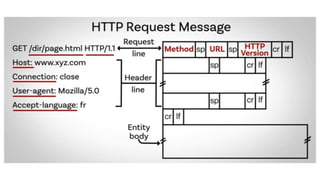
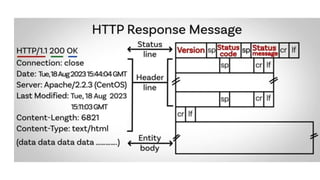
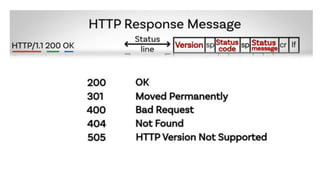
How HTTP works?
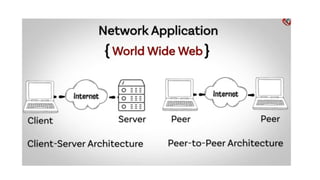
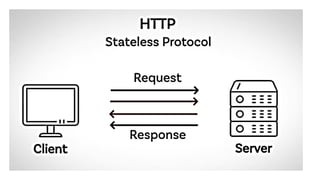
HTTP Protocol Overview
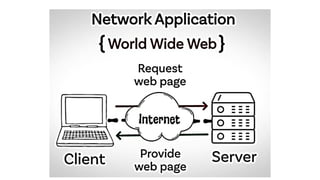
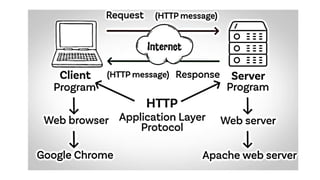
HTTP is like the language web browsers and
servers use to talk to each other. When you
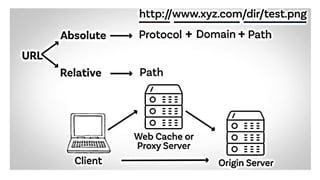
type a website URL, your browser (client) sends
an HTTP request to the server, which responds
with the webpage you want to see.
• Hypertext Transfer Protocol (HTTP)
• Foundation of data communication on the
World Wide Web
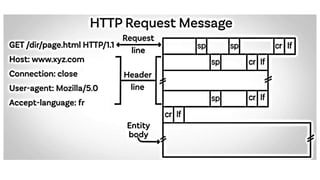
• Defines how messages are formatted and
transmitted
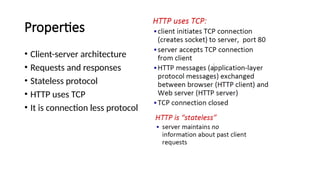
Properties
• Client-server architecture
• Requests and responses
• Stateless protocol
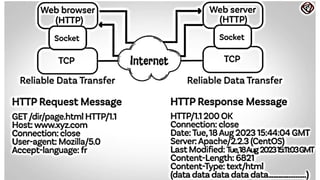
• HTTP uses TCP
• It is connection less protocol
Method
HTTP Protocol: The Internet’s Waiter
Imagine the internet is a giant restaurant, and the HTTP
protocol is the waiter.
1.Client (You) Arrives: You walk into the restaurant (open your
browser) and sit at a table (type in a URL).
2.Making a Request: You call the waiter (HTTP) and ask for a menu
(send a request to the server). The waiter nods and goes to the
kitchen (server).
3.Fetching the Menu: The waiter comes back with the menu (the
server sends back the requested web page).
4.Ordering Food: You decide you want a burger (click on a link). The
waiter takes your order (another HTTP request) and heads back to
the kitchen.
5.Bringing the Food: The waiter returns with your burger (the server
sends back the requested content).
6.Asking for More: You realize you also want fries (click another link).
The waiter takes another trip to the kitchen and brings back fries
(another HTTP request and response).
Persistent vs. Non-Persistent
Connections
• Non-Persistent Connection: Every time you want
something, the waiter goes back to the kitchen, gets it, and
then leaves. If you want more, you have to call the waiter
again. It’s like the waiter has a very short memory and
forgets you after each trip.
• Persistent Connection: The waiter stays at your table,
ready to take multiple orders without leaving. You can keep
asking for more food, and the waiter will keep bringing it
without having to go back and forth each time.
Non-Persistent Connections
Imagine you’re at a fast-food restaurant. Every time you want something,
you have to get back in line. You order fries, get back in line, order a
burger, get back in line, order a drink, and so on. This is how non-
persistent connections work. Each request (order) requires a new
connection (getting back in line).
Pros:
• Simple and straightforward.
• Each connection is short-lived, reducing the risk of long-term issues.
Cons:
• Inefficient, as you spend a lot of time getting back in line.
• More overhead due to multiple connections.
Technically
Figure 10.10 shows an example of a nonpersistent connection. The
client needs to access a file that contains one link to an image.
• The text file and image are located on the same server. Here we need
two connections. For each connection, TCP requires at least three
handshake messages to establish the connection, but the request can
be sent with the third one.
• After the connection is established, the object can be transferred.
After receiving an object, another three handshake messages are
needed to terminate the connection.
Figure 10.10
Example 10.4
Working
Persistent Connections
Now, imagine you’re at a fancy restaurant. You sit down, and the waiter stays
with you the whole time. You order fries, and the waiter brings them. You
order a burger, and the waiter brings it. You order a drink, and the waiter
brings it. This is how persistent connections work. The connection stays open,
allowing multiple requests and responses without the need to reconnect each
time.
Pros:
• More efficient, as the connection stays open.
• Reduces overhead and latency.
Cons:
• Requires more resources to keep the connection open.
• Potentially more complex to manage.
Technically
Figure 10.11 shows the same scenario as in Example 10.4, but using a
persistent connection.
• Only one connection establishment and connection termination is
used, but the request for the image is sent separately.
Figure 10.11
Example 10.5
Differences

Hypertext Transfer Protocol (HTTP) is a request-response protocol that allows web clients to communicate with web servers

  • 1.
  • 2.
  • 3.
  • 5.
    How HTTP works? HTTPProtocol Overview HTTP is like the language web browsers and servers use to talk to each other. When you type a website URL, your browser (client) sends an HTTP request to the server, which responds with the webpage you want to see. • Hypertext Transfer Protocol (HTTP) • Foundation of data communication on the World Wide Web • Defines how messages are formatted and transmitted
  • 6.
    Properties • Client-server architecture •Requests and responses • Stateless protocol • HTTP uses TCP • It is connection less protocol
  • 18.
  • 23.
    HTTP Protocol: TheInternet’s Waiter Imagine the internet is a giant restaurant, and the HTTP protocol is the waiter.
  • 24.
    1.Client (You) Arrives:You walk into the restaurant (open your browser) and sit at a table (type in a URL). 2.Making a Request: You call the waiter (HTTP) and ask for a menu (send a request to the server). The waiter nods and goes to the kitchen (server). 3.Fetching the Menu: The waiter comes back with the menu (the server sends back the requested web page). 4.Ordering Food: You decide you want a burger (click on a link). The waiter takes your order (another HTTP request) and heads back to the kitchen. 5.Bringing the Food: The waiter returns with your burger (the server sends back the requested content). 6.Asking for More: You realize you also want fries (click another link). The waiter takes another trip to the kitchen and brings back fries (another HTTP request and response).
  • 25.
    Persistent vs. Non-Persistent Connections •Non-Persistent Connection: Every time you want something, the waiter goes back to the kitchen, gets it, and then leaves. If you want more, you have to call the waiter again. It’s like the waiter has a very short memory and forgets you after each trip. • Persistent Connection: The waiter stays at your table, ready to take multiple orders without leaving. You can keep asking for more food, and the waiter will keep bringing it without having to go back and forth each time.
  • 26.
    Non-Persistent Connections Imagine you’reat a fast-food restaurant. Every time you want something, you have to get back in line. You order fries, get back in line, order a burger, get back in line, order a drink, and so on. This is how non- persistent connections work. Each request (order) requires a new connection (getting back in line). Pros: • Simple and straightforward. • Each connection is short-lived, reducing the risk of long-term issues. Cons: • Inefficient, as you spend a lot of time getting back in line. • More overhead due to multiple connections.
  • 27.
    Technically Figure 10.10 showsan example of a nonpersistent connection. The client needs to access a file that contains one link to an image. • The text file and image are located on the same server. Here we need two connections. For each connection, TCP requires at least three handshake messages to establish the connection, but the request can be sent with the third one. • After the connection is established, the object can be transferred. After receiving an object, another three handshake messages are needed to terminate the connection.
  • 28.
  • 29.
  • 32.
    Persistent Connections Now, imagineyou’re at a fancy restaurant. You sit down, and the waiter stays with you the whole time. You order fries, and the waiter brings them. You order a burger, and the waiter brings it. You order a drink, and the waiter brings it. This is how persistent connections work. The connection stays open, allowing multiple requests and responses without the need to reconnect each time. Pros: • More efficient, as the connection stays open. • Reduces overhead and latency. Cons: • Requires more resources to keep the connection open. • Potentially more complex to manage.
  • 33.
    Technically Figure 10.11 showsthe same scenario as in Example 10.4, but using a persistent connection. • Only one connection establishment and connection termination is used, but the request for the image is sent separately.
  • 34.
  • 36.