More Related Content

PPTX

PDF

PDF
Azure Monitor Logで実現するモダンな管理手法 
PPTX
NGINXをBFF (Backend for Frontend)として利用した話 
PDF
PostgreSQLをKubernetes上で活用するためのOperator紹介!(Cloud Native Database Meetup #3 発表資料) 
PDF
Zabbix最新情報 ~Zabbix 6.0に向けて~ @OSC2021 Online/Fall 
PDF

PDF
What's hot

PDF
乗っ取れコンテナ!!開発者から見たコンテナセキュリティの考え方(CloudNative Days Tokyo 2021 発表資料) 
PDF
コンテナとimmutableとわたし。あとセキュリティ。(Kubernetes Novice Tokyo #15 発表資料) 
PDF
使ってみて気づいた AGPL ライセンスの メリット・デメリット 
PDF

PDF
ゼロトラスト・アーキテクチャを無料で(やれるだけ)実現する 
PPTX
CrowdStrike Falconと効果的に楽に付き合っていくために 
PPTX

PDF

PDF
Githubを使って簡単に helm repoを公開してみよう 
PPTX
データ履歴管理のためのテンポラルデータモデルとReladomoの紹介 #jjug_ccc #ccc_g3 
PDF
余ったPCをルータに変える、ソフトウェアルータ「SEIL/x86」 
PDF

PDF
KubeConRecap_nakamura.pdf 
PDF

PPTX
Azure AD による Web API の 保護 
PPTX
おっさんES6/ES2015,React.jsを学ぶ 
PDF
PacemakerのMaster/Slave構成の基本と事例紹介(DRBD、PostgreSQLレプリケーション) @Open Source Confer... 
PPTX
VSCodeで作るPostgreSQL開発環境(第25回 PostgreSQLアンカンファレンス@オンライン 発表資料) 
PPTX

PDF
Similar to http2 最速実装 v2

PDF

PDF

PPTX
もしWebセキュリティのエンジニアがRFC7540の「HTTP/2アプリ」をWeb診断したら 
PDF

PDF

PDF
Hokkaido.cap#2 一般的なプロトコルのパケットを覗いてみよう 
PDF

PDF
WebSocket Protocol と Plack::Middleware::WebSocket 
PPTX

PPT

PPTX

PPTX

PPTX

PDF
法政大学情報科学部 2012年度コンピュータネットワーク-第8回授業-Web公開用 
PPTX
HTTP/2 draft 14 preview and IETF90 httpbis WG Report 
PDF

PDF

PPTX
HTTP/2 クライアントのパッシブ・フィンガープリンティング by オリー・シガール 
PDF
Rails と Rack と HTTP と通信の話 
PPTX
More from Yoshihiro Iwanaga

PPTX
JavaScript と Arduino でオリジナルデバイスを作ろう 
PPTX

PDF

PDF
Arduino and johnny-five, creating IoT device in easiest way 
PDF
Anomaly detection using correlations of load 
PPTX
Anomaly Detection by Mean and Standard Deviation (LT at AQ) 
PDF
Node.js Tutorial at Hiroshima 
PDF
Web Technology for Hardware Control (html5 conference 2015) 
PPTX
HOTATE (Developers Summit 2012) 
PPTX

PPTX
http2 最速実装 v2
- 1.
- 2.
- 3.
- 4.
- 5.
- 6.
- 7.
- 8.
- 9.
- 10.
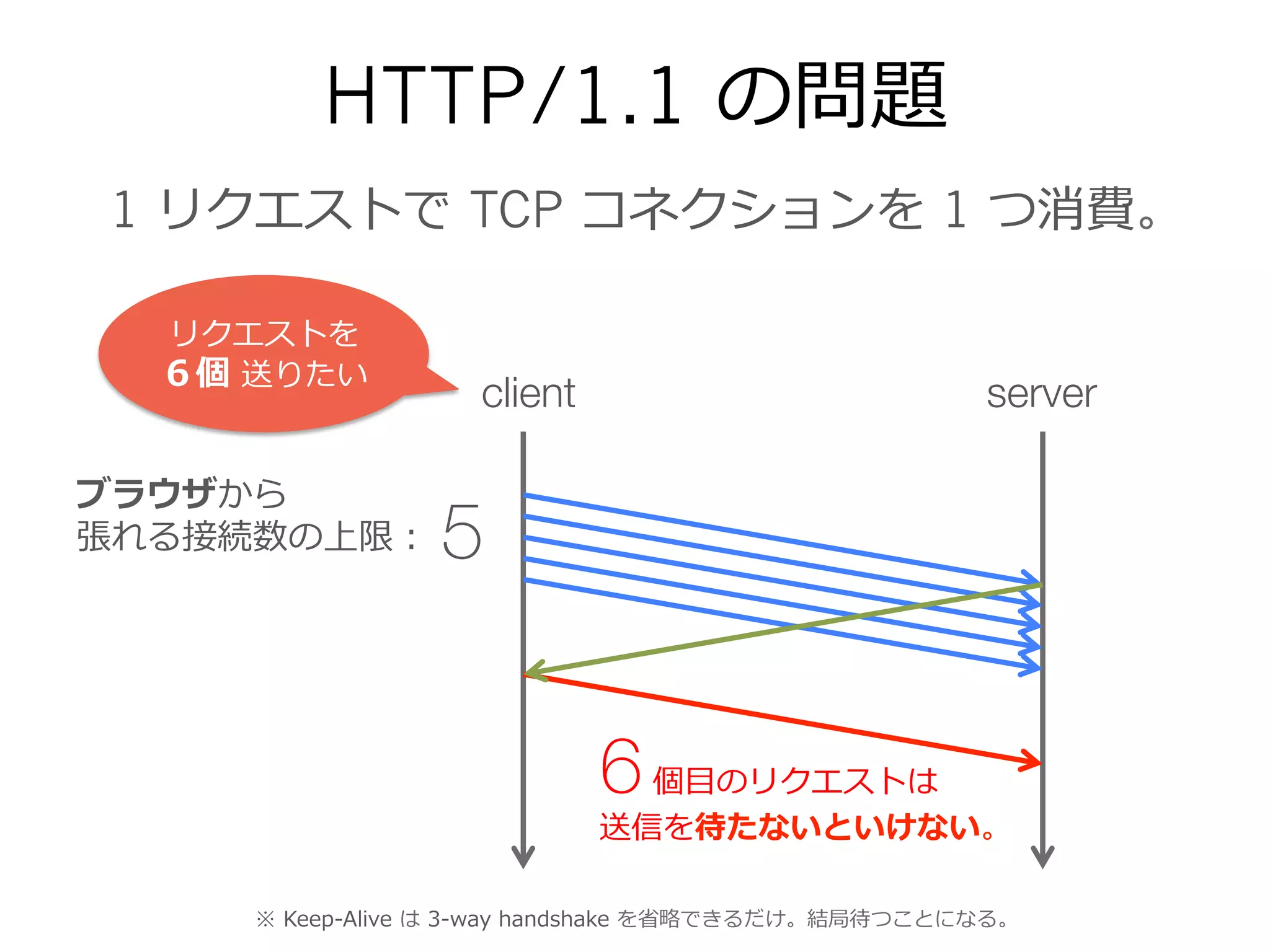
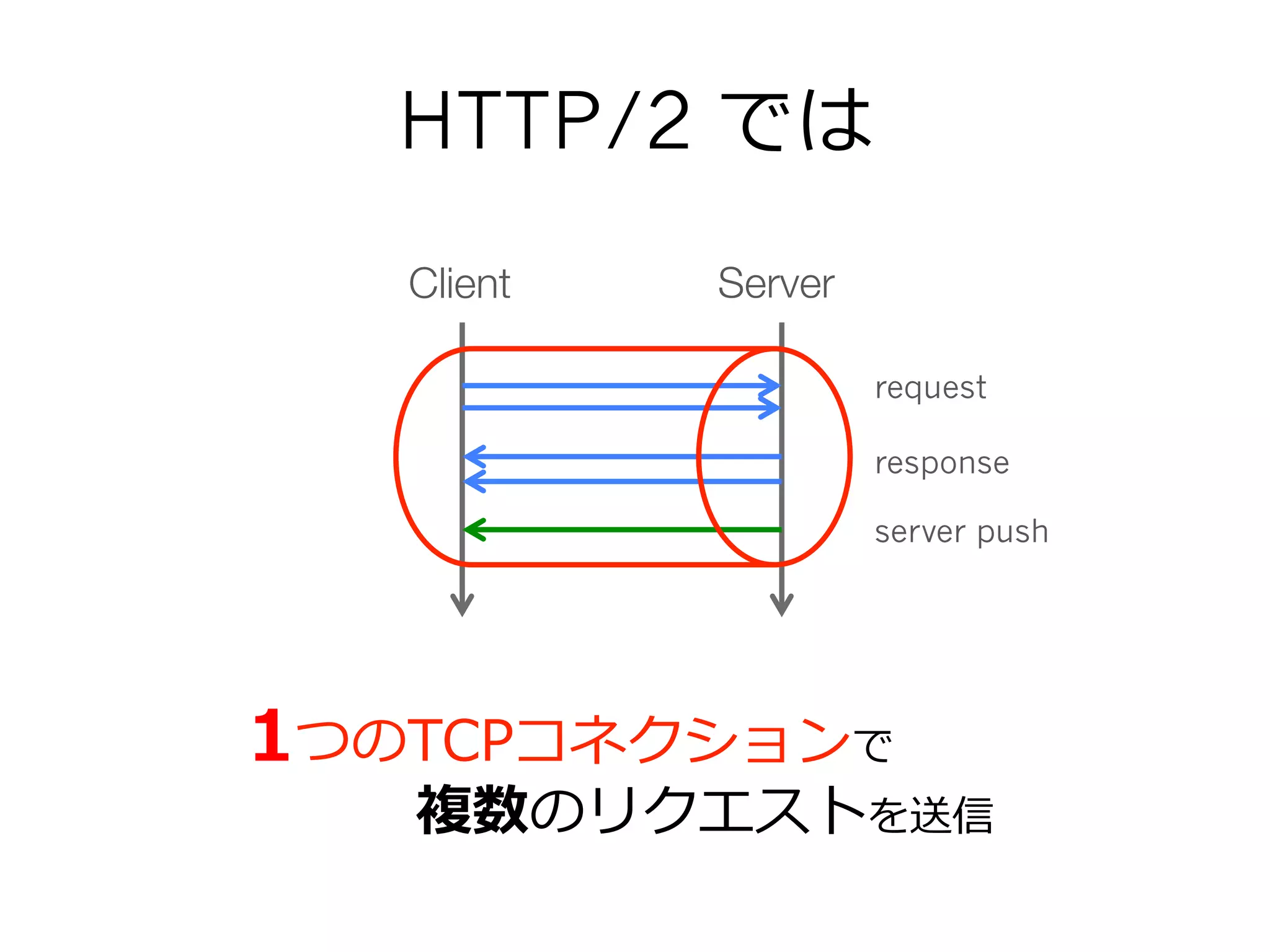
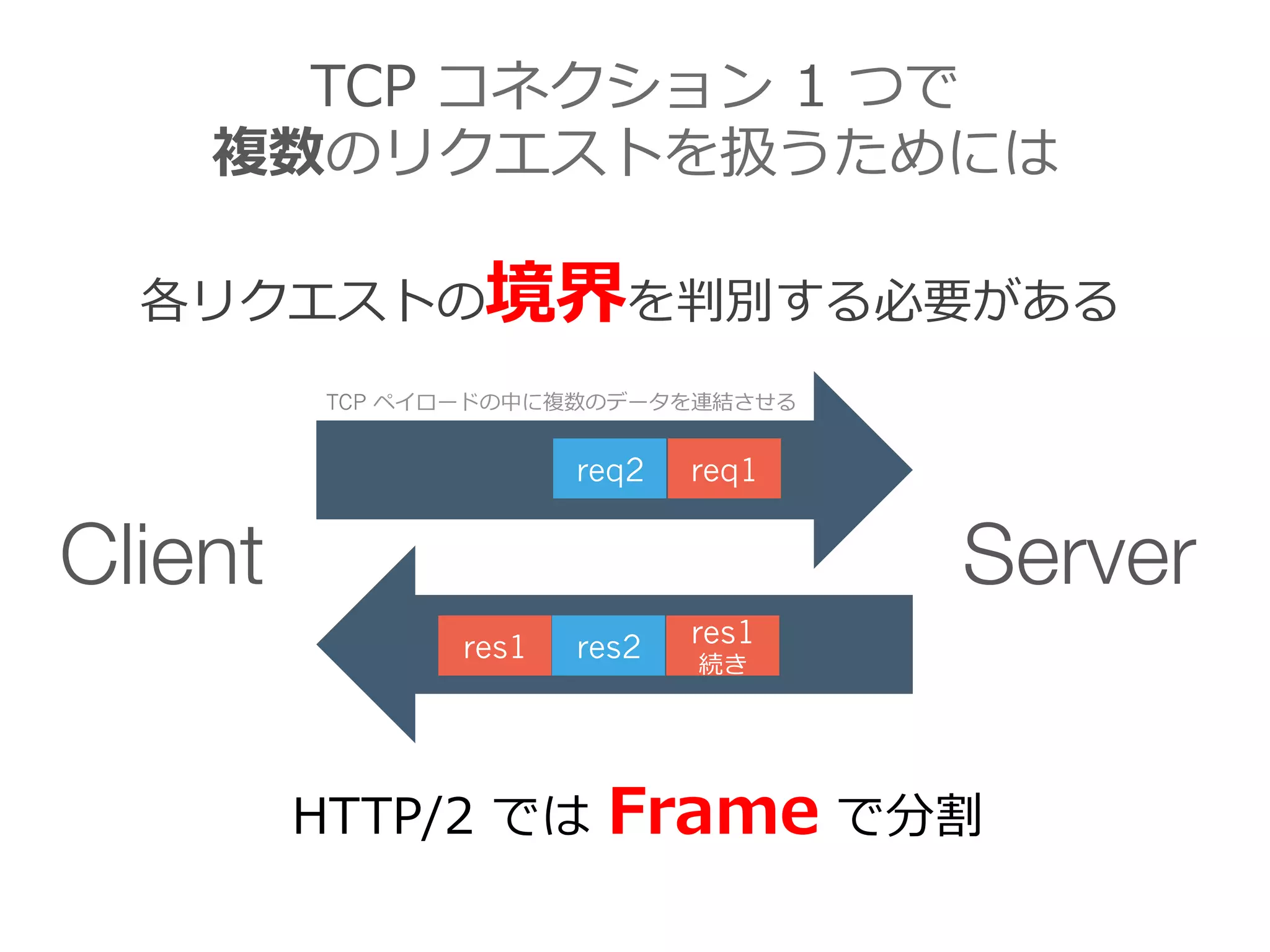
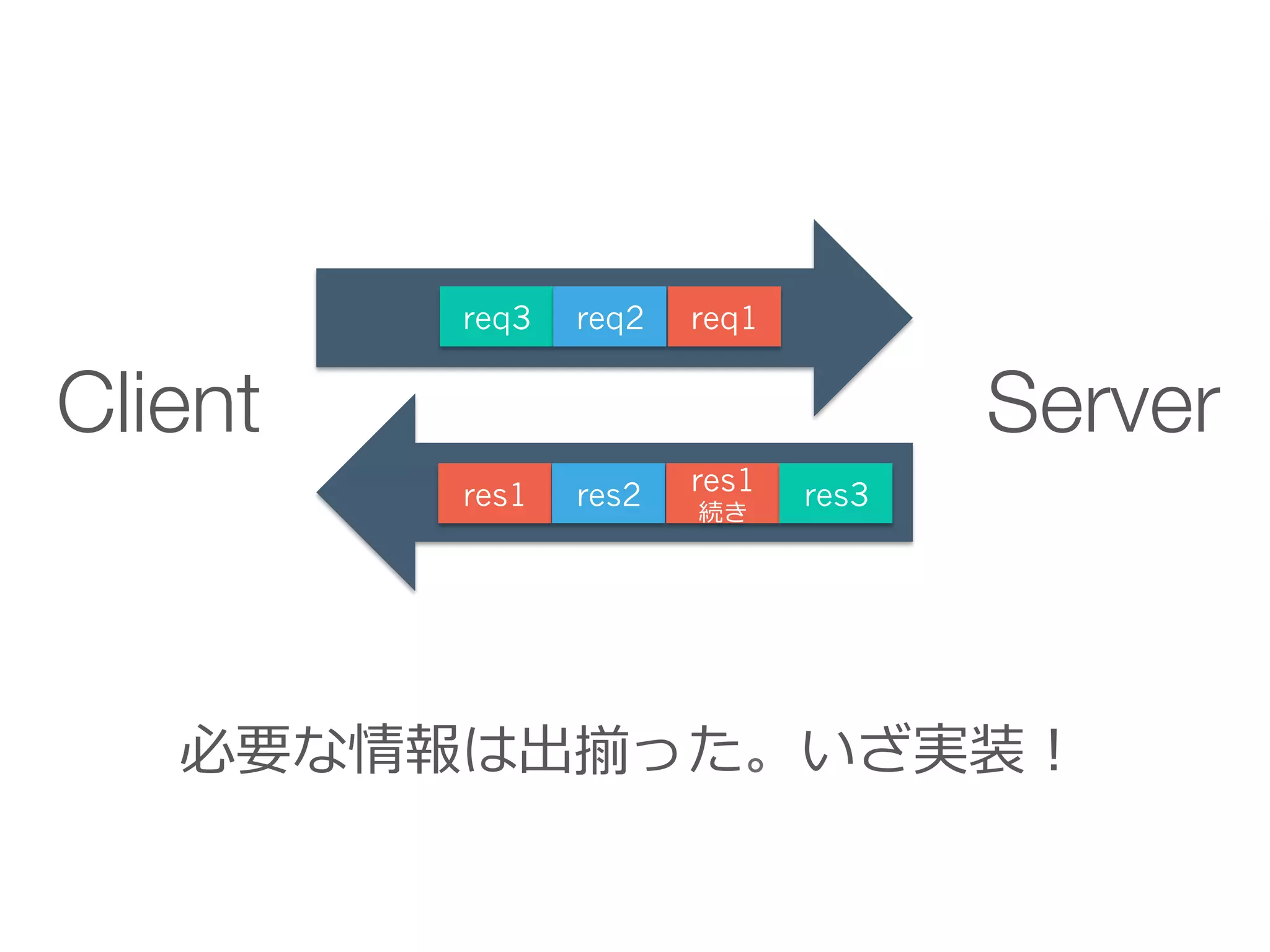
TCP コネクション 1 つで
複数のリクエストを扱うためには
各リクエストの境界を判別する必要がある
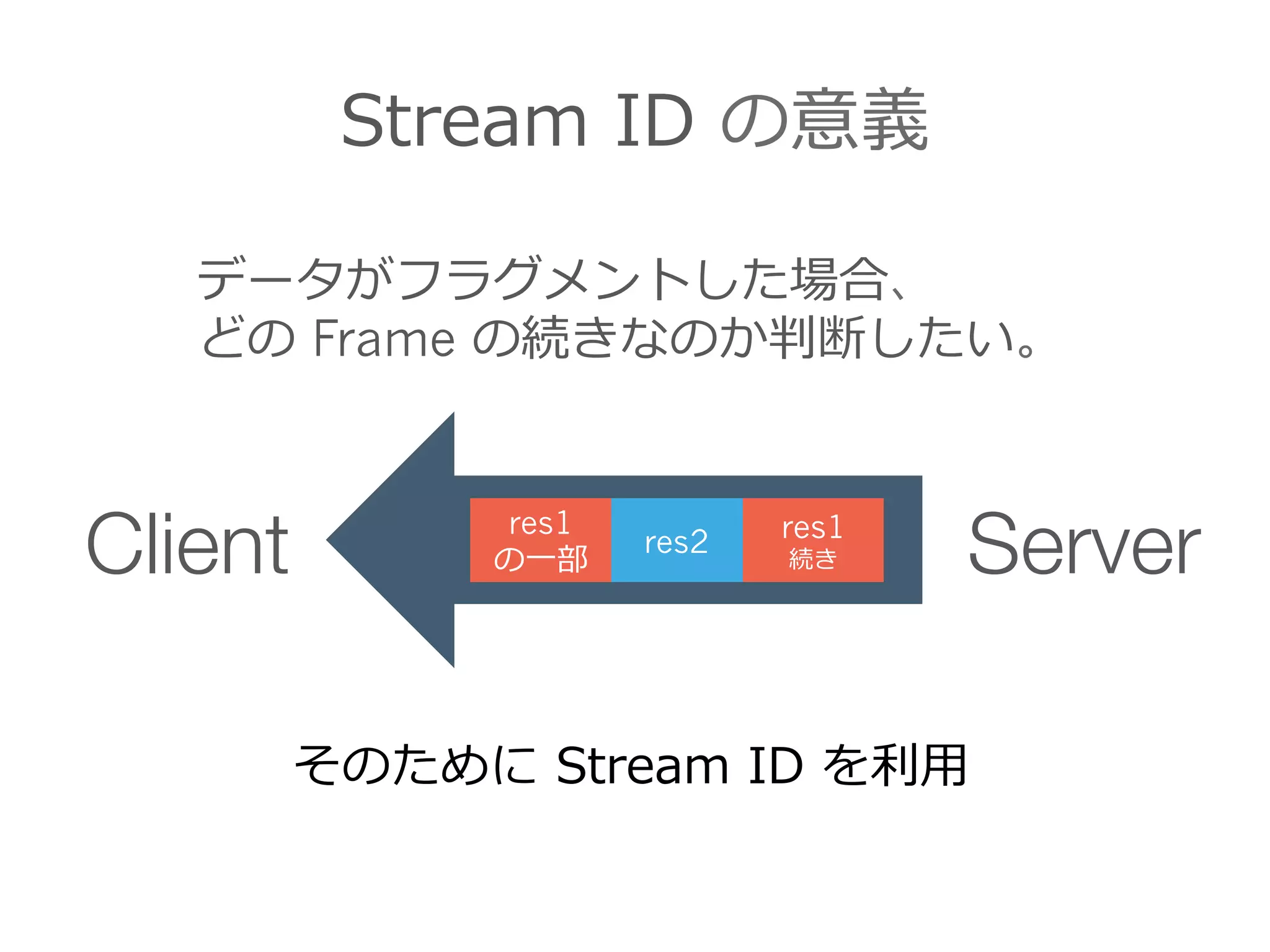
HTTP/2 では Frame で分割
Client Server
req1req2
res1 res2 res1
続き
TCP ペイロードの中に複数のデータを連結させる
- 11.
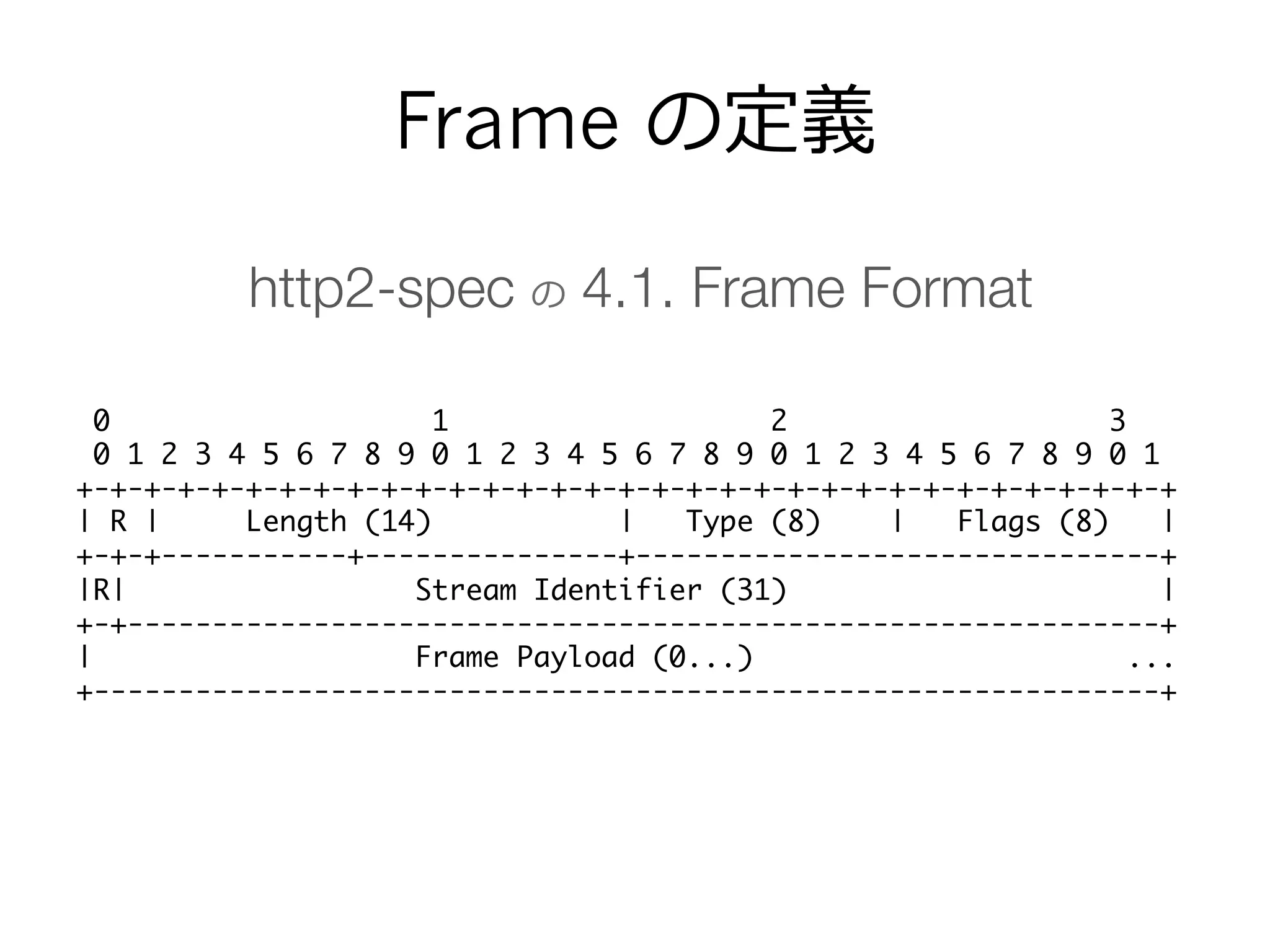
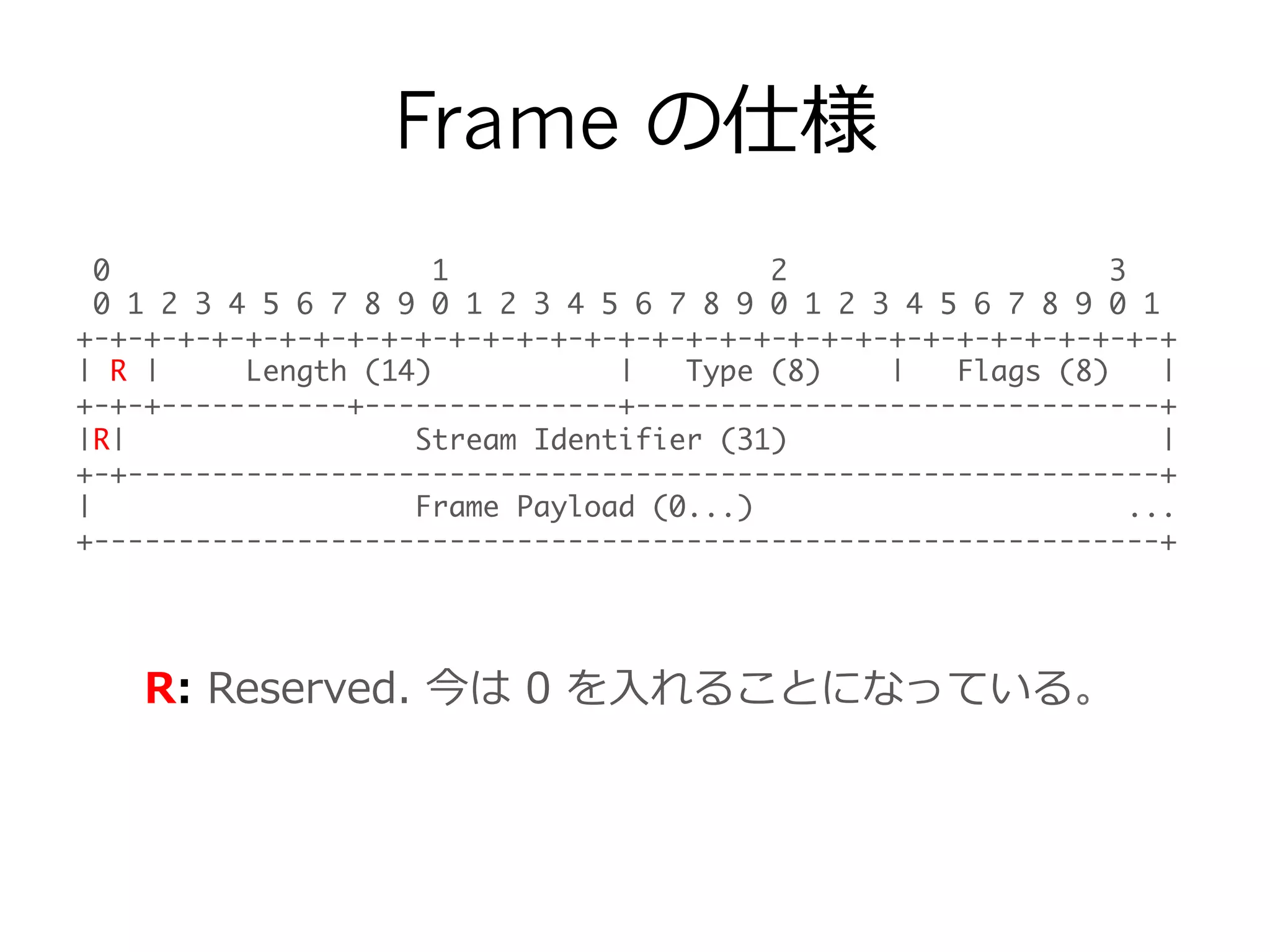
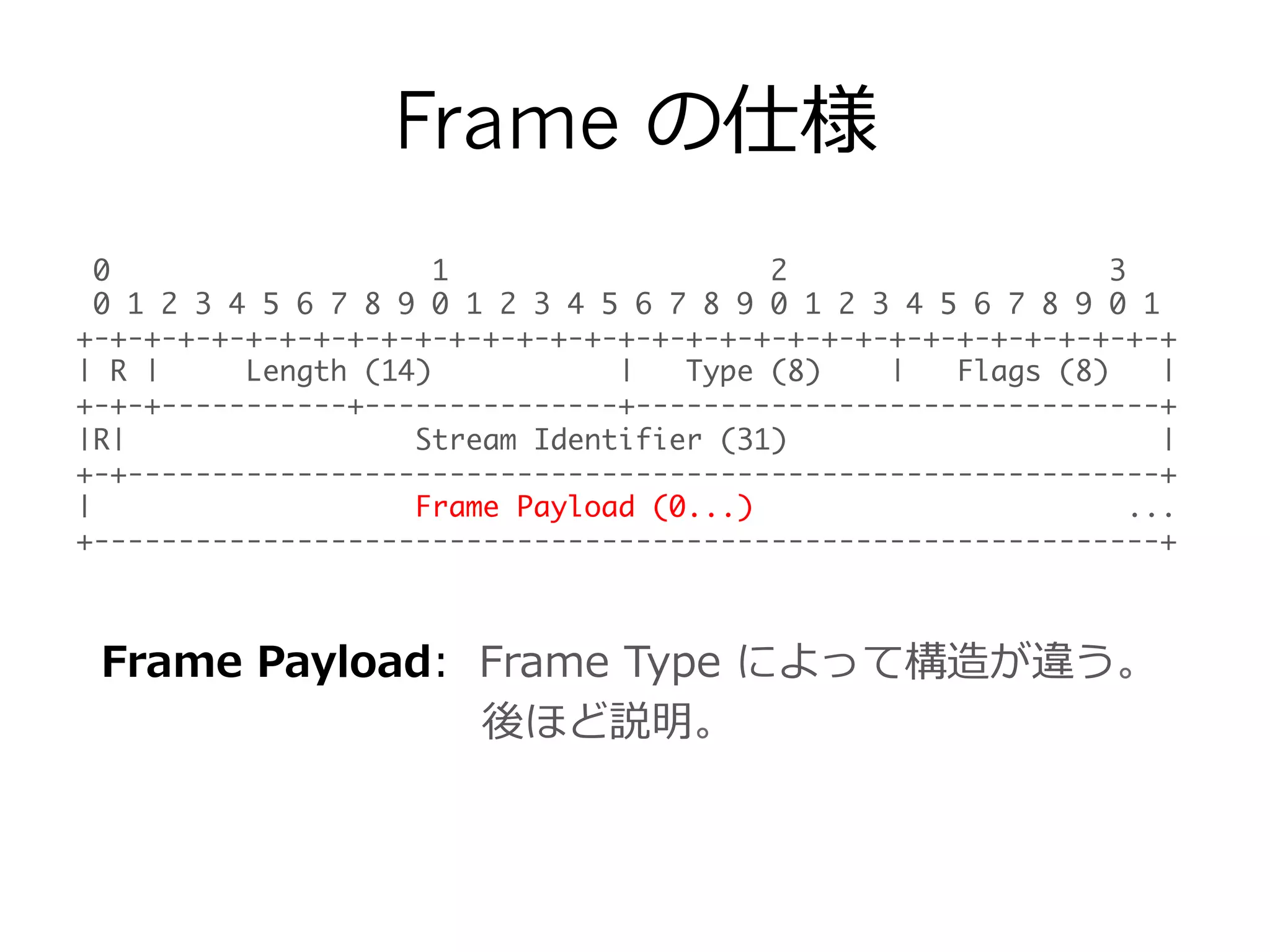
Frame の定義
0 12 3
0 1 2 3 4 5 6 7 8 9 0 1 2 3 4 5 6 7 8 9 0 1 2 3 4 5 6 7 8 9 0 1
+-+-+-+-+-+-+-+-+-+-+-+-+-+-+-+-+-+-+-+-+-+-+-+-+-+-+-+-+-+-+-+-+
| R | Length (14) | Type (8) | Flags (8) |
+-+-+-----------+---------------+-------------------------------+
|R| Stream Identifier (31) |
+-+-------------------------------------------------------------+
| Frame Payload (0...) ...
+---------------------------------------------------------------+
http2-spec の 4.1. Frame Format
- 12.
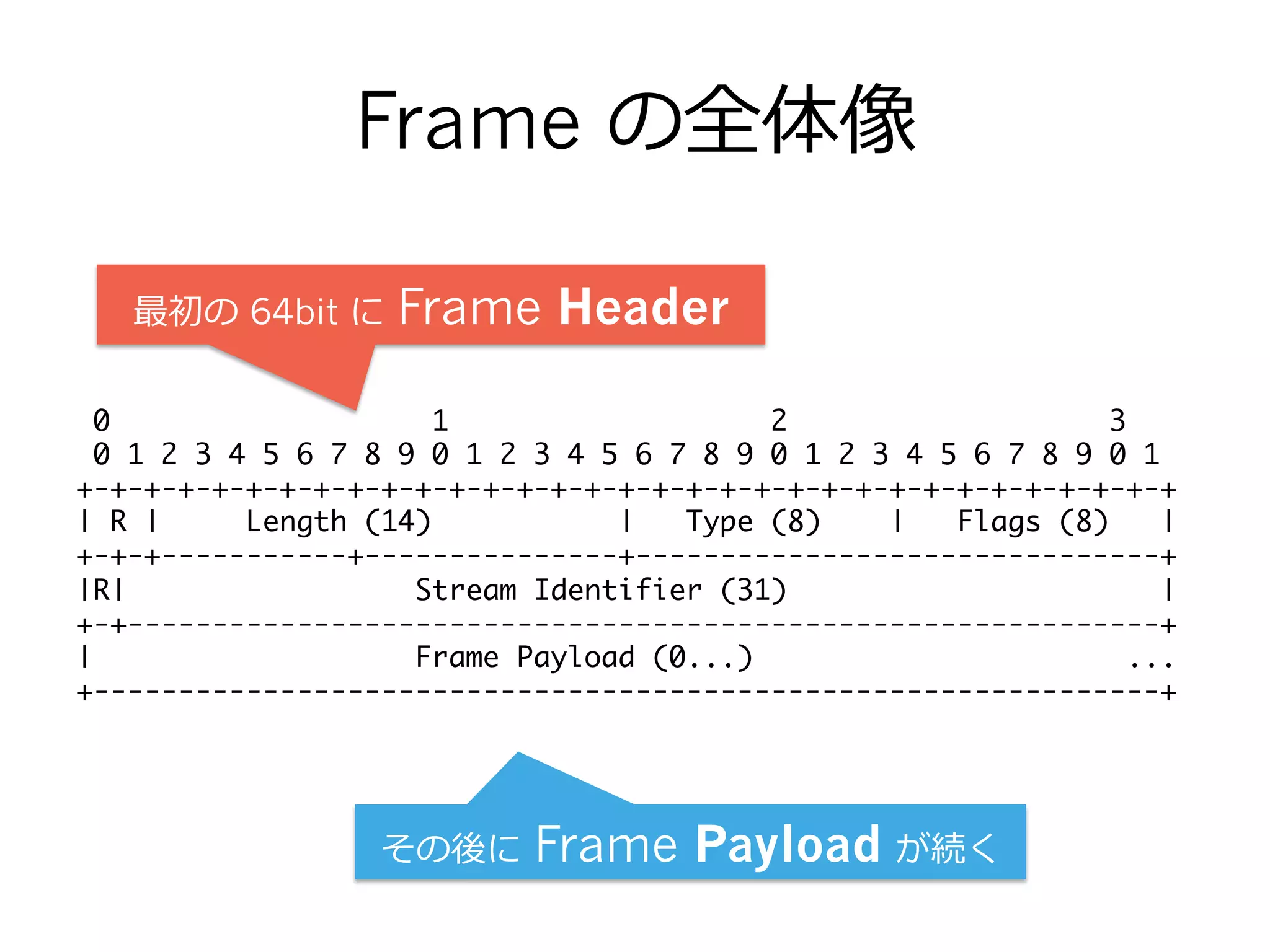
Frame の全体像
0 12 3
0 1 2 3 4 5 6 7 8 9 0 1 2 3 4 5 6 7 8 9 0 1 2 3 4 5 6 7 8 9 0 1
+-+-+-+-+-+-+-+-+-+-+-+-+-+-+-+-+-+-+-+-+-+-+-+-+-+-+-+-+-+-+-+-+
| R | Length (14) | Type (8) | Flags (8) |
+-+-+-----------+---------------+-------------------------------+
|R| Stream Identifier (31) |
+-+-------------------------------------------------------------+
| Frame Payload (0...) ...
+---------------------------------------------------------------+
その後に Frame Payload が続く
最初の 64bit に Frame Header
- 13.
Frame の仕様
0 12 3
0 1 2 3 4 5 6 7 8 9 0 1 2 3 4 5 6 7 8 9 0 1 2 3 4 5 6 7 8 9 0 1
+-+-+-+-+-+-+-+-+-+-+-+-+-+-+-+-+-+-+-+-+-+-+-+-+-+-+-+-+-+-+-+-+
| R | Length (14) | Type (8) | Flags (8) |
+-+-+-----------+---------------+-------------------------------+
|R| Stream Identifier (31) |
+-+-------------------------------------------------------------+
| Frame Payload (0...) ...
+---------------------------------------------------------------+
R: Reserved. 今は 0 を⼊入れることになっている。
- 14.
Frame の仕様
0 12 3
0 1 2 3 4 5 6 7 8 9 0 1 2 3 4 5 6 7 8 9 0 1 2 3 4 5 6 7 8 9 0 1
+-+-+-+-+-+-+-+-+-+-+-+-+-+-+-+-+-+-+-+-+-+-+-+-+-+-+-+-+-+-+-+-+
| R | Length (14) | Type (8) | Flags (8) |
+-+-+-----------+---------------+-------------------------------+
|R| Stream Identifier (31) |
+-+-------------------------------------------------------------+
| Frame Payload (0...) ...
+---------------------------------------------------------------+
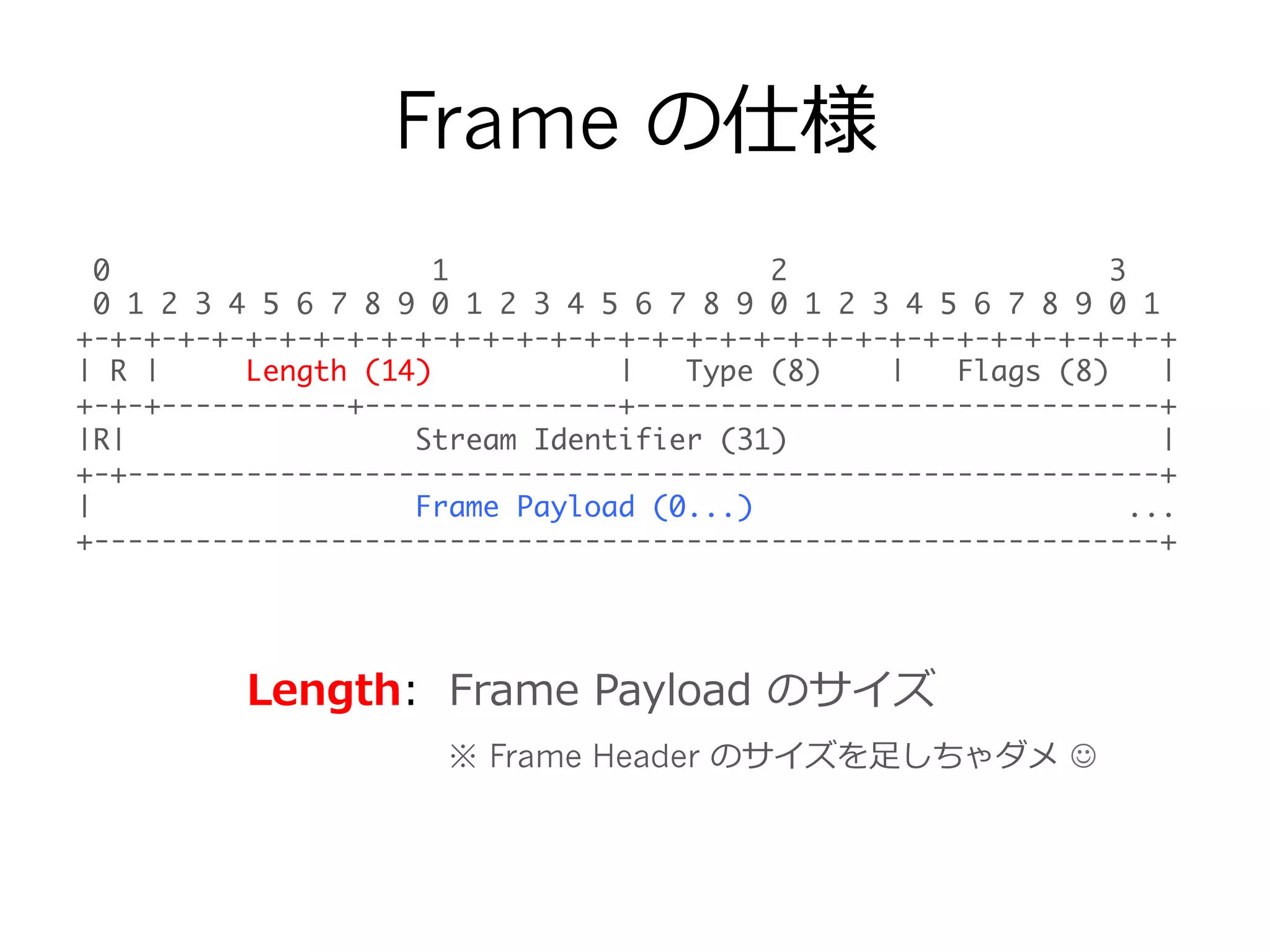
Length: Frame Payload のサイズ
※ Frame Header のサイズを⾜足しちゃダメ J
- 15.
Frame の仕様
0 12 3
0 1 2 3 4 5 6 7 8 9 0 1 2 3 4 5 6 7 8 9 0 1 2 3 4 5 6 7 8 9 0 1
+-+-+-+-+-+-+-+-+-+-+-+-+-+-+-+-+-+-+-+-+-+-+-+-+-+-+-+-+-+-+-+-+
| R | Length (14) | Type (8) | Flags (8) |
+-+-+-----------+---------------+-------------------------------+
|R| Stream Identifier (31) |
+-+-------------------------------------------------------------+
| Frame Payload (0...) ...
+---------------------------------------------------------------+
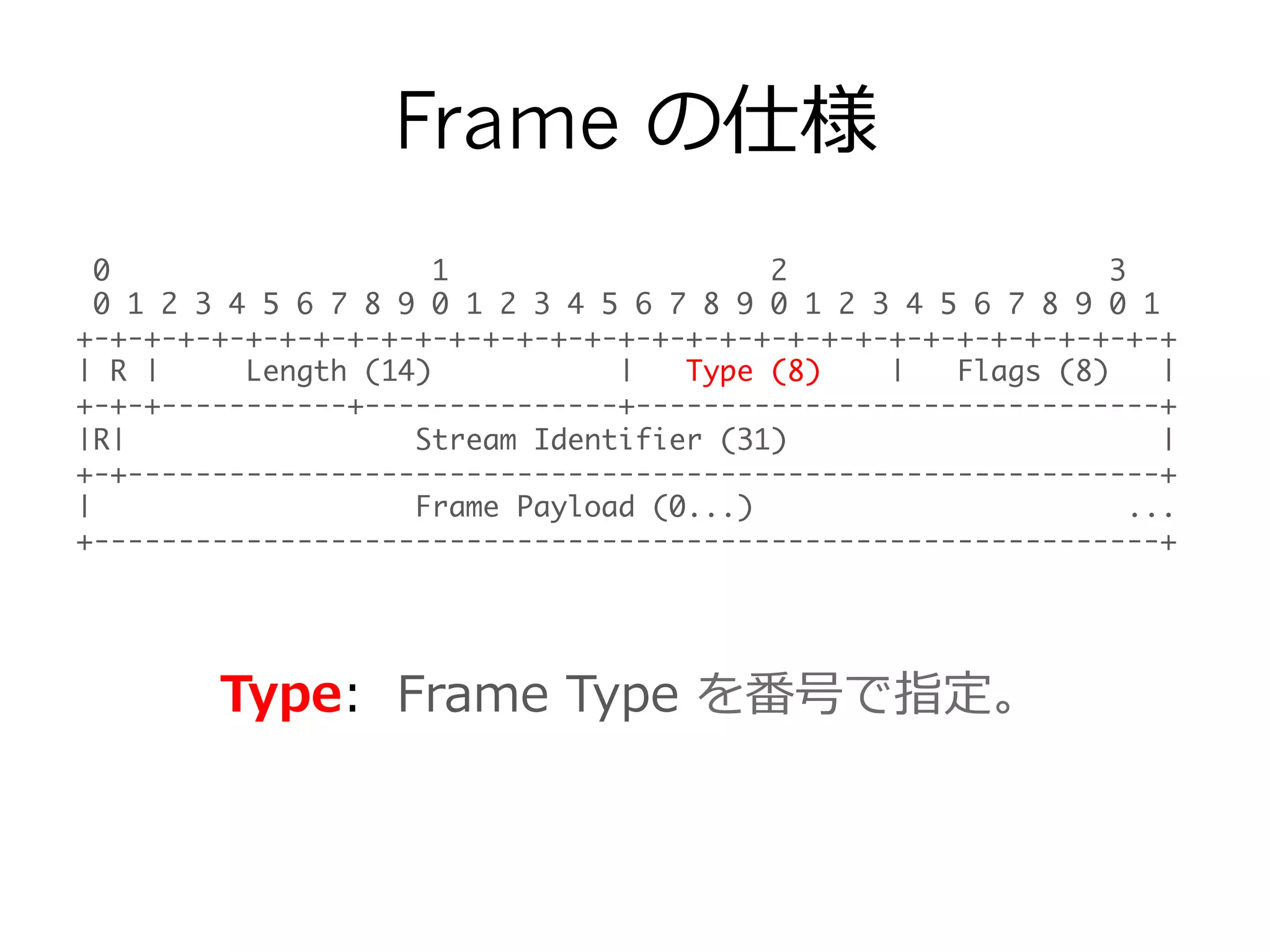
Type: Frame Type を番号で指定。
- 16.
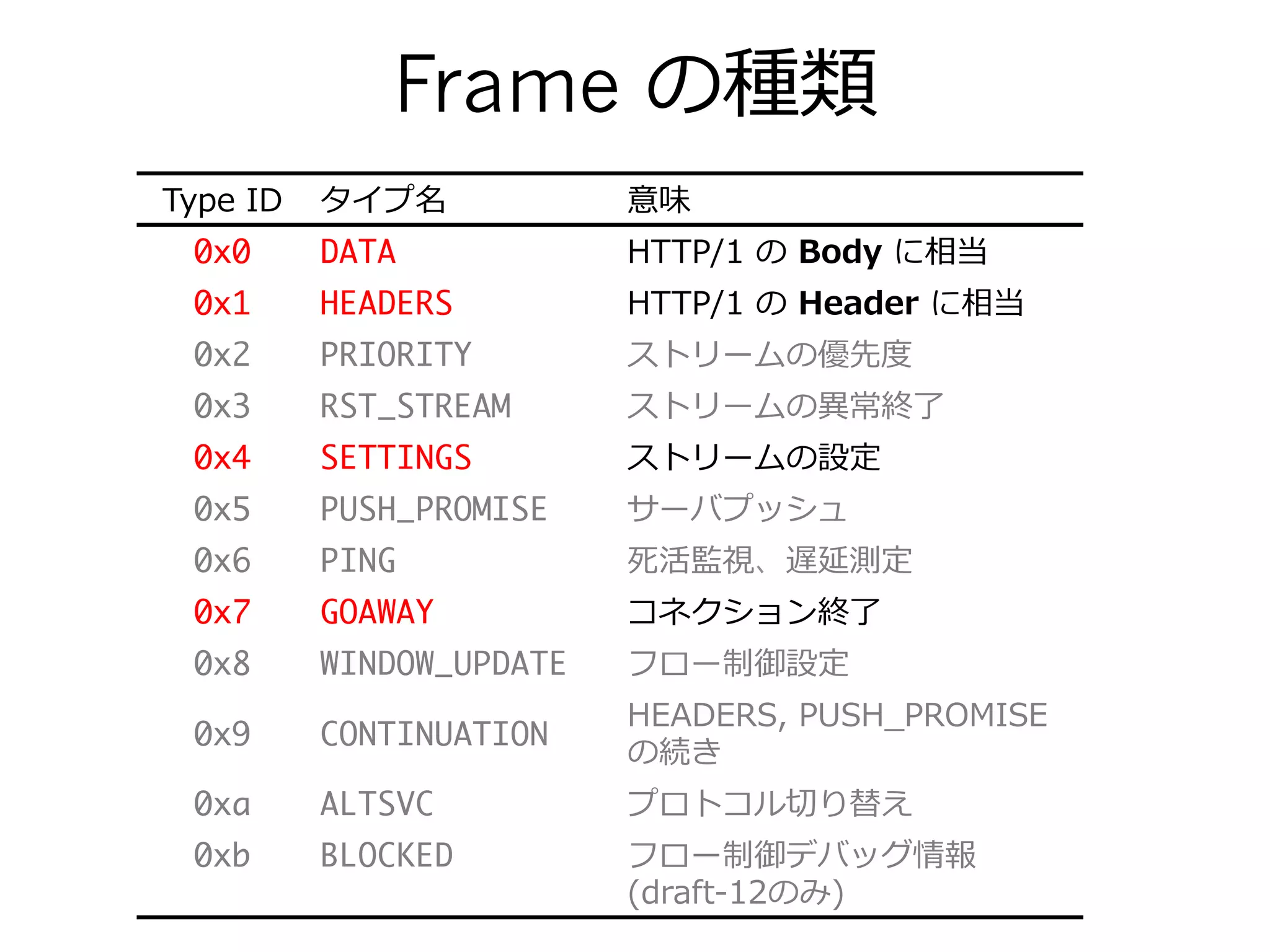
Frame の種類
Type IDタイプ名 意味
0x0 DATA HTTP/1 の Body に相当
0x1 HEADERS HTTP/1 の Header に相当
0x2 PRIORITY ストリームの優先度度
0x3 RST_STREAM ストリームの異異常終了了
0x4 SETTINGS ストリームの設定
0x5 PUSH_PROMISE サーバプッシュ
0x6 PING 死活監視、遅延測定
0x7 GOAWAY コネクション終了了
0x8 WINDOW_UPDATE フロー制御設定
0x9 CONTINUATION
HEADERS, PUSH_̲PROMISE
の続き
0xa ALTSVC プロトコル切切り替え
0xb BLOCKED フロー制御デバッグ情報
(draft-‐‑‒12のみ)
- 17.
Frame の仕様
0 12 3
0 1 2 3 4 5 6 7 8 9 0 1 2 3 4 5 6 7 8 9 0 1 2 3 4 5 6 7 8 9 0 1
+-+-+-+-+-+-+-+-+-+-+-+-+-+-+-+-+-+-+-+-+-+-+-+-+-+-+-+-+-+-+-+-+
| R | Length (14) | Type (8) | Flags (8) |
+-+-+-----------+---------------+-------------------------------+
|R| Stream Identifier (31) |
+-+-------------------------------------------------------------+
| Frame Payload (0...) ...
+---------------------------------------------------------------+
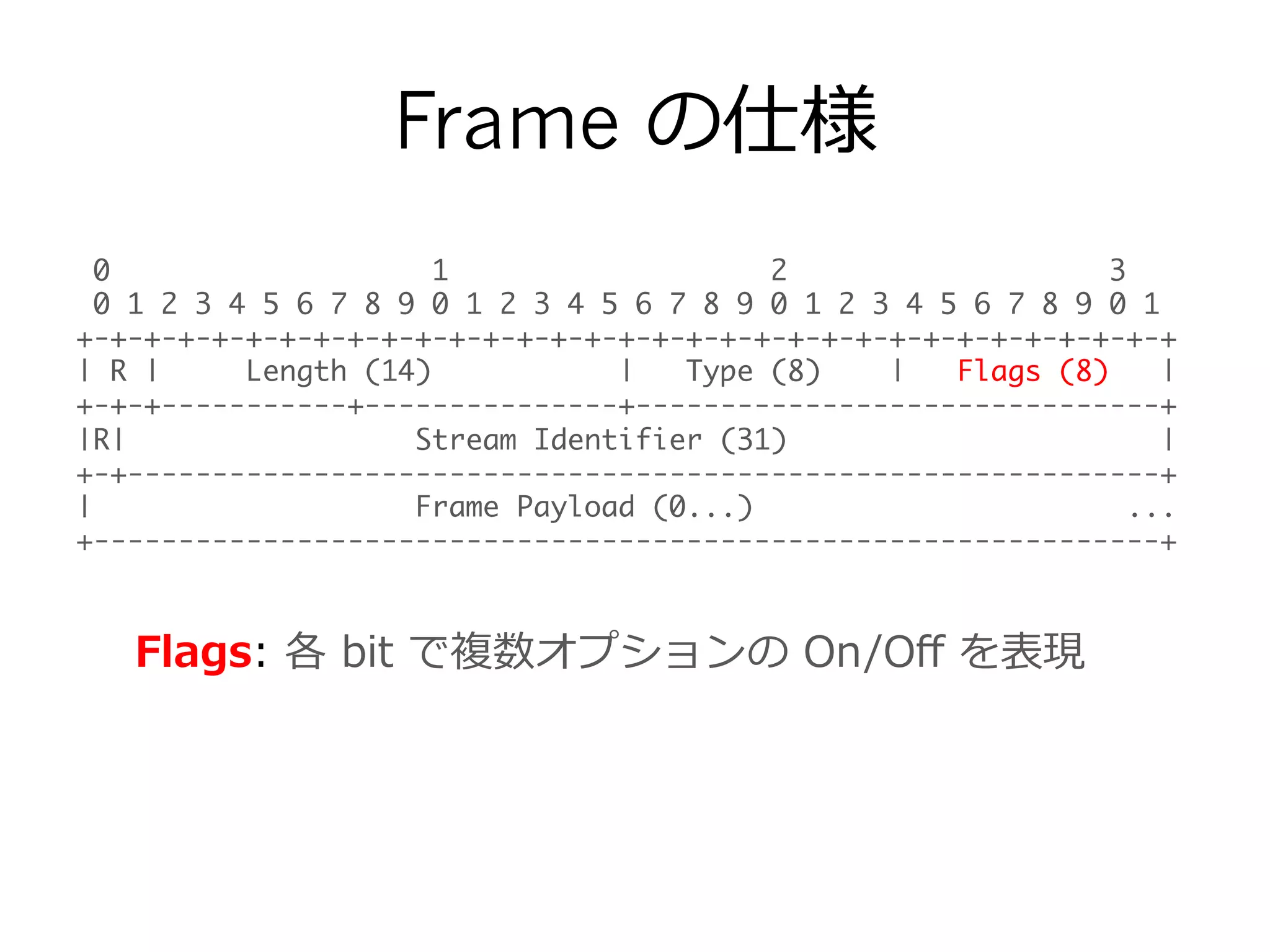
Flags: 各 bit で複数オプションの On/Off を表現
- 18.
Frame の仕様
0 12 3
0 1 2 3 4 5 6 7 8 9 0 1 2 3 4 5 6 7 8 9 0 1 2 3 4 5 6 7 8 9 0 1
+-+-+-+-+-+-+-+-+-+-+-+-+-+-+-+-+-+-+-+-+-+-+-+-+-+-+-+-+-+-+-+-+
| R | Length (14) | Type (8) | Flags (8) |
+-+-+-----------+---------------+-------------------------------+
|R| Stream Identifier (31) |
+-+-------------------------------------------------------------+
| Frame Payload (0...) ...
+---------------------------------------------------------------+
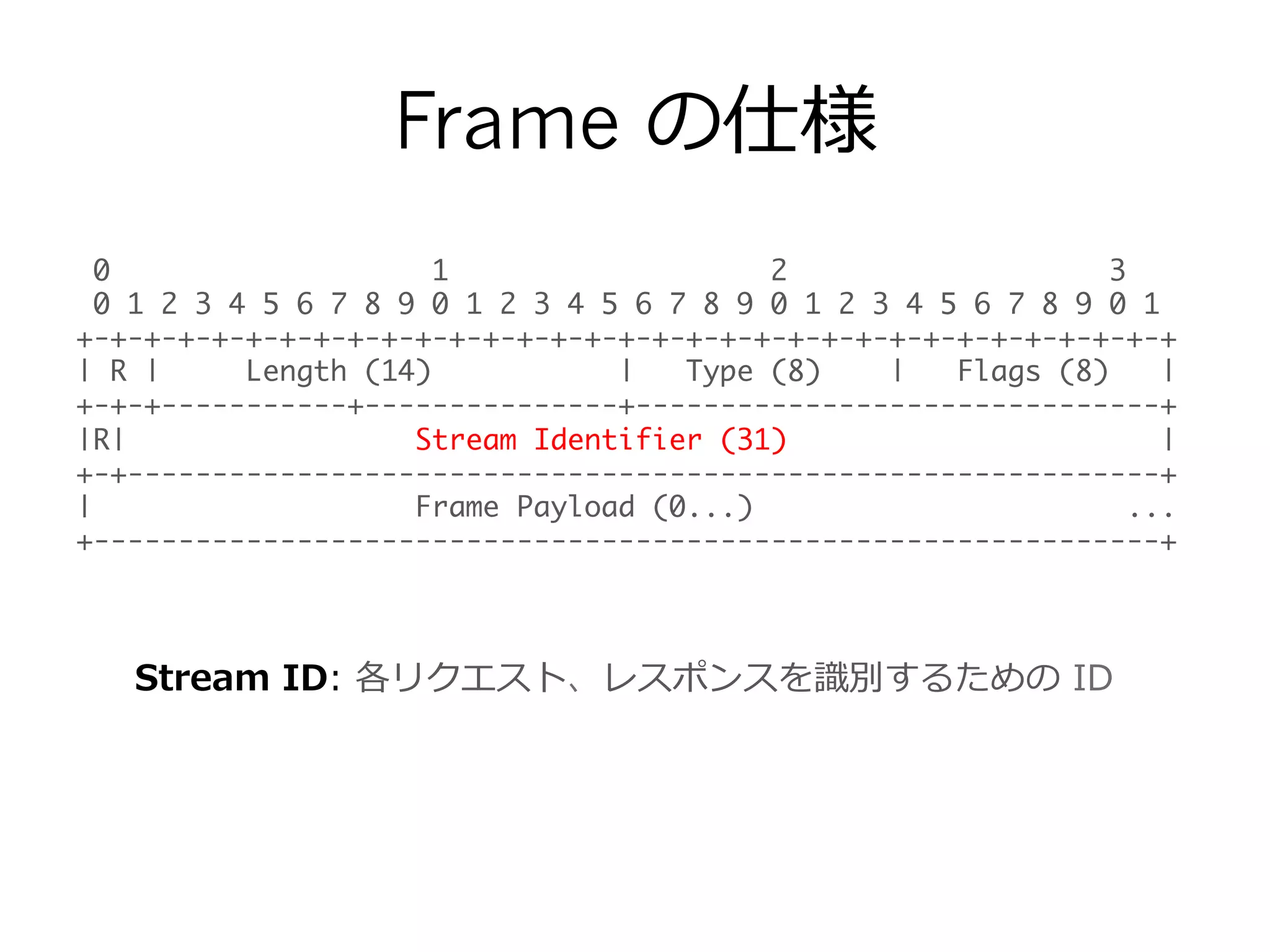
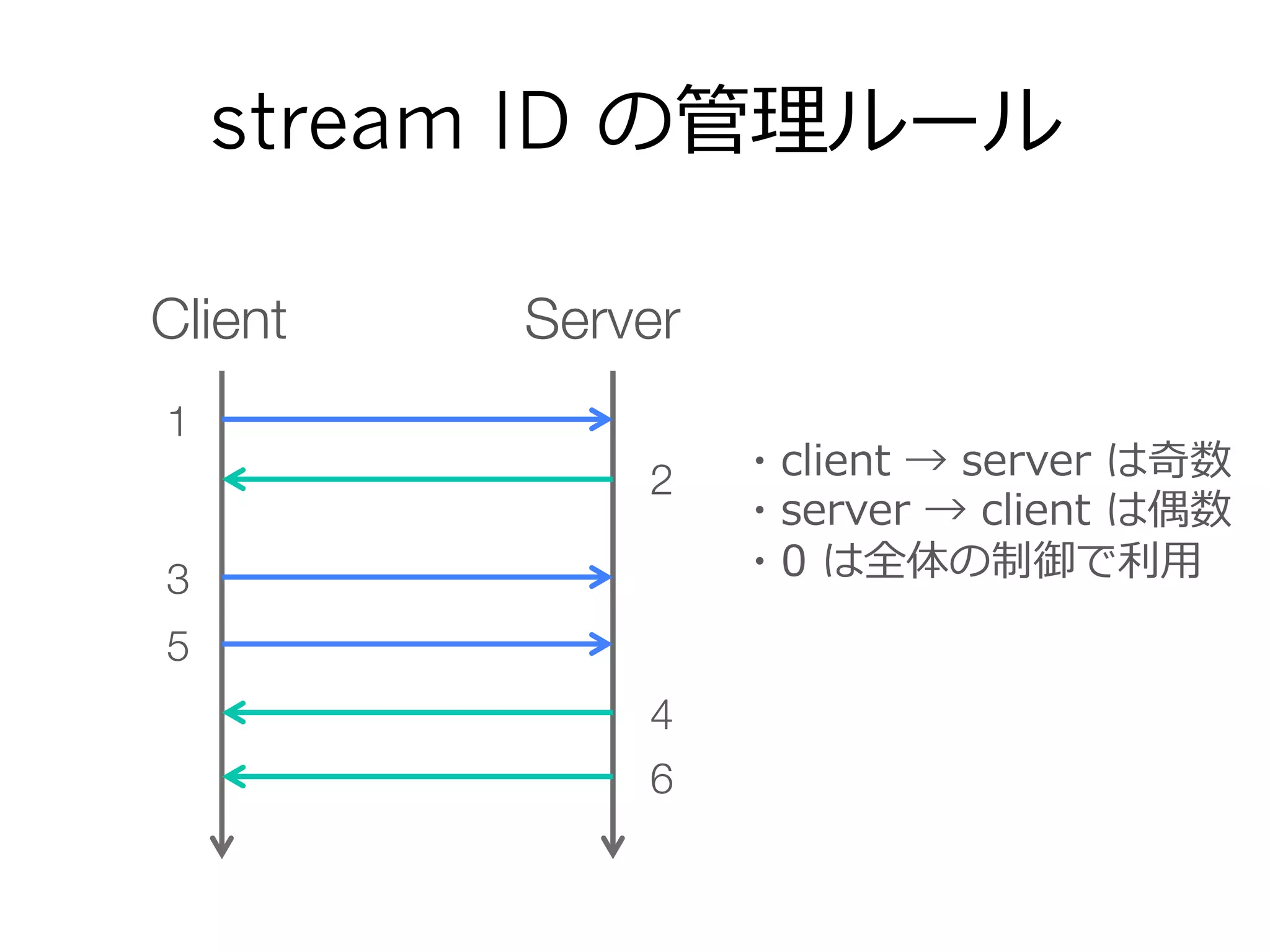
Stream ID: 各リクエスト、レスポンスを識識別するための ID
- 19.
- 20.
- 21.
Frame の仕様
0 12 3
0 1 2 3 4 5 6 7 8 9 0 1 2 3 4 5 6 7 8 9 0 1 2 3 4 5 6 7 8 9 0 1
+-+-+-+-+-+-+-+-+-+-+-+-+-+-+-+-+-+-+-+-+-+-+-+-+-+-+-+-+-+-+-+-+
| R | Length (14) | Type (8) | Flags (8) |
+-+-+-----------+---------------+-------------------------------+
|R| Stream Identifier (31) |
+-+-------------------------------------------------------------+
| Frame Payload (0...) ...
+---------------------------------------------------------------+
Frame Payload: Frame Type によって構造が違う。
後ほど説明。
- 22.
- 23.
- 24.
- 25.
- 26.
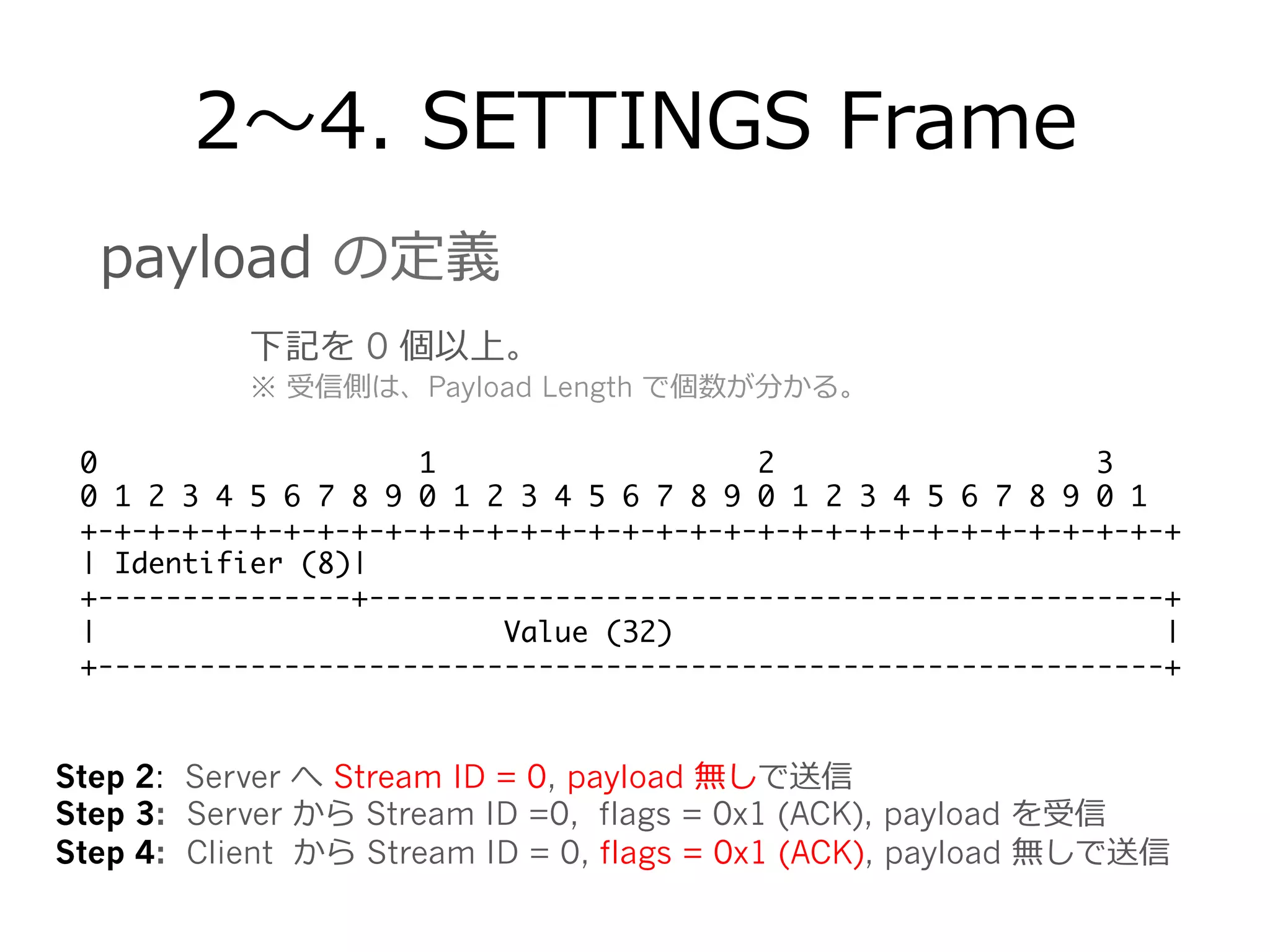
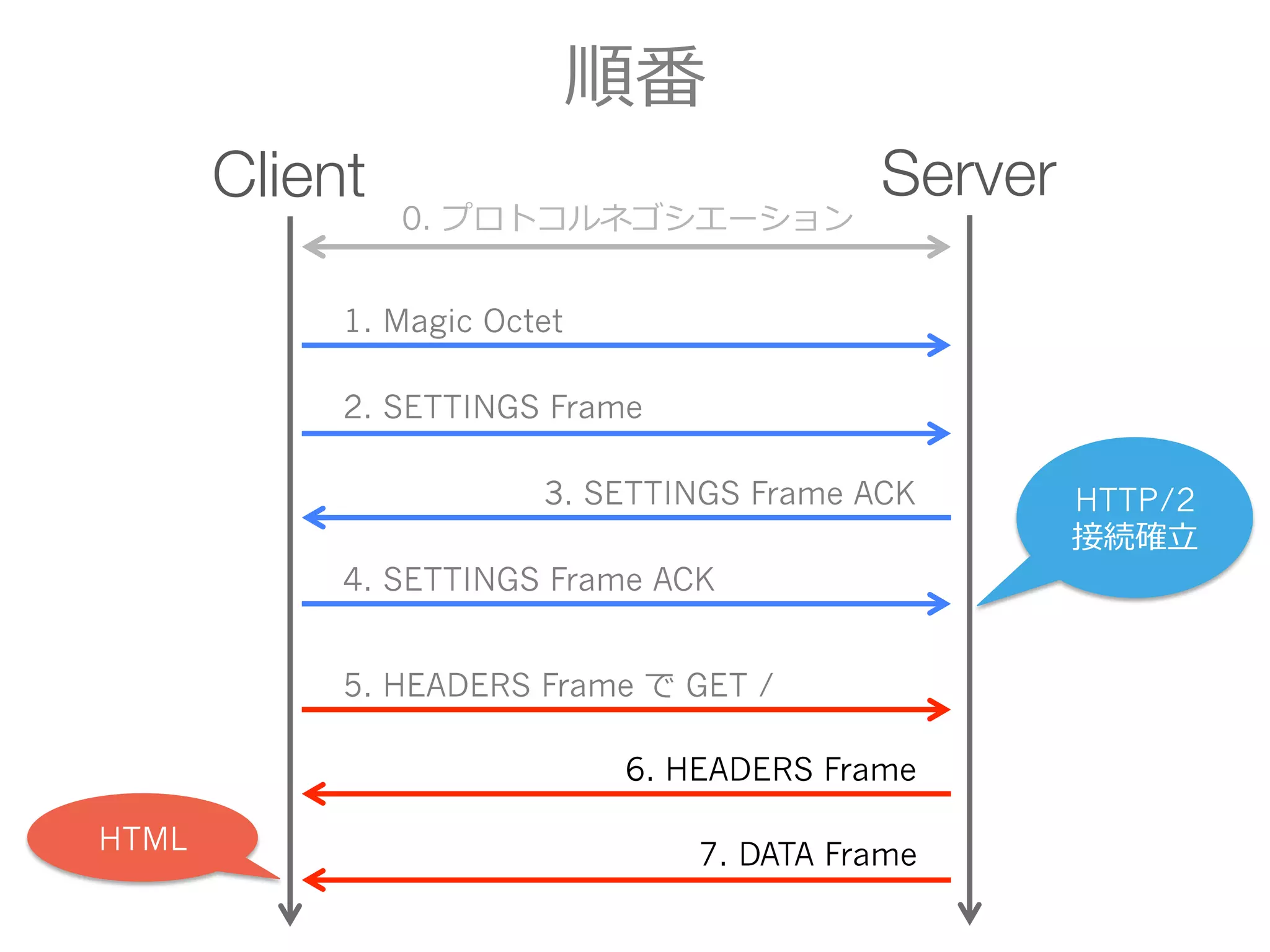
2〜~4. SETTINGS Frame
01 2 3
0 1 2 3 4 5 6 7 8 9 0 1 2 3 4 5 6 7 8 9 0 1 2 3 4 5 6 7 8 9 0 1
+-+-+-+-+-+-+-+-+-+-+-+-+-+-+-+-+-+-+-+-+-+-+-+-+-+-+-+-+-+-+-+-+
| Identifier (8)|
+---------------+-----------------------------------------------+
| Value (32) |
+---------------------------------------------------------------+
下記を 0 個以上。
※ 受信側は、Payload Length で個数が分かる。
payload の定義
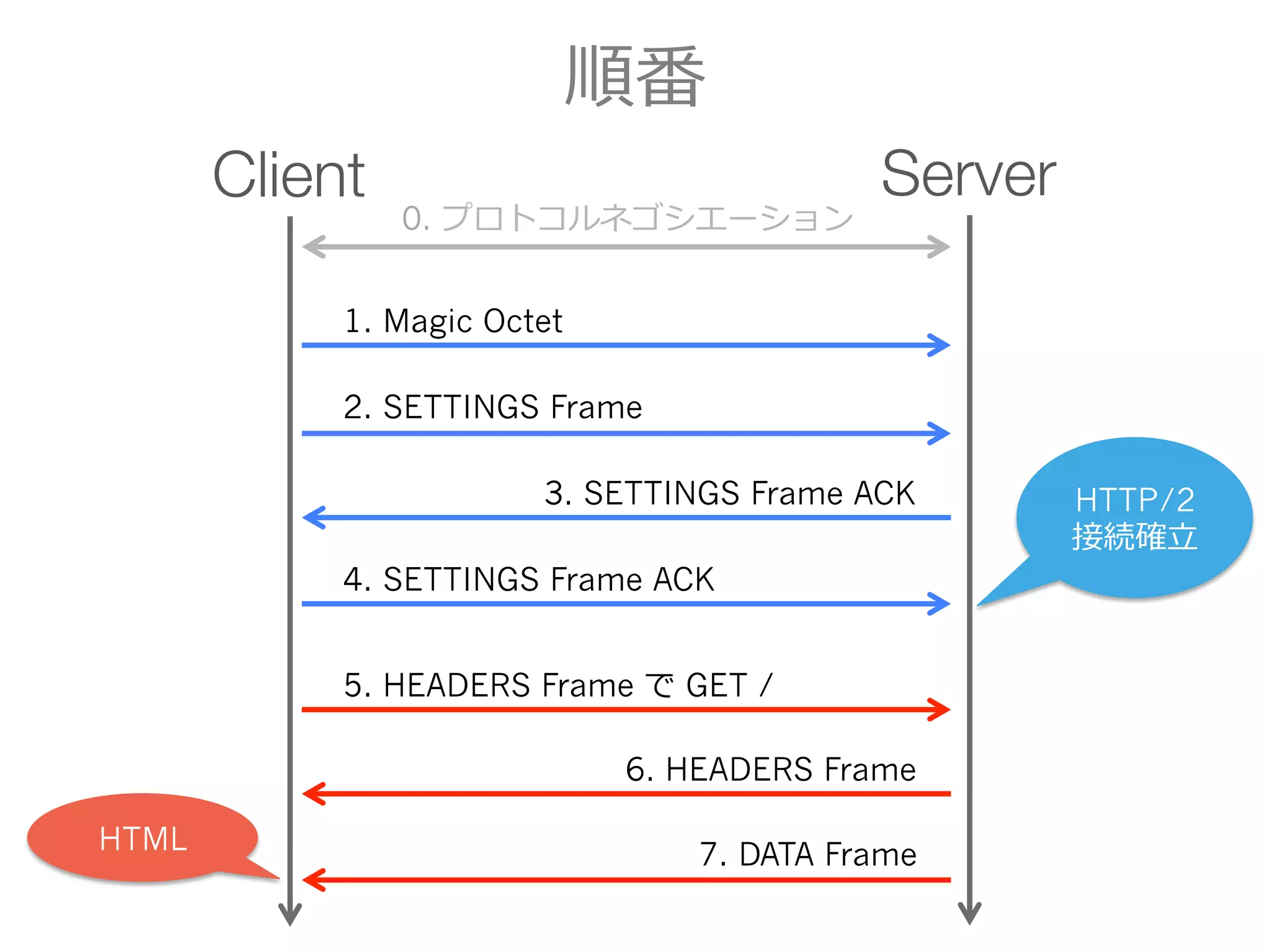
Step 2: Server へ Stream ID = 0, payload 無しで送信
Step 3: Server から Stream ID =0, flags = 0x1 (ACK), payload を受信
Step 4: Client から Stream ID = 0, flags = 0x1 (ACK), payload 無しで送信
- 27.
- 28.
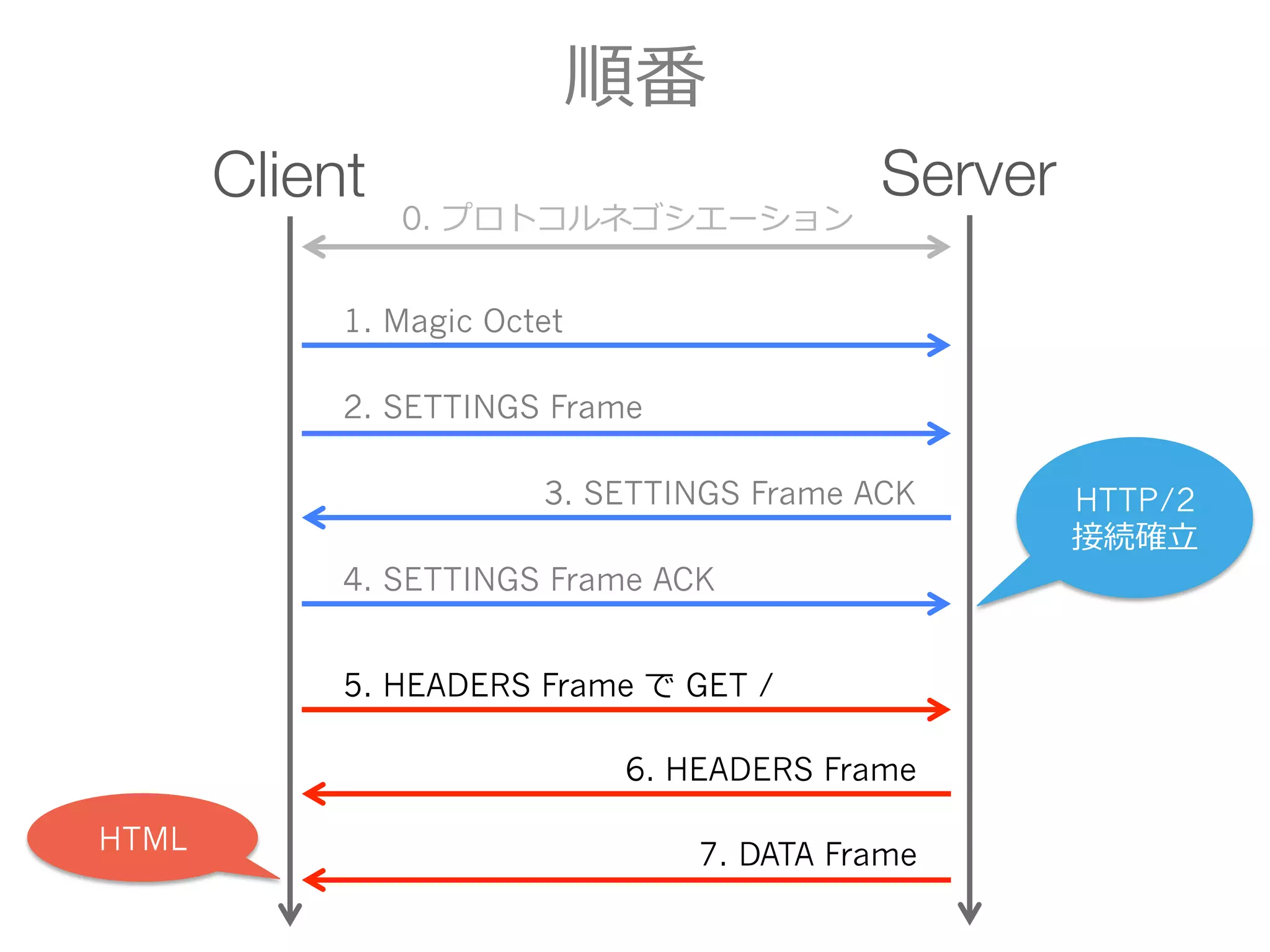
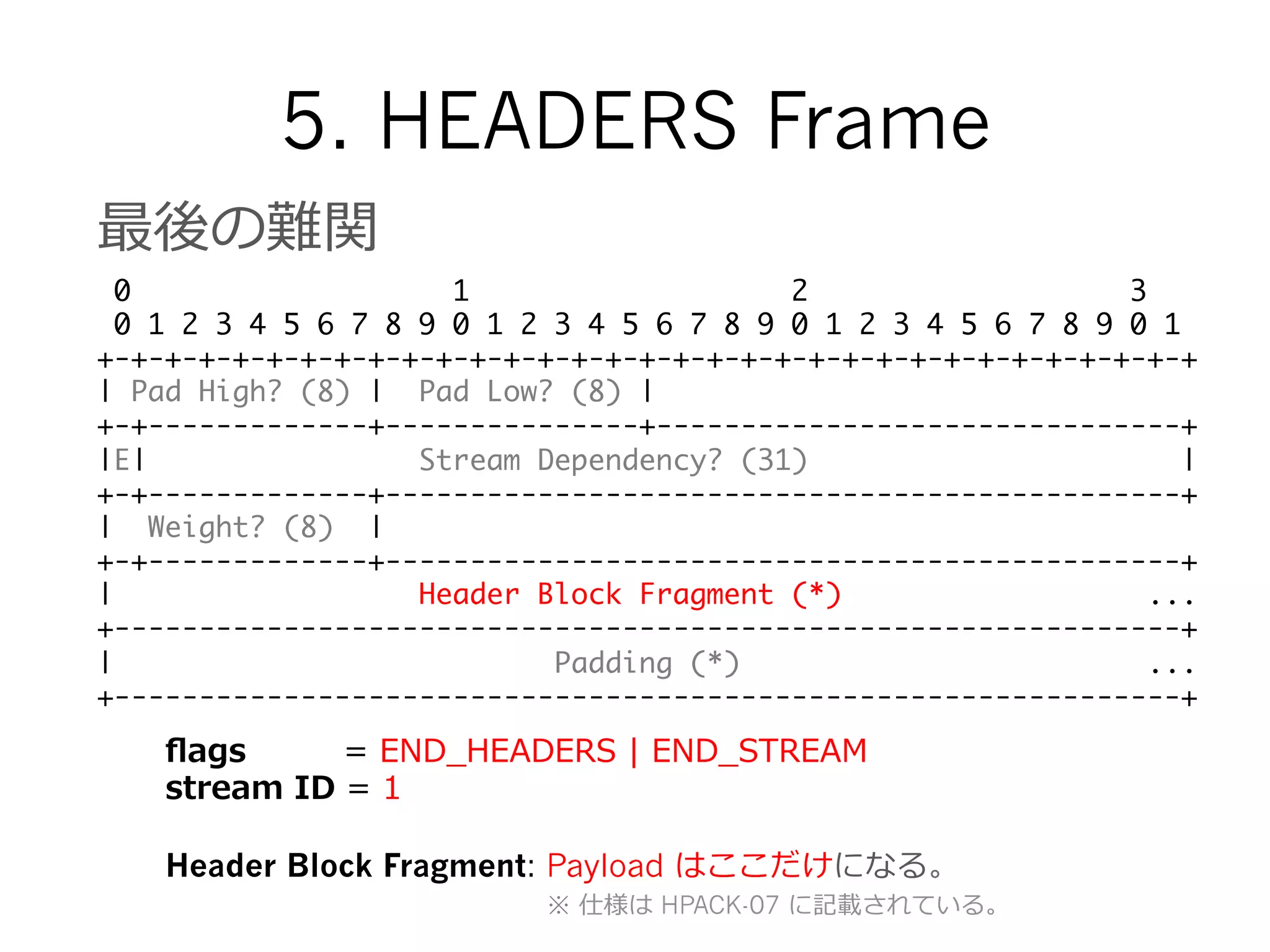
5. HEADERS Frame
最後の難関
01 2 3
0 1 2 3 4 5 6 7 8 9 0 1 2 3 4 5 6 7 8 9 0 1 2 3 4 5 6 7 8 9 0 1
+-+-+-+-+-+-+-+-+-+-+-+-+-+-+-+-+-+-+-+-+-+-+-+-+-+-+-+-+-+-+-+-+
| Pad High? (8) | Pad Low? (8) |
+-+-------------+---------------+-------------------------------+
|E| Stream Dependency? (31) |
+-+-------------+-----------------------------------------------+
| Weight? (8) |
+-+-------------+-----------------------------------------------+
| Header Block Fragment (*) ...
+---------------------------------------------------------------+
| Padding (*) ...
+---------------------------------------------------------------+
flags = END_̲HEADERS | END_̲STREAM
stream ID = 1
Header Block Fragment: Payload はここだけになる。
※ 仕様は HPACK-07 に記載されている。
- 29.
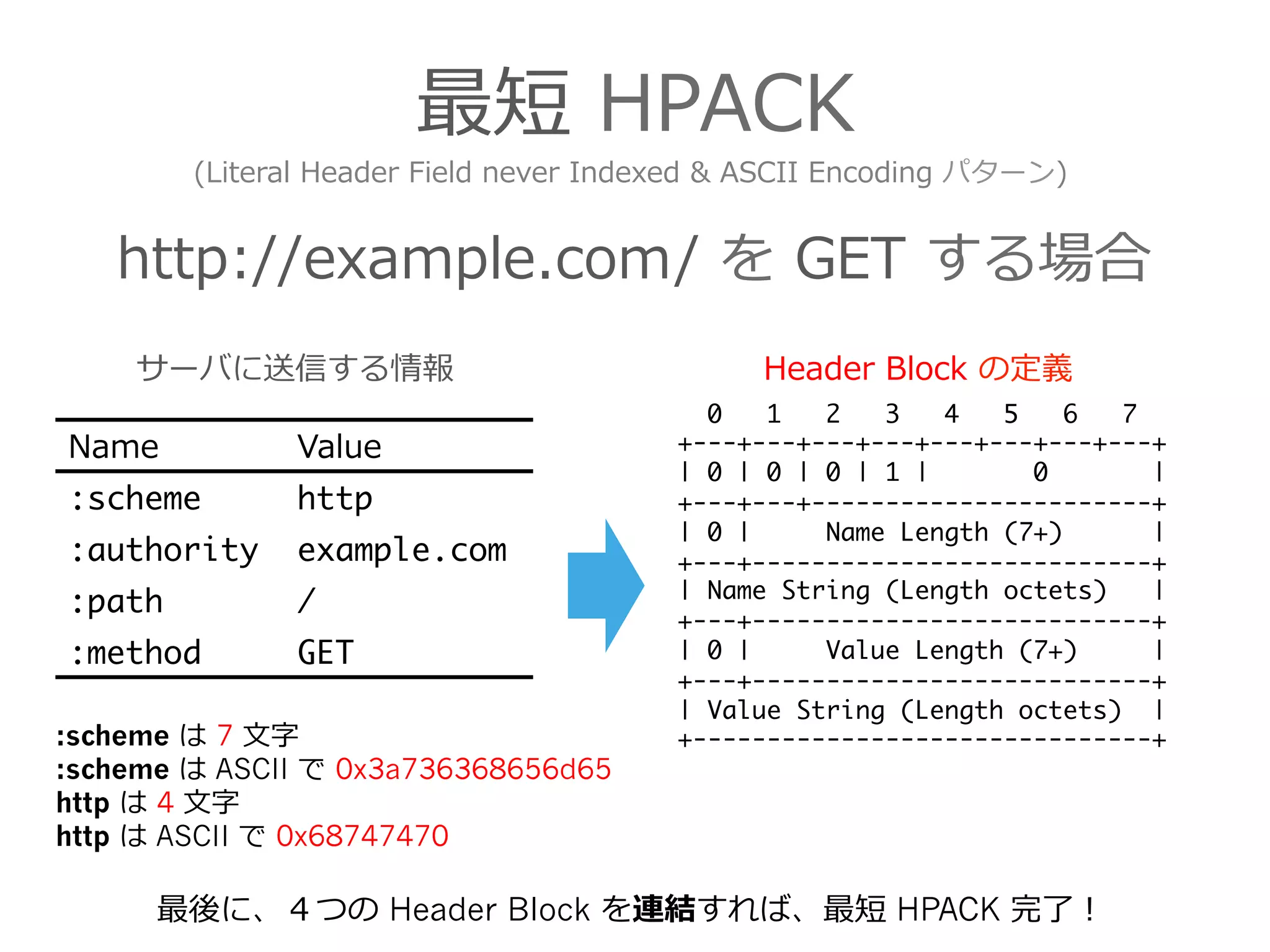
最短 HPACK
http://example.com/ を GET する場合
0 1 2 3 4 5 6 7
+---+---+---+---+---+---+---+---+
| 0 | 0 | 0 | 1 | 0 |
+---+---+-----------------------+
| 0 | Name Length (7+) |
+---+---------------------------+
| Name String (Length octets) |
+---+---------------------------+
| 0 | Value Length (7+) |
+---+---------------------------+
| Value String (Length octets) |
+-------------------------------+
Name Value
:scheme http
:authority example.com
:path /
:method GET
Header Block の定義
(Literal Header Field never Indexed & ASCII Encoding パターン)
サーバに送信する情報
最後に、4つの Header Block を連結すれば、最短 HPACK 完了了!
:scheme は 7 ⽂文字
:scheme は ASCII で 0x3a736368656d65
http は 4 ⽂文字
http は ASCII で 0x68747470
- 30.
- 31.
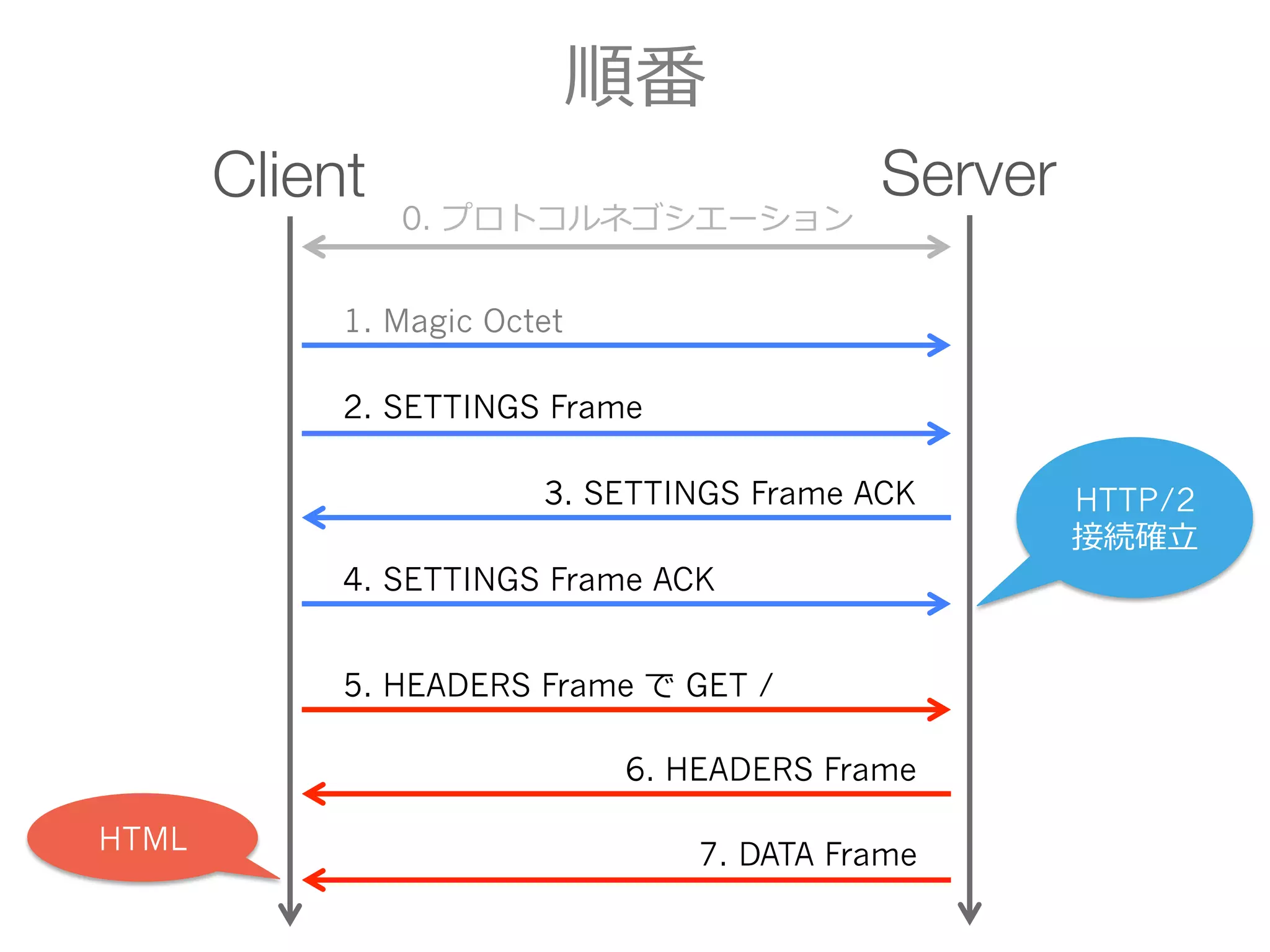
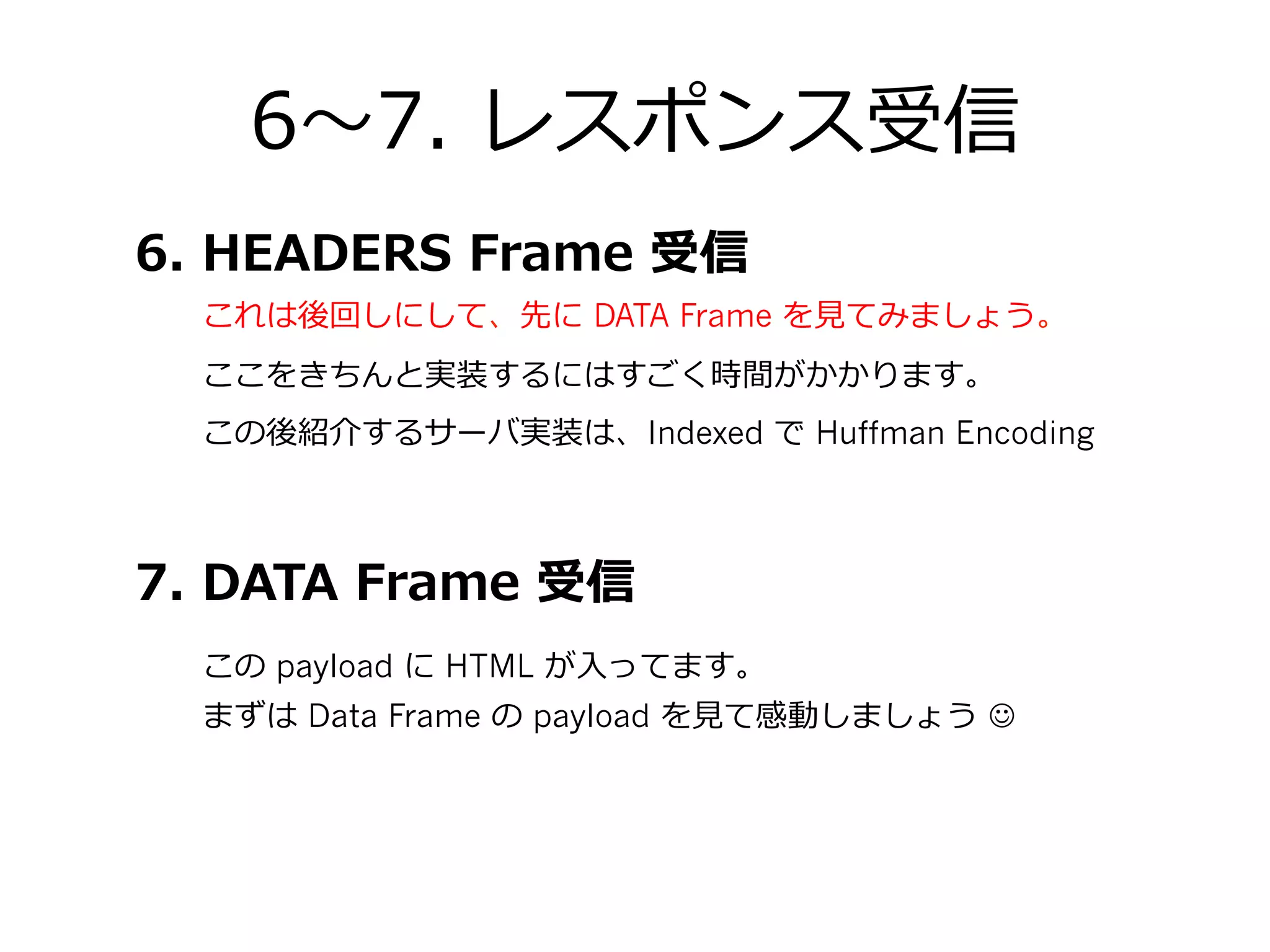
6〜~7. レスポンス受信
まずは DataFrame の payload を⾒見見て感動しましょう J
この後紹介するサーバ実装は、Indexed で Huffman Encoding
7. DATA Frame 受信
6. HEADERS Frame 受信
この payload に HTML が⼊入ってます。
ここをきちんと実装するにはすごく時間がかかります。
これは後回しにして、先に DATA Frame を⾒見見てみましょう。
- 32.
- 33.
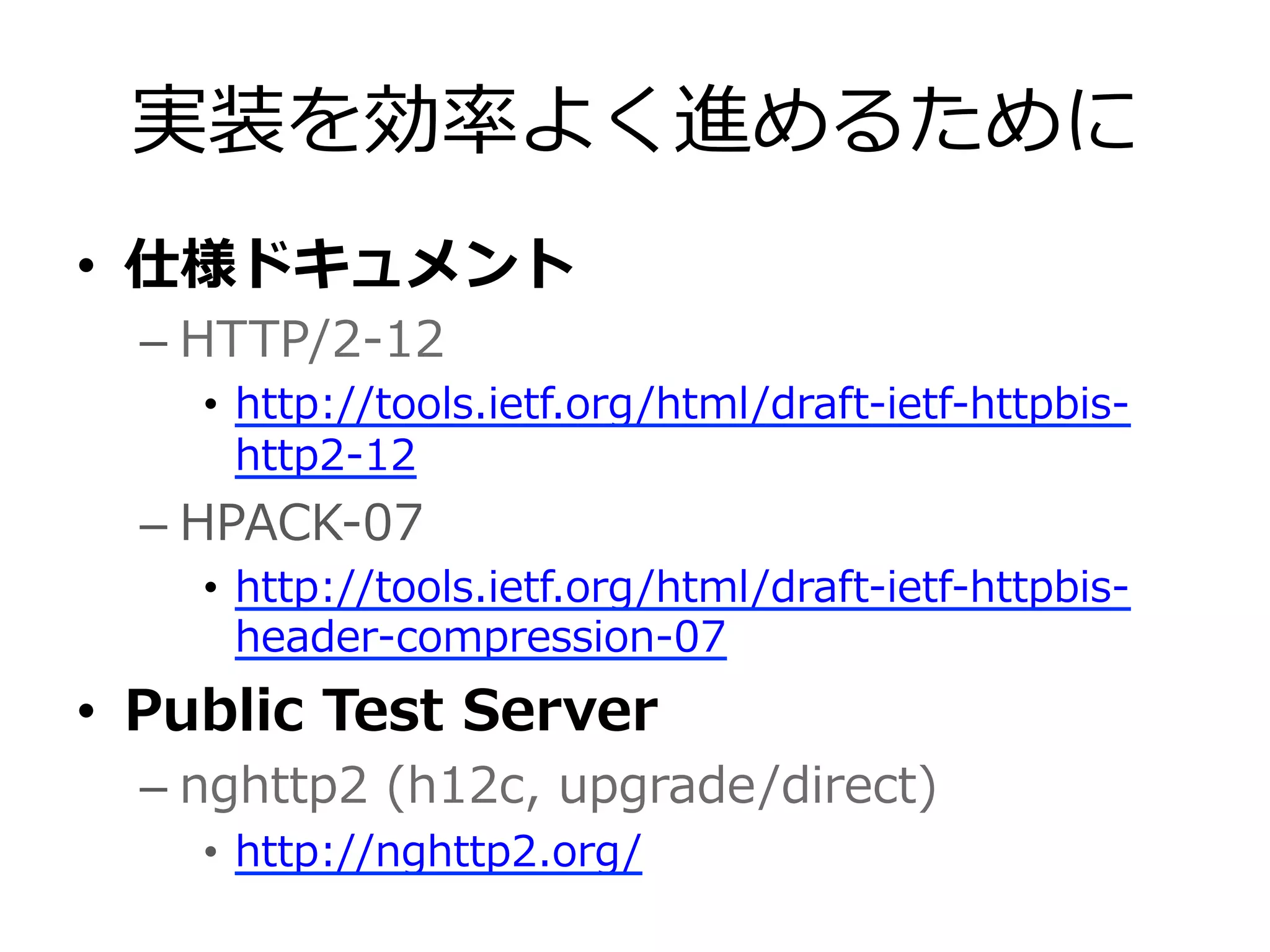
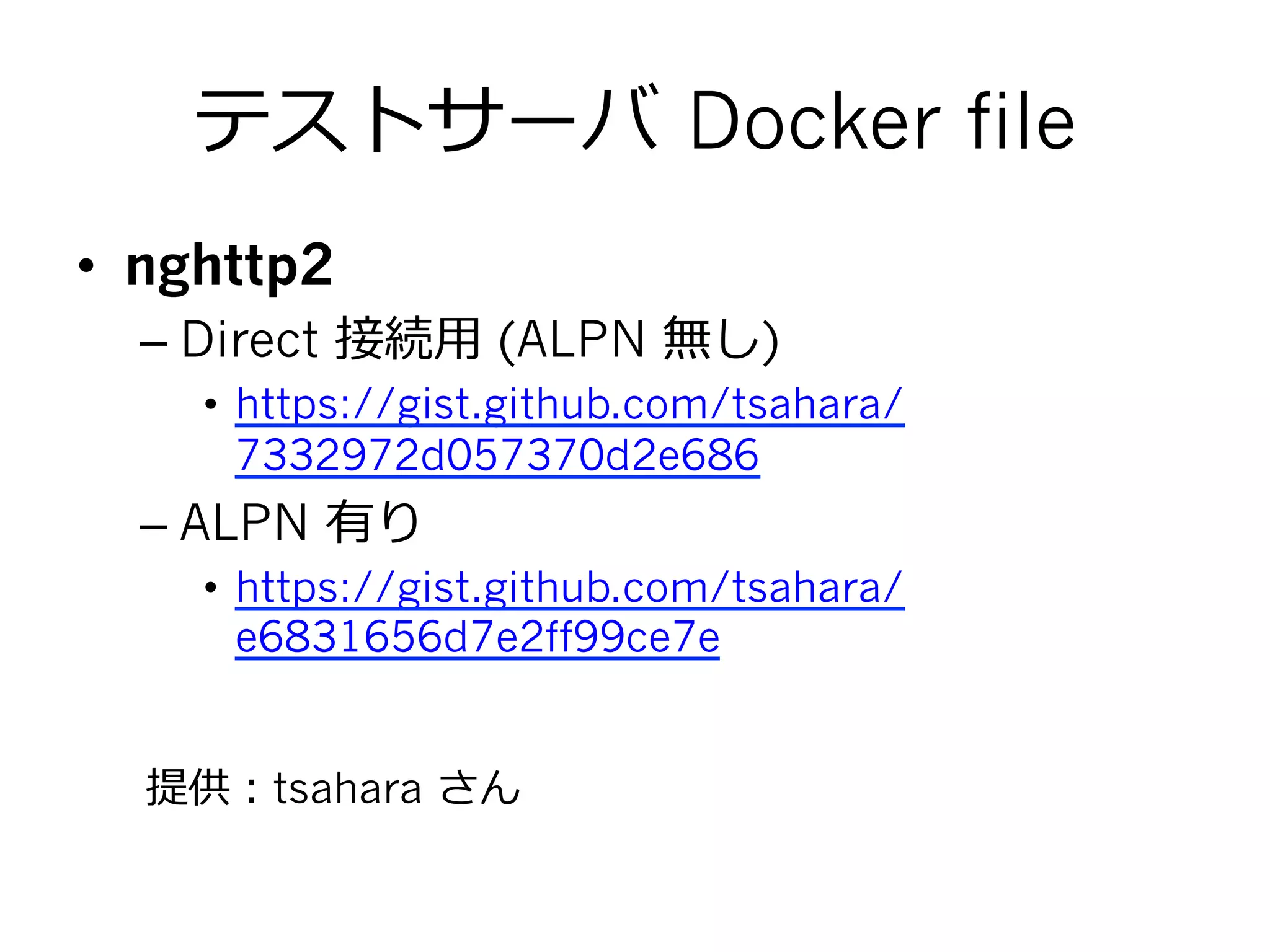
テストサーバ Docker file
• nghttp2
– Direct 接続⽤用 (ALPN 無し)
• https://gist.github.com/tsahara/
7332972d057370d2e686
– ALPN 有り
• https://gist.github.com/tsahara/
e6831656d7e2ff99ce7e
提供:tsahara さん
- 34.
- 35.
- 36.
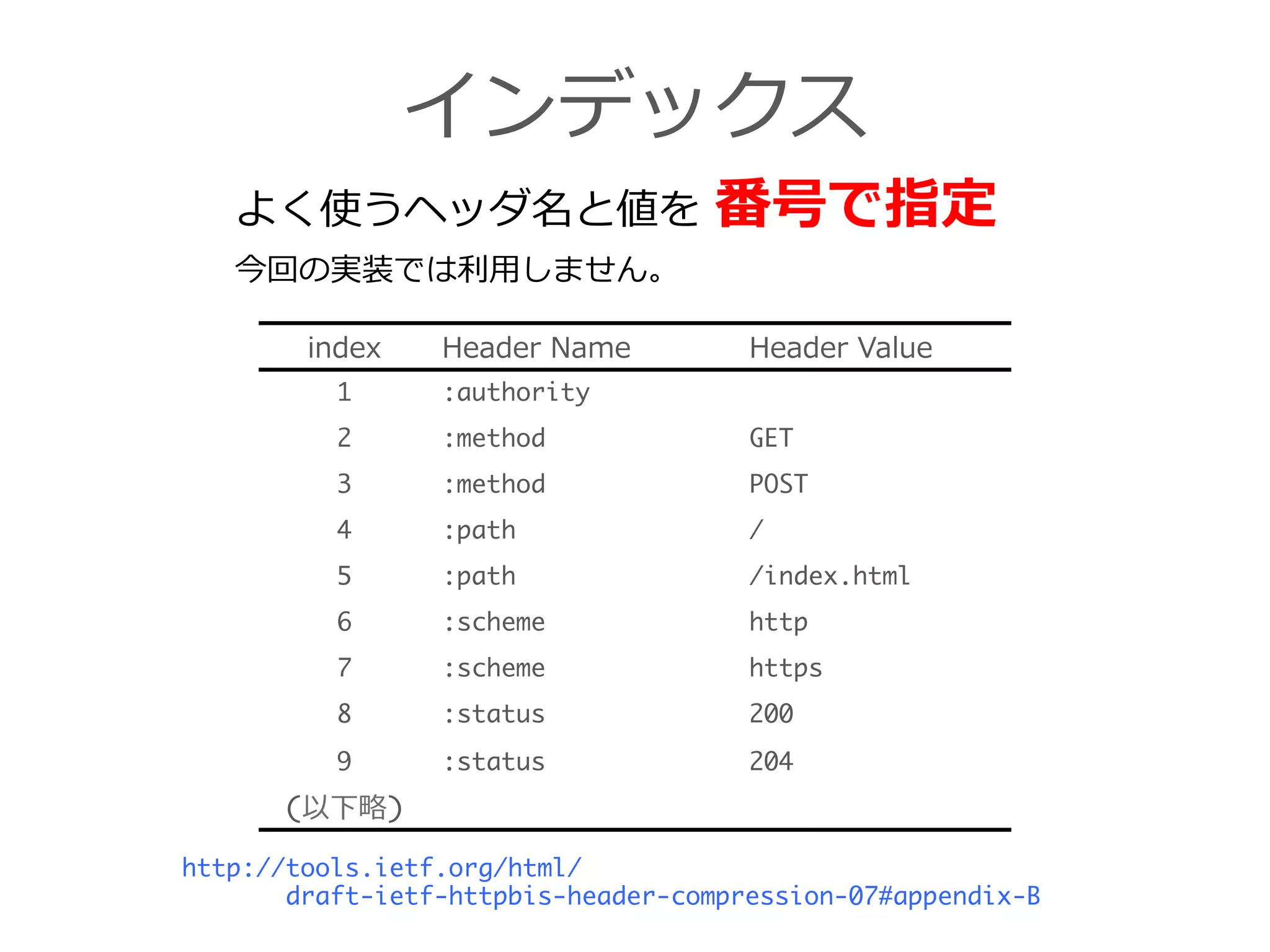
インデックス
index Header NameHeader Value
1 :authority
2 :method GET
3 :method POST
4 :path /
5 :path /index.html
6 :scheme http
7 :scheme https
8 :status 200
9 :status 204
(以下略略)
よく使うヘッダ名と値を 番号で指定
http://tools.ietf.org/html/
draft-ietf-httpbis-header-compression-07#appendix-B
今回の実装では利利⽤用しません。
- 37.