HTTP Error Codes and their
meaning
INFI KIK
Concept on HTTP Error code and their
meaning
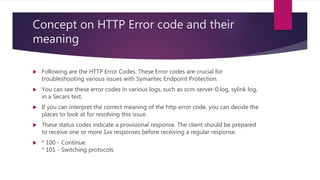
 Following are the HTTP Error Codes. These Error codes are crucial for
troubleshooting various issues with Symantec Endpoint Protection.
 You can see these error codes in various logs, such as scm-server-0.log, sylink log,
in a Secars test.
 If you can interpret the correct meaning of the http error code, you can decide the
places to look at for resolving this issue.
 These status codes indicate a provisional response. The client should be prepared
to receive one or more 1xx responses before receiving a regular response.
 * 100 - Continue.
* 101 - Switching protocols.
2xx - Success
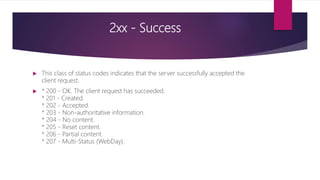
 This class of status codes indicates that the server successfully accepted the
client request.
 * 200 - OK. The client request has succeeded.
* 201 - Created.
* 202 - Accepted.
* 203 - Non-authoritative information.
* 204 - No content.
* 205 - Reset content.
* 206 - Partial content.
* 207 - Multi-Status (WebDay).
3xx - Redirection
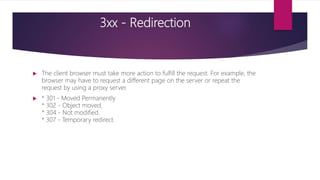
 The client browser must take more action to fulfill the request. For example, the
browser may have to request a different page on the server or repeat the
request by using a proxy server.
 * 301 - Moved Permanently
* 302 - Object moved.
* 304 - Not modified.
* 307 - Temporary redirect.
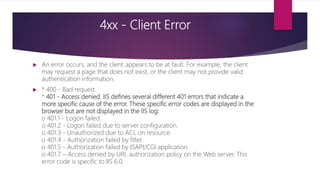
4xx - Client Error
 An error occurs, and the client appears to be at fault. For example, the client
may request a page that does not exist, or the client may not provide valid
authentication information.
 * 400 - Bad request.
* 401 - Access denied. IIS defines several different 401 errors that indicate a
more specific cause of the error. These specific error codes are displayed in the
browser but are not displayed in the IIS log:
o 401.1 - Logon failed.
o 401.2 - Logon failed due to server configuration.
o 401.3 - Unauthorized due to ACL on resource.
o 401.4 - Authorization failed by filter.
o 401.5 - Authorization failed by ISAPI/CGI application.
o 401.7 – Access denied by URL authorization policy on the Web server. This
error code is specific to IIS 6.0.
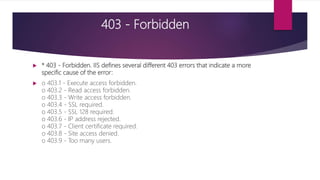
403 - Forbidden
 * 403 - Forbidden. IIS defines several different 403 errors that indicate a more
specific cause of the error:
 o 403.1 - Execute access forbidden.
o 403.2 - Read access forbidden.
o 403.3 - Write access forbidden.
o 403.4 - SSL required.
o 403.5 - SSL 128 required.
o 403.6 - IP address rejected.
o 403.7 - Client certificate required.
o 403.8 - Site access denied.
o 403.9 - Too many users.
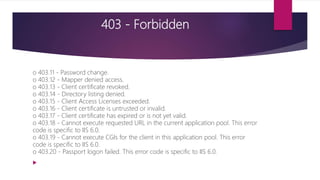
403 - Forbidden
o 403.11 - Password change.
o 403.12 - Mapper denied access.
o 403.13 - Client certificate revoked.
o 403.14 - Directory listing denied.
o 403.15 - Client Access Licenses exceeded.
o 403.16 - Client certificate is untrusted or invalid.
o 403.17 - Client certificate has expired or is not yet valid.
o 403.18 - Cannot execute requested URL in the current application pool. This error
code is specific to IIS 6.0.
o 403.19 - Cannot execute CGIs for the client in this application pool. This error
code is specific to IIS 6.0.
o 403.20 - Passport logon failed. This error code is specific to IIS 6.0.

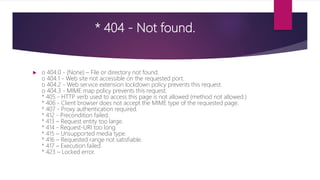
* 404 - Not found.
 o 404.0 - (None) – File or directory not found.
o 404.1 - Web site not accessible on the requested port.
o 404.2 - Web service extension lockdown policy prevents this request.
o 404.3 - MIME map policy prevents this request.
* 405 - HTTP verb used to access this page is not allowed (method not allowed.)
* 406 - Client browser does not accept the MIME type of the requested page.
* 407 - Proxy authentication required.
* 412 - Precondition failed.
* 413 – Request entity too large.
* 414 - Request-URI too long.
* 415 – Unsupported media type.
* 416 – Requested range not satisfiable.
* 417 – Execution failed.
* 423 – Locked error.
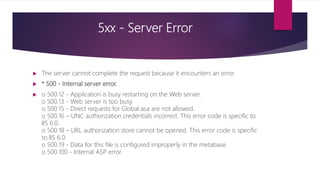
5xx - Server Error
 The server cannot complete the request because it encounters an error.
 * 500 - Internal server error.
 o 500.12 - Application is busy restarting on the Web server.
o 500.13 - Web server is too busy.
o 500.15 - Direct requests for Global.asa are not allowed.
o 500.16 – UNC authorization credentials incorrect. This error code is specific to
IIS 6.0.
o 500.18 – URL authorization store cannot be opened. This error code is specific
to IIS 6.0.
o 500.19 - Data for this file is configured improperly in the metabase.
o 500.100 - Internal ASP error.
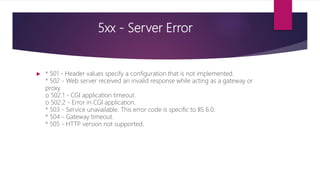
5xx - Server Error
 * 501 - Header values specify a configuration that is not implemented.
* 502 - Web server received an invalid response while acting as a gateway or
proxy.
o 502.1 - CGI application timeout.
o 502.2 - Error in CGI application.
* 503 - Service unavailable. This error code is specific to IIS 6.0.
* 504 - Gateway timeout.
* 505 - HTTP version not supported.
Thanks for watching
Download slide :
https://www.facebook.com/groups/136527203769026/

Http error codes and their meaning

  • 1.
    HTTP Error Codesand their meaning INFI KIK
  • 2.
    Concept on HTTPError code and their meaning  Following are the HTTP Error Codes. These Error codes are crucial for troubleshooting various issues with Symantec Endpoint Protection.  You can see these error codes in various logs, such as scm-server-0.log, sylink log, in a Secars test.  If you can interpret the correct meaning of the http error code, you can decide the places to look at for resolving this issue.  These status codes indicate a provisional response. The client should be prepared to receive one or more 1xx responses before receiving a regular response.  * 100 - Continue. * 101 - Switching protocols.
  • 3.
    2xx - Success This class of status codes indicates that the server successfully accepted the client request.  * 200 - OK. The client request has succeeded. * 201 - Created. * 202 - Accepted. * 203 - Non-authoritative information. * 204 - No content. * 205 - Reset content. * 206 - Partial content. * 207 - Multi-Status (WebDay).
  • 4.
    3xx - Redirection The client browser must take more action to fulfill the request. For example, the browser may have to request a different page on the server or repeat the request by using a proxy server.  * 301 - Moved Permanently * 302 - Object moved. * 304 - Not modified. * 307 - Temporary redirect.
  • 5.
    4xx - ClientError  An error occurs, and the client appears to be at fault. For example, the client may request a page that does not exist, or the client may not provide valid authentication information.  * 400 - Bad request. * 401 - Access denied. IIS defines several different 401 errors that indicate a more specific cause of the error. These specific error codes are displayed in the browser but are not displayed in the IIS log: o 401.1 - Logon failed. o 401.2 - Logon failed due to server configuration. o 401.3 - Unauthorized due to ACL on resource. o 401.4 - Authorization failed by filter. o 401.5 - Authorization failed by ISAPI/CGI application. o 401.7 – Access denied by URL authorization policy on the Web server. This error code is specific to IIS 6.0.
  • 6.
    403 - Forbidden * 403 - Forbidden. IIS defines several different 403 errors that indicate a more specific cause of the error:  o 403.1 - Execute access forbidden. o 403.2 - Read access forbidden. o 403.3 - Write access forbidden. o 403.4 - SSL required. o 403.5 - SSL 128 required. o 403.6 - IP address rejected. o 403.7 - Client certificate required. o 403.8 - Site access denied. o 403.9 - Too many users.
  • 7.
    403 - Forbidden o403.11 - Password change. o 403.12 - Mapper denied access. o 403.13 - Client certificate revoked. o 403.14 - Directory listing denied. o 403.15 - Client Access Licenses exceeded. o 403.16 - Client certificate is untrusted or invalid. o 403.17 - Client certificate has expired or is not yet valid. o 403.18 - Cannot execute requested URL in the current application pool. This error code is specific to IIS 6.0. o 403.19 - Cannot execute CGIs for the client in this application pool. This error code is specific to IIS 6.0. o 403.20 - Passport logon failed. This error code is specific to IIS 6.0. 
  • 8.
    * 404 -Not found.  o 404.0 - (None) – File or directory not found. o 404.1 - Web site not accessible on the requested port. o 404.2 - Web service extension lockdown policy prevents this request. o 404.3 - MIME map policy prevents this request. * 405 - HTTP verb used to access this page is not allowed (method not allowed.) * 406 - Client browser does not accept the MIME type of the requested page. * 407 - Proxy authentication required. * 412 - Precondition failed. * 413 – Request entity too large. * 414 - Request-URI too long. * 415 – Unsupported media type. * 416 – Requested range not satisfiable. * 417 – Execution failed. * 423 – Locked error.
  • 9.
    5xx - ServerError  The server cannot complete the request because it encounters an error.  * 500 - Internal server error.  o 500.12 - Application is busy restarting on the Web server. o 500.13 - Web server is too busy. o 500.15 - Direct requests for Global.asa are not allowed. o 500.16 – UNC authorization credentials incorrect. This error code is specific to IIS 6.0. o 500.18 – URL authorization store cannot be opened. This error code is specific to IIS 6.0. o 500.19 - Data for this file is configured improperly in the metabase. o 500.100 - Internal ASP error.
  • 10.
    5xx - ServerError  * 501 - Header values specify a configuration that is not implemented. * 502 - Web server received an invalid response while acting as a gateway or proxy. o 502.1 - CGI application timeout. o 502.2 - Error in CGI application. * 503 - Service unavailable. This error code is specific to IIS 6.0. * 504 - Gateway timeout. * 505 - HTTP version not supported.
  • 11.
    Thanks for watching Downloadslide : https://www.facebook.com/groups/136527203769026/