






HTML5 Gaming
Dave Isbitski
Sr. Developer Evangelist
David.Isbitski@microsoft.com
blogs.msdn.com/davedev
@TheDaveDev
The Adventure Begins…
 Game Loop
 Canvas Gaming
 Game Libraries
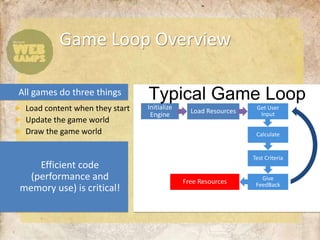
Game Loop Overview


             Initialize                       Get User
              Engine        Load Resources     Input


                                              Calculate


                                             Test Criteria


                                                Give
                          Free Resources      FeedBack


3
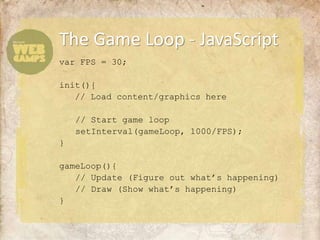
The Game Loop - JavaScript
var FPS = 30;

init(){
   // Load content/graphics here

    // Start game loop
    setInterval(gameLoop, 1000/FPS);
}

gameLoop(){
   // Update (Figure out what’s happening)
   // Draw (Show what’s happening)
}
HTML5 Game
Libraries

 Demo
EaselJS
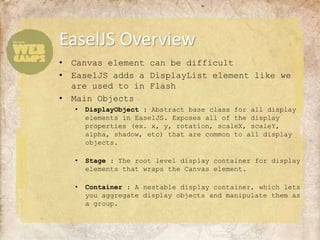
EaselJS Overview
•   Canvas element can be difficult
•   EaselJS adds a DisplayList element like we
    are used to in Flash
•   Main Objects
    •   DisplayObject : Abstract base class for all display
        elements in EaselJS. Exposes all of the display
        properties (ex. x, y, rotation, scaleX, scaleY,
        alpha, shadow, etc) that are common to all display
        objects.

    •   Stage : The root level display container for display
        elements that wraps the Canvas element.

    •   Container : A nestable display container, which lets
        you aggregate display objects and manipulate them as
        a group.
EaselJS Overview
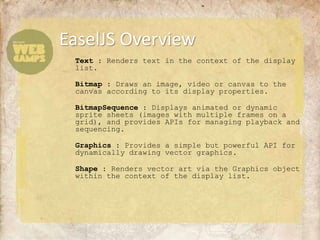
 Text : Renders text in the context of the display
 list.

 Bitmap : Draws an image, video or canvas to the
 canvas according to its display properties.

 BitmapSequence : Displays animated or dynamic
 sprite sheets (images with multiple frames on a
 grid), and provides APIs for managing playback and
 sequencing.

 Graphics : Provides a simple but powerful API for
 dynamically drawing vector graphics.

 Shape : Renders vector art via the Graphics object
 within the context of the display list.
EaselJS Overview
• EaselJS is wrapping the Canvas calls
  for us
  • Works like the Stage we are used to in Flash


• The stage is only rendered when you
  call stage.update()

• The Ticker class handles time
  management.
  • Objects subscribe to be notified.
  • Similar to ENTER_FRAME event in Flash.
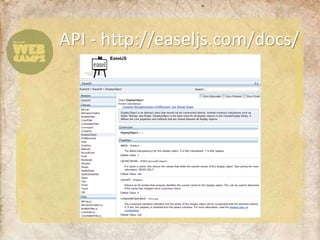
API - http://easeljs.com/docs/
EaselJS in
Action

  Demo
Stuff for Games
HTML5 Gaming Libraries
  github.com/bebraw/jswiki/wiki/Game-Engines
EaselJS
  EaselJS.com
Sample Game Apps (XNA, etc.)
  create.msdn.com/en-US/education/catalog
Tons of Frameworks
  MakeAwesomeWeb.com
Demos and More
  IETestDrive.com
HTML5 Gaming
Dave Isbitski
Sr. Developer Evangelist
David.Isbitski@microsoft.com
blogs.msdn.com/davedev
@TheDaveDev

HTML5 Gaming

  • 1.
    HTML5 Gaming Dave Isbitski Sr.Developer Evangelist David.Isbitski@microsoft.com blogs.msdn.com/davedev @TheDaveDev
  • 2.
    The Adventure Begins… Game Loop Canvas Gaming Game Libraries
  • 3.
    Game Loop Overview Initialize Get User Engine Load Resources Input Calculate Test Criteria Give Free Resources FeedBack 3
  • 4.
    The Game Loop- JavaScript var FPS = 30; init(){ // Load content/graphics here // Start game loop setInterval(gameLoop, 1000/FPS); } gameLoop(){ // Update (Figure out what’s happening) // Draw (Show what’s happening) }
  • 5.
  • 6.
  • 7.
    EaselJS Overview • Canvas element can be difficult • EaselJS adds a DisplayList element like we are used to in Flash • Main Objects • DisplayObject : Abstract base class for all display elements in EaselJS. Exposes all of the display properties (ex. x, y, rotation, scaleX, scaleY, alpha, shadow, etc) that are common to all display objects. • Stage : The root level display container for display elements that wraps the Canvas element. • Container : A nestable display container, which lets you aggregate display objects and manipulate them as a group.
  • 8.
    EaselJS Overview Text: Renders text in the context of the display list. Bitmap : Draws an image, video or canvas to the canvas according to its display properties. BitmapSequence : Displays animated or dynamic sprite sheets (images with multiple frames on a grid), and provides APIs for managing playback and sequencing. Graphics : Provides a simple but powerful API for dynamically drawing vector graphics. Shape : Renders vector art via the Graphics object within the context of the display list.
  • 9.
    EaselJS Overview • EaselJSis wrapping the Canvas calls for us • Works like the Stage we are used to in Flash • The stage is only rendered when you call stage.update() • The Ticker class handles time management. • Objects subscribe to be notified. • Similar to ENTER_FRAME event in Flash.
  • 10.
  • 11.
  • 12.
    Stuff for Games HTML5Gaming Libraries github.com/bebraw/jswiki/wiki/Game-Engines EaselJS EaselJS.com Sample Game Apps (XNA, etc.) create.msdn.com/en-US/education/catalog Tons of Frameworks MakeAwesomeWeb.com Demos and More IETestDrive.com
  • 13.
    HTML5 Gaming Dave Isbitski Sr.Developer Evangelist David.Isbitski@microsoft.com blogs.msdn.com/davedev @TheDaveDev

Editor's Notes

  • #3 Agenda
  • #5 // You can reset canvas each frame by setting width (to anything)canvas.width = canvas.width;
  • #6 Review of JavaScript Game Engines - https://github.com/bebraw/jswiki/wiki/Game-Engines
  • #7 // You can reset canvas each frame by setting width (to anything)canvas.width = canvas.width;Text : Renders text in the context of the display list.Bitmap : Draws an image, video or canvas to the canvas according to its display properties.BitmapSequence : Displays animated or dynamic sprite sheets (images with multiple frames on a grid), and provides APIs for managing playback and sequencing.Graphics : Provides a simple but powerful API for dynamically drawing vector graphics.Shape : Renders vector art via the Graphics object within the context of the display list.
  • #10 API - http://easeljs.com/docs/