Virtualization Techniques
&
Cloud Computing

Brahim EL BOUDANI
This presentation is under creative commons BY-NC-SA license
What will talk about
•

Virtualization
–
–

Why do we use it?

–

Is it really a new technology?

–
•

What is it?

Virtualization Types

Cloud Computing
–

What is it?

–

Why to use it?

–

Is it mature and dependable? Should we use
it?

–

Example: Amazon Web Services
Virtualization
•

What is Virtualization?

•

refers the act of creating a virtual (rather
than actual) version of something, including
but not limited to a virtual computer
hardware platform, operating system (OS),
storage device, or computer network
resources.

•

Is it a new technology?
–

No, IBM started it in the 70's (or even
60's).
Why Virtualization?
•

Cost Reduction.

•

Isolation and creating protected environment.

•

Testing and evaluation of OS, kernel, or an application.

•

Teaching.

•

Ease of duplication.

•

Relocation (and disaster recovery).

•

Running Application not supported by the host.

•

Green IT.

•

… etc.
Virtualization Techniques
•

Full Virtualization.

•

OS-level Virtualization.

•

Partial Virtualization (Historical, not used).

•

Paravirtualization.

•

Hardware-assisted Virtualization.
Full Virtualization
•

Concept: The host OS emulated a hardware
layer for each guest OS.

•

Pros: Stability, comptability, guest OS is not
patched.

•

Cons: resources, porfromance.
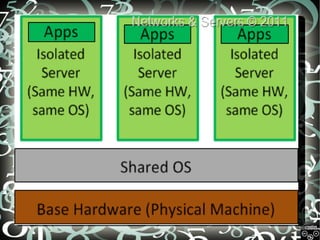
OS-Level Virtualization
•

Concept: Same OS for everyone (host &
guest), and isolation is only in the userland. If
you run `ps aux` in the host, you will see all
guests processes.

•

Pros: low overhead, highest performance.

•

Cons: isolation, stability.

•

Examples: FreeBSD Jails, Solaris
Containers, Virtuzzo/OpenVZ.
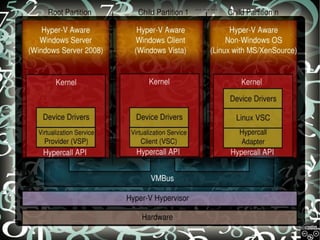
Paravirtualization
•

Concept: A thin layer (called the hypervisor, you can
think of it as a kernel more than an OS), interfaces the
hardware to all OS's (host and guest), Dom0 is called
”the privilged domain” which can issue commands to
the hypervisor.

•

If Dom0 crashed (not the hypervisor), the guest OS still
runs fine, anyway you won't be able to control the
hypervisor till you reboot.

•

The hypervisor provides API's to the DomU's kernels,
which are not actually real kernels, they only interface
these API's to the userland, not real kernels.
Paravirtualization Cont'd
•

Pros:
–
–

Performance is very good (nothing can beat OSlevel virtualizatin in this matter).

–

•

Stability is very close to the hardware virtualization.

Overhead is very low (kernel level only, and not
even a complete kernel).

Cons:
–

–

Both host and guest kernels has to be patched.

–
•

Not easy to implement (it's getting better these
days).
Maintainability.

Example: Xen project by Linux
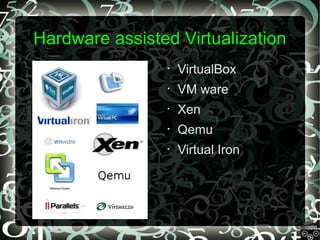
Hardware assisted Virtualization
•

VirtualBox

•

VM ware

•

Xen

•

Qemu

•

Virtual Iron
Hardware-assisted Virtualization
•

Sometimes it's called accelerated
virtualization or HVM (Hardware Virtual
Machines).

•

Concept: Hardware provides support to run
instructions independently for each OS.

•

Implementation: IBM 370 (1972), Intel VT,
AMD-V, UltraSparc, and others.

•

Examples: linux KVM, Vmware fusion, M$
VirtualPC, Xen, Virtual Box.
Hardware-assisted Cont'd
•

Pros:
–

–

Theoritically optimal performance.

–
•

Highly reduces (theoritically eleminates) the need to
patch the guest OS.
Great Stability.

Cons:
–

Hardware restrictions.

–

A “pure” hardware-assisted virtualization approach,
using entirely unmodified guest operating systems,
involves many VM traps, and thus high CPU overheads;
this limits scalability and the efficiency of server
consolidation. This performance hit can be mitigated by
the use of paravirtualized drivers; the combination has
been called “hybrid virtualization”.
Part Two : Cloud system
Cloud Computing
•

So What is Cloud Computing Anyway? Do you find
yourself saying "am I the only one that is confused
about this?"

•

Two openions about this:
Cloud is Not a technology

Cloud is a Pradigm Shift

It's just a mechanism of outsourcing
Internal infrastructure (IaaS), it just
didn't come up with new technologies.
It's a marketing hype, nothing more.

It's a total new technology shift to
utilizing new technologies in a more
usable and abstract way. It has
offered the core technologies in a
very practical way.

My Openion? Well those 2 openions are the same.. It's a marketing
hype that will drive the techies to make new technologies that didn't
exist before, like what always happens...
Cloud Computing Cont'd
•

Are all clouds are public ones like AWS?
–

Of course not, there are private clouds, check
eucalyptus (or ubuntu enterprise cloud), it's an
open source (and free software, as speech & as
beer) software.

•

It's also a business hype, everybody is talking about it.

•

The most known public clouds are Amazon and
Rackspace clouds.

•

Everything is great, it's cheaper, more performant, and
sustainable... where's the trick?
Cloud Pros
•

Very fast provisioning.

•

Easy scaling up/down.

•

Virtually unlimited resources.

•

Agility.

•

Cost, on certain situations anyway.

•

Metering, you pay as you go.
Bottom Line
•

Cloud is good when you have large scale, variable
load application, and you need to minimize the cost.

•

Cloud is also good in application that are memory
intensive but not CPU intensive, e.g RoR
applications.

•

It should be suitable soon, this technology have the
potential but it just needs to get more mature.

•

If you are a system developer, it's a very good
chance to enter this hype now, cause later it will be
very complicated (if it's not already late).
AWS Overview
•

Now let's talk about AWS stack, we chose it cause it's one of
the most complicated clouds around.

•

AWS is based on Xen Virtualization.

•

It contains the following services:
–
–

SimpleDB, Relational DB Services (RDS): Database.

–

Simple Queue Service (SQS), Simple Notifications Service
(SNS): Messaging.

–

Simple Storage Service (S3): Storage.

–

Elastic Block Storage (EBS): Storage.

–
•

Elactic Computer Cloud (EC2): computing.

Others: like CloudFront, CloudWatch, AutoScaling, … etc.

The minimal stable is EC2 + EBS
EC2
•

Computing instance, the harddisk is totally volatile if the
instance crashed (which happens, rarely but happens).

•

The smallest instance type is 1.7G RAM, 1 CPU
(1~1.2GHz), 32bit OS. The largest is 68.4 G RAM, 8 CPU
(3.25~3.9GHz), 64bit OS.

•

Very Obvious that CPU is the most costy part

•

2 identical instance with only difference in CPU (1 CPU of
1~1.2GHz Vs. 2CPUs of 2.5~3GHz), both are 1.7G RAM, 32
bit OS. The price difference is exactly double.
EBS & S3
•

They share that they are redaundant, reliable
storage. The maximum that happened before
is a blackout, but never a dataloss.

•

EBS can be mounted to a single EC2, which
is bad limitation.

•

S3 is to be accessed via http protocol, can be
a great help in serving static http files from
outside your servers.
Thank You

Elatt Presentation

  • 1.
    Virtualization Techniques & Cloud Computing BrahimEL BOUDANI This presentation is under creative commons BY-NC-SA license
  • 2.
    What will talkabout • Virtualization – – Why do we use it? – Is it really a new technology? – • What is it? Virtualization Types Cloud Computing – What is it? – Why to use it? – Is it mature and dependable? Should we use it? – Example: Amazon Web Services
  • 3.
    Virtualization • What is Virtualization? • refersthe act of creating a virtual (rather than actual) version of something, including but not limited to a virtual computer hardware platform, operating system (OS), storage device, or computer network resources. • Is it a new technology? – No, IBM started it in the 70's (or even 60's).
  • 4.
    Why Virtualization? • Cost Reduction. • Isolationand creating protected environment. • Testing and evaluation of OS, kernel, or an application. • Teaching. • Ease of duplication. • Relocation (and disaster recovery). • Running Application not supported by the host. • Green IT. • … etc.
  • 5.
    Virtualization Techniques • Full Virtualization. • OS-levelVirtualization. • Partial Virtualization (Historical, not used). • Paravirtualization. • Hardware-assisted Virtualization.
  • 6.
    Full Virtualization • Concept: Thehost OS emulated a hardware layer for each guest OS. • Pros: Stability, comptability, guest OS is not patched. • Cons: resources, porfromance.
  • 7.
    OS-Level Virtualization • Concept: SameOS for everyone (host & guest), and isolation is only in the userland. If you run `ps aux` in the host, you will see all guests processes. • Pros: low overhead, highest performance. • Cons: isolation, stability. • Examples: FreeBSD Jails, Solaris Containers, Virtuzzo/OpenVZ.
  • 9.
    Paravirtualization • Concept: A thinlayer (called the hypervisor, you can think of it as a kernel more than an OS), interfaces the hardware to all OS's (host and guest), Dom0 is called ”the privilged domain” which can issue commands to the hypervisor. • If Dom0 crashed (not the hypervisor), the guest OS still runs fine, anyway you won't be able to control the hypervisor till you reboot. • The hypervisor provides API's to the DomU's kernels, which are not actually real kernels, they only interface these API's to the userland, not real kernels.
  • 11.
    Paravirtualization Cont'd • Pros: – – Performance isvery good (nothing can beat OSlevel virtualizatin in this matter). – • Stability is very close to the hardware virtualization. Overhead is very low (kernel level only, and not even a complete kernel). Cons: – – Both host and guest kernels has to be patched. – • Not easy to implement (it's getting better these days). Maintainability. Example: Xen project by Linux
  • 12.
    Hardware assisted Virtualization • VirtualBox • VMware • Xen • Qemu • Virtual Iron
  • 13.
    Hardware-assisted Virtualization • Sometimes it'scalled accelerated virtualization or HVM (Hardware Virtual Machines). • Concept: Hardware provides support to run instructions independently for each OS. • Implementation: IBM 370 (1972), Intel VT, AMD-V, UltraSparc, and others. • Examples: linux KVM, Vmware fusion, M$ VirtualPC, Xen, Virtual Box.
  • 14.
    Hardware-assisted Cont'd • Pros: – – Theoritically optimalperformance. – • Highly reduces (theoritically eleminates) the need to patch the guest OS. Great Stability. Cons: – Hardware restrictions. – A “pure” hardware-assisted virtualization approach, using entirely unmodified guest operating systems, involves many VM traps, and thus high CPU overheads; this limits scalability and the efficiency of server consolidation. This performance hit can be mitigated by the use of paravirtualized drivers; the combination has been called “hybrid virtualization”.
  • 15.
    Part Two :Cloud system
  • 16.
    Cloud Computing • So Whatis Cloud Computing Anyway? Do you find yourself saying "am I the only one that is confused about this?" • Two openions about this: Cloud is Not a technology Cloud is a Pradigm Shift It's just a mechanism of outsourcing Internal infrastructure (IaaS), it just didn't come up with new technologies. It's a marketing hype, nothing more. It's a total new technology shift to utilizing new technologies in a more usable and abstract way. It has offered the core technologies in a very practical way. My Openion? Well those 2 openions are the same.. It's a marketing hype that will drive the techies to make new technologies that didn't exist before, like what always happens...
  • 17.
    Cloud Computing Cont'd • Areall clouds are public ones like AWS? – Of course not, there are private clouds, check eucalyptus (or ubuntu enterprise cloud), it's an open source (and free software, as speech & as beer) software. • It's also a business hype, everybody is talking about it. • The most known public clouds are Amazon and Rackspace clouds. • Everything is great, it's cheaper, more performant, and sustainable... where's the trick?
  • 18.
    Cloud Pros • Very fastprovisioning. • Easy scaling up/down. • Virtually unlimited resources. • Agility. • Cost, on certain situations anyway. • Metering, you pay as you go.
  • 19.
    Bottom Line • Cloud isgood when you have large scale, variable load application, and you need to minimize the cost. • Cloud is also good in application that are memory intensive but not CPU intensive, e.g RoR applications. • It should be suitable soon, this technology have the potential but it just needs to get more mature. • If you are a system developer, it's a very good chance to enter this hype now, cause later it will be very complicated (if it's not already late).
  • 20.
    AWS Overview • Now let'stalk about AWS stack, we chose it cause it's one of the most complicated clouds around. • AWS is based on Xen Virtualization. • It contains the following services: – – SimpleDB, Relational DB Services (RDS): Database. – Simple Queue Service (SQS), Simple Notifications Service (SNS): Messaging. – Simple Storage Service (S3): Storage. – Elastic Block Storage (EBS): Storage. – • Elactic Computer Cloud (EC2): computing. Others: like CloudFront, CloudWatch, AutoScaling, … etc. The minimal stable is EC2 + EBS
  • 21.
    EC2 • Computing instance, theharddisk is totally volatile if the instance crashed (which happens, rarely but happens). • The smallest instance type is 1.7G RAM, 1 CPU (1~1.2GHz), 32bit OS. The largest is 68.4 G RAM, 8 CPU (3.25~3.9GHz), 64bit OS. • Very Obvious that CPU is the most costy part • 2 identical instance with only difference in CPU (1 CPU of 1~1.2GHz Vs. 2CPUs of 2.5~3GHz), both are 1.7G RAM, 32 bit OS. The price difference is exactly double.
  • 22.
    EBS & S3 • Theyshare that they are redaundant, reliable storage. The maximum that happened before is a blackout, but never a dataloss. • EBS can be mounted to a single EC2, which is bad limitation. • S3 is to be accessed via http protocol, can be a great help in serving static http files from outside your servers.
  • 23.