HTML
( HyperText Markup
Language)
Nidhi Mishra
HTML (HyperText Markup
Language)
 HTML, is the standard markup language used to create web
pages.
 Markup languages are designed for the processing, definition
and presentation of text.
 The language specifies code for formatting, both the layout
and style, within a text file.
 The code used to specify the formatting are called tags.
HTML is a an example of a widely known and used markup
language.
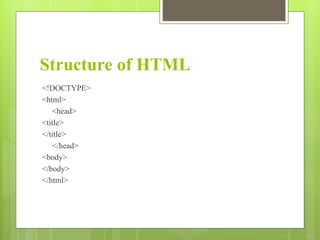
Structure of HTML
<!DOCTYPE>
<html>
<head>
<title>
</title>
</head>
<body>
</body>
</html>
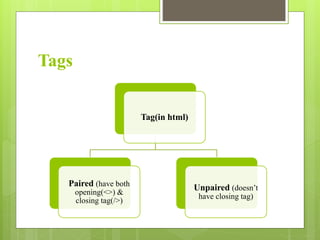
Tags
Tag(in html)
Paired (have both
opening(<>) &
closing tag(/>)
Unpaired (doesn’t
have closing tag)
TAGS IN HTML
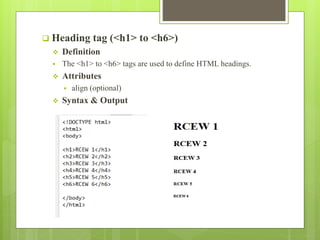
 Heading tag (<h1> to <h6>)
 Definition
 The <h1> to <h6> tags are used to define HTML headings.
 Attributes
 align (optional)
 Syntax & Output
 <b> tag
 Definition
 The <b> tag specifies bold text.
 <i> tag
 Definition
 The content of the <i> tag is usually displayed in italic.
 <u> tag
 Definition
 Used to underline the text.
 <center> tag
 Definition
 The <center> tag is used to center-align text.
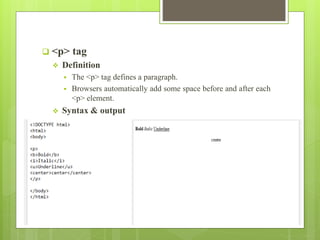
 <p> tag
 Definition
 The <p> tag defines a paragraph.
 Browsers automatically add some space before and after each
<p> element.
 Syntax & output
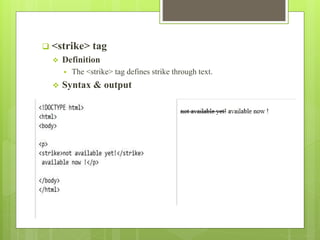
 <strike> tag
 Definition
 The <strike> tag defines strike through text.
 Syntax & output
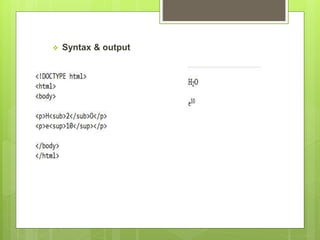
 <sub> tag
 Definition
 The <sub> tag defines subscript text. Subscript text appears
half a character below the normal line, and is sometimes
rendered in a smaller font.
 <sup> tag
 Definition
 The <sup> tag defines superscript text. Superscript text
appears half a character above the normal line, and is
sometimes rendered in a smaller font.
 Syntax & output
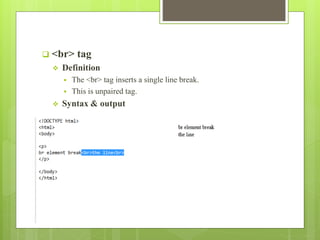
 <br> tag
 Definition
 The <br> tag inserts a single line break.
 This is unpaired tag.
 Syntax & output
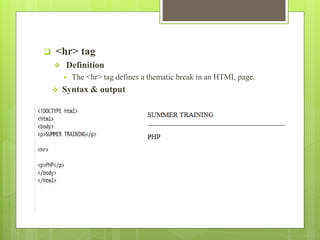
 <hr> tag
 Definition
 The <hr> tag defines a thematic break in an HTML page.
 Syntax & output
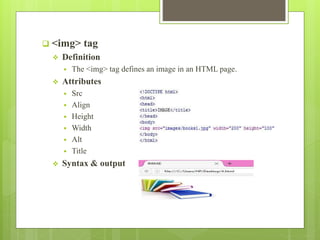
 <img> tag
 Definition
 The <img> tag defines an image in an HTML page.
 Attributes
 Src
 Align
 Height
 Width
 Alt
 Title
 Syntax & output
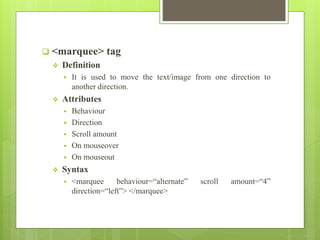
 <marquee> tag
 Definition
 It is used to move the text/image from one direction to
another direction.
 Attributes
 Behaviour
 Direction
 Scroll amount
 On mouseover
 On mouseout
 Syntax
 <marquee behaviour=“alternate” scroll amount=“4”
direction=“left”> </marquee>
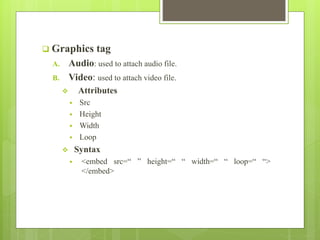
 Graphics tag
A. Audio: used to attach audio file.
B. Video: used to attach video file.
 Attributes
 Src
 Height
 Width
 Loop
 Syntax
 <embed src=“ ” height=“ “ width=“ “ loop=“ “>
</embed>
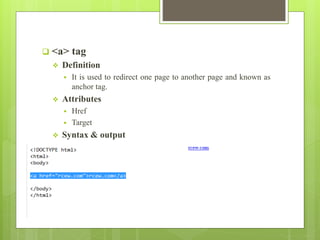
 <a> tag
 Definition
 It is used to redirect one page to another page and known as
anchor tag.
 Attributes
 Href
 Target
 Syntax & output
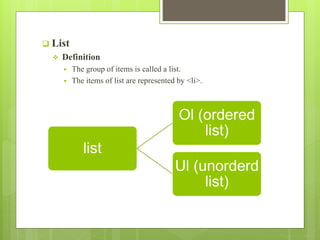
 List
 Definition
 The group of items is called a list.
 The items of list are represented by <li>.
list
Ol (ordered
list)
Ul (unorderd
list)
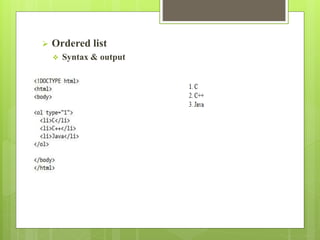
 Ordered list
 Syntax & output
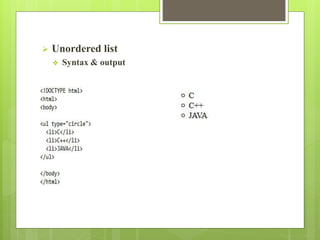
 Unordered list
 Syntax & output
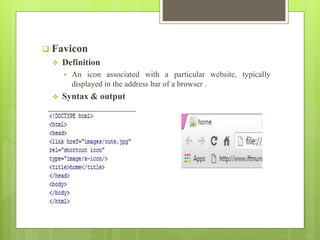
 Favicon
 Definition
 An icon associated with a particular website, typically
displayed in the address bar of a browser .
 Syntax & output
 Refresh
 Definition
 Meta refresh is a method of automatically refresh the current
web page after a given time interval.
 It uses the property of meta.
 Attributes
 http-equiv=“refresh”
 content
 Syntax
 <meta http-equiv=“refresh” content=“5”/>
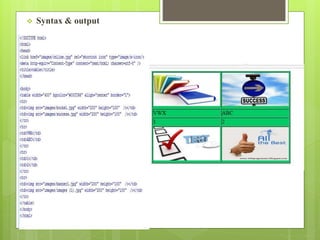
 Table
 Definition
 Table is used to store the data in the form of row and column.
 <tr> tag represent the row.
 <td> tag represent the column.
 Attributes
 Width
 Height
 Border
 Align
 Syntax & output
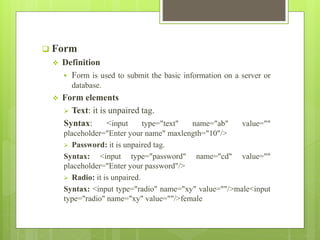
 Form
 Definition
 Form is used to submit the basic information on a server or
database.
 Form elements
 Text: it is unpaired tag.
Syntax: <input type="text" name="ab" value=""
placeholder="Enter your name" maxlength="10"/>
 Password: it is unpaired tag.
Syntax: <input type="password" name="cd" value=""
placeholder="Enter your password"/>
 Radio: it is unpaired.
Syntax: <input type="radio" name="xy" value=""/>male<input
type="radio" name="xy" value=""/>female
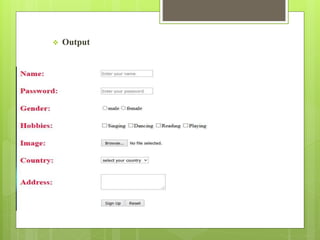
 Checkbox
Syntax: <input type="checkbox" name="qw[]"
value=""/>Singing
<input type="checkbox" name="qw[]" value=""/>Dancing
 File: used to upload the file.
syntax: <input type="file" name="qwe" value=""/>
 Textarea: it is paired tag.
syntax:<textarea name="asd">
</textarea>
 Button: it is unpaired.
Syntax:<input type="submit" name="qas" value="Sign Up"/>
 Output
CSS
 CSS stands for cascading style sheet.
 CSS is not a language, it is part of design.
 CSS is most often used to set the visual style of web pages.
 CSS is used to define styles for your web pages, including
the design, layout and variations in display for different
devices and screen sizes.
 CSS is a heart of HTML.
 .css is the extension of CSS.
CSS
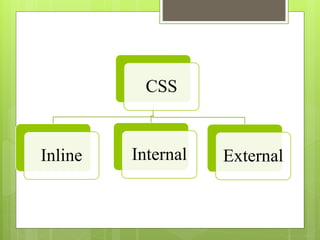
Inline Internal External
Inline CSS
 To use inline styles, add the style attribute to the relevant
element. The style attribute can contain any CSS property.
 Always used in <body> tag.
 Style is used for this purpose.
 Used inside the tag and only one style is used in one tag.
 Semicolon(;) is used in style for multiple properties.
 An inline style may be used to apply a unique style for a
single element.
Internal CSS
 Internal styles are defined within the <style> element, inside
the <head> section of an HTML page.
External CSS
 Each page must include a reference to the external style sheet
file inside the <link> element. The <link> element goes
inside the <head> section.
Properties of CSS
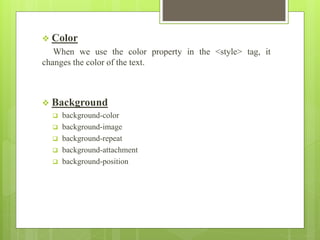
 Color
When we use the color property in the <style> tag, it
changes the color of the text.
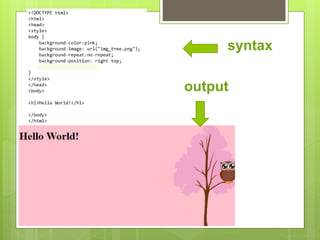
 Background
 background-color
 background-image
 background-repeat
 background-attachment
 background-position
syntax
output
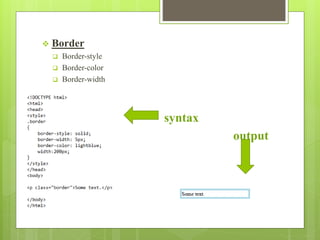
 Border
 Border-style
 Border-color
 Border-width
 syntax
 output


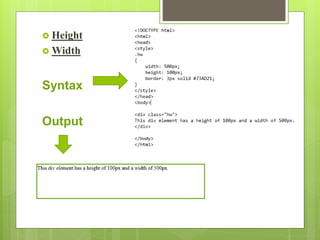
 Height
 Width
Syntax
Output
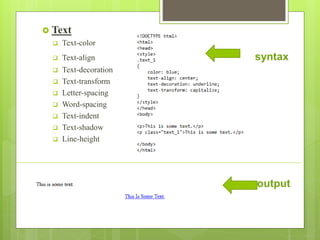
 Text
 Text-color
 Text-align syntax
 Text-decoration
 Text-transform
 Letter-spacing
 Word-spacing
 Text-indent
 Text-shadow
 Line-height
output
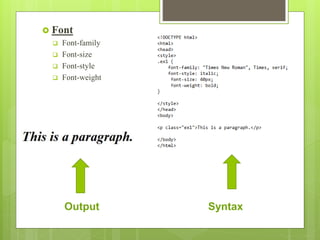
 Font
 Font-family
 Font-size
 Font-style
 Font-weight
Output Syntax
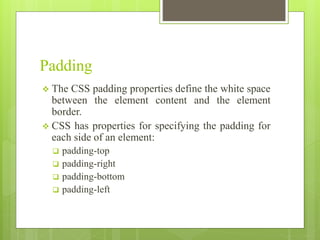
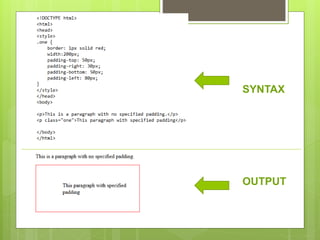
Padding
 The CSS padding properties define the white space
between the element content and the element
border.
 CSS has properties for specifying the padding for
each side of an element:
 padding-top
 padding-right
 padding-bottom
 padding-left
SYNTAX
OUTPUT
Margin
 The CSS margin properties set the size of the
white space OUTSIDE the border.
 CSS has properties for specifying the margin for
each side of an element:
 margin-top
 margin-right
 margin-bottom
 margin-left



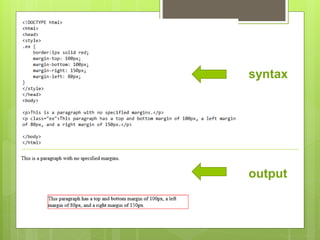
syntax
output
THANK YOU

Html

  • 1.
  • 2.
    HTML (HyperText Markup Language) HTML, is the standard markup language used to create web pages.  Markup languages are designed for the processing, definition and presentation of text.  The language specifies code for formatting, both the layout and style, within a text file.  The code used to specify the formatting are called tags. HTML is a an example of a widely known and used markup language.
  • 3.
  • 4.
    Tags Tag(in html) Paired (haveboth opening(<>) & closing tag(/>) Unpaired (doesn’t have closing tag)
  • 5.
  • 6.
     Heading tag(<h1> to <h6>)  Definition  The <h1> to <h6> tags are used to define HTML headings.  Attributes  align (optional)  Syntax & Output
  • 7.
     <b> tag Definition  The <b> tag specifies bold text.  <i> tag  Definition  The content of the <i> tag is usually displayed in italic.  <u> tag  Definition  Used to underline the text.  <center> tag  Definition  The <center> tag is used to center-align text.
  • 8.
     <p> tag Definition  The <p> tag defines a paragraph.  Browsers automatically add some space before and after each <p> element.  Syntax & output
  • 9.
     <strike> tag Definition  The <strike> tag defines strike through text.  Syntax & output
  • 10.
     <sub> tag Definition  The <sub> tag defines subscript text. Subscript text appears half a character below the normal line, and is sometimes rendered in a smaller font.  <sup> tag  Definition  The <sup> tag defines superscript text. Superscript text appears half a character above the normal line, and is sometimes rendered in a smaller font.
  • 11.
  • 12.
     <br> tag Definition  The <br> tag inserts a single line break.  This is unpaired tag.  Syntax & output
  • 13.
     <hr> tag Definition  The <hr> tag defines a thematic break in an HTML page.  Syntax & output
  • 14.
     <img> tag Definition  The <img> tag defines an image in an HTML page.  Attributes  Src  Align  Height  Width  Alt  Title  Syntax & output
  • 15.
     <marquee> tag Definition  It is used to move the text/image from one direction to another direction.  Attributes  Behaviour  Direction  Scroll amount  On mouseover  On mouseout  Syntax  <marquee behaviour=“alternate” scroll amount=“4” direction=“left”> </marquee>
  • 16.
     Graphics tag A.Audio: used to attach audio file. B. Video: used to attach video file.  Attributes  Src  Height  Width  Loop  Syntax  <embed src=“ ” height=“ “ width=“ “ loop=“ “> </embed>
  • 17.
     <a> tag Definition  It is used to redirect one page to another page and known as anchor tag.  Attributes  Href  Target  Syntax & output
  • 18.
     List  Definition The group of items is called a list.  The items of list are represented by <li>. list Ol (ordered list) Ul (unorderd list)
  • 19.
     Ordered list Syntax & output
  • 20.
     Unordered list Syntax & output
  • 21.
     Favicon  Definition An icon associated with a particular website, typically displayed in the address bar of a browser .  Syntax & output
  • 22.
     Refresh  Definition Meta refresh is a method of automatically refresh the current web page after a given time interval.  It uses the property of meta.  Attributes  http-equiv=“refresh”  content  Syntax  <meta http-equiv=“refresh” content=“5”/>
  • 23.
     Table  Definition Table is used to store the data in the form of row and column.  <tr> tag represent the row.  <td> tag represent the column.  Attributes  Width  Height  Border  Align
  • 24.
  • 25.
     Form  Definition Form is used to submit the basic information on a server or database.  Form elements  Text: it is unpaired tag. Syntax: <input type="text" name="ab" value="" placeholder="Enter your name" maxlength="10"/>  Password: it is unpaired tag. Syntax: <input type="password" name="cd" value="" placeholder="Enter your password"/>  Radio: it is unpaired. Syntax: <input type="radio" name="xy" value=""/>male<input type="radio" name="xy" value=""/>female
  • 26.
     Checkbox Syntax: <inputtype="checkbox" name="qw[]" value=""/>Singing <input type="checkbox" name="qw[]" value=""/>Dancing  File: used to upload the file. syntax: <input type="file" name="qwe" value=""/>  Textarea: it is paired tag. syntax:<textarea name="asd"> </textarea>  Button: it is unpaired. Syntax:<input type="submit" name="qas" value="Sign Up"/>
  • 27.
  • 28.
    CSS  CSS standsfor cascading style sheet.  CSS is not a language, it is part of design.  CSS is most often used to set the visual style of web pages.  CSS is used to define styles for your web pages, including the design, layout and variations in display for different devices and screen sizes.  CSS is a heart of HTML.  .css is the extension of CSS.
  • 29.
  • 30.
    Inline CSS  Touse inline styles, add the style attribute to the relevant element. The style attribute can contain any CSS property.  Always used in <body> tag.  Style is used for this purpose.  Used inside the tag and only one style is used in one tag.  Semicolon(;) is used in style for multiple properties.  An inline style may be used to apply a unique style for a single element.
  • 31.
    Internal CSS  Internalstyles are defined within the <style> element, inside the <head> section of an HTML page.
  • 32.
    External CSS  Eachpage must include a reference to the external style sheet file inside the <link> element. The <link> element goes inside the <head> section.
  • 33.
  • 34.
     Color When weuse the color property in the <style> tag, it changes the color of the text.  Background  background-color  background-image  background-repeat  background-attachment  background-position
  • 35.
  • 36.
     Border  Border-style Border-color  Border-width  syntax  output  
  • 37.
  • 38.
     Text  Text-color Text-align syntax  Text-decoration  Text-transform  Letter-spacing  Word-spacing  Text-indent  Text-shadow  Line-height output
  • 39.
     Font  Font-family Font-size  Font-style  Font-weight Output Syntax
  • 40.
    Padding  The CSSpadding properties define the white space between the element content and the element border.  CSS has properties for specifying the padding for each side of an element:  padding-top  padding-right  padding-bottom  padding-left
  • 41.
  • 42.
    Margin  The CSSmargin properties set the size of the white space OUTSIDE the border.  CSS has properties for specifying the margin for each side of an element:  margin-top  margin-right  margin-bottom  margin-left
  • 43.
  • 44.