HP Helion OpenStack

Community Edition
Deployment overview - Virtual mode
Márton Kiss

HP Helion MVP

marton.kiss@gmail.com
What is HP Helion OpenStack CE?
An OpenStack based private cloud distribution, packaged
by HP Engineers, based entirely on open-source
components.
What HP Helion OpenStack CE provides?
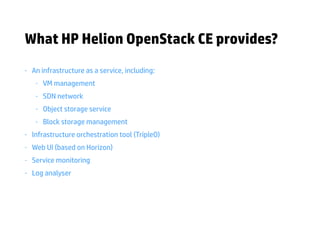
- An infrastructure as a service, including:

- VM management

- SDN network

- Object storage service

- Block storage management

- Infrastructure orchestration tool (TripleO)

- Web UI (based on Horizon)

- Service monitoring

- Log analyser
Deployment modes
Virtual deployment

• deployed on a single box

• qemu inside kvm guest

• demo only
Baremetal deployment

• deployed on multiple physical nodes

• kvm on native hosts

• perfect for pilot projects
Prerequisites
Hardware / Operating System

• single node with 64GB RAM

• Ubuntu 14.04 OS on a baremetal

Reference deployment

• i7-3930K CPU @ 3.20GHz (12core) CPU

• 64GB memory

• 2x3TB HDD (raid 1)
Architecture
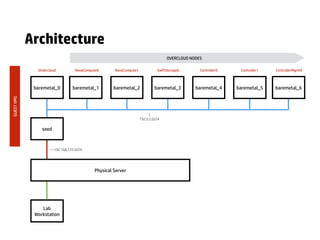
seed
baremetal_0 baremetal_1 baremetal_2 baremetal_3 baremetal_4 baremetal_5 baremetal_6
Lab

Workstation
Physical Server
—192.168.122.0/24
|
192.0.2.0/24
Undercloud NovaCompute0 NovaCompute1 SwiftStorage0 Controller0 Controller1 ControllerMgmt0
OVERCLOUD NODES
GUESTVMS
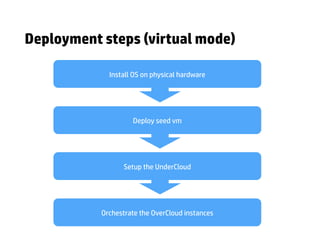
Install OS on physical hardware
Deploy seed vm
Setup the UnderCloud
Orchestrate the OverCloud instances
Deployment steps (virtual mode)
SEED VM UNDERCLOUD OVERCLOUD
5m 15m 45m
Deployment time
* Deployment time strongly depends on disk I/O performance (SSD suggested for testing)
Provision settings
VM Memory allocation NODE_MEM 8192
Controller nodes OVERCLOUD_CONTROLSCALE 1
Compute nodes OVERCLOUD_COMPUTESCALE 2
Swift nodes OVERCLOUD_SWIFTSTORAGESCALE 1
OVERCLOUD_SWIFT_REPLICA_COUNT 1
Environment Variable Value
Service endpoints
root@hLinux:~# bash ./hphelioncedemo/scripts/endpoints.sh

## UNDERCLOUD ##
undercloud.ip: 192.0.2.2
undercloud_dashboard.url: http://192.0.2.2
undercloud_dashboard.user: admin
undercloud_dashboard.password: 12d24XXXXXXXXXXXXXXXXXXXXXXXX
undercloud_kibana.url: http://192.0.2.2:81
undercloud_kibana.user: kibana
undercloud_kibana.password: 42e19XXXXXXXXXXXXXXXXXXXXXXXX
undercloud_icinga.url: http://192.0.2.2/icinga
undercloud_icinga.user: icingaadmin
undercloud_icinga.password: icingaadmin
## OVERCLOUD ##
overcloud.ip: 192.0.2.21
overcloud_dashboard.url: http://192.0.2.21
overcloud_dashboard.user: admin
overcloud_dashboard.password: e95d24XXXXXXXXXXXXXXXXXXXXXXXX
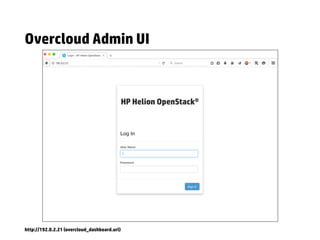
Overcloud Admin UI
http://192.0.2.21 (overcloud_dashboard.url)
Undercloud Admin UI
http://192.0.2.2 (undercloud_dashboard.url)
Monitoring dashboard
http://192.0.2.2/icinga (undercloud_icinga.url)
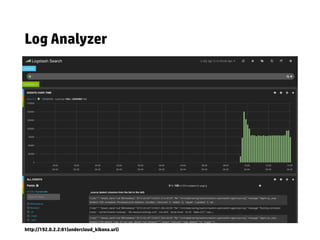
Log Analyzer
http://192.0.2.2:81(undercloud_kibana.url)
DEMO!
Deployment reference
Deployment guide and helper scripts available at:

http://github.com/mkissam/hphelioncedemo
Useful links
[1] HP Helion OpenStack 1.0 Community Virtual Installation and Configuration

http://docs.hpcloud.com/helion/community/install-virtual/

[2] HP Helion Youtube Channel

https://www.youtube.com/channel/UC4pSHVlbvJRBu0AnqOKbIog


[3] Configure NTP server

http://docs.hpcloud.com/helion/openstack/install/ntp/

HP Helion OpenStack Community Edition Deployment

  • 1.
    HP Helion OpenStack CommunityEdition Deployment overview - Virtual mode Márton Kiss HP Helion MVP marton.kiss@gmail.com
  • 2.
    What is HPHelion OpenStack CE? An OpenStack based private cloud distribution, packaged by HP Engineers, based entirely on open-source components.
  • 3.
    What HP HelionOpenStack CE provides? - An infrastructure as a service, including: - VM management - SDN network - Object storage service - Block storage management - Infrastructure orchestration tool (TripleO) - Web UI (based on Horizon) - Service monitoring - Log analyser
  • 4.
    Deployment modes Virtual deployment •deployed on a single box • qemu inside kvm guest • demo only Baremetal deployment • deployed on multiple physical nodes • kvm on native hosts • perfect for pilot projects
  • 5.
    Prerequisites Hardware / OperatingSystem • single node with 64GB RAM • Ubuntu 14.04 OS on a baremetal Reference deployment • i7-3930K CPU @ 3.20GHz (12core) CPU • 64GB memory • 2x3TB HDD (raid 1)
  • 6.
    Architecture seed baremetal_0 baremetal_1 baremetal_2baremetal_3 baremetal_4 baremetal_5 baremetal_6 Lab Workstation Physical Server —192.168.122.0/24 | 192.0.2.0/24 Undercloud NovaCompute0 NovaCompute1 SwiftStorage0 Controller0 Controller1 ControllerMgmt0 OVERCLOUD NODES GUESTVMS
  • 7.
    Install OS onphysical hardware Deploy seed vm Setup the UnderCloud Orchestrate the OverCloud instances Deployment steps (virtual mode)
  • 8.
    SEED VM UNDERCLOUDOVERCLOUD 5m 15m 45m Deployment time * Deployment time strongly depends on disk I/O performance (SSD suggested for testing)
  • 9.
    Provision settings VM Memoryallocation NODE_MEM 8192 Controller nodes OVERCLOUD_CONTROLSCALE 1 Compute nodes OVERCLOUD_COMPUTESCALE 2 Swift nodes OVERCLOUD_SWIFTSTORAGESCALE 1 OVERCLOUD_SWIFT_REPLICA_COUNT 1 Environment Variable Value
  • 10.
    Service endpoints root@hLinux:~# bash./hphelioncedemo/scripts/endpoints.sh ## UNDERCLOUD ## undercloud.ip: 192.0.2.2 undercloud_dashboard.url: http://192.0.2.2 undercloud_dashboard.user: admin undercloud_dashboard.password: 12d24XXXXXXXXXXXXXXXXXXXXXXXX undercloud_kibana.url: http://192.0.2.2:81 undercloud_kibana.user: kibana undercloud_kibana.password: 42e19XXXXXXXXXXXXXXXXXXXXXXXX undercloud_icinga.url: http://192.0.2.2/icinga undercloud_icinga.user: icingaadmin undercloud_icinga.password: icingaadmin ## OVERCLOUD ## overcloud.ip: 192.0.2.21 overcloud_dashboard.url: http://192.0.2.21 overcloud_dashboard.user: admin overcloud_dashboard.password: e95d24XXXXXXXXXXXXXXXXXXXXXXXX
  • 11.
    Overcloud Admin UI http://192.0.2.21(overcloud_dashboard.url)
  • 12.
    Undercloud Admin UI http://192.0.2.2(undercloud_dashboard.url)
  • 13.
  • 14.
  • 15.
  • 16.
    Deployment reference Deployment guideand helper scripts available at: http://github.com/mkissam/hphelioncedemo
  • 17.
    Useful links [1] HPHelion OpenStack 1.0 Community Virtual Installation and Configuration
 http://docs.hpcloud.com/helion/community/install-virtual/ [2] HP Helion Youtube Channel
 https://www.youtube.com/channel/UC4pSHVlbvJRBu0AnqOKbIog
 
 [3] Configure NTP server
 http://docs.hpcloud.com/helion/openstack/install/ntp/