How to add
Whatsapp to your
website
Why should I add Whatsapp to my website?
1. Many clients do not use email anymore. With Whatsapp we make sure you contact your
clients.
2. You can solve any doubts your clients may have quicker with Whatsapp. Before spending
time with a client, ask him some questions in case he is not qualified for your specialty
3. Closing meetings with Whatsapp is way easier since they always have it with them
4. It’s much easier and safe sending pictures or documents.
5. And think about it, more than 50% of the views you get are with a phone. Therefore, the
best way to interact with clients when they´re visiting your site is with whatsapp.
Conclusion: Whatsapp will help you attract new clients and give better support to your already
existing ones.
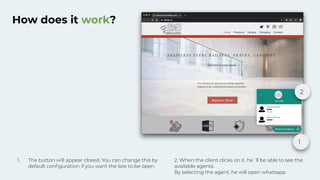
How does it work?
1
2
1. The button will appear closed. You can change this by
default configuration if you want the box to be open.
2. When the client clicks on it, he´ll be able to see the
available agents.
By selecting the agent, he will open whatsapp
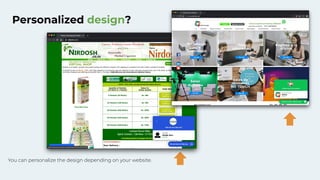
Personalized design?
You can personalize the design depending on your website.
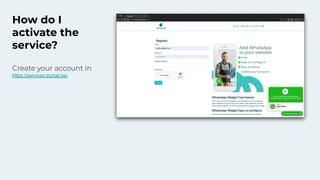
How do I
activate the
service?
Create your account in
https://services.tochat.be/
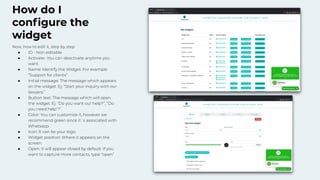
How do I
configure the
widget
Now, how to edit it, step by step
● ID - Non editable
● Activate- You can deactivate anytime you
want.
● Name: Identify the Widget. For example
“Support for clients”
● Initial message: The message which appears
on the widget. Ej: “Start your inquiry with our
lawyers.”
● Button text: The message which will open
the widget. Ej. “Do you want our help?”, “Do
you need help’?”.
● Color: You can customize it, however we
recommend green since it´s associated with
Whatsapp.
● Icon: It can be your logo.
● Widget position: Where it appears on the
screen.
● Open: it will appear closed by default. If you
want to capture more contacts, type “open”
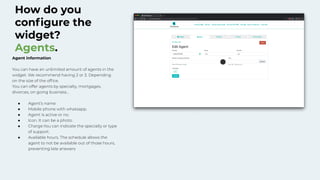
How do you
configure the
widget?
Agents.
Agent information
You can have an unlimited amount of agents in the
widget. We recommend having 2 or 3. Depending
on the size of the office.
You can offer agents by specialty, mortgages,
divorces, on going business…
● Agent’s name
● Mobile phone with whatsapp.
● Agent is active or no.
● Icon. It can be a photo.
● Charge.You can indicate the specialty or type
of support.
● Available hours. The schedule allows the
agent to not be available out of those hours,
preventing late answers
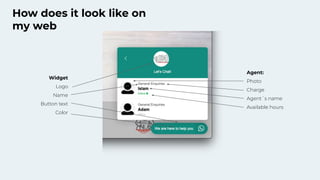
How does it look like on
my web
Agent:
Photo
Charge
Agent´s name
Available hours
Widget
Logo
Name
Button text
Color
How to handle my clients quicker with
Whatsapp?
1. The most important thing is using Whatsapp Business. This free version of
Whatsapp will help you handle your clients better
2. You can define your clients traffic which will help you manage potential clients.
3. You can add automatic answer messages in a way that your clients are always
dealt with even though you are not available.
4. You can add services in a way that your clients can accept the custom ships or
other documents from Whatsapp.
Sign to our webinar where we explain to you step by step how to get the most out
of Whatsapp.
Can I use my landline for Whatsapp
Business?
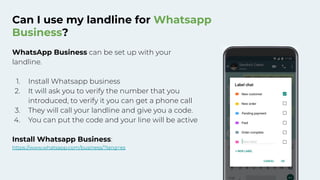
WhatsApp Business can be set up with your
landline.
1. Install Whatsapp business
2. It will ask you to verify the number that you
introduced, to verify it you can get a phone call
3. They will call your landline and give you a code.
4. You can put the code and your line will be active
Install Whatsapp Business:
https://www.whatsapp.com/business/?lang=es
How to manage WhatsApp Business
from my computer?
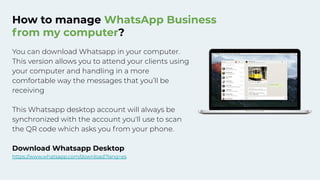
You can download Whatsapp in your computer.
This version allows you to attend your clients using
your computer and handling in a more
comfortable way the messages that you’ll be
receiving
This Whatsapp desktop account will always be
synchronized with the account you'll use to scan
the QR code which asks you from your phone.
Download Whatsapp Desktop
https://www.whatsapp.com/download?lang=es
Thank you

How to use Widget WhatsApp

  • 1.
    How to add Whatsappto your website
  • 2.
    Why should Iadd Whatsapp to my website? 1. Many clients do not use email anymore. With Whatsapp we make sure you contact your clients. 2. You can solve any doubts your clients may have quicker with Whatsapp. Before spending time with a client, ask him some questions in case he is not qualified for your specialty 3. Closing meetings with Whatsapp is way easier since they always have it with them 4. It’s much easier and safe sending pictures or documents. 5. And think about it, more than 50% of the views you get are with a phone. Therefore, the best way to interact with clients when they´re visiting your site is with whatsapp. Conclusion: Whatsapp will help you attract new clients and give better support to your already existing ones.
  • 3.
    How does itwork? 1 2 1. The button will appear closed. You can change this by default configuration if you want the box to be open. 2. When the client clicks on it, he´ll be able to see the available agents. By selecting the agent, he will open whatsapp
  • 4.
    Personalized design? You canpersonalize the design depending on your website.
  • 5.
    How do I activatethe service? Create your account in https://services.tochat.be/
  • 6.
    How do I configurethe widget Now, how to edit it, step by step ● ID - Non editable ● Activate- You can deactivate anytime you want. ● Name: Identify the Widget. For example “Support for clients” ● Initial message: The message which appears on the widget. Ej: “Start your inquiry with our lawyers.” ● Button text: The message which will open the widget. Ej. “Do you want our help?”, “Do you need help’?”. ● Color: You can customize it, however we recommend green since it´s associated with Whatsapp. ● Icon: It can be your logo. ● Widget position: Where it appears on the screen. ● Open: it will appear closed by default. If you want to capture more contacts, type “open”
  • 7.
    How do you configurethe widget? Agents. Agent information You can have an unlimited amount of agents in the widget. We recommend having 2 or 3. Depending on the size of the office. You can offer agents by specialty, mortgages, divorces, on going business… ● Agent’s name ● Mobile phone with whatsapp. ● Agent is active or no. ● Icon. It can be a photo. ● Charge.You can indicate the specialty or type of support. ● Available hours. The schedule allows the agent to not be available out of those hours, preventing late answers
  • 8.
    How does itlook like on my web Agent: Photo Charge Agent´s name Available hours Widget Logo Name Button text Color
  • 9.
    How to handlemy clients quicker with Whatsapp? 1. The most important thing is using Whatsapp Business. This free version of Whatsapp will help you handle your clients better 2. You can define your clients traffic which will help you manage potential clients. 3. You can add automatic answer messages in a way that your clients are always dealt with even though you are not available. 4. You can add services in a way that your clients can accept the custom ships or other documents from Whatsapp. Sign to our webinar where we explain to you step by step how to get the most out of Whatsapp.
  • 10.
    Can I usemy landline for Whatsapp Business? WhatsApp Business can be set up with your landline. 1. Install Whatsapp business 2. It will ask you to verify the number that you introduced, to verify it you can get a phone call 3. They will call your landline and give you a code. 4. You can put the code and your line will be active Install Whatsapp Business: https://www.whatsapp.com/business/?lang=es
  • 11.
    How to manageWhatsApp Business from my computer? You can download Whatsapp in your computer. This version allows you to attend your clients using your computer and handling in a more comfortable way the messages that you’ll be receiving This Whatsapp desktop account will always be synchronized with the account you'll use to scan the QR code which asks you from your phone. Download Whatsapp Desktop https://www.whatsapp.com/download?lang=es
  • 12.