How to use REST Component
15-12-2014
Abstract
• The main motto of this PPT is How to use REST
Component in our applications.
Introduction
• REST stands for Representational State
Transfer. REST exposes a much simpler
interface than SOAP. REST components are
bound with HTTP. So, if you are designing
an application to be used exclusively on the
Web, REST is a very good option. RESTful
applications simply rely on the built-in HTTP
security. A REST design is good for database-
driven applications and also when a client
wants quick integration.
SOAP Component POC:
Link: https://youtu.be/h-aJIjt9TcQ
How to do above POC using REST component?
Example
ArthematicOperations
a. Addition
b. Subtraction
c. Multiplication
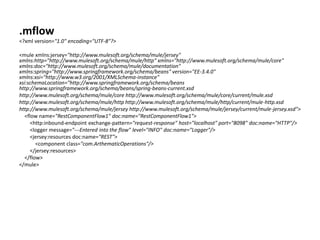
.mflow
<?xml version="1.0" encoding="UTF-8"?>
<mule xmlns:jersey="http://www.mulesoft.org/schema/mule/jersey"
xmlns:http="http://www.mulesoft.org/schema/mule/http" xmlns="http://www.mulesoft.org/schema/mule/core"
xmlns:doc="http://www.mulesoft.org/schema/mule/documentation"
xmlns:spring="http://www.springframework.org/schema/beans" version="EE-3.4.0"
xmlns:xsi="http://www.w3.org/2001/XMLSchema-instance"
xsi:schemaLocation="http://www.springframework.org/schema/beans
http://www.springframework.org/schema/beans/spring-beans-current.xsd
http://www.mulesoft.org/schema/mule/core http://www.mulesoft.org/schema/mule/core/current/mule.xsd
http://www.mulesoft.org/schema/mule/http http://www.mulesoft.org/schema/mule/http/current/mule-http.xsd
http://www.mulesoft.org/schema/mule/jersey http://www.mulesoft.org/schema/mule/jersey/current/mule-jersey.xsd">
<flow name="RestComponentFlow1" doc:name="RestComponentFlow1">
<http:inbound-endpoint exchange-pattern="request-response" host="localhost" port="8098" doc:name="HTTP"/>
<logger message="---Entered into the flow" level="INFO" doc:name="Logger"/>
<jersey:resources doc:name="REST">
<component class="com.ArthematicOperations"/>
</jersey:resources>
</flow>
</mule>
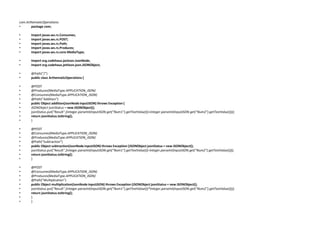
com.ArthematicOperations:
• package com;
• import javax.ws.rs.Consumes;
• import javax.ws.rs.POST;
• import javax.ws.rs.Path;
• import javax.ws.rs.Produces;
• import javax.ws.rs.core.MediaType;
• import org.codehaus.jackson.JsonNode;
• import org.codehaus.jettison.json.JSONObject;
• @Path("/")
• public class ArthematicOperations {
• @POST
• @Produces(MediaType.APPLICATION_JSON)
• @Consumes(MediaType.APPLICATION_JSON)
• @Path("Addition")
• public Object addition(JsonNode inputJSON) throws Exception {
• JSONObject jsonStatus = new JSONObject();
• jsonStatus.put("Result",(Integer.parseInt(inputJSON.get("Num1").getTextValue())+Integer.parseInt(inputJSON.get("Num2").getTextValue())));
• return jsonStatus.toString();
• }
• @POST
• @Consumes(MediaType.APPLICATION_JSON)
• @Produces(MediaType.APPLICATION_JSON)
• @Path("Subtraction")
• public Object subtraction(JsonNode inputJSON) throws Exception {JSONObject jsonStatus = new JSONObject();
• jsonStatus.put("Result",(Integer.parseInt(inputJSON.get("Num1").getTextValue())-Integer.parseInt(inputJSON.get("Num2").getTextValue())));
• return jsonStatus.toString();
• }
• @POST
• @Consumes(MediaType.APPLICATION_JSON)
• @Produces(MediaType.APPLICATION_JSON)
• @Path("Multiplication")
• public Object multiplication(JsonNode inputJSON) throws Exception {JSONObject jsonStatus = new JSONObject();
• jsonStatus.put("Result",(Integer.parseInt(inputJSON.get("Num1").getTextValue())*Integer.parseInt(inputJSON.get("Num2").getTextValue())));
• return jsonStatus.toString();
• }
• }
How to test this?
URLs
Addition: http://localhost:8098/Addition
Subtraction: http://localhost:8098/Subtraction
Multiplication:
http://localhost:8098/Multiplication
Trigger the methods:
1. Addition:
• Console:
INFO 2015-12-15 18:09:29,554 [main] org.mule.DefaultMuleContext:
**********************************************************************
* Application: RestComponent *
* OS encoding: Cp1252, Mule encoding: UTF-8 *
* *
* Agents Running: *
* Clustering Agent *
* JMX Agent *
**********************************************************************
INFO 2015-12-15 18:09:29,556 [main]
org.mule.module.launcher.MuleDeploymentService:
++++++++++++++++++++++++++++++++++++++++++++++++++++++++++++
+ Started app 'RestComponent' +
++++++++++++++++++++++++++++++++++++++++++++++++++++++++++++
INFO 2015-12-15 18:10:28,825
[[RestComponent].connector.http.mule.default.receiver.02]
org.mule.api.processor.LoggerMessageProcessor: ---Entered into the flow
References
• https://docs.mulesoft.com/mule-user-
guide/v/3.7/rest-component-reference

How to use rest component

  • 1.
    How to useREST Component 15-12-2014
  • 2.
    Abstract • The mainmotto of this PPT is How to use REST Component in our applications.
  • 3.
    Introduction • REST standsfor Representational State Transfer. REST exposes a much simpler interface than SOAP. REST components are bound with HTTP. So, if you are designing an application to be used exclusively on the Web, REST is a very good option. RESTful applications simply rely on the built-in HTTP security. A REST design is good for database- driven applications and also when a client wants quick integration.
  • 4.
    SOAP Component POC: Link:https://youtu.be/h-aJIjt9TcQ How to do above POC using REST component?
  • 5.
  • 7.
    .mflow <?xml version="1.0" encoding="UTF-8"?> <mulexmlns:jersey="http://www.mulesoft.org/schema/mule/jersey" xmlns:http="http://www.mulesoft.org/schema/mule/http" xmlns="http://www.mulesoft.org/schema/mule/core" xmlns:doc="http://www.mulesoft.org/schema/mule/documentation" xmlns:spring="http://www.springframework.org/schema/beans" version="EE-3.4.0" xmlns:xsi="http://www.w3.org/2001/XMLSchema-instance" xsi:schemaLocation="http://www.springframework.org/schema/beans http://www.springframework.org/schema/beans/spring-beans-current.xsd http://www.mulesoft.org/schema/mule/core http://www.mulesoft.org/schema/mule/core/current/mule.xsd http://www.mulesoft.org/schema/mule/http http://www.mulesoft.org/schema/mule/http/current/mule-http.xsd http://www.mulesoft.org/schema/mule/jersey http://www.mulesoft.org/schema/mule/jersey/current/mule-jersey.xsd"> <flow name="RestComponentFlow1" doc:name="RestComponentFlow1"> <http:inbound-endpoint exchange-pattern="request-response" host="localhost" port="8098" doc:name="HTTP"/> <logger message="---Entered into the flow" level="INFO" doc:name="Logger"/> <jersey:resources doc:name="REST"> <component class="com.ArthematicOperations"/> </jersey:resources> </flow> </mule>
  • 8.
    com.ArthematicOperations: • package com; •import javax.ws.rs.Consumes; • import javax.ws.rs.POST; • import javax.ws.rs.Path; • import javax.ws.rs.Produces; • import javax.ws.rs.core.MediaType; • import org.codehaus.jackson.JsonNode; • import org.codehaus.jettison.json.JSONObject; • @Path("/") • public class ArthematicOperations { • @POST • @Produces(MediaType.APPLICATION_JSON) • @Consumes(MediaType.APPLICATION_JSON) • @Path("Addition") • public Object addition(JsonNode inputJSON) throws Exception { • JSONObject jsonStatus = new JSONObject(); • jsonStatus.put("Result",(Integer.parseInt(inputJSON.get("Num1").getTextValue())+Integer.parseInt(inputJSON.get("Num2").getTextValue()))); • return jsonStatus.toString(); • } • @POST • @Consumes(MediaType.APPLICATION_JSON) • @Produces(MediaType.APPLICATION_JSON) • @Path("Subtraction") • public Object subtraction(JsonNode inputJSON) throws Exception {JSONObject jsonStatus = new JSONObject(); • jsonStatus.put("Result",(Integer.parseInt(inputJSON.get("Num1").getTextValue())-Integer.parseInt(inputJSON.get("Num2").getTextValue()))); • return jsonStatus.toString(); • } • @POST • @Consumes(MediaType.APPLICATION_JSON) • @Produces(MediaType.APPLICATION_JSON) • @Path("Multiplication") • public Object multiplication(JsonNode inputJSON) throws Exception {JSONObject jsonStatus = new JSONObject(); • jsonStatus.put("Result",(Integer.parseInt(inputJSON.get("Num1").getTextValue())*Integer.parseInt(inputJSON.get("Num2").getTextValue()))); • return jsonStatus.toString(); • } • }
  • 9.
    How to testthis? URLs Addition: http://localhost:8098/Addition Subtraction: http://localhost:8098/Subtraction Multiplication: http://localhost:8098/Multiplication
  • 10.
  • 11.
    • Console: INFO 2015-12-1518:09:29,554 [main] org.mule.DefaultMuleContext: ********************************************************************** * Application: RestComponent * * OS encoding: Cp1252, Mule encoding: UTF-8 * * * * Agents Running: * * Clustering Agent * * JMX Agent * ********************************************************************** INFO 2015-12-15 18:09:29,556 [main] org.mule.module.launcher.MuleDeploymentService: ++++++++++++++++++++++++++++++++++++++++++++++++++++++++++++ + Started app 'RestComponent' + ++++++++++++++++++++++++++++++++++++++++++++++++++++++++++++ INFO 2015-12-15 18:10:28,825 [[RestComponent].connector.http.mule.default.receiver.02] org.mule.api.processor.LoggerMessageProcessor: ---Entered into the flow
  • 12.