


Elena Laskavaia,
Research In Motion,
Eclipse Con, March 2012
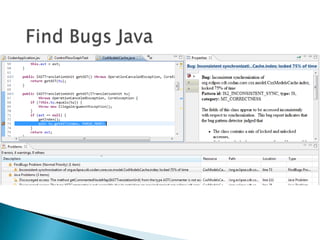
 Use  Static Analysis Tools
 Sell Static Analysis Tools
 ◦   not discussing today   
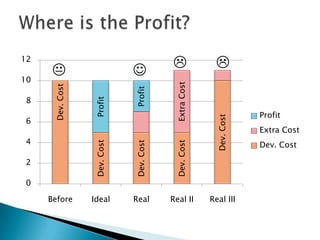
12
                                                       
10


                                           Extra Cost
      Dev. Cost


                              Profit
8                 Profit
                                                                      Profit


                                                          Dev. Cost
6
                                                                      Extra Cost
4                                                                     Dev. Cost
                  Dev. Cost


                              Dev. Cost


                                           Dev. Cost
2

0

     Before       Ideal       Real        Real II       Real III
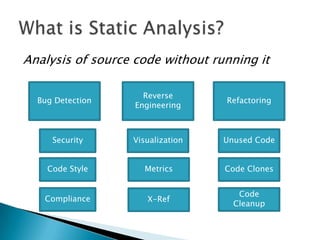
Analysis of source code without running it

                     Reverse
  Bug Detection                   Refactoring
                   Engineering


     Security     Visualization   Unused Code


    Code Style       Metrics      Code Clones


                                     Code
   Compliance         X-Ref
                                    Cleanup
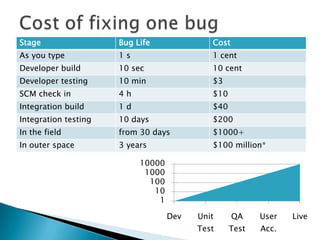
Stage                 Bug Life              Cost
As you type           1s                    1 cent
Developer build       10 sec                10 cent
Developer testing     10 min                $3
SCM check in          4h                    $10
Integration build     1d                    $40
Integration testing   10 days               $200
In the field          from 30 days          $1000+
In outer space        3 years               $100 million*

                           10000
                            1000
                             100
                              10
                               1

                                   Dev   Unit      QA    User   Live
                                         Test     Test   Acc.
   Finding of bugs for “Free”
   Detection of security vulnerabilities
   Enforcement of code style
   Assistance on software certification and audit
   Help with testing and regression testing
   Automation of code review
   Generation of software metrics trends
   Cost of Tools
   Installation and Setup
   Users Training
   Build Integration and Maintenance
   Tuning and Customization
   Problems Triage
   Use maximum of your IDE and compiler
   If you need external tools try to pick ONE
   Evaluate tool before buying
   Pay for integration
   Tune it
   Customize it
   Integrate into existing software lifecycle!
   Be customizable
   Hide false positives without code modification
   Have ability to report new errors only
   Use adaptive error reporting
   Auto-correct errors
   Explain itself well
 Incorrect integration
 Failure to tune: noise
 Obscure code
 Bug in tool
   Developers Workstation
    ◦   Integrated as you type
    ◦   In local build
    ◦   As unit tests
    ◦   As extra “tool” to run on code
   Code Review
    ◦ Bot code reviewer (gives -1 or +1 on review )
   Commit Hook
    ◦ Veto on code submission
   Integration Build
    ◦ Send auto-alerts on new bugs
    ◦ Provide trends on sw quality, maintainability, size
   Run on Demand
    ◦ Audit - FDA, DO-178B, MISRA
    ◦ Find bugs for external triage
   All bugs have to be fixed
   Free tool means no cost
   The more tools we buy, the more bugs they
    find, the better it is for us
   If we pay for the tools they will find all our
    bugs
   Tool just works out of the box
   Developers love to use a new tool
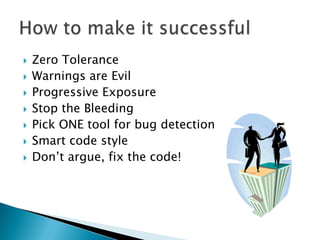
   Zero Tolerance
   Warnings are Evil
   Progressive Exposure
   Stop the Bleeding
   Pick ONE tool for bug detection
   Smart code style
   Don’t argue, fix the code!
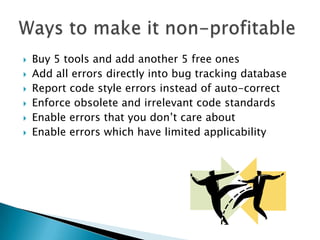
   Buy 5 tools and add another 5 free ones
   Add all errors directly into bug tracking database
   Report code style errors instead of auto-correct
   Enforce obsolete and irrelevant code standards
   Enable errors that you don’t care about
   Enable errors which have limited applicability
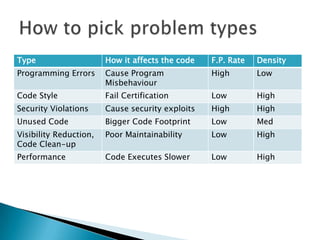
Type                    How it affects the code   F.P. Rate   Density
Programming Errors      Cause Program             High        Low
                        Misbehaviour
Code Style              Fail Certification        Low         High
Security Violations     Cause security exploits   High        High
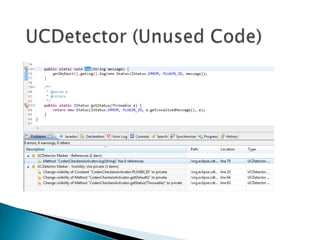
Unused Code             Bigger Code Footprint     Low         Med
Visibility Reduction,   Poor Maintainability      Low         High
Code Clean-up
Performance             Code Executes Slower      Low         High
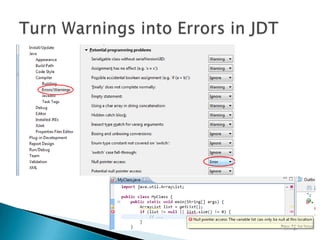
   Set to Error!
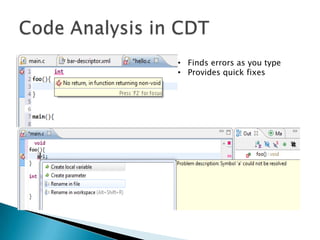
• Finds errors as you type
• Provides quick fixes
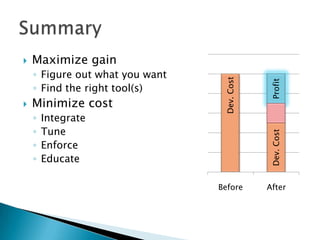
   Maximize gain
    ◦ Figure out what you want


                                  Dev. Cost


                                              Profit
    ◦ Find the right tool(s)
   Minimize cost
    ◦   Integrate
    ◦   Tune


                                              Dev. Cost
    ◦   Enforce
    ◦   Educate

                                 Before       After
Elena Laskavaia,
elaskavaia@qnx.com

How to Profit from Static Analysis

  • 1.
    Elena Laskavaia, Research InMotion, Eclipse Con, March 2012
  • 2.
     Use Static Analysis Tools  Sell Static Analysis Tools ◦ not discussing today 
  • 3.
    12     10 Extra Cost Dev. Cost Profit 8 Profit Profit Dev. Cost 6 Extra Cost 4 Dev. Cost Dev. Cost Dev. Cost Dev. Cost 2 0 Before Ideal Real Real II Real III
  • 4.
    Analysis of sourcecode without running it Reverse Bug Detection Refactoring Engineering Security Visualization Unused Code Code Style Metrics Code Clones Code Compliance X-Ref Cleanup
  • 5.
    Stage Bug Life Cost As you type 1s 1 cent Developer build 10 sec 10 cent Developer testing 10 min $3 SCM check in 4h $10 Integration build 1d $40 Integration testing 10 days $200 In the field from 30 days $1000+ In outer space 3 years $100 million* 10000 1000 100 10 1 Dev Unit QA User Live Test Test Acc.
  • 6.
    Finding of bugs for “Free”  Detection of security vulnerabilities  Enforcement of code style  Assistance on software certification and audit  Help with testing and regression testing  Automation of code review  Generation of software metrics trends
  • 7.
    Cost of Tools  Installation and Setup  Users Training  Build Integration and Maintenance  Tuning and Customization  Problems Triage
  • 8.
    Use maximum of your IDE and compiler  If you need external tools try to pick ONE  Evaluate tool before buying  Pay for integration  Tune it  Customize it
  • 9.
    Integrate into existing software lifecycle!  Be customizable  Hide false positives without code modification  Have ability to report new errors only  Use adaptive error reporting  Auto-correct errors  Explain itself well
  • 10.
     Incorrect integration Failure to tune: noise  Obscure code  Bug in tool
  • 11.
    Developers Workstation ◦ Integrated as you type ◦ In local build ◦ As unit tests ◦ As extra “tool” to run on code
  • 12.
    Code Review ◦ Bot code reviewer (gives -1 or +1 on review )  Commit Hook ◦ Veto on code submission  Integration Build ◦ Send auto-alerts on new bugs ◦ Provide trends on sw quality, maintainability, size  Run on Demand ◦ Audit - FDA, DO-178B, MISRA ◦ Find bugs for external triage
  • 13.
    All bugs have to be fixed  Free tool means no cost  The more tools we buy, the more bugs they find, the better it is for us  If we pay for the tools they will find all our bugs  Tool just works out of the box  Developers love to use a new tool
  • 14.
    Zero Tolerance  Warnings are Evil  Progressive Exposure  Stop the Bleeding  Pick ONE tool for bug detection  Smart code style  Don’t argue, fix the code!
  • 15.
    Buy 5 tools and add another 5 free ones  Add all errors directly into bug tracking database  Report code style errors instead of auto-correct  Enforce obsolete and irrelevant code standards  Enable errors that you don’t care about  Enable errors which have limited applicability
  • 16.
    Type How it affects the code F.P. Rate Density Programming Errors Cause Program High Low Misbehaviour Code Style Fail Certification Low High Security Violations Cause security exploits High High Unused Code Bigger Code Footprint Low Med Visibility Reduction, Poor Maintainability Low High Code Clean-up Performance Code Executes Slower Low High
  • 18.
    Set to Error!
  • 20.
    • Finds errorsas you type • Provides quick fixes
  • 25.
    Maximize gain ◦ Figure out what you want Dev. Cost Profit ◦ Find the right tool(s)  Minimize cost ◦ Integrate ◦ Tune Dev. Cost ◦ Enforce ◦ Educate Before After
  • 26.

Editor's Notes

  • #6 Mars Pathfinder
  • #15 f.p. returnvoid f(); void g() { return f(); }int main() { }int f(void) { assert(false); }