



How to Optimize
Salesforce
Marketing Cloud
Connect - 5 ways?
cloud.analogy info@cloudanalogy.com +1(415)830-3899
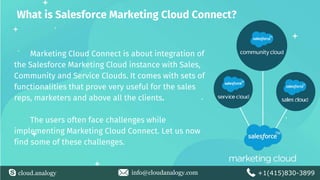
What is Salesforce Marketing Cloud Connect?
Marketing Cloud Connect is about integration of
the Salesforce Marketing Cloud instance with Sales,
Community and Service Clouds. It comes with sets of
functionalities that prove very useful for the sales
reps, marketers and above all the clients.
The users often face challenges while
implementing Marketing Cloud Connect. Let us now
find some of these challenges.
cloud.analogy info@cloudanalogy.com +1(415)830-3899
Challenges for Marketing Cloud Connect
Not Easy to send Personalized Messages
The marketers are often found to rely on IT, for a
successful completion of daily tasks. Marketing Cloud
provides with the necessary out-of-the-box functionalities
to manage these complexities, without any hindrance.
Not just Implementation of Connector
The Marketing Cloud Connector fulfills the requirements
of the present day marketers for capturing events across
all the Cloud platforms - Sales, Service or Commerce - to
deliver timely, relevant content.However, an adjustment
in the processes are required,
cloud.analogy info@cloudanalogy.com +1(415)830-3899
Benefits of the Marketing Cloud Connect
Let us now find out the benefits
● Synchronized Data between CRM and the Marketing Cloud
● Using CRM Data for highly Personalized Emails
● Connecting with Journey Builder
cloud.analogy info@cloudanalogy.com +1(415)830-3899
5 ways to Optimize Salesforce Marketing Cloud Connect
● Create New Leads and Contacts in Sales Cloud
● Use Record Id in Marketing Cloud
● Use Salesforce Data for Journeys
● Use Salesforce Reports/Campaigns for
Segmentation
● Replace API Calls with Triggers
cloud.analogy info@cloudanalogy.com +1(415)830-3899
Create New Leads and Contacts, first in Sales Cloud
It is wise to create leads and
contacts, first in Sales Cloud for all
the triggered emails, arising from
external APIs to Sales Cloud. Here
the lead or contact ID need to be
set as a subscriber key, for
successfully making calls from
external systems into Marketing
Cloud.
cloud.analogy info@cloudanalogy.com +1(415)830-3899
Use Record Id in Marketing Cloud
The user must consistently identify the contact
records across Cloud platforms. So, the SFDC record
key is taken as subscriber key for the contacts in
Marketing Cloud. The Marketing Cloud automatically
uses this Salesforce record id, for accessing the
subscribers in Email Studio.
cloud.analogy info@cloudanalogy.com +1(415)830-3899
Use Salesforce Data for Journeys
While using the Salesforce data entry source
in Journey Builder, it is simpler to manage
complex journeys. The Marketing Cloud first
creates Sales Cloud objects, to trigger off journeys
and then uses rules for further refinement of
audiences.
cloud.analogy info@cloudanalogy.com +1(415)830-3899
Use Salesforce Reports/Campaigns for Segmentation
Import Activity in the Salesforce
Data extensions, is for finding an
already created Salesforce
report/campaign inside Marketing
Cloud. It then becomes easier to create
segments, to send customized content
to people of importance.
cloud.analogy info@cloudanalogy.com +1(415)830-3899
Replace API Calls with Trigger
It is imperative to first identify the Salesforce objects, for
triggering messages or campaigns, after updates. This is
resorted to instead of relying on external API calls to
Marketing Cloud.
cloud.analogy info@cloudanalogy.com +1(415)830-3899
THANK
YOU

How to optimize salesforce marketing cloud

  • 1.
    How to Optimize Salesforce MarketingCloud Connect - 5 ways? cloud.analogy info@cloudanalogy.com +1(415)830-3899
  • 2.
    What is SalesforceMarketing Cloud Connect? Marketing Cloud Connect is about integration of the Salesforce Marketing Cloud instance with Sales, Community and Service Clouds. It comes with sets of functionalities that prove very useful for the sales reps, marketers and above all the clients. The users often face challenges while implementing Marketing Cloud Connect. Let us now find some of these challenges. cloud.analogy info@cloudanalogy.com +1(415)830-3899
  • 3.
    cloud.analogy info@cloudanalogy.com +1(415)830-3899 Challengesfor Marketing Cloud Connect Not Easy to send Personalized Messages The marketers are often found to rely on IT, for a successful completion of daily tasks. Marketing Cloud provides with the necessary out-of-the-box functionalities to manage these complexities, without any hindrance. Not just Implementation of Connector The Marketing Cloud Connector fulfills the requirements of the present day marketers for capturing events across all the Cloud platforms - Sales, Service or Commerce - to deliver timely, relevant content.However, an adjustment in the processes are required,
  • 4.
    cloud.analogy info@cloudanalogy.com +1(415)830-3899 Benefitsof the Marketing Cloud Connect Let us now find out the benefits ● Synchronized Data between CRM and the Marketing Cloud ● Using CRM Data for highly Personalized Emails ● Connecting with Journey Builder
  • 5.
    cloud.analogy info@cloudanalogy.com +1(415)830-3899 5ways to Optimize Salesforce Marketing Cloud Connect ● Create New Leads and Contacts in Sales Cloud ● Use Record Id in Marketing Cloud ● Use Salesforce Data for Journeys ● Use Salesforce Reports/Campaigns for Segmentation ● Replace API Calls with Triggers
  • 6.
    cloud.analogy info@cloudanalogy.com +1(415)830-3899 CreateNew Leads and Contacts, first in Sales Cloud It is wise to create leads and contacts, first in Sales Cloud for all the triggered emails, arising from external APIs to Sales Cloud. Here the lead or contact ID need to be set as a subscriber key, for successfully making calls from external systems into Marketing Cloud.
  • 7.
    cloud.analogy info@cloudanalogy.com +1(415)830-3899 UseRecord Id in Marketing Cloud The user must consistently identify the contact records across Cloud platforms. So, the SFDC record key is taken as subscriber key for the contacts in Marketing Cloud. The Marketing Cloud automatically uses this Salesforce record id, for accessing the subscribers in Email Studio.
  • 8.
    cloud.analogy info@cloudanalogy.com +1(415)830-3899 UseSalesforce Data for Journeys While using the Salesforce data entry source in Journey Builder, it is simpler to manage complex journeys. The Marketing Cloud first creates Sales Cloud objects, to trigger off journeys and then uses rules for further refinement of audiences.
  • 9.
    cloud.analogy info@cloudanalogy.com +1(415)830-3899 UseSalesforce Reports/Campaigns for Segmentation Import Activity in the Salesforce Data extensions, is for finding an already created Salesforce report/campaign inside Marketing Cloud. It then becomes easier to create segments, to send customized content to people of importance.
  • 10.
    cloud.analogy info@cloudanalogy.com +1(415)830-3899 ReplaceAPI Calls with Trigger It is imperative to first identify the Salesforce objects, for triggering messages or campaigns, after updates. This is resorted to instead of relying on external API calls to Marketing Cloud.
  • 11.