
It’s been a long wait
for Instagram Ads.
Since Facebook acquired
Instagram in 2012, digital
marketers were keen to see how
the platform would integrate with
Facebook’s kickass Ad suite.
Facebook recently announced
that Instagram ad placements
have been unlocked for all
interested advertisers in Power
Editor.
This means you have yet
another powerful social media
marketing tool you can use to
expand your business reach.
But just in case you are wondering how
useful Instagram is going to be for your
overall advertising plan, it’s important
to know that the platform hosts over
400 million monthly active users.
More, so there are over
80 million photos shared
and 3.5 billion likes daily.
That is immense potential for
increasing your engagement
through a visual social media
platform that’s growing
increasingly popular.
Understand
Instagram Ads
Since Facebook owns
Instagram, the new ads will align
perfectly with your existing
Facebook Ads campaigns.
At 7 Figure Automation, we like to think of
Instagram Ads as an expansion to your
existing audience network. And here’s the
best part – you won’t have to adjust your
current advertising efforts to the paint
points of a new social media network…
Facebook already
makes the integration
seamless for you.
You can use Instagram ad placements
to increase clicks to specific pages on
your website, boost your mobile app
installs, as well as get more relevant
views for your video.
Follow the 4 easy steps in
the following slides to get
started using Instagram
ads for your business.
#1 Connect Instagram to Facebook
Take the first step by
connecting your
Instagram account to
Facebook.
This is a prerequisite in
order to be able to create
your Instagram ads in
Facebook’s Power Editor.
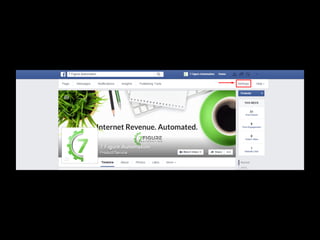
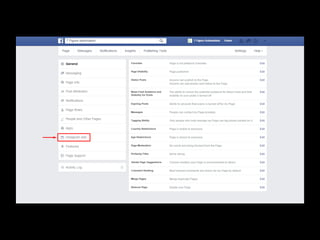
Navigate to your business’s
Facebook page and hit on
the ‘Settings’ option located
on the top-right corner.
Click ‘Instagram Ads’ from
the menu that appears in
the left column.
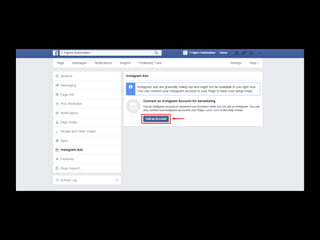
Hit the ‘Add an Account’
button in the Instagram
Ads screen that appears.
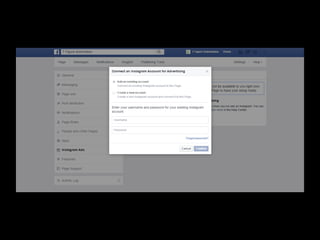
You can either use an existing Instagram
account, or create a brand new one.
Select the appropriate option from the
‘Connect an Instagram Account for
Advertising’ screen. If you chose the
‘Create a new account’ option, you can do
so within Facebook. Simply select a
username for the Instagram account and
key in your email address. Click ‘Confirm’
once done.
Login to the email address you
provided and follow the instructions
to set a password. Your new
Instagram account will now be
connected to your Facebook page…
You’ll be able to show the
same Ads you created for
Facebook on Instagram!
#2 Select Your Ad Type
Facebook provides three ad
objectives for Instagram Ads:
website clicks, mobile app
installs and video views (for
videos up to 30 seconds long).
Set up image, video or carousel
ads for Instagram. Image ads are
the most basic and they feature a
standard photo equipped with a
call to action button. Video ads use
a video instead of an image, while
Carousel ads include a number of
images that users can browse.
Choose the right option
based on the intent of
your Instagram marketing
campaign.
#3 Configure the Targeting Options
Most of the targeting options you
leverage for Facebook ads are available
for Instagram ads as well. That means
you can fine tune your audience based
on their interests, actions, behavior,
location and demographics.
Simplify configure targeting options
for your Instagram Ads the same way
you do it for Facebook Ads. You can
get started with three basic targeting
options: age, gender and location.
This is an important step so keep your
eyes open. You want to make sure that
your advertising message gets to the
right people, so that you can see high
ROI for your advertisement efforts.
Simply put, the trick is to create
compelling Ad content then
fine-tune your audience so your
ads get seen by the right group!
#4 Optimize Your Instagram Ads
a) Leverage Visuals!
!
Instagram is an increasingly popular
visual social network. To make sure that
your ads hit the bull’s eye, you want to
make good use of attention-grabbing
visuals that will make people stop to
look as they scroll down the page.
Consider capturing top-quality, real
photos for your campaign. If this will not
suffice, hire a professional
photographer or illustrator through a
freelancing platform such as Fiverr or
Upwork to get it done for you.
Use text within your visual
to lead people to the
action you want them to
take.
b) Hashtags!
!
Hashtags are a solid component for many
social media networks today, more so
Instagram.!
You can increase the reach of your
Instagram posts and Ads by mastering the
use of appropriate hashtags. These also
give you the opportunity to create a
connection between your brand and other
people who’re using similar hashtags.
Conclusion
Instagram is a mobile app. Thus, your
ads can be placed on mobile devices.
Instagram ads give you the power to
engage your audience in a whole new
way. Facebook’s seamless
integration with Instagram all the
same makes this more
accomplishable.
By leveraging the right advertising
content, targeting a specific audience
and following a solid engagement
strategy, you can drive results for your
brand and really stand out on the photo-
sharing social network!
Was This Useful?

Subscribe to our channel and click the links
below for more resources to help you take action!
WATCH!
MORE

How to Get Started With Instagram Ads

  • 2.
    It’s been along wait for Instagram Ads.
  • 3.
    Since Facebook acquired Instagramin 2012, digital marketers were keen to see how the platform would integrate with Facebook’s kickass Ad suite.
  • 4.
    Facebook recently announced thatInstagram ad placements have been unlocked for all interested advertisers in Power Editor.
  • 5.
    This means youhave yet another powerful social media marketing tool you can use to expand your business reach.
  • 6.
    But just incase you are wondering how useful Instagram is going to be for your overall advertising plan, it’s important to know that the platform hosts over 400 million monthly active users.
  • 7.
    More, so thereare over 80 million photos shared and 3.5 billion likes daily.
  • 8.
    That is immensepotential for increasing your engagement through a visual social media platform that’s growing increasingly popular.
  • 9.
  • 10.
    Since Facebook owns Instagram,the new ads will align perfectly with your existing Facebook Ads campaigns.
  • 11.
    At 7 FigureAutomation, we like to think of Instagram Ads as an expansion to your existing audience network. And here’s the best part – you won’t have to adjust your current advertising efforts to the paint points of a new social media network…
  • 12.
    Facebook already makes theintegration seamless for you.
  • 13.
    You can useInstagram ad placements to increase clicks to specific pages on your website, boost your mobile app installs, as well as get more relevant views for your video.
  • 14.
    Follow the 4easy steps in the following slides to get started using Instagram ads for your business.
  • 15.
  • 16.
    Take the firststep by connecting your Instagram account to Facebook.
  • 17.
    This is aprerequisite in order to be able to create your Instagram ads in Facebook’s Power Editor.
  • 18.
    Navigate to yourbusiness’s Facebook page and hit on the ‘Settings’ option located on the top-right corner.
  • 20.
    Click ‘Instagram Ads’from the menu that appears in the left column.
  • 22.
    Hit the ‘Addan Account’ button in the Instagram Ads screen that appears.
  • 24.
    You can eitheruse an existing Instagram account, or create a brand new one. Select the appropriate option from the ‘Connect an Instagram Account for Advertising’ screen. If you chose the ‘Create a new account’ option, you can do so within Facebook. Simply select a username for the Instagram account and key in your email address. Click ‘Confirm’ once done.
  • 26.
    Login to theemail address you provided and follow the instructions to set a password. Your new Instagram account will now be connected to your Facebook page…
  • 27.
    You’ll be ableto show the same Ads you created for Facebook on Instagram!
  • 28.
  • 29.
    Facebook provides threead objectives for Instagram Ads: website clicks, mobile app installs and video views (for videos up to 30 seconds long).
  • 30.
    Set up image,video or carousel ads for Instagram. Image ads are the most basic and they feature a standard photo equipped with a call to action button. Video ads use a video instead of an image, while Carousel ads include a number of images that users can browse.
  • 31.
    Choose the rightoption based on the intent of your Instagram marketing campaign.
  • 32.
    #3 Configure theTargeting Options
  • 33.
    Most of thetargeting options you leverage for Facebook ads are available for Instagram ads as well. That means you can fine tune your audience based on their interests, actions, behavior, location and demographics.
  • 34.
    Simplify configure targetingoptions for your Instagram Ads the same way you do it for Facebook Ads. You can get started with three basic targeting options: age, gender and location.
  • 35.
    This is animportant step so keep your eyes open. You want to make sure that your advertising message gets to the right people, so that you can see high ROI for your advertisement efforts.
  • 36.
    Simply put, thetrick is to create compelling Ad content then fine-tune your audience so your ads get seen by the right group!
  • 37.
    #4 Optimize YourInstagram Ads
  • 38.
    a) Leverage Visuals! ! Instagramis an increasingly popular visual social network. To make sure that your ads hit the bull’s eye, you want to make good use of attention-grabbing visuals that will make people stop to look as they scroll down the page.
  • 39.
    Consider capturing top-quality,real photos for your campaign. If this will not suffice, hire a professional photographer or illustrator through a freelancing platform such as Fiverr or Upwork to get it done for you.
  • 40.
    Use text withinyour visual to lead people to the action you want them to take.
  • 41.
    b) Hashtags! ! Hashtags area solid component for many social media networks today, more so Instagram.! You can increase the reach of your Instagram posts and Ads by mastering the use of appropriate hashtags. These also give you the opportunity to create a connection between your brand and other people who’re using similar hashtags.
  • 42.
  • 43.
    Instagram is amobile app. Thus, your ads can be placed on mobile devices. Instagram ads give you the power to engage your audience in a whole new way. Facebook’s seamless integration with Instagram all the same makes this more accomplishable.
  • 44.
    By leveraging theright advertising content, targeting a specific audience and following a solid engagement strategy, you can drive results for your brand and really stand out on the photo- sharing social network!
  • 45.
    Was This Useful?
 Subscribeto our channel and click the links below for more resources to help you take action! WATCH! MORE