How to create return policy for a
                                          product
                                       Category: Store Settings


Eshopbox Wiki for Store Owners
Welcome to Eshopbox Wiki

  What you will learn here


  ▪     What is a return policy


  ▪     How to create return policy for a product


A Eshopbox Wiki production. © All Rights Reserved at BoxBeat Technologies Pvt. Ltd.
1
                               What is a return policy


A Eshopbox Wiki production. © All Rights Reserved at BoxBeat Technologies Pvt. Ltd.
What is a return policy


  ▪      Return policy defines all the terms & conditions, when a buyer has to
         return a product and seller has to reimburse the product


  ▪      Return policy helps the buyer by protecting him against item not
         received, defective item received or items receives is not as described by
         the seller


  ▪      Return policy defines if any fee is applicable on return of a product or
         not


A Eshopbox Wiki production. © All Rights Reserved at BoxBeat Technologies Pvt. Ltd.
2
                 How to create return policy for
                           a product


A Eshopbox Wiki production. © All Rights Reserved at BoxBeat Technologies Pvt. Ltd.
How to create return policy for a product
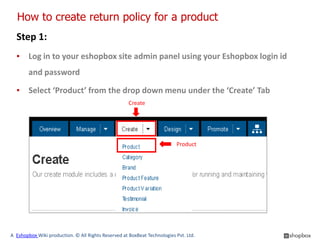
  Step 1:
  ▪ Log in to your eshopbox site admin panel using your Eshopbox login id
        and password

  ▪ Select ‘Product’ from the drop down menu under the ‘Create’ Tab
                                                     Create


                                                                          Product


A Eshopbox Wiki production. © All Rights Reserved at BoxBeat Technologies Pvt. Ltd.
How to create return policy for a product
  Step 2:
  ▪ This will direct you to ‘Create a new product’ page


  ▪ In order to create a return policy you will have to create a product, if
        have not created a product you can create it by following the
        presentation i.e. “How to create a product”


  ▪ If you have product added on your store then continue with the steps


A Eshopbox Wiki production. © All Rights Reserved at BoxBeat Technologies Pvt. Ltd.
How to create return policy for a product
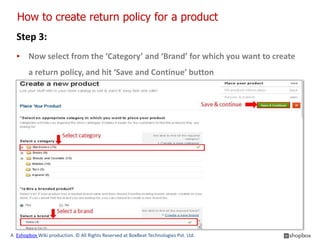
  Step 3:
  ▪ Now select from the ‘Category’ and ‘Brand’ for which you want to create
        a return policy, and hit ‘Save and Continue’ button


A Eshopbox Wiki production. © All Rights Reserved at BoxBeat Technologies Pvt. Ltd.
How to create return policy for a product
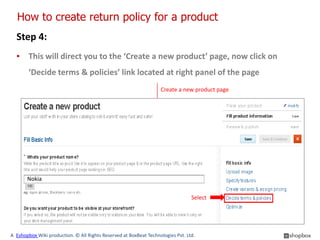
  Step 4:
  ▪ This will direct you to the ‘Create a new product’ page, now click on
        ‘Decide terms & policies’ link located at right panel of the page
                                                                   Create a new product page


       Nokia

                                                                                 Select


A Eshopbox Wiki production. © All Rights Reserved at BoxBeat Technologies Pvt. Ltd.
How to create return policy for a product
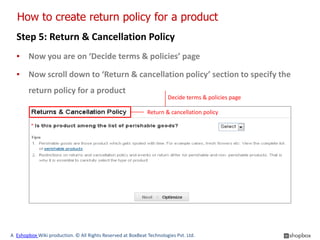
  Step 5: Return & Cancellation Policy
  ▪ Now you are on ‘Decide terms & policies’ page

  ▪ Now scroll down to ‘Return & cancellation policy’ section to specify the
        return policy for a product
                                                                      Decide terms & policies page

                                                             Return & cancellation policy


A Eshopbox Wiki production. © All Rights Reserved at BoxBeat Technologies Pvt. Ltd.
How to create return policy for a product
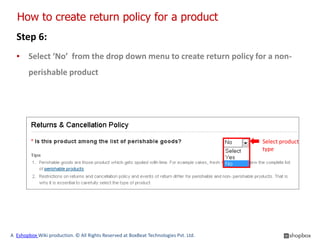
  Step 6:
  ▪ Select ‘No’ from the drop down menu to create return policy for a non-
        perishable product


                                                                                      Select product
                                                                                      type


A Eshopbox Wiki production. © All Rights Reserved at BoxBeat Technologies Pvt. Ltd.
How to create return policy for a product
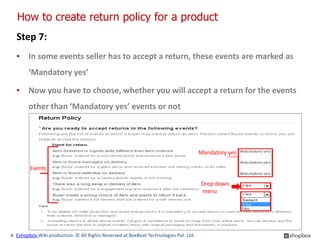
  Step 7:
  ▪ In some events seller has to accept a return, these events are marked as
        ‘Mandatory yes’

  ▪ Now you have to choose, whether you will accept a return for the events
        other than ‘Mandatory yes’ events or not


                                                                                      Mandatory yes

        Events

                                                                                      Drop down
                                                                                      menu


A Eshopbox Wiki production. © All Rights Reserved at BoxBeat Technologies Pvt. Ltd.
How to create return policy for a product
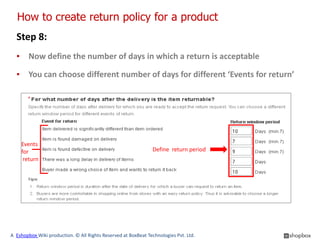
  Step 8:
  ▪ Now define the number of days in which a return is acceptable

  ▪ You can choose different number of days for different ‘Events for return’


    Events
    for                                                        Define return period
     return


A Eshopbox Wiki production. © All Rights Reserved at BoxBeat Technologies Pvt. Ltd.
How to create return policy for a product
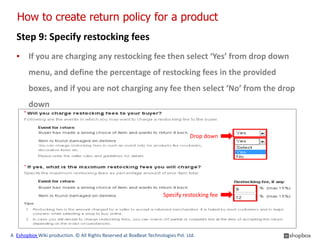
  Step 9: Specify restocking fees
  ▪ If you are charging any restocking fee then select ‘Yes’ from drop down
        menu, and define the percentage of restocking fees in the provided
        boxes, and if you are not charging any fee then select ‘No’ from the drop
        down


                                                                                Drop down


                                                                    Specify restocking fee


A Eshopbox Wiki production. © All Rights Reserved at BoxBeat Technologies Pvt. Ltd.
How to create return policy for a product
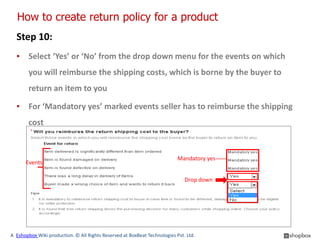
  Step 10:
  ▪ Select ‘Yes’ or ‘No’ from the drop down menu for the events on which
        you will reimburse the shipping costs, which is borne by the buyer to
        return an item to you

  ▪ For ‘Mandatory yes’ marked events seller has to reimburse the shipping
        cost


                                                                           Mandatory yes
      Events

                                                                              Drop down


A Eshopbox Wiki production. © All Rights Reserved at BoxBeat Technologies Pvt. Ltd.
How to create return policy for a product
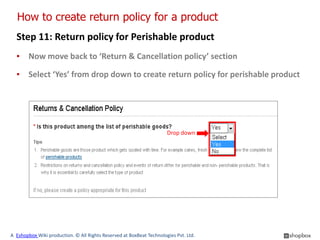
  Step 11: Return policy for Perishable product
  ▪ Now move back to ‘Return & Cancellation policy’ section

  ▪ Select ‘Yes’ from drop down to create return policy for perishable product


                                                                      Drop down


A Eshopbox Wiki production. © All Rights Reserved at BoxBeat Technologies Pvt. Ltd.
How to create return policy for a product
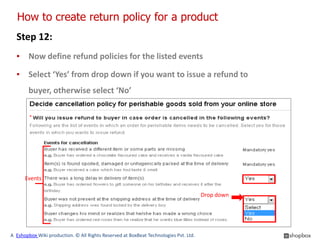
  Step 12:
  ▪ Now define refund policies for the listed events

  ▪ Select ‘Yes’ from drop down if you want to issue a refund to
        buyer, otherwise select ‘No’


      Events

                                                                                      Drop down


A Eshopbox Wiki production. © All Rights Reserved at BoxBeat Technologies Pvt. Ltd.
How to create return policy for a product
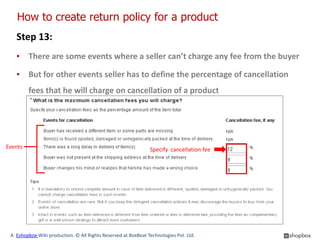
   Step 13:
   ▪ There are some events where a seller can’t charge any fee from the buyer

   ▪ But for other events seller has to define the percentage of cancellation
         fees that he will charge on cancellation of a product


Events                                                         Specify cancellation fee


 A Eshopbox Wiki production. © All Rights Reserved at BoxBeat Technologies Pvt. Ltd.
How to create return policy for a product
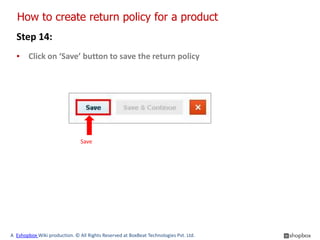
  Step 14:
  ▪ Click on ‘Save’ button to save the return policy


                               Save


A Eshopbox Wiki production. © All Rights Reserved at BoxBeat Technologies Pvt. Ltd.
How to create return policy for a product
  Step 15:
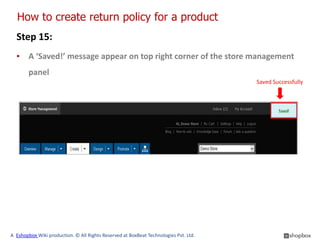
  ▪ A ‘Saved!’ message appear on top right corner of the store management
        panel
                                                                                      Saved Successfully


A Eshopbox Wiki production. © All Rights Reserved at BoxBeat Technologies Pvt. Ltd.
Good to know

  ▪ Always mention the return policy with the product you are selling on
        your store, whether you accept return for the listed product or not


  ▪ The more clear and buyer-friendly your return policy, the more secure
        your buyers will feel while shopping with you


  ▪ A good return policy protects you from irrelevant disputes. In cases
        where a buyer raises a dispute in an event which is not described in
        your return policy the seller remain safe


A Eshopbox Wiki production. © All Rights Reserved at BoxBeat Technologies Pvt. Ltd.
For More Support

                   Wiki : A collection of illustrative presentations which will guide you in a
                   step by step manner to answer your store related queries.

                   Knowledgebase : A repository of detailed articles that provide you with in
        depth information about running your store and understanding the process
              involved.

                   Forum : An open community for Store owners to share and discuss
                   everything about Eshopbox. Get real and practical solutions to most of
                   your problems.


                   Blog : A rich source of Tips, Articles and Announcements that keep you
                  updated about the latest happening and techniques to enhance your art of
                  selling online.


                   Ask a question : Find simple answers to complex questions through our
                   experts. For any further assistance, mail us at support@eshopbox.com

A Eshopbox Wiki production. © All Rights Reserved at BoxBeat Technologies Pvt. Ltd.

How to create return policy for a product

  • 1.
    How to createreturn policy for a product Category: Store Settings Eshopbox Wiki for Store Owners
  • 2.
    Welcome to EshopboxWiki What you will learn here ▪ What is a return policy ▪ How to create return policy for a product A Eshopbox Wiki production. © All Rights Reserved at BoxBeat Technologies Pvt. Ltd.
  • 3.
    1 What is a return policy A Eshopbox Wiki production. © All Rights Reserved at BoxBeat Technologies Pvt. Ltd.
  • 4.
    What is areturn policy ▪ Return policy defines all the terms & conditions, when a buyer has to return a product and seller has to reimburse the product ▪ Return policy helps the buyer by protecting him against item not received, defective item received or items receives is not as described by the seller ▪ Return policy defines if any fee is applicable on return of a product or not A Eshopbox Wiki production. © All Rights Reserved at BoxBeat Technologies Pvt. Ltd.
  • 5.
    2 How to create return policy for a product A Eshopbox Wiki production. © All Rights Reserved at BoxBeat Technologies Pvt. Ltd.
  • 6.
    How to createreturn policy for a product Step 1: ▪ Log in to your eshopbox site admin panel using your Eshopbox login id and password ▪ Select ‘Product’ from the drop down menu under the ‘Create’ Tab Create Product A Eshopbox Wiki production. © All Rights Reserved at BoxBeat Technologies Pvt. Ltd.
  • 7.
    How to createreturn policy for a product Step 2: ▪ This will direct you to ‘Create a new product’ page ▪ In order to create a return policy you will have to create a product, if have not created a product you can create it by following the presentation i.e. “How to create a product” ▪ If you have product added on your store then continue with the steps A Eshopbox Wiki production. © All Rights Reserved at BoxBeat Technologies Pvt. Ltd.
  • 8.
    How to createreturn policy for a product Step 3: ▪ Now select from the ‘Category’ and ‘Brand’ for which you want to create a return policy, and hit ‘Save and Continue’ button A Eshopbox Wiki production. © All Rights Reserved at BoxBeat Technologies Pvt. Ltd.
  • 9.
    How to createreturn policy for a product Step 4: ▪ This will direct you to the ‘Create a new product’ page, now click on ‘Decide terms & policies’ link located at right panel of the page Create a new product page Nokia Select A Eshopbox Wiki production. © All Rights Reserved at BoxBeat Technologies Pvt. Ltd.
  • 10.
    How to createreturn policy for a product Step 5: Return & Cancellation Policy ▪ Now you are on ‘Decide terms & policies’ page ▪ Now scroll down to ‘Return & cancellation policy’ section to specify the return policy for a product Decide terms & policies page Return & cancellation policy A Eshopbox Wiki production. © All Rights Reserved at BoxBeat Technologies Pvt. Ltd.
  • 11.
    How to createreturn policy for a product Step 6: ▪ Select ‘No’ from the drop down menu to create return policy for a non- perishable product Select product type A Eshopbox Wiki production. © All Rights Reserved at BoxBeat Technologies Pvt. Ltd.
  • 12.
    How to createreturn policy for a product Step 7: ▪ In some events seller has to accept a return, these events are marked as ‘Mandatory yes’ ▪ Now you have to choose, whether you will accept a return for the events other than ‘Mandatory yes’ events or not Mandatory yes Events Drop down menu A Eshopbox Wiki production. © All Rights Reserved at BoxBeat Technologies Pvt. Ltd.
  • 13.
    How to createreturn policy for a product Step 8: ▪ Now define the number of days in which a return is acceptable ▪ You can choose different number of days for different ‘Events for return’ Events for Define return period return A Eshopbox Wiki production. © All Rights Reserved at BoxBeat Technologies Pvt. Ltd.
  • 14.
    How to createreturn policy for a product Step 9: Specify restocking fees ▪ If you are charging any restocking fee then select ‘Yes’ from drop down menu, and define the percentage of restocking fees in the provided boxes, and if you are not charging any fee then select ‘No’ from the drop down Drop down Specify restocking fee A Eshopbox Wiki production. © All Rights Reserved at BoxBeat Technologies Pvt. Ltd.
  • 15.
    How to createreturn policy for a product Step 10: ▪ Select ‘Yes’ or ‘No’ from the drop down menu for the events on which you will reimburse the shipping costs, which is borne by the buyer to return an item to you ▪ For ‘Mandatory yes’ marked events seller has to reimburse the shipping cost Mandatory yes Events Drop down A Eshopbox Wiki production. © All Rights Reserved at BoxBeat Technologies Pvt. Ltd.
  • 16.
    How to createreturn policy for a product Step 11: Return policy for Perishable product ▪ Now move back to ‘Return & Cancellation policy’ section ▪ Select ‘Yes’ from drop down to create return policy for perishable product Drop down A Eshopbox Wiki production. © All Rights Reserved at BoxBeat Technologies Pvt. Ltd.
  • 17.
    How to createreturn policy for a product Step 12: ▪ Now define refund policies for the listed events ▪ Select ‘Yes’ from drop down if you want to issue a refund to buyer, otherwise select ‘No’ Events Drop down A Eshopbox Wiki production. © All Rights Reserved at BoxBeat Technologies Pvt. Ltd.
  • 18.
    How to createreturn policy for a product Step 13: ▪ There are some events where a seller can’t charge any fee from the buyer ▪ But for other events seller has to define the percentage of cancellation fees that he will charge on cancellation of a product Events Specify cancellation fee A Eshopbox Wiki production. © All Rights Reserved at BoxBeat Technologies Pvt. Ltd.
  • 19.
    How to createreturn policy for a product Step 14: ▪ Click on ‘Save’ button to save the return policy Save A Eshopbox Wiki production. © All Rights Reserved at BoxBeat Technologies Pvt. Ltd.
  • 20.
    How to createreturn policy for a product Step 15: ▪ A ‘Saved!’ message appear on top right corner of the store management panel Saved Successfully A Eshopbox Wiki production. © All Rights Reserved at BoxBeat Technologies Pvt. Ltd.
  • 21.
    Good to know ▪ Always mention the return policy with the product you are selling on your store, whether you accept return for the listed product or not ▪ The more clear and buyer-friendly your return policy, the more secure your buyers will feel while shopping with you ▪ A good return policy protects you from irrelevant disputes. In cases where a buyer raises a dispute in an event which is not described in your return policy the seller remain safe A Eshopbox Wiki production. © All Rights Reserved at BoxBeat Technologies Pvt. Ltd.
  • 22.
    For More Support Wiki : A collection of illustrative presentations which will guide you in a step by step manner to answer your store related queries. Knowledgebase : A repository of detailed articles that provide you with in depth information about running your store and understanding the process involved. Forum : An open community for Store owners to share and discuss everything about Eshopbox. Get real and practical solutions to most of your problems. Blog : A rich source of Tips, Articles and Announcements that keep you updated about the latest happening and techniques to enhance your art of selling online. Ask a question : Find simple answers to complex questions through our experts. For any further assistance, mail us at support@eshopbox.com A Eshopbox Wiki production. © All Rights Reserved at BoxBeat Technologies Pvt. Ltd.