How to Configure and Use
Github From PyCharm
Enterprise
Introduction
Enterprise
PyCharm allow you to manage project posted on a GitHub account
and helps to clone the repository, share the project and commit
code.
Enterprise
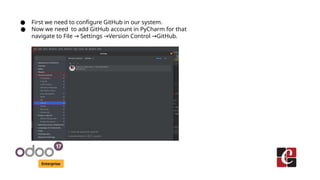
● First we need to configure GitHub in our system.
● Now we need to add GitHub account in PyCharm for that
navigate to File Settings Version Control GitHub.
→ → →
Enterprise
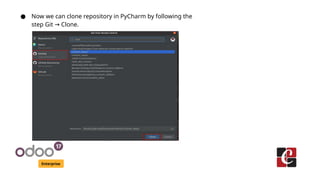
● Now we can clone repository in PyCharm by following the
step Git Clone.
→
Enterprise
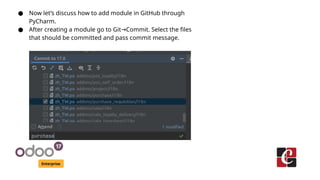
● Now let’s discuss how to add module in GitHub through
PyCharm.
● After creating a module go to Git Commit. Select the files
→
that should be committed and pass commit message.
Enterprise
● Now we can Push to GitHub by clicking Git Push as shown
→
below.
For More Info.
Check our company website for related blogs
and Odoo book.
Check our YouTube channel for
functional and technical videos in Odoo.
Enterprise
www.cybrosys.com

How to Configure and Use Github From PyCharm

  • 1.
    How to Configureand Use Github From PyCharm Enterprise
  • 2.
    Introduction Enterprise PyCharm allow youto manage project posted on a GitHub account and helps to clone the repository, share the project and commit code.
  • 3.
    Enterprise ● First weneed to configure GitHub in our system. ● Now we need to add GitHub account in PyCharm for that navigate to File Settings Version Control GitHub. → → →
  • 4.
    Enterprise ● Now wecan clone repository in PyCharm by following the step Git Clone. →
  • 5.
    Enterprise ● Now let’sdiscuss how to add module in GitHub through PyCharm. ● After creating a module go to Git Commit. Select the files → that should be committed and pass commit message.
  • 6.
    Enterprise ● Now wecan Push to GitHub by clicking Git Push as shown → below.
  • 7.
    For More Info. Checkour company website for related blogs and Odoo book. Check our YouTube channel for functional and technical videos in Odoo. Enterprise www.cybrosys.com