How does
Instacart Work?
Complete Workflow of Instacart
“A business is simply an idea to make other
people’s lives better” -Richard Branson
Instacart has been one such business idea that has defined convenience in an
altogether different manner. The buyers on the platform are provided an almost
first-hand experience of shopping for their groceries and household items.
How does Instacart App Work?
From the time the buyer registers on the Instacart portal till their grocery list
reaches them, a series of steps help streamline the process. We will here walk
you through the journey of a buyer on the Instacart platform.
Step 1: Login
● As the buyer logs in into the app, a
confirmation for the delivery zip code
is requested for delivery.
● The delivery address allows stores to
notify buyers in case they do not
deliver in their area.
Step 2: Selecting a store
The buyer then selects the store they want to order from and selects a store
from where they intend to shop. At this stage, the buyer can:
● Search for items, browsing through the store’s list
● Start adding Items to the Order
● Bookmark items to purchase them later
Step 3: Adding items to the cart
Once the buyer account is set, the address is stored, the buyer can start
preparing shopping lists for ordering. Also,
● The buyers are offered discount coupons.
● Coupon conditions, if satisfied, get adjusted in the final bill.
● Buyers communicate their requirements to shoppers who are out to fulfil
their shopping list.
● Buyers can quickly add the product to their
shopping list right from the search page by
pressing the + sign.
● Buyers can add items that aren’t in Instacart’s
database using the “Add a Special Request”
button. They can search for the item using any
possible combination of search terms, and if
they can’t find the item, they can scroll to the
top of the page and tap the “Add a special
request” button.
Step 4: Review order & add instructions
When all items have been added to a shopping list, the buyer can then review all
inclusions and proceed to the next step:
● When at the review page, the buyers can see their list of items to order,
along with the product’s picture, name, size, a quantity of the box, and
subtotal for each item, followed by a total cost.
● There is an Instructions button to guide shoppers on what specifications to
look for while they pick items from the shelf.
● The ‘Remove’ button removes all units of an
item in one go. So, in case the buyer would
want to keep some units, they will have to
search for that item once again to add it back.
● Instacart Express is a paid membership service
that can provide free delivery if buyers have
delivery orders over a certain amount. There
are running ads on the page on it for the
buyer’s information.
Step 5: Checkout
In the checkout mode, Instacart allows buyers to select suitable time slots to have
their groceries delivered to them. Buyers leave their options, and the following steps
lead to order delivery:
● There are hour-long slots that the buyers can select from.
● There is also an option to select & leave a particular tip for the delivery vendors.
● Towards the end of the page, there is a payment breakdown that buyers must
review before they authorize the final order amount.
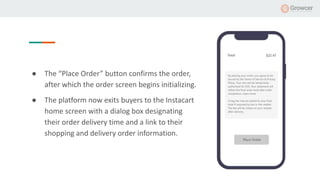
● The “Place Order” button confirms the order,
after which the order screen begins initializing.
● The platform now exits buyers to the Instacart
home screen with a dialog box designating
their order delivery time and a link to their
shopping and delivery order information.
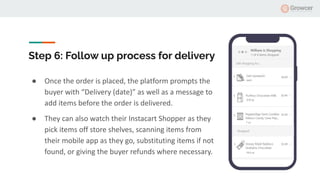
Step 6: Follow up process for delivery
● Once the order is placed, the platform prompts the
buyer with “Delivery (date)” as well as a message to
add items before the order is delivered.
● They can also watch their Instacart Shopper as they
pick items off store shelves, scanning items from
their mobile app as they go, substituting items if not
found, or giving the buyer refunds where necessary.
● After that, the buyer needs to wait for their Instacart shopper to arrive at
the delivery location.
● The buyer can rate the shopper substitutions and the shoppers too.
For more details like work flow in the case of pickup and how to build a similar platform.
Please visit https://www.yogrowcer.com/blog/how-does-instacart-buyer-app-work/
How Does Instacart Shopper App Work?
The landscape of online grocery is changing everyday with new models like
Instacart. Understanding Instacart’s shopper journey will help enhance online
shopping convenience for the ever-evolving consumers as you build your
marketplace.
For more information, please visit
https://www.yogrowcer.com/blog/how-does-instacart-shopper-app-work/
Planning to Build a Platform Like
Instacart?
Visit: www.yogrowcer.com
Email at sales@fatbit.com
Call us at +1 469 844 3346

How does instacart work? Slide Share

  • 1.
    How does Instacart Work? CompleteWorkflow of Instacart
  • 2.
    “A business issimply an idea to make other people’s lives better” -Richard Branson Instacart has been one such business idea that has defined convenience in an altogether different manner. The buyers on the platform are provided an almost first-hand experience of shopping for their groceries and household items.
  • 3.
    How does InstacartApp Work? From the time the buyer registers on the Instacart portal till their grocery list reaches them, a series of steps help streamline the process. We will here walk you through the journey of a buyer on the Instacart platform.
  • 4.
    Step 1: Login ●As the buyer logs in into the app, a confirmation for the delivery zip code is requested for delivery. ● The delivery address allows stores to notify buyers in case they do not deliver in their area.
  • 5.
    Step 2: Selectinga store The buyer then selects the store they want to order from and selects a store from where they intend to shop. At this stage, the buyer can: ● Search for items, browsing through the store’s list ● Start adding Items to the Order ● Bookmark items to purchase them later
  • 6.
    Step 3: Addingitems to the cart Once the buyer account is set, the address is stored, the buyer can start preparing shopping lists for ordering. Also, ● The buyers are offered discount coupons. ● Coupon conditions, if satisfied, get adjusted in the final bill. ● Buyers communicate their requirements to shoppers who are out to fulfil their shopping list.
  • 7.
    ● Buyers canquickly add the product to their shopping list right from the search page by pressing the + sign. ● Buyers can add items that aren’t in Instacart’s database using the “Add a Special Request” button. They can search for the item using any possible combination of search terms, and if they can’t find the item, they can scroll to the top of the page and tap the “Add a special request” button.
  • 8.
    Step 4: Revieworder & add instructions When all items have been added to a shopping list, the buyer can then review all inclusions and proceed to the next step: ● When at the review page, the buyers can see their list of items to order, along with the product’s picture, name, size, a quantity of the box, and subtotal for each item, followed by a total cost. ● There is an Instructions button to guide shoppers on what specifications to look for while they pick items from the shelf.
  • 9.
    ● The ‘Remove’button removes all units of an item in one go. So, in case the buyer would want to keep some units, they will have to search for that item once again to add it back. ● Instacart Express is a paid membership service that can provide free delivery if buyers have delivery orders over a certain amount. There are running ads on the page on it for the buyer’s information.
  • 10.
    Step 5: Checkout Inthe checkout mode, Instacart allows buyers to select suitable time slots to have their groceries delivered to them. Buyers leave their options, and the following steps lead to order delivery: ● There are hour-long slots that the buyers can select from. ● There is also an option to select & leave a particular tip for the delivery vendors. ● Towards the end of the page, there is a payment breakdown that buyers must review before they authorize the final order amount.
  • 11.
    ● The “PlaceOrder” button confirms the order, after which the order screen begins initializing. ● The platform now exits buyers to the Instacart home screen with a dialog box designating their order delivery time and a link to their shopping and delivery order information.
  • 12.
    Step 6: Followup process for delivery ● Once the order is placed, the platform prompts the buyer with “Delivery (date)” as well as a message to add items before the order is delivered. ● They can also watch their Instacart Shopper as they pick items off store shelves, scanning items from their mobile app as they go, substituting items if not found, or giving the buyer refunds where necessary.
  • 13.
    ● After that,the buyer needs to wait for their Instacart shopper to arrive at the delivery location. ● The buyer can rate the shopper substitutions and the shoppers too. For more details like work flow in the case of pickup and how to build a similar platform. Please visit https://www.yogrowcer.com/blog/how-does-instacart-buyer-app-work/
  • 14.
    How Does InstacartShopper App Work? The landscape of online grocery is changing everyday with new models like Instacart. Understanding Instacart’s shopper journey will help enhance online shopping convenience for the ever-evolving consumers as you build your marketplace. For more information, please visit https://www.yogrowcer.com/blog/how-does-instacart-shopper-app-work/
  • 15.
    Planning to Builda Platform Like Instacart? Visit: www.yogrowcer.com Email at sales@fatbit.com Call us at +1 469 844 3346