CC-BY-NC-SA Rhianon E. Gutierrez, Digital Learning Specialist, OIIT Digital Learning Team @RhianonElan http://bit.ly/RW4GC_btuplc
How can
Read&Write for Google Chrome
transform blended learning for teachers
and students by creating a truly
inclusive learning environment?
Rhianon E. Gutierrez, MA
Digital Learning Specialist, OIIT Digital Learning Team
Boston Teachers Union Professional Learning Conference
June 4, 2016
CC-BY-NC-SA Rhianon E. Gutierrez, Digital Learning Specialist, OIIT Digital Learning Team @RhianonElan http://bit.ly/RW4GC_btuplc
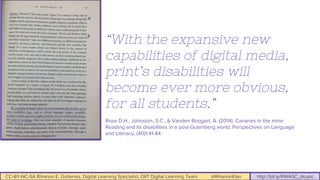
“With the expansive new
capabilities of digital media,
print’s disabilities will
become ever more obvious,
for all students.”
Rose D.H., Johnston, S.C., & Vanden Boogart, A. (2014). Canaries in the mine:
Reading and its disabilities in a post-Gutenberg world. Perspectives on Language
and Literacy, (40)1:41-44.
CC-BY-NC-SA Rhianon E. Gutierrez, Digital Learning Specialist, OIIT Digital Learning Team @RhianonElan http://bit.ly/RW4GC_btuplc
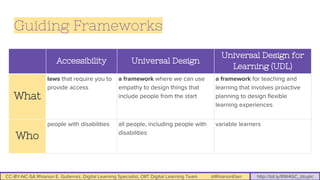
Accessibility Universal Design
Universal Design for
Learning (UDL)
What
laws that require you to
provide access
a framework where we can use
empathy to design things that
include people from the start
a framework for teaching and
learning that involves proactive
planning to design flexible
learning experiences
Who
people with disabilities all people, including people with
disabilities
variable learners
Guiding Frameworks
CC-BY-NC-SA Rhianon E. Gutierrez, Digital Learning Specialist, OIIT Digital Learning Team @RhianonElan http://bit.ly/RW4GC_btuplc
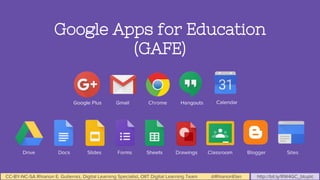
Google Apps for Education
(GAFE)
CC-BY-NC-SA Rhianon E. Gutierrez, Digital Learning Specialist, OIIT Digital Learning Team @RhianonElan http://bit.ly/RW4GC_btuplc
GAFE can be UDL,
when you dig
deeper...
CC-BY-NC-SA Rhianon E. Gutierrez, Digital Learning Specialist, OIIT Digital Learning Team @RhianonElan http://bit.ly/RW4GC_btuplc
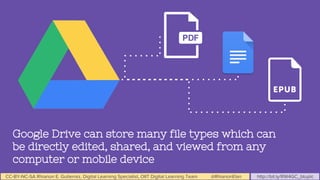
Google Drive can store many file types which can
be directly edited, shared, and viewed from any
computer or mobile device
CC-BY-NC-SA Rhianon E. Gutierrez, Digital Learning Specialist, OIIT Digital Learning Team @RhianonElan http://bit.ly/RW4GC_btuplc
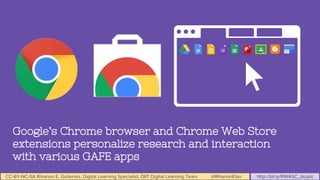
Google’s Chrome browser and Chrome Web Store
extensions personalize research and interaction
with various GAFE apps
CC-BY-NC-SA Rhianon E. Gutierrez, Digital Learning Specialist, OIIT Digital Learning Team @RhianonElan http://bit.ly/RW4GC_btuplc
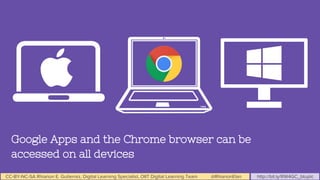
Google Apps and the Chrome browser can be
accessed on all devices
CC-BY-NC-SA Rhianon E. Gutierrez, Digital Learning Specialist, OIIT Digital Learning Team @RhianonElan http://bit.ly/RW4GC_btuplc
“It’s not a SPED tool; it’s a 21st
century tool.”
-BPS Teacher Amy G.
CC-BY-NC-SA Rhianon E. Gutierrez, Digital Learning Specialist, OIIT Digital Learning Team @RhianonElan http://bit.ly/RW4GC_btuplc
Read&Write is a Chrome
extension that supports
reading and writing, gives
students choice and
autonomy in research and
assignments, complements
digital curricula, and
supports collaborative work
in various Google Apps.
CC-BY-NC-SA Rhianon E. Gutierrez, Digital Learning Specialist, OIIT Digital Learning Team @RhianonElan http://bit.ly/RW4GC_btuplc
BPS Read&Write Trainings
● Officially pushed out district-wide in December 2015
● All BPS emails have access to this extension
● OIIT has led conference, department, and school-based trainings on functional
and strategic uses of the tool
● Texthelp’s Literacy Specialist led intensive training on strategies in March 2016
● Blended delivery method for trainings using GAFE tools: Classroom, Sites,
Slides, and Docs
● Trainings and resources designed around UDL principles
What I’ve Learned in Teaching About Read&Write: http://bit.ly/RW4GC_RGblog
CC-BY-NC-SA Rhianon E. Gutierrez, Digital Learning Specialist, OIIT Digital Learning Team @RhianonElan http://bit.ly/RW4GC_btuplc
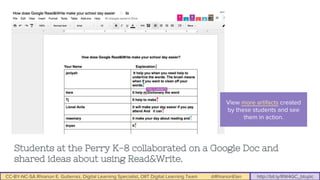
View more artifacts created
by these students and see
them in action.
Students at the Perry K-8 collaborated on a Google Doc and
shared ideas about using Read&Write.
CC-BY-NC-SA Rhianon E. Gutierrez, Digital Learning Specialist, OIIT Digital Learning Team @RhianonElan http://bit.ly/RW4GC_btuplc
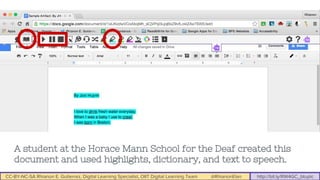
A student at the Horace Mann School for the Deaf created this
document and used highlights, dictionary, and text to speech.
CC-BY-NC-SA Rhianon E. Gutierrez, Digital Learning Specialist, OIIT Digital Learning Team @RhianonElan http://bit.ly/RW4GC_btuplc
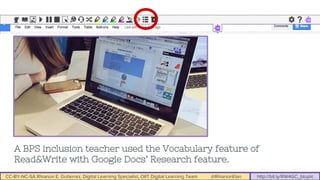
A BPS inclusion teacher used the Vocabulary feature of
Read&Write with Google Docs’ Research feature.
CC-BY-NC-SA Rhianon E. Gutierrez, Digital Learning Specialist, OIIT Digital Learning Team @RhianonElan http://bit.ly/RW4GC_btuplc
Now, how can I
use this tool or
teach others how
to use it?
CC-BY-NC-SA Rhianon E. Gutierrez, Digital Learning Specialist, OIIT Digital Learning Team @RhianonElan http://bit.ly/RW4GC_btuplc
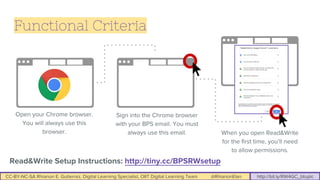
Functional Criteria
Read&Write Setup Instructions: http://tiny.cc/BPSRWsetup
Open your Chrome browser.
You will always use this
browser.
Sign into the Chrome browser
with your BPS email. You must
always use this email. When you open Read&Write
for the first time, you’ll need
to allow permissions.
CC-BY-NC-SA Rhianon E. Gutierrez, Digital Learning Specialist, OIIT Digital Learning Team @RhianonElan http://bit.ly/RW4GC_btuplc
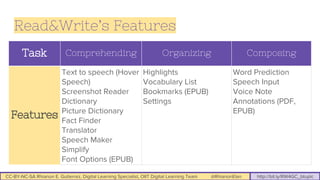
Task Comprehending Organizing Composing
Features
Text to speech (Hover
Speech)
Screenshot Reader
Dictionary
Picture Dictionary
Fact Finder
Translator
Speech Maker
Simplify
Font Options (EPUB)
Highlights
Vocabulary List
Bookmarks (EPUB)
Settings
Word Prediction
Speech Input
Voice Note
Annotations (PDF,
EPUB)
Read&Write’s Features
CC-BY-NC-SA Rhianon E. Gutierrez, Digital Learning Specialist, OIIT Digital Learning Team @RhianonElan http://bit.ly/RW4GC_btuplc
How can we use
Read&Write with these?
● A news website
● A shared article or essay (Google Doc)
● Reading assignment (PDF)
● Digital book (EPUB)
CC-BY-NC-SA Rhianon E. Gutierrez, Digital Learning Specialist, OIIT Digital Learning Team @RhianonElan http://bit.ly/RW4GC_btuplc
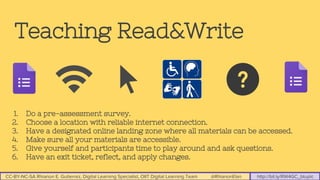
Teaching Read&Write
1. Do a pre-assessment survey.
2. Choose a location with reliable internet connection.
3. Have a designated online landing zone where all materials can be accessed.
4. Make sure all your materials are accessible.
5. Give yourself and participants time to play around and ask questions.
6. Have an exit ticket, reflect, and apply changes.
CC-BY-NC-SA Rhianon E. Gutierrez, Digital Learning Specialist, OIIT Digital Learning Team @RhianonElan http://bit.ly/RW4GC_btuplc
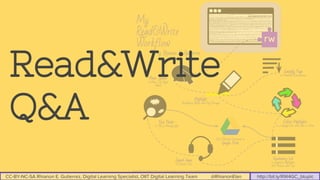
Read&Write
Q&A
CC-BY-NC-SA Rhianon E. Gutierrez, Digital Learning Specialist, OIIT Digital Learning Team @RhianonElan http://bit.ly/RW4GC_btuplc
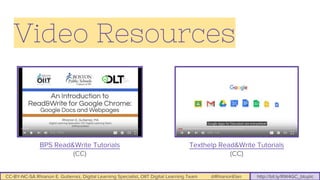
Video Resources
BPS Read&Write Tutorials
(CC)
Texthelp Read&Write Tutorials
(CC)
CC-BY-NC-SA Rhianon E. Gutierrez, Digital Learning Specialist, OIIT Digital Learning Team @RhianonElan http://bit.ly/RW4GC_btuplc
Web Resources
BPS Read&Write Landing Zone: http://tiny.cc/readwritebps
Read&Write Setup: http://tiny.cc/BPSRWsetup
Read&Write Interactive Agenda with Google and Bookshare resources:
http://tiny.cc/RWagenda
Rhianon’s BTU Read&Write Blog: http://bit.ly/RW4GC_RGblog
OIIT Digital Learning Team: www.bostonpublicschools.org/dlt
CC-BY-NC-SA Rhianon E. Gutierrez, Digital Learning Specialist, OIIT Digital Learning Team @RhianonElan http://bit.ly/RW4GC_btuplc
Credits
This presentation by R.E. Gutierrez is licensed under a Creative Commons Attribution-NonCommercial-ShareAlike 4.0
license (CC-BY-NC-SA).
White icons from The Noun Project. CC BY Pham Thi Dieu Linh, Sven Gabriel, Viktor Vorobeyev, Chad Remsing, Laurent
Canivet, and Oleg Frolov.
Read&Write for Google Chrome logo courtesy Texthelp.
Slide 3: Screenshot from Gee, J.P. (2007). What video games have to teach us about learning and literacy. New York, NY:
Palgrave MacMillan.

How can Read&Write for Google Chrome transform blended learning?

  • 1.
    CC-BY-NC-SA Rhianon E.Gutierrez, Digital Learning Specialist, OIIT Digital Learning Team @RhianonElan http://bit.ly/RW4GC_btuplc How can Read&Write for Google Chrome transform blended learning for teachers and students by creating a truly inclusive learning environment? Rhianon E. Gutierrez, MA Digital Learning Specialist, OIIT Digital Learning Team Boston Teachers Union Professional Learning Conference June 4, 2016
  • 2.
    CC-BY-NC-SA Rhianon E.Gutierrez, Digital Learning Specialist, OIIT Digital Learning Team @RhianonElan http://bit.ly/RW4GC_btuplc
  • 3.
    CC-BY-NC-SA Rhianon E.Gutierrez, Digital Learning Specialist, OIIT Digital Learning Team @RhianonElan http://bit.ly/RW4GC_btuplc “With the expansive new capabilities of digital media, print’s disabilities will become ever more obvious, for all students.” Rose D.H., Johnston, S.C., & Vanden Boogart, A. (2014). Canaries in the mine: Reading and its disabilities in a post-Gutenberg world. Perspectives on Language and Literacy, (40)1:41-44.
  • 4.
    CC-BY-NC-SA Rhianon E.Gutierrez, Digital Learning Specialist, OIIT Digital Learning Team @RhianonElan http://bit.ly/RW4GC_btuplc Accessibility Universal Design Universal Design for Learning (UDL) What laws that require you to provide access a framework where we can use empathy to design things that include people from the start a framework for teaching and learning that involves proactive planning to design flexible learning experiences Who people with disabilities all people, including people with disabilities variable learners Guiding Frameworks
  • 5.
    CC-BY-NC-SA Rhianon E.Gutierrez, Digital Learning Specialist, OIIT Digital Learning Team @RhianonElan http://bit.ly/RW4GC_btuplc Google Apps for Education (GAFE)
  • 6.
    CC-BY-NC-SA Rhianon E.Gutierrez, Digital Learning Specialist, OIIT Digital Learning Team @RhianonElan http://bit.ly/RW4GC_btuplc GAFE can be UDL, when you dig deeper...
  • 7.
    CC-BY-NC-SA Rhianon E.Gutierrez, Digital Learning Specialist, OIIT Digital Learning Team @RhianonElan http://bit.ly/RW4GC_btuplc Google Drive can store many file types which can be directly edited, shared, and viewed from any computer or mobile device
  • 8.
    CC-BY-NC-SA Rhianon E.Gutierrez, Digital Learning Specialist, OIIT Digital Learning Team @RhianonElan http://bit.ly/RW4GC_btuplc Google’s Chrome browser and Chrome Web Store extensions personalize research and interaction with various GAFE apps
  • 9.
    CC-BY-NC-SA Rhianon E.Gutierrez, Digital Learning Specialist, OIIT Digital Learning Team @RhianonElan http://bit.ly/RW4GC_btuplc Google Apps and the Chrome browser can be accessed on all devices
  • 10.
    CC-BY-NC-SA Rhianon E.Gutierrez, Digital Learning Specialist, OIIT Digital Learning Team @RhianonElan http://bit.ly/RW4GC_btuplc “It’s not a SPED tool; it’s a 21st century tool.” -BPS Teacher Amy G.
  • 11.
    CC-BY-NC-SA Rhianon E.Gutierrez, Digital Learning Specialist, OIIT Digital Learning Team @RhianonElan http://bit.ly/RW4GC_btuplc
  • 12.
    CC-BY-NC-SA Rhianon E.Gutierrez, Digital Learning Specialist, OIIT Digital Learning Team @RhianonElan http://bit.ly/RW4GC_btuplc Read&Write is a Chrome extension that supports reading and writing, gives students choice and autonomy in research and assignments, complements digital curricula, and supports collaborative work in various Google Apps.
  • 13.
    CC-BY-NC-SA Rhianon E.Gutierrez, Digital Learning Specialist, OIIT Digital Learning Team @RhianonElan http://bit.ly/RW4GC_btuplc BPS Read&Write Trainings ● Officially pushed out district-wide in December 2015 ● All BPS emails have access to this extension ● OIIT has led conference, department, and school-based trainings on functional and strategic uses of the tool ● Texthelp’s Literacy Specialist led intensive training on strategies in March 2016 ● Blended delivery method for trainings using GAFE tools: Classroom, Sites, Slides, and Docs ● Trainings and resources designed around UDL principles What I’ve Learned in Teaching About Read&Write: http://bit.ly/RW4GC_RGblog
  • 14.
    CC-BY-NC-SA Rhianon E.Gutierrez, Digital Learning Specialist, OIIT Digital Learning Team @RhianonElan http://bit.ly/RW4GC_btuplc View more artifacts created by these students and see them in action. Students at the Perry K-8 collaborated on a Google Doc and shared ideas about using Read&Write.
  • 15.
    CC-BY-NC-SA Rhianon E.Gutierrez, Digital Learning Specialist, OIIT Digital Learning Team @RhianonElan http://bit.ly/RW4GC_btuplc A student at the Horace Mann School for the Deaf created this document and used highlights, dictionary, and text to speech.
  • 16.
    CC-BY-NC-SA Rhianon E.Gutierrez, Digital Learning Specialist, OIIT Digital Learning Team @RhianonElan http://bit.ly/RW4GC_btuplc A BPS inclusion teacher used the Vocabulary feature of Read&Write with Google Docs’ Research feature.
  • 17.
    CC-BY-NC-SA Rhianon E.Gutierrez, Digital Learning Specialist, OIIT Digital Learning Team @RhianonElan http://bit.ly/RW4GC_btuplc Now, how can I use this tool or teach others how to use it?
  • 18.
    CC-BY-NC-SA Rhianon E.Gutierrez, Digital Learning Specialist, OIIT Digital Learning Team @RhianonElan http://bit.ly/RW4GC_btuplc Functional Criteria Read&Write Setup Instructions: http://tiny.cc/BPSRWsetup Open your Chrome browser. You will always use this browser. Sign into the Chrome browser with your BPS email. You must always use this email. When you open Read&Write for the first time, you’ll need to allow permissions.
  • 19.
    CC-BY-NC-SA Rhianon E.Gutierrez, Digital Learning Specialist, OIIT Digital Learning Team @RhianonElan http://bit.ly/RW4GC_btuplc Task Comprehending Organizing Composing Features Text to speech (Hover Speech) Screenshot Reader Dictionary Picture Dictionary Fact Finder Translator Speech Maker Simplify Font Options (EPUB) Highlights Vocabulary List Bookmarks (EPUB) Settings Word Prediction Speech Input Voice Note Annotations (PDF, EPUB) Read&Write’s Features
  • 20.
    CC-BY-NC-SA Rhianon E.Gutierrez, Digital Learning Specialist, OIIT Digital Learning Team @RhianonElan http://bit.ly/RW4GC_btuplc How can we use Read&Write with these? ● A news website ● A shared article or essay (Google Doc) ● Reading assignment (PDF) ● Digital book (EPUB)
  • 21.
    CC-BY-NC-SA Rhianon E.Gutierrez, Digital Learning Specialist, OIIT Digital Learning Team @RhianonElan http://bit.ly/RW4GC_btuplc Teaching Read&Write 1. Do a pre-assessment survey. 2. Choose a location with reliable internet connection. 3. Have a designated online landing zone where all materials can be accessed. 4. Make sure all your materials are accessible. 5. Give yourself and participants time to play around and ask questions. 6. Have an exit ticket, reflect, and apply changes.
  • 22.
    CC-BY-NC-SA Rhianon E.Gutierrez, Digital Learning Specialist, OIIT Digital Learning Team @RhianonElan http://bit.ly/RW4GC_btuplc Read&Write Q&A
  • 23.
    CC-BY-NC-SA Rhianon E.Gutierrez, Digital Learning Specialist, OIIT Digital Learning Team @RhianonElan http://bit.ly/RW4GC_btuplc Video Resources BPS Read&Write Tutorials (CC) Texthelp Read&Write Tutorials (CC)
  • 24.
    CC-BY-NC-SA Rhianon E.Gutierrez, Digital Learning Specialist, OIIT Digital Learning Team @RhianonElan http://bit.ly/RW4GC_btuplc Web Resources BPS Read&Write Landing Zone: http://tiny.cc/readwritebps Read&Write Setup: http://tiny.cc/BPSRWsetup Read&Write Interactive Agenda with Google and Bookshare resources: http://tiny.cc/RWagenda Rhianon’s BTU Read&Write Blog: http://bit.ly/RW4GC_RGblog OIIT Digital Learning Team: www.bostonpublicschools.org/dlt
  • 25.
    CC-BY-NC-SA Rhianon E.Gutierrez, Digital Learning Specialist, OIIT Digital Learning Team @RhianonElan http://bit.ly/RW4GC_btuplc Credits This presentation by R.E. Gutierrez is licensed under a Creative Commons Attribution-NonCommercial-ShareAlike 4.0 license (CC-BY-NC-SA). White icons from The Noun Project. CC BY Pham Thi Dieu Linh, Sven Gabriel, Viktor Vorobeyev, Chad Remsing, Laurent Canivet, and Oleg Frolov. Read&Write for Google Chrome logo courtesy Texthelp. Slide 3: Screenshot from Gee, J.P. (2007). What video games have to teach us about learning and literacy. New York, NY: Palgrave MacMillan.