



Just in Time
Thomas Kyte
http://asktom.oracle.com/
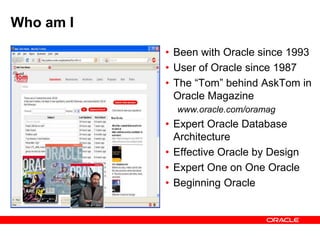
Who am I
• Been with Oracle since 1993
• User of Oracle since 1987
• The “Tom” behind AskTom in
Oracle Magazine
www.oracle.com/oramag
• Expert Oracle Database
Architecture
• Effective Oracle by Design
• Expert One on One Oracle
• Beginning Oracle
What I learned at
Hotsos 2011
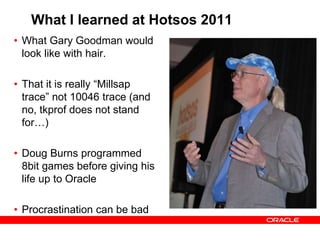
What I learned at Hotsos 2011
• What Gary Goodman would
look like with hair.
• That it is really “Millsap
trace” not 10046 trace (and
no, tkprof does not stand
for…)
• Doug Burns programmed
8bit games before giving his
life up to Oracle
• Procrastination can be bad
It all started with
Back to the Future!
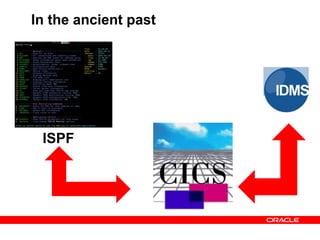
In the ancient past
ISPF
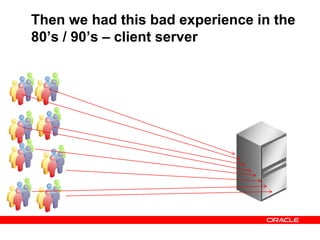
Then we had this bad experience in the
80’s / 90’s – client server
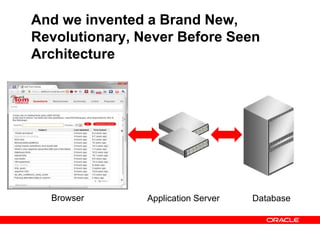
And we invented a Brand New,
Revolutionary, Never Before Seen
Architecture
Browser Application Server Database
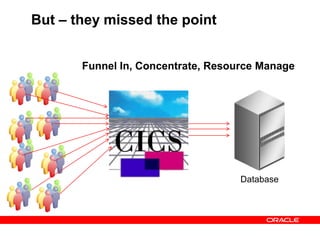
But – they missed the point
Database
Funnel In, Concentrate, Resource Manage
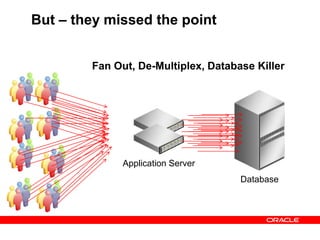
But – they missed the point
Database
Application Server
Fan Out, De-Multiplex, Database Killer
Do The Math
• It is all about queueing.
• Almost every talk I attended had something to say
about queueing, resource management – even if they
didn’t say it out loud
• Just do the math – it is easy…..
Do The Math
• From asktom
• The database is set to handle 400 concurrent connections
• All requests are coming through oracle HTTP server and
mod-plsql and invoke a stored procedure
• The transactions are not CPU intensive. It takes 2 seconds or
less.
• The machine has 16 CPUs
• We see about 17 active sessions at most
• This is a disaster waiting to happen – it will happen, it is a
matter of time. It probably already has happened, they just
didn’t know what it was…
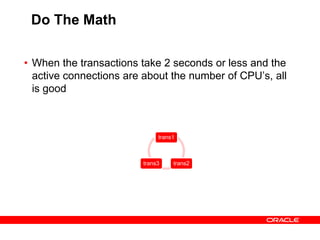
Do The Math
trans1
trans2trans3
• When the transactions take 2 seconds or less and the
active connections are about the number of CPU’s, all
is good
Do The Math
trans1
trans2
trans3
trans4
trans5
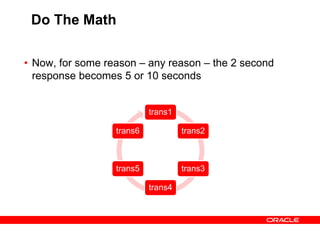
trans6
• Now, for some reason – any reason – the 2 second
response becomes 5 or 10 seconds
Do The Math
trans1
trans2
trans3
trans4
trans5
Trans6
Trans7
Trans8
transN
transNtransN
transN
transN
transN
transN
transN
transN
transN
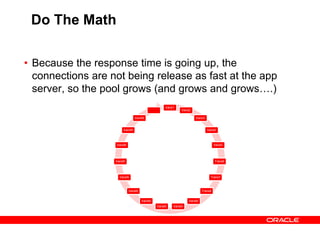
• Because the response time is going up, the
connections are not being release as fast at the app
server, so the pool grows (and grows and grows….)
Do The Math
trans1
trans2
trans3
trans4
trans5
Trans6
Trans7
Trans8
transN
transNtransN
transN
transN
transN
transN
transN
transN
transN
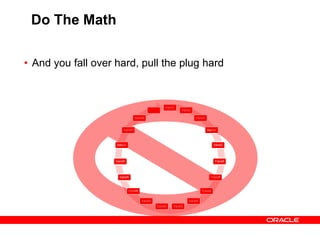
• And you fall over hard, pull the plug hard
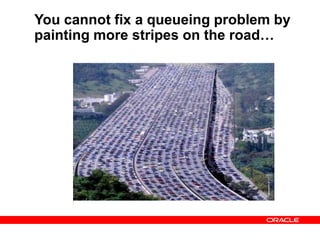
You cannot fix a queueing problem by
painting more stripes on the road…
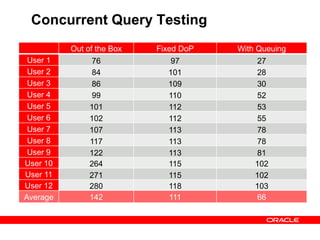
Concurrent Query Testing
Out of the Box Fixed DoP With Queuing
User 1 76 97 27
User 2 84 101 28
User 3 86 109 30
User 4 99 110 52
User 5 101 112 53
User 6 102 112 55
User 7 107 113 78
User 8 117 113 78
User 9 122 113 81
User 10 264 115 102
User 11 271 115 102
User 12 280 118 103
Average 142 111 66
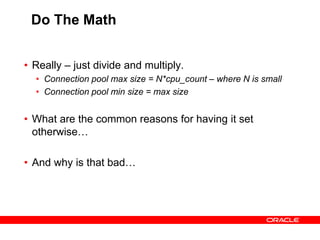
Do The Math
• Really – just divide and multiply.
• Connection pool max size = N*cpu_count – where N is small
• Connection pool min size = max size
• What are the common reasons for having it set
otherwise…
• And why is that bad…
Preciseness
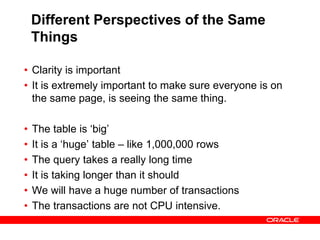
Different Perspectives of the Same
Things
• Clarity is important
• It is extremely important to make sure everyone is on
the same page, is seeing the same thing.
• The table is ‘big’
• It is a ‘huge’ table – like 1,000,000 rows
• The query takes a really long time
• It is taking longer than it should
• We will have a huge number of transactions
• The transactions are not CPU intensive.
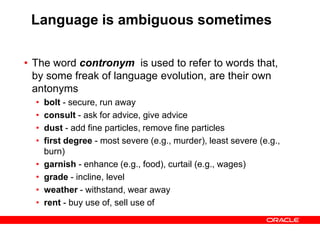
Language is ambiguous sometimes
• The word contronym is used to refer to words that,
by some freak of language evolution, are their own
antonyms
• bolt - secure, run away
• consult - ask for advice, give advice
• dust - add fine particles, remove fine particles
• first degree - most severe (e.g., murder), least severe (e.g.,
burn)
• garnish - enhance (e.g., food), curtail (e.g., wages)
• grade - incline, level
• weather - withstand, wear away
• rent - buy use of, sell use of
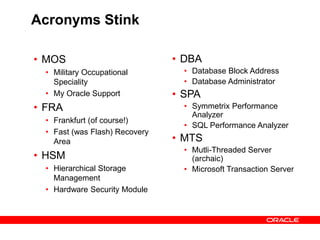
Acronyms Stink
• MOS
• Military Occupational
Speciality
• My Oracle Support
• FRA
• Frankfurt (of course!)
• Fast (was Flash) Recovery
Area
• HSM
• Hierarchical Storage
Management
• Hardware Security Module
• DBA
• Database Block Address
• Database Administrator
• SPA
• Symmetrix Performance
Analyzer
• SQL Performance Analyzer
• MTS
• Mutli-Threaded Server
(archaic)
• Microsoft Transaction Server
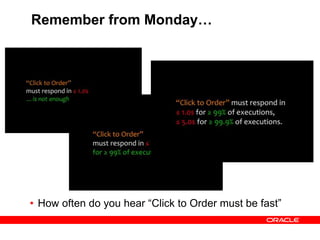
Remember from Monday…
• How often do you hear “Click to Order must be fast”
Mastercard Still Rules
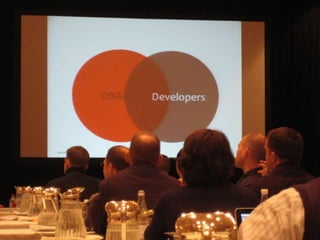
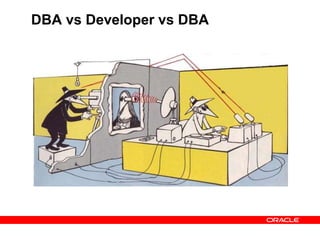
DBA vs Developer vs DBA
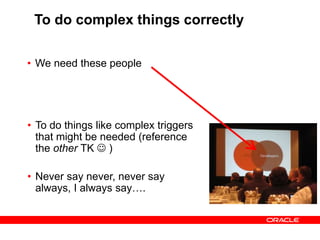
To do complex things correctly
• We need these people
• To do things like complex triggers
that might be needed (reference
the other TK  )
• Never say never, never say
always, I always say….
Why?
It depends
There are only two answers to all
(technical) questions
• Why
• Two examples…
• It Depends
Simple Things
Count
I was glad to see many ‘simple’ things
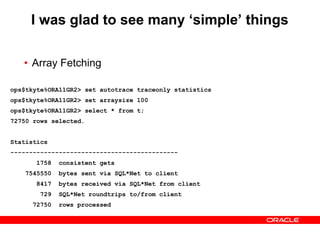
• Array Fetching
ops$tkyte%ORA11GR2> /*
ops$tkyte%ORA11GR2> drop table t;
ops$tkyte%ORA11GR2> create table t as select * from all_objects;
ops$tkyte%ORA11GR2> */
ops$tkyte%ORA11GR2> set autotrace traceonly statistics
ops$tkyte%ORA11GR2> set arraysize 15
ops$tkyte%ORA11GR2> select * from t;
72750 rows selected.
Statistics
---------------------------------------------
5837 consistent gets
8081410 bytes sent via SQL*Net to client
53759 bytes received via SQL*Net from client
4851 SQL*Net roundtrips to/from client
72750 rows processed
ops$tkyte%ORA11GR2> set autotrace traceonly statistics
ops$tkyte%ORA11GR2> set arraysize 100
ops$tkyte%ORA11GR2> select * from t;
72750 rows selected.
Statistics
---------------------------------------------
1758 consistent gets
7545550 bytes sent via SQL*Net to client
8417 bytes received via SQL*Net from client
729 SQL*Net roundtrips to/from client
72750 rows processed
I was glad to see many ‘simple’ things
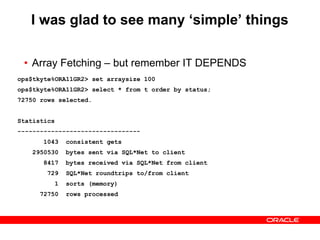
• Array Fetching – but remember IT DEPENDS
ops$tkyte%ORA11GR2> set arraysize 15
ops$tkyte%ORA11GR2> select * from t order by status;
72750 rows selected.
Statistics
---------------------------------
1043 consistent gets
3474024 bytes sent via SQL*Net to client
53759 bytes received via SQL*Net from client
4851 SQL*Net roundtrips to/from client
1 sorts (memory)
72750 rows processed
ops$tkyte%ORA11GR2> set arraysize 100
ops$tkyte%ORA11GR2> select * from t order by status;
72750 rows selected.
Statistics
---------------------------------
1043 consistent gets
2950530 bytes sent via SQL*Net to client
8417 bytes received via SQL*Net from client
729 SQL*Net roundtrips to/from client
1 sorts (memory)
72750 rows processed
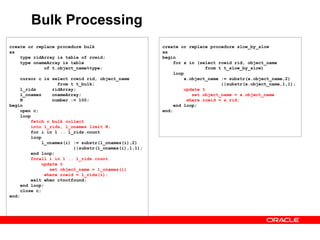
Bulk Processing
create or replace procedure bulk
as
type ridArray is table of rowid;
type onameArray is table
of t.object_name%type;
cursor c is select rowid rid, object_name
from t t_bulk;
l_rids ridArray;
l_onames onameArray;
N number := 100;
begin
open c;
loop
fetch c bulk collect
into l_rids, l_onames limit N;
for i in 1 .. l_rids.count
loop
l_onames(i) := substr(l_onames(i),2)
||substr(l_onames(i),1,1);
end loop;
forall i in 1 .. l_rids.count
update t
set object_name = l_onames(i)
where rowid = l_rids(i);
exit when c%notfound;
end loop;
close c;
end;
create or replace procedure slow_by_slow
as
begin
for x in (select rowid rid, object_name
from t t_slow_by_slow)
loop
x.object_name := substr(x.object_name,2)
||substr(x.object_name,1,1);
update t
set object_name = x.object_name
where rowid = x.rid;
end loop;
end;
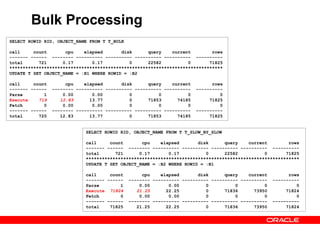
Bulk Processing
SELECT ROWID RID, OBJECT_NAME FROM T T_BULK
call count cpu elapsed disk query current rows
------- ------ -------- ---------- ---------- ---------- ---------- ----------
total 721 0.17 0.17 0 22582 0 71825
********************************************************************************
UPDATE T SET OBJECT_NAME = :B1 WHERE ROWID = :B2
call count cpu elapsed disk query current rows
------- ------ -------- ---------- ---------- ---------- ---------- ----------
Parse 1 0.00 0.00 0 0 0 0
Execute 719 12.83 13.77 0 71853 74185 71825
Fetch 0 0.00 0.00 0 0 0 0
------- ------ -------- ---------- ---------- ---------- ---------- ----------
total 720 12.83 13.77 0 71853 74185 71825
SELECT ROWID RID, OBJECT_NAME FROM T T_SLOW_BY_SLOW
call count cpu elapsed disk query current rows
------- ------ -------- ---------- ---------- ---------- ---------- ----------
total 721 0.17 0.17 0 22582 0 71825
********************************************************************************
UPDATE T SET OBJECT_NAME = :B2 WHERE ROWID = :B1
call count cpu elapsed disk query current rows
------- ------ -------- ---------- ---------- ---------- ---------- ----------
Parse 1 0.00 0.00 0 0 0 0
Execute 71824 21.25 22.25 0 71836 73950 71824
Fetch 0 0.00 0.00 0 0 0 0
------- ------ -------- ---------- ---------- ---------- ---------- ----------
total 71825 21.25 22.25 0 71836 73950 71824
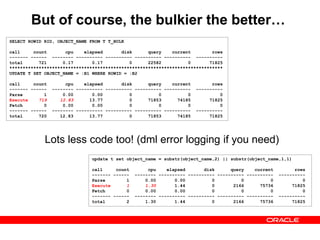
But of course, the bulkier the better…
SELECT ROWID RID, OBJECT_NAME FROM T T_BULK
call count cpu elapsed disk query current rows
------- ------ -------- ---------- ---------- ---------- ---------- ----------
total 721 0.17 0.17 0 22582 0 71825
********************************************************************************
UPDATE T SET OBJECT_NAME = :B1 WHERE ROWID = :B2
call count cpu elapsed disk query current rows
------- ------ -------- ---------- ---------- ---------- ---------- ----------
Parse 1 0.00 0.00 0 0 0 0
Execute 719 12.83 13.77 0 71853 74185 71825
Fetch 0 0.00 0.00 0 0 0 0
------- ------ -------- ---------- ---------- ---------- ---------- ----------
total 720 12.83 13.77 0 71853 74185 71825
update t set object_name = substr(object_name,2) || substr(object_name,1,1)
call count cpu elapsed disk query current rows
------- ------ -------- ---------- ---------- ---------- ---------- ----------
Parse 1 0.00 0.00 0 0 0 0
Execute 1 1.30 1.44 0 2166 75736 71825
Fetch 0 0.00 0.00 0 0 0 0
------- ------ -------- ---------- ---------- ---------- ---------- ----------
total 2 1.30 1.44 0 2166 75736 71825
Lots less code too! (dml error logging if you need)
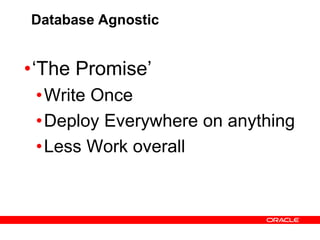
Database Agnostic
•‘The Promise’
•Write Once
•Deploy Everywhere on anything
•Less Work overall
Database Agnostic
• The Reality
• Write Once
• For each database
• They are different
• Deploy Everywhere on anything
• Deploy on specific dot releases
• Of specific databases
• On certain platforms
• (it is a support issue)
• Less Work overall
• More work overall
Database Agnostic
• Historically, the only thing I’ve seen achieved with this
approach is
• You get an application that performs poorly against one of the
databases
• And does really really really bad against all of the rest.
Nothing instills fear
more than…
Statistics
They seem like magic
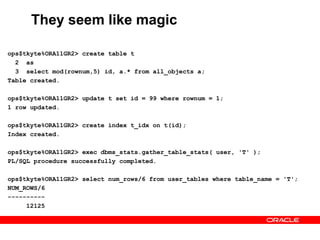
ops$tkyte%ORA11GR2> create table t
2 as
3 select mod(rownum,5) id, a.* from all_objects a;
Table created.
ops$tkyte%ORA11GR2> update t set id = 99 where rownum = 1;
1 row updated.
ops$tkyte%ORA11GR2> create index t_idx on t(id);
Index created.
ops$tkyte%ORA11GR2> exec dbms_stats.gather_table_stats( user, 'T' );
PL/SQL procedure successfully completed.
ops$tkyte%ORA11GR2> select num_rows/6 from user_tables where table_name = 'T';
NUM_ROWS/6
----------
12125
They seem like magic
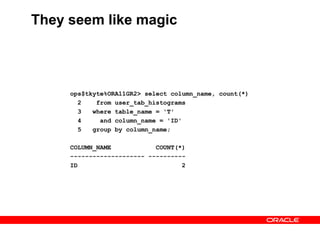
ops$tkyte%ORA11GR2> select column_name, count(*)
2 from user_tab_histograms
3 where table_name = 'T'
4 and column_name = 'ID'
5 group by column_name;
COLUMN_NAME COUNT(*)
-------------------- ----------
ID 2
They seem like magic
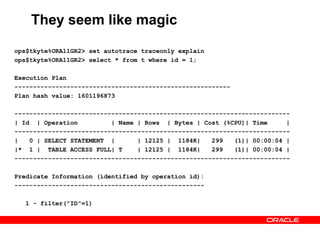
ops$tkyte%ORA11GR2> set autotrace traceonly explain
ops$tkyte%ORA11GR2> select * from t where id = 1;
Execution Plan
----------------------------------------------------------
Plan hash value: 1601196873
--------------------------------------------------------------------------
| Id | Operation | Name | Rows | Bytes | Cost (%CPU)| Time |
--------------------------------------------------------------------------
| 0 | SELECT STATEMENT | | 12125 | 1184K| 299 (1)| 00:00:04 |
|* 1 | TABLE ACCESS FULL| T | 12125 | 1184K| 299 (1)| 00:00:04 |
--------------------------------------------------------------------------
Predicate Information (identified by operation id):
---------------------------------------------------
1 - filter("ID"=1)
They seem like magic
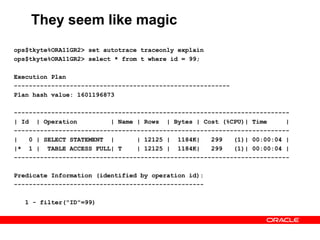
ops$tkyte%ORA11GR2> set autotrace traceonly explain
ops$tkyte%ORA11GR2> select * from t where id = 99;
Execution Plan
----------------------------------------------------------
Plan hash value: 1601196873
--------------------------------------------------------------------------
| Id | Operation | Name | Rows | Bytes | Cost (%CPU)| Time |
--------------------------------------------------------------------------
| 0 | SELECT STATEMENT | | 12125 | 1184K| 299 (1)| 00:00:04 |
|* 1 | TABLE ACCESS FULL| T | 12125 | 1184K| 299 (1)| 00:00:04 |
--------------------------------------------------------------------------
Predicate Information (identified by operation id):
---------------------------------------------------
1 - filter("ID"=99)
They seem like magic
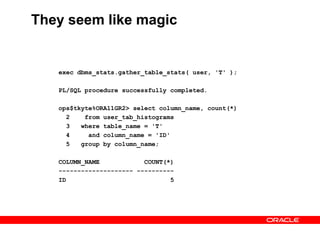
exec dbms_stats.gather_table_stats( user, 'T' );
PL/SQL procedure successfully completed.
ops$tkyte%ORA11GR2> select column_name, count(*)
2 from user_tab_histograms
3 where table_name = 'T'
4 and column_name = 'ID'
5 group by column_name;
COLUMN_NAME COUNT(*)
-------------------- ----------
ID 5
They seem like magic
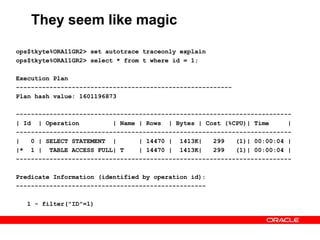
ops$tkyte%ORA11GR2> set autotrace traceonly explain
ops$tkyte%ORA11GR2> select * from t where id = 1;
Execution Plan
----------------------------------------------------------
Plan hash value: 1601196873
--------------------------------------------------------------------------
| Id | Operation | Name | Rows | Bytes | Cost (%CPU)| Time |
--------------------------------------------------------------------------
| 0 | SELECT STATEMENT | | 14470 | 1413K| 299 (1)| 00:00:04 |
|* 1 | TABLE ACCESS FULL| T | 14470 | 1413K| 299 (1)| 00:00:04 |
--------------------------------------------------------------------------
Predicate Information (identified by operation id):
---------------------------------------------------
1 - filter("ID"=1)
They seem like magic
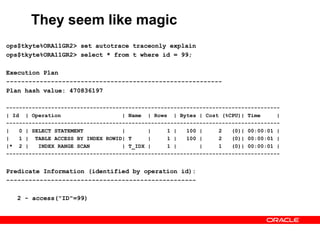
ops$tkyte%ORA11GR2> set autotrace traceonly explain
ops$tkyte%ORA11GR2> select * from t where id = 99;
Execution Plan
----------------------------------------------------------
Plan hash value: 470836197
-------------------------------------------------------------------------------------
| Id | Operation | Name | Rows | Bytes | Cost (%CPU)| Time |
-------------------------------------------------------------------------------------
| 0 | SELECT STATEMENT | | 1 | 100 | 2 (0)| 00:00:01 |
| 1 | TABLE ACCESS BY INDEX ROWID| T | 1 | 100 | 2 (0)| 00:00:01 |
|* 2 | INDEX RANGE SCAN | T_IDX | 1 | | 1 (0)| 00:00:01 |
-------------------------------------------------------------------------------------
Predicate Information (identified by operation id):
---------------------------------------------------
2 - access("ID"=99)
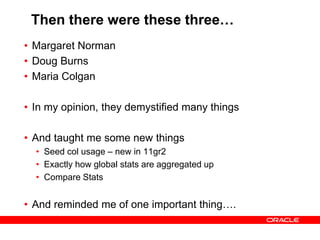
Then there were these three…
• Margaret Norman
• Doug Burns
• Maria Colgan
• In my opinion, they demystified many things
• And taught me some new things
• Seed col usage – new in 11gr2
• Exactly how global stats are aggregated up
• Compare Stats
• And reminded me of one important thing….
Never be afraid to
admit you made a
mistake ….
The R in Requirement
Stands for ….
Request
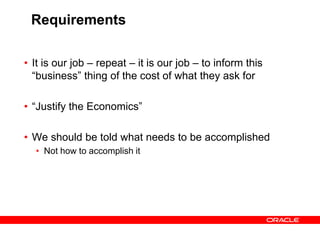
Requirements
• It is our job – repeat – it is our job – to inform this
“business” thing of the cost of what they ask for
• “Justify the Economics”
• We should be told what needs to be accomplished
• Not how to accomplish it
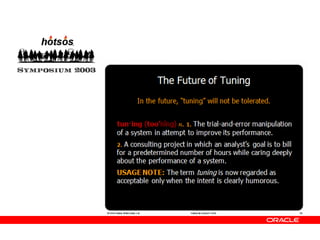
In the Future...
In conclusion...
Q U E S T I O N S
A N S W E R S

Hotsos 2012

  • 1.
    Just in Time ThomasKyte http://asktom.oracle.com/
  • 2.
    Who am I •Been with Oracle since 1993 • User of Oracle since 1987 • The “Tom” behind AskTom in Oracle Magazine www.oracle.com/oramag • Expert Oracle Database Architecture • Effective Oracle by Design • Expert One on One Oracle • Beginning Oracle
  • 3.
    What I learnedat Hotsos 2011
  • 4.
    What I learnedat Hotsos 2011 • What Gary Goodman would look like with hair. • That it is really “Millsap trace” not 10046 trace (and no, tkprof does not stand for…) • Doug Burns programmed 8bit games before giving his life up to Oracle • Procrastination can be bad
  • 5.
    It all startedwith Back to the Future!
  • 6.
    In the ancientpast ISPF
  • 7.
    Then we hadthis bad experience in the 80’s / 90’s – client server
  • 8.
    And we inventeda Brand New, Revolutionary, Never Before Seen Architecture Browser Application Server Database
  • 9.
    But – theymissed the point Database Funnel In, Concentrate, Resource Manage
  • 10.
    But – theymissed the point Database Application Server Fan Out, De-Multiplex, Database Killer
  • 11.
    Do The Math •It is all about queueing. • Almost every talk I attended had something to say about queueing, resource management – even if they didn’t say it out loud • Just do the math – it is easy…..
  • 12.
    Do The Math •From asktom • The database is set to handle 400 concurrent connections • All requests are coming through oracle HTTP server and mod-plsql and invoke a stored procedure • The transactions are not CPU intensive. It takes 2 seconds or less. • The machine has 16 CPUs • We see about 17 active sessions at most • This is a disaster waiting to happen – it will happen, it is a matter of time. It probably already has happened, they just didn’t know what it was…
  • 13.
    Do The Math trans1 trans2trans3 •When the transactions take 2 seconds or less and the active connections are about the number of CPU’s, all is good
  • 14.
    Do The Math trans1 trans2 trans3 trans4 trans5 trans6 •Now, for some reason – any reason – the 2 second response becomes 5 or 10 seconds
  • 15.
    Do The Math trans1 trans2 trans3 trans4 trans5 Trans6 Trans7 Trans8 transN transNtransN transN transN transN transN transN transN transN •Because the response time is going up, the connections are not being release as fast at the app server, so the pool grows (and grows and grows….)
  • 16.
  • 17.
    You cannot fixa queueing problem by painting more stripes on the road…
  • 18.
    Concurrent Query Testing Outof the Box Fixed DoP With Queuing User 1 76 97 27 User 2 84 101 28 User 3 86 109 30 User 4 99 110 52 User 5 101 112 53 User 6 102 112 55 User 7 107 113 78 User 8 117 113 78 User 9 122 113 81 User 10 264 115 102 User 11 271 115 102 User 12 280 118 103 Average 142 111 66
  • 19.
    Do The Math •Really – just divide and multiply. • Connection pool max size = N*cpu_count – where N is small • Connection pool min size = max size • What are the common reasons for having it set otherwise… • And why is that bad…
  • 20.
  • 21.
    Different Perspectives ofthe Same Things • Clarity is important • It is extremely important to make sure everyone is on the same page, is seeing the same thing. • The table is ‘big’ • It is a ‘huge’ table – like 1,000,000 rows • The query takes a really long time • It is taking longer than it should • We will have a huge number of transactions • The transactions are not CPU intensive.
  • 22.
    Language is ambiguoussometimes • The word contronym is used to refer to words that, by some freak of language evolution, are their own antonyms • bolt - secure, run away • consult - ask for advice, give advice • dust - add fine particles, remove fine particles • first degree - most severe (e.g., murder), least severe (e.g., burn) • garnish - enhance (e.g., food), curtail (e.g., wages) • grade - incline, level • weather - withstand, wear away • rent - buy use of, sell use of
  • 23.
    Acronyms Stink • MOS •Military Occupational Speciality • My Oracle Support • FRA • Frankfurt (of course!) • Fast (was Flash) Recovery Area • HSM • Hierarchical Storage Management • Hardware Security Module • DBA • Database Block Address • Database Administrator • SPA • Symmetrix Performance Analyzer • SQL Performance Analyzer • MTS • Mutli-Threaded Server (archaic) • Microsoft Transaction Server
  • 24.
    Remember from Monday… •How often do you hear “Click to Order must be fast”
  • 25.
  • 27.
  • 28.
    To do complexthings correctly • We need these people • To do things like complex triggers that might be needed (reference the other TK  ) • Never say never, never say always, I always say….
  • 29.
  • 30.
    There are onlytwo answers to all (technical) questions • Why • Two examples… • It Depends
  • 31.
  • 32.
    I was gladto see many ‘simple’ things • Array Fetching ops$tkyte%ORA11GR2> /* ops$tkyte%ORA11GR2> drop table t; ops$tkyte%ORA11GR2> create table t as select * from all_objects; ops$tkyte%ORA11GR2> */ ops$tkyte%ORA11GR2> set autotrace traceonly statistics ops$tkyte%ORA11GR2> set autotrace traceonly statistics ops$tkyte%ORA11GR2> set arraysize 15 ops$tkyte%ORA11GR2> select * from t; 72750 rows selected. Statistics --------------------------------------------- 5837 consistent gets 8081410 bytes sent via SQL*Net to client 53759 bytes received via SQL*Net from client 4851 SQL*Net roundtrips to/from client 72750 rows processed ops$tkyte%ORA11GR2> set autotrace traceonly statistics ops$tkyte%ORA11GR2> set arraysize 100 ops$tkyte%ORA11GR2> select * from t; 72750 rows selected. Statistics --------------------------------------------- 1758 consistent gets 7545550 bytes sent via SQL*Net to client 8417 bytes received via SQL*Net from client 729 SQL*Net roundtrips to/from client 72750 rows processed
  • 33.
    I was gladto see many ‘simple’ things • Array Fetching – but remember IT DEPENDS ops$tkyte%ORA11GR2> set arraysize 15 ops$tkyte%ORA11GR2> select * from t order by status; 72750 rows selected. Statistics --------------------------------- 1043 consistent gets 3474024 bytes sent via SQL*Net to client 53759 bytes received via SQL*Net from client 4851 SQL*Net roundtrips to/from client 1 sorts (memory) 72750 rows processed ops$tkyte%ORA11GR2> set arraysize 100 ops$tkyte%ORA11GR2> select * from t order by status; 72750 rows selected. Statistics --------------------------------- 1043 consistent gets 2950530 bytes sent via SQL*Net to client 8417 bytes received via SQL*Net from client 729 SQL*Net roundtrips to/from client 1 sorts (memory) 72750 rows processed
  • 34.
    Bulk Processing create orreplace procedure bulk as type ridArray is table of rowid; type onameArray is table of t.object_name%type; cursor c is select rowid rid, object_name from t t_bulk; l_rids ridArray; l_onames onameArray; N number := 100; begin open c; loop fetch c bulk collect into l_rids, l_onames limit N; for i in 1 .. l_rids.count loop l_onames(i) := substr(l_onames(i),2) ||substr(l_onames(i),1,1); end loop; forall i in 1 .. l_rids.count update t set object_name = l_onames(i) where rowid = l_rids(i); exit when c%notfound; end loop; close c; end; create or replace procedure slow_by_slow as begin for x in (select rowid rid, object_name from t t_slow_by_slow) loop x.object_name := substr(x.object_name,2) ||substr(x.object_name,1,1); update t set object_name = x.object_name where rowid = x.rid; end loop; end;
  • 35.
    Bulk Processing SELECT ROWIDRID, OBJECT_NAME FROM T T_BULK call count cpu elapsed disk query current rows ------- ------ -------- ---------- ---------- ---------- ---------- ---------- total 721 0.17 0.17 0 22582 0 71825 ******************************************************************************** UPDATE T SET OBJECT_NAME = :B1 WHERE ROWID = :B2 call count cpu elapsed disk query current rows ------- ------ -------- ---------- ---------- ---------- ---------- ---------- Parse 1 0.00 0.00 0 0 0 0 Execute 719 12.83 13.77 0 71853 74185 71825 Fetch 0 0.00 0.00 0 0 0 0 ------- ------ -------- ---------- ---------- ---------- ---------- ---------- total 720 12.83 13.77 0 71853 74185 71825 SELECT ROWID RID, OBJECT_NAME FROM T T_SLOW_BY_SLOW call count cpu elapsed disk query current rows ------- ------ -------- ---------- ---------- ---------- ---------- ---------- total 721 0.17 0.17 0 22582 0 71825 ******************************************************************************** UPDATE T SET OBJECT_NAME = :B2 WHERE ROWID = :B1 call count cpu elapsed disk query current rows ------- ------ -------- ---------- ---------- ---------- ---------- ---------- Parse 1 0.00 0.00 0 0 0 0 Execute 71824 21.25 22.25 0 71836 73950 71824 Fetch 0 0.00 0.00 0 0 0 0 ------- ------ -------- ---------- ---------- ---------- ---------- ---------- total 71825 21.25 22.25 0 71836 73950 71824
  • 36.
    But of course,the bulkier the better… SELECT ROWID RID, OBJECT_NAME FROM T T_BULK call count cpu elapsed disk query current rows ------- ------ -------- ---------- ---------- ---------- ---------- ---------- total 721 0.17 0.17 0 22582 0 71825 ******************************************************************************** UPDATE T SET OBJECT_NAME = :B1 WHERE ROWID = :B2 call count cpu elapsed disk query current rows ------- ------ -------- ---------- ---------- ---------- ---------- ---------- Parse 1 0.00 0.00 0 0 0 0 Execute 719 12.83 13.77 0 71853 74185 71825 Fetch 0 0.00 0.00 0 0 0 0 ------- ------ -------- ---------- ---------- ---------- ---------- ---------- total 720 12.83 13.77 0 71853 74185 71825 update t set object_name = substr(object_name,2) || substr(object_name,1,1) call count cpu elapsed disk query current rows ------- ------ -------- ---------- ---------- ---------- ---------- ---------- Parse 1 0.00 0.00 0 0 0 0 Execute 1 1.30 1.44 0 2166 75736 71825 Fetch 0 0.00 0.00 0 0 0 0 ------- ------ -------- ---------- ---------- ---------- ---------- ---------- total 2 1.30 1.44 0 2166 75736 71825 Lots less code too! (dml error logging if you need)
  • 37.
    Database Agnostic •‘The Promise’ •WriteOnce •Deploy Everywhere on anything •Less Work overall
  • 38.
    Database Agnostic • TheReality • Write Once • For each database • They are different • Deploy Everywhere on anything • Deploy on specific dot releases • Of specific databases • On certain platforms • (it is a support issue) • Less Work overall • More work overall
  • 39.
    Database Agnostic • Historically,the only thing I’ve seen achieved with this approach is • You get an application that performs poorly against one of the databases • And does really really really bad against all of the rest.
  • 40.
  • 41.
  • 42.
    They seem likemagic ops$tkyte%ORA11GR2> create table t 2 as 3 select mod(rownum,5) id, a.* from all_objects a; Table created. ops$tkyte%ORA11GR2> update t set id = 99 where rownum = 1; 1 row updated. ops$tkyte%ORA11GR2> create index t_idx on t(id); Index created. ops$tkyte%ORA11GR2> exec dbms_stats.gather_table_stats( user, 'T' ); PL/SQL procedure successfully completed. ops$tkyte%ORA11GR2> select num_rows/6 from user_tables where table_name = 'T'; NUM_ROWS/6 ---------- 12125
  • 43.
    They seem likemagic ops$tkyte%ORA11GR2> select column_name, count(*) 2 from user_tab_histograms 3 where table_name = 'T' 4 and column_name = 'ID' 5 group by column_name; COLUMN_NAME COUNT(*) -------------------- ---------- ID 2
  • 44.
    They seem likemagic ops$tkyte%ORA11GR2> set autotrace traceonly explain ops$tkyte%ORA11GR2> select * from t where id = 1; Execution Plan ---------------------------------------------------------- Plan hash value: 1601196873 -------------------------------------------------------------------------- | Id | Operation | Name | Rows | Bytes | Cost (%CPU)| Time | -------------------------------------------------------------------------- | 0 | SELECT STATEMENT | | 12125 | 1184K| 299 (1)| 00:00:04 | |* 1 | TABLE ACCESS FULL| T | 12125 | 1184K| 299 (1)| 00:00:04 | -------------------------------------------------------------------------- Predicate Information (identified by operation id): --------------------------------------------------- 1 - filter("ID"=1)
  • 45.
    They seem likemagic ops$tkyte%ORA11GR2> set autotrace traceonly explain ops$tkyte%ORA11GR2> select * from t where id = 99; Execution Plan ---------------------------------------------------------- Plan hash value: 1601196873 -------------------------------------------------------------------------- | Id | Operation | Name | Rows | Bytes | Cost (%CPU)| Time | -------------------------------------------------------------------------- | 0 | SELECT STATEMENT | | 12125 | 1184K| 299 (1)| 00:00:04 | |* 1 | TABLE ACCESS FULL| T | 12125 | 1184K| 299 (1)| 00:00:04 | -------------------------------------------------------------------------- Predicate Information (identified by operation id): --------------------------------------------------- 1 - filter("ID"=99)
  • 46.
    They seem likemagic exec dbms_stats.gather_table_stats( user, 'T' ); PL/SQL procedure successfully completed. ops$tkyte%ORA11GR2> select column_name, count(*) 2 from user_tab_histograms 3 where table_name = 'T' 4 and column_name = 'ID' 5 group by column_name; COLUMN_NAME COUNT(*) -------------------- ---------- ID 5
  • 47.
    They seem likemagic ops$tkyte%ORA11GR2> set autotrace traceonly explain ops$tkyte%ORA11GR2> select * from t where id = 1; Execution Plan ---------------------------------------------------------- Plan hash value: 1601196873 -------------------------------------------------------------------------- | Id | Operation | Name | Rows | Bytes | Cost (%CPU)| Time | -------------------------------------------------------------------------- | 0 | SELECT STATEMENT | | 14470 | 1413K| 299 (1)| 00:00:04 | |* 1 | TABLE ACCESS FULL| T | 14470 | 1413K| 299 (1)| 00:00:04 | -------------------------------------------------------------------------- Predicate Information (identified by operation id): --------------------------------------------------- 1 - filter("ID"=1)
  • 48.
    They seem likemagic ops$tkyte%ORA11GR2> set autotrace traceonly explain ops$tkyte%ORA11GR2> select * from t where id = 99; Execution Plan ---------------------------------------------------------- Plan hash value: 470836197 ------------------------------------------------------------------------------------- | Id | Operation | Name | Rows | Bytes | Cost (%CPU)| Time | ------------------------------------------------------------------------------------- | 0 | SELECT STATEMENT | | 1 | 100 | 2 (0)| 00:00:01 | | 1 | TABLE ACCESS BY INDEX ROWID| T | 1 | 100 | 2 (0)| 00:00:01 | |* 2 | INDEX RANGE SCAN | T_IDX | 1 | | 1 (0)| 00:00:01 | ------------------------------------------------------------------------------------- Predicate Information (identified by operation id): --------------------------------------------------- 2 - access("ID"=99)
  • 49.
    Then there werethese three… • Margaret Norman • Doug Burns • Maria Colgan • In my opinion, they demystified many things • And taught me some new things • Seed col usage – new in 11gr2 • Exactly how global stats are aggregated up • Compare Stats • And reminded me of one important thing….
  • 50.
    Never be afraidto admit you made a mistake ….
  • 51.
    The R inRequirement Stands for ….
  • 52.
  • 53.
    Requirements • It isour job – repeat – it is our job – to inform this “business” thing of the cost of what they ask for • “Justify the Economics” • We should be told what needs to be accomplished • Not how to accomplish it
  • 54.
  • 56.
  • 57.
    Q U ES T I O N S A N S W E R S