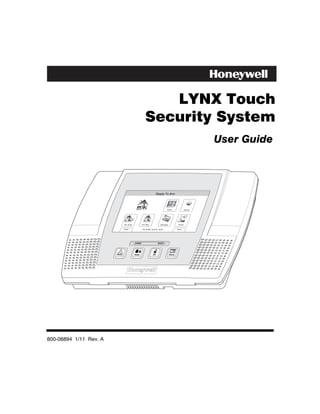
LYNX Touch
                                               Security System
                                                                                             User Guide


                                                        Ready To Arm


                                                                   Zones            System


                        Arm Away           Arm Stay          Message        Phone


                        Delay              10:18 AM June 8, 2010           More


                                   ARMED                  READY


800-06894 1/11 Rev. A
Your Honeywell security system is designed for use with devices manufactured or approved by
Honeywell for use with your security system. Your Honeywell security system is not designed for
use with any device that may be attached to your security system's control or other
communicating bus if Honeywell has not approved such device for use with your security system.
Use of any such unauthorized device may cause damage or compromise the performance of your
security system and affect the validity of your Honeywell limited warranty. When you purchase
devices that have been manufactured or approved by Honeywell, you acquire the assurance that
these devices have been thoroughly tested to ensure optimum performance when used with your
Honeywell security system.


                                             –2–
TABLE OF CONTENTS

SYSTEM OVERVIEW..................................................................................................................................5
   Features ...................................................................................................................................................5
   General Operation...................................................................................................................................6
   Quick View of System Functions ............................................................................................................9
   About the Touchscreen Control ............................................................................................................10
   Touchscreen Control Definitions ..........................................................................................................11
   About the Display and Indicators.........................................................................................................13
   Navigating Menus .................................................................................................................................15
SECURING THE PREMISES ..................................................................................................................17
   System Status........................................................................................................................................17
   Arming the System................................................................................................................................18
   Entry/Exit Delays..................................................................................................................................23
   Disarming the System...........................................................................................................................25
   Bypassing Protection Zones ..................................................................................................................27
   Panic Keys .............................................................................................................................................29
   Chime Mode...........................................................................................................................................31
   Voice Mode.............................................................................................................................................32
USER FUNCTIONS ...................................................................................................................................33
   User Access............................................................................................................................................33
   View Events ...........................................................................................................................................37
   Message Recording and Playback.........................................................................................................39
   System Adjustment ...............................................................................................................................41
   Clock/Calendar ......................................................................................................................................43
   Programming Devices ...........................................................................................................................45
   Scheduling User Interface ....................................................................................................................49
   Reminders..............................................................................................................................................52
   Speaker Phone Feature.........................................................................................................................55
   Remote Phone Control Feature ............................................................................................................57
   Remote Services ....................................................................................................................................59
FIRE/CO ALARM SYSTEM......................................................................................................................60
   General Information..............................................................................................................................60
   National Fire Protection Association’s Smoke Detector Recommendations.......................................61
   Emergency Evacuation .........................................................................................................................62
SYSTEM FUNCTIONS..............................................................................................................................63
   Testing the System................................................................................................................................63
   Maintaining Your System.....................................................................................................................65


Congratulations on your ownership of a Honeywell Security System. You have made a wise
decision in choosing it, for it represents the latest in security protection technology today.
Honeywell is the world's largest manufacturer of security system and millions of premises are
protected by Honeywell products.

                                                                           –3–
TABLE OF CONTENTS

SUMMARY OF AUDIBLE & VISUAL NOTIFICATIONS ...................................................................67
   System Displays ....................................................................................................................................68
   Zone Status Icons ..................................................................................................................................68
Regulatory Agency Statements....................................................................................................................69
FCC STATEMENTS ..................................................................................................................................70
OWNER’S INSURANCE PREMIUM CREDIT REQUEST..................................................................73
LIMITATIONS OF THIS ALARM SYSTEM..........................................................................................76
INDEX ..........................................................................................................................................................77
TWO YEAR WARRANTY..........................................................................................................................79


                                                                            –4–
SYSTEM OVERVIEW
                                                                      Features
General Information
This system offers you three forms of protection: burglary, fire, and emergency, depending on
the configuration of your system. The system consists of a touchscreen control for system
operation, various wireless sensors that provide perimeter and interior burglary protection,
and optional smoke or combustion detectors to provide early fire warning. In addition,
optional wireless keypads may have been installed to allow you to control the system away
from the touchscreen control. The system may also be used as a speaker phone.
The system monitors protection zones and system status, displays appropriate information
on the touchscreen display, and initiates appropriate alarms. Your system may also have
been programmed to automatically send alarm or status messages over the phone lines or via
the cellular/GSM network or the internet to a central alarm monitoring station, and may also
be capable of two-way voice communication with the central station.
The user features of this security system are listed below. Ask your installer which
features have been programmed for your system.
• STAY and AWAY arming modes: By using these modes you can protect either the
  perimeter only, or the entire premises.
• Panic key functions: A designated key allow you to manually activate fire, medical
  emergency, or silent police alarms. Refer to the PANIC KEYS section for detailed
  information.
• Follow me reminder announcements: Allows the panel to dial a number that you have
  specified, at a programmed time and day and deliver a message programmed by your
  installer.
• Real-time clock: Touchscreen displays current date and time. Refer to the
  CLOCK/CALENDAR section for procedures for setting the time.
• Message center: The system allows recording and play back of brief messages. Refer to
  the RECORDING/PLAYBACK MESSAGES section for procedures.
• Two-way voice: Allows the central station to listen, talk to or conduct two-way
  conversations with individuals on the premises Refer to the TWO-WAY VOICE section for
  detailed information.
• Phone Control: Provides a remote interactive phone capability that permits access to the
  security system from any off-site touch-tone telephone. Refer to the Remote Phone Control
  Feature section for detailed information.
• Speaker Phone Operation: The system is capable of operating as a speaker phone
  allowing hands free telephone conversation.
• Security Codes: The system is capable of supporting an Installer code, Master user code
  and 14 additional User codes including Babysitter and Duress codes. Refer to the
  SECURITY CODES section for detailed information.


                                            –5–
SYSTEM OVERVIEW
General Operation
• Device activation: Allows you to send “Follow-Me” or e-mail messages, as a result of a
  system event such as an alarm or trouble condition. Refer to the DEVICES section for
  detailed information.
• Scheduling feature: Allows you to schedule the automatic activation or deactivation of
  program events (e.g. alarm clock, reminder, and latch key). Refer to the SCHEDULES
  section for detailed information.

Zones
Your system's sensing devices have been assigned to various "zones." For example, the
sensing device on your entry/exit door may have been assigned to zone 01, sensing devices on
windows in the master bedroom to zone 02, and so on. These numbers appear on the display
when an alarm or trouble condition occurs.

Fire Protection
The fire protection portion of your security system (if used) is always active and will sound
an alarm if a fire condition is detected. Refer to the FIRE ALARM SYSTEM section for
important information concerning fire protection, smoke detectors and planning emergency
exit routes from the premises.

Carbon Monoxide
The carbon monoxide (CO) portion of your security system (if used) is always active and will
sound an alarm if a CO condition is detected. Refer to the FIRE ALARM SYSTEM section for
more information.

Burglary Protection
Your system provides two modes of burglary protection: STAY and AWAY. STAY mode
protects the perimeter only, allowing you to freely move inside the premises. AWAY mode
protects the entire system. Both modes provide an entry delay time that allows you to
reenter the premises without setting off an alarm. For additional security, you can turn the
entry delay off when arming the system. Refer to the ARMING THE SYSTEM section. The
system also allows you to bypass selected zones before arming the system, if desired. Refer to
the BYPASSING PROTECTION ZONES section. The system also provides a CHIME mode,
for alerting users to the opening of protected doors and windows while the system is
disarmed.
You must arm the burglary protection portion of your system before it will sense burglary
alarms. Refer to the ARMING THE SYSTEM section for detailed procedures and
information.


                                            –6–
SYSTEM OVERVIEW
                                                                        General Operation

LYNX Touch SIA False Alarm Prevention Features
Many false alarms are caused by simple accidents, like forgetting to close a door when you leave. The
LYNX Touch SIA includes several features that help prevent false alarms and some of these are
optional or programmable. Although turning off some of these features may provide additional security,
it may also increase the chance of false alarms. Your installer can help you decide whether to use the
features or not. The following provides a brief explanation of the features included with your security
system that help prevent false alarms from occurring, and what you should do if such alarms occur.
• Exit/Entry Delays: Your security system has been programmed with delay times that allow you to
   exit the premises after arming, and to disarm the system upon entry, before an alarm occurs. If you
   leave the premises too late when exiting, or disarm too late when arriving home, it will cause a false
   alarm. If an alarm occurs, you should disarm the system immediately, and wait for your monitoring
   company to call you.
• Exit Alarms: Leaving the premises and forgetting to close the door is a common cause of false
   alarms. The security system will sound an alarm, and display “Exit Error”. The security system
   provides extra time for you to disarm the system before dialing your monitoring company. Disarming
   the system immediately may prevent a call to your monitoring company.
• Exit Time Restart-Exit Delay Restart/Reset: If you leave the premises and enter again before the
   exit delay has expired, the system will restart the exit time giving you more time to leave. If there
   are less than 10 seconds left to exit, the system will sound fast beeps, indicating an alarm will occur
   soon if you fail to exit or disarm immediately. If this occurs, disarm the system and arm it again
   when you are ready to leave. The Exit Delay can also be restarted by pressing the RESTART Icon.
• Auto Stay Feature: If you arm the system in the “AWAY” mode from the control’s keypad or an RF
   keypad but no one exits, the alarm system will automatically change to the “STAY” mode. This will
   prevent you from tripping alarms by remaining on premises. Disarm the system and arm away again
   when you are ready to leave.
• Burglary Abort Window: Your security system has a delay between the time a burglary alarm
   sounds, and the time the monitoring company is called. This delay gives you time to disarm the
   security system before the alarm is reported to the monitoring company. This delay is factory preset
   at 30 seconds, but may be increased or decreased by your installer.
• False Alarms: If a burglary or fire alarm condition occurs and the system has been disarmed, the
   keypad will display “Alarm Cancelled”. If this was a false alarm, wait for the monitoring company to
   call you. They will verify your security code or password and prevent them from calling emergency
   personnel to respond to a false alarm.


                                                  –7–
SYSTEM OVERVIEW
General Operation
Security Codes
At the time of installation, you were asked to provide a personal 4-digit security or “Master
User” code. You must enter the user code when arming and disarming the system, and when
performing other system functions. As an additional security feature, other users who do not
need to know your code can be assigned up to 14 different security codes. Refer to the
SECURITY CODES section for procedures on adding security codes to the system.
Alarms
When an alarm occurs, the LYNX Touch internal sounder will sound for about 15-seconds,
and the touchscreen displays the zone(s) causing the alarm. After 15-seconds, the internal
sounder stops temporarily and voice announcements of the zones in alarm begins. When
these zones have been announced, the internal sounder sounds again and the cycle repeats
itself, until the system is disarmed or until alarm bell timeout occurs. If your system is
connected to a central monitoring station, an alarm message will be sent. To stop the alarm
sounding, simply disarm the system. The zone(s) causing the alarm remain displayed
indicating memory of alarm. Refer to the DISARMING THE SYSTEM section for
information about clearing the memory of alarm display

Two-Way Voice Feature
The control supports voice dialog between an operator at the central station and an
individual at the premises. This feature allows the central station to listen, talk to or conduct
a two-way conversation with an individual(s) at the premises and allows the operator to
gather information about the nature and location of the alarm that may be helpful in
responding to police or rescue departments. If the Two-way Voice Feature has been
programmed and an alarm condition is detected, the system sends an alarm message to the
central station. After acknowledgement is received, a “listen in to follow” message is sent to
the central station. In response to this message, the central station operator can enter
commands that allow him to initiate a 5-minute voice session.
If a subsequent zone is violated during a voice session, the system will terminate the session
and process the alarm. During the voice session, the ARMED (red) and READY (green) LEDs
will alternately blink in the Talk and VOX Modes but not during Listen Mode.


                                             –8–
QUICK VIEW OF SYSTEM FUNCTIONS

SECURITY FUNCTIONS
Checking system status: ............................................. Select “System” icon.
To arm in STAY mode: .............................................. Select “Stay” icon then enter Code.
To restart exit delay: ................................................... Select “Restart Exit Delay” icon.
To arm in AWAY mode: ............................................. Select “Away” icon or depress “Away” key then enter
                                                                           Code.
To arm INSTANT: ...................................................... Set “Delay” to ”Instant” . Select “Stay” or “Away” icon
                                                                           or “Away” key then enter code.
To arm if Quick Arm* is active: .................................... Select “Stay” or “Away” icon or “Away” key followed
                                                                           by Quick Arm tab on the touchscreen.
* User code is not required if Quick Arm is active.
To disarm system and silence alarms:......................... Depress “Off’” key or “Disarm” icon and enter Code
Note: During Entry Delay or when an Alarm Condition exists, the LYNX Touch can be disarmed by entering the User
                                                        Code. Entering the OFF key is not required
To bypass a zone(s): .................................................. Select “Zones” icon
To turn Chime mode on or off: .................................... Select “Settings” icon
MESSAGE CENTER
To record a message: ................................................. Select “Message” icon
VOLUME ADJUSTMENT
To adjust volume: ........................................................ Select “Settings” icon
To restore/unmute user announcements: .................... Select “Settings” icon
SPEAKER PHONE OPERATION
To enter speaker phone mode: .................................... Select “Phone” Icon
To enable/disable (toggle) ringer: ................................ Select “Settings” icon
OTHER FUNCTIONS (accessible to the Master User only)
To set the time and date: ............................................. Select “Date Time” icon (on Master User Menu)
To set scheduling:........................................................ Select “Schedules” icon (on Master User Menu)
To activate/deactivate devices: .................................... Select “Devices” icon (on Master User Menu)
To add/delete a user code* (except Master Code):...... Select “Users” icon (on Master User Menu)

* Only the master code can be used to add or delete another user code.
To turn Test mode On or Off:....................................... Select “Test” icon (on Master User Menu)
To view system events:................................................ Select “Events” icon (on Master User Menu)
To program or delete “Follow Me” Reminders: ............ Select “Reminders” icon (on Master User Menu)


                                                                 –9–
SYSTEM OVERVIEW
About the Touchscreen Control
General
                                   **IMPORTANT**
If the LYNX Touch is beeping rapidly upon entering the premises, an alarm has occurred
during your absence and an intruder may still be on the premises. LEAVE IMMEDIATELY
and CONTACT THE POLICE from a nearby safe location.

The touchscreen icons and keys allow you to control all system functions. Additionally, the
touchscreen display shows the zone and description of all system occurrences. When the
speaker phone mode is active, a full-function telephone keypad is displayed on the
touchscreen.
The system also features a built-in sounder, which will sound during alarms and troubles
and a built-in speaker announces system status. Additionally, the system "beeps" during
certain system functions, such as during entry/exit delay times, in Chime mode, and when
depressing any of the keys (to acknowledge the key press).
The voice announcement volume is adjustable, however the “beeps” that sound in response to
alarms always sound at the maximum volume level. All other “beeps” (trouble, chime,
exit/entry, etc) can be set to either low or high volume.


                                        ARMED            READY


                                                                        5000-100-002-V0


                                                – 10 –
SYSTEM OVERVIEW
                                                      Touchscreen Control Definitions

                                                                           1


  9                                                                                                   2


                                                                                                      3

                                              ARMED            READY


  8                                                                                                   4


                            7             6                            5                       5000-100-051-V0


Note: The system functions described below are for reference only and require additional key entries to
      activate.
1. DISPLAY WINDOW: Color Liquid Crystal Display (LCD). Displays system status icons, time,
   system status information, user menus and the virtual keypad.
2. READY Indicator (LED): (GREEN) When lit, indicates system is ready to be armed; blinking
   indicates system is not ready (a zone is open). Blinks once per second when AVM (VOX or Talk) or
   speaker phone mode is active.
3. HOME Key: Used to exit from a screen or return to the home screen.
4. Speaker: Source of audible internal warning and confirmation sounds, status announce-
   ments, as well as alarms (see "Summary of Audible Notifications").


                                                      – 11 –
SYSTEM OVERVIEW
Touchscreen Controls Definitions
5. OFF (Disarm) KEY: Initiates the disarm process and causes a keypad to be displayed on
   the touchscreen. Disarms the burglary portion of the system, silences alarms and audible
   trouble indicators, and clears alarm trouble display after the problem has been corrected.
6. AWAY KEY: Completely arms both perimeter and interior burglary protection for backup
   protection by sensing an intruder's movements through protected interior areas as well as
   guarding protected doors, windows, etc. Entrance can be made through an entry delay
   zone without causing an alarm if the system is disarmed before the entry delay time
   expires.
7. PANIC Key: When depressed for 4 seconds, the virtual panic icons are displayed on the
   touchscreen.
8. MICROPHONE: Used to record personal messages via the Message Center, and for two-
   way voice and speaker phone operation.
9. ARMED Indicator (LED): (RED) Lit when the system has been armed (STAY, AWAY).
   Blinks when armed and fault exists, or once per second when AVM (VOX or Talk) or
   speaker phone mode is active.

LED Meanings
ARMED LED:     ON = System armed
(Red)          OFF = System disarmed
               Blinking = System armed, and an alarm is in progress or was previously.
               Blinking alternately with READY LED = speaker phone mode is active
READY LED:     ON = System disarmed, ready to arm
(Green)        OFF = System armed
               Blinking = System disarmed, not ready to arm (a fault exists)
               Blinking alternately with ARMED LED = speaker phone mode is active.


                                             – 12 –
SYSTEM OVERVIEW
                                       About the Display and Indicators
Display Definitions
    ICON         TEXT       DEFINITION
               Ready to     Displayed along with the the text “READY TO ARM” when
               Arm          system is Disarmed and ready to arm.


               Armed        “Armed Away” is displayed along the top of the screen. An
               Away         armed away icon along with “Armed Away” is displayed after
                            the exit delay expires.

               Armed Stay   “Armed Stay” is displayed along the top of the screen. An
                            armed stay icon along with “Armed Stay” is displayed after the
                            exit delay expires.

               Exit Now     “Armed Stay – Exit Now” or “Armed Away – Exit Now” is
               28 Seconds   displayed in a red band along the top of the screen. An exit
                            icon along with “Exit Now” and the time remaining (i.e.; “28
                            Seconds”) is displayed during the exit delay.
                            when the system is armed in the Stay mode. The text “Armed:
                            Stay Exit Now” Once the exit delay expires “Armed: Stay” is
                            displayed along with the Home Screen.
                            Note: Display alternates with ARMED STAY icon and text
               Alarm        “Alarm” is displayed in a red band along the top of the screen.
                            An alarm (bell) icon along with “Alarm” is displayed alternately
                            with the Zone that has caused the alarm.

               Fault (Zone “Not Ready To Arm – Fault” is displayed in a yellow band
               No.&         along the top of the screen. An open windowor door icon
               Description) along with the zone descriptor and “Window” or “Door” is
                            displayed when a window or entry/exit fault has been
     OR                     detected.
                            OR
                            Displayed alternately with the alarm (bell) icon and “Alarm”.
                            “Alarm” is also displayed in a red band along the top of the
                            screen.


                                        – 13 –
SYSTEM OVERVIEW
About the Display and Indicators
   ICON       TEXT      DEFINITION
           Fire OR      The fire icon is displayed with alternating text “Fire” and “Fire
           Fire Alarm   Alarm 95 Fire”. “Fire Alarm” is also displayed in a red band
                        along the top of the screen.
           95 Fire
           Alarm 96     The Medical icon isplayed when a medical alarm is activated.
           Medical      “Alarm” is also displayed in a red band along the top of the
                        screen.
                        (If programmed for display by your installer)
           Alarm 99     The alarm (bell) icon when a burglary alarm is activated.
           Police       “Alarm” is also displayed in a red band along the top of the
                        screen.
                        (If programmed for display by your installer)
           CO Alarm     Displayed alternately with the alarm (bell) icon when a CO
                        alarm is activated.
                        “Alarm” is also displayed in a red band along the top of the
                        screen.
           Cover        A check system icon along with “Cover Tamper” is displayed
           Tamper       when a cover tamper has been detected. “Ready To Arm –
                        System Trouble” is displayed in a yellow band along the top of
                        the screen.
           Reporter     The system has identified a problem with the telephone dialer.
           Failure

           Low          “Not Ready To Arm – System Trouble” is displayed in a yellow
           Battery      band along the top of the screen. A low battery icon along with
                        “Low Battery” is displayed when the system’s backup battery
                        power is low.
           90 RF Jam    Appears when the system has detected an RF jamming
                        condition or excessive interference.

           94 Phone     Appears when the system has detected a loss of telephone
           Line Cut     service.

           AC Loss      Displayed when the system has lost AC power. “Ready To
                        Arm – System Trouble” is displayed in a yellow band along the
                        top of the screen.


                                    – 14 –
SYSTEM OVERVIEW
                                                                          Navigating Menus
LCD Display
LYNX Touch’s Liquid Crystal Display (LCD) touch-screen displays variable icons and text on
“screens”. The screen displays status icons and associated text, the current time, system
status information and menu choices. The system status is displayed in a colored band along
the top of the screen. The band color is variable and will change between red, yellow and
green as the system status changes.
The Menu area includes a list of commands, or choices that apply to the current selection.
The status area provides information about various system events. A “Home Screen” is
displayed whenever power is applied to the system. In addition the green ‘READY” LED will
be lit.

      SYSTEM                                     Ready To Arm
      STATUS


SYSTEM/ZONE
     STATUS
                                                                   Zones            System


                           Arm Away           Arm Stay            Message           Phone


                             Delay              10:18 AM June 8, 2010                More

                                                                                         5000-100-054-V0

                                LYNX Touch Home Screen (page 1)

Navigation Keys
Navigating through the screens is accomplished by lightly touching the menu item on the
touch-screen. Once activated, the control will take you to the next screen. Selecting the
“Home” (cancel) key or the “ ” Key will return you to the home screen at any time unless
System Programming mode is active.
Note: You may find it convenient to adjust the volume setting before entering the Program (Tools) Mode.
      This will allow you to clearly hear the feedback announcements or system beeps in the Programming
      Mode, of the system’s built-in speaker. To adjust the volume, select “More” on the “home Screen” and
      then select “Settings”. Adjust the volume using the slide shown on the Settings screen and then
      select “Save” to accept.


                                                 – 15 –
SYSTEM OVERVIEW
Navigating Menus
Menu Screens
System Status is displayed at the top of each screen. The time and date are displayed at the
bottom of the Home Screen.
Menus
Unrestricted Menu
The first page of the Home Screen provides access to an Unrestricted Menu displays the
system status and eight selection icons or “buttons”.
    1. Zones – Provides access to Zone information and options.
    2. System – Provides information about system status.
    3. Arm Away – Used to Arm the system in Away mode.
    4. Arm Stay – Used to Arm the system in Stay mode.
    5. Message – Provides access to Message Center.
    6. Phone – Provides access to Speaker Phone mode (if programmed).
    7. Delay/Instant – Used to toggle between exit delay and instant arming options.
    8. More – Advances system to second page of the Home Screen.
The second page of the Home Screen displays the system status in and seven options.
    1. Tools – Provides access User Programming Menus (Master User Code required for
        access).
    2. Arm Away – Used to Arm the system in Away mode.
    3. Arm Stay – Used to Arm the system in Stay mode.
    4. Settings – Provides access to various touchscreen functions including Brightness,
        Contrast, Volume, Voice, Chime and Ringer.
    5. Delay/Instant – Used to toggle between exit delay and instant arming options.
    6. Back – Returns system to first page of the Home Screen.

Master Menu
The User Menu provides access to User configurable features and displays eight options.
Entering the Master User Code is required to access the Master menu.
   1. Users – Allows Master User to add or remove User Codes
   2. Devices – Allows Master User to program output triggers.
   3. Schedules – Allows Master User to program schedules
   4. Test – Allows Master User to Test the system
   5. Date Time – Used to program date and time.
   6. Events – Allows Master User to view system events
   7. Reminders – Allows Master User to add or remove local and “Follow Me” reminders.
   8. Slide Show – Allows Master User to select a slide show for use as a screensaver.
   9. Back – Returns system to first page of the Home Screen.


                                           – 16 –
SECURING THE PREMISES
                                                                    System Status
General Information
Before arming your system, all protected doors, windows, and other protection zones must be
closed or bypassed (see the BYPASSING PROTECTION section).
READY LED: The green READY indicator on the control will be lit if the system is ready to
           be armed. If blinking, the system is not ready.
NOTE: The phrases shown in brackets are variable, and are announced only if appropriate in the
      current state of the system.
Depending on the current state of the system the following phrases may be heard:
fire alarm [zone voice descriptors]
carbon monoxide alarm [zone voice descriptors]
alarm [zone voice descriptors]
fire fault [zone voice descriptors]
carbon monoxide fault [zone voice descriptors]
fault [zone voice descriptors]
low battery [zone voice descriptor]
system low battery
check system
AC loss
zones bypassed
chime

VOLUME LEVEL: The volume level of system announcements can be increased or decreased. Refer to
the MESSAGE RECORDING/PLAYBACK section for the procedure.

System Can Be Armed
The READY LED will be lit steadily once all protection zones have been closed or bypassed.
You may now arm the system.


                                                 – 17 –
SECURING
SECURIN G THE PREMISES
Arming the System
Arming in Stay Mode
Use this mode when you are staying home, but expect someone to use the entrance door
later. Close all protected perimeter windows and doors before arming. The green READY
indicator on the control should be lit if the system is ready to be armed. When armed in
STAY mode, the system will sound an alarm if a protected door or window is opened, but you
may otherwise move freely throughout the premises. Late arrivals can enter through the
designated entrance door without causing an alarm, but they must disarm the system within
the entry delay period or an alarm will occur. If Quick Arm was programmed by the installer,
you do not need to enter the security code to arm the system. The security code must always
be used to disarm the system, however.

             The Babysitter Code and Installer Code cannot disarm the system unless it was used to arm
             the system. In addition, if the system is armed by pressing via Quick-Arming, neither the
             Babysitter Code nor Installer Code can disarm the system.

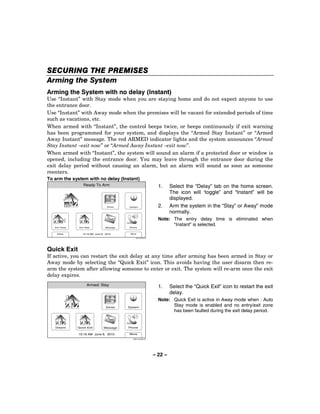
                         Ready To Arm                                        1.   Select the Arm Stay icon, the system will
                                                                                  beep once and display a keypad.


                                           Zones       System


    Arm Away          Arm Stay           Message       Phone


     Delay              10:18 AM June 8, 2010          More

                                                           5000-100-006-V0


                           Ready To Arm                                      2.   Enter a valid User Code.
 Arm the system in Stay mode                                                      OR
                                       1           2        3
                                                                                  If Quick Arm has been enabled, select the
       Enter Code:                                                                “Quick Arm” icon.
                                       4           5        6
                                                                                  The system will beep three times and
                                                                                  announce “Armed Stay Exit Now”. The exit
                                       7           8        9
                                                                                  delay screen will be displayed. If
                                                                                  programmed the display will count down
             Cancel                 Clear          0
                                                                                  the time remaining in the exit delay.
                                                         5000-100-137-V0
                                                                             Note:   If a valid user code is not entered or the
                                                                                     Confirm icon has not been selected within
                                                                                     10 seconds, the system will return to the
                                                                                     “home” screen and it will not be armed.


                                                                      – 18 –
SECURING THE PREMISES
                                                                             Arming the System
                      Armed: Stay                                      3.   At the end of the exit delay the system
                                                                            will announce “Armed Stay” and
                                                                            display the “Armed Stay” screen.
                                 Zones         System


         Disarm                 Message        Phone

                  10:18 AM June 8, 2010         More
                                                  5000-100-056-V0


        If an invalid User Code is entered, the system will return to the home screen.


Auto Stay Feature
If this feature is enabled by installer, the LYNX Touch SIA, when armed AWAY from the control’s
keypad or a Wireless Keypad, switches to the STAY mode if the Exit Time expires and no exit has been
made.
NOTE:   If the exit route entry/exit sensor is in a check condition or has been bypassed it will result in a loss of interior
        protection because the alarm system will arm STAY in this case. Consult with your installer for servicing of the
        entry exit zones or to turn off this feature if a check condition on entry exit zones occurs.


                                                              – 19 –
SECURING THE PREMISES
Arming the System
Arming In Away Mode
Use this mode when no one will be staying on the premises. Close all protected perimeter
windows and doors before arming. The green READY indicator on the control should be lit if
the system is ready to be armed. When armed in AWAY mode, the system will sound an
alarm if a protected door or window is opened, or if any movement is detected inside the
premises, when infrared detection devices are used. You may leave through a designated
entrance door during the exit delay period without causing an alarm. You may also re-enter
through the entrance door, but you must disarm the system within the entry delay period or
an alarm will occur. If Quick Arm was programmed by the installer, you do not need to enter
the security code to arm the system. The security code must always be used to disarm the
system, however.

              The Babysitter Code and Installer Code cannot disarm the system unless it was used to arm
              the system. In addition, if the system is armed by pressing via Quick-Arming, neither the
              Babysitter Code nor Installer Code can disarm the system.

                        Ready To Arm                                        1.   Select the Arm Away icon, the system will
                                                                                 beep once and display a keypad.

                                          Zones       System


   Arm Away          Arm Stay           Message       Phone


    Delay              10:18 AM June 8, 2010          More

                                                          5000-100-006-V0


                          Ready To Arm
                                                                            2.    Enter a valid User Code.
Arm the system in Away mode
                                      1           2        3                      OR
                                                                                  If Quick Arm has been enabled, select the
      Enter Code:                                                                 “Quick Arm” icon.
                                      4           5        6
                                                                                 The system will beep two times and announce
                                      7           8        9
                                                                                 “Armed Away Exit Now. The exit delay screen
                                                                                 will be displayed. If programmed the display
            Cancel                 Clear          0                              will count down the time remaining in the exit
                                                                                 delay in seconds.
                                                        5000-100-053-V0

                                                                            Note:    If a valid user code is not entered or the Confirm
                                                                                     icon has not been selected within 10 seconds,
                                                                                     the system will return to the “home” screen and it
                                                                                     will not be armed.


                                                                            – 20 –
SECURING THE PREMISES
                                                                    Arming the System

             Armed: Away                               3.     If “Exit Warning” has been enabled, the
                                                              system will continue to beep throughout
                                                              the exit delay. Rapid beeps will sound for
                        Zones    System
                                                              the final 10 seconds of the delay period. At
                                                              the end of the exit delay the system will
                                                              announce “Armed Away” and displays the
                                                              “Armed Away” screen.
Disarm                 Message   Phone

         10:18 AM June 8, 2010   More
                                   5000-100-057-V0


If an invalid User Code is entered, the system will return to the home screen.


                                                     – 21 –
SECURING THE PREMISES
Arming the System
Arming the System with no delay (Instant)
Use “Instant” with Stay mode when you are staying home and do not expect anyone to use
the entrance door.
Use “Instant” with Away mode when the premises will be vacant for extended periods of time
such as vacations, etc.
When armed with “Instant”, the control beeps twice, or beeps continuously if exit warning
has been programmed for your system, and displays the “Armed Stay Instant” or “Armed
Away Instant” message. The red ARMED indicator lights and the system announces “Armed
Stay Instant –exit now” or “Armed Away Instant –exit now”.
When armed with “Instant”, the system will sound an alarm if a protected door or window is
opened, including the entrance door. You may leave through the entrance door during the
exit delay period without causing an alarm, but an alarm will sound as soon as someone
reenters.
To arm the system with no delay (Instant)
                  Ready To Arm                                      1.     Select the “Delay” tab on the home screen.
                                                                           The icon will ‘toggle” and “Instant” will be
                                                                           displayed.
                                   Zones    System                  2.     Arm the system in the “Stay” or Away” mode
                                                                           normally.
                                                                    Note: The entry delay time is eliminated when
   Arm Away    Arm Stay           Message   Phone
                                                                          “Instant” is selected.
    Delay        10:18 AM June 8, 2010       More

                                                5000-100-006-V0


Quick Exit
If active, you can restart the exit delay at any time after arming has been armed in Stay or
Away mode by selecting the “Quick Exit” icon. This avoids having the user disarm then re-
arm the system after allowing someone to enter or exit. The system will re-arm once the exit
delay expires.
                    Armed: Stay
                                                                    1.     Select the “Quick Exit” icon to restart the exit
                                                                           delay.
                                                                    Note: Quick Exit is active in Away mode when : Auto
                                  Zones     System
                                                                          Stay mode is enabled and no entry/exit zone
                                                                          has been faulted during the exit delay period.


   Disarm     Quick Exit        Message     Phone

              10:18 AM June 8, 2010         More
                                              5000-100-060-V0


                                                                  – 22 –
SECURING THE PREMISES
                                                                    Entry/Exit Delays
Exit Delay
Exit delay begins immediately after arming the system, and gives you time to leave through
the designated exit door without setting off an alarm. The system display will count down
the time remaining in the exit delay, if programmed by your installer. If the system has been
Armed Away, a slow beeping will sound throughout the exit delay period, if programmed by
your installer. The exit door must be closed before the end of the exit delay. During the last
10 seconds of the exit delay fast beeps will sound as a warning that the delay time is nearing
its end. The exit beeps cannot be silenced.
Restarting Exit Delay While System Armed
Ask your installer if this feature is active for your system. If active, you can restart the exit
delay one time after arming in Stay or Away mode during the exit delay by selecting the
“Restart” key. This will allowing extra time for someone to enter or exit or re-enter the
property before the system is armed.
             Armed: Stay - Exit Now

              Exit now
              28 seconds

                             Zones    System


    Disarm     Restart      Message   Phone

              10:18 AM June 8, 2010   More
                                        5000-100-061-V0


Exit Alarms
To minimize false alarms sent to the alarm monitoring company, your system may have been
programmed for this feature. Ask your installer if Exit Alarm is active for your system.

Whenever you arm the system, the exit delay begins. If an entry/exit door or interior zone is
faulted when the exit delay ends (e.g., exit door left open), the system sounds an alarm and
starts the entry delay timer. If you disarm the system before the entry delay ends, the alarm
sound stops and the message “Alarm Cancelled is displayed, in the system bar. Additionally,
Alarm and the faulted zone are displayed with their associated icons in the system/zone
status area. No message is sent to the alarm monitoring company. To clear the exit alarm
condition, the open zone must be secured. To clear the display, select the “Disarm” icon OR
depress the “Off” key and then enter your security code.
If you do not disarm the system before the entry delay ends, and an entry/exit door or
interior zone is still open, the alarm sound continues and an "exit alarm" message is sent to
the alarm monitoring company. The message “Alarm Exit Error" is displayed, in the system
bar. Additionally, Alarm and the faulted zone are displayed with their associated icons in the
                                                    – 23 –
SECURING THE PREMISES
Entry/Exit Delays
system/zone status area. The alarm will continue to sound until the system is disarmed or
timeout ocurs. To stop the alarm, the system must be disarmed by selecting the “Disarm”
icon OR depressing the “Off” key and then entering your security code. The message “Alarm
Cancelled" is displayed, in the system bar, indicating that the alarm has been cancelled (if
this feature is enabled by the installer). “Alarm” and the faulted zone continue to be
displayed with their associated icons in the system/zone status area. To clear the display,
select the “Disarm” icon OR depress the “Off” key and then enter your security code a second
time. An exit alarm also results if an entry/exit door or interior zone is faulted within two
minutes after the end of the exit delay.
Entry Delay
Entry Delays give you time to disarm the system when you re-enter through the designated
entrance door. You must disarm the system before the entry delay period ends, or an alarm
will occur. The control beeps during the entry delay period, reminding you to disarm the
system. There are two entry delays (if programmed). The first is for your primary entrance
and the second can be used for a secondary entrance, where a longer delay is required to
walk to the control to disarm the system. You can also arm the system with no entry delay at
all by selecting the “Delay” icon prior to arming the system. This will toggle the system to
“Instant”, which can provide greater security while on the premises or while away for
extended periods of time. See ARMING THE SYSTEM section for procedure. See your
installer for delay times programmed for your system.
Exit Delay:            None, 30, 45, 60, 90 seconds, 2 minutes
Entry Delay 1:         None, 30, 45, 60, 90 seconds, 2 minutes
Entry Delay 2:         None, 30, 45, 60, 90 seconds, 2 minutes

LYNX Touch SIA Exit/Entry Delay Times
Exit Delay:            45, 60, 90 seconds, 2 minutes
Entry Delay 1:         30, 45, 60, 90 seconds, 2, 3, 4 minutes
Entry Delay 2:         30, 45, 60, 90 seconds, 2, 3, 4 minutes


                                            – 24 –
SECURING THE PREMISES
                                                                                Disarming the System
Select the “Disarm” icon or the “Off” key to disarm the system and to silence alarm and
trouble sounds. See the SUMMARY OF AUDIBLE NOTIFICATION section for information,
which will help you to distinguish between fire and burglary alarm sounds. During Entry
Delay or when an Alarm Condition exists, the system will be disarmed as soon as the correct
user code is entered on the touchscreen. Selecting the OFF key is not required. The entry
beeps or alarm sound can be silenced by pressing any key however, it will restart in 10
seconds if the correct User Code is not entered. The READY indicator will light (if no alarms
have occurred while armed) and the control will beep once to confirm that the system is
disarmed.

                                   **IMPORTANT**
If the LYNX Touch is beeping rapidly upon entering the premises, an alarm has occurred
during your absence and an intruder may still be on the premises. LEAVE IMMEDIATELY
and CONTACT THE POLICE from a nearby safe location.

Disarming the system and silencing alarms
                     Armed: Stay
                                                                      1.    Select the “Disarm” icon or depress the
                                                                            “Off” key. The system will beep once and
                                                                            display a keypad.
                                   Zones       System


        Disarm                 Message         Phone

                 10:18 AM June 8, 2010         More
                                                 5000-100-056-V0


                     Armed Stay
                                                                      2.   Enter a valid Code. The system will beep
                               1           2        3                      once and announce “Disarmed Ready to
                                                                           Arm”.
                               4           5        6                 Note: If a valid user code is not entered or the
     Enter Code:
                                                                             Confirm icon has not been selected
                               7           8        9                        within 30 seconds, the system will return
                                                                             to the “home” screen and it will not be
       Cancel                Clear         0                                 disarmed.
                                                 5000-100-065-V0


       If an invalid User Code is entered, system will return to the home screen.


                                                                   – 25 –
SECURING THE PREMISES
Disarming the System
When an Alarm Occurs
When an alarm has occurred, the touchscreen displays the zone number(s) that caused the
alarm and the type of alarm (e.g., “Fire Alarm”). These messages remain displayed until
cleared by a user. To clear the display, note the zone number displayed and enter an Off
sequence. If the fault cannot be corrected, notify your alarm company.


                                         – 26 –
SECURING THE PREMISES
                                                                                      Bypassing Protection Zones
Bypassing Individual Zones
The Bypass feature can be used when you want to intentionally arm your system with one or
more zones unprotected. Bypassed zones are unprotected and will not cause an alarm when
violated while your system is armed. All bypasses are removed when an Off sequence
is performed. Bypasses are also removed if the arming procedure that follows the bypass
command is not successful. The system will not allow panic, fire or CO zones to be
bypassed.
Bypassing zones
                         Ready To Arm                                           1. With the system in the disarmed state,
                                                                                   select the “Zones” icon. The system displays
                                                                                   the Zones/Bypass screen.
                                          Zones        System


    Arm Away        Arm Stay             Message       Phone


     Delay              10:18 AM June 8, 2010          More

                                                           5000-100-006-V0


                 Not Ready To Arm - Fault                                       2. Select the zone(s) that you wish to bypass
 2. Front                                                                          and then select “Bypass” OR if programmed,
 Door               FAULT                                                          the “Bypass All Faulted” button allows you to
                                                                                   bypass all faulted zones (excluding Panic,
                                                                                   Fire or CO zones). The system displays a
                                                                                   keypad.

  Bypass All              Clear                          Select
                                             Bypass       Fault
   Faulted              Bypasses
                                                         5000-100-141-V0


                  Not Ready to Arm - Fault
                                                                                3. Enter a valid Code. The system returns to
   Bypass Selected Zones
                                         1         2          3
                                                                                   the Bypass screen and the zone(s) that are
                                                                                   bypassed will be displayed.
       Enter Code:
                                         4         5          6                 4. Select the     icon to return to the home
                                                                                   screen.
                                         7         8          9                 5. Arm the system normally. See ARMING
                                                                                   THE SYSTEM section for procedure
               Cancel                 Clear        0
                                                         5000-100-067-V0


                                                                             – 27 –
SECURING
SECURING THE PREMISES
Bypassing Protection Zones
Displaying Bypassed Zones
                    Ready To Arm                                                 1. With the system in the disarmed state,
                                                                                    select the “Zones” icon. The system displays
                                                                                    the Zone screen and the status for each
                                        Zones           System
                                                                                    zone will be indicated.
                                                                                 2. Use the “ ” “ ” buttons to scroll to
                                                                                    additional pages and view the zone status.
    Arm Away     Arm Stay            Message            Phone
                                                                                 3. If you select the “Select All” button it
      Delay        10:18 AM June 8, 2010                More
                                                                                    functions scrolls through the following:
                                                            5000-100-006-V0         “Select All”, “Select Alarm”, “Select Trouble”
                    Ready To Arm
                                                                                    and “Select Fault”. The system will display
                                                                                    the associated zones.
 2. Front                   3. Garage
 Door                       Door
               BYPASSED                         READY

95. Fire                    96. Medical
                READY                           READY

99. Police
                READY

  Bypass All        Clear                 Bypass         Select
   Faulted        Bypasses                                  All
                                                          5000-100-066-V0


                                                                              – 28 –
SECURING THE PREMISES
                                                                    Panic Keys
Panic Keys
Your system may have been programmed to use special keys to manually activate panic
functions. The functions that might be programmed are listed below. See your installer for
the function(s) that may have been programmed for your system.
Note: Your installer should advise which functions are active in your system.
   Key                                            Function

             When activated, alerts the alarm monitoring company that a fire condition exists.


             When activated, alerts the alarm monitoring company that a police emergency
             exists.


             When activated, alerts the alarm monitoring company that a health emergency
             exists.

Types of Panic Alarms
• A silent emergency/silent alarm sends an alarm signal to the alarm monitoring
   company, if your system is connected to an alarm monitoring company, but there will be
   no audible alarms or visual displays.
• An audible emergency/audible alarm sends an emergency message to the alarm
   monitoring company, if your system is connected to an alarm monitoring company, and
   sounds a loud, steady alarm at your control. (“ALARM” will be announced and the Alarm
   icon is displayed along with “Alarm” and “Alarm 99 Police” alternately.
• A personal emergency/aux alarm sends an emergency message to the alarm
   monitoring company, if your system is connected to an alarm monitoring company, and
   sounds at controls, but not at external sounders. . (“ALARM” will be announced and the
   Alarm icon is displayed along with “Alarm” and with “Alarm 96 Medical”.
• A fire alarm sends a fire alarm message to the alarm monitoring company, if your
   system is connected to an alarm monitoring company, and uniquely activates the
   sounder. The Fire Alarm icon is displayed along with “Fire Alarm 95 Fire”.


                                              – 29 –
SECURING THE PREMISES
Panic Keys
Activating a panic alarm
                        Ready To Arm                                             1. With the system in the disarmed or armed
                                                                                    state, depress and hold the “Panic” key until
                                                                                    the system displays the Panic screen
                                          Zones         System
                                                                                    (approximately 3-4 seconds).


   Arm Away          Arm Stay           Message         Phone


    Delay              10:18 AM June 8, 2010            More

                                                            5000-100-006-V0


                        Ready To Arm
                                                                                 2. Touch the desired panic icon on the screen.
                                                                                 3. If applicable, the alarm will sound and the
                                                                                    associated icon will be displayed.


      Police              Fire            Medical


                                                          5000-100-068-V0


                           Fire Alarm
                                                                                 Note: Dependant upon how your system has
                                      1             2        3                         been programmed a keypad may be
               Fire Alarm                                                              displayed. This will allow you to cancel
               Fire
                                      4             5        6                         the alarm by entering valid User Code
                                                                                       on the keypad.
      Enter Code:
                                      7             8        9

            Cancel                 Clear            0
                                                          5000-100-149-V0


                                                                              – 30 –
SECURING THE PREMISES
                                                                                                  Chime Mode
Chime Mode
Your system can be set to provide you with an audible alert of the opening of a door, while it
is disarmed, by using Chime mode. When activated, three beeps will sound at the control
whenever a protected perimeter door is opened and the zone voice descriptor will be
announced. Additionally, the faulted zone information will be displayed on the home screen.
Selecting the “Zones” icon displays the open protection points. The Chime mode can be
turned on only when the system is disarmed.
Turning Chime mode On or Off
                     Ready To Arm                                                1. With the system in the disarmed or armed
                                                                                    state, select the “Settings” icon from the
                                                                                    second page of the Home Screen. The
                                                       Tools
                                                                                    system displays the Setting screen.


   Arm Away     Arm Stay                              Settings


       Delay         10:18 AM June 8, 2010             Back

                                                            5000-100-007-V0


                     Ready To Arm
                                                                                 2. Select the “Chime” icon. The system will
Brightness                                                                          toggle between “Off” and “On”. When “On” is
                                                                                    selected, the Chime mode will be active.
Contrast                                                                         3. Select the “Save” button to save your new
                                                                                    settings.
Volume


 Off   Voice   Off    Chime          Off     Ringer      Save

                                                         5000-100-008-V0


                                                                              – 31 –
SECURING THE PREMISES
Voice Mode
Voice Mode
Your system can be set to provide you with a voice alert of system functions by activating the
Voice mode. When activated, the system will announce the system status when
armed/disarmed. The Voice mode can be turned on only when the system is disarmed.
Turning Voice mode On or Off
                     Ready To Arm                                              1. With the system in the disarmed or armed
                                                                                  state, select the “Settings” icon from the
                                                                                  second page of the Home Screen. The
                                       Zones          System
                                                                                  system displays the Keypad screen.


   Arm Away     Arm Stay              Message         Phone


       Delay         10:18 AM June 8, 2010            More

                                                          5000-100-006-V0


                     Ready To Arm
                                                                               2. Select the “Voice” icon. The system will
Brightness                                                                        toggle between “Off” and “On”. When “On” is
                                                                                  selected, the Voice mode will be active.
Contrast                                                                       3. Select the “Save” button to save your new
                                                                                  settings.
Volume


 Off   Voice   Off    Chime          Off     Ringer    Save

                                                        5000-100-008-V0


                                                                            – 32 –
USER FUNCTIONS
                                                                                        User Access
General Information
For additional security you (the Master User Code) can assign secondary user codes to
individual users enabling them to perform specific system functions. These secondary users
are identified by "User Numbers" when their codes are assigned. You can assign up to 14
user codes. Note that the Master User is the only one who can assign codes to secondary
users.
All codes can be used interchangeably when performing system functions (a system armed
with one user's code can be disarmed by another user's code), with the exception of the
Babysitter Code described below.
•   Babysitter Code: This code can be used to arm the system, but cannot disarm the
    system unless the system was armed with this code. This code is typically assigned to
    someone (such as a babysitter) who needs to arm/disarm the system only at certain
    times.
•   Duress Code: This feature is intended for use when you are forced to disarm or arm the
    system under threat. When used, the system will act normally, but can silently notify the
    alarm monitoring company of your situation, if that service has been provided. The
    Duress Code is useful only when the system is connected to an alarm
    monitoring company.
IMPORTANT: Temporary users of the system (e.g., babysitters, cleaning staff) should not
be shown how to use any system function they do not need to know, such as bypassing
protection zones for example.
False Alarm Prevention Feature
The system prevents User Codes (including the Duress Code) from being duplicated. If you have
attempted to assign a duplicate 4-digit code, the entry will be rejected. Any previous existing code will
remain unchanged. Choose a different new 4-digit code and repeat the procedure.

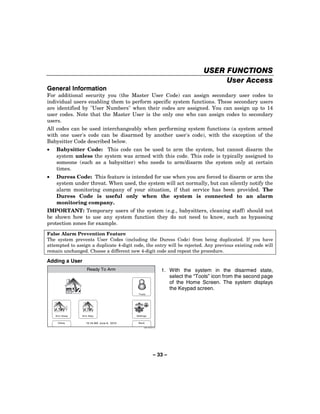
Adding a User
                   Ready To Arm                                   1. With the system in the disarmed state,
                                                                     select the “Tools” icon from the second page
                                                                     of the Home Screen. The system displays
                                                                     the Keypad screen.
                                           Tools


    Arm Away    Arm Stay                  Settings


     Delay        10:18 AM June 8, 2010    Back

                                                5000-100-007-V0


                                                           – 33 –
USER FUNCTIONS
User Access
                                Ready To Arm                                                    2. Enter your 4-digit Master User Code. The
    Program the system                                                                             system    displays   the   Master   User
                                                 1           2               3
                                                                                                   programming screen.
         Enter Code:
                                                 4           5               6


                                                 7           8               9


               Cancel                        Clear           0
                                                                           5000-100-009-V0


                                 Ready To Arm                                                   3. Select the “Users” icon. The system displays
                                                                                                   the Master User screen.

     Users                  Devices          Schedules                Test


    Date Time               Events           Reminders           Slide Show

                                                                      Back
                                                                           5000-100-070-V0


                                Ready To Arm                                                    4. Select the “Add New” key. The system
                                                                                                   displays a keyboard.
Master ****                          Babysitter ****
                                                                                                Note: **** appears to the right of User name after a
                                                                                                      valid 4-digit User Code has been assigned to a
Duress ****
                                                                                                      specific User.


        Edit                 Add New                 Delete
                                                                           5000-100-069-V0


                                Ready To Arm                                                    5. If desired you can enter a User Name.
 !(
                   7IAH!                                                                           Select the “Clear” key and then enter up to
                                                                                                   10 characters of text.
Q        W          E       R        T       Y       U       I         O           P
                                                                                                Note: Select the “ABC…” key to switch the keyboard
                                                                                                      between upper/lower case or the “123!@#” key
    A          S        D        F       G       H       J       K           L
                                                                                                      to switch to numbers.
Clear          Z        X        C       V       B       N        M                             6. Once you are finished, select “Done”. The
                                                                                                   system displays the Keypad screen.
 abc...                                                                Done
                                                                           5000-100-081-V0


                                                                                             – 34 –
USER FUNCTIONS
                                                                                                          User Access
                         Ready To Arm
                                                                                    7. Enter the 4-digit code for the new User
Enter Code
                                 1        2          3
                                                                                       followed by “Done”. The system returns to
                                                                                       the Users screen and the new User is
                                 4        5          6                                 displayed.

                                 7        8          9


                           Clear          0                 Done
                                                            5000-100-185-V0


                         Ready To Arm

 Master ****                     Babysitter ****


 Duress ****                     Thomas ****


      Edit             Add New                  Delete
                                                            5000-100-142-V0


Editing/Deleting a User
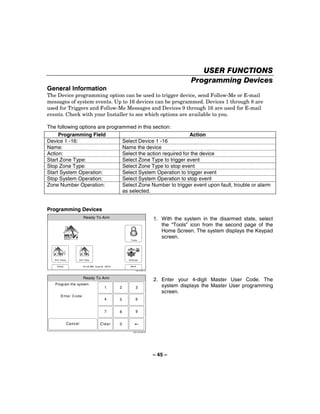
                         Ready To Arm                                               1. With the system in the disarmed state,
                                                                                       select the “Tools” icon from the second page
                                                                                       of the Home Screen. The system displays
                                                          Tools
                                                                                       the Keypad screen.


    Arm Away          Arm Stay                           Settings


     Delay              10:18 AM June 8, 2010             Back

                                                               5000-100-007-V0


                         Ready To Arm
                                                                                    2. Enter your 4-digit Master User Code. The
    Program the system
                                         1          2          3                       system    displays   the   Master   User
                                                                                       programming screen.
        Enter Code:
                                         4          5          6


                                         7          8          9


             Cancel                    Clear        0
                                                            5000-100-009-V0


                                                                                 – 35 –
USER FUNCTIONS
User Access
                                  Ready To Arm
                                                                                                 3. Select the “Users” icon. The system displays
                                                                                                    the Users screen.

      Users                  Devices          Schedules                Test


     Date Time               Events           Reminders           Slide Show

                                                                       Back
                                                                            5000-100-070-V0


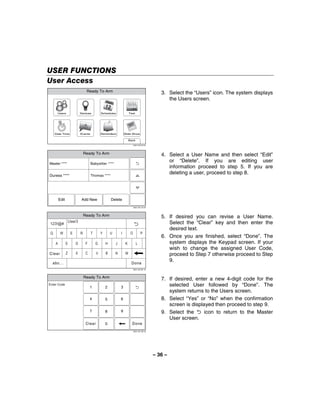
                                 Ready To Arm                                                    4. Select a User Name and then select “Edit”
Master ****                           Babysitter ****
                                                                                                    or “Delete”. If you are editing user
                                                                                                    information proceed to step 5. If you are
Duress ****                           Thomas ****
                                                                                                    deleting a user, proceed to step 8.


         Edit                 Add New                 Delete
                                                                            5000-100-142-V0


                                 Ready To Arm                                                    5. If desired you can revise a User Name.
 !(
                    7IAH!
                                                                                                    Select the “Clear” key and then enter the
                                                                                                    desired text.
 Q        W          E       R        T       Y       U       I         O           P
                                                                                                 6. Once you are finished, select “Done”. The
     A          S        D        F       G       H       J       K           L
                                                                                                    system displays the Keypad screen. If your
                                                                                                    wish to change the assigned User Code,
Clear           Z        X        C       V       B       N        M
                                                                                                    proceed to Step 7 otherwise proceed to Step
  abc...                                                                Done
                                                                                                    9.
                                                                            5000-100-081-V0


                                 Ready To Arm
                                                                                                 7. If desired, enter a new 4-digit code for the
Enter Code
                                      1           2           3
                                                                                                    selected User followed by “Done”. The
                                                                                                    system returns to the Users screen.
                                      4           5           6                                  8. Select “Yes” or “No” when the confirmation
                                                                                                    screen is displayed then proceed to step 9.
                                      7           8           9                                  9. Select the      icon to return to the Master
                                                                                                    User screen.
                                  Clear           0                      Done
                                                                            5000-100-185-V0


                                                                                              – 36 –
USER FUNCTIONS
                                                                                                               View Events
This feature can be used to view a number of System Events including Arming/Disarming,
Zone Activity, Troubles and Alarms.
Viewing System Events
                        Ready To Arm                                               1. With the system in the disarmed state,
                                                                                      select the “Tools” icon from the second page
                                                                                      of the Home Screen. The system displays
                                                        Tools
                                                                                      the Keypad screen.


  Arm Away           Arm Stay                          Settings


   Delay               10:18 AM June 8, 2010            Back

                                                              5000-100-007-V0


                        Ready To Arm
                                                                                   2. Enter your 4-digit Master User Code. The
   Program the system                                                                 system    displays   the   Master   User
                                       1        2             3
                                                                                      programming screen.
      Enter Code:
                                       4        5             6


                                       7        8             9


            Cancel                  Clear       0
                                                          5000-100-009-V0


                          Ready To Arm
                                                                                   3. Select the “Events” icon. The Events screen
                                                                                      will appear and displays all events.

    Users            Devices        Schedules          Test


  Date Time          Events         Reminders       Slide Show

                                                      Back
                                                          5000-100-070-V0


                                                                                – 37 –
USER FUNCTIONS
View Events
                         Ready To Arm
                                                                           4. If you wish to view specific system history,
Sun Jun 13, 2010 15:08
Disarmed
                             Sat Jun 12, 2010 11:15
                             Armed Stay
                                                                              select “All”. The system displays a new
User 2 E 441                 User 1 R 441
                                                                              menu.
Sat Jun 12, 2010 11:08       Sat Jun 12, 2010 10:15
Burglary Bypass              Disarmed
Zone 3 E 570                 User 1 E 401

Fri Jun 11, 2010 18:08       Fri Jun 11, 2010 12:10
Armed Away                   Disarmed
User 2 R 401                 User 3 E 441

Fri Jun 11, 2010 11:08       Fri Jun 11, 2010 10:15
Armed Stay                   Burglary Bypass            All
User 2 R 441                 Zone 3 E 570

                                                      5000-100-072-V0


                         Ready To Arm
                                                                           5. Select from the menu to display the specific
All                         Alarm                                             event types that you wish to view.
                                                                           Note: Only the event types that were
Trouble                     Bypass                                                programmed by your installer are
                                                                                  available for viewing.
Open                        Non
or Close                    Security


                                                      5000-100-071-V0


                                                                        – 38 –
USER FUNCTIONS
                                                                           Message Recording and Playback
The LYNX Touch Message Center allows you to record, play and delete messages. The
maximum message duration is 180 seconds.
NOTES: (1) If the system loses electrical power, all messages will be erased.
       (2) Message Play/Record will not be available if a report must be sent.
Entering message mode
                 Ready To Arm                                                  1.    With the system in the disarmed state,
                                                                                     select the “Message” icon from the Home
                                                                                     Screen. The system displays the Message
                                  Zones             System
                                                                                     screen.


   Arm Away   Arm Stay           Message            Phone


    Delay       10:18 AM June 8, 2010               More

                                                         5000-100-006-V0


Recording a message
                 Ready To Arm                                                  1. Select “Add New”. The system displays the
                                                                                  Record Message screen.


   Add New        Play             Delete All         Save
                                                      5000-100-045-V0


                 Ready To Arm                                                  2. Select “Record”, the system will sound a
 Message 2                                Stopped                                 single tone. Speak into the microphone and
                                                                                  record your message.
                                                                               3. When you are finished recording your
                                                                                  message, select. “Stop”
                                                                               4. To listen to the message, select “Play”.
                                                                               5. If you wish to delete the message, select
   Record         Play                  Delete
                                                                                  “Delete”.
                                                      5000-100-047-V0


                                                                            – 39 –
USER FUNCTIONS
Message Recording and Playback
                         Ready To Arm
                                                                             6. When you have finished recording, select
        Message 1   2:48 PM    September 1, 2010                                “ ”. The system displays the recorded
                                                                                messages.
        Message 2   5:09 PM    September 5, 2010                             7. To record additional messages (if recording
                                                                                time is available) repeat steps 1 through 3.


   Add New              Play               Delete All

                                                        5000-100-046-V0


NOTE: If you are trying to record a new message and the message center is already full, “Add New” will not
      be displayed. If the message center is full all old messages must be deleted before new messages
      can be recorded. See Deleting Messages section.
Playing a message(s)
                         Ready To Arm
                                                                             1.    At the Message screen, select the
 Message 1   2:48 PM      September 1, 2010
                                                                                   message you wish to play.
                                                                             2.    Select “Play”, the system plays your
 Message 2   5:09 PM      September 5, 2010                                        message.
                                                                             3.    When you are finished listening to the
                                                                                   message, you may select. “Stop”. If “Stop”
                                                                                   is not selected the system continues to
   Add New              Play               Delete All                              play the remaining messages.
                                                        5000-100-046-V0
                                                                             4.    When you have finished listening to the
                                                                                   messages, select “ ”. The system returns
                                                                                   to the Home Screen.
Deleting messages
                         Ready To Arm
                                                                             1.    At the Message screen, select “Delete All”.
 Message 1   2:48 PM      September 1, 2010
                                                                                   The system deletes all messages.
                                                                             2.    When you have finished deleting the
 Message 2   5:09 PM      September 5, 2010                                        messages, select “ ”. The system returns
                                                                                   to the Home Screen.


   Add New              Play               Delete All
                                                        5000-100-046-V0


                                                                          – 40 –
USER FUNCTIONS
                                                                                             System Adjustments
The volume level of message playback, system announcements, and status beeps can be
changed if desired. Additionally, you can adjust the display’s brightness and contrast and
turn on or off the Chime or turn off the telephone Ringer.
                     Ready To Arm                                             1. With the system in the disarmed or armed
                                                                                 state, select the “Settings” icon from the
                                                                                 second page of the Home Screen. The
                                                                                 system displays the Settings screen.
                                                       Tools


   Arm Away     Arm Stay                              Settings


       Delay         10:18 AM June 8, 2010             Back

                                                            5000-100-007-V0


                     Ready To Arm                                             2. Increase or decrease the Display Brightness
                                                                                 or Contrast or the System Volume by using
Brightness
                                                                                 the sliding adjustment from left (decrease) to
                                                                                 right (increase).
Contrast
                                                                              3. Turn On or Off the Voice, Chime or
                                                                                 telephone     Ringer    by    selecting   the
Volume
                                                                                 appropriate icon. The system toggles
                                                                                 between “On” and “Off”.
 Off   Voice   Off    Chime          Off     Ringer      Save
                                                                              4. Select “Save” when you are finished. The
                                                         5000-100-008-V0         system returns to the second page of the
                                                                                 Home Screen.


                                                                       – 41 –
USER FUNCTIONS
Clock/Calendar
Note: If your system is equipped with a GSMVLP5 or ILP5 Communication Module, the time and date will
      be programmed and updated automatically via Central Station. You may still program the correct
      Time Zone as shown below. Check with your installer to see if your system is equipped with a
      Communications Module.
Setting the date and time
                         Ready To Arm                                               Note: The system must be disarmed in order
                                                                                          to set the date and time.
                                                                                    1. With the system in the disarmed state,
                                                         Tools                         select the “Tools” icon from the second page
                                                                                       of the Home Screen. The system displays
                                                                                       the Keypad screen.
   Arm Away           Arm Stay                          Settings


    Delay               10:18 AM June 8, 2010            Back

                                                               5000-100-007-V0


                         Ready To Arm
                                                                                    2. Enter your 4-digit Master User Code. The
   Program the system
                                        1        2             3                       system    displays   the   Master   User
                                                                                       programming screen.
       Enter Code:
                                        4        5             6


                                        7        8             9


             Cancel                  Clear       0
                                                           5000-100-009-V0


                           Ready To Arm
                                                                                    3. Select the “Date Time” icon. The Calendar
                                                                                       screen will appear.

     Users            Devices        Schedules          Test


   Date Time          Events         Reminders       Slide Show

                                                       Back
                                                           5000-100-070-V0


                                                                                 – 42 –
USER FUNCTIONS
                                                                                                              Clock/Calendar
                        System Programming...
                                                                                         4. Select the correct month by using the “ ”
          June                                  2010                                        and “ ”.
SUN        MON        TUE     WED         THU       FRI     SAT
                                                                                         5. Select the correct year by using the “ ” and
                    1         2           3         4       5
                                                                                            “ ”.
6         7         8         9         10      11          12
                                                                                         6. Select the correct day on the calendar.
13       14       15        16          17      18          19
                                                                                         7. When you have finished select the “ ” icon.
20       21         22      23          24      25          26                              The system advances to the time screen.
                                                                    Save
27       28         29      30
                                                                    5000-100-016-V0


                            System Programming
                                                                                         8. If the displayed time is not correct, select
                                    1           2               3
                                                                                            “Clear” then enter the correct time (4 digits)
                                                                                            on the keypad and select AM or PM.
      Enter Time                    4           5               6                        9. When you have finished select the “ ” icon.
       10:21 AM                                                                             The system advances to the next screen OR
                                    7           8               9                           proceed to step 17.
        AM / PM
                                  Clear         0                   Save

                                                                    5000-100-010-V0


                            Ready To Arm                                                 10. Select “Time Zone”. The system scrolls
           Time Zone                                                                         between through the following options:
       Eastern (EST)
                                                                                                 Eastern (EST)
     Day Light Savings Time                                                                      Central (CST)
              Yes
                                                                                                 Mountain (MST)
          Start Month                           Start Week
                                                                                                 Pacific (PST)
              March                             Second
                                                                                                 Hawaii (HAST)
          End Month                             End Week
                                                                    Save                         Alaska (AKST)
         November                                   First
                                                                                             Select the correct time zone.
                                                                    5000-100-022-V0


                                                                                         11. Select “Day Light Savings Time”. The
                                                                                             system toggles between “Yes” and “No”.
                                                                                         Note: The start month/week and end month week are
                                                                                               default programmed to “March/Second” and
                                                                                               “November/First” respectively. Steps 13 to 16
                                                                                               should only be performed if you wish to change
                                                                                               those entries. If you are not changing the
                                                                                               defaults, advance to step 17.


                                                                                      – 43 –
USER FUNCTIONS
Clock/Calendar
          Ready To Arm
                                              12. Select “Start Month”. The system displays a
January      February                             calendar. Select the correct month.
                                              13. Select “Start Week”. The system will toggle
March        April                                between:
                                                     Second
May          June                                    Third
                                                     Fourth
July         August                                  First
                         5000-100-075-V0      14. Select “End Month”. The system displays a
                                                  calendar. Select the correct month.
                                              15. Select “End Week”. The system will toggle
                                                  between:
                                                    First
                                                    Second
                                                    Third
                                                    Fourth
                                              16. When you are finished select the “Save”
                                                  key. The system returns to the Master User
                                                  program screen.


                                           – 44 –
USER FUNCTIONS
                                                                                          Programming Devices
General Information
The Device programming option can be used to trigger device, send Follow-Me or E-mail
messages of system events. Up to 16 devices can be programmed. Devices 1 through 8 are
used for Triggers and Follow-Me Messages and Devices 9 through 16 are used for E-mail
events. Check with your Installer to see which options are available to you.

The following options are programmed in this section:
     Programming Field                                        Action
Device 1 -16:                   Select Device 1 -16
Name:                           Name the device
Action:                         Select the action required for the device
Start Zone Type:                Select Zone Type to trigger event
Stop Zone Type:                 Select Zone Type to stop event
Start System Operation:         Select System Operation to trigger event
Stop System Operation:          Select System Operation to stop event
Zone Number Operation:          Select Zone Number to trigger event upon fault, trouble or alarm
                                as selected.


Programming Devices
                        Ready To Arm                                       1. With the system in the disarmed state, select
                                                                              the “Tools” icon from the second page of the
                                                                              Home Screen. The system displays the Keypad
                                                    Tools
                                                                              screen.


   Arm Away          Arm Stay                      Settings


    Delay              10:18 AM June 8, 2010        Back

                                                         5000-100-007-V0


                        Ready To Arm
                                                                           2. Enter your 4-digit Master User Code. The
   Program the system
                                       1       2         3                    system displays the Master User programming
                                                                              screen.
       Enter Code:
                                       4       5         6


                                       7       8         9


            Cancel                  Clear      0
                                                      5000-100-009-V0


                                                                           – 45 –
FUNCTIONS
USER FUNCTIONS
Programming Devices
                                Ready To Arm
                                                                                             3. Select the “Devices” icon. The system displays
                                                                                                the Devices screen.

      Users                Devices          Schedules                 Test


    Date Time              Events           Reminders            Slide Show

                                                                      Back
                                                                           5000-100-070-V0


                               Ready To Arm                                                  4. Select a “Device” key followed by the Edit
Device 1                             Device 2                                                   button. The system displays a keyboard.
New                                  New
Device 3                             Device 4
New                                  New
Device 5                             Device 6
New                                  New

        Edit                                         Delete
                                                                           5000-100-187-V0


                               Ready To Arm                                                  5. If desired you can enter a Device Name. Select
   !(                                                                                        the “Clear” key and then enter up to 13
                                                                                                characters of text.
Q        W         E       R        T       Y       U        I         O           P
                                                                                             Note: Select the “ABC…” key to switch the keyboard
    A          S       D        F       G       H        J       K           L
                                                                                                   between upper/lower case or the “123!@#” key to
                                                                                                   switch to numbers.
Clear          Z       X        C       V       B        N        M
                                                                                             6. Once you are finished, select “Done”. The
 ABC...                                                                Done
                                                                                                system returns to the Device screen.
                                                                           5000-100-190-V0


                               Ready To Arm                                                  7. Select the “Type” button. Dependant upon what
             Name                                   01                                          features are programmed in your control the
                                                                                                system toggles between the following options:
             Type                                                                               Disabled
         Disabled                                                                               Trigger Output
                                                                                                Message to Phone 1
                                                                                                Message to Phone 2
                                                                           Save
                                                                                                Message to ph. 12
                                                                                                Email 1
                                                                           5000-100-188-V0

                                                                                                When an option is selected, the system displays
                                                                                                several new programming fields.


                                                                                             – 46 –
USER FUNCTIONS
                                                                                    Programming Devices
                     Ready To Arm                                  8. Select “Action”. Dependant upon the Type
        Name                      01                                  selected previously, the system scrolls between
                                                                      several options:
        Type                    Action                                None
  Trigger Output                None                                  Permanent On
   Start Zone Type          Stop Zone Type
                                                                      On for 2 sec
                                                                      Pulsing
     Not Used                 Not Used
                                                                      Send
Start System Operation   Stop System Operation
     Not Used                 Not Used
                                                 Save              9. Select “Start Zone Type”. The system displays
                                                 5000-100-189-V0      the following options:
                                                                       Not Used               Entry Exit 1
                                                                       Entry Exit 2           Perimeter
                                                                       Interior Follower      Day/Night
                                                                       24 Hour Silent         24 Hour Audible
                                                                      Use the “ ” “ ” buttons to scroll to second
                                                                      page of zone type options.
                                                                       Silent Burglary        24 Hour Auxiliary
                                                                       Interior With Delay    Fire No Verification
                                                                       Carbon Monoxide        Trouble
                                                                       No Response            Arm Stay
                                                                      Use the “ ” “ ” buttons to scroll to third page
                                                                      of zone type options.
                                                                       Arm Away               Disarm
                                                                       Monitor                Resident Monitor
                                                                       Resident Response      General Monitor
                                                                       General Response
                                                                   10. Select “Stop Zone Type”. The system displays
                                                                       the same options as step 9.
                                                                   11. Select “Start System Operation”. The system
                                                                       displays the following options:
                                                                       Not Used               Arm Stay
                                                                       Arm Away               Disarm
                                                                       Any Burglary Alarm     Any Fire Alarm
                                                                       Bell Timeout           End of Exit Delay
                                                                      Use the “ ” “ ” buttons to scroll to second
                                                                      page of zone type options.
                                                                       Start of Entry Delay   Chime
                                                                       Kissoff                Bypass
                                                                       System Low Battery     Reporter Failure
                                                                       Duress Alarm
                                                                   12. Select “Stop System Operation”. The system
                                                                       displays the same options as step 11.
                                                                       Use the “ ” “ ” buttons to scroll to second
                                                                       page of options.

                                                                   – 47 –
USER FUNCTIONS
Programming Devices
                         Ready To Arm                                  13. Select “Zone Number Operation”. The system
                  Zone Number Operation                                    toggles between the following options:
                         Not Used                                         None
                                                                          Trouble
                                                                          Fault
                                                                          Alarm
                                                                          If Trouble, Fault or Alarm is selected, the system
                                                                          displays several new options:
                                                     Save
                                                     5000-100-191-V0


                         Ready To Arm                                  14. Select a Start Zone or Stop Zone Number from
             Zone Number Operation                                         the list displayed by the system.
                         Fault                                         15. Select “Save” when programming is complete.
      First Start Zone             First Stop Zone
Disabled                    Disabled
    Second Start Zone            Second Stop Zone
Disabled                    Disabled
      Third Start Zone            Third Stop Zone
                                                     Save
Disabled                    Disabled
                                                     5000-100-192-V0


Editing or Deleting Devices
                         Ready To Arm                                  1. At the Device Programming Screen, select the
Device 1                     Device 2                                     Device that you wish to edit or delete.
System Armed
Follow Me                    New
                                                                       2. To delete the device, select the delete button.
Device 3                     Device 4
                                                                          To edit the device select the Edit button and
New                          New
                                                                          proceed to step 3.
Device 5                     Device 6
New                          New

      Edit                                Delete
                                                     5000-100-194-V0


                         Ready To Arm                                  3. Select the field that you wish to edit and follow
           Name                         01                                the steps as outlined in the Programming
    System Armed                                                          Devices procedure.
           Type                       Action
Message to phone 1                    Send
    Start Zone Type               Stop Zone Type
       Not Used                     Not Used
 Start System Operation     Stop System Operation
                                                     Save
      Armed Stay                     Disarm
                                                     5000-100-195-V0


                                                                       – 48 –
USER FUNCTIONS
                                                                                          Scheduling User Interface
The Scheduling Feature can be used to program the system to automatically perform certain
functions (i.e.; automatically arming the system in Stay mode and activating output devices).
Programming a Scheduled Function
                         Ready To Arm                                               1. With the system in the disarmed state,
                                                                                       select the “Tools” icon from the second page
                                                                                       of the Home Screen. The system displays
                                                         Tools
                                                                                       the Keypad screen.


   Arm Away           Arm Stay                          Settings


    Delay               10:18 AM June 8, 2010            Back

                                                               5000-100-007-V0


                         Ready To Arm
                                                                                    2. Enter your 4-digit Master User Code. The
   Program the system
                                        1        2             3                       system    displays   the   Master   User
                                                                                       programming screen.
       Enter Code:
                                        4        5             6


                                        7        8             9


             Cancel                  Clear       0
                                                           5000-100-009-V0


                           Ready To Arm
                                                                                    3. Select the “Schedules” icon. The system
                                                                                       displays the Scheduling screen.

     Users            Devices        Schedules          Test


   Date Time          Events         Reminders       Slide Show

                                                       Back
                                                           5000-100-070-V0


                                                                                 – 49 –
USER FUNCTIONS
Scheduling User Interface
                                 Ready To Arm                                                     4. Select “Add New”. The system displays the
                                                                                                     scheduling options screen.


         Edit                Add New                    Delete
                                                                             5000-100-146-V0


                                 Ready To Arm
                                                                                                   5. Select “Name”. The system displays a
                Name                              Frequency                                           keypad.
                                                   None

                Type
              None


                                                                             Save

                                                                             5000-100-144-V0


                                 Ready To Arm                                                     6. Enter a name (up to 13 digits long) for the
    !(
                    7IAH!
                                                                                                     scheduled function on the displayed keypad
                                                                                                     then select “Done”.
Q         W          E       R        T       Y         U        I       O           P
                                                                                                  7. Select “Frequency” then select one of the
     A          S        D        F       G        H        J        K          L                    following displayed options:
                                                                                                     None                 Once
Clear           Z        X        C       V         B       N        M
                                                                                                     Daily                Weekday
    abc...                                                               Done                        Weekly               Monthly
                                                                             5000-100-081-V0      8. Program the following options based upon
                                                                                                     the Frequency selected in step 7:
                                                                                                     Once        Date
                                                                                                     Daily
                                                                                                     Weekday Start Time
                                                                                                     Weekly      Day of the Week
                                                                                                     Monthly     Day of the Month
                                                                                                  9. Select “Type” then scroll through and select
                                                                                                     one of the following options:
                                                                                                     None
                                                                                                     Auto Stay
                                                                                                     Output
                                                                                                     Disarm Notification

                                                                                               – 50 –
USER FUNCTIONS
                                                                          Scheduling User Interface
                   Ready To Arm
                                                                    10. If Auto Stay is selected, select “Clear” then
                       1      2            3
                                                                        enter a 4-digit time on the displayed keypad
                                                                        then select “Save”. If “Output” is selected
                       4      5            6                            proceed to Step 11. If “Disarm Notification”
    Enter Time
                                                                        is selected proceed to Step 12.
  10:21     AM
                       7      8            9                        11. Select a Device (Device 1 through Device
                                                                        16).
    AM / PM
                    Clear     0                Done                 12. Enter a Start Time and End Time on the
                                               5000-100-147-V0          displayed keypad then select “Save”.


Editing a Scheduled Function
                   Ready To Arm                                     1. At the Schedules screen, select the
 Auto Arm        -Auto Stay       -Daily                               Schedule you wish to edit.
                                                                    2. Select the “Edit” button. The Schedule
                                                                       programming screen will appear. Follow the
                                                                       steps as noted above in the programming a
                                                                       Scheduled Function section to edit and
                                                                       save your changes.
     Edit         Add New         Delete
                                               5000-100-179-V0


Deleting a Scheduled Function
                   Ready To Arm                                     1. At the Schedules screen, select the
 Auto Arm        -Auto Stay       -Daily                               Schedule you wish to delete.
                                                                    2. Select the “Delete” button. A confirmation
                                                                       screen will be displayed. Select “Yes” to
                                                                       confirm the deletion.
                                                                    3. Select the “ ” button. The system returns
                                                                       to the Master User programming screen.
     Edit         Add New         Delete
                                               5000-100-179-V0


                                                                 – 51 –
USER FUNCTIONS
Reminders
The Reminder Feature can be used to program/record reminders that can be displayed on the
touchscreen, announced by the control and/or sent to one ort two pre-programmed phone
number(s). Check with your installer to see if the latter feature has been programmed on
your control.
Programming a Reminder
                         Ready To Arm                                               1. With the system in the disarmed state,
                                                                                       select the “Tools” icon from the second page
                                                                                       of the Home Screen. The system displays
                                                         Tools
                                                                                       the Keypad screen.


   Arm Away           Arm Stay                          Settings


    Delay               10:18 AM June 8, 2010            Back

                                                               5000-100-007-V0


                         Ready To Arm
                                                                                    2. Enter your 4-digit Master User Code. The
   Program the system
                                        1        2             3                       system    displays   the   Master   User
                                                                                       programming screen.
       Enter Code:
                                        4        5             6


                                        7        8             9


             Cancel                  Clear       0
                                                           5000-100-009-V0


                           Ready To Arm
                                                                                    3. Select the “Reminders” icon. The system
                                                                                       displays the Reminders screen.

     Users            Devices        Schedules          Test


  Date Time           Events         Reminders       Slide Show

                                                       Back
                                                           5000-100-070-V0


                                                                                 – 52 –
USER FUNCTIONS
                                                                                                                       Reminders
                                Ready To Arm                                                    4. Select “Add New”. The system displays the
No items to display!                                                                               Reminder programming screen.


         Edit               Add New                  Delete
                                                                           5000-100-178-V0


                                Ready To Arm                                                    5. Select “Name”. Enter a name for the
              Name                           Frequency                                             scheduled function on the displayed keypad
                                                 None
                                                                                                   then select “Done”.
                                                                                                6. Select “Frequency” then select one of the
                                                                                                   following displayed options:
                                                                                                   None                Once
                                                                                                   Daily               Weekday
      Voice                                      Acknowledge
         No                                              No                Save                     Weekly              Monthly
                                                                           5000-100-176-V0
                                                                                                7. Program the following options based upon
                                Ready To Arm                                                       the Frequency selected in step 6:
    !(                                                                                          Once       Date/Start Time
                                                                                                   Daily      Start Time
Q         W         E       R        T       Y       U        I        O           P
                                                                                                   Weekday Start Time
     A          S       D        F       G       H       J         K          L
                                                                                                   Weekly     Days of the Week/Start Time
                                                                                                   Monthly    Day of the Month/Start Time
Clear           Z       X        C       V       B       N         M


    abc...                                                             Done
                                                                           5000-100-180-V0


                                Ready To Arm                                                    8. If a voice reminder is desired, select
Reminders 1                                              Stopped                                   “Voice”. The system toggles between “No”
                                                                                                   and “Yes”. If yes is selected, the record
                                                                                                   reminders screen appears.
                                                                                                9. Select the “Record” button and record your
                                                                                                   reminder. When you are finished select the
                                                                                                   “Stop” button followed by the “ ” button.
     Record                     Play                 Delete                                        The system returns to the Reminder
                                                                           5000-100-182-V0
                                                                                                   programming screen.


                                                                                             – 53 –
USER FUNCTIONS
Reminders
                     Ready To Arm                                         10. If a “Follow Me” phone number(s) was
          Name                   Frequency                                    programmed by your installer you can send
     Walk Dog                      Once
                                                                              a reminder to the phone number(s). Select
                      Date                                                    “Follow Me” option. The system toggles
                 January 1, 2011
                                                                              between “Disabled”, “To Ph. 1”, “To Ph. 2”
                    Start Time                                                and “To Ph. 1  2”, as applicable.
                    3:00 PM
                                                                          Note: For important reminders you should
    Voice
     No
                    Follow Me      Acknowledge
                                                 Save                            program the “Acknowledge” option.
                    Disabled           No
                                                 5000-100-183-V0
                                                                                 When this option is selected, the
                                                                                 reminder will continue to play until it is
                                                                                 acknowledged.
                                                                          11. Select the “Acknowledge” option. The
                                                                              system toggles between “No and “Yes”.
                                                                          12. Select “Save” when all applicable options
                                                                              have been programmed.

Editing a Reminder
                      Ready To Arm                                        1. At the Reminders screen, select the
 Walk Dog        - Daily
                                                                             reminder you wish to edit.
                                                                          2. Select the “Edit” button. The Reminder
                                                                             programming screen will appear. Follow the
                                                                             steps as noted above in the programming a
                                                                             Reminder section to edit and save your
                                                                             changes.
     Edit              New              Delete
                                                     5000-100-184-V0


Deleting a Reminder
                      Ready To Arm                                        1. At the Reminders screen, select the
 Walk Dog        - Daily
                                                                             reminder you wish to delete.
                                                                          2. Select the “Delete” button. A confirmation
                                                                             screen will be displayed. Select “Yes” to
                                                                             confirm the deletion.
                                                                          3. Select the “ ” button. The system returns
                                                                             to the Master User programming screen.
     Edit              New              Delete
                                                     5000-100-184-V0


                                                                       – 54 –
USER FUNCTIONS
                                                              Speaker Phone Feature
If this feature has been programmed the LYNX Touch is capable of operating as a speaker
phone. During speaker phone operation the system will provide the following functions:
• All function/event processing will continue to operate, but there will be no
    announcements.
NOTE: The system will enter the Speaker Phone mode even if an alarm or trouble is stored in the system
      memory.

        Do not use the speaker phone as the only telephone in your home since in some special
       cases the speaker phone is not functional.

The system will not enter speaker phone mode and LYNX Touch will not ring if:
• The feature has not been programmed.
• A report is being sent.
• An audible alarm is present.
• An announcement is being made or a recorded message is being played back.
• A message is being recorded.
• If the system is in test or sniffer mode.
• AC power is not present
The speaker phone will be aborted if:
• A report must be sent.
• An audible alarm or trouble has ocurred.
• AC power is lost.

Using the Speaker Phone Feature
When the LYNX Touch is operating in the Speaker Phone mode, if a zone is violated and has
triggered an entry/exit delay, the system will automatically change the touchscreen from
telephone to security mode. This allows the user to disarm the system or take other
appropriate actions in the security mode without interrupting the telephone session. To
regain telephone keypad control you will need to reactivate the telephone keypad.


                                               – 55 –
USER FUNCTIONS
Speaker Phone Feature
Placing a Call
                 Ready To Arm                                            1. With the system in the disarmed or armed
                                                                            state, select the “Phone” icon from the
                                                                            Home Screen. The system displays the
                                   Zones        System
                                                                            Keypad screen.


   Arm Away   Arm Stay            Message       Phone


    Delay        10:18 AM June 8, 2010          More

                                                    5000-100-006-V0


                 Ready To Arm
                                                                         2. Select the “Talk” icon and then enter the
                         1        2         3                               number you wish to dial. The “End” icon
                                                                            replaces the “Talk” icon. Selecting the
                         4        5         6                               “Redial” icon will allow you to redial the last
       Talk
                                                                            number that was dialed.
                         7        8         9    Flash                   3. Select the “Flash” icon to switch between
                                                                            two calls.
     Volume                       0              Redial                  4. Select the “End” icon to hang up and end
                                                  5000-100-148-V0           the call.

Answering a Call
                 Ready To Arm                                            1. With the system in the disarmed or armed
                                                                            state, select the “Phone” icon from the
                                                                            Home Screen. The system displays the
                                   Zones        System
                                                                            Keypad screen.


   Arm Away   Arm Stay            Message       Phone


    Delay        10:18 AM June 8, 2010          More

                                                    5000-100-006-V0


                 Ready To Arm
                                                                         2. Select the “Talk” icon. The “End” icon
                         1        2         3
                                                                            replaces the “Talk” icon.
                                                                         3. Select the “End” icon to hang up and end
                         4        5         6                               the call.
       Talk
                         7        8         9    Flash


     Volume                       0              Redial
                                                  5000-100-148-V0


                                                                      – 56 –
USER FUNCTIONS
                                              Remote Phone Control Feature
The LYNX Touch Series is equipped with a remote interactive phone capability that permits
access to the security system from any off-site touch-tone telephone using all user codes. The
system will provide the appropriate voice messages and any system beeping sounds
indicating the status of the security system over the phone line. (Refer to Summary of
Audible Notification for further information.) The following functions can be performed from
any remote touch-tone telephone:
• Disarm the system.
• Arm the system in STAY or AWAY mode.
• Bypass zones.
• Check system status.
The remote access session will be aborted if:
• A report must be sent.
• Any local or wireless key entry is made.
• User Code is not entered within eight (8) seconds of call pickup (during the
   “system…..system announcement).
• No keys are depressed for a period of 15 seconds and while no announcement has been
   made by the system. Any remote key entry will, however extend this timeout back to 15
   seconds.
It will not be possible to begin a remote access session if:
• A report must be sent
• The system is in any Test mode.
• Panel is in shutdown mode (programmed by your installer).


Using Remote Phone Control Feature
Dial the controls’s phone number. If no answering machine is present, the control will pick
up between 1 and 14 rings, depending on the number programmed by your installer and will
periodically announce “SYSTEM ENTER CODE”. If an answering machine is on the
premises, you need to dial the premises and hang up on the first ring. Wait at least five (5)
seconds (but no more than 22 seconds) and dial the premises phone number again. The
control will pick up and periodically announce “SYSTEM”.


                                            – 57 –
USER FUNCTIONS
                                                       Remote Phone Control Feature
Remote Phone Control Commands
Enter User Code (within eight seconds). Upon entering remote phone control mode the Lynx will
announce “System, enter code”.
To remotely disarm system:........................................................... User Code + [1]
To remotely arm in AWAY mode: .................................................. User Code + [2]
To remotely arm in STAY mode: ................................................... User Code + [3]
To remotely arm in AWAY or STAY mode with no delay:.............. User Code + [2] or [3] + [0]
To remotely Bypass zones: ........................................................... User Code + [6] + zone no.
To remotely activate Forced Bypass: ............................................ User Code + [6] + [#]
To remotely check system status:.................................................. [✻]
To end remote phone session: Hang Up or ................................. User Code + [9]

Notes: (1) Check with your installer to see if the Forced Bypass mode has been enabled.
       (2) When bypassing zones, make sure a confirmation beep sounds for each zone that has been
           bypassed.


                                                    – 58 –
USER FUNCTIONS
                                                               Remote Services
Your security system may be capable of providing a series of web-based services that allow
you to communicate with your security system remotely in a number of ways. These services
provide the ability to:
   •   Access to your security system from a computer via website (Remote Access Feature)
   •   Receive e-mail and text message notification of system events (Multi-Mode Feature)
   •   Perform system functions and receive confirmations using text messages (SMS
       Feature)
Ask you installer if your system employs a remote services capable device.


                                          – 59 –
FIRE/CO
FIRE/CO ALARM SYSTEM (If Installed)
General Information
        LYNX Touch is not intended for UL985 Household Fire applications unless a 24-hour
UL      backup battery (P/N LYNXRCHKIT-SHA) is installed.

General
Your fire alarm system (if installed) is active 24 hours a day, providing continuous
protection. In the event of an emergency, the installed smoke, heat and/or carbon monoxide
detectors will automatically activate your security system, triggering a loud, intermittent
sound from the touchscreen. The sound will be interlaced with the voice descriptor, sounding
every 15 seconds. A “FIRE” or “CO” message will appear at your touchscreen and remain on
until you silence and clear the alarm display.

In Case of Fire
1. Should you become aware of a fire emergency before your detectors sense the problem, go
   to the LYNX Touch and press and hold the panic key and then select the Fire icon. The alarm
   will sound and an alarm will be transmitted to the central station.
2. Evacuate all occupants from the premises.
3. If flames and/or smoke are present, leave the premises and notify your local Fire Department
   immediately.
4. If no flames or smoke are apparent, investigate the cause of the alarm. The zone number of
   the zone(s) in an alarm condition will appear at the touchscreen.

In Case of Carbon Monoxide Alarm
1. If a high level of carbon monoxide is detected you should evacuate all occupants from the
   premises and immediately move to a spot where fresh air is available, preferably outdoors.
2. From a safe area, contact your security service provider for further instructions.


Silencing a Fire/Carbon Monoxide Alarm
1. Silence the alarm by entering an OFF sequence.
2. To clear the alarm, enter a second OFF sequence.
3 If the touchscreen indicates a trouble condition after the second OFF sequence, check that
   smoke detectors are not responding to smoke- or heat-producing objects in their vicinity.
   Should this be the case, eliminate the source of heat or smoke.
4. If this does not remedy the problem, there may still be smoke in the detector. Clear it by
   fanning the detector for about 30 seconds.
5. When the problem has been corrected, clear the display by entering another OFF sequence.


                                            – 60 –
FIRE/CO
                                                        FIRE/CO ALARM SYSTEM
                                           National Fire Protection Association’s
                                             Smoke Detector Recommendations
        LYNX Touch is not intended for UL985 Household Fire applications unless a 24-hour
UL      backup battery (P/N LYNXRCHKIT-SHA) is installed.


With regard to the number and placement of smoke and heat detectors, we subscribe to the
recommendations contained in the National Fire Protection Association's (NFPA) Standard
#72 noted below.
Early warning fire detection is best achieved by the installation of fire detection equipment
in all rooms and areas of the household. The equipment should be installed as follows: A
smoke detector installed outside of each separate sleeping area, in the immediate vicinity of
the bedrooms and on each additional story of the family living unit, including basements and
excluding crawl spaces and unfinished attics.
In addition, the NFPA recommends that you install heat or smoke detectors in the living
room, dining room, bedroom(s), kitchen, hallway(s), attic, furnace room, utility and storage
rooms, basements and attached garages.


                      KITCHEN
                                   BEDROOM BEDROOM            TV ROOM   KITCHEN   DINING    BDRM
          DINING
                                                                        LIVING ROOM
                                                                                           BDRM


                                     BEDROOM                  BEDROOM
          LIVING ROOM


                                                          Smoke Detectors for Minimum Protection
                                                          Smoke Detectors for Additional Protection
                          BEDROOM                         Heat-Activated Detectors


                              TO
                BEDROOM       BR    BEDROOM

                                   KTCHN
                                                              GARAGE
                LVNG RM                     .   CLOSED
                                                DOOR

                   BASEMENT
                                                                                           floor_plan-001-V1


                                                     – 61 –
FIRE/CO
FIRE/CO ALARM SYSTEM
Emergency Evacuation
        LYNX Touch is not intended for UL985 Household Fire applications unless a 24-hour
UL      backup battery (P/N LYNXRCHKIT-SHA) is installed.

Establish and regularly practice a plan of escape in the event of fire. The following steps are
recommended by the National Fire Protection Association:
 1. Position your detector or your interior and/or exterior
    sounders so that they can be heard by all occupants.
 2. Determine two means of escape from each room. One
    path of escape should lead to the door that permits                                ET      OM
    normal exit from the building. The other should be an                            OS      RO
                                                                                   CL     BED
    alternative escape, such as a window, should your path


                                                                           PORCH
    to that door be unpassable. Station an escape ladder at                                              OM
                                                                                               TH      RO
    such windows if there is a long drop to the ground.                              DR      BA      ED
                                                                                   BE               B
 3. Sketch a floor plan of the building. Show windows, doors,                           2ND FLOOR
    stairs and rooftops that can be used to escape. Indicate
    escape routes for each room. Keep these routes free from                    N              OM
                                                                              HE             RO
    obstruction and post copies of the escape routes in every               TC             ED
                                                                          KI              B
    room.                                                         BACK DOOR
                                                                                         M
 4. Assure that all bedroom doors are shut while you are                               OO    TH
                                                                                     DR    BA
    asleep. This will prevent deadly smoke from entering                           BE
    while you escape.                                                                   1ST FLOOR
 5. Try the door. If the door is hot, check your alternate
    escape route. If the door is cool, open it cautiously. Be
    prepared to slam the door if smoke or heat rushes in.                           •
 6. When smoke is present, crawl on the ground. Do not
    walk upright, since smoke rises and may overcome you.                                     •
    Clearer air is near the floor.
                                                                                          BACK
 7. Escape quickly; don't panic.
 8. Establish a place outdoors, away from your house, where
    everyone can meet and then take steps to contact the
    authorities and account for those missing. Choose
    someone to assure that nobody returns to the house —
    many die going back.                                                                      •
                                                                                          FRONT
                                                                                                         emerevac


                                             – 62 –
SYSTEM FUNCTIONS
                                            Testing the System (to be conducted weekly)
Test Mode
The Test mode allows each protection point to be checked for proper operation. When the
Walk Test mode is active, the control sounds a single beep every 30 seconds as a reminder
that the system is in the Test mode.
NOTE: An alarm message will not be sent to your alarm monitoring company during these tests.

Entering Test Mode
Disarm the system and close all protected windows, doors, etc. The “READY” indicator
should be lit.

Testing the System
                         Ready To Arm                                               1. With the system in the disarmed state,
                                                                                       select the “Tools” icon from the second page
                                                                                       of the Home Screen. The system displays
                                                         Tools
                                                                                       the Keypad screen.


   Arm Away           Arm Stay                          Settings


    Delay               10:18 AM June 8, 2010            Back

                                                               5000-100-007-V0


                         Ready To Arm
                                                                                    2. Enter your 4-digit Master User Code. The
   Program the system
                                        1        2             3                       system    displays   the   Master   User
                                                                                       programming screen.
       Enter Code:
                                        4        5             6


                                        7        8             9


             Cancel                  Clear       0
                                                           5000-100-009-V0


                           Ready To Arm
                                                                                    3. Select the “Test” icon. The system displays
                                                                                       the Test screen.

     Users            Devices        Schedules          Test


   Date Time          Events         Reminders       Slide Show

                                                       Back
                                                           5000-100-070-V0


                                                                                 – 63 –
SYSTEM FUNCTIONS
Testing the System (to be conducted weekly)
                      Ready To Arm                              4. Select the “Walk Test” or “Dialer Test” icon.
      Version Number: CA01.00EXX
                                                                   If Walk Test is selected proceed to Step 5. If
         CRC Number: 0X877D                                        Dialer Test is selected proceed to Step 6
        RF Version Number: 0.44
                                                                5. “Walk Test…” is displayed on the system
                                                                   status bar. Fault each zone as described
                                                                   below.
                                                                6. If the dialer test is unsuccessful the system
          Walk Test      Dialer Test
                                                                   will display a Reporter Failure message.
                                         Back                      Contact your security service provider.
                                           5000-100-076-V0


Walk Test
FAULT ZONES. Open each protected door and window in turn and listen for three beeps
from the control, followed by the zone’s Voice Descriptor, if it is programmed. Identification
of each faulted protection point should appear on the display. The display will clear when the
door or window is closed.
Walk in front of any interior motion detectors (if used) and listen for three beeps and/or voice
descriptors, if programmed. The identification of the detector should appear on the display
when it is activated, and its voice descriptor will be announced (if programmed). The display
will clear when no motion is detected. Note that if wireless motion detectors are used, in
order to conserve battery life, there is a 3-minute delay between activations.
To test all smoke detectors, follow the manufacturer's instructions. The identification of each
detector should appear on the display when each is activated.
If a problem is experienced with any protection point (no confirming sounds, no display),
notify your service company.
When all protection points have been checked and are intact (closed), there should be no zone
identification numbers displayed on the touchscreen.

Exiting Test Mode
When testing is completed, exit the Walk Test or Dialer Test mode by entering an Off
sequence.
NOTE: If the Walk Test mode is inadvertently left active, it automatically turns off after 4 hours. The Dialer
      Test mode will remain active until exited via an Off sequence.

LYNX Touch SIA Exit/Entry Delay Times
The LYNX Touch SIA will send an event code to the Central Station after entering and after
exiting from Test mode.


                                                             – 64 –
SYSTEM FUNCTIONS
                                                                Maintaining your system
The components of your security system are designed to be as maintenance-free as possible.
To make sure that your system is in working condition, do the following:
1. Test your system weekly.
2. Test your system after any alarm occurs (see the TESTING THE SYSTEM section).

Routine Care
• Treat the components of your security system as you would any other electrical
  equipment. Do not slam sensor-protected doors or windows.
• Keep dust from accumulating on the touchscreen and all protective sensors, particularly
  on motion sensors and smoke detectors.
• The touchscreen and sensors should be cleaned carefully with a dry soft cloth. Do not
  spray water or any other fluid on the units.

Low Battery Conditions in Wireless Sensors
Each wireless sensor in your system has an internal battery. The system detects low battery
conditions in wireless sensors, including smoke detectors, personal emergency transmitter,
and the portable wireless keypad, and displays a “Battery Low” message on the touchscreen,
which also beeps. A low battery in a wireless keypad is detected as soon as one of its keys is
pressed. In addition, a wireless smoke detector with a low battery also emits a chirp sound
approximately once every 20–30 seconds, identifying itself as the smoke detector with the
weak battery.
NOTE: A low battery message means that battery replacement in the indicated sensor(s) is due within 30
      days. In the meantime, a sensor with a low battery is still operational.
To silence Low Battery Warning Tones, enter an Off sequence. The low battery message
display will remain on as a reminder. When you replace the weak battery with a fresh one,
the sensor will send a good battery signal to the control when the sensor is activated
(opening/closing of door, window, etc.). To clear the “Low Battery” message, enter an Off
sequence.
              When replacing batteries, use only those recommended by your installer.
Alkaline batteries provide a minimum of 1 year of operation, and in most units and applications, provide 2–4
years of service. 3-volt lithium batteries may provide from 4-7 years of operation. Actual battery life will
depend on the environment in which the sensor is used, the number of signals that the transmitter in the
sensor has had to send, and the specific type of sensor. Factors such as humidity, high or low temperatures,
and large swings in temperature may all lead to the reduction of actual battery life in an installation.


                                                  – 65 –
SYSTEM FUNCTIONS
Maintaining your system
Changing the LYNX Touch Series System Battery
In the event of an AC power loss, the LYNX Touch Series is powered by a rechargeable,
nickel-metal hydride battery pack. The battery pack should be replaced when a “Battery
Low” message with no zone number is displayed.
NOTE: The battery pack (P/N LYNXRCHKIT-SC or LYNXRCHKIT-SHA) should be changed every four years
      and must be replaced by a qualified service technician.
Following battery pack replacement, rechargeable batteries may take up to 48 hours to
charge. The “Battery Low” message may be displayed after one minute, however it should
clear within 4 hours or by entering Test Mode.


                                            – 66 –
SUMMARY OF AUDIBLE  VISUAL NOTIFICATIONS
SOUND                  CAUSE                                   ANNOUNCEMENT*
INTERRUPTED            FIRE ALARM (3 beeps)                    fire alarm + zone voice descriptor
                       OR                                      OR
                       CARBON MONOXIDE ALARM (4 beeps)         Carbon monoxide alarm + zone voice descriptor
                                                               (Voice descriptor is interlaced with the sounder
                                                               and sounds every 45 seconds)
CONTINUOUS             BURGLARY/AUDIBLE EMERGENCY              alarm + zone voice descriptor
                       ALARM                                   (Voice descriptor is interlaced with the sounder
                                                               and sounds every 45 seconds)
ONE SHORT BEEP         a. SYSTEM DISARM                        a. disarmed–ready to arm
(not repeated)         b. SYSTEM ARMING ATTEMPT WITH AN        b. disarmed–not ready to arm
                          OPEN ZONE.
                       c. BYPASS VERIFY                        c. zones bypassed
ONE SHORT BEEP         a. SYSTEM IS IN TEST MODE               a. no announcement
(once every 45 secs)   b. LOW BATTERY AT A TRANSMITTER         b. low battery + zone voice descriptor
                       c. SYSTEM LOW BATTERY                   c. system low battery
                       d. FAIL TO COMMUNICATE                  d. check system
TWO SHORT              ARM AWAY                                armed away [instant] – exit now
BEEPS
THREE SHORT            a. ARM STAY OR INSTANT                  a. armed stay [instant] – exit now
BEEPS                  b. ZONE OPENED WHILE SYSTEM IS IN       b. zone voice descriptor
                          CHIME MODE.
RAPID BEEPING          a. TROUBLE                              a. fault + zone voice descriptor
                       b. MEMORY OF ALARM                      b. fire alarm or alarm + zone voice descriptor
SLOW BEEPING           a. ENTRY DELAY WARNING                  a. disarm system now
                       b. EXIT DELAY WARNING                   b. armed [away] [instant] – exit now

Additional Announcements:
The system will announce the following primary messages, depending on the system’s status
at the time:
    •    Disarmed–Ready to Arm [check system]
    •    Disarmed [not ready to arm]
    •    Armed [away] [stay] [instant] [check system] [exit now]
The system will announce the following secondary messages, depending on the system’s
status at the time:
    •    Fire Alarm + zone voice descriptor
    •    Alarm + zone voice descriptor
    •    Carbon Monoxide Alarm + zone voice descriptor
    •    Carbon Monoxide Fault + zone voice descriptor
    •    Fire Fault + zone voice descriptor
    •    Fault + zone voice descriptor Alarm + zone voice descriptor
    •    Low Battery + zone voice descriptor Fire Fault + zone voice descriptor
    •    System Low Battery
    •    Check System
    •    AC Loss
    •    Zones Bypassed
    •    Chime
Note: If there are no secondary messages, the primary status messages will be announced.


                                                   – 67 –
SUMMARY OF AUDIBLE  VISUAL NOTIFICATIONS

System Displays
The following icons will be displayed on the Home screen along with specific zone status
information (if applicable) to indicate system status.
     DISPLAY      DEFINITION                         DISPLAY        DEFINITION
                 AC Loss                                           Door Open


                 Alarm                                             Window Open
                 (intrusion)

                 Armed Away                                        Exit Active


                 Armed Stay                                        Fire


                 Battery Low                                       Flood


                 Check Zones                                       Glass Break

                 CO Alarm                                          Medical Alarm


                 Disarmed Not                                      Motion
                 Ready to Arm

                 Disarmed                                          Temperature
                 Ready to Arm

                 Reporter                                          90 RF Jam
                 Failure

                 Cover                                             94 Phone
                 Tamper                                            Line Cut

                 Trouble                                           103 Comm.
                                                                   Trouble


                                         – 68 –
SUMMARY OF AUDIBLE  VISUAL NOTIFICATIONS
Zone Status Icons
The following icons may be displayed on the Zone Status screen.
        ICON        DEFINITION                            ICON             DEFINITION
                   Alarm                                                  Trouble (red)


                    Fault (Yellow)                                        Bypass


                    Ready


LED Meanings
ARMED LED (Red):       ON = System armed
                       OFF = System disarmed
                       Blinking = System armed, but a fault exists or alternating with READY LED
                       when AVM (VOX or Talk) or speaker phone mode is active.
READY LED (Green): ON = System disarmed, ready to arm
                   Blinking = System disarmed, not ready to arm (a fault exists) or alternating
                   with ARMED LED when AVM (VOX or Talk) or speakerphone mode is active.
Note: When the system is armed, the READY LED turns off.


                                               – 69 –
Regulatory Agency Statements

Federal Communications Commission (FCC) Part 15
The user shall not make any changes or modifications to the equipment unless authorized by the Installation Instructions or User's
Manual. Unauthorized changes or modifications could void the user's authority to operate the equipment.
CLASS B DIGITAL DEVICE STATEMENT
NOTE: This equipment has been tested and found to comply with the limits for a Class B digital device, pursuant to part 15 of the
FCC Rules. These limits are designed to provide reasonable protection against harmful interference in a residential installation.
This equipment generates, uses and can radiate radio frequency energy and, if not installed and used in accordance with the
instructions, may cause harmful interference to radio communications. However, there is no guarantee that interference will not
occur in a particular installation. If this equipment does cause harmful interference to radio or television reception, which can be
determined by turning the equipment off and on, the user is encouraged to try to correct the interference by one or more of the
following measures:
•    Reorient or relocate the receiving antenna.
•    Increase the separation between the equipment and receiver.
•    Connect the equipment into an outlet on a circuit different from that to which the receiver is connected.
•    Consult the dealer or an experienced radio/TV technician for help.
This Class B digital apparatus complies with Canadian ICES-003.
Cet appareil numérique de la classe B est conforme à la norme NMB-003 du Canada.
Industry Canada (IC)
This device complies with RSS210 of Industry Canada. Operation is subject to the following two conditions: (1) This device may
not cause harmful interference, and (2) This device must accept any interference received, including interference that may cause
undesired operation.
Cet appareil est conforme à la partie 15 des règles de la FCC  de RSS 210 des Industries Canada. Son fonctionnement est
soumis aux conditions suivantes: (1) Cet appareil ne doit pas causer d' interferences nuisibles. (2) Cet appareil doit accepter toute
interference reçue y compris les interferences causant une reception indésirable.


                                                              – 70 –
Regulatory Agency Statements

                                          TELEPHONE/MODEM INTERFACE
Federal Communications Commission (FCC) Part 68
This equipment complies with Part 68 of the FCC rules. On the front cover of this equipment is a label that contains the FCC
registration number and Ringer Equivalence Number (REN). You must provide this information to the telephone company when
requested.
This equipment uses the following USOC jack: RJ31X
This equipment may not be used on telephone-company-provided coin service. Connection to party lines is subject to state tariffs.
This equipment is hearing-aid compatible.
Industry Canada
NOTICE: The Industry Canada Label identifies certified equipment. This certification means that the equipment meets
telecommunications network protective, operational and safety requirements as prescribed in the appropriate Terminal Equipment
Technical Requirements document(s). The Department does not guarantee the equipment will operate to the user’s satisfaction.
Before installing this equipment, users should ensure that it is permissible to be connected to the facilities of the local
telecommunications company. The equipment must also be installed using an acceptable method of connection. The customer
should be aware that compliance with the above conditions may not prevent degradation of service in some situations.
Repairs to certified equipment should be coordinated by a representative designated by the supplier. Any repairs or alterations
made by the user to this equipment, or equipment malfunctions, may give the telecommunications company to request the user to
disconnect the equipment.
Users should ensure for their own protection that the electrical ground connections of the power utility, telephone lines and internal
metallic water pipe system, if present, are connected together, This precaution may be particularly important in rural areas.
Caution: Users should not attempt to make such connections themselves but should contact appropriate electric inspection
authority, or electrician, as appropriate.
AVIS: l’étiquette d’Industrie Canada identifie le matériel homologué. Cette étiquette certifie que le matériel est conforme aux
normes de protection, d’exploitation et de sécurité des réseaux de télécommunications, comme le prescrivent les documents
concernant les exigences techniques relatives au matériel terminal. Le Ministère n’assure toutefois pas que le matériel
fonctionnera à la satisfaction de l’utilisateur.
Avant d’installer ce matériel, l’utilisateur doit s’assurer qu’il est permis de le raccorder aux installations de l’enterprise locale de
télécommunication. Le matériel doit également être installé en suivant une méthode acceptée da raccordement. L’abonné ne doit
pas oublier qu’il est possible que la conformité aux conditions énoncées ci-dessus n’empêche pas la dégradation du service dans
certaines situations.
Les réparations de matériel nomologué doivent être coordonnées par un représentant désigné par le fournisseur. L’entreprise de
télécommunications peut demander à l’utilisateur da débrancher un appareil à la suite de réparations ou de modifications
effectuées par l’utilisateur ou à cause de mauvais fonctionnement.
Pour sa propre protection, l’utilisateur doit s’assurer que tous les fils de mise à la terre de la source d’energie électrique, de lignes
téléphoniques et des canalisations d’eau métalliques, s’il y en a, sont raccordés ensemble. Cette précaution est particulièrement
importante dans les régions rurales.
Avertissement : L’utilisateur ne doit pas tenter de faire ces raccordements lui-même; il doit avoir racours à un service
d’inspection des installations électriques, ou à un électricien, selon le cas.
Ringer Equivalence Number Notice:
The Ringer Equivalence Number (REN) assigned to each terminal device provides an indication of the maximum number of
terminals allowed to be connected to a telephone interface. The termination on an interface may consist of any combination of
devices subject only to the requirement that the sum of the Ringer Equivalence Numbers of all the devices does not exceed 5.
AVIS : L’indice d’équivalence de la sonnerie (IES) assigné à chaque dispositif terminal indique le nombre maximal de
terminaux qui peuvent être raccordés à une interface. La terminaison d’une interface téléphonique peut consister en une
combinaison de quelques dispositifs, à la seule condition que la somme d’indices d’équivalence de la sonnerie de tous les
dispositifs n’excède pas 5.

                                                                  RF Exposure
           WARNING: The LYNX Touch must be installed to provide a separation distance of at least 7.8 in (20 cm) from
            all persons and not co-located or operated in conjunction with any other transmitter.


                                                                – 71 –
IN THE EVENT OF TELEPHONE OPERATIONAL PROBLEMS
In the event of telephone operational problems, disconnect the control by removing the plug from the
RJ31X (CA38A in Canada) telephone wall jack. We recommend that your certified installer
demonstrate disconnecting the phones on installation of the system. Do not disconnect the phone
connection inside the control/communicator. Doing so will result in the loss of your phone lines. If the
regular phone works correctly after the control/communicator has been disconnected from the phone
lines, the control/communicator has a problem and should be returned for repair. If upon disconnection
of the control/communicator, there is still a problem on the line, notify the telephone company that they
have a problem and request prompt repair service. The user may not under any circumstances (in or
out of warranty) attempt any service or repairs to the system. It must be returned to the factory or an
authorized service agency for all repairs.


                                                 – 72 –
OWNER'S INSURANCE PREMIUM CREDIT REQUEST
This form should be completed and forwarded to your homeowner's insurance carrier for possible premium credit.

A. GENERAL INFORMATION:
Insured's Name and Address:


Insurance Company:                                                    Policy No.:

LYNX Touch Series _________________________________________________                 Other

Type of Alarm:       Burglary                        Fire                            Both


Installed by:                                                   Serviced by:
                              Name                                                       Name

                              Address                                                    Address

B. NOTIFIES (Insert B = Burglary, F = Fire)
Local Sounding Device                            Police Dept.                          Fire Dept.

Central Station      Name: _______________________________________________________________________________

                     Address:

                     Phone:

C. POWERED BY: A.C. With Rechargeable Power Supply

D. TESTING:          Quarterly             Monthly              Weekly              Other


                                         (continued on other side)


                                                     – 73 –
OWNER'S INSURANCE PREMIUM CREDIT REQUEST (cont.)
E. SMOKE DETECTOR LOCATIONS
     Furnace Room                          Kitchen                      Bedrooms             Attic

     Basement                              Living Room                  Dining Room          Hall


F. BURGLARY DETECTING DEVICE LOCATIONS:
     Front Door                            Basement Door                Rear Door            All Exterior Doors

      1st Floor Windows                    All Windows                  Interior Locations

      All Accessible Openings, Including Skylights, Air Conditioners and Vents


G. ADDITIONAL PERTINENT INFORMATION:


Signature:                                                           Date:


                                                     – 74 –
SERVICING INFORMATION
Your local Honeywell dealer is the person best qualified to service your alarm
system. Arranging some kind of regular service program with him is
advisable.
Your local Honeywell dealer is:

Name:

Address:


Phone:


                                    – 75 –
WARNING!
                            THE LIMITATIONS OF THIS ALARM SYSTEM
While this system is an advanced design security system, it does not offer guaranteed protection against burglary or fire or other
emergency. Any alarm system, whether commercial or residential, is subject to compromise or failure to warn for a variety of
reasons. For example:
• Intruders may gain access through unprotected openings or have the technical sophistication to bypass an alarm sensor or
  disconnect an alarm warning device.
• Intrusion detectors (e.g. passive infrared detectors), smoke detectors, and many other sensing devices will not work without
  power. Battery operated devices will not work without batteries, with dead batteries, or if the batteries are not put in properly.
  Devices powered solely by AC will not work if their AC power supply is cut off for any reason, however briefly.
• Signals sent by wireless transmitters may be blocked or reflected by metal before they reach the alarm receiver. Even if the
  signal path has been recently checked during a weekly test, blockage can occur if a metal object is moved into the path.
• A user may not be able to reach a panic or emergency button quickly enough.
• While smoke detectors have played a key role in reducing residential fire deaths in the United States, they may not activate or
  provide early warning for a variety of reasons in as many as 35% of all fires, according to data published by the Federal
  Emergency Management Agency. Some of the reasons smoke detectors used in conjunction with this System may not work are
  as follows. Smoke detectors may have been improperly installed and positioned. Smoke detectors may not sense fires that start
  where smoke cannot reach the detectors, such as in chimneys, in walls, or roofs, or on the other side of closed doors. Smoke
  detectors also may not sense a fire on another level of a residence or building. A second floor detector, for example, may not
  sense a first floor or basement fire. Moreover, smoke detectors have sensing limitations. No smoke detector can sense every
  kind of fire every time. In general, detectors may not always warn about fires caused by carelessness and safety hazards like
  smoking in bed, violent explosions, escaping gas, improper storage of flammable materials, overloaded electrical circuits,
  children playing with matches, or arson. Depending upon the nature of the fire and/or the locations of the smoke detectors, the
  detector, even if it operates as anticipated, may not provide sufficient warning to allow all occupants to escape in time to
  prevent injury or death.
• Passive Infrared Motion Detectors can only detect intrusion within the designed ranges as diagrammed in their installation
  manual. Passive Infrared Detectors do not provide volumetric area protection. They do create multiple beams of protection, and
  intrusion can only be detected in unobstructed areas covered by those beams. They cannot detect motion or intrusion that takes
  place behind walls, ceilings, floors, closed doors, glass partitions, glass doors, or windows. Mechanical tampering, masking,
  painting or spraying of any material on the mirrors, windows or any part of the optical system can reduce their detection
  ability. Passive Infrared Detectors sense changes in temperature; however, as the ambient temperature of protected area
  approaches the temperature range of 90° to 105°F, the detection performance can decrease.
• Alarm warning devices such as sirens, bells or horns may not alert people or wake up sleepers if they are located on the other
  side of closed or partly open doors. If warning devices sound on a different level of the residence from the bedrooms, then they
  are less likely to waken or alert people inside the bedrooms. Even persons who are awake may not hear the warning if the
  alarm is muffled from a stereo, radio, air conditioner or other appliance, or by passing traffic. Finally, alarm warning devices,
  however loud, may not warn hearing-impaired people or waken deep sleepers.
• Telephone lines needed to transmit alarm signals from a premises to a central monitoring station may be out of service or
  temporarily out of service. Telephone lines are also subject to compromise by sophisticated intruders.
• Even if the system responds to the emergency as intended, however, occupants may have insufficient time to protect
  themselves from the emergency situation. In the case of a monitored alarm system, authorities may not respond appropriately.
• This equipment, like other electrical devices, is subject to component failure. Even though this equipment is designed to last as
  long as 10 years, the electronic components could fail at any time.
The most common cause of an alarm system not functioning when an intrusion or fire occurs is inadequate maintenance. This
alarm system should be tested weekly to make sure all sensors and transmitters are working properly.
Installing an alarm system may make one eligible for lower insurance rates, but an alarm system is not a substitute for insurance.
Homeowners, property owners and renters should continue to act prudently in protecting themselves and continue to insure their
lives and property.
We continue to develop new and improved protection devices. Users of alarm systems owe it to themselves and their loved ones to
learn about these developments.


                                                             – 76 –
– INDEX –
                             A                                                                         E
Alarm Cancelled ........................... 7, 23, 24                        E-Mail Events .......................................... 45
Alarm Exit Error .................................... 23                     Entering Test Mode ................................. 63
Alarms ........................................................ 8            Entry Delay ............6, 12, 18, 20, 22, 23, 24
Armed Indicator................................. 17, 22                      Exit Alarms ......................................... 7, 23
Audible Emergency/Audible Alarm ........ 29                                  Exit Delay................................................. 23
Auto Stay Feature ............................... 7, 19                      Exit Time Restart-Exit Delay
Away Mode........................... 6, 9, 20, 22, 23                          Restart/Reset ......................................... 7
                                                                             Exit/Entry Delays ...................................... 7
                         B
Babysitter Code ........................... 18, 20, 33                                                   F
Battery......14, 17, 60, 61, 62, 64, 65, 66, 67                              False Alarm Prevention Features....... 7, 33
Battery Conditions .................................. 65                     False Alarms ........................................ 7, 23
Battery Low ............................................. 66                 Features...................................................... 5
Battery Pack ............................................ 66                 Fire Alarm ..............................14, 26, 29, 67
Burglary Abort Window ............................ 7                         Fire Alarm System................................... 60
Burglary Protection ......................... 5, 6, 12                       Fire Protection ........................................... 6
Burglary Protection .................................. 6
Bypass a Zone ............................................ 9                                         H
Bypassing Protection Zones ...... 6,27,28, 33                                Home Screen ..11, 15, 19, 21, 22, 25, 27, 31
                                                                             Home” (Cancel) Key ................................. 15
                        C                                                                             L
Central Monitoring Station................ 8, 76                             LCD Display ............................................. 15
Checking System Status .......................... 9                          Liquid Crystal Display ............................ 15
Chime Mode ............................... 6, 9, 10, 31
Clock/Calendar............................ 42, 43, 44                                                     M
                                                                             Master Menu ........................................... 16
                            D                                                Master User.......................................... 8, 33
Device Activation ....................................... 6                  Master User Code16, 33, 34, 35, 37, 42, 45,
Device Programming Option................... 45                                49, 52, 63
Devices.................. 2, 6, 9, 20, 45, 49, 71, 76                        Memory of Alarm ..................................... 67
Dialer Test ............................................... 64               Menu ..................................................... 9, 15
Disarm .... 7, 8, 9, 12, 18, 20, 22, 23, 24, 25,                             Menu Screens ........................................... 16
  33, 55, 67                                                                 Message Center....................5, 9, 12, 16, 39
Disarming The System and Silencing                                           Microphone......................................... 12, 39
  Burglary Alarms................................. 25                        Multi-Mode Feature................................. 59
Duress Code, 33
                                                                                                        N
                                                                             Navigation Keys....................................... 15
                                                                             No Delay ................................................... 22


                                                                    – 77 –
P                                                                                 T
Panic Key ....................................... 5, 29, 60                     Test Mode ....................................... 9, 63, 64
Personal Emergency/Aux. Alarm ........... 29                                    Time and Date................................ 9, 16, 42
Phone Control ............................................ 5                    Touchscreen Control ...................... 5, 10, 11
                                                                                Triggers .................................................... 45
                           Q                                                    Two-Way Voice....................................... 5, 8
Quick Arm ...................................... 9, 18, 20
Quick Exit ................................................ 22                                           U
                                                                                Unrestricted Menu................................... 16
                         R                                                      User Access.......................33, 45, 46, 47, 48
Ready Indicator................ 11, 17, 18, 20, 25                              User Codes............................................ 5, 33
Ready LED ............................................... 17
Real-Time Clock......................................... 5                                               V
Rechargeable, Nickel-Metal Hydride                                              Voice Dialog................................................ 8
  Battery Pack ........................................ 66                      Volume Adjustment ................................... 9
Record a Message ...................................... 9                       Volume Level................................10, 17, 41
Reminder Feature.................................... 52
Remote Access Feature ........................... 59                                                      W
Remote Interactive Phone Capability .... 57                                     Walk Test ........................................... 63, 64
Remote Phone Control............... 3, 5, 57, 58                                Wireless Keypads....................................... 5
Remote Services....................................... 59                       Wireless Sensors ...................................... 65
Restart Exit Delay ..................................... 9
Restarting Exit Delay.............................. 23                                                          Z
                                                                                Zones ......................5, 6, 8, 17, 19, 27, 28, 64, 67
                                 S
Schedules.............................. 6, 9, 16, 49, 51
Scheduling Feature ............................ 6, 49
Security Codes ....................................... 5, 8
Security Functions..................................... 9
Servicing Information.............................. 75
Silence Alarm....................................... 9, 25
Silencing a Fire/Carbon Monoxide Alarm..
   .............................................................. 60
Silencing Low Battery Warning Tones .. 65
Silent Emergency/Silent Alarm .............. 29
Smoke Detectors .......... 6, 60, 61, 64, 65, 76
SMS Feature ............................................ 59
Speaker Phone ......... 5, 9, 10, 11, 12, 55, 69
Status Area .............................................. 15
Stay Mode................................... 6, 9, 18, 22
System Adjustments................................ 41
System Battery ........................................ 66
System Status .......................................... 17

                                                                       – 78 –
TWO YEAR LIMITED WARRANTY
Honeywell International Inc., acting through its Security  Communications business (“Seller”), 2 Corporate Center
Drive, Melville, New York 11747 warrants its products to be free from defects in materials and workmanship under
normal use and service, normal wear and tear excepted, for 24 months from the manufacture date code; provided,
however, that in the event the Buyer presents a proper invoice relating to the purchased product and such invoice
bears a date later than the manufacture date, then Seller may at its discretion, reflect the warranty period as
commencing at invoice date. Except as required by law, this Limited Warranty is only made to Buyer and may not
be transferred to any third party. During the applicable warranty period, Seller will repair or replace, at its sole
option and as the exclusive remedy hereunder, free of charge, any defective products.
Seller shall have no obligation under this Limited Warranty or otherwise if the product:
(i)is improperly installed, applied or maintained;
(ii)installed outside of stated operating parameters, altered or improperly serviced or repaired by anyone other than
         the Seller/Seller’s Authorized Service/Repair Center;
(iii)damage is caused by outside natural occurrences, such as lightning, power surges, fire, floods, acts of nature, or
         the like; or
(iv)defects result from unauthorized modification, misuse, vandalism, alterations of serial numbers, other causes
         unrelated to defective materials or workmanship, or failures related to batteries of any type used in
         connection with the products sold hereunder.
Exceptions to Warranty With Respect to Honeywell Products listed below:
Hardwire Contacts and PIRs – Seller warrants parts for hardwire contacts and PIRs in accordance with the terms of
the above limited warranty for a period of five (5) years from the manufacture date code.
EXCLUSION OF WARRANTIES, LIMITATION OF LIABILITY
THERE ARE NO WARRANTIES OR CONDITIONS, EXPRESS OR IMPLIED, OF MERCHANTABILITY, OR
FITNESS FOR A PARTICULAR PURPOSE OR OTHERWISE, WHICH EXTEND BEYOND THE DESCRIPTION
ON THE FACE HEREOF. TO THE FULLEST EXTENT PERMITTED BY LAW, IN NO CASE SHALL SELLER BE
LIABLE TO ANYONE FOR ANY (i) CONSEQUENTIAL, INCIDENTAL, INDIRECT, SPECIAL, OR PUNITIVE
DAMAGES ARISING OUT OF OR RELATING IN ANY WAY TO THE PRODUCT AND/OR FOR BREACH OF
THIS OR ANY OTHER WARRANTY OR CONDITION, EXPRESS OR IMPLIED, OR UPON ANY OTHER BASIS
OF LIABILITY WHATSOEVER, EVEN IF THE LOSS OR DAMAGE IS CAUSED BY SELLER’S OWN
NEGLIGENCE OR FAULT AND EVEN IF SELLER HAS BEEN ADVISED OF THE POSSIBILITY OF SUCH
LOSSES OR DAMAGES. Any product description (whether in writing or made orally by Seller or Seller’s agents),
specifications, samples, models, bulletin, drawings, diagrams, engineering sheets or similar materials used in
connection with the Buyer’s order are for the sole purpose of identifying the Seller’s products and shall not be
construed as an express warranty or condition. Any suggestions by Seller or Seller’s agents regarding use,
applications, or suitability of the products shall not be construed as an express warranty or condition unless
confirmed to be such in writing by Seller. Seller does not represent that the products it sells may not be
compromised or circumvented; that the products will prevent any personal injury or property loss by burglary,
robbery, fire or otherwise, or that the products will in all cases provide adequate warning or protection. Buyer
understands that a properly installed and maintained alarm may only reduce the risk of a burglary, robbery or fire
without warning, but it is not insurance or a guarantee that such will not occur or will not cause or lead to personal
injury or property loss. CONSEQUENTLY, SELLER SHALL HAVE NO LIABILITY FOR ANY PERSONAL
INJURY, PROPERTY DAMAGE OR OTHER LOSS BASED ON ANY CLAIM AT ALL INCLUDING A CLAIM THE
PRODUCT FAILED TO GIVE WARNING. However, if Seller is held liable whether directly or indirectly for any loss
or damage with respect to the products it sells, regardless of cause or origin, its maximum liability shall not in any
case exceed the purchase price of the product, which shall be fixed as liquidated damages and not as a penalty, and
shall be the complete and exclusive remedy against the Seller. Should your product become defective during the
warranty, please contact your installer to facilitate repair or replacement with Seller pursuant to the terms hereof.
Seller reserves the right to replace any defective product under warranty with new, refurbished, or remanufactured
product.


                                                       – 79 –
2 Corporate Center Drive, Suite 100
                         P.O. Box 9040, Melville, NY 11747
                        Copyright © 2011 Honeywell International Inc.

                                 www.honeywell.com/security


Ê800-06894}Š
800-06894 1/11 Rev. A

Honeywell l5000-user-guide

  • 1.
    LYNX Touch Security System User Guide Ready To Arm Zones System Arm Away Arm Stay Message Phone Delay 10:18 AM June 8, 2010 More ARMED READY 800-06894 1/11 Rev. A
  • 2.
    Your Honeywell securitysystem is designed for use with devices manufactured or approved by Honeywell for use with your security system. Your Honeywell security system is not designed for use with any device that may be attached to your security system's control or other communicating bus if Honeywell has not approved such device for use with your security system. Use of any such unauthorized device may cause damage or compromise the performance of your security system and affect the validity of your Honeywell limited warranty. When you purchase devices that have been manufactured or approved by Honeywell, you acquire the assurance that these devices have been thoroughly tested to ensure optimum performance when used with your Honeywell security system. –2–
  • 3.
    TABLE OF CONTENTS SYSTEMOVERVIEW..................................................................................................................................5 Features ...................................................................................................................................................5 General Operation...................................................................................................................................6 Quick View of System Functions ............................................................................................................9 About the Touchscreen Control ............................................................................................................10 Touchscreen Control Definitions ..........................................................................................................11 About the Display and Indicators.........................................................................................................13 Navigating Menus .................................................................................................................................15 SECURING THE PREMISES ..................................................................................................................17 System Status........................................................................................................................................17 Arming the System................................................................................................................................18 Entry/Exit Delays..................................................................................................................................23 Disarming the System...........................................................................................................................25 Bypassing Protection Zones ..................................................................................................................27 Panic Keys .............................................................................................................................................29 Chime Mode...........................................................................................................................................31 Voice Mode.............................................................................................................................................32 USER FUNCTIONS ...................................................................................................................................33 User Access............................................................................................................................................33 View Events ...........................................................................................................................................37 Message Recording and Playback.........................................................................................................39 System Adjustment ...............................................................................................................................41 Clock/Calendar ......................................................................................................................................43 Programming Devices ...........................................................................................................................45 Scheduling User Interface ....................................................................................................................49 Reminders..............................................................................................................................................52 Speaker Phone Feature.........................................................................................................................55 Remote Phone Control Feature ............................................................................................................57 Remote Services ....................................................................................................................................59 FIRE/CO ALARM SYSTEM......................................................................................................................60 General Information..............................................................................................................................60 National Fire Protection Association’s Smoke Detector Recommendations.......................................61 Emergency Evacuation .........................................................................................................................62 SYSTEM FUNCTIONS..............................................................................................................................63 Testing the System................................................................................................................................63 Maintaining Your System.....................................................................................................................65 Congratulations on your ownership of a Honeywell Security System. You have made a wise decision in choosing it, for it represents the latest in security protection technology today. Honeywell is the world's largest manufacturer of security system and millions of premises are protected by Honeywell products. –3–
  • 4.
    TABLE OF CONTENTS SUMMARYOF AUDIBLE & VISUAL NOTIFICATIONS ...................................................................67 System Displays ....................................................................................................................................68 Zone Status Icons ..................................................................................................................................68 Regulatory Agency Statements....................................................................................................................69 FCC STATEMENTS ..................................................................................................................................70 OWNER’S INSURANCE PREMIUM CREDIT REQUEST..................................................................73 LIMITATIONS OF THIS ALARM SYSTEM..........................................................................................76 INDEX ..........................................................................................................................................................77 TWO YEAR WARRANTY..........................................................................................................................79 –4–
  • 5.
    SYSTEM OVERVIEW Features General Information This system offers you three forms of protection: burglary, fire, and emergency, depending on the configuration of your system. The system consists of a touchscreen control for system operation, various wireless sensors that provide perimeter and interior burglary protection, and optional smoke or combustion detectors to provide early fire warning. In addition, optional wireless keypads may have been installed to allow you to control the system away from the touchscreen control. The system may also be used as a speaker phone. The system monitors protection zones and system status, displays appropriate information on the touchscreen display, and initiates appropriate alarms. Your system may also have been programmed to automatically send alarm or status messages over the phone lines or via the cellular/GSM network or the internet to a central alarm monitoring station, and may also be capable of two-way voice communication with the central station. The user features of this security system are listed below. Ask your installer which features have been programmed for your system. • STAY and AWAY arming modes: By using these modes you can protect either the perimeter only, or the entire premises. • Panic key functions: A designated key allow you to manually activate fire, medical emergency, or silent police alarms. Refer to the PANIC KEYS section for detailed information. • Follow me reminder announcements: Allows the panel to dial a number that you have specified, at a programmed time and day and deliver a message programmed by your installer. • Real-time clock: Touchscreen displays current date and time. Refer to the CLOCK/CALENDAR section for procedures for setting the time. • Message center: The system allows recording and play back of brief messages. Refer to the RECORDING/PLAYBACK MESSAGES section for procedures. • Two-way voice: Allows the central station to listen, talk to or conduct two-way conversations with individuals on the premises Refer to the TWO-WAY VOICE section for detailed information. • Phone Control: Provides a remote interactive phone capability that permits access to the security system from any off-site touch-tone telephone. Refer to the Remote Phone Control Feature section for detailed information. • Speaker Phone Operation: The system is capable of operating as a speaker phone allowing hands free telephone conversation. • Security Codes: The system is capable of supporting an Installer code, Master user code and 14 additional User codes including Babysitter and Duress codes. Refer to the SECURITY CODES section for detailed information. –5–
  • 6.
    SYSTEM OVERVIEW General Operation •Device activation: Allows you to send “Follow-Me” or e-mail messages, as a result of a system event such as an alarm or trouble condition. Refer to the DEVICES section for detailed information. • Scheduling feature: Allows you to schedule the automatic activation or deactivation of program events (e.g. alarm clock, reminder, and latch key). Refer to the SCHEDULES section for detailed information. Zones Your system's sensing devices have been assigned to various "zones." For example, the sensing device on your entry/exit door may have been assigned to zone 01, sensing devices on windows in the master bedroom to zone 02, and so on. These numbers appear on the display when an alarm or trouble condition occurs. Fire Protection The fire protection portion of your security system (if used) is always active and will sound an alarm if a fire condition is detected. Refer to the FIRE ALARM SYSTEM section for important information concerning fire protection, smoke detectors and planning emergency exit routes from the premises. Carbon Monoxide The carbon monoxide (CO) portion of your security system (if used) is always active and will sound an alarm if a CO condition is detected. Refer to the FIRE ALARM SYSTEM section for more information. Burglary Protection Your system provides two modes of burglary protection: STAY and AWAY. STAY mode protects the perimeter only, allowing you to freely move inside the premises. AWAY mode protects the entire system. Both modes provide an entry delay time that allows you to reenter the premises without setting off an alarm. For additional security, you can turn the entry delay off when arming the system. Refer to the ARMING THE SYSTEM section. The system also allows you to bypass selected zones before arming the system, if desired. Refer to the BYPASSING PROTECTION ZONES section. The system also provides a CHIME mode, for alerting users to the opening of protected doors and windows while the system is disarmed. You must arm the burglary protection portion of your system before it will sense burglary alarms. Refer to the ARMING THE SYSTEM section for detailed procedures and information. –6–
  • 7.
    SYSTEM OVERVIEW General Operation LYNX Touch SIA False Alarm Prevention Features Many false alarms are caused by simple accidents, like forgetting to close a door when you leave. The LYNX Touch SIA includes several features that help prevent false alarms and some of these are optional or programmable. Although turning off some of these features may provide additional security, it may also increase the chance of false alarms. Your installer can help you decide whether to use the features or not. The following provides a brief explanation of the features included with your security system that help prevent false alarms from occurring, and what you should do if such alarms occur. • Exit/Entry Delays: Your security system has been programmed with delay times that allow you to exit the premises after arming, and to disarm the system upon entry, before an alarm occurs. If you leave the premises too late when exiting, or disarm too late when arriving home, it will cause a false alarm. If an alarm occurs, you should disarm the system immediately, and wait for your monitoring company to call you. • Exit Alarms: Leaving the premises and forgetting to close the door is a common cause of false alarms. The security system will sound an alarm, and display “Exit Error”. The security system provides extra time for you to disarm the system before dialing your monitoring company. Disarming the system immediately may prevent a call to your monitoring company. • Exit Time Restart-Exit Delay Restart/Reset: If you leave the premises and enter again before the exit delay has expired, the system will restart the exit time giving you more time to leave. If there are less than 10 seconds left to exit, the system will sound fast beeps, indicating an alarm will occur soon if you fail to exit or disarm immediately. If this occurs, disarm the system and arm it again when you are ready to leave. The Exit Delay can also be restarted by pressing the RESTART Icon. • Auto Stay Feature: If you arm the system in the “AWAY” mode from the control’s keypad or an RF keypad but no one exits, the alarm system will automatically change to the “STAY” mode. This will prevent you from tripping alarms by remaining on premises. Disarm the system and arm away again when you are ready to leave. • Burglary Abort Window: Your security system has a delay between the time a burglary alarm sounds, and the time the monitoring company is called. This delay gives you time to disarm the security system before the alarm is reported to the monitoring company. This delay is factory preset at 30 seconds, but may be increased or decreased by your installer. • False Alarms: If a burglary or fire alarm condition occurs and the system has been disarmed, the keypad will display “Alarm Cancelled”. If this was a false alarm, wait for the monitoring company to call you. They will verify your security code or password and prevent them from calling emergency personnel to respond to a false alarm. –7–
  • 8.
    SYSTEM OVERVIEW General Operation SecurityCodes At the time of installation, you were asked to provide a personal 4-digit security or “Master User” code. You must enter the user code when arming and disarming the system, and when performing other system functions. As an additional security feature, other users who do not need to know your code can be assigned up to 14 different security codes. Refer to the SECURITY CODES section for procedures on adding security codes to the system. Alarms When an alarm occurs, the LYNX Touch internal sounder will sound for about 15-seconds, and the touchscreen displays the zone(s) causing the alarm. After 15-seconds, the internal sounder stops temporarily and voice announcements of the zones in alarm begins. When these zones have been announced, the internal sounder sounds again and the cycle repeats itself, until the system is disarmed or until alarm bell timeout occurs. If your system is connected to a central monitoring station, an alarm message will be sent. To stop the alarm sounding, simply disarm the system. The zone(s) causing the alarm remain displayed indicating memory of alarm. Refer to the DISARMING THE SYSTEM section for information about clearing the memory of alarm display Two-Way Voice Feature The control supports voice dialog between an operator at the central station and an individual at the premises. This feature allows the central station to listen, talk to or conduct a two-way conversation with an individual(s) at the premises and allows the operator to gather information about the nature and location of the alarm that may be helpful in responding to police or rescue departments. If the Two-way Voice Feature has been programmed and an alarm condition is detected, the system sends an alarm message to the central station. After acknowledgement is received, a “listen in to follow” message is sent to the central station. In response to this message, the central station operator can enter commands that allow him to initiate a 5-minute voice session. If a subsequent zone is violated during a voice session, the system will terminate the session and process the alarm. During the voice session, the ARMED (red) and READY (green) LEDs will alternately blink in the Talk and VOX Modes but not during Listen Mode. –8–
  • 9.
    QUICK VIEW OFSYSTEM FUNCTIONS SECURITY FUNCTIONS Checking system status: ............................................. Select “System” icon. To arm in STAY mode: .............................................. Select “Stay” icon then enter Code. To restart exit delay: ................................................... Select “Restart Exit Delay” icon. To arm in AWAY mode: ............................................. Select “Away” icon or depress “Away” key then enter Code. To arm INSTANT: ...................................................... Set “Delay” to ”Instant” . Select “Stay” or “Away” icon or “Away” key then enter code. To arm if Quick Arm* is active: .................................... Select “Stay” or “Away” icon or “Away” key followed by Quick Arm tab on the touchscreen. * User code is not required if Quick Arm is active. To disarm system and silence alarms:......................... Depress “Off’” key or “Disarm” icon and enter Code Note: During Entry Delay or when an Alarm Condition exists, the LYNX Touch can be disarmed by entering the User Code. Entering the OFF key is not required To bypass a zone(s): .................................................. Select “Zones” icon To turn Chime mode on or off: .................................... Select “Settings” icon MESSAGE CENTER To record a message: ................................................. Select “Message” icon VOLUME ADJUSTMENT To adjust volume: ........................................................ Select “Settings” icon To restore/unmute user announcements: .................... Select “Settings” icon SPEAKER PHONE OPERATION To enter speaker phone mode: .................................... Select “Phone” Icon To enable/disable (toggle) ringer: ................................ Select “Settings” icon OTHER FUNCTIONS (accessible to the Master User only) To set the time and date: ............................................. Select “Date Time” icon (on Master User Menu) To set scheduling:........................................................ Select “Schedules” icon (on Master User Menu) To activate/deactivate devices: .................................... Select “Devices” icon (on Master User Menu) To add/delete a user code* (except Master Code):...... Select “Users” icon (on Master User Menu) * Only the master code can be used to add or delete another user code. To turn Test mode On or Off:....................................... Select “Test” icon (on Master User Menu) To view system events:................................................ Select “Events” icon (on Master User Menu) To program or delete “Follow Me” Reminders: ............ Select “Reminders” icon (on Master User Menu) –9–
  • 10.
    SYSTEM OVERVIEW About theTouchscreen Control General **IMPORTANT** If the LYNX Touch is beeping rapidly upon entering the premises, an alarm has occurred during your absence and an intruder may still be on the premises. LEAVE IMMEDIATELY and CONTACT THE POLICE from a nearby safe location. The touchscreen icons and keys allow you to control all system functions. Additionally, the touchscreen display shows the zone and description of all system occurrences. When the speaker phone mode is active, a full-function telephone keypad is displayed on the touchscreen. The system also features a built-in sounder, which will sound during alarms and troubles and a built-in speaker announces system status. Additionally, the system "beeps" during certain system functions, such as during entry/exit delay times, in Chime mode, and when depressing any of the keys (to acknowledge the key press). The voice announcement volume is adjustable, however the “beeps” that sound in response to alarms always sound at the maximum volume level. All other “beeps” (trouble, chime, exit/entry, etc) can be set to either low or high volume. ARMED READY 5000-100-002-V0 – 10 –
  • 11.
    SYSTEM OVERVIEW Touchscreen Control Definitions 1 9 2 3 ARMED READY 8 4 7 6 5 5000-100-051-V0 Note: The system functions described below are for reference only and require additional key entries to activate. 1. DISPLAY WINDOW: Color Liquid Crystal Display (LCD). Displays system status icons, time, system status information, user menus and the virtual keypad. 2. READY Indicator (LED): (GREEN) When lit, indicates system is ready to be armed; blinking indicates system is not ready (a zone is open). Blinks once per second when AVM (VOX or Talk) or speaker phone mode is active. 3. HOME Key: Used to exit from a screen or return to the home screen. 4. Speaker: Source of audible internal warning and confirmation sounds, status announce- ments, as well as alarms (see "Summary of Audible Notifications"). – 11 –
  • 12.
    SYSTEM OVERVIEW Touchscreen ControlsDefinitions 5. OFF (Disarm) KEY: Initiates the disarm process and causes a keypad to be displayed on the touchscreen. Disarms the burglary portion of the system, silences alarms and audible trouble indicators, and clears alarm trouble display after the problem has been corrected. 6. AWAY KEY: Completely arms both perimeter and interior burglary protection for backup protection by sensing an intruder's movements through protected interior areas as well as guarding protected doors, windows, etc. Entrance can be made through an entry delay zone without causing an alarm if the system is disarmed before the entry delay time expires. 7. PANIC Key: When depressed for 4 seconds, the virtual panic icons are displayed on the touchscreen. 8. MICROPHONE: Used to record personal messages via the Message Center, and for two- way voice and speaker phone operation. 9. ARMED Indicator (LED): (RED) Lit when the system has been armed (STAY, AWAY). Blinks when armed and fault exists, or once per second when AVM (VOX or Talk) or speaker phone mode is active. LED Meanings ARMED LED: ON = System armed (Red) OFF = System disarmed Blinking = System armed, and an alarm is in progress or was previously. Blinking alternately with READY LED = speaker phone mode is active READY LED: ON = System disarmed, ready to arm (Green) OFF = System armed Blinking = System disarmed, not ready to arm (a fault exists) Blinking alternately with ARMED LED = speaker phone mode is active. – 12 –
  • 13.
    SYSTEM OVERVIEW About the Display and Indicators Display Definitions ICON TEXT DEFINITION Ready to Displayed along with the the text “READY TO ARM” when Arm system is Disarmed and ready to arm. Armed “Armed Away” is displayed along the top of the screen. An Away armed away icon along with “Armed Away” is displayed after the exit delay expires. Armed Stay “Armed Stay” is displayed along the top of the screen. An armed stay icon along with “Armed Stay” is displayed after the exit delay expires. Exit Now “Armed Stay – Exit Now” or “Armed Away – Exit Now” is 28 Seconds displayed in a red band along the top of the screen. An exit icon along with “Exit Now” and the time remaining (i.e.; “28 Seconds”) is displayed during the exit delay. when the system is armed in the Stay mode. The text “Armed: Stay Exit Now” Once the exit delay expires “Armed: Stay” is displayed along with the Home Screen. Note: Display alternates with ARMED STAY icon and text Alarm “Alarm” is displayed in a red band along the top of the screen. An alarm (bell) icon along with “Alarm” is displayed alternately with the Zone that has caused the alarm. Fault (Zone “Not Ready To Arm – Fault” is displayed in a yellow band No.& along the top of the screen. An open windowor door icon Description) along with the zone descriptor and “Window” or “Door” is displayed when a window or entry/exit fault has been OR detected. OR Displayed alternately with the alarm (bell) icon and “Alarm”. “Alarm” is also displayed in a red band along the top of the screen. – 13 –
  • 14.
    SYSTEM OVERVIEW About theDisplay and Indicators ICON TEXT DEFINITION Fire OR The fire icon is displayed with alternating text “Fire” and “Fire Fire Alarm Alarm 95 Fire”. “Fire Alarm” is also displayed in a red band along the top of the screen. 95 Fire Alarm 96 The Medical icon isplayed when a medical alarm is activated. Medical “Alarm” is also displayed in a red band along the top of the screen. (If programmed for display by your installer) Alarm 99 The alarm (bell) icon when a burglary alarm is activated. Police “Alarm” is also displayed in a red band along the top of the screen. (If programmed for display by your installer) CO Alarm Displayed alternately with the alarm (bell) icon when a CO alarm is activated. “Alarm” is also displayed in a red band along the top of the screen. Cover A check system icon along with “Cover Tamper” is displayed Tamper when a cover tamper has been detected. “Ready To Arm – System Trouble” is displayed in a yellow band along the top of the screen. Reporter The system has identified a problem with the telephone dialer. Failure Low “Not Ready To Arm – System Trouble” is displayed in a yellow Battery band along the top of the screen. A low battery icon along with “Low Battery” is displayed when the system’s backup battery power is low. 90 RF Jam Appears when the system has detected an RF jamming condition or excessive interference. 94 Phone Appears when the system has detected a loss of telephone Line Cut service. AC Loss Displayed when the system has lost AC power. “Ready To Arm – System Trouble” is displayed in a yellow band along the top of the screen. – 14 –
  • 15.
    SYSTEM OVERVIEW Navigating Menus LCD Display LYNX Touch’s Liquid Crystal Display (LCD) touch-screen displays variable icons and text on “screens”. The screen displays status icons and associated text, the current time, system status information and menu choices. The system status is displayed in a colored band along the top of the screen. The band color is variable and will change between red, yellow and green as the system status changes. The Menu area includes a list of commands, or choices that apply to the current selection. The status area provides information about various system events. A “Home Screen” is displayed whenever power is applied to the system. In addition the green ‘READY” LED will be lit. SYSTEM Ready To Arm STATUS SYSTEM/ZONE STATUS Zones System Arm Away Arm Stay Message Phone Delay 10:18 AM June 8, 2010 More 5000-100-054-V0 LYNX Touch Home Screen (page 1) Navigation Keys Navigating through the screens is accomplished by lightly touching the menu item on the touch-screen. Once activated, the control will take you to the next screen. Selecting the “Home” (cancel) key or the “ ” Key will return you to the home screen at any time unless System Programming mode is active. Note: You may find it convenient to adjust the volume setting before entering the Program (Tools) Mode. This will allow you to clearly hear the feedback announcements or system beeps in the Programming Mode, of the system’s built-in speaker. To adjust the volume, select “More” on the “home Screen” and then select “Settings”. Adjust the volume using the slide shown on the Settings screen and then select “Save” to accept. – 15 –
  • 16.
    SYSTEM OVERVIEW Navigating Menus MenuScreens System Status is displayed at the top of each screen. The time and date are displayed at the bottom of the Home Screen. Menus Unrestricted Menu The first page of the Home Screen provides access to an Unrestricted Menu displays the system status and eight selection icons or “buttons”. 1. Zones – Provides access to Zone information and options. 2. System – Provides information about system status. 3. Arm Away – Used to Arm the system in Away mode. 4. Arm Stay – Used to Arm the system in Stay mode. 5. Message – Provides access to Message Center. 6. Phone – Provides access to Speaker Phone mode (if programmed). 7. Delay/Instant – Used to toggle between exit delay and instant arming options. 8. More – Advances system to second page of the Home Screen. The second page of the Home Screen displays the system status in and seven options. 1. Tools – Provides access User Programming Menus (Master User Code required for access). 2. Arm Away – Used to Arm the system in Away mode. 3. Arm Stay – Used to Arm the system in Stay mode. 4. Settings – Provides access to various touchscreen functions including Brightness, Contrast, Volume, Voice, Chime and Ringer. 5. Delay/Instant – Used to toggle between exit delay and instant arming options. 6. Back – Returns system to first page of the Home Screen. Master Menu The User Menu provides access to User configurable features and displays eight options. Entering the Master User Code is required to access the Master menu. 1. Users – Allows Master User to add or remove User Codes 2. Devices – Allows Master User to program output triggers. 3. Schedules – Allows Master User to program schedules 4. Test – Allows Master User to Test the system 5. Date Time – Used to program date and time. 6. Events – Allows Master User to view system events 7. Reminders – Allows Master User to add or remove local and “Follow Me” reminders. 8. Slide Show – Allows Master User to select a slide show for use as a screensaver. 9. Back – Returns system to first page of the Home Screen. – 16 –
  • 17.
    SECURING THE PREMISES System Status General Information Before arming your system, all protected doors, windows, and other protection zones must be closed or bypassed (see the BYPASSING PROTECTION section). READY LED: The green READY indicator on the control will be lit if the system is ready to be armed. If blinking, the system is not ready. NOTE: The phrases shown in brackets are variable, and are announced only if appropriate in the current state of the system. Depending on the current state of the system the following phrases may be heard: fire alarm [zone voice descriptors] carbon monoxide alarm [zone voice descriptors] alarm [zone voice descriptors] fire fault [zone voice descriptors] carbon monoxide fault [zone voice descriptors] fault [zone voice descriptors] low battery [zone voice descriptor] system low battery check system AC loss zones bypassed chime VOLUME LEVEL: The volume level of system announcements can be increased or decreased. Refer to the MESSAGE RECORDING/PLAYBACK section for the procedure. System Can Be Armed The READY LED will be lit steadily once all protection zones have been closed or bypassed. You may now arm the system. – 17 –
  • 18.
    SECURING SECURIN G THEPREMISES Arming the System Arming in Stay Mode Use this mode when you are staying home, but expect someone to use the entrance door later. Close all protected perimeter windows and doors before arming. The green READY indicator on the control should be lit if the system is ready to be armed. When armed in STAY mode, the system will sound an alarm if a protected door or window is opened, but you may otherwise move freely throughout the premises. Late arrivals can enter through the designated entrance door without causing an alarm, but they must disarm the system within the entry delay period or an alarm will occur. If Quick Arm was programmed by the installer, you do not need to enter the security code to arm the system. The security code must always be used to disarm the system, however. The Babysitter Code and Installer Code cannot disarm the system unless it was used to arm the system. In addition, if the system is armed by pressing via Quick-Arming, neither the Babysitter Code nor Installer Code can disarm the system. Ready To Arm 1. Select the Arm Stay icon, the system will beep once and display a keypad. Zones System Arm Away Arm Stay Message Phone Delay 10:18 AM June 8, 2010 More 5000-100-006-V0 Ready To Arm 2. Enter a valid User Code. Arm the system in Stay mode OR 1 2 3 If Quick Arm has been enabled, select the Enter Code: “Quick Arm” icon. 4 5 6 The system will beep three times and announce “Armed Stay Exit Now”. The exit 7 8 9 delay screen will be displayed. If programmed the display will count down Cancel Clear 0 the time remaining in the exit delay. 5000-100-137-V0 Note: If a valid user code is not entered or the Confirm icon has not been selected within 10 seconds, the system will return to the “home” screen and it will not be armed. – 18 –
  • 19.
    SECURING THE PREMISES Arming the System Armed: Stay 3. At the end of the exit delay the system will announce “Armed Stay” and display the “Armed Stay” screen. Zones System Disarm Message Phone 10:18 AM June 8, 2010 More 5000-100-056-V0 If an invalid User Code is entered, the system will return to the home screen. Auto Stay Feature If this feature is enabled by installer, the LYNX Touch SIA, when armed AWAY from the control’s keypad or a Wireless Keypad, switches to the STAY mode if the Exit Time expires and no exit has been made. NOTE: If the exit route entry/exit sensor is in a check condition or has been bypassed it will result in a loss of interior protection because the alarm system will arm STAY in this case. Consult with your installer for servicing of the entry exit zones or to turn off this feature if a check condition on entry exit zones occurs. – 19 –
  • 20.
    SECURING THE PREMISES Armingthe System Arming In Away Mode Use this mode when no one will be staying on the premises. Close all protected perimeter windows and doors before arming. The green READY indicator on the control should be lit if the system is ready to be armed. When armed in AWAY mode, the system will sound an alarm if a protected door or window is opened, or if any movement is detected inside the premises, when infrared detection devices are used. You may leave through a designated entrance door during the exit delay period without causing an alarm. You may also re-enter through the entrance door, but you must disarm the system within the entry delay period or an alarm will occur. If Quick Arm was programmed by the installer, you do not need to enter the security code to arm the system. The security code must always be used to disarm the system, however. The Babysitter Code and Installer Code cannot disarm the system unless it was used to arm the system. In addition, if the system is armed by pressing via Quick-Arming, neither the Babysitter Code nor Installer Code can disarm the system. Ready To Arm 1. Select the Arm Away icon, the system will beep once and display a keypad. Zones System Arm Away Arm Stay Message Phone Delay 10:18 AM June 8, 2010 More 5000-100-006-V0 Ready To Arm 2. Enter a valid User Code. Arm the system in Away mode 1 2 3 OR If Quick Arm has been enabled, select the Enter Code: “Quick Arm” icon. 4 5 6 The system will beep two times and announce 7 8 9 “Armed Away Exit Now. The exit delay screen will be displayed. If programmed the display Cancel Clear 0 will count down the time remaining in the exit delay in seconds. 5000-100-053-V0 Note: If a valid user code is not entered or the Confirm icon has not been selected within 10 seconds, the system will return to the “home” screen and it will not be armed. – 20 –
  • 21.
    SECURING THE PREMISES Arming the System Armed: Away 3. If “Exit Warning” has been enabled, the system will continue to beep throughout the exit delay. Rapid beeps will sound for Zones System the final 10 seconds of the delay period. At the end of the exit delay the system will announce “Armed Away” and displays the “Armed Away” screen. Disarm Message Phone 10:18 AM June 8, 2010 More 5000-100-057-V0 If an invalid User Code is entered, the system will return to the home screen. – 21 –
  • 22.
    SECURING THE PREMISES Armingthe System Arming the System with no delay (Instant) Use “Instant” with Stay mode when you are staying home and do not expect anyone to use the entrance door. Use “Instant” with Away mode when the premises will be vacant for extended periods of time such as vacations, etc. When armed with “Instant”, the control beeps twice, or beeps continuously if exit warning has been programmed for your system, and displays the “Armed Stay Instant” or “Armed Away Instant” message. The red ARMED indicator lights and the system announces “Armed Stay Instant –exit now” or “Armed Away Instant –exit now”. When armed with “Instant”, the system will sound an alarm if a protected door or window is opened, including the entrance door. You may leave through the entrance door during the exit delay period without causing an alarm, but an alarm will sound as soon as someone reenters. To arm the system with no delay (Instant) Ready To Arm 1. Select the “Delay” tab on the home screen. The icon will ‘toggle” and “Instant” will be displayed. Zones System 2. Arm the system in the “Stay” or Away” mode normally. Note: The entry delay time is eliminated when Arm Away Arm Stay Message Phone “Instant” is selected. Delay 10:18 AM June 8, 2010 More 5000-100-006-V0 Quick Exit If active, you can restart the exit delay at any time after arming has been armed in Stay or Away mode by selecting the “Quick Exit” icon. This avoids having the user disarm then re- arm the system after allowing someone to enter or exit. The system will re-arm once the exit delay expires. Armed: Stay 1. Select the “Quick Exit” icon to restart the exit delay. Note: Quick Exit is active in Away mode when : Auto Zones System Stay mode is enabled and no entry/exit zone has been faulted during the exit delay period. Disarm Quick Exit Message Phone 10:18 AM June 8, 2010 More 5000-100-060-V0 – 22 –
  • 23.
    SECURING THE PREMISES Entry/Exit Delays Exit Delay Exit delay begins immediately after arming the system, and gives you time to leave through the designated exit door without setting off an alarm. The system display will count down the time remaining in the exit delay, if programmed by your installer. If the system has been Armed Away, a slow beeping will sound throughout the exit delay period, if programmed by your installer. The exit door must be closed before the end of the exit delay. During the last 10 seconds of the exit delay fast beeps will sound as a warning that the delay time is nearing its end. The exit beeps cannot be silenced. Restarting Exit Delay While System Armed Ask your installer if this feature is active for your system. If active, you can restart the exit delay one time after arming in Stay or Away mode during the exit delay by selecting the “Restart” key. This will allowing extra time for someone to enter or exit or re-enter the property before the system is armed. Armed: Stay - Exit Now Exit now 28 seconds Zones System Disarm Restart Message Phone 10:18 AM June 8, 2010 More 5000-100-061-V0 Exit Alarms To minimize false alarms sent to the alarm monitoring company, your system may have been programmed for this feature. Ask your installer if Exit Alarm is active for your system. Whenever you arm the system, the exit delay begins. If an entry/exit door or interior zone is faulted when the exit delay ends (e.g., exit door left open), the system sounds an alarm and starts the entry delay timer. If you disarm the system before the entry delay ends, the alarm sound stops and the message “Alarm Cancelled is displayed, in the system bar. Additionally, Alarm and the faulted zone are displayed with their associated icons in the system/zone status area. No message is sent to the alarm monitoring company. To clear the exit alarm condition, the open zone must be secured. To clear the display, select the “Disarm” icon OR depress the “Off” key and then enter your security code. If you do not disarm the system before the entry delay ends, and an entry/exit door or interior zone is still open, the alarm sound continues and an "exit alarm" message is sent to the alarm monitoring company. The message “Alarm Exit Error" is displayed, in the system bar. Additionally, Alarm and the faulted zone are displayed with their associated icons in the – 23 –
  • 24.
    SECURING THE PREMISES Entry/ExitDelays system/zone status area. The alarm will continue to sound until the system is disarmed or timeout ocurs. To stop the alarm, the system must be disarmed by selecting the “Disarm” icon OR depressing the “Off” key and then entering your security code. The message “Alarm Cancelled" is displayed, in the system bar, indicating that the alarm has been cancelled (if this feature is enabled by the installer). “Alarm” and the faulted zone continue to be displayed with their associated icons in the system/zone status area. To clear the display, select the “Disarm” icon OR depress the “Off” key and then enter your security code a second time. An exit alarm also results if an entry/exit door or interior zone is faulted within two minutes after the end of the exit delay. Entry Delay Entry Delays give you time to disarm the system when you re-enter through the designated entrance door. You must disarm the system before the entry delay period ends, or an alarm will occur. The control beeps during the entry delay period, reminding you to disarm the system. There are two entry delays (if programmed). The first is for your primary entrance and the second can be used for a secondary entrance, where a longer delay is required to walk to the control to disarm the system. You can also arm the system with no entry delay at all by selecting the “Delay” icon prior to arming the system. This will toggle the system to “Instant”, which can provide greater security while on the premises or while away for extended periods of time. See ARMING THE SYSTEM section for procedure. See your installer for delay times programmed for your system. Exit Delay: None, 30, 45, 60, 90 seconds, 2 minutes Entry Delay 1: None, 30, 45, 60, 90 seconds, 2 minutes Entry Delay 2: None, 30, 45, 60, 90 seconds, 2 minutes LYNX Touch SIA Exit/Entry Delay Times Exit Delay: 45, 60, 90 seconds, 2 minutes Entry Delay 1: 30, 45, 60, 90 seconds, 2, 3, 4 minutes Entry Delay 2: 30, 45, 60, 90 seconds, 2, 3, 4 minutes – 24 –
  • 25.
    SECURING THE PREMISES Disarming the System Select the “Disarm” icon or the “Off” key to disarm the system and to silence alarm and trouble sounds. See the SUMMARY OF AUDIBLE NOTIFICATION section for information, which will help you to distinguish between fire and burglary alarm sounds. During Entry Delay or when an Alarm Condition exists, the system will be disarmed as soon as the correct user code is entered on the touchscreen. Selecting the OFF key is not required. The entry beeps or alarm sound can be silenced by pressing any key however, it will restart in 10 seconds if the correct User Code is not entered. The READY indicator will light (if no alarms have occurred while armed) and the control will beep once to confirm that the system is disarmed. **IMPORTANT** If the LYNX Touch is beeping rapidly upon entering the premises, an alarm has occurred during your absence and an intruder may still be on the premises. LEAVE IMMEDIATELY and CONTACT THE POLICE from a nearby safe location. Disarming the system and silencing alarms Armed: Stay 1. Select the “Disarm” icon or depress the “Off” key. The system will beep once and display a keypad. Zones System Disarm Message Phone 10:18 AM June 8, 2010 More 5000-100-056-V0 Armed Stay 2. Enter a valid Code. The system will beep 1 2 3 once and announce “Disarmed Ready to Arm”. 4 5 6 Note: If a valid user code is not entered or the Enter Code: Confirm icon has not been selected 7 8 9 within 30 seconds, the system will return to the “home” screen and it will not be Cancel Clear 0 disarmed. 5000-100-065-V0 If an invalid User Code is entered, system will return to the home screen. – 25 –
  • 26.
    SECURING THE PREMISES Disarmingthe System When an Alarm Occurs When an alarm has occurred, the touchscreen displays the zone number(s) that caused the alarm and the type of alarm (e.g., “Fire Alarm”). These messages remain displayed until cleared by a user. To clear the display, note the zone number displayed and enter an Off sequence. If the fault cannot be corrected, notify your alarm company. – 26 –
  • 27.
    SECURING THE PREMISES Bypassing Protection Zones Bypassing Individual Zones The Bypass feature can be used when you want to intentionally arm your system with one or more zones unprotected. Bypassed zones are unprotected and will not cause an alarm when violated while your system is armed. All bypasses are removed when an Off sequence is performed. Bypasses are also removed if the arming procedure that follows the bypass command is not successful. The system will not allow panic, fire or CO zones to be bypassed. Bypassing zones Ready To Arm 1. With the system in the disarmed state, select the “Zones” icon. The system displays the Zones/Bypass screen. Zones System Arm Away Arm Stay Message Phone Delay 10:18 AM June 8, 2010 More 5000-100-006-V0 Not Ready To Arm - Fault 2. Select the zone(s) that you wish to bypass 2. Front and then select “Bypass” OR if programmed, Door FAULT the “Bypass All Faulted” button allows you to bypass all faulted zones (excluding Panic, Fire or CO zones). The system displays a keypad. Bypass All Clear Select Bypass Fault Faulted Bypasses 5000-100-141-V0 Not Ready to Arm - Fault 3. Enter a valid Code. The system returns to Bypass Selected Zones 1 2 3 the Bypass screen and the zone(s) that are bypassed will be displayed. Enter Code: 4 5 6 4. Select the icon to return to the home screen. 7 8 9 5. Arm the system normally. See ARMING THE SYSTEM section for procedure Cancel Clear 0 5000-100-067-V0 – 27 –
  • 28.
    SECURING SECURING THE PREMISES BypassingProtection Zones Displaying Bypassed Zones Ready To Arm 1. With the system in the disarmed state, select the “Zones” icon. The system displays the Zone screen and the status for each Zones System zone will be indicated. 2. Use the “ ” “ ” buttons to scroll to additional pages and view the zone status. Arm Away Arm Stay Message Phone 3. If you select the “Select All” button it Delay 10:18 AM June 8, 2010 More functions scrolls through the following: 5000-100-006-V0 “Select All”, “Select Alarm”, “Select Trouble” Ready To Arm and “Select Fault”. The system will display the associated zones. 2. Front 3. Garage Door Door BYPASSED READY 95. Fire 96. Medical READY READY 99. Police READY Bypass All Clear Bypass Select Faulted Bypasses All 5000-100-066-V0 – 28 –
  • 29.
    SECURING THE PREMISES Panic Keys Panic Keys Your system may have been programmed to use special keys to manually activate panic functions. The functions that might be programmed are listed below. See your installer for the function(s) that may have been programmed for your system. Note: Your installer should advise which functions are active in your system. Key Function When activated, alerts the alarm monitoring company that a fire condition exists. When activated, alerts the alarm monitoring company that a police emergency exists. When activated, alerts the alarm monitoring company that a health emergency exists. Types of Panic Alarms • A silent emergency/silent alarm sends an alarm signal to the alarm monitoring company, if your system is connected to an alarm monitoring company, but there will be no audible alarms or visual displays. • An audible emergency/audible alarm sends an emergency message to the alarm monitoring company, if your system is connected to an alarm monitoring company, and sounds a loud, steady alarm at your control. (“ALARM” will be announced and the Alarm icon is displayed along with “Alarm” and “Alarm 99 Police” alternately. • A personal emergency/aux alarm sends an emergency message to the alarm monitoring company, if your system is connected to an alarm monitoring company, and sounds at controls, but not at external sounders. . (“ALARM” will be announced and the Alarm icon is displayed along with “Alarm” and with “Alarm 96 Medical”. • A fire alarm sends a fire alarm message to the alarm monitoring company, if your system is connected to an alarm monitoring company, and uniquely activates the sounder. The Fire Alarm icon is displayed along with “Fire Alarm 95 Fire”. – 29 –
  • 30.
    SECURING THE PREMISES PanicKeys Activating a panic alarm Ready To Arm 1. With the system in the disarmed or armed state, depress and hold the “Panic” key until the system displays the Panic screen Zones System (approximately 3-4 seconds). Arm Away Arm Stay Message Phone Delay 10:18 AM June 8, 2010 More 5000-100-006-V0 Ready To Arm 2. Touch the desired panic icon on the screen. 3. If applicable, the alarm will sound and the associated icon will be displayed. Police Fire Medical 5000-100-068-V0 Fire Alarm Note: Dependant upon how your system has 1 2 3 been programmed a keypad may be Fire Alarm displayed. This will allow you to cancel Fire 4 5 6 the alarm by entering valid User Code on the keypad. Enter Code: 7 8 9 Cancel Clear 0 5000-100-149-V0 – 30 –
  • 31.
    SECURING THE PREMISES Chime Mode Chime Mode Your system can be set to provide you with an audible alert of the opening of a door, while it is disarmed, by using Chime mode. When activated, three beeps will sound at the control whenever a protected perimeter door is opened and the zone voice descriptor will be announced. Additionally, the faulted zone information will be displayed on the home screen. Selecting the “Zones” icon displays the open protection points. The Chime mode can be turned on only when the system is disarmed. Turning Chime mode On or Off Ready To Arm 1. With the system in the disarmed or armed state, select the “Settings” icon from the second page of the Home Screen. The Tools system displays the Setting screen. Arm Away Arm Stay Settings Delay 10:18 AM June 8, 2010 Back 5000-100-007-V0 Ready To Arm 2. Select the “Chime” icon. The system will Brightness toggle between “Off” and “On”. When “On” is selected, the Chime mode will be active. Contrast 3. Select the “Save” button to save your new settings. Volume Off Voice Off Chime Off Ringer Save 5000-100-008-V0 – 31 –
  • 32.
    SECURING THE PREMISES VoiceMode Voice Mode Your system can be set to provide you with a voice alert of system functions by activating the Voice mode. When activated, the system will announce the system status when armed/disarmed. The Voice mode can be turned on only when the system is disarmed. Turning Voice mode On or Off Ready To Arm 1. With the system in the disarmed or armed state, select the “Settings” icon from the second page of the Home Screen. The Zones System system displays the Keypad screen. Arm Away Arm Stay Message Phone Delay 10:18 AM June 8, 2010 More 5000-100-006-V0 Ready To Arm 2. Select the “Voice” icon. The system will Brightness toggle between “Off” and “On”. When “On” is selected, the Voice mode will be active. Contrast 3. Select the “Save” button to save your new settings. Volume Off Voice Off Chime Off Ringer Save 5000-100-008-V0 – 32 –
  • 33.
    USER FUNCTIONS User Access General Information For additional security you (the Master User Code) can assign secondary user codes to individual users enabling them to perform specific system functions. These secondary users are identified by "User Numbers" when their codes are assigned. You can assign up to 14 user codes. Note that the Master User is the only one who can assign codes to secondary users. All codes can be used interchangeably when performing system functions (a system armed with one user's code can be disarmed by another user's code), with the exception of the Babysitter Code described below. • Babysitter Code: This code can be used to arm the system, but cannot disarm the system unless the system was armed with this code. This code is typically assigned to someone (such as a babysitter) who needs to arm/disarm the system only at certain times. • Duress Code: This feature is intended for use when you are forced to disarm or arm the system under threat. When used, the system will act normally, but can silently notify the alarm monitoring company of your situation, if that service has been provided. The Duress Code is useful only when the system is connected to an alarm monitoring company. IMPORTANT: Temporary users of the system (e.g., babysitters, cleaning staff) should not be shown how to use any system function they do not need to know, such as bypassing protection zones for example. False Alarm Prevention Feature The system prevents User Codes (including the Duress Code) from being duplicated. If you have attempted to assign a duplicate 4-digit code, the entry will be rejected. Any previous existing code will remain unchanged. Choose a different new 4-digit code and repeat the procedure. Adding a User Ready To Arm 1. With the system in the disarmed state, select the “Tools” icon from the second page of the Home Screen. The system displays the Keypad screen. Tools Arm Away Arm Stay Settings Delay 10:18 AM June 8, 2010 Back 5000-100-007-V0 – 33 –
  • 34.
    USER FUNCTIONS User Access Ready To Arm 2. Enter your 4-digit Master User Code. The Program the system system displays the Master User 1 2 3 programming screen. Enter Code: 4 5 6 7 8 9 Cancel Clear 0 5000-100-009-V0 Ready To Arm 3. Select the “Users” icon. The system displays the Master User screen. Users Devices Schedules Test Date Time Events Reminders Slide Show Back 5000-100-070-V0 Ready To Arm 4. Select the “Add New” key. The system displays a keyboard. Master **** Babysitter **** Note: **** appears to the right of User name after a valid 4-digit User Code has been assigned to a Duress **** specific User. Edit Add New Delete 5000-100-069-V0 Ready To Arm 5. If desired you can enter a User Name. !( 7IAH! Select the “Clear” key and then enter up to 10 characters of text. Q W E R T Y U I O P Note: Select the “ABC…” key to switch the keyboard between upper/lower case or the “123!@#” key A S D F G H J K L to switch to numbers. Clear Z X C V B N M 6. Once you are finished, select “Done”. The system displays the Keypad screen. abc... Done 5000-100-081-V0 – 34 –
  • 35.
    USER FUNCTIONS User Access Ready To Arm 7. Enter the 4-digit code for the new User Enter Code 1 2 3 followed by “Done”. The system returns to the Users screen and the new User is 4 5 6 displayed. 7 8 9 Clear 0 Done 5000-100-185-V0 Ready To Arm Master **** Babysitter **** Duress **** Thomas **** Edit Add New Delete 5000-100-142-V0 Editing/Deleting a User Ready To Arm 1. With the system in the disarmed state, select the “Tools” icon from the second page of the Home Screen. The system displays Tools the Keypad screen. Arm Away Arm Stay Settings Delay 10:18 AM June 8, 2010 Back 5000-100-007-V0 Ready To Arm 2. Enter your 4-digit Master User Code. The Program the system 1 2 3 system displays the Master User programming screen. Enter Code: 4 5 6 7 8 9 Cancel Clear 0 5000-100-009-V0 – 35 –
  • 36.
    USER FUNCTIONS User Access Ready To Arm 3. Select the “Users” icon. The system displays the Users screen. Users Devices Schedules Test Date Time Events Reminders Slide Show Back 5000-100-070-V0 Ready To Arm 4. Select a User Name and then select “Edit” Master **** Babysitter **** or “Delete”. If you are editing user information proceed to step 5. If you are Duress **** Thomas **** deleting a user, proceed to step 8. Edit Add New Delete 5000-100-142-V0 Ready To Arm 5. If desired you can revise a User Name. !( 7IAH! Select the “Clear” key and then enter the desired text. Q W E R T Y U I O P 6. Once you are finished, select “Done”. The A S D F G H J K L system displays the Keypad screen. If your wish to change the assigned User Code, Clear Z X C V B N M proceed to Step 7 otherwise proceed to Step abc... Done 9. 5000-100-081-V0 Ready To Arm 7. If desired, enter a new 4-digit code for the Enter Code 1 2 3 selected User followed by “Done”. The system returns to the Users screen. 4 5 6 8. Select “Yes” or “No” when the confirmation screen is displayed then proceed to step 9. 7 8 9 9. Select the icon to return to the Master User screen. Clear 0 Done 5000-100-185-V0 – 36 –
  • 37.
    USER FUNCTIONS View Events This feature can be used to view a number of System Events including Arming/Disarming, Zone Activity, Troubles and Alarms. Viewing System Events Ready To Arm 1. With the system in the disarmed state, select the “Tools” icon from the second page of the Home Screen. The system displays Tools the Keypad screen. Arm Away Arm Stay Settings Delay 10:18 AM June 8, 2010 Back 5000-100-007-V0 Ready To Arm 2. Enter your 4-digit Master User Code. The Program the system system displays the Master User 1 2 3 programming screen. Enter Code: 4 5 6 7 8 9 Cancel Clear 0 5000-100-009-V0 Ready To Arm 3. Select the “Events” icon. The Events screen will appear and displays all events. Users Devices Schedules Test Date Time Events Reminders Slide Show Back 5000-100-070-V0 – 37 –
  • 38.
    USER FUNCTIONS View Events Ready To Arm 4. If you wish to view specific system history, Sun Jun 13, 2010 15:08 Disarmed Sat Jun 12, 2010 11:15 Armed Stay select “All”. The system displays a new User 2 E 441 User 1 R 441 menu. Sat Jun 12, 2010 11:08 Sat Jun 12, 2010 10:15 Burglary Bypass Disarmed Zone 3 E 570 User 1 E 401 Fri Jun 11, 2010 18:08 Fri Jun 11, 2010 12:10 Armed Away Disarmed User 2 R 401 User 3 E 441 Fri Jun 11, 2010 11:08 Fri Jun 11, 2010 10:15 Armed Stay Burglary Bypass All User 2 R 441 Zone 3 E 570 5000-100-072-V0 Ready To Arm 5. Select from the menu to display the specific All Alarm event types that you wish to view. Note: Only the event types that were Trouble Bypass programmed by your installer are available for viewing. Open Non or Close Security 5000-100-071-V0 – 38 –
  • 39.
    USER FUNCTIONS Message Recording and Playback The LYNX Touch Message Center allows you to record, play and delete messages. The maximum message duration is 180 seconds. NOTES: (1) If the system loses electrical power, all messages will be erased. (2) Message Play/Record will not be available if a report must be sent. Entering message mode Ready To Arm 1. With the system in the disarmed state, select the “Message” icon from the Home Screen. The system displays the Message Zones System screen. Arm Away Arm Stay Message Phone Delay 10:18 AM June 8, 2010 More 5000-100-006-V0 Recording a message Ready To Arm 1. Select “Add New”. The system displays the Record Message screen. Add New Play Delete All Save 5000-100-045-V0 Ready To Arm 2. Select “Record”, the system will sound a Message 2 Stopped single tone. Speak into the microphone and record your message. 3. When you are finished recording your message, select. “Stop” 4. To listen to the message, select “Play”. 5. If you wish to delete the message, select Record Play Delete “Delete”. 5000-100-047-V0 – 39 –
  • 40.
    USER FUNCTIONS Message Recordingand Playback Ready To Arm 6. When you have finished recording, select Message 1 2:48 PM September 1, 2010 “ ”. The system displays the recorded messages. Message 2 5:09 PM September 5, 2010 7. To record additional messages (if recording time is available) repeat steps 1 through 3. Add New Play Delete All 5000-100-046-V0 NOTE: If you are trying to record a new message and the message center is already full, “Add New” will not be displayed. If the message center is full all old messages must be deleted before new messages can be recorded. See Deleting Messages section. Playing a message(s) Ready To Arm 1. At the Message screen, select the Message 1 2:48 PM September 1, 2010 message you wish to play. 2. Select “Play”, the system plays your Message 2 5:09 PM September 5, 2010 message. 3. When you are finished listening to the message, you may select. “Stop”. If “Stop” is not selected the system continues to Add New Play Delete All play the remaining messages. 5000-100-046-V0 4. When you have finished listening to the messages, select “ ”. The system returns to the Home Screen. Deleting messages Ready To Arm 1. At the Message screen, select “Delete All”. Message 1 2:48 PM September 1, 2010 The system deletes all messages. 2. When you have finished deleting the Message 2 5:09 PM September 5, 2010 messages, select “ ”. The system returns to the Home Screen. Add New Play Delete All 5000-100-046-V0 – 40 –
  • 41.
    USER FUNCTIONS System Adjustments The volume level of message playback, system announcements, and status beeps can be changed if desired. Additionally, you can adjust the display’s brightness and contrast and turn on or off the Chime or turn off the telephone Ringer. Ready To Arm 1. With the system in the disarmed or armed state, select the “Settings” icon from the second page of the Home Screen. The system displays the Settings screen. Tools Arm Away Arm Stay Settings Delay 10:18 AM June 8, 2010 Back 5000-100-007-V0 Ready To Arm 2. Increase or decrease the Display Brightness or Contrast or the System Volume by using Brightness the sliding adjustment from left (decrease) to right (increase). Contrast 3. Turn On or Off the Voice, Chime or telephone Ringer by selecting the Volume appropriate icon. The system toggles between “On” and “Off”. Off Voice Off Chime Off Ringer Save 4. Select “Save” when you are finished. The 5000-100-008-V0 system returns to the second page of the Home Screen. – 41 –
  • 42.
    USER FUNCTIONS Clock/Calendar Note: Ifyour system is equipped with a GSMVLP5 or ILP5 Communication Module, the time and date will be programmed and updated automatically via Central Station. You may still program the correct Time Zone as shown below. Check with your installer to see if your system is equipped with a Communications Module. Setting the date and time Ready To Arm Note: The system must be disarmed in order to set the date and time. 1. With the system in the disarmed state, Tools select the “Tools” icon from the second page of the Home Screen. The system displays the Keypad screen. Arm Away Arm Stay Settings Delay 10:18 AM June 8, 2010 Back 5000-100-007-V0 Ready To Arm 2. Enter your 4-digit Master User Code. The Program the system 1 2 3 system displays the Master User programming screen. Enter Code: 4 5 6 7 8 9 Cancel Clear 0 5000-100-009-V0 Ready To Arm 3. Select the “Date Time” icon. The Calendar screen will appear. Users Devices Schedules Test Date Time Events Reminders Slide Show Back 5000-100-070-V0 – 42 –
  • 43.
    USER FUNCTIONS Clock/Calendar System Programming... 4. Select the correct month by using the “ ” June 2010 and “ ”. SUN MON TUE WED THU FRI SAT 5. Select the correct year by using the “ ” and 1 2 3 4 5 “ ”. 6 7 8 9 10 11 12 6. Select the correct day on the calendar. 13 14 15 16 17 18 19 7. When you have finished select the “ ” icon. 20 21 22 23 24 25 26 The system advances to the time screen. Save 27 28 29 30 5000-100-016-V0 System Programming 8. If the displayed time is not correct, select 1 2 3 “Clear” then enter the correct time (4 digits) on the keypad and select AM or PM. Enter Time 4 5 6 9. When you have finished select the “ ” icon. 10:21 AM The system advances to the next screen OR 7 8 9 proceed to step 17. AM / PM Clear 0 Save 5000-100-010-V0 Ready To Arm 10. Select “Time Zone”. The system scrolls Time Zone between through the following options: Eastern (EST) Eastern (EST) Day Light Savings Time Central (CST) Yes Mountain (MST) Start Month Start Week Pacific (PST) March Second Hawaii (HAST) End Month End Week Save Alaska (AKST) November First Select the correct time zone. 5000-100-022-V0 11. Select “Day Light Savings Time”. The system toggles between “Yes” and “No”. Note: The start month/week and end month week are default programmed to “March/Second” and “November/First” respectively. Steps 13 to 16 should only be performed if you wish to change those entries. If you are not changing the defaults, advance to step 17. – 43 –
  • 44.
    USER FUNCTIONS Clock/Calendar Ready To Arm 12. Select “Start Month”. The system displays a January February calendar. Select the correct month. 13. Select “Start Week”. The system will toggle March April between: Second May June Third Fourth July August First 5000-100-075-V0 14. Select “End Month”. The system displays a calendar. Select the correct month. 15. Select “End Week”. The system will toggle between: First Second Third Fourth 16. When you are finished select the “Save” key. The system returns to the Master User program screen. – 44 –
  • 45.
    USER FUNCTIONS Programming Devices General Information The Device programming option can be used to trigger device, send Follow-Me or E-mail messages of system events. Up to 16 devices can be programmed. Devices 1 through 8 are used for Triggers and Follow-Me Messages and Devices 9 through 16 are used for E-mail events. Check with your Installer to see which options are available to you. The following options are programmed in this section: Programming Field Action Device 1 -16: Select Device 1 -16 Name: Name the device Action: Select the action required for the device Start Zone Type: Select Zone Type to trigger event Stop Zone Type: Select Zone Type to stop event Start System Operation: Select System Operation to trigger event Stop System Operation: Select System Operation to stop event Zone Number Operation: Select Zone Number to trigger event upon fault, trouble or alarm as selected. Programming Devices Ready To Arm 1. With the system in the disarmed state, select the “Tools” icon from the second page of the Home Screen. The system displays the Keypad Tools screen. Arm Away Arm Stay Settings Delay 10:18 AM June 8, 2010 Back 5000-100-007-V0 Ready To Arm 2. Enter your 4-digit Master User Code. The Program the system 1 2 3 system displays the Master User programming screen. Enter Code: 4 5 6 7 8 9 Cancel Clear 0 5000-100-009-V0 – 45 –
  • 46.
    FUNCTIONS USER FUNCTIONS Programming Devices Ready To Arm 3. Select the “Devices” icon. The system displays the Devices screen. Users Devices Schedules Test Date Time Events Reminders Slide Show Back 5000-100-070-V0 Ready To Arm 4. Select a “Device” key followed by the Edit Device 1 Device 2 button. The system displays a keyboard. New New Device 3 Device 4 New New Device 5 Device 6 New New Edit Delete 5000-100-187-V0 Ready To Arm 5. If desired you can enter a Device Name. Select !( the “Clear” key and then enter up to 13 characters of text. Q W E R T Y U I O P Note: Select the “ABC…” key to switch the keyboard A S D F G H J K L between upper/lower case or the “123!@#” key to switch to numbers. Clear Z X C V B N M 6. Once you are finished, select “Done”. The ABC... Done system returns to the Device screen. 5000-100-190-V0 Ready To Arm 7. Select the “Type” button. Dependant upon what Name 01 features are programmed in your control the system toggles between the following options: Type Disabled Disabled Trigger Output Message to Phone 1 Message to Phone 2 Save Message to ph. 12 Email 1 5000-100-188-V0 When an option is selected, the system displays several new programming fields. – 46 –
  • 47.
    USER FUNCTIONS Programming Devices Ready To Arm 8. Select “Action”. Dependant upon the Type Name 01 selected previously, the system scrolls between several options: Type Action None Trigger Output None Permanent On Start Zone Type Stop Zone Type On for 2 sec Pulsing Not Used Not Used Send Start System Operation Stop System Operation Not Used Not Used Save 9. Select “Start Zone Type”. The system displays 5000-100-189-V0 the following options: Not Used Entry Exit 1 Entry Exit 2 Perimeter Interior Follower Day/Night 24 Hour Silent 24 Hour Audible Use the “ ” “ ” buttons to scroll to second page of zone type options. Silent Burglary 24 Hour Auxiliary Interior With Delay Fire No Verification Carbon Monoxide Trouble No Response Arm Stay Use the “ ” “ ” buttons to scroll to third page of zone type options. Arm Away Disarm Monitor Resident Monitor Resident Response General Monitor General Response 10. Select “Stop Zone Type”. The system displays the same options as step 9. 11. Select “Start System Operation”. The system displays the following options: Not Used Arm Stay Arm Away Disarm Any Burglary Alarm Any Fire Alarm Bell Timeout End of Exit Delay Use the “ ” “ ” buttons to scroll to second page of zone type options. Start of Entry Delay Chime Kissoff Bypass System Low Battery Reporter Failure Duress Alarm 12. Select “Stop System Operation”. The system displays the same options as step 11. Use the “ ” “ ” buttons to scroll to second page of options. – 47 –
  • 48.
    USER FUNCTIONS Programming Devices Ready To Arm 13. Select “Zone Number Operation”. The system Zone Number Operation toggles between the following options: Not Used None Trouble Fault Alarm If Trouble, Fault or Alarm is selected, the system displays several new options: Save 5000-100-191-V0 Ready To Arm 14. Select a Start Zone or Stop Zone Number from Zone Number Operation the list displayed by the system. Fault 15. Select “Save” when programming is complete. First Start Zone First Stop Zone Disabled Disabled Second Start Zone Second Stop Zone Disabled Disabled Third Start Zone Third Stop Zone Save Disabled Disabled 5000-100-192-V0 Editing or Deleting Devices Ready To Arm 1. At the Device Programming Screen, select the Device 1 Device 2 Device that you wish to edit or delete. System Armed Follow Me New 2. To delete the device, select the delete button. Device 3 Device 4 To edit the device select the Edit button and New New proceed to step 3. Device 5 Device 6 New New Edit Delete 5000-100-194-V0 Ready To Arm 3. Select the field that you wish to edit and follow Name 01 the steps as outlined in the Programming System Armed Devices procedure. Type Action Message to phone 1 Send Start Zone Type Stop Zone Type Not Used Not Used Start System Operation Stop System Operation Save Armed Stay Disarm 5000-100-195-V0 – 48 –
  • 49.
    USER FUNCTIONS Scheduling User Interface The Scheduling Feature can be used to program the system to automatically perform certain functions (i.e.; automatically arming the system in Stay mode and activating output devices). Programming a Scheduled Function Ready To Arm 1. With the system in the disarmed state, select the “Tools” icon from the second page of the Home Screen. The system displays Tools the Keypad screen. Arm Away Arm Stay Settings Delay 10:18 AM June 8, 2010 Back 5000-100-007-V0 Ready To Arm 2. Enter your 4-digit Master User Code. The Program the system 1 2 3 system displays the Master User programming screen. Enter Code: 4 5 6 7 8 9 Cancel Clear 0 5000-100-009-V0 Ready To Arm 3. Select the “Schedules” icon. The system displays the Scheduling screen. Users Devices Schedules Test Date Time Events Reminders Slide Show Back 5000-100-070-V0 – 49 –
  • 50.
    USER FUNCTIONS Scheduling UserInterface Ready To Arm 4. Select “Add New”. The system displays the scheduling options screen. Edit Add New Delete 5000-100-146-V0 Ready To Arm 5. Select “Name”. The system displays a Name Frequency keypad. None Type None Save 5000-100-144-V0 Ready To Arm 6. Enter a name (up to 13 digits long) for the !( 7IAH! scheduled function on the displayed keypad then select “Done”. Q W E R T Y U I O P 7. Select “Frequency” then select one of the A S D F G H J K L following displayed options: None Once Clear Z X C V B N M Daily Weekday abc... Done Weekly Monthly 5000-100-081-V0 8. Program the following options based upon the Frequency selected in step 7: Once Date Daily Weekday Start Time Weekly Day of the Week Monthly Day of the Month 9. Select “Type” then scroll through and select one of the following options: None Auto Stay Output Disarm Notification – 50 –
  • 51.
    USER FUNCTIONS Scheduling User Interface Ready To Arm 10. If Auto Stay is selected, select “Clear” then 1 2 3 enter a 4-digit time on the displayed keypad then select “Save”. If “Output” is selected 4 5 6 proceed to Step 11. If “Disarm Notification” Enter Time is selected proceed to Step 12. 10:21 AM 7 8 9 11. Select a Device (Device 1 through Device 16). AM / PM Clear 0 Done 12. Enter a Start Time and End Time on the 5000-100-147-V0 displayed keypad then select “Save”. Editing a Scheduled Function Ready To Arm 1. At the Schedules screen, select the Auto Arm -Auto Stay -Daily Schedule you wish to edit. 2. Select the “Edit” button. The Schedule programming screen will appear. Follow the steps as noted above in the programming a Scheduled Function section to edit and save your changes. Edit Add New Delete 5000-100-179-V0 Deleting a Scheduled Function Ready To Arm 1. At the Schedules screen, select the Auto Arm -Auto Stay -Daily Schedule you wish to delete. 2. Select the “Delete” button. A confirmation screen will be displayed. Select “Yes” to confirm the deletion. 3. Select the “ ” button. The system returns to the Master User programming screen. Edit Add New Delete 5000-100-179-V0 – 51 –
  • 52.
    USER FUNCTIONS Reminders The ReminderFeature can be used to program/record reminders that can be displayed on the touchscreen, announced by the control and/or sent to one ort two pre-programmed phone number(s). Check with your installer to see if the latter feature has been programmed on your control. Programming a Reminder Ready To Arm 1. With the system in the disarmed state, select the “Tools” icon from the second page of the Home Screen. The system displays Tools the Keypad screen. Arm Away Arm Stay Settings Delay 10:18 AM June 8, 2010 Back 5000-100-007-V0 Ready To Arm 2. Enter your 4-digit Master User Code. The Program the system 1 2 3 system displays the Master User programming screen. Enter Code: 4 5 6 7 8 9 Cancel Clear 0 5000-100-009-V0 Ready To Arm 3. Select the “Reminders” icon. The system displays the Reminders screen. Users Devices Schedules Test Date Time Events Reminders Slide Show Back 5000-100-070-V0 – 52 –
  • 53.
    USER FUNCTIONS Reminders Ready To Arm 4. Select “Add New”. The system displays the No items to display! Reminder programming screen. Edit Add New Delete 5000-100-178-V0 Ready To Arm 5. Select “Name”. Enter a name for the Name Frequency scheduled function on the displayed keypad None then select “Done”. 6. Select “Frequency” then select one of the following displayed options: None Once Daily Weekday Voice Acknowledge No No Save Weekly Monthly 5000-100-176-V0 7. Program the following options based upon Ready To Arm the Frequency selected in step 6: !( Once Date/Start Time Daily Start Time Q W E R T Y U I O P Weekday Start Time A S D F G H J K L Weekly Days of the Week/Start Time Monthly Day of the Month/Start Time Clear Z X C V B N M abc... Done 5000-100-180-V0 Ready To Arm 8. If a voice reminder is desired, select Reminders 1 Stopped “Voice”. The system toggles between “No” and “Yes”. If yes is selected, the record reminders screen appears. 9. Select the “Record” button and record your reminder. When you are finished select the “Stop” button followed by the “ ” button. Record Play Delete The system returns to the Reminder 5000-100-182-V0 programming screen. – 53 –
  • 54.
    USER FUNCTIONS Reminders Ready To Arm 10. If a “Follow Me” phone number(s) was Name Frequency programmed by your installer you can send Walk Dog Once a reminder to the phone number(s). Select Date “Follow Me” option. The system toggles January 1, 2011 between “Disabled”, “To Ph. 1”, “To Ph. 2” Start Time and “To Ph. 1 2”, as applicable. 3:00 PM Note: For important reminders you should Voice No Follow Me Acknowledge Save program the “Acknowledge” option. Disabled No 5000-100-183-V0 When this option is selected, the reminder will continue to play until it is acknowledged. 11. Select the “Acknowledge” option. The system toggles between “No and “Yes”. 12. Select “Save” when all applicable options have been programmed. Editing a Reminder Ready To Arm 1. At the Reminders screen, select the Walk Dog - Daily reminder you wish to edit. 2. Select the “Edit” button. The Reminder programming screen will appear. Follow the steps as noted above in the programming a Reminder section to edit and save your changes. Edit New Delete 5000-100-184-V0 Deleting a Reminder Ready To Arm 1. At the Reminders screen, select the Walk Dog - Daily reminder you wish to delete. 2. Select the “Delete” button. A confirmation screen will be displayed. Select “Yes” to confirm the deletion. 3. Select the “ ” button. The system returns to the Master User programming screen. Edit New Delete 5000-100-184-V0 – 54 –
  • 55.
    USER FUNCTIONS Speaker Phone Feature If this feature has been programmed the LYNX Touch is capable of operating as a speaker phone. During speaker phone operation the system will provide the following functions: • All function/event processing will continue to operate, but there will be no announcements. NOTE: The system will enter the Speaker Phone mode even if an alarm or trouble is stored in the system memory. Do not use the speaker phone as the only telephone in your home since in some special cases the speaker phone is not functional. The system will not enter speaker phone mode and LYNX Touch will not ring if: • The feature has not been programmed. • A report is being sent. • An audible alarm is present. • An announcement is being made or a recorded message is being played back. • A message is being recorded. • If the system is in test or sniffer mode. • AC power is not present The speaker phone will be aborted if: • A report must be sent. • An audible alarm or trouble has ocurred. • AC power is lost. Using the Speaker Phone Feature When the LYNX Touch is operating in the Speaker Phone mode, if a zone is violated and has triggered an entry/exit delay, the system will automatically change the touchscreen from telephone to security mode. This allows the user to disarm the system or take other appropriate actions in the security mode without interrupting the telephone session. To regain telephone keypad control you will need to reactivate the telephone keypad. – 55 –
  • 56.
    USER FUNCTIONS Speaker PhoneFeature Placing a Call Ready To Arm 1. With the system in the disarmed or armed state, select the “Phone” icon from the Home Screen. The system displays the Zones System Keypad screen. Arm Away Arm Stay Message Phone Delay 10:18 AM June 8, 2010 More 5000-100-006-V0 Ready To Arm 2. Select the “Talk” icon and then enter the 1 2 3 number you wish to dial. The “End” icon replaces the “Talk” icon. Selecting the 4 5 6 “Redial” icon will allow you to redial the last Talk number that was dialed. 7 8 9 Flash 3. Select the “Flash” icon to switch between two calls. Volume 0 Redial 4. Select the “End” icon to hang up and end 5000-100-148-V0 the call. Answering a Call Ready To Arm 1. With the system in the disarmed or armed state, select the “Phone” icon from the Home Screen. The system displays the Zones System Keypad screen. Arm Away Arm Stay Message Phone Delay 10:18 AM June 8, 2010 More 5000-100-006-V0 Ready To Arm 2. Select the “Talk” icon. The “End” icon 1 2 3 replaces the “Talk” icon. 3. Select the “End” icon to hang up and end 4 5 6 the call. Talk 7 8 9 Flash Volume 0 Redial 5000-100-148-V0 – 56 –
  • 57.
    USER FUNCTIONS Remote Phone Control Feature The LYNX Touch Series is equipped with a remote interactive phone capability that permits access to the security system from any off-site touch-tone telephone using all user codes. The system will provide the appropriate voice messages and any system beeping sounds indicating the status of the security system over the phone line. (Refer to Summary of Audible Notification for further information.) The following functions can be performed from any remote touch-tone telephone: • Disarm the system. • Arm the system in STAY or AWAY mode. • Bypass zones. • Check system status. The remote access session will be aborted if: • A report must be sent. • Any local or wireless key entry is made. • User Code is not entered within eight (8) seconds of call pickup (during the “system…..system announcement). • No keys are depressed for a period of 15 seconds and while no announcement has been made by the system. Any remote key entry will, however extend this timeout back to 15 seconds. It will not be possible to begin a remote access session if: • A report must be sent • The system is in any Test mode. • Panel is in shutdown mode (programmed by your installer). Using Remote Phone Control Feature Dial the controls’s phone number. If no answering machine is present, the control will pick up between 1 and 14 rings, depending on the number programmed by your installer and will periodically announce “SYSTEM ENTER CODE”. If an answering machine is on the premises, you need to dial the premises and hang up on the first ring. Wait at least five (5) seconds (but no more than 22 seconds) and dial the premises phone number again. The control will pick up and periodically announce “SYSTEM”. – 57 –
  • 58.
    USER FUNCTIONS Remote Phone Control Feature Remote Phone Control Commands Enter User Code (within eight seconds). Upon entering remote phone control mode the Lynx will announce “System, enter code”. To remotely disarm system:........................................................... User Code + [1] To remotely arm in AWAY mode: .................................................. User Code + [2] To remotely arm in STAY mode: ................................................... User Code + [3] To remotely arm in AWAY or STAY mode with no delay:.............. User Code + [2] or [3] + [0] To remotely Bypass zones: ........................................................... User Code + [6] + zone no. To remotely activate Forced Bypass: ............................................ User Code + [6] + [#] To remotely check system status:.................................................. [✻] To end remote phone session: Hang Up or ................................. User Code + [9] Notes: (1) Check with your installer to see if the Forced Bypass mode has been enabled. (2) When bypassing zones, make sure a confirmation beep sounds for each zone that has been bypassed. – 58 –
  • 59.
    USER FUNCTIONS Remote Services Your security system may be capable of providing a series of web-based services that allow you to communicate with your security system remotely in a number of ways. These services provide the ability to: • Access to your security system from a computer via website (Remote Access Feature) • Receive e-mail and text message notification of system events (Multi-Mode Feature) • Perform system functions and receive confirmations using text messages (SMS Feature) Ask you installer if your system employs a remote services capable device. – 59 –
  • 60.
    FIRE/CO FIRE/CO ALARM SYSTEM(If Installed) General Information LYNX Touch is not intended for UL985 Household Fire applications unless a 24-hour UL backup battery (P/N LYNXRCHKIT-SHA) is installed. General Your fire alarm system (if installed) is active 24 hours a day, providing continuous protection. In the event of an emergency, the installed smoke, heat and/or carbon monoxide detectors will automatically activate your security system, triggering a loud, intermittent sound from the touchscreen. The sound will be interlaced with the voice descriptor, sounding every 15 seconds. A “FIRE” or “CO” message will appear at your touchscreen and remain on until you silence and clear the alarm display. In Case of Fire 1. Should you become aware of a fire emergency before your detectors sense the problem, go to the LYNX Touch and press and hold the panic key and then select the Fire icon. The alarm will sound and an alarm will be transmitted to the central station. 2. Evacuate all occupants from the premises. 3. If flames and/or smoke are present, leave the premises and notify your local Fire Department immediately. 4. If no flames or smoke are apparent, investigate the cause of the alarm. The zone number of the zone(s) in an alarm condition will appear at the touchscreen. In Case of Carbon Monoxide Alarm 1. If a high level of carbon monoxide is detected you should evacuate all occupants from the premises and immediately move to a spot where fresh air is available, preferably outdoors. 2. From a safe area, contact your security service provider for further instructions. Silencing a Fire/Carbon Monoxide Alarm 1. Silence the alarm by entering an OFF sequence. 2. To clear the alarm, enter a second OFF sequence. 3 If the touchscreen indicates a trouble condition after the second OFF sequence, check that smoke detectors are not responding to smoke- or heat-producing objects in their vicinity. Should this be the case, eliminate the source of heat or smoke. 4. If this does not remedy the problem, there may still be smoke in the detector. Clear it by fanning the detector for about 30 seconds. 5. When the problem has been corrected, clear the display by entering another OFF sequence. – 60 –
  • 61.
    FIRE/CO FIRE/CO ALARM SYSTEM National Fire Protection Association’s Smoke Detector Recommendations LYNX Touch is not intended for UL985 Household Fire applications unless a 24-hour UL backup battery (P/N LYNXRCHKIT-SHA) is installed. With regard to the number and placement of smoke and heat detectors, we subscribe to the recommendations contained in the National Fire Protection Association's (NFPA) Standard #72 noted below. Early warning fire detection is best achieved by the installation of fire detection equipment in all rooms and areas of the household. The equipment should be installed as follows: A smoke detector installed outside of each separate sleeping area, in the immediate vicinity of the bedrooms and on each additional story of the family living unit, including basements and excluding crawl spaces and unfinished attics. In addition, the NFPA recommends that you install heat or smoke detectors in the living room, dining room, bedroom(s), kitchen, hallway(s), attic, furnace room, utility and storage rooms, basements and attached garages. KITCHEN BEDROOM BEDROOM TV ROOM KITCHEN DINING BDRM DINING LIVING ROOM BDRM BEDROOM BEDROOM LIVING ROOM Smoke Detectors for Minimum Protection Smoke Detectors for Additional Protection BEDROOM Heat-Activated Detectors TO BEDROOM BR BEDROOM KTCHN GARAGE LVNG RM . CLOSED DOOR BASEMENT floor_plan-001-V1 – 61 –
  • 62.
    FIRE/CO FIRE/CO ALARM SYSTEM EmergencyEvacuation LYNX Touch is not intended for UL985 Household Fire applications unless a 24-hour UL backup battery (P/N LYNXRCHKIT-SHA) is installed. Establish and regularly practice a plan of escape in the event of fire. The following steps are recommended by the National Fire Protection Association: 1. Position your detector or your interior and/or exterior sounders so that they can be heard by all occupants. 2. Determine two means of escape from each room. One path of escape should lead to the door that permits ET OM normal exit from the building. The other should be an OS RO CL BED alternative escape, such as a window, should your path PORCH to that door be unpassable. Station an escape ladder at OM TH RO such windows if there is a long drop to the ground. DR BA ED BE B 3. Sketch a floor plan of the building. Show windows, doors, 2ND FLOOR stairs and rooftops that can be used to escape. Indicate escape routes for each room. Keep these routes free from N OM HE RO obstruction and post copies of the escape routes in every TC ED KI B room. BACK DOOR M 4. Assure that all bedroom doors are shut while you are OO TH DR BA asleep. This will prevent deadly smoke from entering BE while you escape. 1ST FLOOR 5. Try the door. If the door is hot, check your alternate escape route. If the door is cool, open it cautiously. Be prepared to slam the door if smoke or heat rushes in. • 6. When smoke is present, crawl on the ground. Do not walk upright, since smoke rises and may overcome you. • Clearer air is near the floor. BACK 7. Escape quickly; don't panic. 8. Establish a place outdoors, away from your house, where everyone can meet and then take steps to contact the authorities and account for those missing. Choose someone to assure that nobody returns to the house — many die going back. • FRONT emerevac – 62 –
  • 63.
    SYSTEM FUNCTIONS Testing the System (to be conducted weekly) Test Mode The Test mode allows each protection point to be checked for proper operation. When the Walk Test mode is active, the control sounds a single beep every 30 seconds as a reminder that the system is in the Test mode. NOTE: An alarm message will not be sent to your alarm monitoring company during these tests. Entering Test Mode Disarm the system and close all protected windows, doors, etc. The “READY” indicator should be lit. Testing the System Ready To Arm 1. With the system in the disarmed state, select the “Tools” icon from the second page of the Home Screen. The system displays Tools the Keypad screen. Arm Away Arm Stay Settings Delay 10:18 AM June 8, 2010 Back 5000-100-007-V0 Ready To Arm 2. Enter your 4-digit Master User Code. The Program the system 1 2 3 system displays the Master User programming screen. Enter Code: 4 5 6 7 8 9 Cancel Clear 0 5000-100-009-V0 Ready To Arm 3. Select the “Test” icon. The system displays the Test screen. Users Devices Schedules Test Date Time Events Reminders Slide Show Back 5000-100-070-V0 – 63 –
  • 64.
    SYSTEM FUNCTIONS Testing theSystem (to be conducted weekly) Ready To Arm 4. Select the “Walk Test” or “Dialer Test” icon. Version Number: CA01.00EXX If Walk Test is selected proceed to Step 5. If CRC Number: 0X877D Dialer Test is selected proceed to Step 6 RF Version Number: 0.44 5. “Walk Test…” is displayed on the system status bar. Fault each zone as described below. 6. If the dialer test is unsuccessful the system Walk Test Dialer Test will display a Reporter Failure message. Back Contact your security service provider. 5000-100-076-V0 Walk Test FAULT ZONES. Open each protected door and window in turn and listen for three beeps from the control, followed by the zone’s Voice Descriptor, if it is programmed. Identification of each faulted protection point should appear on the display. The display will clear when the door or window is closed. Walk in front of any interior motion detectors (if used) and listen for three beeps and/or voice descriptors, if programmed. The identification of the detector should appear on the display when it is activated, and its voice descriptor will be announced (if programmed). The display will clear when no motion is detected. Note that if wireless motion detectors are used, in order to conserve battery life, there is a 3-minute delay between activations. To test all smoke detectors, follow the manufacturer's instructions. The identification of each detector should appear on the display when each is activated. If a problem is experienced with any protection point (no confirming sounds, no display), notify your service company. When all protection points have been checked and are intact (closed), there should be no zone identification numbers displayed on the touchscreen. Exiting Test Mode When testing is completed, exit the Walk Test or Dialer Test mode by entering an Off sequence. NOTE: If the Walk Test mode is inadvertently left active, it automatically turns off after 4 hours. The Dialer Test mode will remain active until exited via an Off sequence. LYNX Touch SIA Exit/Entry Delay Times The LYNX Touch SIA will send an event code to the Central Station after entering and after exiting from Test mode. – 64 –
  • 65.
    SYSTEM FUNCTIONS Maintaining your system The components of your security system are designed to be as maintenance-free as possible. To make sure that your system is in working condition, do the following: 1. Test your system weekly. 2. Test your system after any alarm occurs (see the TESTING THE SYSTEM section). Routine Care • Treat the components of your security system as you would any other electrical equipment. Do not slam sensor-protected doors or windows. • Keep dust from accumulating on the touchscreen and all protective sensors, particularly on motion sensors and smoke detectors. • The touchscreen and sensors should be cleaned carefully with a dry soft cloth. Do not spray water or any other fluid on the units. Low Battery Conditions in Wireless Sensors Each wireless sensor in your system has an internal battery. The system detects low battery conditions in wireless sensors, including smoke detectors, personal emergency transmitter, and the portable wireless keypad, and displays a “Battery Low” message on the touchscreen, which also beeps. A low battery in a wireless keypad is detected as soon as one of its keys is pressed. In addition, a wireless smoke detector with a low battery also emits a chirp sound approximately once every 20–30 seconds, identifying itself as the smoke detector with the weak battery. NOTE: A low battery message means that battery replacement in the indicated sensor(s) is due within 30 days. In the meantime, a sensor with a low battery is still operational. To silence Low Battery Warning Tones, enter an Off sequence. The low battery message display will remain on as a reminder. When you replace the weak battery with a fresh one, the sensor will send a good battery signal to the control when the sensor is activated (opening/closing of door, window, etc.). To clear the “Low Battery” message, enter an Off sequence. When replacing batteries, use only those recommended by your installer. Alkaline batteries provide a minimum of 1 year of operation, and in most units and applications, provide 2–4 years of service. 3-volt lithium batteries may provide from 4-7 years of operation. Actual battery life will depend on the environment in which the sensor is used, the number of signals that the transmitter in the sensor has had to send, and the specific type of sensor. Factors such as humidity, high or low temperatures, and large swings in temperature may all lead to the reduction of actual battery life in an installation. – 65 –
  • 66.
    SYSTEM FUNCTIONS Maintaining yoursystem Changing the LYNX Touch Series System Battery In the event of an AC power loss, the LYNX Touch Series is powered by a rechargeable, nickel-metal hydride battery pack. The battery pack should be replaced when a “Battery Low” message with no zone number is displayed. NOTE: The battery pack (P/N LYNXRCHKIT-SC or LYNXRCHKIT-SHA) should be changed every four years and must be replaced by a qualified service technician. Following battery pack replacement, rechargeable batteries may take up to 48 hours to charge. The “Battery Low” message may be displayed after one minute, however it should clear within 4 hours or by entering Test Mode. – 66 –
  • 67.
    SUMMARY OF AUDIBLE VISUAL NOTIFICATIONS SOUND CAUSE ANNOUNCEMENT* INTERRUPTED FIRE ALARM (3 beeps) fire alarm + zone voice descriptor OR OR CARBON MONOXIDE ALARM (4 beeps) Carbon monoxide alarm + zone voice descriptor (Voice descriptor is interlaced with the sounder and sounds every 45 seconds) CONTINUOUS BURGLARY/AUDIBLE EMERGENCY alarm + zone voice descriptor ALARM (Voice descriptor is interlaced with the sounder and sounds every 45 seconds) ONE SHORT BEEP a. SYSTEM DISARM a. disarmed–ready to arm (not repeated) b. SYSTEM ARMING ATTEMPT WITH AN b. disarmed–not ready to arm OPEN ZONE. c. BYPASS VERIFY c. zones bypassed ONE SHORT BEEP a. SYSTEM IS IN TEST MODE a. no announcement (once every 45 secs) b. LOW BATTERY AT A TRANSMITTER b. low battery + zone voice descriptor c. SYSTEM LOW BATTERY c. system low battery d. FAIL TO COMMUNICATE d. check system TWO SHORT ARM AWAY armed away [instant] – exit now BEEPS THREE SHORT a. ARM STAY OR INSTANT a. armed stay [instant] – exit now BEEPS b. ZONE OPENED WHILE SYSTEM IS IN b. zone voice descriptor CHIME MODE. RAPID BEEPING a. TROUBLE a. fault + zone voice descriptor b. MEMORY OF ALARM b. fire alarm or alarm + zone voice descriptor SLOW BEEPING a. ENTRY DELAY WARNING a. disarm system now b. EXIT DELAY WARNING b. armed [away] [instant] – exit now Additional Announcements: The system will announce the following primary messages, depending on the system’s status at the time: • Disarmed–Ready to Arm [check system] • Disarmed [not ready to arm] • Armed [away] [stay] [instant] [check system] [exit now] The system will announce the following secondary messages, depending on the system’s status at the time: • Fire Alarm + zone voice descriptor • Alarm + zone voice descriptor • Carbon Monoxide Alarm + zone voice descriptor • Carbon Monoxide Fault + zone voice descriptor • Fire Fault + zone voice descriptor • Fault + zone voice descriptor Alarm + zone voice descriptor • Low Battery + zone voice descriptor Fire Fault + zone voice descriptor • System Low Battery • Check System • AC Loss • Zones Bypassed • Chime Note: If there are no secondary messages, the primary status messages will be announced. – 67 –
  • 68.
    SUMMARY OF AUDIBLE VISUAL NOTIFICATIONS System Displays The following icons will be displayed on the Home screen along with specific zone status information (if applicable) to indicate system status. DISPLAY DEFINITION DISPLAY DEFINITION AC Loss Door Open Alarm Window Open (intrusion) Armed Away Exit Active Armed Stay Fire Battery Low Flood Check Zones Glass Break CO Alarm Medical Alarm Disarmed Not Motion Ready to Arm Disarmed Temperature Ready to Arm Reporter 90 RF Jam Failure Cover 94 Phone Tamper Line Cut Trouble 103 Comm. Trouble – 68 –
  • 69.
    SUMMARY OF AUDIBLE VISUAL NOTIFICATIONS Zone Status Icons The following icons may be displayed on the Zone Status screen. ICON DEFINITION ICON DEFINITION Alarm Trouble (red) Fault (Yellow) Bypass Ready LED Meanings ARMED LED (Red): ON = System armed OFF = System disarmed Blinking = System armed, but a fault exists or alternating with READY LED when AVM (VOX or Talk) or speaker phone mode is active. READY LED (Green): ON = System disarmed, ready to arm Blinking = System disarmed, not ready to arm (a fault exists) or alternating with ARMED LED when AVM (VOX or Talk) or speakerphone mode is active. Note: When the system is armed, the READY LED turns off. – 69 –
  • 70.
    Regulatory Agency Statements FederalCommunications Commission (FCC) Part 15 The user shall not make any changes or modifications to the equipment unless authorized by the Installation Instructions or User's Manual. Unauthorized changes or modifications could void the user's authority to operate the equipment. CLASS B DIGITAL DEVICE STATEMENT NOTE: This equipment has been tested and found to comply with the limits for a Class B digital device, pursuant to part 15 of the FCC Rules. These limits are designed to provide reasonable protection against harmful interference in a residential installation. This equipment generates, uses and can radiate radio frequency energy and, if not installed and used in accordance with the instructions, may cause harmful interference to radio communications. However, there is no guarantee that interference will not occur in a particular installation. If this equipment does cause harmful interference to radio or television reception, which can be determined by turning the equipment off and on, the user is encouraged to try to correct the interference by one or more of the following measures: • Reorient or relocate the receiving antenna. • Increase the separation between the equipment and receiver. • Connect the equipment into an outlet on a circuit different from that to which the receiver is connected. • Consult the dealer or an experienced radio/TV technician for help. This Class B digital apparatus complies with Canadian ICES-003. Cet appareil numérique de la classe B est conforme à la norme NMB-003 du Canada. Industry Canada (IC) This device complies with RSS210 of Industry Canada. Operation is subject to the following two conditions: (1) This device may not cause harmful interference, and (2) This device must accept any interference received, including interference that may cause undesired operation. Cet appareil est conforme à la partie 15 des règles de la FCC de RSS 210 des Industries Canada. Son fonctionnement est soumis aux conditions suivantes: (1) Cet appareil ne doit pas causer d' interferences nuisibles. (2) Cet appareil doit accepter toute interference reçue y compris les interferences causant une reception indésirable. – 70 –
  • 71.
    Regulatory Agency Statements TELEPHONE/MODEM INTERFACE Federal Communications Commission (FCC) Part 68 This equipment complies with Part 68 of the FCC rules. On the front cover of this equipment is a label that contains the FCC registration number and Ringer Equivalence Number (REN). You must provide this information to the telephone company when requested. This equipment uses the following USOC jack: RJ31X This equipment may not be used on telephone-company-provided coin service. Connection to party lines is subject to state tariffs. This equipment is hearing-aid compatible. Industry Canada NOTICE: The Industry Canada Label identifies certified equipment. This certification means that the equipment meets telecommunications network protective, operational and safety requirements as prescribed in the appropriate Terminal Equipment Technical Requirements document(s). The Department does not guarantee the equipment will operate to the user’s satisfaction. Before installing this equipment, users should ensure that it is permissible to be connected to the facilities of the local telecommunications company. The equipment must also be installed using an acceptable method of connection. The customer should be aware that compliance with the above conditions may not prevent degradation of service in some situations. Repairs to certified equipment should be coordinated by a representative designated by the supplier. Any repairs or alterations made by the user to this equipment, or equipment malfunctions, may give the telecommunications company to request the user to disconnect the equipment. Users should ensure for their own protection that the electrical ground connections of the power utility, telephone lines and internal metallic water pipe system, if present, are connected together, This precaution may be particularly important in rural areas. Caution: Users should not attempt to make such connections themselves but should contact appropriate electric inspection authority, or electrician, as appropriate. AVIS: l’étiquette d’Industrie Canada identifie le matériel homologué. Cette étiquette certifie que le matériel est conforme aux normes de protection, d’exploitation et de sécurité des réseaux de télécommunications, comme le prescrivent les documents concernant les exigences techniques relatives au matériel terminal. Le Ministère n’assure toutefois pas que le matériel fonctionnera à la satisfaction de l’utilisateur. Avant d’installer ce matériel, l’utilisateur doit s’assurer qu’il est permis de le raccorder aux installations de l’enterprise locale de télécommunication. Le matériel doit également être installé en suivant une méthode acceptée da raccordement. L’abonné ne doit pas oublier qu’il est possible que la conformité aux conditions énoncées ci-dessus n’empêche pas la dégradation du service dans certaines situations. Les réparations de matériel nomologué doivent être coordonnées par un représentant désigné par le fournisseur. L’entreprise de télécommunications peut demander à l’utilisateur da débrancher un appareil à la suite de réparations ou de modifications effectuées par l’utilisateur ou à cause de mauvais fonctionnement. Pour sa propre protection, l’utilisateur doit s’assurer que tous les fils de mise à la terre de la source d’energie électrique, de lignes téléphoniques et des canalisations d’eau métalliques, s’il y en a, sont raccordés ensemble. Cette précaution est particulièrement importante dans les régions rurales. Avertissement : L’utilisateur ne doit pas tenter de faire ces raccordements lui-même; il doit avoir racours à un service d’inspection des installations électriques, ou à un électricien, selon le cas. Ringer Equivalence Number Notice: The Ringer Equivalence Number (REN) assigned to each terminal device provides an indication of the maximum number of terminals allowed to be connected to a telephone interface. The termination on an interface may consist of any combination of devices subject only to the requirement that the sum of the Ringer Equivalence Numbers of all the devices does not exceed 5. AVIS : L’indice d’équivalence de la sonnerie (IES) assigné à chaque dispositif terminal indique le nombre maximal de terminaux qui peuvent être raccordés à une interface. La terminaison d’une interface téléphonique peut consister en une combinaison de quelques dispositifs, à la seule condition que la somme d’indices d’équivalence de la sonnerie de tous les dispositifs n’excède pas 5. RF Exposure WARNING: The LYNX Touch must be installed to provide a separation distance of at least 7.8 in (20 cm) from all persons and not co-located or operated in conjunction with any other transmitter. – 71 –
  • 72.
    IN THE EVENTOF TELEPHONE OPERATIONAL PROBLEMS In the event of telephone operational problems, disconnect the control by removing the plug from the RJ31X (CA38A in Canada) telephone wall jack. We recommend that your certified installer demonstrate disconnecting the phones on installation of the system. Do not disconnect the phone connection inside the control/communicator. Doing so will result in the loss of your phone lines. If the regular phone works correctly after the control/communicator has been disconnected from the phone lines, the control/communicator has a problem and should be returned for repair. If upon disconnection of the control/communicator, there is still a problem on the line, notify the telephone company that they have a problem and request prompt repair service. The user may not under any circumstances (in or out of warranty) attempt any service or repairs to the system. It must be returned to the factory or an authorized service agency for all repairs. – 72 –
  • 73.
    OWNER'S INSURANCE PREMIUMCREDIT REQUEST This form should be completed and forwarded to your homeowner's insurance carrier for possible premium credit. A. GENERAL INFORMATION: Insured's Name and Address: Insurance Company: Policy No.: LYNX Touch Series _________________________________________________ Other Type of Alarm: Burglary Fire Both Installed by: Serviced by: Name Name Address Address B. NOTIFIES (Insert B = Burglary, F = Fire) Local Sounding Device Police Dept. Fire Dept. Central Station Name: _______________________________________________________________________________ Address: Phone: C. POWERED BY: A.C. With Rechargeable Power Supply D. TESTING: Quarterly Monthly Weekly Other (continued on other side) – 73 –
  • 74.
    OWNER'S INSURANCE PREMIUMCREDIT REQUEST (cont.) E. SMOKE DETECTOR LOCATIONS Furnace Room Kitchen Bedrooms Attic Basement Living Room Dining Room Hall F. BURGLARY DETECTING DEVICE LOCATIONS: Front Door Basement Door Rear Door All Exterior Doors 1st Floor Windows All Windows Interior Locations All Accessible Openings, Including Skylights, Air Conditioners and Vents G. ADDITIONAL PERTINENT INFORMATION: Signature: Date: – 74 –
  • 75.
    SERVICING INFORMATION Your localHoneywell dealer is the person best qualified to service your alarm system. Arranging some kind of regular service program with him is advisable. Your local Honeywell dealer is: Name: Address: Phone: – 75 –
  • 76.
    WARNING! THE LIMITATIONS OF THIS ALARM SYSTEM While this system is an advanced design security system, it does not offer guaranteed protection against burglary or fire or other emergency. Any alarm system, whether commercial or residential, is subject to compromise or failure to warn for a variety of reasons. For example: • Intruders may gain access through unprotected openings or have the technical sophistication to bypass an alarm sensor or disconnect an alarm warning device. • Intrusion detectors (e.g. passive infrared detectors), smoke detectors, and many other sensing devices will not work without power. Battery operated devices will not work without batteries, with dead batteries, or if the batteries are not put in properly. Devices powered solely by AC will not work if their AC power supply is cut off for any reason, however briefly. • Signals sent by wireless transmitters may be blocked or reflected by metal before they reach the alarm receiver. Even if the signal path has been recently checked during a weekly test, blockage can occur if a metal object is moved into the path. • A user may not be able to reach a panic or emergency button quickly enough. • While smoke detectors have played a key role in reducing residential fire deaths in the United States, they may not activate or provide early warning for a variety of reasons in as many as 35% of all fires, according to data published by the Federal Emergency Management Agency. Some of the reasons smoke detectors used in conjunction with this System may not work are as follows. Smoke detectors may have been improperly installed and positioned. Smoke detectors may not sense fires that start where smoke cannot reach the detectors, such as in chimneys, in walls, or roofs, or on the other side of closed doors. Smoke detectors also may not sense a fire on another level of a residence or building. A second floor detector, for example, may not sense a first floor or basement fire. Moreover, smoke detectors have sensing limitations. No smoke detector can sense every kind of fire every time. In general, detectors may not always warn about fires caused by carelessness and safety hazards like smoking in bed, violent explosions, escaping gas, improper storage of flammable materials, overloaded electrical circuits, children playing with matches, or arson. Depending upon the nature of the fire and/or the locations of the smoke detectors, the detector, even if it operates as anticipated, may not provide sufficient warning to allow all occupants to escape in time to prevent injury or death. • Passive Infrared Motion Detectors can only detect intrusion within the designed ranges as diagrammed in their installation manual. Passive Infrared Detectors do not provide volumetric area protection. They do create multiple beams of protection, and intrusion can only be detected in unobstructed areas covered by those beams. They cannot detect motion or intrusion that takes place behind walls, ceilings, floors, closed doors, glass partitions, glass doors, or windows. Mechanical tampering, masking, painting or spraying of any material on the mirrors, windows or any part of the optical system can reduce their detection ability. Passive Infrared Detectors sense changes in temperature; however, as the ambient temperature of protected area approaches the temperature range of 90° to 105°F, the detection performance can decrease. • Alarm warning devices such as sirens, bells or horns may not alert people or wake up sleepers if they are located on the other side of closed or partly open doors. If warning devices sound on a different level of the residence from the bedrooms, then they are less likely to waken or alert people inside the bedrooms. Even persons who are awake may not hear the warning if the alarm is muffled from a stereo, radio, air conditioner or other appliance, or by passing traffic. Finally, alarm warning devices, however loud, may not warn hearing-impaired people or waken deep sleepers. • Telephone lines needed to transmit alarm signals from a premises to a central monitoring station may be out of service or temporarily out of service. Telephone lines are also subject to compromise by sophisticated intruders. • Even if the system responds to the emergency as intended, however, occupants may have insufficient time to protect themselves from the emergency situation. In the case of a monitored alarm system, authorities may not respond appropriately. • This equipment, like other electrical devices, is subject to component failure. Even though this equipment is designed to last as long as 10 years, the electronic components could fail at any time. The most common cause of an alarm system not functioning when an intrusion or fire occurs is inadequate maintenance. This alarm system should be tested weekly to make sure all sensors and transmitters are working properly. Installing an alarm system may make one eligible for lower insurance rates, but an alarm system is not a substitute for insurance. Homeowners, property owners and renters should continue to act prudently in protecting themselves and continue to insure their lives and property. We continue to develop new and improved protection devices. Users of alarm systems owe it to themselves and their loved ones to learn about these developments. – 76 –
  • 77.
    – INDEX – A E Alarm Cancelled ........................... 7, 23, 24 E-Mail Events .......................................... 45 Alarm Exit Error .................................... 23 Entering Test Mode ................................. 63 Alarms ........................................................ 8 Entry Delay ............6, 12, 18, 20, 22, 23, 24 Armed Indicator................................. 17, 22 Exit Alarms ......................................... 7, 23 Audible Emergency/Audible Alarm ........ 29 Exit Delay................................................. 23 Auto Stay Feature ............................... 7, 19 Exit Time Restart-Exit Delay Away Mode........................... 6, 9, 20, 22, 23 Restart/Reset ......................................... 7 Exit/Entry Delays ...................................... 7 B Babysitter Code ........................... 18, 20, 33 F Battery......14, 17, 60, 61, 62, 64, 65, 66, 67 False Alarm Prevention Features....... 7, 33 Battery Conditions .................................. 65 False Alarms ........................................ 7, 23 Battery Low ............................................. 66 Features...................................................... 5 Battery Pack ............................................ 66 Fire Alarm ..............................14, 26, 29, 67 Burglary Abort Window ............................ 7 Fire Alarm System................................... 60 Burglary Protection ......................... 5, 6, 12 Fire Protection ........................................... 6 Burglary Protection .................................. 6 Bypass a Zone ............................................ 9 H Bypassing Protection Zones ...... 6,27,28, 33 Home Screen ..11, 15, 19, 21, 22, 25, 27, 31 Home” (Cancel) Key ................................. 15 C L Central Monitoring Station................ 8, 76 LCD Display ............................................. 15 Checking System Status .......................... 9 Liquid Crystal Display ............................ 15 Chime Mode ............................... 6, 9, 10, 31 Clock/Calendar............................ 42, 43, 44 M Master Menu ........................................... 16 D Master User.......................................... 8, 33 Device Activation ....................................... 6 Master User Code16, 33, 34, 35, 37, 42, 45, Device Programming Option................... 45 49, 52, 63 Devices.................. 2, 6, 9, 20, 45, 49, 71, 76 Memory of Alarm ..................................... 67 Dialer Test ............................................... 64 Menu ..................................................... 9, 15 Disarm .... 7, 8, 9, 12, 18, 20, 22, 23, 24, 25, Menu Screens ........................................... 16 33, 55, 67 Message Center....................5, 9, 12, 16, 39 Disarming The System and Silencing Microphone......................................... 12, 39 Burglary Alarms................................. 25 Multi-Mode Feature................................. 59 Duress Code, 33 N Navigation Keys....................................... 15 No Delay ................................................... 22 – 77 –
  • 78.
    P T Panic Key ....................................... 5, 29, 60 Test Mode ....................................... 9, 63, 64 Personal Emergency/Aux. Alarm ........... 29 Time and Date................................ 9, 16, 42 Phone Control ............................................ 5 Touchscreen Control ...................... 5, 10, 11 Triggers .................................................... 45 Q Two-Way Voice....................................... 5, 8 Quick Arm ...................................... 9, 18, 20 Quick Exit ................................................ 22 U Unrestricted Menu................................... 16 R User Access.......................33, 45, 46, 47, 48 Ready Indicator................ 11, 17, 18, 20, 25 User Codes............................................ 5, 33 Ready LED ............................................... 17 Real-Time Clock......................................... 5 V Rechargeable, Nickel-Metal Hydride Voice Dialog................................................ 8 Battery Pack ........................................ 66 Volume Adjustment ................................... 9 Record a Message ...................................... 9 Volume Level................................10, 17, 41 Reminder Feature.................................... 52 Remote Access Feature ........................... 59 W Remote Interactive Phone Capability .... 57 Walk Test ........................................... 63, 64 Remote Phone Control............... 3, 5, 57, 58 Wireless Keypads....................................... 5 Remote Services....................................... 59 Wireless Sensors ...................................... 65 Restart Exit Delay ..................................... 9 Restarting Exit Delay.............................. 23 Z Zones ......................5, 6, 8, 17, 19, 27, 28, 64, 67 S Schedules.............................. 6, 9, 16, 49, 51 Scheduling Feature ............................ 6, 49 Security Codes ....................................... 5, 8 Security Functions..................................... 9 Servicing Information.............................. 75 Silence Alarm....................................... 9, 25 Silencing a Fire/Carbon Monoxide Alarm.. .............................................................. 60 Silencing Low Battery Warning Tones .. 65 Silent Emergency/Silent Alarm .............. 29 Smoke Detectors .......... 6, 60, 61, 64, 65, 76 SMS Feature ............................................ 59 Speaker Phone ......... 5, 9, 10, 11, 12, 55, 69 Status Area .............................................. 15 Stay Mode................................... 6, 9, 18, 22 System Adjustments................................ 41 System Battery ........................................ 66 System Status .......................................... 17 – 78 –
  • 79.
    TWO YEAR LIMITEDWARRANTY Honeywell International Inc., acting through its Security Communications business (“Seller”), 2 Corporate Center Drive, Melville, New York 11747 warrants its products to be free from defects in materials and workmanship under normal use and service, normal wear and tear excepted, for 24 months from the manufacture date code; provided, however, that in the event the Buyer presents a proper invoice relating to the purchased product and such invoice bears a date later than the manufacture date, then Seller may at its discretion, reflect the warranty period as commencing at invoice date. Except as required by law, this Limited Warranty is only made to Buyer and may not be transferred to any third party. During the applicable warranty period, Seller will repair or replace, at its sole option and as the exclusive remedy hereunder, free of charge, any defective products. Seller shall have no obligation under this Limited Warranty or otherwise if the product: (i)is improperly installed, applied or maintained; (ii)installed outside of stated operating parameters, altered or improperly serviced or repaired by anyone other than the Seller/Seller’s Authorized Service/Repair Center; (iii)damage is caused by outside natural occurrences, such as lightning, power surges, fire, floods, acts of nature, or the like; or (iv)defects result from unauthorized modification, misuse, vandalism, alterations of serial numbers, other causes unrelated to defective materials or workmanship, or failures related to batteries of any type used in connection with the products sold hereunder. Exceptions to Warranty With Respect to Honeywell Products listed below: Hardwire Contacts and PIRs – Seller warrants parts for hardwire contacts and PIRs in accordance with the terms of the above limited warranty for a period of five (5) years from the manufacture date code. EXCLUSION OF WARRANTIES, LIMITATION OF LIABILITY THERE ARE NO WARRANTIES OR CONDITIONS, EXPRESS OR IMPLIED, OF MERCHANTABILITY, OR FITNESS FOR A PARTICULAR PURPOSE OR OTHERWISE, WHICH EXTEND BEYOND THE DESCRIPTION ON THE FACE HEREOF. TO THE FULLEST EXTENT PERMITTED BY LAW, IN NO CASE SHALL SELLER BE LIABLE TO ANYONE FOR ANY (i) CONSEQUENTIAL, INCIDENTAL, INDIRECT, SPECIAL, OR PUNITIVE DAMAGES ARISING OUT OF OR RELATING IN ANY WAY TO THE PRODUCT AND/OR FOR BREACH OF THIS OR ANY OTHER WARRANTY OR CONDITION, EXPRESS OR IMPLIED, OR UPON ANY OTHER BASIS OF LIABILITY WHATSOEVER, EVEN IF THE LOSS OR DAMAGE IS CAUSED BY SELLER’S OWN NEGLIGENCE OR FAULT AND EVEN IF SELLER HAS BEEN ADVISED OF THE POSSIBILITY OF SUCH LOSSES OR DAMAGES. Any product description (whether in writing or made orally by Seller or Seller’s agents), specifications, samples, models, bulletin, drawings, diagrams, engineering sheets or similar materials used in connection with the Buyer’s order are for the sole purpose of identifying the Seller’s products and shall not be construed as an express warranty or condition. Any suggestions by Seller or Seller’s agents regarding use, applications, or suitability of the products shall not be construed as an express warranty or condition unless confirmed to be such in writing by Seller. Seller does not represent that the products it sells may not be compromised or circumvented; that the products will prevent any personal injury or property loss by burglary, robbery, fire or otherwise, or that the products will in all cases provide adequate warning or protection. Buyer understands that a properly installed and maintained alarm may only reduce the risk of a burglary, robbery or fire without warning, but it is not insurance or a guarantee that such will not occur or will not cause or lead to personal injury or property loss. CONSEQUENTLY, SELLER SHALL HAVE NO LIABILITY FOR ANY PERSONAL INJURY, PROPERTY DAMAGE OR OTHER LOSS BASED ON ANY CLAIM AT ALL INCLUDING A CLAIM THE PRODUCT FAILED TO GIVE WARNING. However, if Seller is held liable whether directly or indirectly for any loss or damage with respect to the products it sells, regardless of cause or origin, its maximum liability shall not in any case exceed the purchase price of the product, which shall be fixed as liquidated damages and not as a penalty, and shall be the complete and exclusive remedy against the Seller. Should your product become defective during the warranty, please contact your installer to facilitate repair or replacement with Seller pursuant to the terms hereof. Seller reserves the right to replace any defective product under warranty with new, refurbished, or remanufactured product. – 79 –
  • 80.
    2 Corporate CenterDrive, Suite 100 P.O. Box 9040, Melville, NY 11747 Copyright © 2011 Honeywell International Inc. www.honeywell.com/security Ê800-06894}Š 800-06894 1/11 Rev. A