Step-by-Step

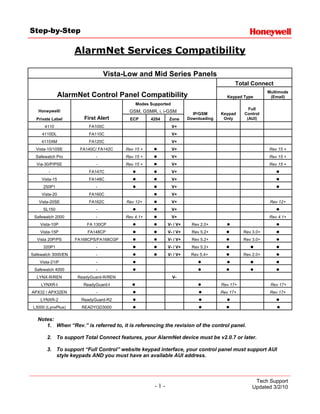
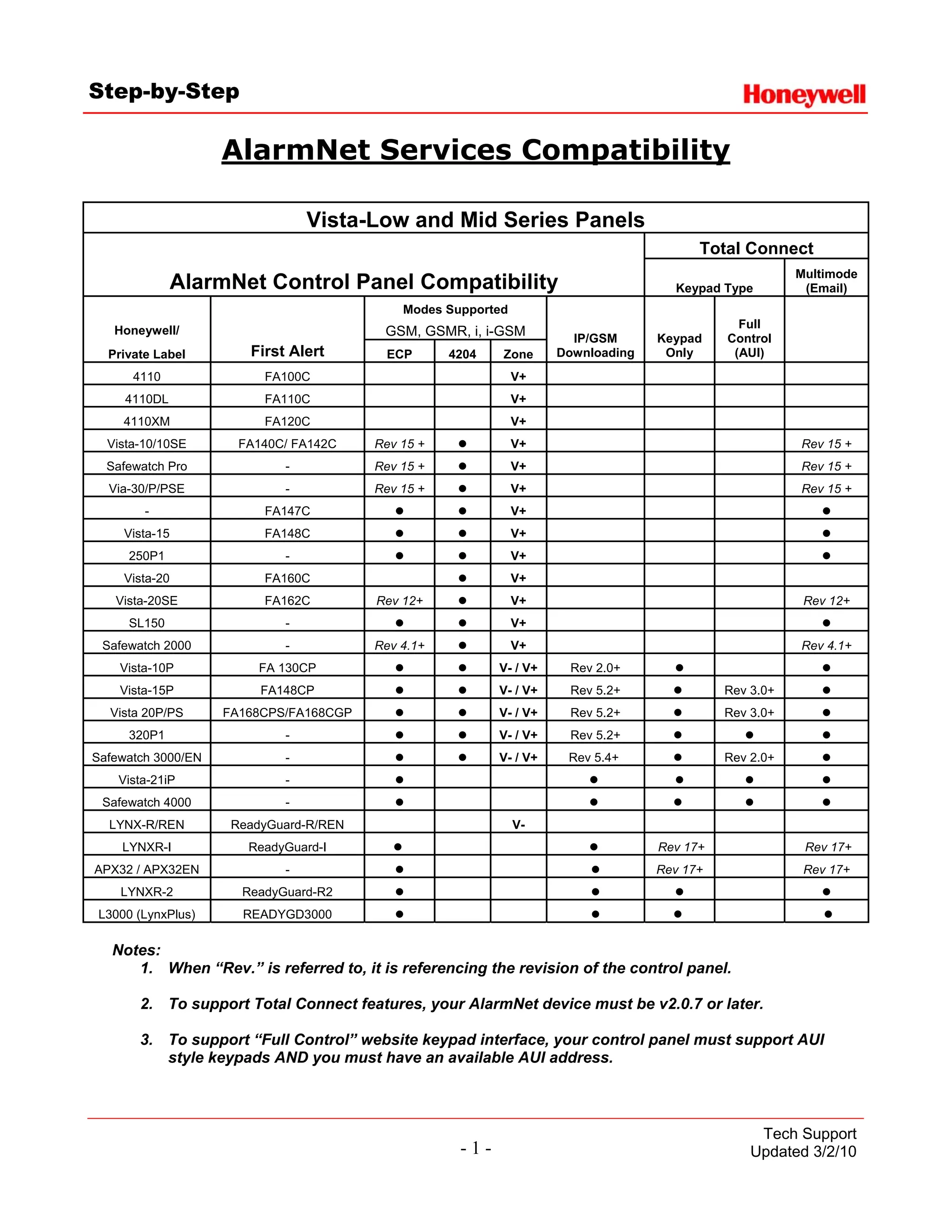
                    AlarmNet Services Compatibility

                                Vista-Low and Mid Series Panels
                                                                                        Total Connect
                                                                                                       Multimode
                AlarmNet Control Panel Compatibility                                Keypad Type         (Email)
                                            Modes Supported
                                                                                              Full
   Honeywell/                            GSM, GSMR, i, i-GSM          IP/GSM      Keypad    Control
  Private Label        First Alert       ECP       4204   Zone      Downloading    Only      (AUI)
      4110               FA100C                               V+
     4110DL              FA110C                               V+
     4110XM              FA120C                               V+
  Vista-10/10SE       FA140C/ FA142C    Rev 15 +              V+                                       Rev 15 +
  Safewatch Pro             -           Rev 15 +              V+                                       Rev 15 +
  Via-30/P/PSE              -           Rev 15 +              V+                                       Rev 15 +
        -                FA147C                               V+
     Vista-15            FA148C                               V+
      250P1                 -                                 V+
     Vista-20            FA160C                               V+
   Vista-20SE            FA162C         Rev 12+               V+                                        Rev 12+
      SL150                 -                                 V+
 Safewatch 2000             -           Rev 4.1+              V+                                       Rev 4.1+
    Vista-10P           FA 130CP                          V- / V+    Rev 2.0+
    Vista-15P            FA148CP                          V- / V+    Rev 5.2+               Rev 3.0+
  Vista 20P/PS      FA168CPS/FA168CGP                     V- / V+    Rev 5.2+               Rev 3.0+
      320P1                 -                             V- / V+    Rev 5.2+
Safewatch 3000/EN           -                             V- / V+    Rev 5.4+               Rev 2.0+
    Vista-21iP              -
 Safewatch 4000             -
  LYNX-R/REN         ReadyGuard-R/REN                         V-
    LYNXR-I            ReadyGuard-I                                               Rev 17+               Rev 17+
APX32 / APX32EN             -                                                     Rev 17+               Rev 17+
    LYNXR-2           ReadyGuard-R2
 L3000 (LynxPlus)     READYGD3000

   Notes:
      1. When “Rev.” is referred to, it is referencing the revision of the control panel.

       2. To support Total Connect features, your AlarmNet device must be v2.0.7 or later.

       3. To support “Full Control” website keypad interface, your control panel must support AUI
          style keypads AND you must have an available AUI address.


                                                                                                 Tech Support
                                                    -1-                                         Updated 3/2/10
Step-by-Step


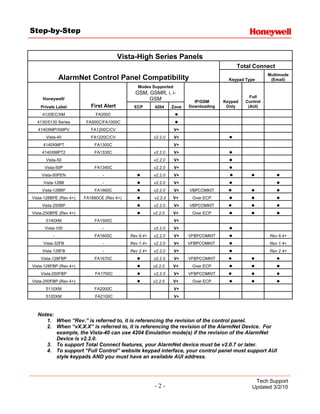
                                         Vista-High Series Panels
                                                                                          Total Connect
                                                                                                        Multimode
              AlarmNet Control Panel Compatibility                                     Keypad Type       (Email)
                                               Modes Supported
                                              GSM, GSMR, i, i-
                                                                                                Full
     Honeywell/                                    GSM                   IP/GSM      Keypad   Control
    Private Label          First Alert       ECP       4204     Zone   Downloading    Only     (AUI)
     4120EC/XM               FA200C
  4130/5130 Series       FA500C/FA1000C
  4140XMP/XMPV             FA1200C/CV                            V+
      Vista-40             FA1220C/CV                  v2.2.0    V+
     4140XMPT               FA1300C                              V+
    4140XMPT2               FA1330C                    v2.2.0    V+
      Vista-50                                         v2.2.0    V+
      Vista-50P             FA1340C                    v2.2.0    V+
    Vista-50PEN                 -                      v2.2.0    V+
     Vista-128B                 -                      v2.2.0    V+
    Vista-128BP             FA1660C                    v2.2.0    V+    VBPCOMKIT
Vista-128BPE (Rev 4+)   FA1660CE (Rev 4+)              v2.2.0   V+      Over ECP
    Vista-250BP                                        v2.2.0    V+    VBPCOMKIT
Vista-250BPE (Rev 4+)                                  v2.2.0   V+      Over ECP
      5140XM                FA1500C                              V+
      Vista-100                 -                      v2.2.0    V+
          -                 FA1600C         Rev 6.4+   v2.2.0    V+    VFBPCOMKIT                       Rev 6.4+
     Vista-32FB                 -           Rev 1.4+   v2.2.0    V+    VFBPCOMKIT                       Rev 1.4+
    Vista 128FB                 -           Rev 2.4+   v2.2.0    V+                                     Rev 2.4+
    Vista-128FBP            FA1670C                    v2.2.0    V+    VFBPCOMKIT
Vista-128FBP (Rev 4+)                                  v2.2.0   V+      Over ECP
    Vista-250FBP             FA1700C                   v2.2.0    V+    VFBPCOMKIT
Vista-250FBP (Rev 4+)                                  v2.2.0   V+      Over ECP
      5110XM                FA2000C                              V+
      5120XM                 FA2100C                             V+


  Notes:
     1. When “Rev.” is referred to, it is referencing the revision of the control panel.
     2. When “vX.X.X” is referred to, it is referencing the revision of the AlarmNet Device. For
         example, the Vista-40 can use 4204 Emulation mode(s) if the revision of the AlarmNet
         Device is v2.2.0.
     3. To support Total Connect features, your AlarmNet device must be v2.0.7 or later.
     4. To support “Full Control” website keypad interface, your control panel must support AUI
         style keypads AND you must have an available AUI address.


                                                                                                  Tech Support
                                                       -2-                                       Updated 3/2/10
Step-by-Step


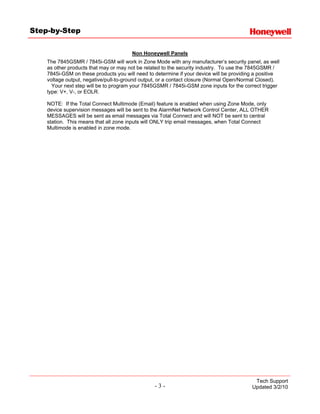
                                       Non Honeywell Panels
    The 7845GSMR / 7845i-GSM will work in Zone Mode with any manufacturer’s security panel, as well
    as other products that may or may not be related to the security industry. To use the 7845GSMR /
    7845i-GSM on these products you will need to determine if your device will be providing a positive
    voltage output, negative/pull-to-ground output, or a contact closure (Normal Open/Normal Closed).
      Your next step will be to program your 7845GSMR / 7845i-GSM zone inputs for the correct trigger
    type: V+, V-, or EOLR.

    NOTE: If the Total Connect Multimode (Email) feature is enabled when using Zone Mode, only
    device supervision messages will be sent to the AlarmNet Network Control Center, ALL OTHER
    MESSAGES will be sent as email messages via Total Connect and will NOT be sent to central
    station. This means that all zone inputs will ONLY trip email messages, when Total Connect
    Multimode is enabled in zone mode.


                                                                                           Tech Support
                                                 -3-                                      Updated 3/2/10

Honeywell alarmnet-compatibility

  • 1.
    Step-by-Step AlarmNet Services Compatibility Vista-Low and Mid Series Panels Total Connect Multimode AlarmNet Control Panel Compatibility Keypad Type (Email) Modes Supported Full Honeywell/ GSM, GSMR, i, i-GSM IP/GSM Keypad Control Private Label First Alert ECP 4204 Zone Downloading Only (AUI) 4110 FA100C V+ 4110DL FA110C V+ 4110XM FA120C V+ Vista-10/10SE FA140C/ FA142C Rev 15 + V+ Rev 15 + Safewatch Pro - Rev 15 + V+ Rev 15 + Via-30/P/PSE - Rev 15 + V+ Rev 15 + - FA147C V+ Vista-15 FA148C V+ 250P1 - V+ Vista-20 FA160C V+ Vista-20SE FA162C Rev 12+ V+ Rev 12+ SL150 - V+ Safewatch 2000 - Rev 4.1+ V+ Rev 4.1+ Vista-10P FA 130CP V- / V+ Rev 2.0+ Vista-15P FA148CP V- / V+ Rev 5.2+ Rev 3.0+ Vista 20P/PS FA168CPS/FA168CGP V- / V+ Rev 5.2+ Rev 3.0+ 320P1 - V- / V+ Rev 5.2+ Safewatch 3000/EN - V- / V+ Rev 5.4+ Rev 2.0+ Vista-21iP - Safewatch 4000 - LYNX-R/REN ReadyGuard-R/REN V- LYNXR-I ReadyGuard-I Rev 17+ Rev 17+ APX32 / APX32EN - Rev 17+ Rev 17+ LYNXR-2 ReadyGuard-R2 L3000 (LynxPlus) READYGD3000 Notes: 1. When “Rev.” is referred to, it is referencing the revision of the control panel. 2. To support Total Connect features, your AlarmNet device must be v2.0.7 or later. 3. To support “Full Control” website keypad interface, your control panel must support AUI style keypads AND you must have an available AUI address. Tech Support -1- Updated 3/2/10
  • 2.
    Step-by-Step Vista-High Series Panels Total Connect Multimode AlarmNet Control Panel Compatibility Keypad Type (Email) Modes Supported GSM, GSMR, i, i- Full Honeywell/ GSM IP/GSM Keypad Control Private Label First Alert ECP 4204 Zone Downloading Only (AUI) 4120EC/XM FA200C 4130/5130 Series FA500C/FA1000C 4140XMP/XMPV FA1200C/CV V+ Vista-40 FA1220C/CV v2.2.0 V+ 4140XMPT FA1300C V+ 4140XMPT2 FA1330C v2.2.0 V+ Vista-50 v2.2.0 V+ Vista-50P FA1340C v2.2.0 V+ Vista-50PEN - v2.2.0 V+ Vista-128B - v2.2.0 V+ Vista-128BP FA1660C v2.2.0 V+ VBPCOMKIT Vista-128BPE (Rev 4+) FA1660CE (Rev 4+) v2.2.0 V+ Over ECP Vista-250BP v2.2.0 V+ VBPCOMKIT Vista-250BPE (Rev 4+) v2.2.0 V+ Over ECP 5140XM FA1500C V+ Vista-100 - v2.2.0 V+ - FA1600C Rev 6.4+ v2.2.0 V+ VFBPCOMKIT Rev 6.4+ Vista-32FB - Rev 1.4+ v2.2.0 V+ VFBPCOMKIT Rev 1.4+ Vista 128FB - Rev 2.4+ v2.2.0 V+ Rev 2.4+ Vista-128FBP FA1670C v2.2.0 V+ VFBPCOMKIT Vista-128FBP (Rev 4+) v2.2.0 V+ Over ECP Vista-250FBP FA1700C v2.2.0 V+ VFBPCOMKIT Vista-250FBP (Rev 4+) v2.2.0 V+ Over ECP 5110XM FA2000C V+ 5120XM FA2100C V+ Notes: 1. When “Rev.” is referred to, it is referencing the revision of the control panel. 2. When “vX.X.X” is referred to, it is referencing the revision of the AlarmNet Device. For example, the Vista-40 can use 4204 Emulation mode(s) if the revision of the AlarmNet Device is v2.2.0. 3. To support Total Connect features, your AlarmNet device must be v2.0.7 or later. 4. To support “Full Control” website keypad interface, your control panel must support AUI style keypads AND you must have an available AUI address. Tech Support -2- Updated 3/2/10
  • 3.
    Step-by-Step Non Honeywell Panels The 7845GSMR / 7845i-GSM will work in Zone Mode with any manufacturer’s security panel, as well as other products that may or may not be related to the security industry. To use the 7845GSMR / 7845i-GSM on these products you will need to determine if your device will be providing a positive voltage output, negative/pull-to-ground output, or a contact closure (Normal Open/Normal Closed). Your next step will be to program your 7845GSMR / 7845i-GSM zone inputs for the correct trigger type: V+, V-, or EOLR. NOTE: If the Total Connect Multimode (Email) feature is enabled when using Zone Mode, only device supervision messages will be sent to the AlarmNet Network Control Center, ALL OTHER MESSAGES will be sent as email messages via Total Connect and will NOT be sent to central station. This means that all zone inputs will ONLY trip email messages, when Total Connect Multimode is enabled in zone mode. Tech Support -3- Updated 3/2/10