




HIGHER-ORDER FUNCTIONS- WHAT ARE THEY?
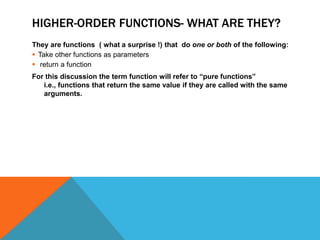
They are functions ( what a surprise !) that do one or both of the following:
 Take other functions as parameters
 return a function
For this discussion the term function will refer to “pure functions”
i.e., functions that return the same value if they are called with the same
arguments.
TYPES OF FUNCTIONS
function Add(x,y) {
return x+y
}
function Add (x,y) {
console.log (x+y)
return x+y
}
function newadder(x){
return function (y){
return x+y
}
}
function fn ( another function) {
return anotherfunction()
}
function fnfn (another fn){
return function (x){
return anotherfn()+x
}
}

<- a pure function

<- a function with side effects
<- a function that returns
another function

<- function that takes another
function and returns a value.
<-a function that takes another
function and returns yet another
function!!
CURRYING
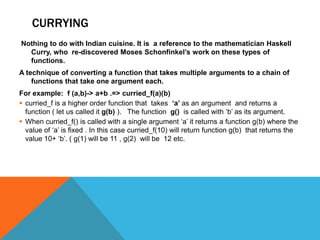
Nothing to do with Indian cuisine. It is a reference to the mathematician Haskell
Curry, who re-discovered Moses Schonfinkel‟s work on these types of
functions.
A technique of converting a function that takes multiple arguments to a chain of
functions that take one argument each.
For example: f (a,b)-> a+b .=> curried_f(a)(b)
 curried_f is a higher order function that takes „a‟ as an argument and returns a
function ( let us called it g(b) ). The function g() is called with „b‟ as its argument.
 When curried_f() is called with a single argument „a‟ it returns a function g(b) where the
value of „a‟ is fixed . In this case curried_f(10) will return function g(b) that returns the
value 10+ „b‟. ( g(1) will be 11 , g(2) will be 12 etc.
CURRIED FUNCTIONS EXAMPLES

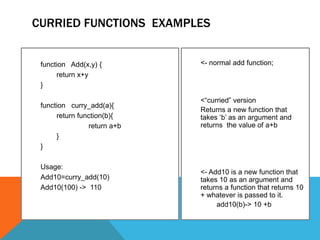
function Add(x,y) {
return x+y
}
function curry_add(a){
return function(b){
return a+b
}
}
Usage:
Add10=curry_add(10)
Add10(100) -> 110

<- normal add function;

<“curried” version
Returns a new function that
takes „b‟ as an argument and
returns the value of a+b

<- Add10 is a new function that
takes 10 as an argument and
returns a function that returns 10
+ whatever is passed to it.
add10(b)-> 10 +b
CURRIED FUNCTIONS EXAMPLES
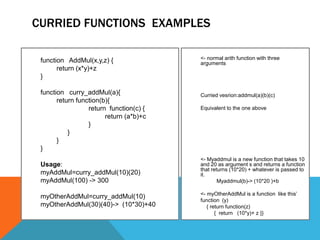
function AddMul(x,y,z) {
return (x*y)+z
}
function curry_addMul(a){
return function(b){
return function(c) {
return (a*b)+c
}
}
}
}

<- normal arith function with three
arguments

Curried vesrion:addmul(a)(b)(c)
Equivalent to the one above

Usage:
myAddMul=curry_addMul(10)(20)
myAddMul(100) -> 300

<- Myaddmul is a new function that takes 10
and 20 as argument s and returns a function
that returns (10*20) + whatever is passed to
it.
Myaddmul(b)-> (10*20 )+b

myOtherAddMul=curry_addMul(10)
myOtherAddMul(30)(40)-> (10*30)+40

<- myOtherAddMul is a function like this‟
function (y)
{ return function(z)
{ return (10*y)+ z }}
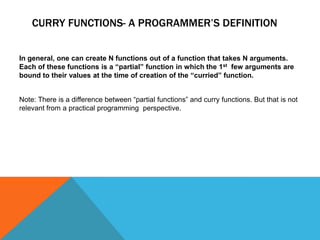
CURRY FUNCTIONS- A PROGRAMMER’S DEFINITION
In general, one can create N functions out of a function that takes N arguments.
Each of these functions is a “partial” function in which the 1st few arguments are
bound to their values at the time of creation of the “curried” function.
Note: There is a difference between “partial functions” and curry functions. But that is not
relevant from a practical programming perspective.
CREATING CURRIED FUNCTIONS
A function with n arguments f(x1,x2… xn) { <body> }
can be converted a curried version in the following
manner.
f (fn) -> {

return f (x1)
{
return f (x2)
.
..
return f(xn)
{
return fn(x1,x2… xn)
}
..
..
}
}
CREATING CURRIED FUNCTIONS IN JAVASCRIPT

There are two ways to create
curried equivalents of any
function in java script
 Using the new Function- creating a new function on the fly
 Using a closure
USING NEW FUNCTION() TO CREATE “CURRIED”
FUNCTIONS
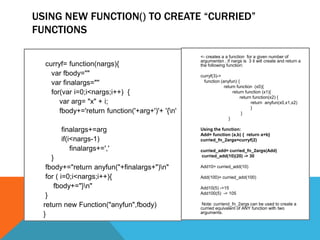
curryf= function(nargs){
var fbody=""
var finalargs=""
for(var i=0;i<nargs;i++) {
var arg= "x" + i;
fbody+='return function('+arg+')'+ '{n'
finalargs+=arg
if(i<nargs-1)
finalargs+=','
}
fbody+="return anyfun("+finalargs+")n"
for ( i=0;i<nargs;i++){
fbody+="}n"
}
return new Function("anyfun",fbody)
}

<- creates a a function for a given number of
argumentsn , if nargs is 3 it will create and return a
the following function:
curryf(3)->
function (anyfun) {
return function (x0){
return function (x1){
return function(x2) {
return anyfun(x0,x1,x2)
}
}
}
Using the function:
Add= function (a,b) { return a+b}
curried_fn_2args=curryf(2)
curried_add= curried_fn_2args(Add)
curried_add(10)(20) -> 30
Add10= curried_add(10)
Add(100)= curried_add(100)
Add10(5) ->15
Add100(5) -> 105
Note: curriend_fn_2args can be used to create a
curried equivalent of ANY function with two
arguments.
PROS AND CONS OF USING THE NEW FUNCTION
Pros
 Creates functions that can be used in the “mathematical” syntax of curry
functions f(,a,b,c)-> f(a)(b)(c)
Cons
 Difficult to understand
 Imperative– automates the manual way of creating curry functions
 Creating functions using new Function is not advisable- slow, some of the
documentation says that functions created using new Function cannot have
closure- this particular example works in Chrome
A BETTER WAY TO CREATE CURRIED FUNCTION
Given the not-so-good attributes of the solution created using “new
Function”, the following section defines a better way of creating „curried”
functions
USING NEW FUNCTION() TO CREATE “CURRIED”
FUNCTIONS
var curry=function (fn) {
var ,
curry_args=
[].slice.call(arguments,1);
return function() {

return
fn.apply(this,curry_args.concat([].slice.call(
arguments)))
}
}

fn – function to be curried

Get partial or all arguments
passed to the curried function at
the time of „creation”. If args==[]
then curried function will expect
all the arrgs of fn().
<_ return a function that applies
the function fn will the all the
arguments– by concatenating
curry_args with the arguments
passed to the inner function
Usage: add(a,b) { return a+b}
Add10= curry(add,10)
Add10(20) -> 30
A PRACTICAL EXAMPLE OF USING CURRIED
FUNCTIONS
function converter(from, to, ratio,input) {
return [input,from,"equals
",(input*ratio),to].join(' ')
}
dlrToRupee= curry(converter, “$”,”Re”, 61)
euroToRupee=
curry(converter, “Euro(s)”, “$”, 1.35)
dlrTo Rupee(1000) ->“1000 $ equal 61000
re)
euroToDollar(100)->
“100 Euro(s ) equals 135 $”
milesToKm= curry
(converter, “Mile(s)”, „Kms”,
1.61)
mileToKm(100)->
“100 Mile(s) equals 161 Kms”

Converter(“$”, “Re”, 61, 100) will
return :
“100 $ equals 6100 Rs)

dlrToRuppee=> a new fn
function (input) {
return [input,”$”,"equals
",(input*ratio),”Re].join(' ')
milesToKm=> a new fn
function(input){
return [input,”Mile(s),"equals
",(input*ratio),”Kms”].join(' ')

As you can see many
functions can be created from
one converter function. This is
the primary use of currying.
ANOTHER EXAMPLE OF USING CURRIED FUNCTIONS
function getFile(callback, “path”, filename)
{
/* go your ajax stuff here*/
}

Self explanatory

getPdf= curry( getFile, pdfCallBack,
“/index/files/docs/pdf”)

getJpeg= curry(getFile,jpgCallback,
„/index/filex/images/jpg”
getPdf(“curryfunctions”)
getJpeg(“captainkirk”)

(a) Cleaner code– no passing
around long paths and
callback functions at every
place where you want to get
a PDF or an image.
(b) If the path or callback
change , you need to change
it only at one place
That‟s it! Currying is as simple as that.
Enjoy!

Curry functions in Javascript

  • 2.
    HIGHER-ORDER FUNCTIONS- WHATARE THEY? They are functions ( what a surprise !) that do one or both of the following:  Take other functions as parameters  return a function For this discussion the term function will refer to “pure functions” i.e., functions that return the same value if they are called with the same arguments.
  • 3.
    TYPES OF FUNCTIONS functionAdd(x,y) { return x+y } function Add (x,y) { console.log (x+y) return x+y } function newadder(x){ return function (y){ return x+y } } function fn ( another function) { return anotherfunction() } function fnfn (another fn){ return function (x){ return anotherfn()+x } } <- a pure function <- a function with side effects <- a function that returns another function <- function that takes another function and returns a value. <-a function that takes another function and returns yet another function!!
  • 4.
    CURRYING Nothing to dowith Indian cuisine. It is a reference to the mathematician Haskell Curry, who re-discovered Moses Schonfinkel‟s work on these types of functions. A technique of converting a function that takes multiple arguments to a chain of functions that take one argument each. For example: f (a,b)-> a+b .=> curried_f(a)(b)  curried_f is a higher order function that takes „a‟ as an argument and returns a function ( let us called it g(b) ). The function g() is called with „b‟ as its argument.  When curried_f() is called with a single argument „a‟ it returns a function g(b) where the value of „a‟ is fixed . In this case curried_f(10) will return function g(b) that returns the value 10+ „b‟. ( g(1) will be 11 , g(2) will be 12 etc.
  • 5.
    CURRIED FUNCTIONS EXAMPLES functionAdd(x,y) { return x+y } function curry_add(a){ return function(b){ return a+b } } Usage: Add10=curry_add(10) Add10(100) -> 110 <- normal add function; <“curried” version Returns a new function that takes „b‟ as an argument and returns the value of a+b <- Add10 is a new function that takes 10 as an argument and returns a function that returns 10 + whatever is passed to it. add10(b)-> 10 +b
  • 6.
    CURRIED FUNCTIONS EXAMPLES functionAddMul(x,y,z) { return (x*y)+z } function curry_addMul(a){ return function(b){ return function(c) { return (a*b)+c } } } } <- normal arith function with three arguments Curried vesrion:addmul(a)(b)(c) Equivalent to the one above Usage: myAddMul=curry_addMul(10)(20) myAddMul(100) -> 300 <- Myaddmul is a new function that takes 10 and 20 as argument s and returns a function that returns (10*20) + whatever is passed to it. Myaddmul(b)-> (10*20 )+b myOtherAddMul=curry_addMul(10) myOtherAddMul(30)(40)-> (10*30)+40 <- myOtherAddMul is a function like this‟ function (y) { return function(z) { return (10*y)+ z }}
  • 7.
    CURRY FUNCTIONS- APROGRAMMER’S DEFINITION In general, one can create N functions out of a function that takes N arguments. Each of these functions is a “partial” function in which the 1st few arguments are bound to their values at the time of creation of the “curried” function. Note: There is a difference between “partial functions” and curry functions. But that is not relevant from a practical programming perspective.
  • 8.
    CREATING CURRIED FUNCTIONS Afunction with n arguments f(x1,x2… xn) { <body> } can be converted a curried version in the following manner. f (fn) -> { return f (x1) { return f (x2) . .. return f(xn) { return fn(x1,x2… xn) } .. .. } }
  • 9.
    CREATING CURRIED FUNCTIONSIN JAVASCRIPT There are two ways to create curried equivalents of any function in java script  Using the new Function- creating a new function on the fly  Using a closure
  • 10.
    USING NEW FUNCTION()TO CREATE “CURRIED” FUNCTIONS curryf= function(nargs){ var fbody="" var finalargs="" for(var i=0;i<nargs;i++) { var arg= "x" + i; fbody+='return function('+arg+')'+ '{n' finalargs+=arg if(i<nargs-1) finalargs+=',' } fbody+="return anyfun("+finalargs+")n" for ( i=0;i<nargs;i++){ fbody+="}n" } return new Function("anyfun",fbody) } <- creates a a function for a given number of argumentsn , if nargs is 3 it will create and return a the following function: curryf(3)-> function (anyfun) { return function (x0){ return function (x1){ return function(x2) { return anyfun(x0,x1,x2) } } } Using the function: Add= function (a,b) { return a+b} curried_fn_2args=curryf(2) curried_add= curried_fn_2args(Add) curried_add(10)(20) -> 30 Add10= curried_add(10) Add(100)= curried_add(100) Add10(5) ->15 Add100(5) -> 105 Note: curriend_fn_2args can be used to create a curried equivalent of ANY function with two arguments.
  • 11.
    PROS AND CONSOF USING THE NEW FUNCTION Pros  Creates functions that can be used in the “mathematical” syntax of curry functions f(,a,b,c)-> f(a)(b)(c) Cons  Difficult to understand  Imperative– automates the manual way of creating curry functions  Creating functions using new Function is not advisable- slow, some of the documentation says that functions created using new Function cannot have closure- this particular example works in Chrome
  • 12.
    A BETTER WAYTO CREATE CURRIED FUNCTION Given the not-so-good attributes of the solution created using “new Function”, the following section defines a better way of creating „curried” functions
  • 13.
    USING NEW FUNCTION()TO CREATE “CURRIED” FUNCTIONS var curry=function (fn) { var , curry_args= [].slice.call(arguments,1); return function() { return fn.apply(this,curry_args.concat([].slice.call( arguments))) } } fn – function to be curried Get partial or all arguments passed to the curried function at the time of „creation”. If args==[] then curried function will expect all the arrgs of fn(). <_ return a function that applies the function fn will the all the arguments– by concatenating curry_args with the arguments passed to the inner function Usage: add(a,b) { return a+b} Add10= curry(add,10) Add10(20) -> 30
  • 14.
    A PRACTICAL EXAMPLEOF USING CURRIED FUNCTIONS function converter(from, to, ratio,input) { return [input,from,"equals ",(input*ratio),to].join(' ') } dlrToRupee= curry(converter, “$”,”Re”, 61) euroToRupee= curry(converter, “Euro(s)”, “$”, 1.35) dlrTo Rupee(1000) ->“1000 $ equal 61000 re) euroToDollar(100)-> “100 Euro(s ) equals 135 $” milesToKm= curry (converter, “Mile(s)”, „Kms”, 1.61) mileToKm(100)-> “100 Mile(s) equals 161 Kms” Converter(“$”, “Re”, 61, 100) will return : “100 $ equals 6100 Rs) dlrToRuppee=> a new fn function (input) { return [input,”$”,"equals ",(input*ratio),”Re].join(' ') milesToKm=> a new fn function(input){ return [input,”Mile(s),"equals ",(input*ratio),”Kms”].join(' ') As you can see many functions can be created from one converter function. This is the primary use of currying.
  • 15.
    ANOTHER EXAMPLE OFUSING CURRIED FUNCTIONS function getFile(callback, “path”, filename) { /* go your ajax stuff here*/ } Self explanatory getPdf= curry( getFile, pdfCallBack, “/index/files/docs/pdf”) getJpeg= curry(getFile,jpgCallback, „/index/filex/images/jpg” getPdf(“curryfunctions”) getJpeg(“captainkirk”) (a) Cleaner code– no passing around long paths and callback functions at every place where you want to get a PDF or an image. (b) If the path or callback change , you need to change it only at one place
  • 16.
    That‟s it! Curryingis as simple as that. Enjoy!