
Help Desk
GLPI
Table of content
1.Introduction.
2.Objective
3. Benefits
4.Agent Log-in
5.Agent Home page
6.Creating a ticket
7.Conclusion
Introduction:
Help desk provides a single point of contact for users to gain assistance in
troubleshooting, get answers to questions, and solve problems.
Objective:
The objective is to keep track of number of tickets raised , for closed tickets, for
still open tickets , who worked on the problems and time taken to resolve the
requests/issue.
Benefits – END USERS

Individual has an issue that needs to be addressed, they have a common point of
call that they can contact – The Helpdesk

Individual gets the benefit of staying in the communication loop via automated
email.

Individual personal history is recorded for future reference so that trouble areas
can be quickly identified & addressed

Individual gets better service & have issues resolved in a timely manner.
Benefits – Addresser

Accountability of work.

Help in his performance Report.

Responds to Individual’s requests to a proactive manner.
Benefits – Management

Statistical & trend reports to identify problem areas & increase helpdesk
efficiency.

Provide better service to all the employees

Managers can quickly generate meaningful reports that can highlight individual
performance bottlenecks, recurring issues & outstanding service.

Technology problems are minimized & addressed in a timely manner.

Leverage use of the internet to provide support to remote individuals
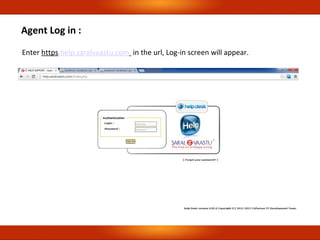
Agent Log in :
Enter https.help.saralvaastu.com in the url, Log-in screen will appear.
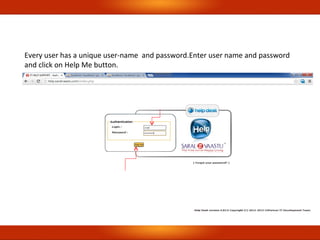
Every user has a unique user-name and password.Enter user name and password
and click on Help Me button.
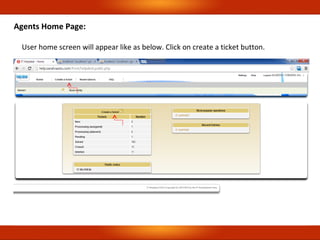
Agents Home Page:
User home screen will appear like as below. Click on create a ticket button.
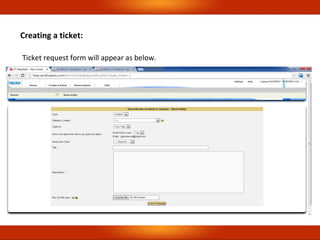
Ticket request form will appear as below.
Creating a ticket:
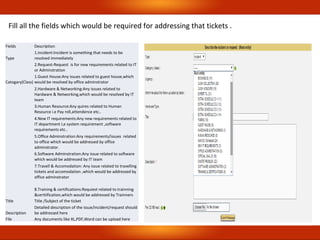
Fields Description
Type
1.Incident:Incident is something that needs to be
resolved immediately
2.Request-Request is for new requirements related to IT
or Adminstration
Catogary(Class)
1.Guest House:Any issues related to guest house,which
would be resolved by office adminstrator
2.Hardware & Networking:Any issues related to
Hardware & Networking,which would be resolved by IT
team
3.Human Resource:Any quires related to Human
Resource i.e Pay roll,attendence etc..
4.New IT requirements:Any new requirements related to
IT department I,e system requirement ,software
requirements etc..
5.Office Adminstration:Any requirements/issues related
to office which would be addressed by office
adminstrator.
6.Software Adminstration:Any issue related to software
which would be addressed by IT team
7.Travell & Accomodation: Any issue related to travelling
tickets and accomodation ,which would be addressed by
office adminstrator
8.Training & certifications:Requiest related to trainning
&certtification,which would be addressed by Trainners
Title Title /Subject of the ticket
Description
Detailed description of the issue/incident/request should
be addressed here
File Any documents like XL,PDF,Word can be upload here
Fill all the fields which would be required for addressing that tickets .
•
Every ticket will be addressed with in 15min- 12 hrs.
•
New requirements will be addressed with in 15 min-24 hrs.
•
Every ticket will be addressed with in 15min- 12 hrs.
•
New requirements will be addressed with in 15 min-24 hrs.
Conclusion:
Helpdesk allows internal staff to have all the necessary tools to log, analyze & assist in
the resolution of helpdesk issues. Recurring issues can be prevented & they have
confidence that nothing will “ Fall through the cracks”
•
Single point communication for all the helpdesk users.
Thank You..
Regional offices :
Bangalore : Shop No.33/1,Between12 &13,Cross,
Margosa Road, Malleshwaram, Bangalore – 560003
Tel : 080-65465054/9448286754
Hubli : Shop No.210-15,2nd floor, Bhavani Arcade,
Opp Basava Vana, Old Bus Stand Road, Hubli – 580029
Tel : 0836 -2356239/9448286755/56
Customer Care : +919480835959

GLPI - Help desk

  • 1.
  • 2.
    Table of content 1.Introduction. 2.Objective 3.Benefits 4.Agent Log-in 5.Agent Home page 6.Creating a ticket 7.Conclusion
  • 3.
    Introduction: Help desk providesa single point of contact for users to gain assistance in troubleshooting, get answers to questions, and solve problems. Objective: The objective is to keep track of number of tickets raised , for closed tickets, for still open tickets , who worked on the problems and time taken to resolve the requests/issue.
  • 4.
    Benefits – ENDUSERS  Individual has an issue that needs to be addressed, they have a common point of call that they can contact – The Helpdesk  Individual gets the benefit of staying in the communication loop via automated email.  Individual personal history is recorded for future reference so that trouble areas can be quickly identified & addressed  Individual gets better service & have issues resolved in a timely manner.
  • 5.
    Benefits – Addresser  Accountabilityof work.  Help in his performance Report.  Responds to Individual’s requests to a proactive manner.
  • 6.
    Benefits – Management  Statistical& trend reports to identify problem areas & increase helpdesk efficiency.  Provide better service to all the employees  Managers can quickly generate meaningful reports that can highlight individual performance bottlenecks, recurring issues & outstanding service.  Technology problems are minimized & addressed in a timely manner.  Leverage use of the internet to provide support to remote individuals
  • 7.
    Agent Log in: Enter https.help.saralvaastu.com in the url, Log-in screen will appear.
  • 8.
    Every user hasa unique user-name and password.Enter user name and password and click on Help Me button.
  • 9.
    Agents Home Page: Userhome screen will appear like as below. Click on create a ticket button.
  • 10.
    Ticket request formwill appear as below. Creating a ticket:
  • 11.
    Fields Description Type 1.Incident:Incident issomething that needs to be resolved immediately 2.Request-Request is for new requirements related to IT or Adminstration Catogary(Class) 1.Guest House:Any issues related to guest house,which would be resolved by office adminstrator 2.Hardware & Networking:Any issues related to Hardware & Networking,which would be resolved by IT team 3.Human Resource:Any quires related to Human Resource i.e Pay roll,attendence etc.. 4.New IT requirements:Any new requirements related to IT department I,e system requirement ,software requirements etc.. 5.Office Adminstration:Any requirements/issues related to office which would be addressed by office adminstrator. 6.Software Adminstration:Any issue related to software which would be addressed by IT team 7.Travell & Accomodation: Any issue related to travelling tickets and accomodation ,which would be addressed by office adminstrator 8.Training & certifications:Requiest related to trainning &certtification,which would be addressed by Trainners Title Title /Subject of the ticket Description Detailed description of the issue/incident/request should be addressed here File Any documents like XL,PDF,Word can be upload here Fill all the fields which would be required for addressing that tickets .
  • 12.
    • Every ticket willbe addressed with in 15min- 12 hrs. • New requirements will be addressed with in 15 min-24 hrs.
  • 13.
    • Every ticket willbe addressed with in 15min- 12 hrs. • New requirements will be addressed with in 15 min-24 hrs.
  • 14.
    Conclusion: Helpdesk allows internalstaff to have all the necessary tools to log, analyze & assist in the resolution of helpdesk issues. Recurring issues can be prevented & they have confidence that nothing will “ Fall through the cracks” • Single point communication for all the helpdesk users.
  • 15.
  • 16.
    Regional offices : Bangalore: Shop No.33/1,Between12 &13,Cross, Margosa Road, Malleshwaram, Bangalore – 560003 Tel : 080-65465054/9448286754 Hubli : Shop No.210-15,2nd floor, Bhavani Arcade, Opp Basava Vana, Old Bus Stand Road, Hubli – 580029 Tel : 0836 -2356239/9448286755/56 Customer Care : +919480835959