


Hello, Git!
• Installation in Windows
• Configuration
• Basic Commands
• GitHub
What’s
Git?
• Distributed SCM (source code
management) system
– Look at the word Distributed
– Everyone will have a complete copy of
all history of the project in their local
computers.
– That is, everyone has a repository in
their own computers.
• Repository, or “Repo” is where Git stores
all necessary information. It’s usually a
folder with name “.git”
Why Git?
• Store a complete history of your project
• Whenever you want to record a snapshot of
your project, simply “commit”
– Snapshot is nothing but the current situation of
all files & folders of your project 
• Easily “merge” codes with your team-mates.
• Secured backup of your project. Since Git is
distributed, every team-mate has complete
record of the project, and it’s unlikely that
everyone’s computer will crash at the same
time!
• Download msysgit
from
– http://code.google.co
m/p/msysgit/download
s/list?q=full+installer+o
fficial+git
Windows
setup
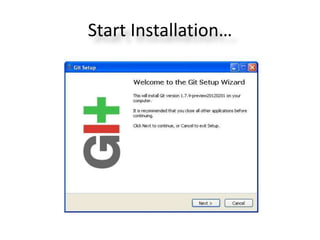
Start Installation…
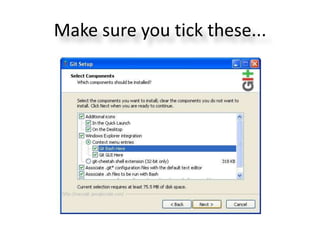
Make sure you tick these...
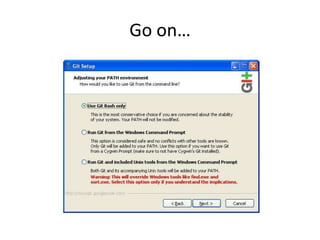
Go on…
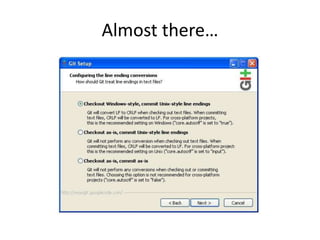
Almost there…
Done
Installing!
• You’ve successfully
installed Git in your
Windows.
• Now what?
• Create a new project?
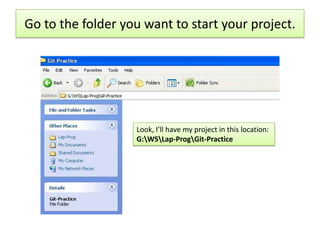
Go to the folder you want to start your project.
Look, I’ll have my project in this location:
G:WSLap-ProgGit-Practice
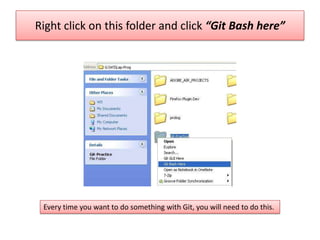
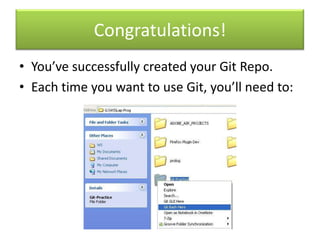
Right click on this folder and click “Git Bash here”
Every time you want to do something with Git, you will need to do this.
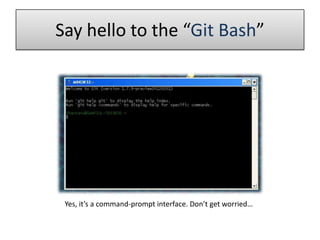
Say hello to the “Git Bash”
Yes, it’s a command-prompt interface. Don’t get worried…
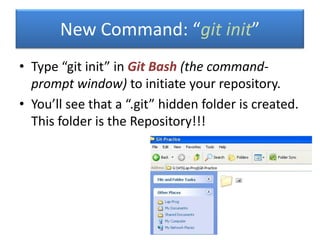
• Type “git init” in Git Bash (the command-
prompt window) to initiate your repository.
• You’ll see that a “.git” hidden folder is created.
This folder is the Repository!!!
New Command: “git init”
Congratulations!
• You’ve successfully created your Git Repo.
• Each time you want to use Git, you’ll need to:
Tell Git who you are…
• Type in Git Bash following 2 commands:
– git config --global user.name "Your Name"
– git config --global user.email your-
email@yahoo.com
• Congratulations, you’ve completed configuring your Git
Bash.
Basic
Commands
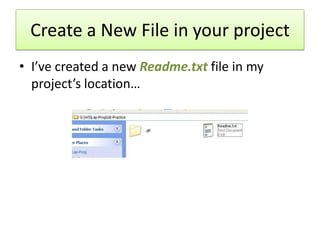
Create a New File in your project
• I’ve created a new Readme.txt file in my
project’s location…
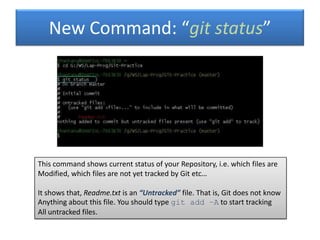
New Command: “git status”
This command shows current status of your Repository, i.e. which files are
Modified, which files are not yet tracked by Git etc…
It shows that, Readme.txt is an “Untracked” file. That is, Git does not know
Anything about this file. You should type git add –A to start tracking
All untracked files.
• Use git add -A to add start tracking all
Untracked files.
• Then use git commit -m “Message
telling what you did” command to
actually Commit your changes.
– Whenever you commit, you store a complete
history/snapshot of your project. Later
anytime, you may view the snapshots of your
project wherever you made commit.
New Command: “git commit”
Add & Commit
• Whenever you wish to record snapshot of
your project:
– git add -A command in Git Bash will add all
new & modified files for commit-list.
– Then, git commit -m “custom
message” command will actually do the
commit.
• Use a message telling what you’ve done, say, “removed
database dependancy”
• Displays a list of all commits you’ve made so
far.
– Tips: You want to go back to some previous
commit? Hmm… you will need a list of all commits
made in your project, and here git log
command comes!
• Food for brain: how does Git uniquely identify
each commit? It should assign each commit
some number or Id…
New Command: “git log”
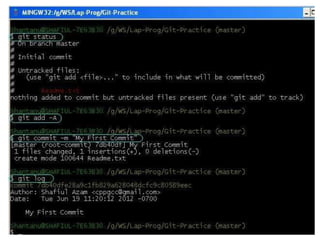
Back to our example scenario
• After creating the Readme.txt file, we
executed following commands in Git
Bash, sequentially:
– git status
– git add -A
– git commit -m “My First Commit”
– git log
• Output window looks like the image of next
slide…
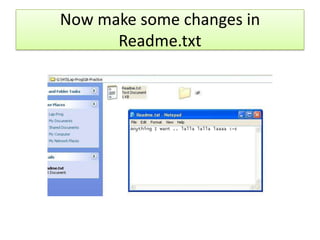
Now make some changes in
Readme.txt
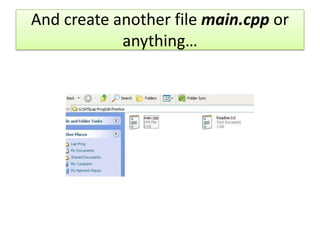
And create another file main.cpp or
anything…
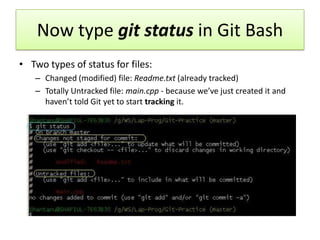
Now type git status in Git Bash
• Two types of status for files:
– Changed (modified) file: Readme.txt (already tracked)
– Totally Untracked file: main.cpp - because we’ve just created it and
haven’t told Git yet to start tracking it.
Add, Commit, and View log…
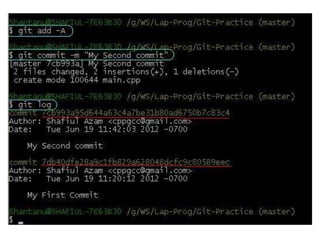
• Execute following commands in Git
Bash, sequentially:
– git add -A
– git commit -m “My second Commit”
– git log
• Output window is on next slide…
Commit IDs
• When we execute git log this time we see two
commits!
• Each commit is identified by a string of 40
characters (say
“7db40dfe28a9c1fb829a628048dcfc9c80589eec”
from our 1st commit example)
– The strings are underlined using red color in the image
of the previous slide.
• We will use these strings to uniquely refer any
particular commit of our project.
Teamwork
with
GitHub
Working in a team
• You and your team-mates.
• Everyone has their own local Git repo in their personal
computers, and everyone is committing in their local repos
(Local repo is the Git repo in someone’s own computer).
• How will you get the commits made by your team-mates
merged in your local Repo?
– And vice versa, how will your team-mates get the commits
made by you merged in their local repo?
• To get others’ commits merged in your local repo, you pull
from their repo.
– And you push to their repo so that their local repo is merged
with your commits! Making sense, right? 
You’ll probably need a server…
• So to get the commits made by others, you should pull from
their local repos i.e. their computers.
• But wait… what if their computer has no Real IP? Then you
can not send/receive network packets to/from it. Most of us
don’t have real IP.
• So we use a server which has a Real IP. Say, GitHub.com or
Assembla.com – they provide us free Git hosting.
• They are nothing but Git repos like the repos in our local machine. But
since they have real IP, we can directly push from & pull to it.
– All team-mates including me push to the repo located in a server
– All team-mates including me pull from the repo located in that server.
• This repo is commonly addressed as “origin”
Another problem… how will the server
authenticate the team-mates?
• Common approach: Username-Password
system.
• But typically Git allows using Public & Private
keys to authenticate someone.
– Think of “public key” as your username. You can
safely supply anyone your public key.
– Think of “private key” as your password. You
should NEVER provide anyone your private key!
• Keys are nothing but some text/characters. LONG
stream of characters!
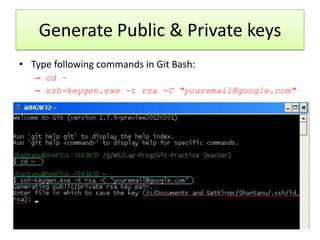
Generate Public & Private keys
• Type following commands in Git Bash:
– cd ~
– ssh-keygen.exe -t rsa -C "youremail@google.com"
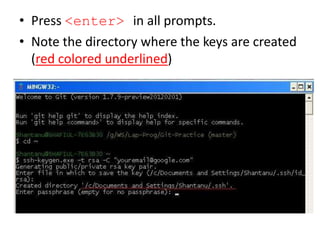
• Press <enter> in all prompts.
• Note the directory where the keys are created
(red colored underlined)
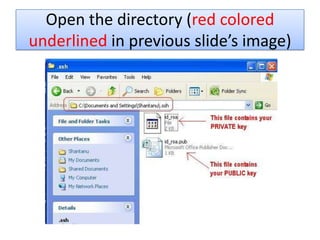
Open the directory (red colored
underlined in previous slide’s image)
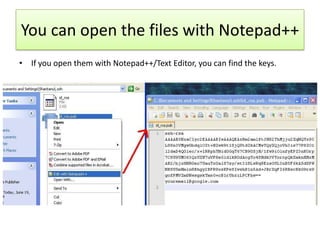
You can open the files with Notepad++
• If you open them with Notepad++/Text Editor, you can find the keys.
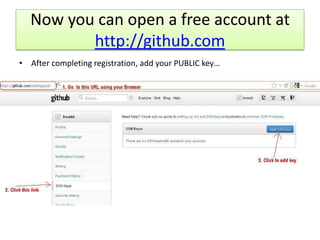
Now you can open a free account at
http://github.com
• After completing registration, add your PUBLIC key…
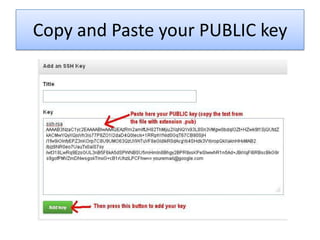
Copy and Paste your PUBLIC key
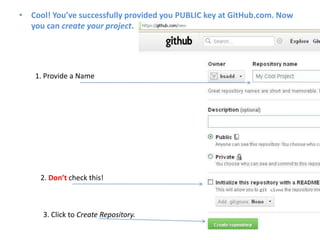
• Cool! You’ve successfully provided you PUBLIC key at GitHub.com. Now
you can create your project.
1. Provide a Name
2. Don’t check this!
3. Click to Create Repository.
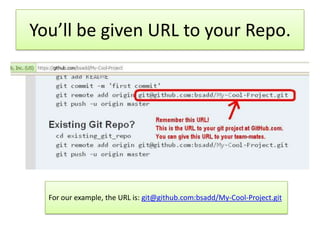
You’ll be given URL to your Repo.
For our example, the URL is: git@github.com:bsadd/My-Cool-Project.git
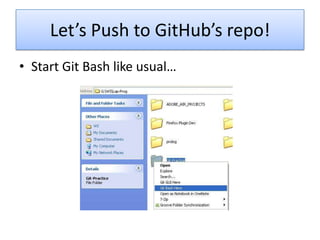
Let’s Push to GitHub’s repo!
• Start Git Bash like usual…
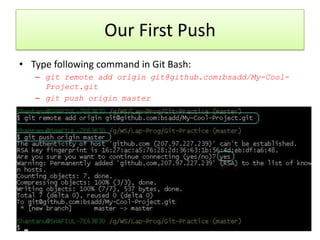
Our First Push
• Type following command in Git Bash:
– git remote add origin git@github.com:bsadd/My-Cool-
Project.git
– git push origin master
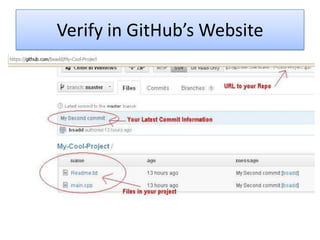
Verify in GitHub’s Website
• Now you’ve pushed the initial repo to GitHub.
• Then, your team-mates should know about this repo and grab the
code from it for the first time.
– All of your team-mates should issue this command in their Git Bash:
– git clone git@github.com:bsadd/My-Cool-
Project.git
• Remember: they should not create Git repo in their computer. Only
one person in the team should create the repo using git init
command
– Then he should push it to a server using git push command
– And all other team mates should Clone the repo to their local
computers using git clone command.
• Note: You should add your team-members in the Project Admin
area. Otherwise they will not have access to push in the GitHub
repo (see image in next slide)
New Command: “git clone”
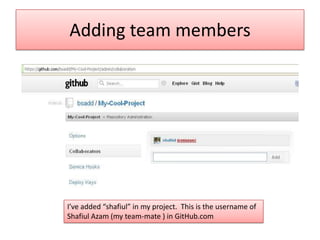
Adding team members
I’ve added “shafiul” in my project. This is the username of
Shafiul Azam (my team-mate ) in GitHub.com
Cloning
• When Shafiul will clone using git clone
command, a new project will be created for
him.
• Then he will be able to push/pull/add/commit
whatever…
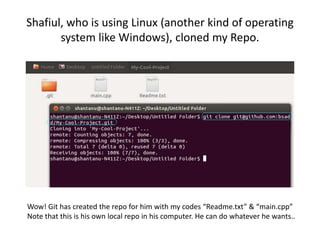
Shafiul, who is using Linux (another kind of operating
system like Windows), cloned my Repo.
Wow! Git has created the repo for him with my codes “Readme.txt” & “main.cpp”
Note that this is his own local repo in his computer. He can do whatever he wants..
Shafiul will Push…
• When Shafiul will finish editing, he will
eventually type following commands in his Git
Bash:
– git add -A
– git commit -m “some message”
– git push origin master
• When he pushes, GitHub’s repo will be
updated with his changes.
And I will Pull!
• To get the changes made by shafiul
automatically merged in my local computer, I
will need to use command git pull
– git pull origin master
• Now my local repo will be updated with
Shafiul’s changes.
• Similarly I can push and Shafiul will need to
pull…
Thank You

Hello Git

  • 1.
    Hello, Git! • Installationin Windows • Configuration • Basic Commands • GitHub
  • 2.
    What’s Git? • Distributed SCM(source code management) system – Look at the word Distributed – Everyone will have a complete copy of all history of the project in their local computers. – That is, everyone has a repository in their own computers. • Repository, or “Repo” is where Git stores all necessary information. It’s usually a folder with name “.git”
  • 3.
    Why Git? • Storea complete history of your project • Whenever you want to record a snapshot of your project, simply “commit” – Snapshot is nothing but the current situation of all files & folders of your project  • Easily “merge” codes with your team-mates. • Secured backup of your project. Since Git is distributed, every team-mate has complete record of the project, and it’s unlikely that everyone’s computer will crash at the same time!
  • 4.
    • Download msysgit from –http://code.google.co m/p/msysgit/download s/list?q=full+installer+o fficial+git Windows setup
  • 5.
  • 6.
    Make sure youtick these...
  • 7.
  • 8.
  • 9.
    Done Installing! • You’ve successfully installedGit in your Windows. • Now what? • Create a new project?
  • 10.
    Go to thefolder you want to start your project. Look, I’ll have my project in this location: G:WSLap-ProgGit-Practice
  • 11.
    Right click onthis folder and click “Git Bash here” Every time you want to do something with Git, you will need to do this.
  • 12.
    Say hello tothe “Git Bash” Yes, it’s a command-prompt interface. Don’t get worried…
  • 13.
    • Type “gitinit” in Git Bash (the command- prompt window) to initiate your repository. • You’ll see that a “.git” hidden folder is created. This folder is the Repository!!! New Command: “git init”
  • 14.
    Congratulations! • You’ve successfullycreated your Git Repo. • Each time you want to use Git, you’ll need to:
  • 15.
    Tell Git whoyou are… • Type in Git Bash following 2 commands: – git config --global user.name "Your Name" – git config --global user.email your- email@yahoo.com • Congratulations, you’ve completed configuring your Git Bash.
  • 16.
  • 17.
    Create a NewFile in your project • I’ve created a new Readme.txt file in my project’s location…
  • 18.
    New Command: “gitstatus” This command shows current status of your Repository, i.e. which files are Modified, which files are not yet tracked by Git etc… It shows that, Readme.txt is an “Untracked” file. That is, Git does not know Anything about this file. You should type git add –A to start tracking All untracked files.
  • 19.
    • Use gitadd -A to add start tracking all Untracked files. • Then use git commit -m “Message telling what you did” command to actually Commit your changes. – Whenever you commit, you store a complete history/snapshot of your project. Later anytime, you may view the snapshots of your project wherever you made commit. New Command: “git commit”
  • 20.
    Add & Commit •Whenever you wish to record snapshot of your project: – git add -A command in Git Bash will add all new & modified files for commit-list. – Then, git commit -m “custom message” command will actually do the commit. • Use a message telling what you’ve done, say, “removed database dependancy”
  • 21.
    • Displays alist of all commits you’ve made so far. – Tips: You want to go back to some previous commit? Hmm… you will need a list of all commits made in your project, and here git log command comes! • Food for brain: how does Git uniquely identify each commit? It should assign each commit some number or Id… New Command: “git log”
  • 22.
    Back to ourexample scenario • After creating the Readme.txt file, we executed following commands in Git Bash, sequentially: – git status – git add -A – git commit -m “My First Commit” – git log • Output window looks like the image of next slide…
  • 24.
    Now make somechanges in Readme.txt
  • 25.
    And create anotherfile main.cpp or anything…
  • 26.
    Now type gitstatus in Git Bash • Two types of status for files: – Changed (modified) file: Readme.txt (already tracked) – Totally Untracked file: main.cpp - because we’ve just created it and haven’t told Git yet to start tracking it.
  • 27.
    Add, Commit, andView log… • Execute following commands in Git Bash, sequentially: – git add -A – git commit -m “My second Commit” – git log • Output window is on next slide…
  • 29.
    Commit IDs • Whenwe execute git log this time we see two commits! • Each commit is identified by a string of 40 characters (say “7db40dfe28a9c1fb829a628048dcfc9c80589eec” from our 1st commit example) – The strings are underlined using red color in the image of the previous slide. • We will use these strings to uniquely refer any particular commit of our project.
  • 31.
  • 32.
    Working in ateam • You and your team-mates. • Everyone has their own local Git repo in their personal computers, and everyone is committing in their local repos (Local repo is the Git repo in someone’s own computer). • How will you get the commits made by your team-mates merged in your local Repo? – And vice versa, how will your team-mates get the commits made by you merged in their local repo? • To get others’ commits merged in your local repo, you pull from their repo. – And you push to their repo so that their local repo is merged with your commits! Making sense, right? 
  • 33.
    You’ll probably needa server… • So to get the commits made by others, you should pull from their local repos i.e. their computers. • But wait… what if their computer has no Real IP? Then you can not send/receive network packets to/from it. Most of us don’t have real IP. • So we use a server which has a Real IP. Say, GitHub.com or Assembla.com – they provide us free Git hosting. • They are nothing but Git repos like the repos in our local machine. But since they have real IP, we can directly push from & pull to it. – All team-mates including me push to the repo located in a server – All team-mates including me pull from the repo located in that server. • This repo is commonly addressed as “origin”
  • 34.
    Another problem… howwill the server authenticate the team-mates? • Common approach: Username-Password system. • But typically Git allows using Public & Private keys to authenticate someone. – Think of “public key” as your username. You can safely supply anyone your public key. – Think of “private key” as your password. You should NEVER provide anyone your private key! • Keys are nothing but some text/characters. LONG stream of characters!
  • 35.
    Generate Public &Private keys • Type following commands in Git Bash: – cd ~ – ssh-keygen.exe -t rsa -C "youremail@google.com"
  • 36.
    • Press <enter>in all prompts. • Note the directory where the keys are created (red colored underlined)
  • 37.
    Open the directory(red colored underlined in previous slide’s image)
  • 38.
    You can openthe files with Notepad++ • If you open them with Notepad++/Text Editor, you can find the keys.
  • 39.
    Now you canopen a free account at http://github.com • After completing registration, add your PUBLIC key…
  • 40.
    Copy and Pasteyour PUBLIC key
  • 41.
    • Cool! You’vesuccessfully provided you PUBLIC key at GitHub.com. Now you can create your project. 1. Provide a Name 2. Don’t check this! 3. Click to Create Repository.
  • 42.
    You’ll be givenURL to your Repo. For our example, the URL is: git@github.com:bsadd/My-Cool-Project.git
  • 43.
    Let’s Push toGitHub’s repo! • Start Git Bash like usual…
  • 44.
    Our First Push •Type following command in Git Bash: – git remote add origin git@github.com:bsadd/My-Cool- Project.git – git push origin master
  • 45.
  • 46.
    • Now you’vepushed the initial repo to GitHub. • Then, your team-mates should know about this repo and grab the code from it for the first time. – All of your team-mates should issue this command in their Git Bash: – git clone git@github.com:bsadd/My-Cool- Project.git • Remember: they should not create Git repo in their computer. Only one person in the team should create the repo using git init command – Then he should push it to a server using git push command – And all other team mates should Clone the repo to their local computers using git clone command. • Note: You should add your team-members in the Project Admin area. Otherwise they will not have access to push in the GitHub repo (see image in next slide) New Command: “git clone”
  • 47.
    Adding team members I’veadded “shafiul” in my project. This is the username of Shafiul Azam (my team-mate ) in GitHub.com
  • 48.
    Cloning • When Shafiulwill clone using git clone command, a new project will be created for him. • Then he will be able to push/pull/add/commit whatever…
  • 49.
    Shafiul, who isusing Linux (another kind of operating system like Windows), cloned my Repo. Wow! Git has created the repo for him with my codes “Readme.txt” & “main.cpp” Note that this is his own local repo in his computer. He can do whatever he wants..
  • 50.
    Shafiul will Push… •When Shafiul will finish editing, he will eventually type following commands in his Git Bash: – git add -A – git commit -m “some message” – git push origin master • When he pushes, GitHub’s repo will be updated with his changes.
  • 51.
    And I willPull! • To get the changes made by shafiul automatically merged in my local computer, I will need to use command git pull – git pull origin master • Now my local repo will be updated with Shafiul’s changes. • Similarly I can push and Shafiul will need to pull…
  • 52.