NAME ROLL #
HAFIZ FURQAN TAHIR B-18298
ABDUL REHMAN B-18758
KAMRAN KHAN B-18157
SYED SAAD QADEER B-17942
 INTRODUCTION TO SOFTWARE
 USER INTERFACE
 VISIBILITY
 VISIBILITY GOALS
 Utility, Efficiency , Learnability, Memorability.
 VISIBILITY PRINCIPLES
 Visibility, Feedback, Constraints, Mapping, Consistency.
 AFFORDANCE
 Virtual affordance
 USABLIRTY PRINCIPLES
 TOLERANCE
 STRUCTURE
 UX GOALS
 Satisfying , Engaging , Helpful
 Rewarding , Motivational , Emotional full filling
 METAPHOR & ANALOGIES
 INTERACTION TYPES
 Instructive
 Conversing
 References
Mid-term Software: CCleaner
Brief-introduction:
CCleaner (formerly Crap Cleaner), developed by Piriform, is a
utility program used to clean potentially unwanted files (including
temporary internet files, where malicious programs and code tend to
reside) and invalid Windows Registry entries from a computer.
Developers: Piriform.
CCleaner is our system optimization, privacy and cleaning tool. It
removes unused files from your system - allowing Windows to run
faster and freeing up valuable hard disk space. It also cleans traces of
your online activities such as your Internet history. Additionally it
contains a fully featured registry cleaner.
Operating system: Windows , Mac OS , ANDROID OS.
Initial release: 23 September 2003, 14 years ago.
License-Type: Freemium.
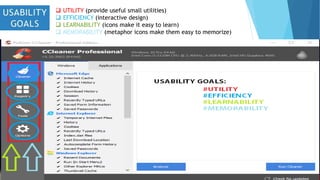
 UTILITY (provide useful small utilities)
 EFFICIENCY (interactive design)
 LEARNABILITY (icons make it easy to learn)
 MEMORABILITY (metaphor icons make them easy to memorize)
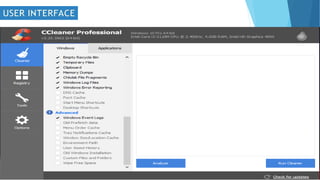
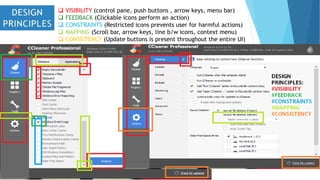
 VISIBILITY (control pane, push buttons , arrow keys, menu bar)
 FEEDBACK (Clickable icons perform an action)
 CONSTRAINTS (Restricted icons prevents user for harmful actions)
 MAPPING (Scroll bar, arrow keys, line b/w icons, context menu)
 CONSISTENCY (Update buttons is present throughout the entire UI)
 Connection A
 Connection B
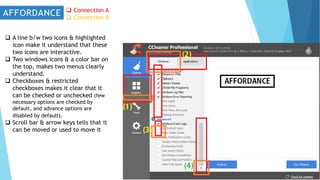
 A line b/w two icons & highlighted
icon make it understand that these
two icons are interactive.
 Two windows icons & a color bar on
the top, makes two menus clearly
understand.
 Checkboxes & restricted
checkboxes makes it clear that it
can be checked or unchecked (few
necessary options are checked by
default, and advance options are
disabled by default).
 Scroll bar & arrow keys tells that it
can be moved or used to move it
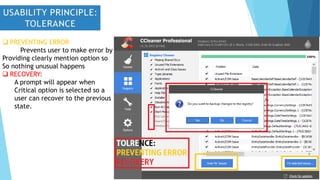
 PREVENTING ERROR
Prevents user to make error by
Providing clearly mention option so
So nothing unusual happens
 RECOVERY:
A prompt will appear when
Critical option is selected so a
user can recover to the previous
state.
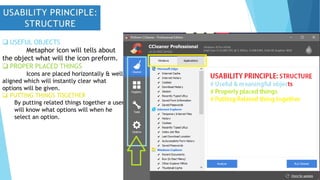
 USEFUL OBJECTS
Metaphor icon will tells about
the object what will the icon preform.
 PROPER PLACED THINGS
Icons are placed horizontally & well
aligned which will instantly clear what
options will be given.
 PUTTING THINGS TOGETHER
By putting related things together a user
will know what options will when he
select an option.
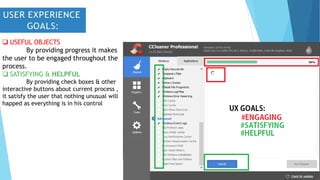
 USEFUL OBJECTS
By providing progress it makes
the user to be engaged throughout the
process.
 SATISFYING & HELPFUL
By providing check boxes & other
interactive buttons about current process ,
it satisfy the user that nothing unusual will
happed as everything is in his control
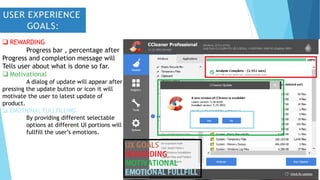
 REWARDING
Progress bar , percentage after
Progress and completion message will
Tells user about what is done so far.
 Motivational
A dialog of update will appear after
pressing the update button or icon it will
motivate the user to latest update of
product.
 EMOTIONAL FULLFILLING
By providing different selectable
options at different UI portions will
fullfill the user’s emotions.
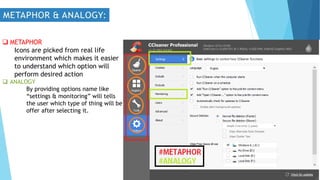
 METAPHOR
Icons are picked from real life
environment which makes it easier
to understand which option will
perform desired action
 ANALOGY
By providing options name like
“settings & monitoring” will tells
the user which type of thing will be
offer after selecting it.
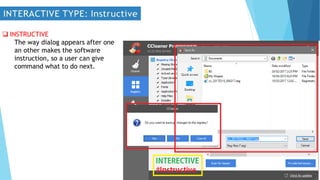
 INSTRUCTIVE
The way dialog appears after one
an other makes the software
instruction, so a user can give
command what to do next.
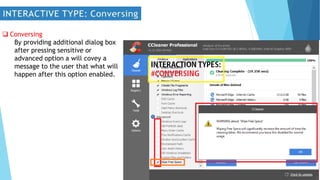
 Conversing
By providing additional dialog box
after pressing sensitive or
advanced option a will covey a
message to the user that what will
happen after this option enabled.
Heim, Steven. (2008). The Resonant Interface: HCI Foundations for Interaction Design.
Boston: Pearson Education, Inc.
Piriform. (2016). CCleaner. Retrieved on September 20, 2016, from
http://www.piriform.com/ccleaner
Nielsen, Jakob. (2005). Useit.com: Ten Usability Heuristics. Retrieved on September 27,
2016, from http://www.useit.com/papers/heuristic/heuristic_list.html
Dictionary.com. (2016). Ethics. Retrieved on September 30, 2016, from
http://dictionary.reference.com/browse/computer+ethics
Allaboutphilosophy.org. (2016). What are Work Ethics. Retrieved on October 4, 2016, from
http://www.allaboutphilosophy.org/what-are-work-ethics-faq.htm
Interaction-design.org. (2016). WIMP. Retrieved October 7, 2016, from
http://www.interaction-design.org/encyclopedia/wimp.html
The Future of Things. (2016). Magnets Power Haptic Computer Interaction. Retrieved
October 22, 2016, from http://thefutureofthings.com/news/1144/magnets-power-haptic-computer-
interface.html
Intechopen.com. (2016). Head-Tracking Haptic Computer Interface for the Blind. Retrieved
October 22, 2016, from http://www.intechopen.com/articles/show/title/head-tracking-haptic-
computer-interface-for-the-blind
hcimidtermhmftj

hcimidtermhmftj

  • 1.
    NAME ROLL # HAFIZFURQAN TAHIR B-18298 ABDUL REHMAN B-18758 KAMRAN KHAN B-18157 SYED SAAD QADEER B-17942
  • 2.
     INTRODUCTION TOSOFTWARE  USER INTERFACE  VISIBILITY  VISIBILITY GOALS  Utility, Efficiency , Learnability, Memorability.  VISIBILITY PRINCIPLES  Visibility, Feedback, Constraints, Mapping, Consistency.  AFFORDANCE  Virtual affordance  USABLIRTY PRINCIPLES  TOLERANCE  STRUCTURE  UX GOALS  Satisfying , Engaging , Helpful  Rewarding , Motivational , Emotional full filling  METAPHOR & ANALOGIES  INTERACTION TYPES  Instructive  Conversing  References
  • 3.
    Mid-term Software: CCleaner Brief-introduction: CCleaner(formerly Crap Cleaner), developed by Piriform, is a utility program used to clean potentially unwanted files (including temporary internet files, where malicious programs and code tend to reside) and invalid Windows Registry entries from a computer. Developers: Piriform. CCleaner is our system optimization, privacy and cleaning tool. It removes unused files from your system - allowing Windows to run faster and freeing up valuable hard disk space. It also cleans traces of your online activities such as your Internet history. Additionally it contains a fully featured registry cleaner. Operating system: Windows , Mac OS , ANDROID OS. Initial release: 23 September 2003, 14 years ago. License-Type: Freemium.
  • 5.
     UTILITY (provideuseful small utilities)  EFFICIENCY (interactive design)  LEARNABILITY (icons make it easy to learn)  MEMORABILITY (metaphor icons make them easy to memorize)
  • 6.
     VISIBILITY (controlpane, push buttons , arrow keys, menu bar)  FEEDBACK (Clickable icons perform an action)  CONSTRAINTS (Restricted icons prevents user for harmful actions)  MAPPING (Scroll bar, arrow keys, line b/w icons, context menu)  CONSISTENCY (Update buttons is present throughout the entire UI)
  • 7.
     Connection A Connection B  A line b/w two icons & highlighted icon make it understand that these two icons are interactive.  Two windows icons & a color bar on the top, makes two menus clearly understand.  Checkboxes & restricted checkboxes makes it clear that it can be checked or unchecked (few necessary options are checked by default, and advance options are disabled by default).  Scroll bar & arrow keys tells that it can be moved or used to move it
  • 8.
     PREVENTING ERROR Preventsuser to make error by Providing clearly mention option so So nothing unusual happens  RECOVERY: A prompt will appear when Critical option is selected so a user can recover to the previous state.
  • 9.
     USEFUL OBJECTS Metaphoricon will tells about the object what will the icon preform.  PROPER PLACED THINGS Icons are placed horizontally & well aligned which will instantly clear what options will be given.  PUTTING THINGS TOGETHER By putting related things together a user will know what options will when he select an option.
  • 10.
     USEFUL OBJECTS Byproviding progress it makes the user to be engaged throughout the process.  SATISFYING & HELPFUL By providing check boxes & other interactive buttons about current process , it satisfy the user that nothing unusual will happed as everything is in his control
  • 11.
     REWARDING Progress bar, percentage after Progress and completion message will Tells user about what is done so far.  Motivational A dialog of update will appear after pressing the update button or icon it will motivate the user to latest update of product.  EMOTIONAL FULLFILLING By providing different selectable options at different UI portions will fullfill the user’s emotions.
  • 12.
     METAPHOR Icons arepicked from real life environment which makes it easier to understand which option will perform desired action  ANALOGY By providing options name like “settings & monitoring” will tells the user which type of thing will be offer after selecting it.
  • 13.
     INSTRUCTIVE The waydialog appears after one an other makes the software instruction, so a user can give command what to do next.
  • 14.
     Conversing By providingadditional dialog box after pressing sensitive or advanced option a will covey a message to the user that what will happen after this option enabled.
  • 15.
    Heim, Steven. (2008).The Resonant Interface: HCI Foundations for Interaction Design. Boston: Pearson Education, Inc. Piriform. (2016). CCleaner. Retrieved on September 20, 2016, from http://www.piriform.com/ccleaner Nielsen, Jakob. (2005). Useit.com: Ten Usability Heuristics. Retrieved on September 27, 2016, from http://www.useit.com/papers/heuristic/heuristic_list.html Dictionary.com. (2016). Ethics. Retrieved on September 30, 2016, from http://dictionary.reference.com/browse/computer+ethics Allaboutphilosophy.org. (2016). What are Work Ethics. Retrieved on October 4, 2016, from http://www.allaboutphilosophy.org/what-are-work-ethics-faq.htm Interaction-design.org. (2016). WIMP. Retrieved October 7, 2016, from http://www.interaction-design.org/encyclopedia/wimp.html The Future of Things. (2016). Magnets Power Haptic Computer Interaction. Retrieved October 22, 2016, from http://thefutureofthings.com/news/1144/magnets-power-haptic-computer- interface.html Intechopen.com. (2016). Head-Tracking Haptic Computer Interface for the Blind. Retrieved October 22, 2016, from http://www.intechopen.com/articles/show/title/head-tracking-haptic- computer-interface-for-the-blind