Seeing if an article’s
peer-reviewed
(evaluating sources tutorial
@HCC Libraries)
You find the perfect article when
you realize that your professor
only wants peer-reviewed articles.
You find the perfect article when
you realize that your professor
only wants peer-reviewed articles.
it’s okay!
you can find out in a few seconds.
If you’re on EBSCO...
1. Click the source’s name (aka the journal)
2. Look at the publication details & check the
peer-reviewed status.
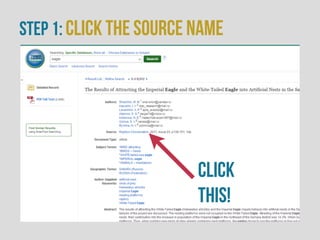
Step 1: Click the source name
Click
this!
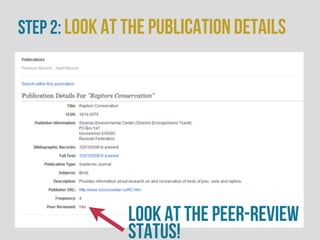
Step 2: Look at the publication details
look at the peer-review
status!
Not on EBSCO or publication details
unavailable?
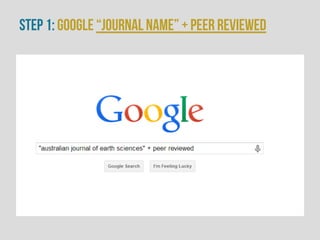
1. Go to Google & type the journal’s name &
quotation marks and peer-reviewed
“journal name” + peer reviewed
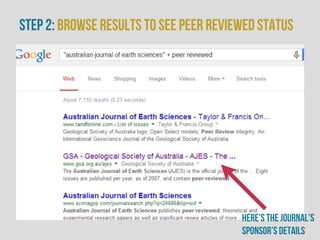
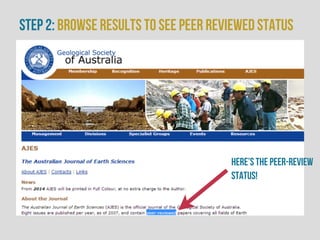
2. Browse the results to see if you can find
information on its peer-reviewed status
Step 1: Google “journal name” + peer reviewed
Step 2: Browse results to see peer reviewed status
Here’s the journal’s
sponsor’s details
Step 2: Browse results to see peer reviewed status
Here’s the peer-review
status!
Remember, being peer-reviewed is
a big deal for an academic/
scholarly journal. If you can’t find
it quickly, it’s probably not peer-
reviewed.
Need help? ask a librarian or Find out
more with HCC Libraries
@library.hccs.edu

HCC - Seeing if an Article's Peer-Reviewed or Not

  • 1.
    Seeing if anarticle’s peer-reviewed (evaluating sources tutorial @HCC Libraries)
  • 2.
    You find theperfect article when you realize that your professor only wants peer-reviewed articles.
  • 3.
    You find theperfect article when you realize that your professor only wants peer-reviewed articles. it’s okay! you can find out in a few seconds.
  • 4.
    If you’re onEBSCO... 1. Click the source’s name (aka the journal) 2. Look at the publication details & check the peer-reviewed status.
  • 5.
    Step 1: Clickthe source name Click this!
  • 6.
    Step 2: Lookat the publication details look at the peer-review status!
  • 7.
    Not on EBSCOor publication details unavailable? 1. Go to Google & type the journal’s name & quotation marks and peer-reviewed “journal name” + peer reviewed 2. Browse the results to see if you can find information on its peer-reviewed status
  • 8.
    Step 1: Google“journal name” + peer reviewed
  • 9.
    Step 2: Browseresults to see peer reviewed status Here’s the journal’s sponsor’s details
  • 10.
    Step 2: Browseresults to see peer reviewed status Here’s the peer-review status!
  • 11.
    Remember, being peer-reviewedis a big deal for an academic/ scholarly journal. If you can’t find it quickly, it’s probably not peer- reviewed.
  • 12.
    Need help? aska librarian or Find out more with HCC Libraries @library.hccs.edu