| Page 1
19. March 2016
HbbTV Primer
Kai Mysliwiec
OTT Development
| Page 2
Follow me
@kaimys
I will post the links there
| Page 3
What is HbbTV?
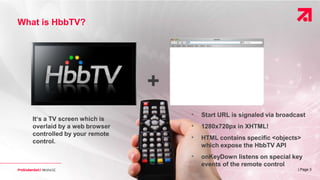
It‘s a TV screen which is
overlaid by a web browser
controlled by your remote
control.
+
• Start URL is signaled via broadcast
• 1280x720px in XHTML!
• HTML contains specific <objects>
which expose the HbbTV API
• onKeyDown listens on special key
events of the remote control
| Page 4
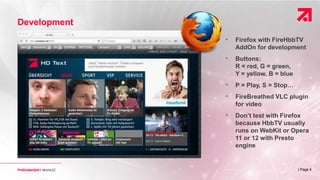
Development
• Firefox with FireHbbTV
AddOn for development
• Buttons:
R = red, G = green,
Y = yellow, B = blue
• P = Play, S = Stop…
• FireBreathed VLC plugin
for video
• Don’t test with Firefox
because HbbTV usually
runs on WebKit or Opera
11 or 12 with Presto
engine
| Page 5
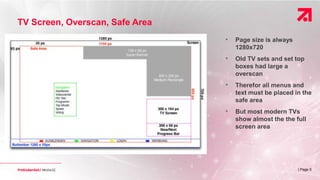
• Page size is always
1280x720
• Old TV sets and set top
boxes had large a
overscan
• Therefor all menus and
text must be placed in the
safe area
• But most modern TVs
show almost the the full
screen area
TV Screen, Overscan, Safe Area
| Page 6
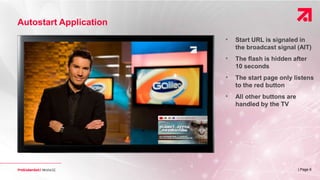
Autostart Application
• Start URL is signaled in
the broadcast signal (AIT)
• The flash is hidden after
10 seconds
• The start page only listens
to the red button
• All other buttons are
handled by the TV
| Page 7
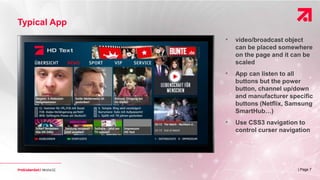
Typical App
• video/broadcast object
can be placed somewhere
on the page and it can be
scaled
• App can listen to all
buttons but the power
button, channel up/down
and manufacturer specific
buttons (Netflix, Samsung
SmartHub…)
• Use CSS3 navigation to
control curser navigation
| Page 8
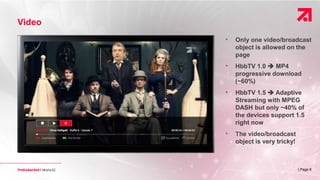
Video
• Only one video/broadcast
object is allowed on the
page
• HbbTV 1.0  MP4
progressive download
(~60%)
• HbbTV 1.5  Adaptive
Streaming with MPEG
DASH but only ~40% of
the devices support 1.5
right now
• The video/broadcast
object is very tricky!
| Page 9
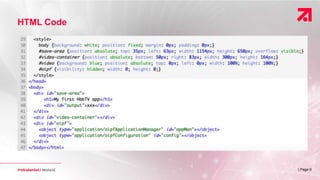
HTML Code
| Page 10
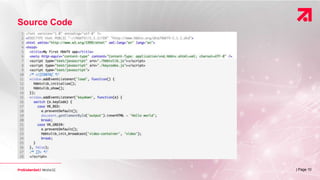
Source Code
| Page 11| Page 11
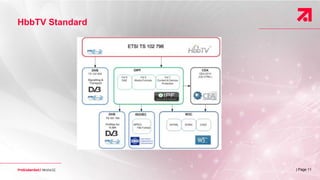
HbbTV Standard
| Page 12
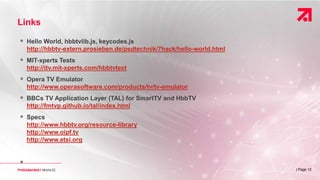
Links
 Hello World, hbbtvlib.js, keycodes.js
http://hbbtv-extern.prosieben.de/psdtechnik/7hack/hello-world.html
 MIT-xperts Tests
http://itv.mit-xperts.com/hbbtvtest
 Opera TV Emulator
http://www.operasoftware.com/products/tv/tv-emulator
 BBCs TV Application Layer (TAL) for SmartTV and HbbTV
http://fmtvp.github.io/tal/index.html
 Specs
http://www.hbbtv.org/resource-library
http://www.oipf.tv
http://www.etsi.org

| Page 13
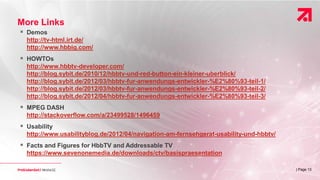
More Links
 Demos
http://tv-html.irt.de/
http://www.hbbig.com/
 HOWTOs
http://www.hbbtv-developer.com/
http://blog.sybit.de/2010/12/hbbtv-und-red-button-ein-kleiner-uberblick/
http://blog.sybit.de/2012/03/hbbtv-fur-anwendungs-entwickler-%E2%80%93-teil-1/
http://blog.sybit.de/2012/03/hbbtv-fur-anwendungs-entwickler-%E2%80%93-teil-2/
http://blog.sybit.de/2012/04/hbbtv-fur-anwendungs-entwickler-%E2%80%93-teil-3/
 MPEG DASH
http://stackoverflow.com/a/23499528/1496459
 Usability
http://www.usabilityblog.de/2012/04/navigation-am-fernsehgerat-usability-und-hbbtv/
 Facts and Figures for HbbTV and Addressable TV
https://www.sevenonemedia.de/downloads/ctv/basispraesentation

HbbTV Primer for 7HACK

  • 1.
    | Page 1 19.March 2016 HbbTV Primer Kai Mysliwiec OTT Development
  • 2.
    | Page 2 Followme @kaimys I will post the links there
  • 3.
    | Page 3 Whatis HbbTV? It‘s a TV screen which is overlaid by a web browser controlled by your remote control. + • Start URL is signaled via broadcast • 1280x720px in XHTML! • HTML contains specific <objects> which expose the HbbTV API • onKeyDown listens on special key events of the remote control
  • 4.
    | Page 4 Development •Firefox with FireHbbTV AddOn for development • Buttons: R = red, G = green, Y = yellow, B = blue • P = Play, S = Stop… • FireBreathed VLC plugin for video • Don’t test with Firefox because HbbTV usually runs on WebKit or Opera 11 or 12 with Presto engine
  • 5.
    | Page 5 •Page size is always 1280x720 • Old TV sets and set top boxes had large a overscan • Therefor all menus and text must be placed in the safe area • But most modern TVs show almost the the full screen area TV Screen, Overscan, Safe Area
  • 6.
    | Page 6 AutostartApplication • Start URL is signaled in the broadcast signal (AIT) • The flash is hidden after 10 seconds • The start page only listens to the red button • All other buttons are handled by the TV
  • 7.
    | Page 7 TypicalApp • video/broadcast object can be placed somewhere on the page and it can be scaled • App can listen to all buttons but the power button, channel up/down and manufacturer specific buttons (Netflix, Samsung SmartHub…) • Use CSS3 navigation to control curser navigation
  • 8.
    | Page 8 Video •Only one video/broadcast object is allowed on the page • HbbTV 1.0  MP4 progressive download (~60%) • HbbTV 1.5  Adaptive Streaming with MPEG DASH but only ~40% of the devices support 1.5 right now • The video/broadcast object is very tricky!
  • 9.
  • 10.
  • 11.
    | Page 11|Page 11 HbbTV Standard
  • 12.
    | Page 12 Links Hello World, hbbtvlib.js, keycodes.js http://hbbtv-extern.prosieben.de/psdtechnik/7hack/hello-world.html  MIT-xperts Tests http://itv.mit-xperts.com/hbbtvtest  Opera TV Emulator http://www.operasoftware.com/products/tv/tv-emulator  BBCs TV Application Layer (TAL) for SmartTV and HbbTV http://fmtvp.github.io/tal/index.html  Specs http://www.hbbtv.org/resource-library http://www.oipf.tv http://www.etsi.org 
  • 13.
    | Page 13 MoreLinks  Demos http://tv-html.irt.de/ http://www.hbbig.com/  HOWTOs http://www.hbbtv-developer.com/ http://blog.sybit.de/2010/12/hbbtv-und-red-button-ein-kleiner-uberblick/ http://blog.sybit.de/2012/03/hbbtv-fur-anwendungs-entwickler-%E2%80%93-teil-1/ http://blog.sybit.de/2012/03/hbbtv-fur-anwendungs-entwickler-%E2%80%93-teil-2/ http://blog.sybit.de/2012/04/hbbtv-fur-anwendungs-entwickler-%E2%80%93-teil-3/  MPEG DASH http://stackoverflow.com/a/23499528/1496459  Usability http://www.usabilityblog.de/2012/04/navigation-am-fernsehgerat-usability-und-hbbtv/  Facts and Figures for HbbTV and Addressable TV https://www.sevenonemedia.de/downloads/ctv/basispraesentation