Agenda
ž  Introduction
ž  Package Manager
ž  Web Framework
ž  Testing
ž  Callback Hell
ž  Obfuscator
ž  Build Tool
Introduction
What is Node.js
ž  Server Side JavaScript
ž  Based on Chrome’s V8 Engines
ž  Non Blocking I/O
ž  15,000+ Modules
ž  Active Community (IRC, Mailing Lists, Twitter,
Github)
ž  Mac, Linux and Windows (all first class
citizens)
ž  One Language for Frontend and Backend
ž  Node is a platform for JavaScript applications
which is not to be confused with a framework.
What is Node.js
Who's using Node.js
Who's using Node.js
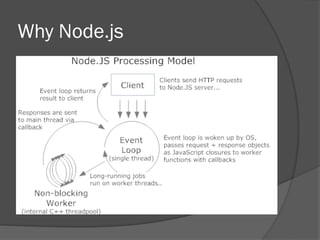
Why Node.js
ž  Apache v.s. Nginx
Why Node.js
ž  Apache v.s. Nginx
Blocking I/L
$query = 'SELECT * FROM users WHERE id = ?';
$users = query($query, array($id));
print_r($users);
$query = 'SELECT * FROM activities ORDER BY timestamp LIMIT 50';
$activities = query($query);
print_r($activities);
$query = 'SELECT count(points) as total, user_id FROM activities LIMIT 50';
$leader_board = query($query);
Non-Blocking I/J
var query = 'SELECT * FROM users WHERE id = ?';
db.query(query, [userId], function (err, results) {
console.log(results);
});
var query = 'SELECT * FROM activities ORDER BY timestamp LIMIT 50';
db.query(query, function (err, results) {
console.log(results);
});
var query = 'SELECT count(points) as total, user_id FROM activities LIMIT 50';
db.query(query, function (err, results) {
console.log(results);
});
Why Node.js
Why Node.js
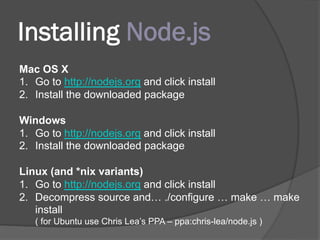
Installing Node.js
Mac OS X
1.  Go to http://nodejs.org and click install
2.  Install the downloaded package
Windows
1.  Go to http://nodejs.org and click install
2.  Install the downloaded package
Linux (and *nix variants)
1.  Go to http://nodejs.org and click install
2.  Decompress source and… ./configure … make … make
install
( for Ubuntu use Chris Lea’s PPA – ppa:chris-lea/node.js )
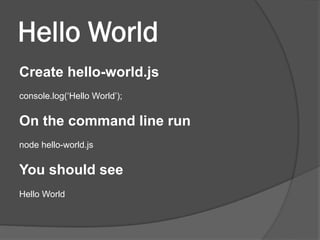
Hello World
Create hello-world.js
console.log(‘Hello World’);
On the command line run
node hello-world.js
You should see
Hello World
Basic HTTP Server
var http = require('http');
var server = http.createServer(function (req, res) {
res.writeHead(200);
res.end('Hello World');
});
server.listen(4000);
Foreign Function Interface
ž  node-ffi
—  a Node.js addon for loading and calling
dynamic libraries using pure JavaScript. It
can be used to create bindings to native
libraries without writing any C++ code.
Package Manager
NPM
ž  Simple CLI tools
ž  Register registry.npmjs.org
ž  Web site npmjs.org
ž  Included in node.js since 0.6
ž  Git friendly
NPM Usage
ž  npm search express
ž  npm info express
ž  npm install -g express
ž  npm update
ž  npm publish
NPM Usage
ž  npm install ./package.tgz
ž  npm install sax --save
ž  npm install node-tap --save-dev
ž  npm install dtrace-provider --save-optional
ž  npm install https://github.com/indexzero/forever/
tarball/v0.5.6
Module Metas
ž  package.json
{
"name": "my-website",
"version": "0.0.1",
"dependencies": {
"express": "2.4.7",
"jade": ">= 0.0.1",
"oauth": ">= 0.9.5"
}
}
Transitive dependencies
Virtual Environment
ž  nvm (starred 3884 on github)
—  Simple bash script to manage multiple active
node.js versions
$ nvm install 0.10.29
$ nvm ls
v0.10.29
current: v0.10.29
$ nvm use 0.10.29
Now using node v0.10.29
$ node --version
v0.10.29
Virtual Environment
ž  nave (starred 645 on github)
—  Virtual Environments for Node
—  run on various node.js builds
$ nave install latest
$ nave ls
src:
0.10.28 0.11.13
installed:
0.10.28 0.11.13
$ nave use 0.11.13
Already installed: 0.11.13
using 0.11.13
$ node --version
v0.11.13
Web Framework
Express
ž  Express is a minimal and flexible node.js
web application framework, providing a
robust set of features for building single
and multi-page, and hybrid web
applications.
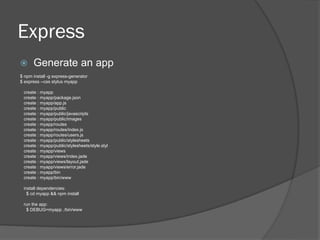
Express
ž  Generate an app
$ npm install -g express-generator
$ express --css stylus myapp
create : myapp
create : myapp/package.json
create : myapp/app.js
create : myapp/public
create : myapp/public/javascripts
create : myapp/public/images
create : myapp/routes
create : myapp/routes/index.js
create : myapp/routes/users.js
create : myapp/public/stylesheets
create : myapp/public/stylesheets/style.styl
create : myapp/views
create : myapp/views/index.jade
create : myapp/views/layout.jade
create : myapp/views/error.jade
create : myapp/bin
create : myapp/bin/www
install dependencies:
$ cd myapp && npm install
run the app:
$ DEBUG=myapp ./bin/www
Express Middleware
ž  Middleware is any number of functions
that are invoked by the Express.js
routing layer before your final request
handler is
Express Middleware
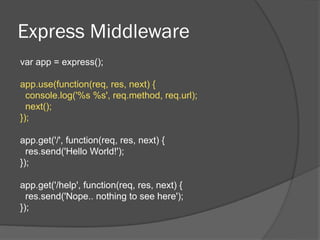
var app = express();
app.use(function(req, res, next) {
console.log('%s %s', req.method, req.url);
next();
});
app.get('/', function(req, res, next) {
res.send('Hello World!');
});
app.get('/help', function(req, res, next) {
res.send('Nope.. nothing to see here');
});
Express Middleware
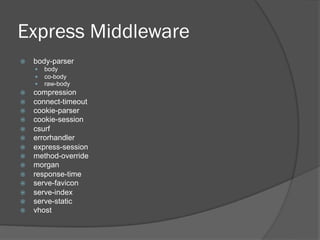
ž  body-parser
—  body
—  co-body
—  raw-body
ž  compression
ž  connect-timeout
ž  cookie-parser
ž  cookie-session
ž  csurf
ž  errorhandler
ž  express-session
ž  method-override
ž  morgan
ž  response-time
ž  serve-favicon
ž  serve-index
ž  serve-static
ž  vhost
Express I18N
app.js
var i18n = require('i18n');
app.use(i18n.init);
app.use(function (req, res, next) {
res.locals.__ = function () {
return function (text, render) {
return i18n.__.apply(req, arguments);
};
};
next();
});
en.js
{
"Home": "Home",
"About Us": "About Us",
"Program": "Program",
"Venue": "Venue",
"Sponsors": "Sponsors"
}
menu.hjs
<li>{{#__}}Home{{/__}}</li>
<li>{{#__}}About Us{{/__}}</li>
<li>{{#__}}Program{{/__}}</li>
<li>{{#__}}Venue{{/__}}</li>
<li>{{#__}}Sponsors{{/__}}</li>
menu.html
<li>Home</li>
<li>About Us</li>
<li>Program</li>
<li>Venue</li>
<li>Sponsors</li>
Express Authentication
ž  Passport
—  authentication middleware for Node.js.
app.post('/login',
passport.authenticate('local'),
function(req, res) {
res.redirect('/users/' + req.user.username);
});
app.use(function(req, res, next) {
if (!req.session.userid) {
return res.redirect(url);
}
next();
});
Template Engine
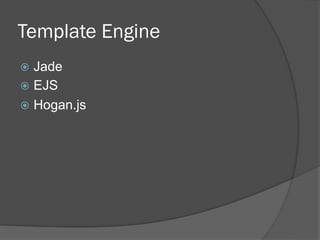
ž  Jade
ž  EJS
ž  Hogan.js
Jade
doctype html
html(lang="en")
head
title= pageTitle
script(type='text/javascript').
if (foo) {
bar(1 + 5)
}
body
h1 Jade - node template engine
#container.col
if youAreUsingJade
p You are amazing
else
p Get on it!
p.
Jade is a terse and simple
templating language with a
strong focus on performance
and powerful features.
<!DOCTYPE html>
<html lang="en">
<head>
<title>Jade</title>
<script type="text/javascript">
if (foo) {
bar(1 + 5)
}
</script>
</head>
<body>
<h1>Jade - node template engine</h1>
<div id="container" class="col">
<p>You are amazing</p>
<p>
Jade is a terse and simple
templating language with a
strong focus on performance
and powerful features.
</p>
</div>
</body>
</html>
Jade
var fn = jade.compile(jadeTemplate);
var htmlOutput = fn({
data = {'title': 'Cleaning Supplies', 'supplies': ['mop', 'broom', 'duster']}
});
h1= title
ul
each supply in supplies
li= supply
<h1>Cleaning supplies</h1>
<ul>
<li>mop</li>
<li>broom</li>
<li>duster</li>
</ul>
EJS
data = {'title': 'Cleaning Supplies', 'supplies': ['mop', 'broom', 'duster']}
var html = new EJS({url: 'cleaning.ejs'}).render(data);
<h1><%= title %></h1>
<ul>
<% for(var i=0; i<supplies.length;
i++) {%>
<li><%= supplies[i] %></li>
<% } %>
</ul>
<h1>Cleaning supplies</h1>
<ul>
<li>mop</li>
<li>broom</li>
<li>duster</li>
</ul>
Hogan.js
data = {'title': 'Cleaning Supplies', 'supplies': ['mop', 'broom', 'duster']}
var template = Hogan.compile(text);
var output = template.render(data);
<h1>{{ title }}</h1>
<ul>
{{#supplies}}
<li>{{.}}</li>
{{/supplies}}
</ul>
<h1>Cleaning supplies</h1>
<ul>
<li>mop</li>
<li>broom</li>
<li>duster</li>
</ul>
Redis Driver
$ npm install redis hiredis
var redis = require("redis"),
client = redis.createClient();
// if you'd like to select database 3, instead of 0 (default), call
// client.select(3, function() { /* ... */ });
client.on("error", function (err) {
console.log("Error " + err);
});
client.set("string key", "string val", redis.print);
client.hset("hash key", "hashtest 1", "some value", redis.print);
client.hset(["hash key", "hashtest 2", "some other value"], redis.print);
client.hkeys("hash key", function (err, replies) {
console.log(replies.length + " replies:");
replies.forEach(function (reply, i) {
console.log(" " + i + ": " + reply);
});
client.quit();
});
Redis Sentinel Driver
$ npm install redis hiredis redis-sentinel
var sentinel = require('redis-sentinel');
var endpoints = [
{host: '127.0.0.1', port: 26379},
{host: '127.0.0.1', port: 26380}
];
var opts = {};
var masterName = 'mymaster';
var redisClient = sentinel.createClient(endpoints, masterName, opts);
Mongo Driver
$ npm install mongodb
var MongoClient = require('mongodb').MongoClient;
MongoClient.connect('mongodb://192.168.68.234:27017/qcloud',
function(err, db) {
if(err) throw err;
var collection = db.collection('device');
collection.find({'device_name':'alexnas'}).toArray(function(err, results)
{
console.dir(results);
db.close();
});
});
Mongo Driver
ž  Mongoose
—  Mongoose provides a straight-forward, schema-based
solution to modeling your application data and includes
built-in type casting, validation, query building,
business logic hooks and more, out of the box.
var mongoose = require('mongoose');
mongoose.connect('mongodb://192.168.68.234:27017/alex_test');
var Cat = mongoose.model('Cat', { name: String });
var kitty = new Cat({ name: 'Zildjian' });
kitty.save(function (err) {
console.log('meow');
});
Testing
Debugging
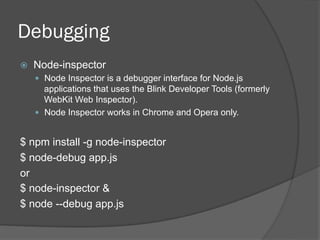
ž  Node-inspector
—  Node Inspector is a debugger interface for Node.js
applications that uses the Blink Developer Tools (formerly
WebKit Web Inspector).
—  Node Inspector works in Chrome and Opera only.
$ npm install -g node-inspector
$ node-debug app.js
or
$ node-inspector &
$ node --debug app.js
Testing Framework
ž  Mocha
—  Mocha is a feature-rich JavaScript test
framework running on node.js and the
browser, making asynchronous testing
simple and fun.
ž  Nodeunit
—  Simple syntax, powerful tools. Nodeunit
provides easy async unit testing for node.js
and the browser.
Mocha
var assert = require("assert");
describe('Test', function() {
var foo;
beforeEach(function() {
console.log('setup');
foo = 'bar';
});
afterEach(function() {
console.log('teardown');
});
it('#test1', function() {
console.log('run test1');
assert.equal(foo, 'bar');
});
});
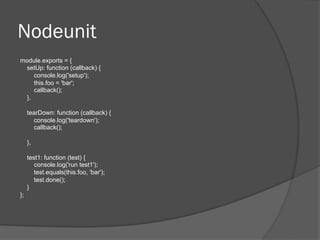
Nodeunit
module.exports = {
setUp: function (callback) {
console.log('setup');
this.foo = 'bar';
callback();
},
tearDown: function (callback) {
console.log('teardown');
callback();
},
test1: function (test) {
console.log('run test1');
test.equals(this.foo, 'bar');
test.done();
}
};
Callback Hell
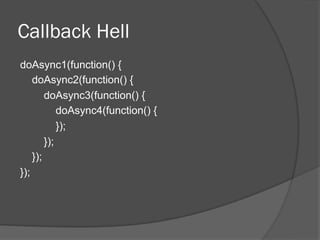
Callback Hell
doAsync1(function() {
doAsync2(function() {
doAsync3(function() {
doAsync4(function() {
});
});
});
});
Callback Hell
ž  An example from http://callbackhell.com/
fs.readdir(source, function(err, files) {
if (err) {
console.log('Error finding files: ' + err)
} else {
files.forEach(function(filename, fileIndex) {
console.log(filename)
gm(source + filename).size(function(err, values) {
if (err) {
console.log('Error identifying file size: ' + err)
} else {
console.log(filename + ' : ' + values)
aspect = (values.width / values.height)
widths.forEach( function(width, widthIndex) {
height = Math.round(width / aspect)
console.log('resizing ' + filename + 'to ' + height + 'x' + height)
this.resize(width, height).write(destination + 'w' + width + '_' + filename, function(err) {
if (err)
console.log('Error writing file: ' + err)
})
}.bind(this))
}
})
})
}
})
Avoiding Callback Hell
ž  Keep your code shallow
ž  Break up your code into small
chunks(modularize)
ž  Use a sequential library like async
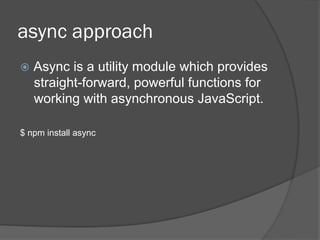
async approach
ž  Async is a utility module which provides
straight-forward, powerful functions for
working with asynchronous JavaScript.
$ npm install async
async approach
var async = require('async');
var db = require(’db');
function getUser (callback) {
var query = 'SELECT * FROM users WHERE id = ?';
db.query(query, [userId], callback);
}
function getActivities (callback) {
var query = 'SELECT * FROM activities ORDER BY timestamp LIMIT 50';
db.query(query, callback);
}
function getLeaderBoard (callback) {
var query = 'SELECT count(points) as total, user_id FROM activities LIMIT 50';
db.query(query, callback);
}
var tasks = [getUser, getActivities, getLeaderBoard];
async.parallel(tasks, function (err, results) {
var user = results[0][0];
var activities = results[1];
var leaderBoard = results[2];
});
promises approach
ž  A tool for making and composing
asynchronous promises in JavaScript
$ npm install q
promises approach
var q = require('q');
var fs = require('fs');
var request = require('request');
var readFile = q.denodeify(fs.readFile);
var q_request = q.denodeify(request);
readFile('url.txt', 'utf-8')
.then(function(text) {
return q_request(text);
})
.then(function(result) {
console.log(result[0].statusCode);
})
.fail(function(err) {
console.log('an error occurs : ' + err);
});
generator approach
ž  Generators are lightweight co-routines
for JavaScript.
ž  Available in Node >=0.11.2 or above
generator approach
var co = require('co');
var thunkify = require('thunkify');
var request = require('request');
var get = thunkify(request.get);
co(function *(){
var a = yield get('http://google.com');
var b = yield get('http://yahoo.com');
var c = yield get('http://cloudup.com');
console.log(a[0].statusCode);
console.log(b[0].statusCode);
console.log(c[0].statusCode);
})()
co(function *(){
var a = get('http://google.com');
var b = get('http://yahoo.com');
var c = get('http://cloudup.com');
var res = yield [a, b, c];
console.log(res);
})()
Obfuscator
Obfuscator
ž  YUI Compressor
ž  Google Closure Compiler
ž  minifyjs
ž  uglify-js
uglifyjs app.js -m -o app-min.js
ž  node-obfuscator
obfuscator --entry app.js app.js routes/index.js routes/user.js
Obfuscator
ž  Write your extension
—  Implement encrypt/decrypt functions
require.extensions[".jse"] = function (m) {
m.exports = MyNativeExtension.decrypt(fs.readFileSync(m.filename));
};
require("YourCode.jse");
Precompilation
ž  Nexe
—  Nexe is a command-line utility that compiles
your Node.js application into a single
executable file.
Build Tool
Make
ž  GNU Make is a tool which controls the
generation of executables and other
non-source files of a program from the
program's source files.
Grunt
ž  JavaScript Task Runner
—  minification
—  compilation
—  unit testing
—  …….
ž  Thousands of plugins
Questions?

Node js introduction

  • 2.
    Agenda ž  Introduction ž  PackageManager ž  Web Framework ž  Testing ž  Callback Hell ž  Obfuscator ž  Build Tool
  • 3.
  • 4.
    What is Node.js ž Server Side JavaScript ž  Based on Chrome’s V8 Engines ž  Non Blocking I/O ž  15,000+ Modules ž  Active Community (IRC, Mailing Lists, Twitter, Github) ž  Mac, Linux and Windows (all first class citizens) ž  One Language for Frontend and Backend ž  Node is a platform for JavaScript applications which is not to be confused with a framework.
  • 5.
  • 6.
  • 7.
  • 8.
  • 9.
  • 10.
    Blocking I/L $query ='SELECT * FROM users WHERE id = ?'; $users = query($query, array($id)); print_r($users); $query = 'SELECT * FROM activities ORDER BY timestamp LIMIT 50'; $activities = query($query); print_r($activities); $query = 'SELECT count(points) as total, user_id FROM activities LIMIT 50'; $leader_board = query($query);
  • 11.
    Non-Blocking I/J var query= 'SELECT * FROM users WHERE id = ?'; db.query(query, [userId], function (err, results) { console.log(results); }); var query = 'SELECT * FROM activities ORDER BY timestamp LIMIT 50'; db.query(query, function (err, results) { console.log(results); }); var query = 'SELECT count(points) as total, user_id FROM activities LIMIT 50'; db.query(query, function (err, results) { console.log(results); });
  • 12.
  • 13.
  • 14.
    Installing Node.js Mac OSX 1.  Go to http://nodejs.org and click install 2.  Install the downloaded package Windows 1.  Go to http://nodejs.org and click install 2.  Install the downloaded package Linux (and *nix variants) 1.  Go to http://nodejs.org and click install 2.  Decompress source and… ./configure … make … make install ( for Ubuntu use Chris Lea’s PPA – ppa:chris-lea/node.js )
  • 15.
    Hello World Create hello-world.js console.log(‘HelloWorld’); On the command line run node hello-world.js You should see Hello World
  • 16.
    Basic HTTP Server varhttp = require('http'); var server = http.createServer(function (req, res) { res.writeHead(200); res.end('Hello World'); }); server.listen(4000);
  • 17.
    Foreign Function Interface ž node-ffi —  a Node.js addon for loading and calling dynamic libraries using pure JavaScript. It can be used to create bindings to native libraries without writing any C++ code.
  • 18.
  • 19.
    NPM ž  Simple CLItools ž  Register registry.npmjs.org ž  Web site npmjs.org ž  Included in node.js since 0.6 ž  Git friendly
  • 20.
    NPM Usage ž  npmsearch express ž  npm info express ž  npm install -g express ž  npm update ž  npm publish
  • 21.
    NPM Usage ž  npminstall ./package.tgz ž  npm install sax --save ž  npm install node-tap --save-dev ž  npm install dtrace-provider --save-optional ž  npm install https://github.com/indexzero/forever/ tarball/v0.5.6
  • 22.
    Module Metas ž  package.json { "name":"my-website", "version": "0.0.1", "dependencies": { "express": "2.4.7", "jade": ">= 0.0.1", "oauth": ">= 0.9.5" } }
  • 23.
  • 24.
    Virtual Environment ž  nvm(starred 3884 on github) —  Simple bash script to manage multiple active node.js versions $ nvm install 0.10.29 $ nvm ls v0.10.29 current: v0.10.29 $ nvm use 0.10.29 Now using node v0.10.29 $ node --version v0.10.29
  • 25.
    Virtual Environment ž  nave(starred 645 on github) —  Virtual Environments for Node —  run on various node.js builds $ nave install latest $ nave ls src: 0.10.28 0.11.13 installed: 0.10.28 0.11.13 $ nave use 0.11.13 Already installed: 0.11.13 using 0.11.13 $ node --version v0.11.13
  • 26.
  • 27.
    Express ž  Express isa minimal and flexible node.js web application framework, providing a robust set of features for building single and multi-page, and hybrid web applications.
  • 28.
    Express ž  Generate anapp $ npm install -g express-generator $ express --css stylus myapp create : myapp create : myapp/package.json create : myapp/app.js create : myapp/public create : myapp/public/javascripts create : myapp/public/images create : myapp/routes create : myapp/routes/index.js create : myapp/routes/users.js create : myapp/public/stylesheets create : myapp/public/stylesheets/style.styl create : myapp/views create : myapp/views/index.jade create : myapp/views/layout.jade create : myapp/views/error.jade create : myapp/bin create : myapp/bin/www install dependencies: $ cd myapp && npm install run the app: $ DEBUG=myapp ./bin/www
  • 29.
    Express Middleware ž  Middlewareis any number of functions that are invoked by the Express.js routing layer before your final request handler is
  • 30.
    Express Middleware var app= express(); app.use(function(req, res, next) { console.log('%s %s', req.method, req.url); next(); }); app.get('/', function(req, res, next) { res.send('Hello World!'); }); app.get('/help', function(req, res, next) { res.send('Nope.. nothing to see here'); });
  • 31.
    Express Middleware ž  body-parser — body —  co-body —  raw-body ž  compression ž  connect-timeout ž  cookie-parser ž  cookie-session ž  csurf ž  errorhandler ž  express-session ž  method-override ž  morgan ž  response-time ž  serve-favicon ž  serve-index ž  serve-static ž  vhost
  • 32.
    Express I18N app.js var i18n= require('i18n'); app.use(i18n.init); app.use(function (req, res, next) { res.locals.__ = function () { return function (text, render) { return i18n.__.apply(req, arguments); }; }; next(); }); en.js { "Home": "Home", "About Us": "About Us", "Program": "Program", "Venue": "Venue", "Sponsors": "Sponsors" } menu.hjs <li>{{#__}}Home{{/__}}</li> <li>{{#__}}About Us{{/__}}</li> <li>{{#__}}Program{{/__}}</li> <li>{{#__}}Venue{{/__}}</li> <li>{{#__}}Sponsors{{/__}}</li> menu.html <li>Home</li> <li>About Us</li> <li>Program</li> <li>Venue</li> <li>Sponsors</li>
  • 33.
    Express Authentication ž  Passport — authentication middleware for Node.js. app.post('/login', passport.authenticate('local'), function(req, res) { res.redirect('/users/' + req.user.username); }); app.use(function(req, res, next) { if (!req.session.userid) { return res.redirect(url); } next(); });
  • 34.
  • 35.
    Jade doctype html html(lang="en") head title= pageTitle script(type='text/javascript'). if(foo) { bar(1 + 5) } body h1 Jade - node template engine #container.col if youAreUsingJade p You are amazing else p Get on it! p. Jade is a terse and simple templating language with a strong focus on performance and powerful features. <!DOCTYPE html> <html lang="en"> <head> <title>Jade</title> <script type="text/javascript"> if (foo) { bar(1 + 5) } </script> </head> <body> <h1>Jade - node template engine</h1> <div id="container" class="col"> <p>You are amazing</p> <p> Jade is a terse and simple templating language with a strong focus on performance and powerful features. </p> </div> </body> </html>
  • 36.
    Jade var fn =jade.compile(jadeTemplate); var htmlOutput = fn({ data = {'title': 'Cleaning Supplies', 'supplies': ['mop', 'broom', 'duster']} }); h1= title ul each supply in supplies li= supply <h1>Cleaning supplies</h1> <ul> <li>mop</li> <li>broom</li> <li>duster</li> </ul>
  • 37.
    EJS data = {'title':'Cleaning Supplies', 'supplies': ['mop', 'broom', 'duster']} var html = new EJS({url: 'cleaning.ejs'}).render(data); <h1><%= title %></h1> <ul> <% for(var i=0; i<supplies.length; i++) {%> <li><%= supplies[i] %></li> <% } %> </ul> <h1>Cleaning supplies</h1> <ul> <li>mop</li> <li>broom</li> <li>duster</li> </ul>
  • 38.
    Hogan.js data = {'title':'Cleaning Supplies', 'supplies': ['mop', 'broom', 'duster']} var template = Hogan.compile(text); var output = template.render(data); <h1>{{ title }}</h1> <ul> {{#supplies}} <li>{{.}}</li> {{/supplies}} </ul> <h1>Cleaning supplies</h1> <ul> <li>mop</li> <li>broom</li> <li>duster</li> </ul>
  • 39.
    Redis Driver $ npminstall redis hiredis var redis = require("redis"), client = redis.createClient(); // if you'd like to select database 3, instead of 0 (default), call // client.select(3, function() { /* ... */ }); client.on("error", function (err) { console.log("Error " + err); }); client.set("string key", "string val", redis.print); client.hset("hash key", "hashtest 1", "some value", redis.print); client.hset(["hash key", "hashtest 2", "some other value"], redis.print); client.hkeys("hash key", function (err, replies) { console.log(replies.length + " replies:"); replies.forEach(function (reply, i) { console.log(" " + i + ": " + reply); }); client.quit(); });
  • 40.
    Redis Sentinel Driver $npm install redis hiredis redis-sentinel var sentinel = require('redis-sentinel'); var endpoints = [ {host: '127.0.0.1', port: 26379}, {host: '127.0.0.1', port: 26380} ]; var opts = {}; var masterName = 'mymaster'; var redisClient = sentinel.createClient(endpoints, masterName, opts);
  • 41.
    Mongo Driver $ npminstall mongodb var MongoClient = require('mongodb').MongoClient; MongoClient.connect('mongodb://192.168.68.234:27017/qcloud', function(err, db) { if(err) throw err; var collection = db.collection('device'); collection.find({'device_name':'alexnas'}).toArray(function(err, results) { console.dir(results); db.close(); }); });
  • 42.
    Mongo Driver ž  Mongoose — Mongoose provides a straight-forward, schema-based solution to modeling your application data and includes built-in type casting, validation, query building, business logic hooks and more, out of the box. var mongoose = require('mongoose'); mongoose.connect('mongodb://192.168.68.234:27017/alex_test'); var Cat = mongoose.model('Cat', { name: String }); var kitty = new Cat({ name: 'Zildjian' }); kitty.save(function (err) { console.log('meow'); });
  • 43.
  • 44.
    Debugging ž  Node-inspector —  NodeInspector is a debugger interface for Node.js applications that uses the Blink Developer Tools (formerly WebKit Web Inspector). —  Node Inspector works in Chrome and Opera only. $ npm install -g node-inspector $ node-debug app.js or $ node-inspector & $ node --debug app.js
  • 45.
    Testing Framework ž  Mocha — Mocha is a feature-rich JavaScript test framework running on node.js and the browser, making asynchronous testing simple and fun. ž  Nodeunit —  Simple syntax, powerful tools. Nodeunit provides easy async unit testing for node.js and the browser.
  • 46.
    Mocha var assert =require("assert"); describe('Test', function() { var foo; beforeEach(function() { console.log('setup'); foo = 'bar'; }); afterEach(function() { console.log('teardown'); }); it('#test1', function() { console.log('run test1'); assert.equal(foo, 'bar'); }); });
  • 47.
    Nodeunit module.exports = { setUp:function (callback) { console.log('setup'); this.foo = 'bar'; callback(); }, tearDown: function (callback) { console.log('teardown'); callback(); }, test1: function (test) { console.log('run test1'); test.equals(this.foo, 'bar'); test.done(); } };
  • 48.
  • 49.
    Callback Hell doAsync1(function() { doAsync2(function(){ doAsync3(function() { doAsync4(function() { }); }); }); });
  • 50.
    Callback Hell ž  Anexample from http://callbackhell.com/ fs.readdir(source, function(err, files) { if (err) { console.log('Error finding files: ' + err) } else { files.forEach(function(filename, fileIndex) { console.log(filename) gm(source + filename).size(function(err, values) { if (err) { console.log('Error identifying file size: ' + err) } else { console.log(filename + ' : ' + values) aspect = (values.width / values.height) widths.forEach( function(width, widthIndex) { height = Math.round(width / aspect) console.log('resizing ' + filename + 'to ' + height + 'x' + height) this.resize(width, height).write(destination + 'w' + width + '_' + filename, function(err) { if (err) console.log('Error writing file: ' + err) }) }.bind(this)) } }) }) } })
  • 51.
    Avoiding Callback Hell ž Keep your code shallow ž  Break up your code into small chunks(modularize) ž  Use a sequential library like async
  • 52.
    async approach ž  Asyncis a utility module which provides straight-forward, powerful functions for working with asynchronous JavaScript. $ npm install async
  • 53.
    async approach var async= require('async'); var db = require(’db'); function getUser (callback) { var query = 'SELECT * FROM users WHERE id = ?'; db.query(query, [userId], callback); } function getActivities (callback) { var query = 'SELECT * FROM activities ORDER BY timestamp LIMIT 50'; db.query(query, callback); } function getLeaderBoard (callback) { var query = 'SELECT count(points) as total, user_id FROM activities LIMIT 50'; db.query(query, callback); } var tasks = [getUser, getActivities, getLeaderBoard]; async.parallel(tasks, function (err, results) { var user = results[0][0]; var activities = results[1]; var leaderBoard = results[2]; });
  • 54.
    promises approach ž  Atool for making and composing asynchronous promises in JavaScript $ npm install q
  • 55.
    promises approach var q= require('q'); var fs = require('fs'); var request = require('request'); var readFile = q.denodeify(fs.readFile); var q_request = q.denodeify(request); readFile('url.txt', 'utf-8') .then(function(text) { return q_request(text); }) .then(function(result) { console.log(result[0].statusCode); }) .fail(function(err) { console.log('an error occurs : ' + err); });
  • 56.
    generator approach ž  Generatorsare lightweight co-routines for JavaScript. ž  Available in Node >=0.11.2 or above
  • 57.
    generator approach var co= require('co'); var thunkify = require('thunkify'); var request = require('request'); var get = thunkify(request.get); co(function *(){ var a = yield get('http://google.com'); var b = yield get('http://yahoo.com'); var c = yield get('http://cloudup.com'); console.log(a[0].statusCode); console.log(b[0].statusCode); console.log(c[0].statusCode); })() co(function *(){ var a = get('http://google.com'); var b = get('http://yahoo.com'); var c = get('http://cloudup.com'); var res = yield [a, b, c]; console.log(res); })()
  • 58.
  • 59.
    Obfuscator ž  YUI Compressor ž Google Closure Compiler ž  minifyjs ž  uglify-js uglifyjs app.js -m -o app-min.js ž  node-obfuscator obfuscator --entry app.js app.js routes/index.js routes/user.js
  • 60.
    Obfuscator ž  Write yourextension —  Implement encrypt/decrypt functions require.extensions[".jse"] = function (m) { m.exports = MyNativeExtension.decrypt(fs.readFileSync(m.filename)); }; require("YourCode.jse");
  • 61.
    Precompilation ž  Nexe —  Nexeis a command-line utility that compiles your Node.js application into a single executable file.
  • 62.
  • 63.
    Make ž  GNU Makeis a tool which controls the generation of executables and other non-source files of a program from the program's source files.
  • 64.
    Grunt ž  JavaScript TaskRunner —  minification —  compilation —  unit testing —  ……. ž  Thousands of plugins
  • 65.