S O L U T IO N G U I D E
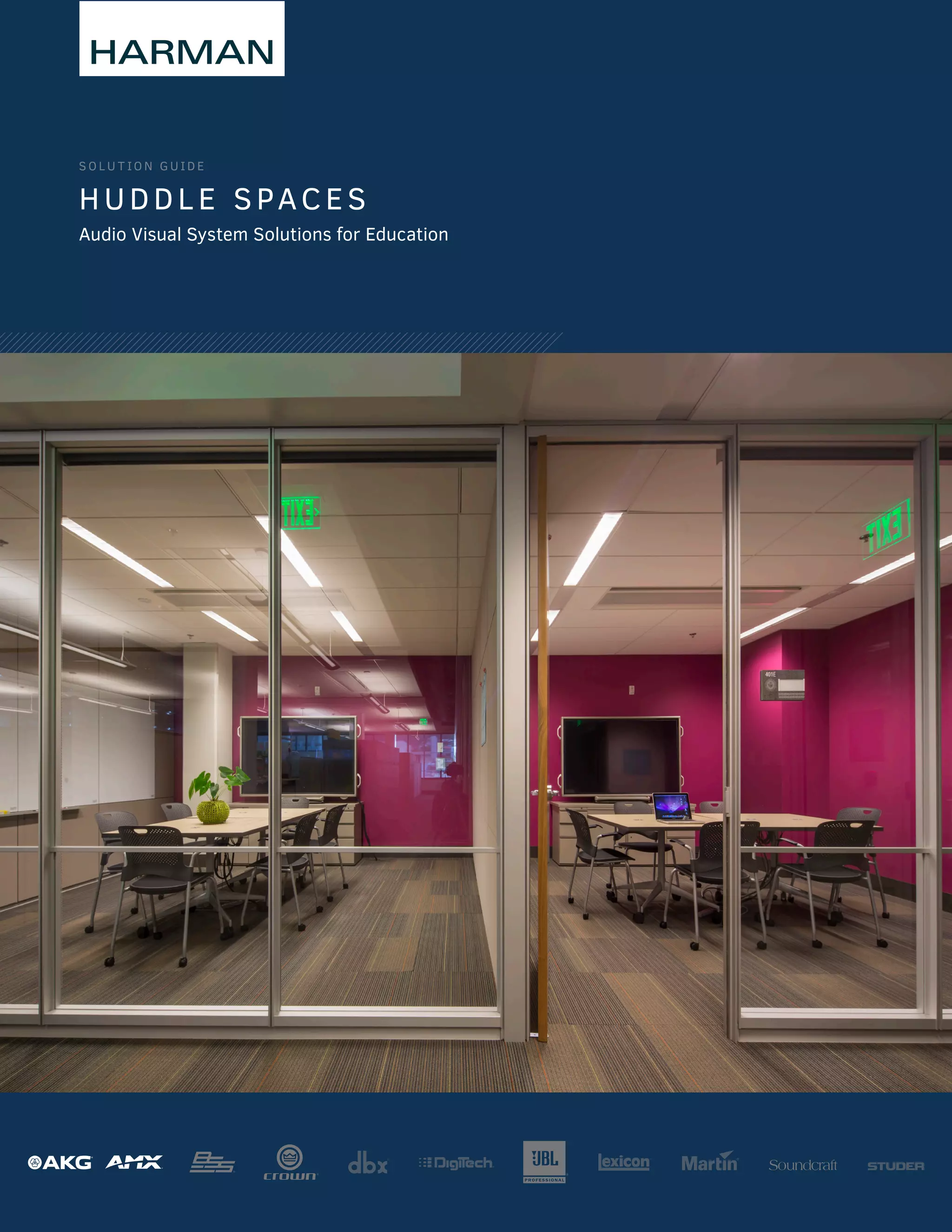
HUDDL E SPACES
Audio Visual System Solutions for Education
HUDDLE SPACES | SOLUTION GUIDE | © 2015 HARMAN | v.01.2015 Page 2 of 12
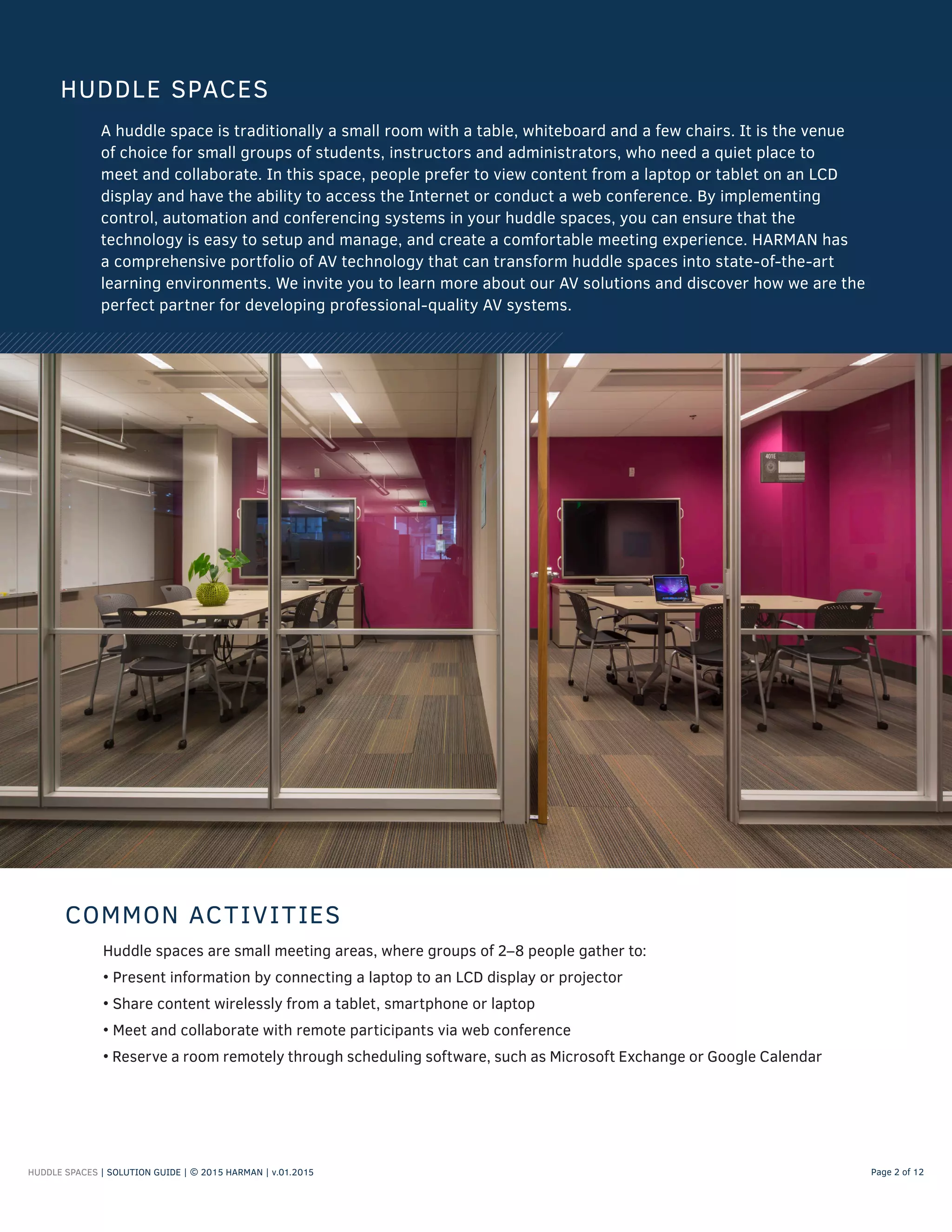
A huddle space is traditionally a small room with a table, whiteboard and a few chairs. It is the venue
of choice for small groups of students, instructors and administrators, who need a quiet place to
meet and collaborate. In this space, people prefer to view content from a laptop or tablet on an LCD
display and have the ability to access the Internet or conduct a web conference. By implementing
control, automation and conferencing systems in your huddle spaces, you can ensure that the
technology is easy to setup and manage, and create a comfortable meeting experience. HARMAN has
a comprehensive portfolio of AV technology that can transform huddle spaces into state-of-the-art
learning environments. We invite you to learn more about our AV solutions and discover how we are the
perfect partner for developing professional-quality AV systems.
HUDDLE SPACES
Huddle spaces are small meeting areas, where groups of 2–8 people gather to:
• Present information by connecting a laptop to an LCD display or projector
• Share content wirelessly from a tablet, smartphone or laptop
• Meet and collaborate with remote participants via web conference
• Reserve a room remotely through scheduling software, such as Microsoft Exchange or Google Calendar
COMMON ACTIVITIES
HUDDLE SPACES | SOLUTION GUIDE | © 2015 HARMAN | v.01.2015 Page 3 of 12
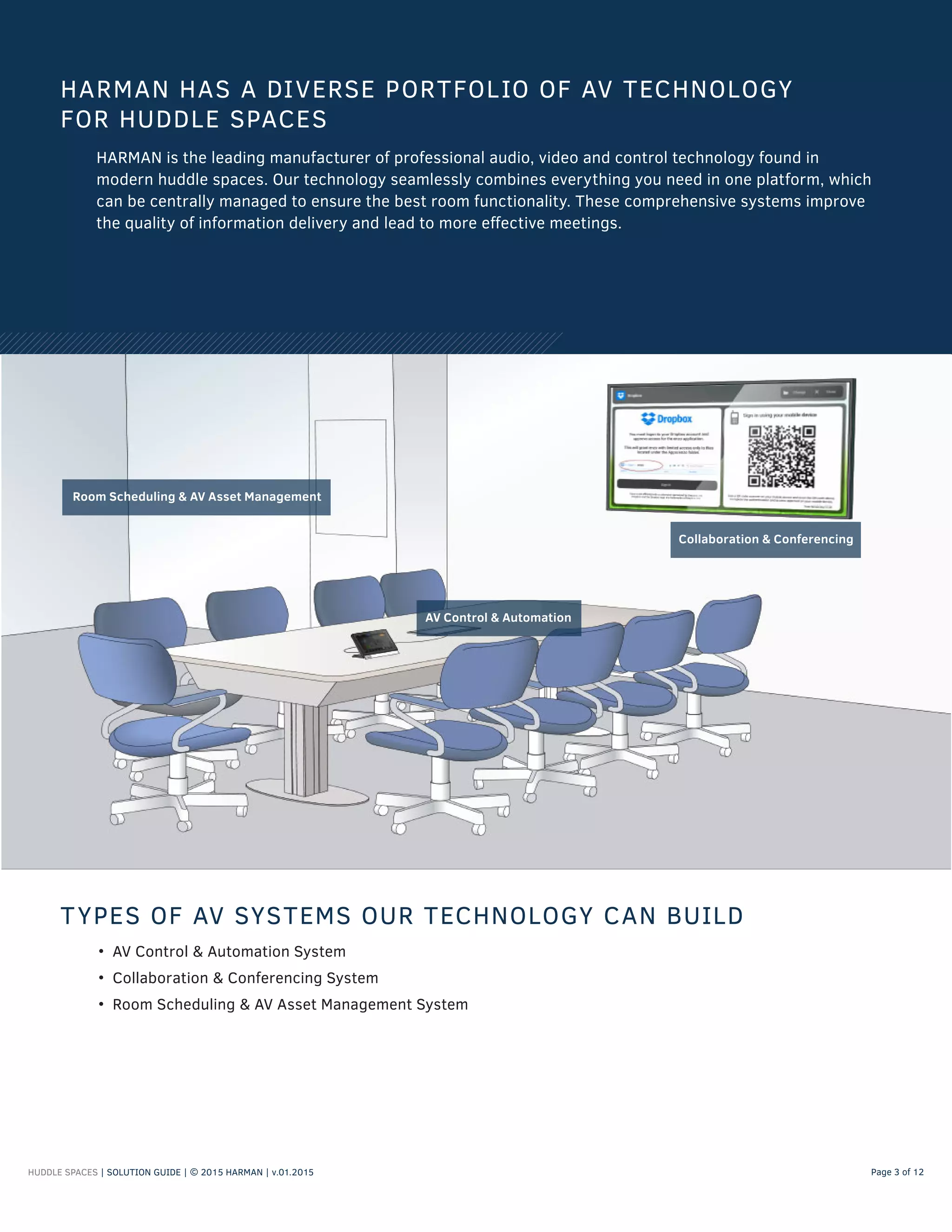
Collaboration & Conferencing
Room Scheduling & AV Asset Management
AV Control & Automation
• AV Control & Automation System
• Collaboration & Conferencing System
• Room Scheduling & AV Asset Management System
HARMAN HAS A DIVERSE PORTFOLIO OF AV TECHNOLOGY
FOR HUDDLE SPACES
HARMAN is the leading manufacturer of professional audio, video and control technology found in
modern huddle spaces. Our technology seamlessly combines everything you need in one platform, which
can be centrally managed to ensure the best room functionality. These comprehensive systems improve
the quality of information delivery and lead to more effective meetings.
TYPES OF AV SYSTEMS OUR TECHNOLOGY CAN BUILD
HUDDLE SPACES | SOLUTION GUIDE | © 2015 HARMAN | v.02.2015 Page 4 of 12
WHAT IS AN AV CONTROL & AUTOMATION SYSTEM?
AV control and automation systems simplify the operation of AV equipment in huddle spaces, so
students, instructors and administrators feel comfortable operating the room’s technology and
confident that it supports their needs.
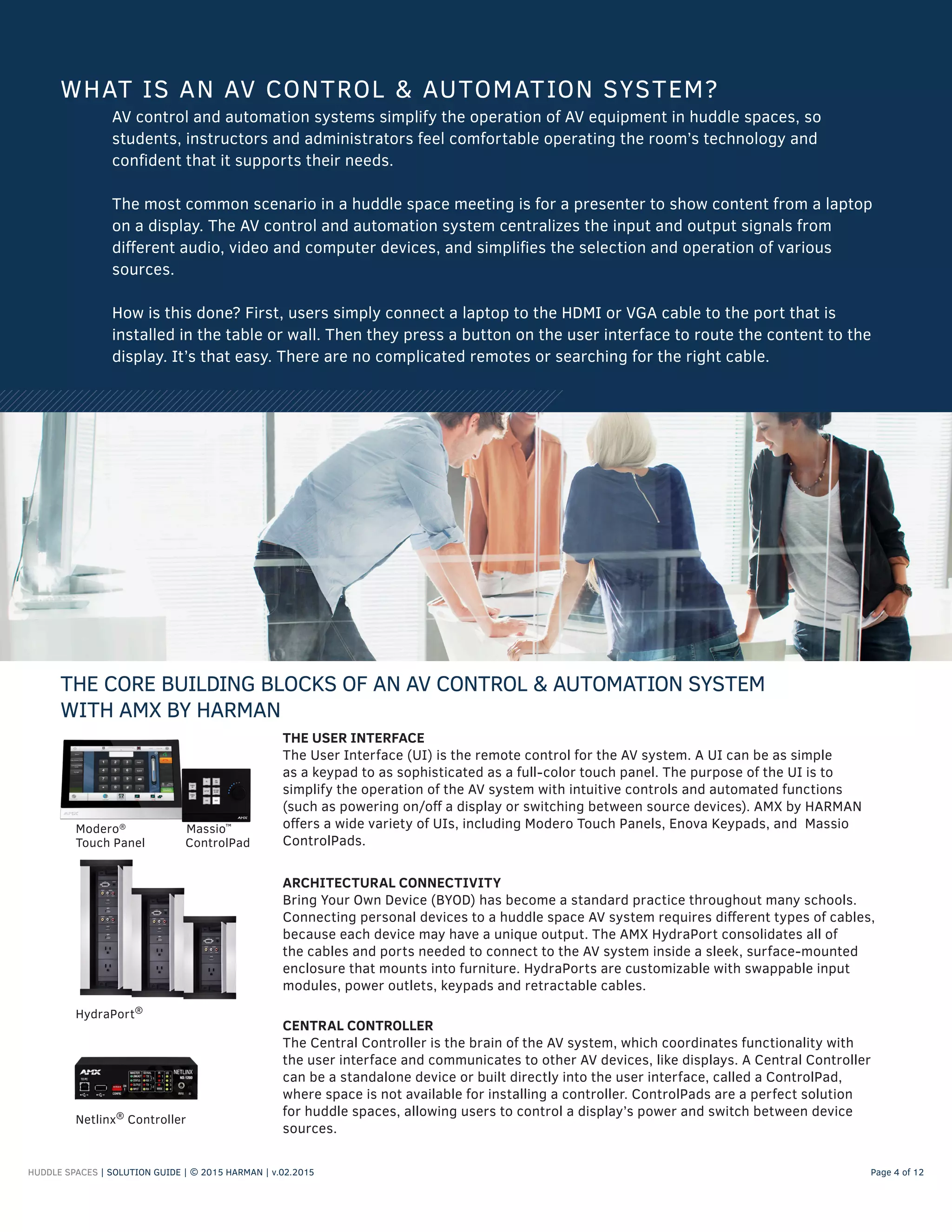
The most common scenario in a huddle space meeting is for a presenter to show content from a laptop
on a display. The AV control and automation system centralizes the input and output signals from
different audio, video and computer devices, and simplifies the selection and operation of various
sources.
How is this done? First, users simply connect a laptop to the HDMI or VGA cable to the port that is
installed in the table or wall. Then they press a button on the user interface to route the content to the
display. It’s that easy. There are no complicated remotes or searching for the right cable.
THE CORE BUILDING BLOCKS OF AN AV CONTROL & AUTOMATION SYSTEM
WITH AMX BY HARMAN
CENTRAL CONTROLLER
The Central Controller is the brain of the AV system, which coordinates functionality with
the user interface and communicates to other AV devices, like displays. A Central Controller
can be a standalone device or built directly into the user interface, called a ControlPad,
where space is not available for installing a controller. ControlPads are a perfect solution
for huddle spaces, allowing users to control a display’s power and switch between device
sources.
ARCHITECTURAL CONNECTIVITY
Bring Your Own Device (BYOD) has become a standard practice throughout many schools.
Connecting personal devices to a huddle space AV system requires different types of cables,
because each device may have a unique output. The AMX HydraPort consolidates all of
the cables and ports needed to connect to the AV system inside a sleek, surface-mounted
enclosure that mounts into furniture. HydraPorts are customizable with swappable input
modules, power outlets, keypads and retractable cables.
HydraPort®
Netlinx®
Controller
THE USER INTERFACE
The User Interface (UI) is the remote control for the AV system. A UI can be as simple
as a keypad to as sophisticated as a full-color touch panel. The purpose of the UI is to
simplify the operation of the AV system with intuitive controls and automated functions
(such as powering on/off a display or switching between source devices). AMX by HARMAN
offers a wide variety of UIs, including Modero Touch Panels, Enova Keypads, and Massio
ControlPads.
Modero®
Massio™
Touch Panel ControlPad
HUDDLE SPACES | SOLUTION GUIDE | © 2015 HARMAN | v.01.2015 Page 5 of 12
• Evaluate your equipment to see if you need a video switcher. Typically, a projector or flat-screen
TV serves as the video switcher in a huddle space. If you already have a display, double check the
manufacturer’s manual to confirm that your device has the proper type and quantity of input ports
(such as VGA and HDMI) for the devices used in the huddle space.
• Determine the required functions users need to operate each source device in the system, like power
on/off, volume up/down and device selection. This will determine the size of user interface you may
need for all of the required buttons.
• Decide where users connect their devices to the display. Will it be a HydraPort in the table or an AV
plate in the wall? Consider the cable types needed for connectivity, the length of these cables and
any potential tripping hazards.
TIPS FOR DESIGNING THE AV CONTROL & AUTOMATION SYSTEM
RAPID PROJECT MAKER
Rapid Project Maker, or RPM, is a cloud-based software application
that guides you through the process of selecting, configuring and
connecting your devices, such as switchers, touch panels and displays.
With RPM, you can program your AV controller and create an elegant
user interface with no programming skills, and save hours of time
versus traditional code-based programming. This software is free to
our registered users.
To learn more about RPM, visit www.amxrpm.com.
RAPID PROJECT MAKER HELPS YOU BUILD THE PERFECT
AV CONTROL & AUTOMATION SYSTEM
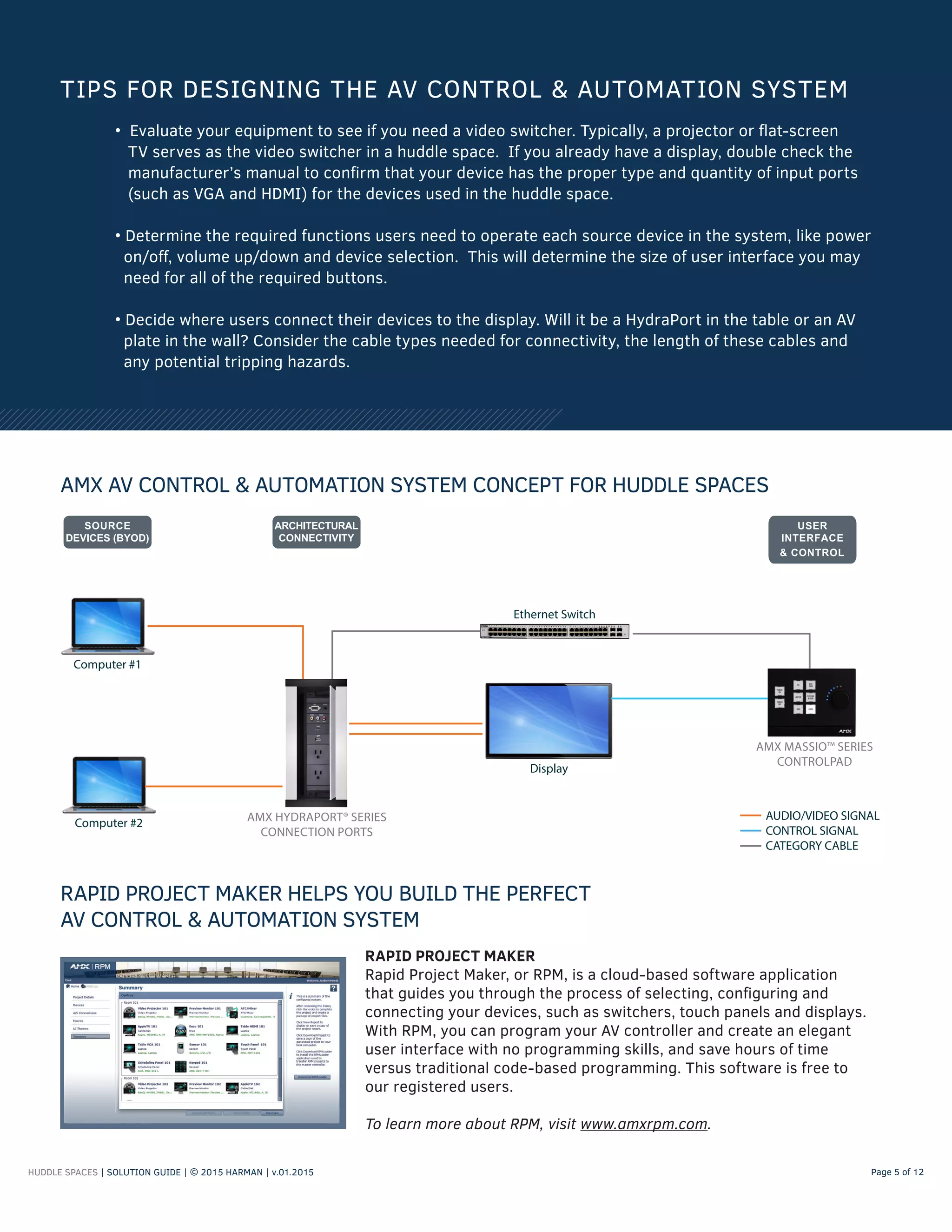
AMX AV CONTROL & AUTOMATION SYSTEM CONCEPT FOR HUDDLE SPACES
AMX HYDRAPORT® SERIES
CONNECTION PORTS
Computer #1
AMX MASSIO™ SERIES
CONTROLPAD
Display
AUDIO/VIDEO SIGNAL
CONTROL SIGNAL
CATEGORY CABLE
Ethernet Switch
Computer #2
HUDDLE SPACES | SOLUTION GUIDE | © 2015 HARMAN | v.01.2015 Page 6 of 12
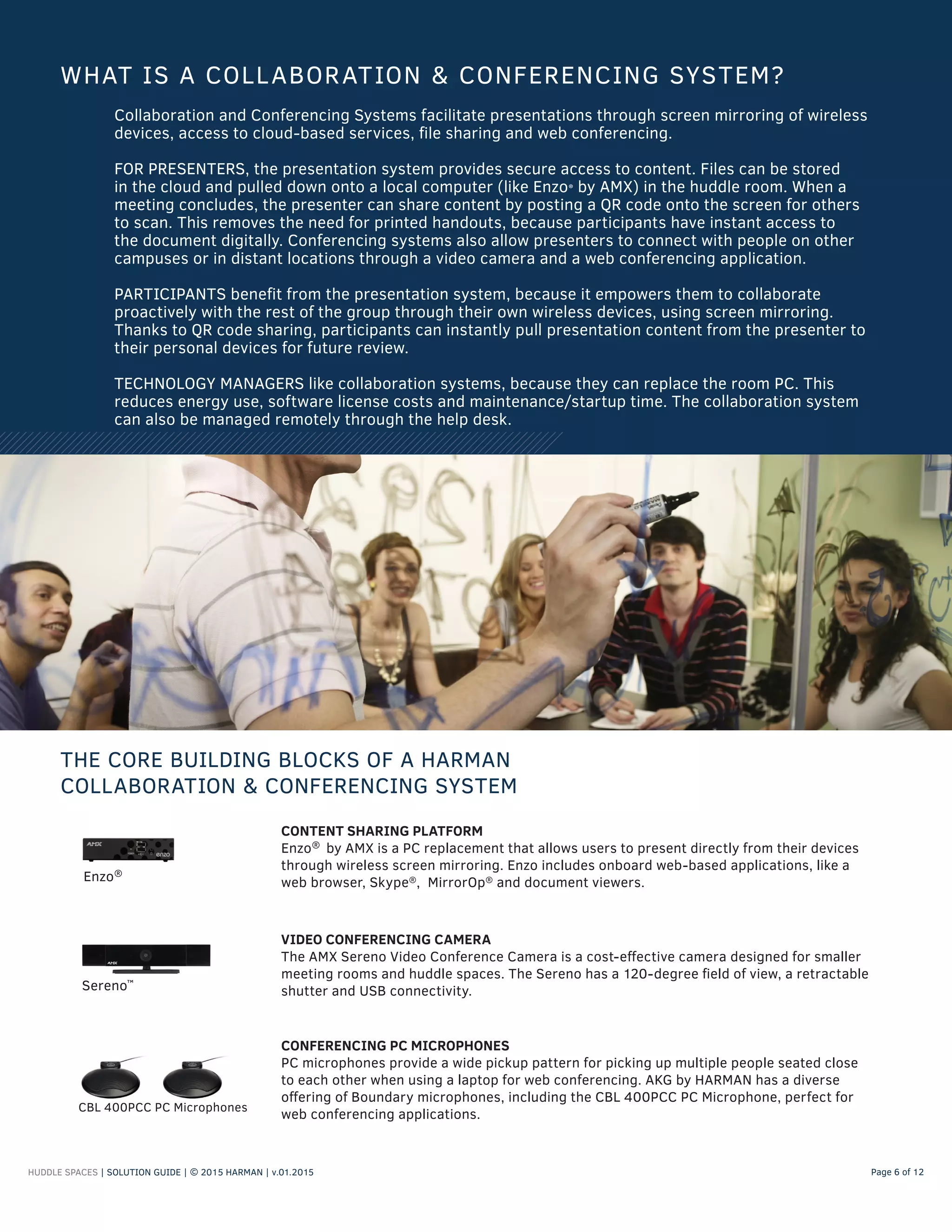
Collaboration and Conferencing Systems facilitate presentations through screen mirroring of wireless
devices, access to cloud-based services, file sharing and web conferencing.
FOR PRESENTERS, the presentation system provides secure access to content. Files can be stored
in the cloud and pulled down onto a local computer (like Enzo® by AMX) in the huddle room. When a
meeting concludes, the presenter can share content by posting a QR code onto the screen for others
to scan. This removes the need for printed handouts, because participants have instant access to
the document digitally. Conferencing systems also allow presenters to connect with people on other
campuses or in distant locations through a video camera and a web conferencing application.
PARTICIPANTS benefit from the presentation system, because it empowers them to collaborate
proactively with the rest of the group through their own wireless devices, using screen mirroring.
Thanks to QR code sharing, participants can instantly pull presentation content from the presenter to
their personal devices for future review.
TECHNOLOGY MANAGERS like collaboration systems, because they can replace the room PC. This
reduces energy use, software license costs and maintenance/startup time. The collaboration system
can also be managed remotely through the help desk.
WHAT IS A COLLABORATION & CONFERENCING SYSTEM?
THE CORE BUILDING BLOCKS OF A HARMAN
COLLABORATION & CONFERENCING SYSTEM
VIDEO CONFERENCING CAMERA
The AMX Sereno Video Conference Camera is a cost-effective camera designed for smaller
meeting rooms and huddle spaces. The Sereno has a 120-degree field of view, a retractable
shutter and USB connectivity.Sereno™
CONTENT SHARING PLATFORM
Enzo®
by AMX is a PC replacement that allows users to present directly from their devices
through wireless screen mirroring. Enzo includes onboard web-based applications, like a
web browser, Skype®
, MirrorOp®
and document viewers.Enzo®
CONFERENCING PC MICROPHONES
PC microphones provide a wide pickup pattern for picking up multiple people seated close
to each other when using a laptop for web conferencing. AKG by HARMAN has a diverse
offering of Boundary microphones, including the CBL 400PCC PC Microphone, perfect for
web conferencing applications.
CBL 400PCC PC Microphones
HUDDLE SPACES | SOLUTION GUIDE | © 2015 HARMAN | v.01.2015 Page 7 of 12
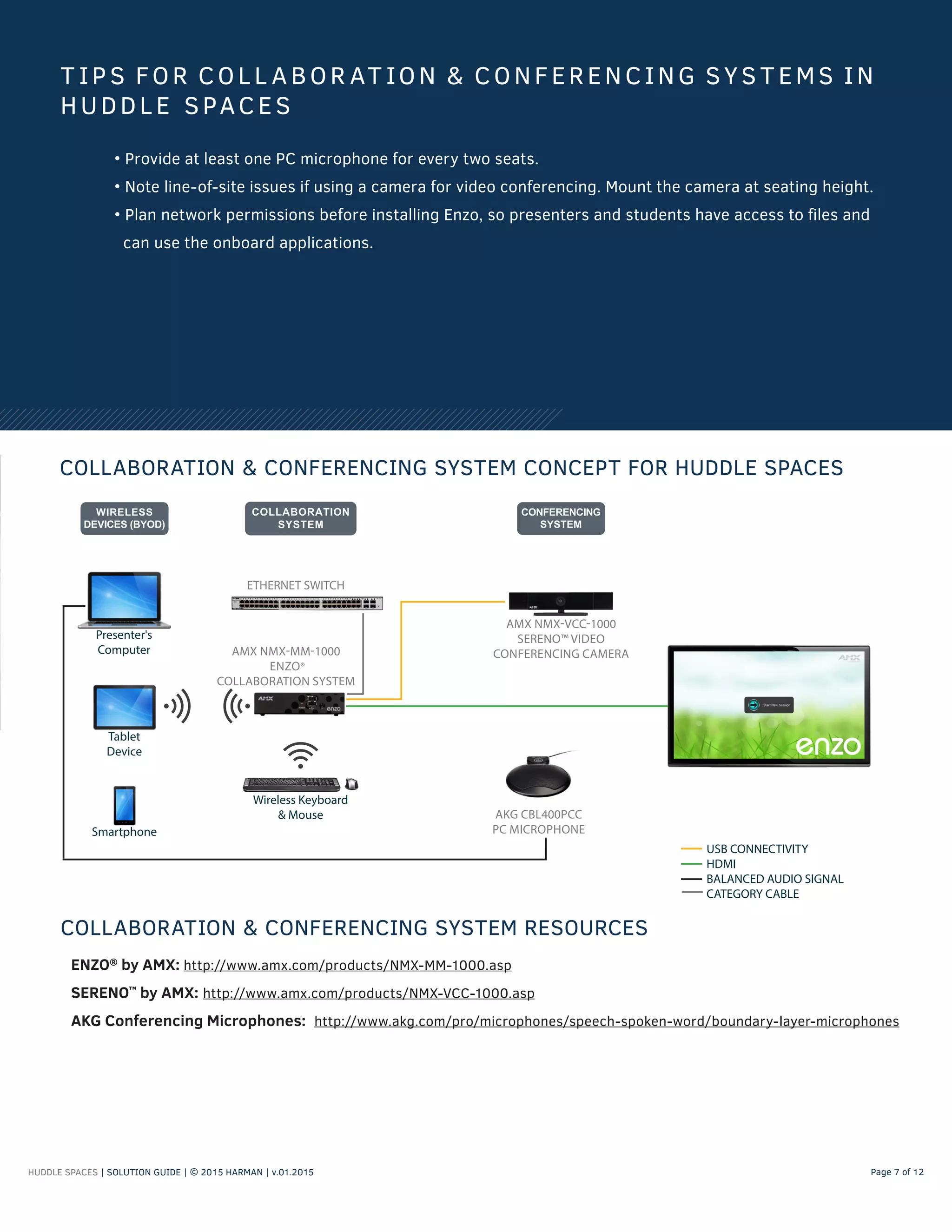
COLLABORATION & CONFERENCING SYSTEM CONCEPT FOR HUDDLE SPACES
T IP S FOR COL L ABOR AT ION & CONFERENC ING SYS T EMS IN
HUDDL E SPACES
• Provide at least one PC microphone for every two seats.
• Note line-of-site issues if using a camera for video conferencing. Mount the camera at seating height.
• Plan network permissions before installing Enzo, so presenters and students have access to files and
can use the onboard applications.
ENZO®
by AMX: http://www.amx.com/products/NMX-MM-1000.asp
SERENO™
by AMX: http://www.amx.com/products/NMX-VCC-1000.asp
AKG Conferencing Microphones: http://www.akg.com/pro/microphones/speech-spoken-word/boundary-layer-microphones
COLLABORATION & CONFERENCING SYSTEM RESOURCES
Smartphone
AMX NMX-MM-1000
ENZO®
COLLABORATION SYSTEM
Presenter's
Computer
AMX NMX-VCC-1000
SERENO™ VIDEO
CONFERENCING CAMERA
Wireless Keyboard
& Mouse
Tablet
Device
ETHERNET SWITCH
USB CONNECTIVITY
HDMI
BALANCED AUDIO SIGNAL
CATEGORY CABLE
AKG CBL400PCC
PC MICROPHONE
HUDDLE SPACES | SOLUTION GUIDE | © 2015 HARMAN | v.01.2015 Page 8 of 12
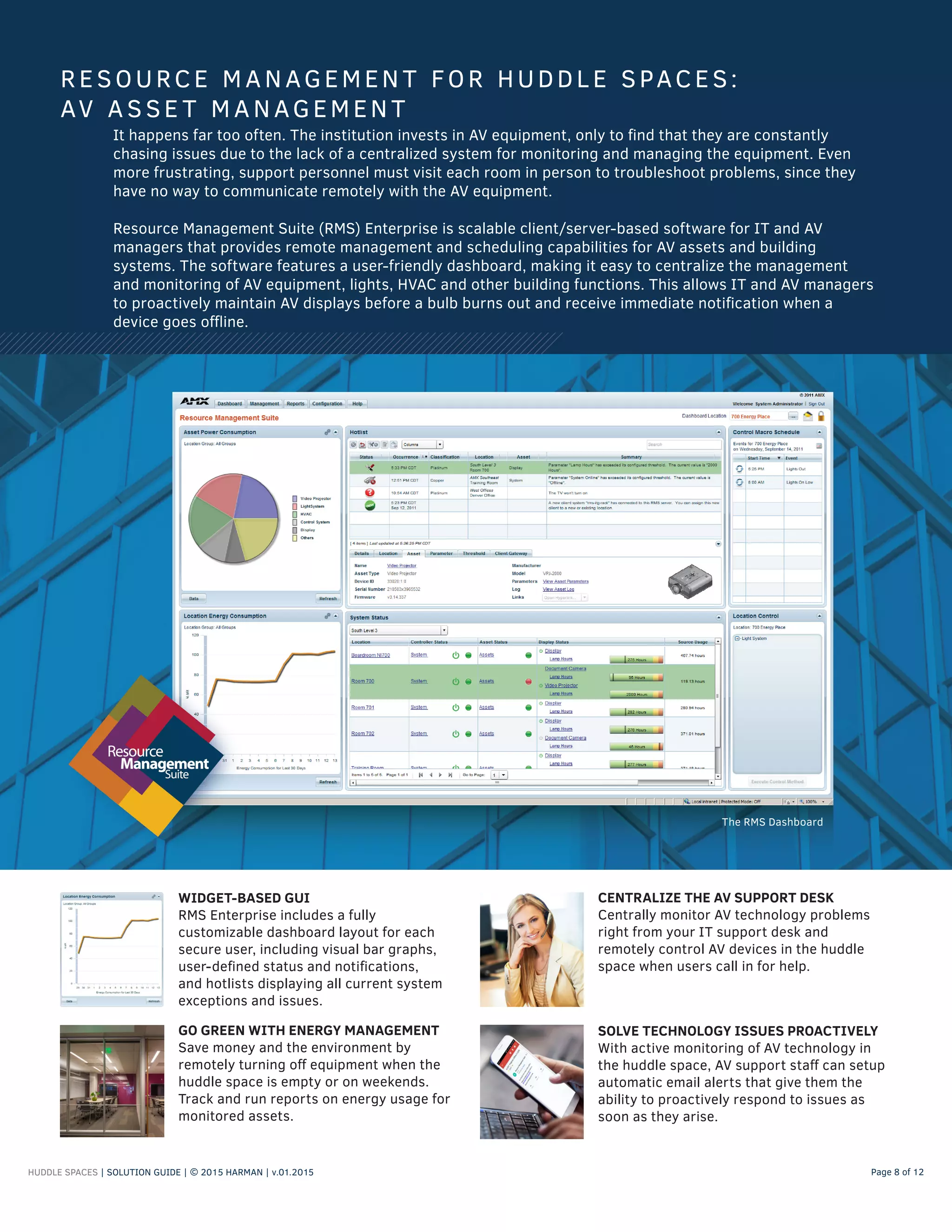
WIDGET-BASED GUI
RMS Enterprise includes a fully
customizable dashboard layout for each
secure user, including visual bar graphs,
user-defined status and notifications,
and hotlists displaying all current system
exceptions and issues.
It happens far too often. The institution invests in AV equipment, only to find that they are constantly
chasing issues due to the lack of a centralized system for monitoring and managing the equipment. Even
more frustrating, support personnel must visit each room in person to troubleshoot problems, since they
have no way to communicate remotely with the AV equipment.
Resource Management Suite (RMS) Enterprise is scalable client/server-based software for IT and AV
managers that provides remote management and scheduling capabilities for AV assets and building
systems. The software features a user-friendly dashboard, making it easy to centralize the management
and monitoring of AV equipment, lights, HVAC and other building functions. This allows IT and AV managers
to proactively maintain AV displays before a bulb burns out and receive immediate notification when a
device goes offline.
RESOURCE MANAGEMEN T FOR HUDDL E SPACES:
AV A S SE T MA NAGEMEN T
CENTRALIZE THE AV SUPPORT DESK
Centrally monitor AV technology problems
right from your IT support desk and
remotely control AV devices in the huddle
space when users call in for help.
GO GREEN WITH ENERGY MANAGEMENT
Save money and the environment by
remotely turning off equipment when the
huddle space is empty or on weekends.
Track and run reports on energy usage for
monitored assets.
SOLVE TECHNOLOGY ISSUES PROACTIVELY
With active monitoring of AV technology in
the huddle space, AV support staff can setup
automatic email alerts that give them the
ability to proactively respond to issues as
soon as they arise.
The RMS Dashboard
HUDDLE SPACES | SOLUTION GUIDE | © 2015 HARMAN | v.01.2015 Page 9 of 12
A college campus runs on classes and events, which are allocated facility resources through a master
calendar. Schedule management systems, like Exchange, Lotus Notes or Google Calendar, provide a
platform to centrally create and change schedules, so campuses can efficiently manage their huddle
spaces. Once this schedule is created, however, how do students and instructors know if there is a room
change, time change, cancellation or if that space is available for the next hour?
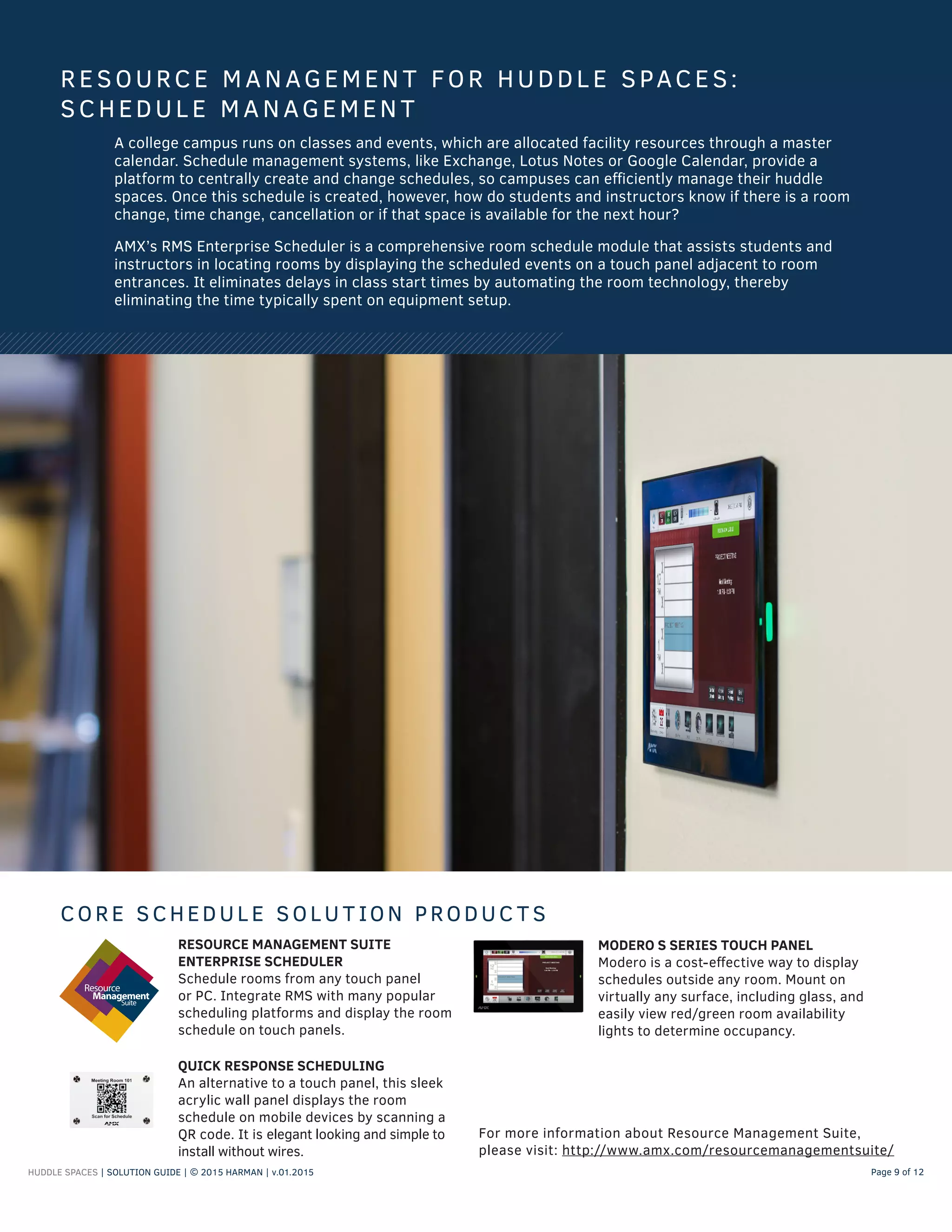
AMX’s RMS Enterprise Scheduler is a comprehensive room schedule module that assists students and
instructors in locating rooms by displaying the scheduled events on a touch panel adjacent to room
entrances. It eliminates delays in class start times by automating the room technology, thereby
eliminating the time typically spent on equipment setup.
RESOURCE MANAGEMEN T FOR HUDDL E SPACES:
SCHEDUL E MANAGEMEN T
CORE SCHEDUL E SOLU T ION PRODUC T S
RESOURCE MANAGEMENT SUITE
ENTERPRISE SCHEDULER
Schedule rooms from any touch panel
or PC. Integrate RMS with many popular
scheduling platforms and display the room
schedule on touch panels.
MODERO S SERIES TOUCH PANEL
Modero is a cost-effective way to display
schedules outside any room. Mount on
virtually any surface, including glass, and
easily view red/green room availability
lights to determine occupancy.
QUICK RESPONSE SCHEDULING
An alternative to a touch panel, this sleek
acrylic wall panel displays the room
schedule on mobile devices by scanning a
QR code. It is elegant looking and simple to
install without wires.
For more information about Resource Management Suite,
please visit: http://www.amx.com/resourcemanagementsuite/
HUDDLE SPACES | SOLUTION GUIDE | © 2015 HARMAN | v.01.2015 Page 10 of 12
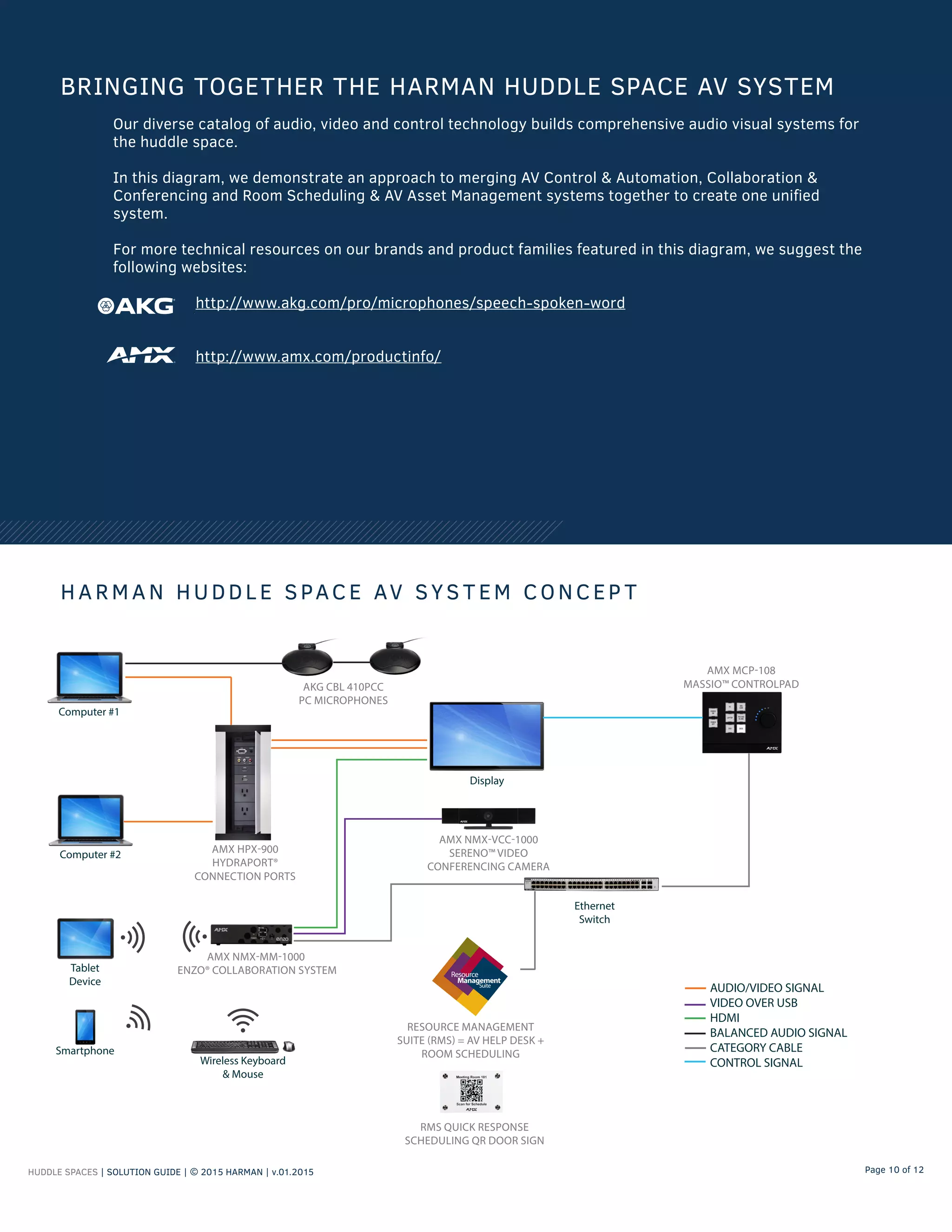
Our diverse catalog of audio, video and control technology builds comprehensive audio visual systems for
the huddle space.
In this diagram, we demonstrate an approach to merging AV Control & Automation, Collaboration &
Conferencing and Room Scheduling & AV Asset Management systems together to create one unified
system.
For more technical resources on our brands and product families featured in this diagram, we suggest the
following websites:
http://www.akg.com/pro/microphones/speech-spoken-word
http://www.amx.com/productinfo/
BRINGING TOGETHER THE HARMAN HUDDLE SPACE AV SYSTEM
H A RM A N HUDDL E SPACE AV SYS T EM CONCEP T
AMX HPX-900
HYDRAPORT®
CONNECTION PORTS
Computer #1
AMX MCP-108
MASSIO™ CONTROLPAD
Display
Ethernet
Switch
Computer #2
Smartphone
AMX NMX-MM-1000
ENZO® COLLABORATION SYSTEM
AMX NMX-VCC-1000
SERENO™ VIDEO
CONFERENCING CAMERA
Wireless Keyboard
& Mouse
Tablet
Device
AKG CBL 410PCC
PC MICROPHONES
RESOURCE MANAGEMENT
SUITE (RMS) = AV HELP DESK +
ROOM SCHEDULING
RMS QUICK RESPONSE
SCHEDULING QR DOOR SIGN
AUDIO/VIDEO SIGNAL
VIDEO OVER USB
HDMI
BALANCED AUDIO SIGNAL
CATEGORY CABLE
CONTROL SIGNAL
FOR MORE INFORMAT ION
Email us: education@harman.com
To contact a member of our Education Business Development Team,
visit: http://www.amx.com/automate/contactamx/
A DDI T ION A L RESOURCES
Campus Explorer: http://www.amx.com/education/plan/campusexplorer/
AMX White Papers: http://www.amx.com/education/plan/resources/#!/
AMX Training Videos: https://www.youtube.com/user/AMXconfigure
AKG Training Videos: https://www.youtube.com/user/AKGAcoustics
HUDDLE SPACES | SOLUTION GUIDE | © 2015 HARMAN | v.01.2015 Page 11 of 12
About HARMAN Professional
Headquartered in Northridge, California, HARMAN Professional is part of HARMAN International Industries,
Incorporated, which designs and engineers connected products and solutions for consumers, automakers,
and enterprises worldwide, including audio, visual and infotainment systems; enterprise automation
solutions; and software services. The company's stock is traded on the New York Stock Exchange under the
symbol NYSE:HAR.
HARMAN Professional is the world’s largest professional audio, video, lighting, and control products and
systems company. Our brands comprise AKG Acoustics®
, AMX®
, BSS Audio®
, Crown International®
, dbx
Professional®
, DigiTech®
, JBL Professional®
, Lexicon Pro®
, Martin®
, Soundcraft®
and Studer®
. These best-in-
class products are designed, manufactured and delivered to a variety of customers, including recording and
broadcast, musicians, cinema, touring sound, commercial sound and contracting applications.
©2015 HARMAN. All rights reserved. Specifications subject to change.

HARMAN-SolutionGuide-Education-Huddle Space Final 6915r

  • 1.
    S O LU T IO N G U I D E HUDDL E SPACES Audio Visual System Solutions for Education
  • 2.
    HUDDLE SPACES |SOLUTION GUIDE | © 2015 HARMAN | v.01.2015 Page 2 of 12 A huddle space is traditionally a small room with a table, whiteboard and a few chairs. It is the venue of choice for small groups of students, instructors and administrators, who need a quiet place to meet and collaborate. In this space, people prefer to view content from a laptop or tablet on an LCD display and have the ability to access the Internet or conduct a web conference. By implementing control, automation and conferencing systems in your huddle spaces, you can ensure that the technology is easy to setup and manage, and create a comfortable meeting experience. HARMAN has a comprehensive portfolio of AV technology that can transform huddle spaces into state-of-the-art learning environments. We invite you to learn more about our AV solutions and discover how we are the perfect partner for developing professional-quality AV systems. HUDDLE SPACES Huddle spaces are small meeting areas, where groups of 2–8 people gather to: • Present information by connecting a laptop to an LCD display or projector • Share content wirelessly from a tablet, smartphone or laptop • Meet and collaborate with remote participants via web conference • Reserve a room remotely through scheduling software, such as Microsoft Exchange or Google Calendar COMMON ACTIVITIES
  • 3.
    HUDDLE SPACES |SOLUTION GUIDE | © 2015 HARMAN | v.01.2015 Page 3 of 12 Collaboration & Conferencing Room Scheduling & AV Asset Management AV Control & Automation • AV Control & Automation System • Collaboration & Conferencing System • Room Scheduling & AV Asset Management System HARMAN HAS A DIVERSE PORTFOLIO OF AV TECHNOLOGY FOR HUDDLE SPACES HARMAN is the leading manufacturer of professional audio, video and control technology found in modern huddle spaces. Our technology seamlessly combines everything you need in one platform, which can be centrally managed to ensure the best room functionality. These comprehensive systems improve the quality of information delivery and lead to more effective meetings. TYPES OF AV SYSTEMS OUR TECHNOLOGY CAN BUILD
  • 4.
    HUDDLE SPACES |SOLUTION GUIDE | © 2015 HARMAN | v.02.2015 Page 4 of 12 WHAT IS AN AV CONTROL & AUTOMATION SYSTEM? AV control and automation systems simplify the operation of AV equipment in huddle spaces, so students, instructors and administrators feel comfortable operating the room’s technology and confident that it supports their needs. The most common scenario in a huddle space meeting is for a presenter to show content from a laptop on a display. The AV control and automation system centralizes the input and output signals from different audio, video and computer devices, and simplifies the selection and operation of various sources. How is this done? First, users simply connect a laptop to the HDMI or VGA cable to the port that is installed in the table or wall. Then they press a button on the user interface to route the content to the display. It’s that easy. There are no complicated remotes or searching for the right cable. THE CORE BUILDING BLOCKS OF AN AV CONTROL & AUTOMATION SYSTEM WITH AMX BY HARMAN CENTRAL CONTROLLER The Central Controller is the brain of the AV system, which coordinates functionality with the user interface and communicates to other AV devices, like displays. A Central Controller can be a standalone device or built directly into the user interface, called a ControlPad, where space is not available for installing a controller. ControlPads are a perfect solution for huddle spaces, allowing users to control a display’s power and switch between device sources. ARCHITECTURAL CONNECTIVITY Bring Your Own Device (BYOD) has become a standard practice throughout many schools. Connecting personal devices to a huddle space AV system requires different types of cables, because each device may have a unique output. The AMX HydraPort consolidates all of the cables and ports needed to connect to the AV system inside a sleek, surface-mounted enclosure that mounts into furniture. HydraPorts are customizable with swappable input modules, power outlets, keypads and retractable cables. HydraPort® Netlinx® Controller THE USER INTERFACE The User Interface (UI) is the remote control for the AV system. A UI can be as simple as a keypad to as sophisticated as a full-color touch panel. The purpose of the UI is to simplify the operation of the AV system with intuitive controls and automated functions (such as powering on/off a display or switching between source devices). AMX by HARMAN offers a wide variety of UIs, including Modero Touch Panels, Enova Keypads, and Massio ControlPads. Modero® Massio™ Touch Panel ControlPad
  • 5.
    HUDDLE SPACES |SOLUTION GUIDE | © 2015 HARMAN | v.01.2015 Page 5 of 12 • Evaluate your equipment to see if you need a video switcher. Typically, a projector or flat-screen TV serves as the video switcher in a huddle space. If you already have a display, double check the manufacturer’s manual to confirm that your device has the proper type and quantity of input ports (such as VGA and HDMI) for the devices used in the huddle space. • Determine the required functions users need to operate each source device in the system, like power on/off, volume up/down and device selection. This will determine the size of user interface you may need for all of the required buttons. • Decide where users connect their devices to the display. Will it be a HydraPort in the table or an AV plate in the wall? Consider the cable types needed for connectivity, the length of these cables and any potential tripping hazards. TIPS FOR DESIGNING THE AV CONTROL & AUTOMATION SYSTEM RAPID PROJECT MAKER Rapid Project Maker, or RPM, is a cloud-based software application that guides you through the process of selecting, configuring and connecting your devices, such as switchers, touch panels and displays. With RPM, you can program your AV controller and create an elegant user interface with no programming skills, and save hours of time versus traditional code-based programming. This software is free to our registered users. To learn more about RPM, visit www.amxrpm.com. RAPID PROJECT MAKER HELPS YOU BUILD THE PERFECT AV CONTROL & AUTOMATION SYSTEM AMX AV CONTROL & AUTOMATION SYSTEM CONCEPT FOR HUDDLE SPACES AMX HYDRAPORT® SERIES CONNECTION PORTS Computer #1 AMX MASSIO™ SERIES CONTROLPAD Display AUDIO/VIDEO SIGNAL CONTROL SIGNAL CATEGORY CABLE Ethernet Switch Computer #2
  • 6.
    HUDDLE SPACES |SOLUTION GUIDE | © 2015 HARMAN | v.01.2015 Page 6 of 12 Collaboration and Conferencing Systems facilitate presentations through screen mirroring of wireless devices, access to cloud-based services, file sharing and web conferencing. FOR PRESENTERS, the presentation system provides secure access to content. Files can be stored in the cloud and pulled down onto a local computer (like Enzo® by AMX) in the huddle room. When a meeting concludes, the presenter can share content by posting a QR code onto the screen for others to scan. This removes the need for printed handouts, because participants have instant access to the document digitally. Conferencing systems also allow presenters to connect with people on other campuses or in distant locations through a video camera and a web conferencing application. PARTICIPANTS benefit from the presentation system, because it empowers them to collaborate proactively with the rest of the group through their own wireless devices, using screen mirroring. Thanks to QR code sharing, participants can instantly pull presentation content from the presenter to their personal devices for future review. TECHNOLOGY MANAGERS like collaboration systems, because they can replace the room PC. This reduces energy use, software license costs and maintenance/startup time. The collaboration system can also be managed remotely through the help desk. WHAT IS A COLLABORATION & CONFERENCING SYSTEM? THE CORE BUILDING BLOCKS OF A HARMAN COLLABORATION & CONFERENCING SYSTEM VIDEO CONFERENCING CAMERA The AMX Sereno Video Conference Camera is a cost-effective camera designed for smaller meeting rooms and huddle spaces. The Sereno has a 120-degree field of view, a retractable shutter and USB connectivity.Sereno™ CONTENT SHARING PLATFORM Enzo® by AMX is a PC replacement that allows users to present directly from their devices through wireless screen mirroring. Enzo includes onboard web-based applications, like a web browser, Skype® , MirrorOp® and document viewers.Enzo® CONFERENCING PC MICROPHONES PC microphones provide a wide pickup pattern for picking up multiple people seated close to each other when using a laptop for web conferencing. AKG by HARMAN has a diverse offering of Boundary microphones, including the CBL 400PCC PC Microphone, perfect for web conferencing applications. CBL 400PCC PC Microphones
  • 7.
    HUDDLE SPACES |SOLUTION GUIDE | © 2015 HARMAN | v.01.2015 Page 7 of 12 COLLABORATION & CONFERENCING SYSTEM CONCEPT FOR HUDDLE SPACES T IP S FOR COL L ABOR AT ION & CONFERENC ING SYS T EMS IN HUDDL E SPACES • Provide at least one PC microphone for every two seats. • Note line-of-site issues if using a camera for video conferencing. Mount the camera at seating height. • Plan network permissions before installing Enzo, so presenters and students have access to files and can use the onboard applications. ENZO® by AMX: http://www.amx.com/products/NMX-MM-1000.asp SERENO™ by AMX: http://www.amx.com/products/NMX-VCC-1000.asp AKG Conferencing Microphones: http://www.akg.com/pro/microphones/speech-spoken-word/boundary-layer-microphones COLLABORATION & CONFERENCING SYSTEM RESOURCES Smartphone AMX NMX-MM-1000 ENZO® COLLABORATION SYSTEM Presenter's Computer AMX NMX-VCC-1000 SERENO™ VIDEO CONFERENCING CAMERA Wireless Keyboard & Mouse Tablet Device ETHERNET SWITCH USB CONNECTIVITY HDMI BALANCED AUDIO SIGNAL CATEGORY CABLE AKG CBL400PCC PC MICROPHONE
  • 8.
    HUDDLE SPACES |SOLUTION GUIDE | © 2015 HARMAN | v.01.2015 Page 8 of 12 WIDGET-BASED GUI RMS Enterprise includes a fully customizable dashboard layout for each secure user, including visual bar graphs, user-defined status and notifications, and hotlists displaying all current system exceptions and issues. It happens far too often. The institution invests in AV equipment, only to find that they are constantly chasing issues due to the lack of a centralized system for monitoring and managing the equipment. Even more frustrating, support personnel must visit each room in person to troubleshoot problems, since they have no way to communicate remotely with the AV equipment. Resource Management Suite (RMS) Enterprise is scalable client/server-based software for IT and AV managers that provides remote management and scheduling capabilities for AV assets and building systems. The software features a user-friendly dashboard, making it easy to centralize the management and monitoring of AV equipment, lights, HVAC and other building functions. This allows IT and AV managers to proactively maintain AV displays before a bulb burns out and receive immediate notification when a device goes offline. RESOURCE MANAGEMEN T FOR HUDDL E SPACES: AV A S SE T MA NAGEMEN T CENTRALIZE THE AV SUPPORT DESK Centrally monitor AV technology problems right from your IT support desk and remotely control AV devices in the huddle space when users call in for help. GO GREEN WITH ENERGY MANAGEMENT Save money and the environment by remotely turning off equipment when the huddle space is empty or on weekends. Track and run reports on energy usage for monitored assets. SOLVE TECHNOLOGY ISSUES PROACTIVELY With active monitoring of AV technology in the huddle space, AV support staff can setup automatic email alerts that give them the ability to proactively respond to issues as soon as they arise. The RMS Dashboard
  • 9.
    HUDDLE SPACES |SOLUTION GUIDE | © 2015 HARMAN | v.01.2015 Page 9 of 12 A college campus runs on classes and events, which are allocated facility resources through a master calendar. Schedule management systems, like Exchange, Lotus Notes or Google Calendar, provide a platform to centrally create and change schedules, so campuses can efficiently manage their huddle spaces. Once this schedule is created, however, how do students and instructors know if there is a room change, time change, cancellation or if that space is available for the next hour? AMX’s RMS Enterprise Scheduler is a comprehensive room schedule module that assists students and instructors in locating rooms by displaying the scheduled events on a touch panel adjacent to room entrances. It eliminates delays in class start times by automating the room technology, thereby eliminating the time typically spent on equipment setup. RESOURCE MANAGEMEN T FOR HUDDL E SPACES: SCHEDUL E MANAGEMEN T CORE SCHEDUL E SOLU T ION PRODUC T S RESOURCE MANAGEMENT SUITE ENTERPRISE SCHEDULER Schedule rooms from any touch panel or PC. Integrate RMS with many popular scheduling platforms and display the room schedule on touch panels. MODERO S SERIES TOUCH PANEL Modero is a cost-effective way to display schedules outside any room. Mount on virtually any surface, including glass, and easily view red/green room availability lights to determine occupancy. QUICK RESPONSE SCHEDULING An alternative to a touch panel, this sleek acrylic wall panel displays the room schedule on mobile devices by scanning a QR code. It is elegant looking and simple to install without wires. For more information about Resource Management Suite, please visit: http://www.amx.com/resourcemanagementsuite/
  • 10.
    HUDDLE SPACES |SOLUTION GUIDE | © 2015 HARMAN | v.01.2015 Page 10 of 12 Our diverse catalog of audio, video and control technology builds comprehensive audio visual systems for the huddle space. In this diagram, we demonstrate an approach to merging AV Control & Automation, Collaboration & Conferencing and Room Scheduling & AV Asset Management systems together to create one unified system. For more technical resources on our brands and product families featured in this diagram, we suggest the following websites: http://www.akg.com/pro/microphones/speech-spoken-word http://www.amx.com/productinfo/ BRINGING TOGETHER THE HARMAN HUDDLE SPACE AV SYSTEM H A RM A N HUDDL E SPACE AV SYS T EM CONCEP T AMX HPX-900 HYDRAPORT® CONNECTION PORTS Computer #1 AMX MCP-108 MASSIO™ CONTROLPAD Display Ethernet Switch Computer #2 Smartphone AMX NMX-MM-1000 ENZO® COLLABORATION SYSTEM AMX NMX-VCC-1000 SERENO™ VIDEO CONFERENCING CAMERA Wireless Keyboard & Mouse Tablet Device AKG CBL 410PCC PC MICROPHONES RESOURCE MANAGEMENT SUITE (RMS) = AV HELP DESK + ROOM SCHEDULING RMS QUICK RESPONSE SCHEDULING QR DOOR SIGN AUDIO/VIDEO SIGNAL VIDEO OVER USB HDMI BALANCED AUDIO SIGNAL CATEGORY CABLE CONTROL SIGNAL
  • 11.
    FOR MORE INFORMATION Email us: education@harman.com To contact a member of our Education Business Development Team, visit: http://www.amx.com/automate/contactamx/ A DDI T ION A L RESOURCES Campus Explorer: http://www.amx.com/education/plan/campusexplorer/ AMX White Papers: http://www.amx.com/education/plan/resources/#!/ AMX Training Videos: https://www.youtube.com/user/AMXconfigure AKG Training Videos: https://www.youtube.com/user/AKGAcoustics HUDDLE SPACES | SOLUTION GUIDE | © 2015 HARMAN | v.01.2015 Page 11 of 12
  • 12.
    About HARMAN Professional Headquarteredin Northridge, California, HARMAN Professional is part of HARMAN International Industries, Incorporated, which designs and engineers connected products and solutions for consumers, automakers, and enterprises worldwide, including audio, visual and infotainment systems; enterprise automation solutions; and software services. The company's stock is traded on the New York Stock Exchange under the symbol NYSE:HAR. HARMAN Professional is the world’s largest professional audio, video, lighting, and control products and systems company. Our brands comprise AKG Acoustics® , AMX® , BSS Audio® , Crown International® , dbx Professional® , DigiTech® , JBL Professional® , Lexicon Pro® , Martin® , Soundcraft® and Studer® . These best-in- class products are designed, manufactured and delivered to a variety of customers, including recording and broadcast, musicians, cinema, touring sound, commercial sound and contracting applications. ©2015 HARMAN. All rights reserved. Specifications subject to change.