White Paper


xDESIGN ONLINE EDITOR & API PERFORMANCE
BENCHMARK SUMMARY
Customer Communications Management


                Abstract
                This white paper explains the performance of the xDesign Online
                Editor and its web services APIs. It provides performance data
                for editing a document, publishing a document, returning it to
                the calling application or browser, and displaying it in the user’s
                queue.


                September 2012
Copyright © 2012 EMC Corporation. All Rights Reserved.

EMC believes the information in this publication is accurate as
of its publication date. The information is subject to change
without notice.

The information in this publication is provided “as is.” EMC
Corporation makes no representations or warranties of any kind
with respect to the information in this publication, and
specifically disclaims implied warranties of merchantability or
fitness for a particular purpose.

Use, copying, and distribution of any EMC software described in
this publication requires an applicable software license.

For the most up-to-date listing of EMC product names, see EMC
Corporation Trademarks on EMC.com.

EMC2, EMC, where information lives, Document Sciences,
xPression, xPresso, and Autograph are registered trademarks or
trademarks of EMC Corporation in the United States and/or
other jurisdictions. All other trademarks used herein are the
property of their respective owners.

Part Number H5115


                    xDesign Online Editor & API Benchmark Summary   2
Table of Contents
Executive Summary ................................................................................................. 4
Test Method ............................................................................................................ 4
   Document Characteristics................................................................................................... 4
Performance Data .................................................................................................... 5
   Method: createDocumentItem ............................................................................................ 5
     Table 1: Beneficiary Letter ............................................................................................. 5
     Table 2: Auto Policy ...................................................................................................... 6
   Method: publishAndReturnDocumentItem.......................................................................... 6
     Table 3: Beneficiary Letter .............................................................................................. 6
     Table 4: Auto Policy ....................................................................................................... 7
   Method: documentItemsAssignedToUser ........................................................................... 8
     Table 5: Beneficiary Letter ............................................................................................. 8
     Table 6: Auto Policy ....................................................................................................... 8
   Method: openDocumentItem .............................................................................................. 9
     Table 7: Beneficiary Letter .............................................................................................. 9
     Table 8: Auto Policy ..................................................................................................... 10
Testing Environment .............................................................................................. 10
   Software Configuration ..................................................................................................... 10
   Hardware Configuration .................................................................................................... 10
   Parameter Settings ........................................................................................................... 11
Conclusion ............................................................................................................ 11


                                                               xDesign Online Editor & API Benchmark Summary                           3
Executive Summary
xDesign Online Editor enables business users to easily edit correspondence
interactively without the need to install and maintain traditional desktop software or
plug-ins. With the browser-based WYSIWYG interface, users can edit existing content,
add optional content, and protect content from unauthorized changes. The xDesign
Online Editor is a full-service editor, with comprehensive style and formatting
capabilities, spell check, and form-field support.
This report benchmarks the performance of the xDesign Online Editor and its web
services APIs. It provides performance data for editing a document, publishing a
document, returning it to the calling application or browser, and displaying it in the
user’s queue.


Test Method
The tests conducted simulate a production environment in which users are sending
simultaneous web service requests to the xPression server. Test results are shown for
1, 10, 50, and 100 concurrent requests. Testing was performed with Apache JMeter, a
graphical desktop application used to load test functional behavior and measure
performance.
Keep in mind, the number of concurrent users is not the same as the total user
population. For example, if you had 1000 users and 10 percent issue requests
simultaneously, this would match the test simulating 100 concurrent requests. During
a test, to simulate a constant load on the server for the appropriate number of
concurrent requests, the completion of one request triggers a new request.
The volume of concurrent requests will vary based on the number of users and their
use of the system, including how many documents they produce per hour and the
number of web services requests that are needed to generate a document. For
example, 100 users will produce 1,500 documents per hour if one user can process
15 documents per hour (1 document every 4 minutes). If each document requires one
to three web service calls (a reasonable estimate), that activity would create 1,500 to
4,500 web service calls per hour.

Document Characteristics
The following table describes the documents used for testing.
                                Beneficiary Letter          Auto Policy
 Pages                          1                           14
 Size                           178KB                       271 KB
 Size of Single customer data   4KB                         10KB
 Logic Complexity               Simple                      Medium
 Number of Rules                3                           20


                                              xDesign Online Editor & API Benchmark Summary   4
Beneficiary Letter                Auto Policy
                                Text, Variable, Table, Optional   Text, Variable, Table, Header
 Document Characteristic
                                Content Group                     and Footer, Barcode, TOC
 Design Tool                    xDesign                           xDesign


Performance Data
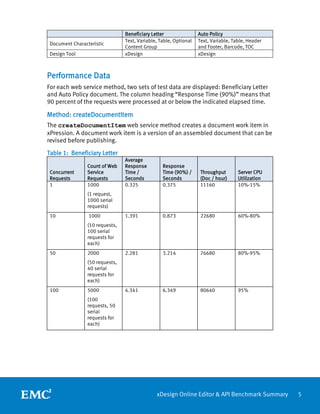
For each web service method, two sets of test data are displayed: Beneficiary Letter
and Auto Policy document. The column heading “Response Time (90%)” means that
90 percent of the requests were processed at or below the indicated elapsed time.

Method: createDocumentItem
The createDocumentItem web service method creates a document work item in
xPression. A document work item is a version of an assembled document that can be
revised before publishing.

Table 1: Beneficiary Letter
                                Average
                Count of Web    Response         Response
 Concurrent     Service         Time /           Time (90%) /      Throughput       Server CPU
 Requests       Requests        Seconds          Seconds           (Doc / hour)     Utilization
 1              1000            0.325            0.375             11160            10%-15%
                (1 request,
                1000 serial
                requests)
 10              1000           1.391            0.873             22680            60%-80%
                (10 requests,
                100 serial
                requests for
                each)
 50             2000            2.281            3.214             76680            80%-95%
                (50 requests,
                40 serial
                requests for
                each)
 100            5000            4.341            6.349             80640            95%
                (100
                requests, 50
                serial
                requests for
                each)


                                              xDesign Online Editor & API Benchmark Summary       5
Table 2: Auto Policy
                               Average
               Count of Web    Response     Response
 Concurrent    Service         Time /       Time (90%) /   Throughput     Server CPU
 Requests      Requests        Seconds      Seconds        (Doc / hour)   Utilization
 1             1000            0.411        0.468          8640           10%-25%
               (1 request,
               1000 serial
               requests)
 10             1000           1.411        1.005          22320          60%-85%
               (10 requests,
               100 serial
               requests for
               each)
 50            2000            3.205        4.56           54720          95%-100%
               (50 requests,
               40 serial
               requests for
               each)
 100           5000            6.872        8.985          51480          95%-100%
               (100
               requests, 50
               serial
               requests for
               each)


Method: publishAndReturnDocumentItem
The publishAndReturnDocumentItem method publishes a document work item
to an output profile. The output profile determines whether the document is returned
or distributed without being returned.

Table 3: Beneficiary Letter
                               Average
               Count of Web    Response     Response
 Concurrent    Service         Time /       Time (90%) /   Throughput     Server CPU
 Requests      Requests        Seconds      Seconds        (Doc / hour)   Utilization
 1             1000            0.411        0.437          8640           10%-20%
               (1 request,
               1000 serial
               requests
               each)
 10            10000           0.589        0.702          60840          70%-80%
               (10 requests,
               1000 serial
               requests for
               each)


                                          xDesign Online Editor & API Benchmark Summary   6
50            10000           2.137        3.182          82440          85%-95%
               (50
               requestors,
               200 serial
               requests for
               each)
 100           20000           4.656        7.254          76320          90%-95%
               (100
               requests, 200
               serial
               requests for
               each)


Table 4: Auto Policy
                               Average
               Number of       Response     Response
 Concurrent    Web Service     Time /       Time (90%) /   Throughput     Server CPU
 Requests      Requests        Seconds      Seconds        (Doc / hour)   Utilization
 1             1000            0.618        0.635          5760           10%-25%
               (1 request,
               1000 serial
               requests)
 10            10000           0.93        1.135           38520          85%-95%
               (10 requests,
               1000 serial
               requests for
               each)
 50            10000           5.014       7.71            35280          90%-98%
               (50 requests,
               200 serial
               requests for
               each)
 100           20000           10.972       16.545         32400          95%-98%
               (100
               requests, 200
               serial
               requests for
               each)


                                          xDesign Online Editor & API Benchmark Summary   7
Method: documentItemsAssignedToUser
The documentItemsAssignedToUser method (100 items for each request)
returns a list of document item IDs for document items assigned to a user. It can
return information about these document items through a subsequent web service
call, which uses the document item IDs as input into the documentItemInfo method.

Table 5: Beneficiary Letter
                               Average
               Count of Web    Response     Response
 Concurrent    Service         Time /       Time (90%) /   Throughput     Server CPU
 Requests      Requests        Seconds      Seconds        (Doc / hour)   Utilization
 1             1000            0.628        0.64           5760           5%-10%
               (1 request,
               1000 serial
               requests for
               each user)
 10            10000           0.882        0.936          40680          35%-45%
               (10 requests,
               1000 serial
               requests for
               each)
 50            10000           1.963       2.137           89280          85%-90%
               (50 requests,
               200 serial
               requests for
               each)
 100           20000           4.321        4.696          82800          85%-92%
               (100
               requests, 200
               serial
               requests for
               each)


Table 6: Auto Policy
                               Average
               Count of Web    Response     Response
 Concurrent    Service         Time /       Time (90%) /   Throughput     Server CPU
 Requests      Requests        Seconds      Seconds        (Doc / hour)   Utilization
 1             1000            0.608        0.625          5760           5%-10%
               (1 request,
               1000 serial
               requests)
 10            10000           0.893        0.935          39960          35%-45%
               (10 requests,
               1000 serial
               requests for
               each)


                                          xDesign Online Editor & API Benchmark Summary   8
50            10000           1.846        2              95400          85%-90%
               (50 requests,
               200 serial
               requests for
               each)
 100           20000           4.138        4.45           86040          85%-92%
               (100
               requests, 200
               serial
               requests for
               each)


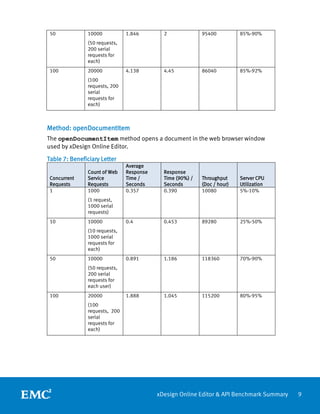
Method: openDocumentItem
The openDocumentItem method opens a document in the web browser window
used by xDesign Online Editor.
Table 7: Beneficiary Letter
                               Average
               Count of Web    Response     Response
 Concurrent    Service         Time /       Time (90%) /   Throughput     Server CPU
 Requests      Requests        Seconds      Seconds        (Doc / hour)   Utilization
 1             1000            0.357        0.390          10080          5%-10%
               (1 request,
               1000 serial
               requests)
 10            10000           0.4          0.453          89280          25%-50%
               (10 requests,
               1000 serial
               requests for
               each)
 50            10000           0.891        1.186          118360         70%-90%
               (50 requests,
               200 serial
               requests for
               each user)
 100           20000           1.888        1.045          115200         80%-95%
               (100
               requests, 200
               serial
               requests for
               each)


                                          xDesign Online Editor & API Benchmark Summary   9
Table 8: Auto Policy
                                 Average
                 Count of Web    Response        Response
 Concurrent      Service         Time /          Time (90%) /    Throughput       Server CPU
 Requests        Requests        Seconds         Seconds         (Doc / hour)     Utilization
 1               1000            0.357           0.390           10080            5%-10%
                 (1 request,
                 1000 serial
                 requests)
 10              10000           0.4             0.453           89280            25%-50%
                 (10 requests,
                 1000 serial
                 requests for
                 each)
 50              10000           0.891           1.186           198360           70%-90%
                 (50 requests,
                 200 loops for
                 each user)
 100             20000           1.888           1.045           115200           80%-95%
                 (100
                 requests, 200
                 serial
                 requests for
                 each)


Testing Environment
Software Configuration

 Application Server              WebSphere 7.0.0.13– 64bit

 JDK                             1.6

                                 Oracle11g on standalone host with Intel(R) Xeon(R) CPU 5130
 Database
                                 @2.00GHz 2.00GHz (2 processors) 4G

 Application                     xPression 4.2 Patch 6


Hardware Configuration

                                 Intel(R) Quad Core E5504 Xeon(R) CPU, 2.0GHz, 4M Cache,
 CPU
                                 4.86 GT/s QPIy
 RAM                             8G


                                              xDesign Online Editor & API Benchmark Summary     10
Parameter Settings
 WebSphere        Transaction Timeout               3600
                                                    Initial Heap Size (Xms 2048)
                                                    Maximum Heap Size (Xmx 2048)
                  Java Virtual Machine
                                                    Generic JVM arguments (-Xgcpolicy:gencon -
                                                    ss1m)
                  ORB service                       pass-by-reference Checked
                  JDBC pool Size                    100-300
                  ORB Thread Pool                   100-200
                  TCPChannel                        100-200
                  WebContainer                      100-300
 xPression        LogConfiguration                  log4j.rootCategory=WARN,ToFile
                  ServiceLogConfiguration           Changed all INFO to ERROR
                  JobBatchLogConfiguration          log4j.rootCategory=WARN, ToFile
                  xPressionPublish.properties       generateTempOutputForReverseOrder=true
                  BatchRunner.bat                   -Xgcpolicy:gencon –Xms2048m –Xmx2048m
                                                    TaskQueue_EnqueueThreshold = 50
                                                    UseInstantiaterEJB = false
                  BatchRunner.properties
                                                    UseAssemblyServiceEJB = true
                                                    DocInfoSystem=off
 Job definition   Thread Pool Size                  4
                  Job log level                     WARN


Conclusion
Organizations that support call center agents and others who need to handle a large
volume of incoming calls face a number of challenges. They require a document
editing solution that offers fast document loading and editing performance.
Companies supporting these solutions require software that allows them to host
large, concurrent user populations in high volume environments, preferably from a
single server in order to keep costs low.
Until now, online editors, despite the attractions of simplicity and ease-of-use, could
not consistently deliver the necessary performance, especially with documents
featuring complex logic. As the results in this report demonstrate, xDesign Online
Editor has overcome these limitations. xDesign Online Editor meets the needs of
users for flexibility and control, and performs reliably under the demands of high
volume, high concurrency production.


                                                xDesign Online Editor & API Benchmark Summary    11

White Paper: xDesign Online Editor & API Performance Benchmark Summary

  • 1.
    White Paper xDESIGN ONLINEEDITOR & API PERFORMANCE BENCHMARK SUMMARY Customer Communications Management Abstract This white paper explains the performance of the xDesign Online Editor and its web services APIs. It provides performance data for editing a document, publishing a document, returning it to the calling application or browser, and displaying it in the user’s queue. September 2012
  • 2.
    Copyright © 2012EMC Corporation. All Rights Reserved. EMC believes the information in this publication is accurate as of its publication date. The information is subject to change without notice. The information in this publication is provided “as is.” EMC Corporation makes no representations or warranties of any kind with respect to the information in this publication, and specifically disclaims implied warranties of merchantability or fitness for a particular purpose. Use, copying, and distribution of any EMC software described in this publication requires an applicable software license. For the most up-to-date listing of EMC product names, see EMC Corporation Trademarks on EMC.com. EMC2, EMC, where information lives, Document Sciences, xPression, xPresso, and Autograph are registered trademarks or trademarks of EMC Corporation in the United States and/or other jurisdictions. All other trademarks used herein are the property of their respective owners. Part Number H5115 xDesign Online Editor & API Benchmark Summary 2
  • 3.
    Table of Contents ExecutiveSummary ................................................................................................. 4 Test Method ............................................................................................................ 4 Document Characteristics................................................................................................... 4 Performance Data .................................................................................................... 5 Method: createDocumentItem ............................................................................................ 5 Table 1: Beneficiary Letter ............................................................................................. 5 Table 2: Auto Policy ...................................................................................................... 6 Method: publishAndReturnDocumentItem.......................................................................... 6 Table 3: Beneficiary Letter .............................................................................................. 6 Table 4: Auto Policy ....................................................................................................... 7 Method: documentItemsAssignedToUser ........................................................................... 8 Table 5: Beneficiary Letter ............................................................................................. 8 Table 6: Auto Policy ....................................................................................................... 8 Method: openDocumentItem .............................................................................................. 9 Table 7: Beneficiary Letter .............................................................................................. 9 Table 8: Auto Policy ..................................................................................................... 10 Testing Environment .............................................................................................. 10 Software Configuration ..................................................................................................... 10 Hardware Configuration .................................................................................................... 10 Parameter Settings ........................................................................................................... 11 Conclusion ............................................................................................................ 11 xDesign Online Editor & API Benchmark Summary 3
  • 4.
    Executive Summary xDesign OnlineEditor enables business users to easily edit correspondence interactively without the need to install and maintain traditional desktop software or plug-ins. With the browser-based WYSIWYG interface, users can edit existing content, add optional content, and protect content from unauthorized changes. The xDesign Online Editor is a full-service editor, with comprehensive style and formatting capabilities, spell check, and form-field support. This report benchmarks the performance of the xDesign Online Editor and its web services APIs. It provides performance data for editing a document, publishing a document, returning it to the calling application or browser, and displaying it in the user’s queue. Test Method The tests conducted simulate a production environment in which users are sending simultaneous web service requests to the xPression server. Test results are shown for 1, 10, 50, and 100 concurrent requests. Testing was performed with Apache JMeter, a graphical desktop application used to load test functional behavior and measure performance. Keep in mind, the number of concurrent users is not the same as the total user population. For example, if you had 1000 users and 10 percent issue requests simultaneously, this would match the test simulating 100 concurrent requests. During a test, to simulate a constant load on the server for the appropriate number of concurrent requests, the completion of one request triggers a new request. The volume of concurrent requests will vary based on the number of users and their use of the system, including how many documents they produce per hour and the number of web services requests that are needed to generate a document. For example, 100 users will produce 1,500 documents per hour if one user can process 15 documents per hour (1 document every 4 minutes). If each document requires one to three web service calls (a reasonable estimate), that activity would create 1,500 to 4,500 web service calls per hour. Document Characteristics The following table describes the documents used for testing. Beneficiary Letter Auto Policy Pages 1 14 Size 178KB 271 KB Size of Single customer data 4KB 10KB Logic Complexity Simple Medium Number of Rules 3 20 xDesign Online Editor & API Benchmark Summary 4
  • 5.
    Beneficiary Letter Auto Policy Text, Variable, Table, Optional Text, Variable, Table, Header Document Characteristic Content Group and Footer, Barcode, TOC Design Tool xDesign xDesign Performance Data For each web service method, two sets of test data are displayed: Beneficiary Letter and Auto Policy document. The column heading “Response Time (90%)” means that 90 percent of the requests were processed at or below the indicated elapsed time. Method: createDocumentItem The createDocumentItem web service method creates a document work item in xPression. A document work item is a version of an assembled document that can be revised before publishing. Table 1: Beneficiary Letter Average Count of Web Response Response Concurrent Service Time / Time (90%) / Throughput Server CPU Requests Requests Seconds Seconds (Doc / hour) Utilization 1 1000 0.325 0.375 11160 10%-15% (1 request, 1000 serial requests) 10 1000 1.391 0.873 22680 60%-80% (10 requests, 100 serial requests for each) 50 2000 2.281 3.214 76680 80%-95% (50 requests, 40 serial requests for each) 100 5000 4.341 6.349 80640 95% (100 requests, 50 serial requests for each) xDesign Online Editor & API Benchmark Summary 5
  • 6.
    Table 2: AutoPolicy Average Count of Web Response Response Concurrent Service Time / Time (90%) / Throughput Server CPU Requests Requests Seconds Seconds (Doc / hour) Utilization 1 1000 0.411 0.468 8640 10%-25% (1 request, 1000 serial requests) 10 1000 1.411 1.005 22320 60%-85% (10 requests, 100 serial requests for each) 50 2000 3.205 4.56 54720 95%-100% (50 requests, 40 serial requests for each) 100 5000 6.872 8.985 51480 95%-100% (100 requests, 50 serial requests for each) Method: publishAndReturnDocumentItem The publishAndReturnDocumentItem method publishes a document work item to an output profile. The output profile determines whether the document is returned or distributed without being returned. Table 3: Beneficiary Letter Average Count of Web Response Response Concurrent Service Time / Time (90%) / Throughput Server CPU Requests Requests Seconds Seconds (Doc / hour) Utilization 1 1000 0.411 0.437 8640 10%-20% (1 request, 1000 serial requests each) 10 10000 0.589 0.702 60840 70%-80% (10 requests, 1000 serial requests for each) xDesign Online Editor & API Benchmark Summary 6
  • 7.
    50 10000 2.137 3.182 82440 85%-95% (50 requestors, 200 serial requests for each) 100 20000 4.656 7.254 76320 90%-95% (100 requests, 200 serial requests for each) Table 4: Auto Policy Average Number of Response Response Concurrent Web Service Time / Time (90%) / Throughput Server CPU Requests Requests Seconds Seconds (Doc / hour) Utilization 1 1000 0.618 0.635 5760 10%-25% (1 request, 1000 serial requests) 10 10000 0.93 1.135 38520 85%-95% (10 requests, 1000 serial requests for each) 50 10000 5.014 7.71 35280 90%-98% (50 requests, 200 serial requests for each) 100 20000 10.972 16.545 32400 95%-98% (100 requests, 200 serial requests for each) xDesign Online Editor & API Benchmark Summary 7
  • 8.
    Method: documentItemsAssignedToUser The documentItemsAssignedToUsermethod (100 items for each request) returns a list of document item IDs for document items assigned to a user. It can return information about these document items through a subsequent web service call, which uses the document item IDs as input into the documentItemInfo method. Table 5: Beneficiary Letter Average Count of Web Response Response Concurrent Service Time / Time (90%) / Throughput Server CPU Requests Requests Seconds Seconds (Doc / hour) Utilization 1 1000 0.628 0.64 5760 5%-10% (1 request, 1000 serial requests for each user) 10 10000 0.882 0.936 40680 35%-45% (10 requests, 1000 serial requests for each) 50 10000 1.963 2.137 89280 85%-90% (50 requests, 200 serial requests for each) 100 20000 4.321 4.696 82800 85%-92% (100 requests, 200 serial requests for each) Table 6: Auto Policy Average Count of Web Response Response Concurrent Service Time / Time (90%) / Throughput Server CPU Requests Requests Seconds Seconds (Doc / hour) Utilization 1 1000 0.608 0.625 5760 5%-10% (1 request, 1000 serial requests) 10 10000 0.893 0.935 39960 35%-45% (10 requests, 1000 serial requests for each) xDesign Online Editor & API Benchmark Summary 8
  • 9.
    50 10000 1.846 2 95400 85%-90% (50 requests, 200 serial requests for each) 100 20000 4.138 4.45 86040 85%-92% (100 requests, 200 serial requests for each) Method: openDocumentItem The openDocumentItem method opens a document in the web browser window used by xDesign Online Editor. Table 7: Beneficiary Letter Average Count of Web Response Response Concurrent Service Time / Time (90%) / Throughput Server CPU Requests Requests Seconds Seconds (Doc / hour) Utilization 1 1000 0.357 0.390 10080 5%-10% (1 request, 1000 serial requests) 10 10000 0.4 0.453 89280 25%-50% (10 requests, 1000 serial requests for each) 50 10000 0.891 1.186 118360 70%-90% (50 requests, 200 serial requests for each user) 100 20000 1.888 1.045 115200 80%-95% (100 requests, 200 serial requests for each) xDesign Online Editor & API Benchmark Summary 9
  • 10.
    Table 8: AutoPolicy Average Count of Web Response Response Concurrent Service Time / Time (90%) / Throughput Server CPU Requests Requests Seconds Seconds (Doc / hour) Utilization 1 1000 0.357 0.390 10080 5%-10% (1 request, 1000 serial requests) 10 10000 0.4 0.453 89280 25%-50% (10 requests, 1000 serial requests for each) 50 10000 0.891 1.186 198360 70%-90% (50 requests, 200 loops for each user) 100 20000 1.888 1.045 115200 80%-95% (100 requests, 200 serial requests for each) Testing Environment Software Configuration Application Server WebSphere 7.0.0.13– 64bit JDK 1.6 Oracle11g on standalone host with Intel(R) Xeon(R) CPU 5130 Database @2.00GHz 2.00GHz (2 processors) 4G Application xPression 4.2 Patch 6 Hardware Configuration Intel(R) Quad Core E5504 Xeon(R) CPU, 2.0GHz, 4M Cache, CPU 4.86 GT/s QPIy RAM 8G xDesign Online Editor & API Benchmark Summary 10
  • 11.
    Parameter Settings WebSphere Transaction Timeout 3600 Initial Heap Size (Xms 2048) Maximum Heap Size (Xmx 2048) Java Virtual Machine Generic JVM arguments (-Xgcpolicy:gencon - ss1m) ORB service pass-by-reference Checked JDBC pool Size 100-300 ORB Thread Pool 100-200 TCPChannel 100-200 WebContainer 100-300 xPression LogConfiguration log4j.rootCategory=WARN,ToFile ServiceLogConfiguration Changed all INFO to ERROR JobBatchLogConfiguration log4j.rootCategory=WARN, ToFile xPressionPublish.properties generateTempOutputForReverseOrder=true BatchRunner.bat -Xgcpolicy:gencon –Xms2048m –Xmx2048m TaskQueue_EnqueueThreshold = 50 UseInstantiaterEJB = false BatchRunner.properties UseAssemblyServiceEJB = true DocInfoSystem=off Job definition Thread Pool Size 4 Job log level WARN Conclusion Organizations that support call center agents and others who need to handle a large volume of incoming calls face a number of challenges. They require a document editing solution that offers fast document loading and editing performance. Companies supporting these solutions require software that allows them to host large, concurrent user populations in high volume environments, preferably from a single server in order to keep costs low. Until now, online editors, despite the attractions of simplicity and ease-of-use, could not consistently deliver the necessary performance, especially with documents featuring complex logic. As the results in this report demonstrate, xDesign Online Editor has overcome these limitations. xDesign Online Editor meets the needs of users for flexibility and control, and performs reliably under the demands of high volume, high concurrency production. xDesign Online Editor & API Benchmark Summary 11