TABLE OF CONTENTS
INTRODUCTION
Why Should I Read the Definitive Guide to Mobile Marketing?
PART I: WHAT IS MOBILE MARKETING
AND WHY IS IT IMPORTANT?
Defining Mobile Marketing
Why Mobile Marketing Is Important
Who Uses Mobile Marketing?
How Has Mobile Marketing Evolved?
Thought Leader Round Table
PART II: CREATING YOUR CROSS-CHANNEL
MOBILE MARKETING STRATEGY
Strategic Thinking
Consider Your Audience
Define Your Goals
Develop Your KPIs
Mobile Marketing as Part of Your Cross-Channel Marketing Strategy
Thought Leader Round Table
PART III: RESPONSIVE DESIGN
Why Responsive Design?
Responsive Web Design
Responsive Email Design
Responsive Landing Pages
03
04
05
06
07
11
14
18
23
24
25
28
30
31
36
42
43
47
56
61
Mobile Landing Page Design
PART IV: MARKETING VIA SMS AND MMS
Defining SMS and MMS
SMS Messaging
MMS Messaging
Opt-in Best Practices
PART V: MOBILE APPS
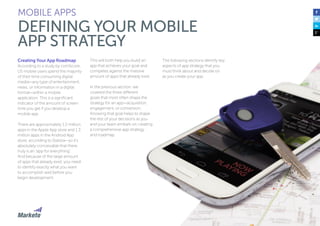
Defining Your Mobile App Strategy
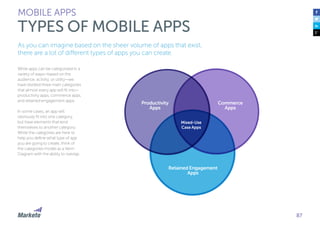
Types of Mobile Apps
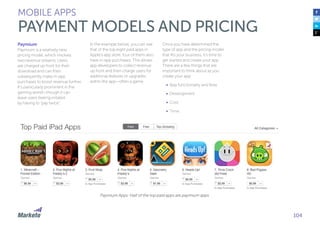
Payment Models and Pricing
App Design
App Development
App Promotion
In-App Engagement
Thought Leader Round Table
PART VI: TESTING, MEASUREMENT, AND OPTIMIZATION
Test & Optimize
Mobile Metrics and ROI
Thought Leader Round Table
CONCLUSION
ABOUT THIS GUIDE
68
68
69
71
75
79
81
82
87
97
105
114
120
125
134
136
137
143
150
154
155
INTRODUCTION
Since the introduction of the iPhone in 2007, smart phones, tablets, and mobile devices
have permeated all aspects of our lives. These devices allow for communication,
commerce, and interaction on a level never previously seen. This creates tremendous
opportunities for marketers.
At the same time, marketing is
undergoing a profound change as
mass media is becoming
increasingly fragmented into highly
personalized content delivered
directly to individuals.
For marketers, the process of
communicating with customers is
evolving at break-neck speeds.
New devices, methods of tracking,
dynamic content, and multiple
points of content consumption
provide more opportunities than
ever. But these new capabilities can
create confusion; and when poorly
executed, they can lead to low
customer engagement.
The goal of our Definitive Guide to
Mobile Marketing is to provide a
thorough overview of the mobile
ecosystem and a framework for
engaging your customers on a
more personal level. As customers
continue to shift their attention
(and dollars) to mobile, successful
marketers need to view mobile as
a critical component of the overall
customer experience.
INTRODUCTION
WHY SHOULD I READ THE DEFINITIVE
GUIDE TO MOBILE MARKETING
Although this guide is designed for
marketers, we created it with the
intention that it can be shared
broadly across your organization.
Successful marketers use mobile
in conjunction with existing
channels (web, email, social) to
drive meaningful engagement
with customers and prospects.
This guide explains:
•	 What is mobile marketing?
•	 How to create a mobile
marketing strategy
•	 How to use SMS/MMS
messaging
•	 The benefits of using
responsive design
•	 Everything you need to know
about apps
•	 How to measure and optimize
your mobile strategy
4
PART I:
WHAT IS MOBILE MARKETING
AND WHY IS IT IMPORTANT?
6
Mobile marketing is marketing that targets users via mobile devices. It leverages mobile devices to
communicate and engage with consumers at any point in the customer lifecycle and
it drives brand-value and demand for your products or services.
The possibilities for marketers
have evolved tremendously since
mobile debuted on the marketing
scene. Today, you can reach
your customers on mobile
devices through SMS, email,
websites, mobile apps, and
mobile notifications.
Because of the rapid introduction
of mobile marketing capabilities, it
will continue to evolve, creating
even more pathways into a mobile
device. Mobile marketing is the
process, science, and art of
reaching people via these
pathways in order to drive your
business forward.
Marketers may feel like we’ve
come a long way with mobile
marketing, but we’re still in the
early stages. With mobile
continuing to gain momentum, it
is more vital than ever before to
make mobile an integral part of
the marketing mix.
Mobile marketing does not mean
just one thing, it offers the ability
to communicate and listen to
consumers via a mobile device
in a variety of ways—you can
send SMS/MMS messages to
your customers, create
mobile-responsive websites
and emails, develop apps to
engage your customer base,
and more.
WHAT IS MOBILE MARKETING AND WHY IS IT IMPORTANT?
DEFINING MOBILE MARKETING
Plus, with new advancements in
mobile and marketing automation,
you can now collect mobile-specific
insights, which helps you engage
your users across channels.
7
Mobile marketing unlocks powerful opportunities for marketers on a scale never before seen.
Unlike any other engagement and communication channel, mobile allows marketers to reach
larger audiences in a way that is real-time and personal.
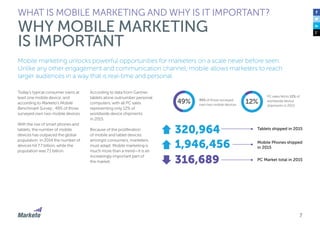
Today’s typical consumer owns at
least one mobile device, and
according to Marketo’s Mobile
Benchmark Survey , 49% of those
surveyed own two mobile devices.
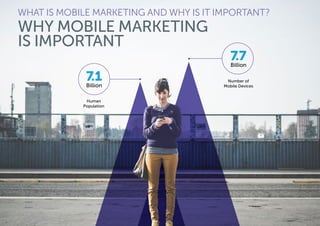
With the rise of smart phones and
tablets, the number of mobile
devices has outpaced the global
population. In 2014 the number of
devices hit 7.7 billion, while the
population was 7.1 billion.
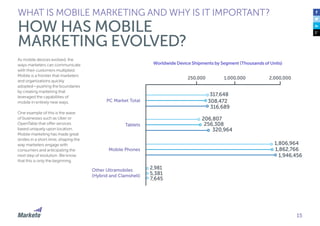
According to data from Gartner,
tablets alone outnumber personal
computers, with all PC sales
representing only 12% of
worldwide device shipments
in 2015.
Because of the proliferation
of mobile and tablet devices
amongst consumers, marketers
must adapt. Mobile marketing is
much more than a trend—it is an
increasingly important part of
the market.
WHAT IS MOBILE MARKETING AND WHY IS IT IMPORTANT?
WHY MOBILE MARKETING
IS IMPORTANT
12%
PC sales fell to 12% of
worldwide device
shipments in 2015
49% 49% of those surveyed
own two mobile devices
320,964
1,946,456
316,689
Tablets shipped in 2015
PC Market total in 2015
Mobile Phones shipped
in 2015
WHAT IS MOBILE MARKETING AND WHY IS IT IMPORTANT?
WHY MOBILE MARKETING
IS IMPORTANT
7.1Billion
Number of
Mobile Devices
Human
Population
7.7Billion
9
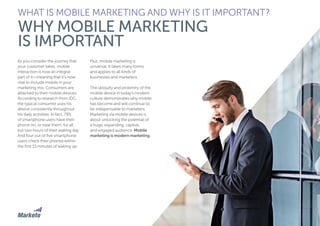
As you consider the journey that
your customer takes, mobile
interaction is now an integral
part of it—meaning that it’s now
vital to include mobile in your
marketing mix. Consumers are
attached to their mobile devices.
According to research from IDC,
the typical consumer uses his
device consistently throughout
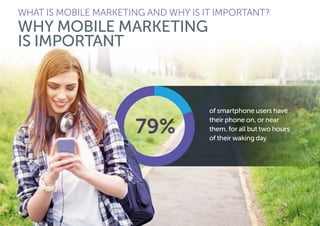
his daily activities. In fact, 79%
of smartphone users have their
phone on, or near them, for all
but two hours of their waking day.
And four out of five smartphone
users check their phones within
the first 15 minutes of waking up.
Plus, mobile marketing is
universal. It takes many forms
and applies to all kinds of
businesses and marketers.
The ubiquity and proximity of the
mobile device in today’s modern
culture demonstrates why mobile
has become and will continue to
be indispensable to marketers.
Marketing via mobile devices is
about unlocking the potential of
a huge, expanding, captive,
and engaged audience. Mobile
marketing is modern marketing.
WHAT IS MOBILE MARKETING AND WHY IS IT IMPORTANT?
WHY MOBILE MARKETING
IS IMPORTANT
WHAT IS MOBILE MARKETING AND WHY IS IT IMPORTANT?
WHY MOBILE MARKETING
IS IMPORTANT
of smartphone users have
their phone on, or near
them, for all but two hours
of their waking day
11
It is clear that mobile marketing is a critical part of a holistic marketing mix for many
organizations. But what types of businesses can benefit from mobile, and how are
they using it today, and in the future?
Mobile is now one of the most
powerful ways to reach people,
regardless of business type. If
you want to reach your target
audiences in a personal and
relevant way, you should think
about how you can engage with
them on their mobile devices.
Business Types
Because of the diversity of
audiences and the variety of use
cases (both consumer and
business) mobile devices serve,
mobile marketing can work for
most types of organizations. Just
look at the overwhelming amount
of mobile communication and
apps that exist today, and you
will see there truly is something
for everyone.
The application of mobile
marketing can certainly differ
based on the type of audience you
try to engage with and the activity
goals you have for them. For
example, according to a 2015
study conducted by the Content
Marketing Institute and Marketing
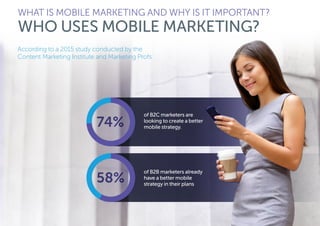
Profs, 74% of B2C marketers are
looking to create a better mobile
strategy, while 58% of B2B
marketers already have it in their
plans. There is no question that
B2C marketers lead the way in
leveraging mobile, but with nearly
60% of B2B marketers diving into
mobile marketing, and those
numbers growing quickly, it
clearly offers an opportunity
for marketers of all types. Let’s
dig into this further.
WHAT IS MOBILE MARKETING AND WHY IS IT IMPORTANT?
WHO USES MOBILE MARKETING?
WHAT IS MOBILE MARKETING AND WHY IS IT IMPORTANT?
WHO USES MOBILE MARKETING?
According to a 2015 study conducted by the
Content Marketing Institute and Marketing Profs:
of B2C marketers are
looking to create a better
mobile strategy.
of B2B marketers already
have a better mobile
strategy in their plans
13
Business-to-Consumers (B2C)
Marketers trying to reach
consumers can communicate
through mobile devices in
a wide range of modalities.
The advancements and explosion
of mobile technology allows
consumer marketers more insight
and flexibility to personalize
their customers’ experiences.
As further proof that mobile is
expanding for B2C, YouTube CEO
Susan Wojcicki confirmed at a
conference in California, that half
of all YouTube traffic comes from
smartphones and tablets. Wojcicki
even told the audience: “Mobile is
super important. I think it’s
important for every business
right now”.
In small—and medium—sized
businesses (SMBs), we’ve seen
consumer brands use mobile
technology in some really creative
ways—from higher education,
to consumer packaged goods,
and beyond.
Even enterprise B2C companies,
which have traditionally been
more wary to adopt “trend”
marketing, have started to
integrate mobile and expand
their overall presence in
their organizations.
According to CompTIA’s 2014
annual Trends in Enterprise
Mobility study, more than 70%
of organizations have made some
level of investment to build out
mobility solutions.
WHAT IS MOBILE MARKETING AND WHY IS IT IMPORTANT?
WHO USES MOBILE MARKETING?
Business-to-Business (B2B)
Whether you are an SMB or an
enterprise organization, if you are
a B2B marketer, it’s important to
consider that although you sell to
businesses, the people making
those purchase decisions are still
people, and they rely on their
mobile devices just as much as
any other consumer. As a result,
it’s important you look at how
you currently engage with your
customers and see how you
can optimize their experience
by incorporating mobile
marketing activities.
For enterprise organizations
specifically, not only have they
started incorporating the use
of different apps inside their
organization, but they also
have started to develop apps
to support their customers.
According to data from the Vision
Mobile State of the Developer
Nation 2015 Report, enterprise
apps break down into five main
categories:
1.	Product extensions
2.	Business and productivity
3.	Utilities
4.	Communication and
social networking
5.	Education and reference
14
From its inception, using the introduction of the iPhone in 2007 as the starting point for the mobile
revolution, mobile has caught fire. From smartphones to tablets—people have an almost insatiable
capacity to adopt mobile technology into their lives and welcome mobile marketing.
Just think about how quickly
mobile has progressed over time.
Remember your first cell phone?
It doesn’t seem that long ago that
you were playing snake and
sending rudimentary text
messages to friends. In just
a short amount of time,
mobile has evolved to be a
central mode of communication
for consumers. Being tied to
a mobile device is now the
norm and not the exception.
The Rapid Evolution of Mobile
Mobile has experienced a rapid
adoption and transformation. In
the previous section we saw how
quickly mobile devices flourished
in the short time since their
creation. Not only have the
devices themselves and our
adoption of them evolved, but
the capabilities have also
advanced rapidly.
We may joke about the early days
of playing snake on our phones,
but the game was introduced on
all Nokia phones in 1998—less
than 20 years ago. In that time,
the standard mobile phone’s
capabilities have expanded to
replace almost every other
peripheral device—from maps, to
calendars, to desktop computers.
WHAT IS MOBILE MARKETING AND WHY IS IT IMPORTANT?
HOW HAS MOBILE
MARKETING EVOLVED?
In 2001 with the launch of the
Blackberry by Research In Motion,
the ability to text and use email
on a mobile phone became
ubiquitous and changed the way
consumers perceived their mobile
devices—consumers became
increasingly reliant upon them.
The launch of the iPhone in 2007
changed the way we did all kinds
of activities, but even that launch
did not introduce apps, which
debuted with the introduction of
the App Store in 2008. The launch
of the app store introduced a new
channel to marketers to
communicate with consumers,
expanding again in 2009 with
the launch of the Push
Notification Service.
That service allowed marketers
to take advantage of new ways
to communicate with users.
Then, Apple launched the first
iPad in 2010, again increasing
the variety of ways consumers
access information and engage
with brands.
15
As mobile devices evolved, the
ways marketers can communicate
with their customers multiplied.
Mobile is a frontier that marketers
and organizations quickly
adopted—pushing the boundaries
by creating marketing that
leveraged the capabilities of
mobile in entirely new ways.
One example of this is the wave
of businesses such as Uber or
OpenTable that offer services
based uniquely upon location.
Mobile marketing has made great
strides in a short time, shaping the
way marketers engage with
consumers and anticipating the
next step of evolution. We know
that this is only the beginning.
WHAT IS MOBILE MARKETING AND WHY IS IT IMPORTANT?
HOW HAS MOBILE
MARKETING EVOLVED?
nt (Thousands of Units)
2,981
5,381
7,645
PC Market Total
Mobile Phones
Other Ultramobiles
(Hybrid and Clamshell)
Tablets
2,000,0001,000,000250,000
317,648
308,472
316,689
206,807
256,308
320,964
1,806,964
1,862,766
1,946,456
Worldwide Device Shipments by Segment (Thousands of Units)
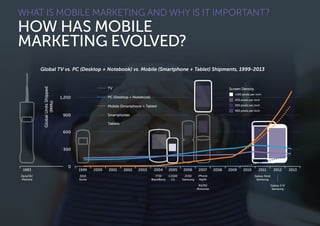
19991983
GlobalUnitsShipped
(MMs)
0
2000 2001 2002 2003 2004 2005 2006 2007 2008 2009 2010 2011 2012 2013
Global TV vs. PC (Desktop + Notebook) vs. Mobile (Smartphone + Tablet) Shipments, 1999-2013
3210
Nokia
DynaTAC
Motorla
7730
BlackBerry
C2500
LG
ZV50
Samsung
Galaxy Note
Samsung
Galaxy S III
Samsung
RAZR2
Motorola
iPhone
Apple
1,200
900
600
300
TV
PC (Desktop + Notebook)
Mobile (Smartphone + Tablet)
Smartphones
Tablets
Screen Density
<100 pixels per inch
200 pixels per inch
300 pixels per inch
400 pixels per inch
WHAT IS MOBILE MARKETING AND WHY IS IT IMPORTANT?
HOW HAS MOBILE
MARKETING EVOLVED?
17
The Future of Mobile Marketing
Looking forward, we see mobile
marketing will not be mobile
marketing; instead, it will be simply
marketing. As we think about how
marketers have adapted over
time—from mass marketing,
to digital, to personalized
messaging—in this new era,
engagement marketing is about
creating relationships with your
customers by delivering relevant,
personal content.
The future of mobile marketing
will help marketers accomplish
this. While marketers today think
the rise of mobile has been
meteoric, in truth, we haven’t even
seen the tip of the iceberg yet.
Mobile will become increasingly
pervasive over time, especially as
we consider the rise of the Internet
of Things (IoT)—physical objects
embedded with sensors and
connectivity. Mobile connected
devices that integrate seamlessly
with each other offer valuable
information to marketers.
WHAT IS MOBILE MARKETING AND WHY IS IT IMPORTANT?
HOW HAS MOBILE
MARKETING EVOLVED?
Predicting how swiftly mobile will
change is a bit like fortune-telling;
we know mobile leads the way
today, and it will only become
more central to customers’ lives
and our marketing as time
marches forward. Marketers will
need to pay careful attention to
incorporate advancements into
their marketing, or they will be left
behind. Mobile will drive the
seamless continuation of your
customers’ journeys, so it’s
important to lay the foundation
for success now.
Nancy Hua, CEO, Apptimize
As a consumer, it would be
great to have more marketers
understand the entire mobile
customer journey and create
great, targeted experiences
from start to finish.
I’d love to see ads with higher
relevancy that land in great
mobile experiences. Right now,
most of the ads I see are not for
me and when I do click on an ad,
the landing experience is often
disjointed or confusing so I
don’t end up engaging anyway.
As a marketer, we know that
measurement has really come a
long way. There are so many
great tools for maximizing ROI.
However, the problem with some
of the existing approaches is it
only tracks the ad click to an app
download. In the case of mobile
advertising landing in mobile web
experiences, the tracking is
much better, but it’s still pretty
unsophisticated on native mobile
right now.
I can see if the clicked ad leads to
a download, but I have no idea if
that user ended up engaging with
the app and ultimately became a
valuable user or not.
Marketers are still spending
millions of dollars on high ROI
activities that might actually be
really low ROI. Marketers and
tools need to collaborate and
work hand-in-hand with mobile
product optimization to get the
most value out of every ad click
and download.
As a Consumer and a Marketer, What Do You See As The Future of Mobile Marketing?
THOUGHT LEADER ROUND TABLE
Niko Nelissen, CEO
TapTarget
As a consumer I expect mobile
apps to behave like a Swiss army
knife, providing me with useful
information, guidance and even
tools, based on my current
context. Apps support me
throughout my customer journey,
as I plan the purchase of a new
product, during my visit to a shop
and after my purchase when I
require service or want to be
rewarded as a loyal customer.
For example look at the Carrefour
app, it allows me to create a
personal shopping list. When I run
out of coffee— which is a bit of a
disaster to me—I can quickly add
coffee to my list or even scan the
empty packaging with the app.
The app recognizes the barcode
and adds coffee to my shopping
list. Then when I’m at the
supermarket, I can use the app
for “self-scanning”, so I don’t
have to get in line at the cashier.
Additionally, the app shows all my
coupons and I’m able to check
my loyalty points and redeem
them for a gift.
As a marketer, I believe that
context-aware apps will allow
us to interact with the “always-
connected consumer”
throughout their daily lives.
Apps provide us with a unique
opportunity to capture user
interests and their context. What’s
more important, the app is also a
communication channel to close
the loop.
As a Consumer and a Marketer, What Do You See As The Future of Mobile Marketing?
THOUGHT LEADER ROUND TABLE
Let’s look at an example from the
automotive world: car brand apps
are very popular among people
looking to buy a new car. As
people compare various models,
the app captures the user interest
for each model, and allows us to
apply lead scoring. Next, we can
use location targeting to invite
each person into a nearby dealer
showroom. Based on the user
profile, the invitation can be
personalized, and sent at the right
place and time: “Hi Annie, you’re
welcome for a test drive of the Kia
Sorento, 5 minutes from here,
we’re open until 6PM !”.
19
Jeff Hasen, President and
Founder, Gotta Mobilize
As mobile users become
more savvy, we will see larger
numbers of consumers opting
in to interact with brands. These
interactions have started to
become increasingly personal,
with some consumers offering
real-time, personal information,
like their location, in exchange
for perceived value.
Will this happen across the
board? Certainly not. There are
no absolutes in mobile. For
example, in mobile banking and
payments we still see consumers
using ATMs to deposit checks
because they are uncomfortable
or misunderstand how to use
their mobile phones. Some
consumers still want the human
touch, so we have to be prepared
for all scenarios.
And then, as a marketer, I’m
excited every day by the future of
mobile marketing. It’s one more
opportunity to engage with
consumers that want to have a
conversation with my brand.
As a Consumer and a Marketer, What Do You See As The Future of Mobile Marketing?
THOUGHT LEADER ROUND TABLE
Helen Keegan, Founder,
Heroes of Mobile 
I am looking forward to seeing
something new and would love
the industry to get beyond the
banner ad. There are some very
big brains working in the sector
and most seem to be focused on
getting the last drop of value out
of the banner ad in all its forms,
rather than taking the opportunity
to reinvent advertising. We know
the banner ad is limited in its
response rates so marketers really
should be thinking of smarter
ways to connect with customers
—especially when the real estate
on a mobile device is so small.
I’d also like to see marketers
remembering the basics.
Marketing is as much about
good service as it is about
push messaging. And mobile
marketing is a great way to offer
good customer service—saying
thank you to customers, sending
reminders about repeat orders,
confirming delivery times and
locations by SMS may not be
sexy, new, or exciting, but it’s
still incredibly useful and often
forgotten in favor of more
complex applications.
As a Consumer and a Marketer, What Do You See As The Future of Mobile Marketing?
THOUGHT LEADER ROUND TABLE
Mike Reynolds, Senior Mobile
Executive, International
Advertising Bureau
For me, the future of mobile
marketing lies in connecting the
dots between online and offline
media. Mobile is such a powerful
tool when used in conjunction
with other, more traditional,
media and should be seen as
the glue that binds everything
together. As we head into the era
of The Internet of Things (IoT)
mobile’s role in connecting
everything together becomes
even more important. What I
think we’ll see over the next few
years is brands absorbing IoT
technology into their products
and using mobile as the remote
control to make these products
come to life.
As a Consumer and a Marketer, What Do You See As The Future of Mobile Marketing?
THOUGHT LEADER ROUND TABLE
PART II:
CREATING YOUR CROSS-CHANNEL
MOBILE MARKETING STRATEGY
24
You don’t want to jump into creating a mobile marketing strategy blindly.
Before you engage in any mobile activities, you need a plan and goals.
Not every mobile activity makes
sense for your business, so it is
critical to sit down and map out
your plan of attack. You need to
include stakeholders in your
strategic mobile discussions—
as mobile participation impacts
the whole organization. Due to
some of the technical aspects
of mobile development, the
marketing team alone can’t entirely
own this function. Implementing
a mobile marketing strategy
requires collaboration across
the organization.
In your strategy planning
sessions, consider including
the following teams:
•	 Marketing
•	 Sales
•	 IT/Engineering
•	 Customer service
•	 Finance
•	 Product
CREATING YOUR CROSS-CHANNEL
MOBILE MARKETING STRATEGY
STRATEGIC THINKING
Together, determine your overall
goals and strategy for mobile.
The following part provides more
detail on what to consider as
you delve into mobile marketing.
25
To create your mobile strategy, first consider your audience. The make-up of your customers helps
determine which mobile marketing activities and channels to use. What makes sense for one
customer may not make sense for another, so keep this in mind as you plan.
For instance, although your
persona for a 34 year old female
who shops three times a week
exclusively on mobile applications
may be a great fit for in-app
promotions, your persona for a
54 year old male who has only
downloaded five apps on his
phone may be a better fit for
push notifications.
It’s important to keep these
nuances in mind as you determine
the best way to reach and engage
with your audience.
Creating Your
Customer Personas
The first step to determining
which mobile strategy makes
sense for your audience is to
create customer personas.
Personas should be developed
for different types of customers,
including your ideal customer—
though most brands will have
more than one. Personas are
developed based on customer
demographics and behavior, along
with your own understanding of
their motivations and challenges.
Your personas should be
developed with all of your
marketing activities in mind, but
there are questions you can ask
to determine mobile preferences.
CREATING YOUR CROSS-CHANNEL
MOBILE MARKETING STRATEGY
CONSIDER YOUR AUDIENCE
When it comes to mobile, buyer
personas help you:
•	 Determine which mobile
touch-points make sense
for which personas
•	 Decide what kind(s) of
content you need to create
•	 Set the tone, style, and
delivery strategies for
your mobile messages
•	 Understand where your
buyers get their information
and how they want
to consume it on a
mobile platform
Conducting Interviews
and Research
To create your personas, you
should conduct interviews with
customers, customer service
teams, and members of your sales
team (if you have a one). You can
also conduct consumer research
through third-party firms.
Focus on the following topics:
•	 Background: Basic details
about your ideal customer—
including age, gender,
location, and so on.
•	 Main Sources of Information:
How does your customer
consume information?
Where does she go?
•	 Main Platforms for Gathering
Information: Does one
persona get information from
her phone, while another
gets information from a
tablet or laptop?
CREATING YOUR CROSS-CHANNEL
MOBILE MARKETING STRATEGY
CONSIDER YOUR AUDIENCE
•	 Hobbies and Aspirations:
What does your persona like
to do for fun, and what are her
goals and aspirations?
•	 Preferred Products and
Stores: What type of products
has your customer purchased
in the past, and from where?
•	 App Usage: What applications
does your customer currently
have on his phone? How are
they used?
•	 Marketing Message: Write a
sample marketing message
for your persona(s)—this
will help craft your website,
applications, advertisements,
and emails.
27
Understand the
Customer Lifecycle
Now that you’ve identified
your personas, you need to
create a representation of their
customer lifecycle. This includes
understanding the stages each
persona moves through during
the time they’re engaged with
your brand.
Mapping this process allows
you to:
•	 Understand the progression
your customers go through
when engaging with your
product or service
•	 Develop a mobile strategy that
speaks directly to customers,
regardless of where they are in
their lifecycle
Your personas may have various
stages in their journey, but here is
an example of what each stage
might look like:
•	 Passive Awareness: Your buyer
is aware of your company and
product and may engage with
your content, but in a passive,
non-active way. As an
example, say you are an
automobile manufacturer—
a buyer in this stage is aware
of who you are, but has
not formally reached out
and engaged.
•	 Active Research: Your buyer
is getting ready to purchase
a product that is similar
to yours and is actively
researching options. Using
our example, a buyer in this
stage has decided that she is
ready to purchase a car and is
researching available products.
CREATING YOUR CROSS-CHANNEL
MOBILE MARKETING STRATEGY
CONSIDER YOUR AUDIENCE
•	 Trigger to Buy: Your buyer has
decided she is ready to make
a purchase. For our car buyer,
she is ready to make a
purchase from your company.
•	 Feedback: You have a new
customer! But now you have
to make sure you build a
two-way dialogue with
her so she becomes a
repeat customer.
•	 Existing Customers: Once
your buyer has purchased your
car, you want to ensure you
maintain a relationship with her
to develop brand allegiance.
•	 Advocates: After engaging
with your customer over time,
you can develop advocacy and
loyalty with your customer.
28
Once you determine your personas and map out their journeys, next you must define your goals.
Creating a mobile strategy should be part of your overall company initiatives, so your mobile goals
should relate to the business’ success.
Set the Stage
The key to designing an effective
mobile strategy is to first determine
what you are doing now for mobile
engagement (if anything), and then
ask yourself some important
questions to determine your future
goals for mobile. By asking the
right questions, you can start to
map out your plan.
Invite key stakeholders into the
room for the initial discovery
process. Work with the teams
listed earlier in this part to answer
the following:
1.	What are you currently doing
for mobile?
This question enables you to
define your baseline. Some
companies may already be
conducting a variety of
mobile marketing activities,
while others may not have
any mobile activity (yet).
CREATING YOUR CROSS-CHANNEL
MOBILE MARKETING STRATEGY
DEFINE YOUR GOALS
Ask yourself:
•	 Are you currently using
responsive design in your
outbound emails?
•	 Have you designed your
website to engage mobile
visitors?
•	 Do you currently have a
mobile app? Is it optimized
for search in the app store?
•	 Are you currently using
push or multi-media
notifications?
•	 Is adding mobile marketing
a large part of future
company initiatives?
2.	If you are conducting any
of these mobile marketing
initiatives today, how well
are you performing?
If you answered “yes” to
any of the questions
above, now is the time to
evaluate how well you are
doing. How are you
measuring success? What
are the areas that need
improvement? Be sure
to evaluate your current
processes and strategies
before moving forward.
29
CREATING YOUR CROSS-CHANNEL
MOBILE MARKETING STRATEGY
DEFINE YOUR GOALS
3.	What are your main
objectives for including
mobile marketing as
part of your overall
marketing strategy?
Why has your company
started to think about mobile
and how do you think it will
help you with your overall
business objectives?
Consider why you think
mobile is a critical initiative
for your organization.
•	 Is brand building a
key objective?
•	 Is gaining new customers
a key objective?
•	 Is relationship building
with current customers
a key objective?
4.	Who are the key audiences
you want to target with
mobile marketing?
You may have one or
multiple personas that you
would like to target with
your mobile marketing.
How different is each
persona in terms of
demographics? To what
extent will each persona
need different messaging
and mobile tactics?
5.	How are you engaging
your mobile audience
cross-channel?
As we mentioned, mobile
should be a holistic part of
your entire marketing strategy.
Ask yourself:
•	 What channels are you
using to engage your
audience today?
•	 How are you including
mobile into that mix?
•	 Are you able to actively
listen on each channel
and respond on
another channel?
30
Once you have a good baseline regarding what you are doing now and why you want to engage
in mobile marketing, you need to set your KPIs (key performance indicators) for success.
While there are a wide range of
possible KPIs for mobile, according
to Kony, a mobile application
development firm, you might
consider the following:
Customer Engagement
One of the key reasons to embark
on a mobile strategy is to engage
your current customers. Your
customers already spend a large
amount of time on mobile, so you
want to make sure your mobile
presence is front and center. If
done correctly, you can create
relationships with your customers
at any time, wherever they are.
How is this measured?
•	 Number of app downloads
•	 Frequency of mobile activity
•	 Duration of mobile activity
•	 Participation in mobile
loyalty programs
•	 Customer satisfaction scores
•	 Number of customers
accessing your emails on
a mobile device
•	 Number of customers
engaging with your website
from a mobile device
•	 Engagement with unique URLs
from SMS/MMS campaigns
•	 Opt-ins for mobile-specific
communications
CREATING YOUR CROSS-CHANNEL
MOBILE MARKETING STRATEGY
DEVELOP YOUR KPIS
Contacts, User, and
Sales Acquisition
Gaining new customers is also
likely an important KPI for your
mobile marketing strategy. By
creating an engaging mobile
strategy, you can attract new
users who convert to customers.
How is this measured?
•	 Total number of mobile users
•	 Contacts and new customers
attributed to mobile
•	 Spend per new mobile
customer
•	 Mobile conversion rates
•	 Closed sales connected to
engaged mobile contacts
•	 Customer lifetime value
of mobile users
•	 In-app purchases
Service Quality
Through your mobile app,
you can create a personalized
relationship with your customers
over time. The 24/7 nature of
mobile apps lets you become
closer with your customers, plus,
you can provide quick access to
information in your app that can
help answer customers’
questions without a call
to customer service.
How is this measured?
•	 Improvement in the quality
of service
•	 Lower rate of non-mobile
and in-person interactions
•	 Customer retention rates
•	 Customer referral rates
31
When creating your mobile marketing strategy, do not think about mobile
in isolation. Consider how it fits with your other marketing initiatives.
Mobile marketing can never exist
in a vacuum. You need to look
at your entire marketing calendar
to determine what other
communications your customers
receive and from where. Examples
of this include sending out emails,
engaging with customers on social
channels, and implementing other
cross-channel communications.
You also need to listen to your
customers to determine what
channels they interact with, and
then create your communication
plan based off those actions
How do these interactions work
in harmony? You want to deliver
coordinated, relevant, customer
experiences across all of the
channels your buyers use.
CREATING YOUR CROSS-CHANNEL
MOBILE MARKETING STRATEGY
MOBILE MARKETING AS PART
OF YOUR CROSS-CHANNEL
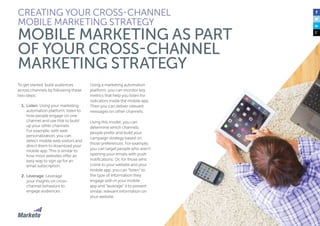
MARKETING STRATEGY
32
To get started, build audiences
across channels by following these
two steps:
1.	Listen: Using your marketing
automation platform, listen to
how people engage on one
channel and use that to build
up your other channels.
For example, with web
personalization, you can
detect mobile web visitors and
direct them to download your
mobile app. This is similar to
how most websites offer an
easy way to sign up for an
email subscription.
2.	Leverage: Leverage
your insights on cross-
channel behaviors to
engage audiences.
Using a marketing automation
platform, you can monitor key
metrics that help you listen for
indicators inside the mobile app.
Then you can deliver relevant
messages on other channels.
Using this model, you can
determine which channels
people prefer and build your
campaign strategy based on
those preferences. For example,
you can target people who aren’t
opening your emails with push
notifications. Or, for those who
come to your website and your
mobile app, you can “listen” to
the type of information they
engage with in your mobile
app and “leverage” it to present
similar, relevant information on
your website.
CREATING YOUR CROSS-CHANNEL
MOBILE MARKETING STRATEGY
MOBILE MARKETING AS PART
OF YOUR CROSS-CHANNEL
MARKETING STRATEGY
33
Communication Timing:
Frequency and Relevance
How often you send customers
communications, particularly
email, needs to be reconciled with
your mobile strategy—especially if
you are engaging in mobile
notifications of any kind. You want
to ensure all communications are
in sync. If a customer completes an
action in your app, you want to be
listening to that action and
responding accordingly. This is
where your marketing automation
platform comes in handy.
The first step is to determine your
overall communication cadence.
How often do you want to engage
with your customers? Meet with
stakeholders in your organization
to decide what this number
should be. Be sure to test and
iterate to determine the optimal
number of touches based on
your results.
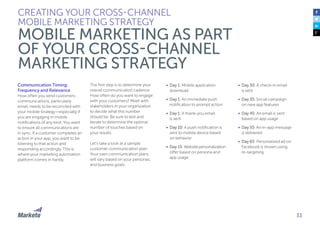
Let’s take a look at a sample
customer communication plan.
Your own communication plans
will vary based on your personas,
and business goals.
CREATING YOUR CROSS-CHANNEL
MOBILE MARKETING STRATEGY
MOBILE MARKETING AS PART
OF YOUR CROSS-CHANNEL
MARKETING STRATEGY
•	 Day 1: Mobile application
download
•	 Day 1: An immediate push
notification to prompt action
•	 Day 1: A thank-you email
is sent
•	 Day 10: A push notification is
sent to mobile device based
on behavior
•	 Day 15: Website personalization
offer based on persona and
app usage
•	 Day 30: A check-in email
is sent
•	 Day 35: Social campaign
on new app features
•	 Day 45: An email is sent
based on app usage
•	 Day 55: An in-app message
is delivered
•	 Day 65: Personalized ad on
Facebook is shown using
re-targeting
34
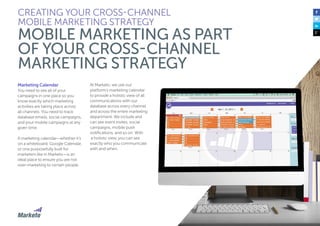
Marketing Calendar
You need to see all of your
campaigns in one place so you
know exactly which marketing
activities are taking place across
all channels. You need to track
database emails, social campaigns,
and your mobile campaigns at any
given time.
A marketing calendar—whether it’s
on a whiteboard, Google Calendar,
or one purposefully built for
marketers like in Marketo—is an
ideal place to ensure you are not
over-marketing to certain people.
At Marketo, we use our
platform’s marketing calendar
to provide a holistic view of all
communications with our
database across every channel
and across the entire marketing
department. We include and
can see event invites, social
campaigns, mobile push
notifications, and so on. With
a holistic view, you can see
exactly who you communicate
with and when.
CREATING YOUR CROSS-CHANNEL
MOBILE MARKETING STRATEGY
MOBILE MARKETING AS PART
OF YOUR CROSS-CHANNEL
MARKETING STRATEGY
35
Combining Mobile and
Marketing Automation
Connecting your mobile
strategy and marketing automation
platform enables you to improve
the customer experience across all
of your mobile channels through
automation, personalization,
data, and analytics. It can instantly
change the customer experience
by listening and analyzing behavior
in real-time and delivering
personalized experiences.
By incorporating marketing
automation capabilities, like those
found in Marketo, you can increase
engagement and create a scalable,
cohesive, and automated
engagement strategy that’s
tailored to your customers’ needs.
Marketing Automation
Features That Matter
for Mobile
Integrating mobile into marketing
automation creates multiple
touch-points and chances for
engaging your customers.
While there is a range of mobile-
focused marketing automation
features available, at Marketo, we
believe the most important are
the following:
CREATING YOUR CROSS-CHANNEL
MOBILE MARKETING STRATEGY
MOBILE MARKETING AS PART
OF YOUR CROSS-CHANNEL
MARKETING STRATEGY
•	 SMS/MMS Campaigns:
Sending SMS (Short Message
Service) and MMS (Multi-
Media Message Service) texts
and notifications to a user’s
mobile phone.
•	 Push Notifications: Trigger-
based notifications sent
directly to a user’s mobile
device after having installed
an app.
•	 A/B and Multivariate Testing:
Testing multiple elements of
a mobile message, campaign,
or interface to identify
optimal engagement.
•	 Segment Targeting: Identify
and target various segments
based on mobile usage,
personas, or behaviors.
•	 In-App Messaging:
Design and deliver
customized messages that
appear in-app to promote
user engagement.
•	 Coordinated Cross-Channel
Campaigns: Ability to
communicate on one
channel informed by actions
taken on another channel.
For example, push messages
based on actions taken in
web, email, or social.
•	 Listening to Key Mobile
Behaviors: Listen and react
to key mobile behaviors such
as who is installing your
mobile app, visiting your
mobile website, opening
emails on mobile devices,
and performing other
customer in-app activities.
Aleyda Solis, International SEO
Consultant, Founder at Orainti
I see five common mistakes
occurring regularly as
organizations get acquainted
with mobile marketing:
1.	Losing out on search:
Overlooking mobile app
indexing for their Android
apps, which will drive cross-
visibility from Google’s web
search results. 
2.	Being overbearing: Being
intrusive when asking for
downloads, in-app purchases,
and reviews is a major turn-off
for consumers.
3.	Forgetting marketing
automation: Not
implementing a complete
marketing automation
process can be detrimental—
understanding how your
consumers interact with
all of your marketing is vital.
4.	Focusing too much on
downloads: There are other
important aspects of your
mobile strategy. Use your
app as an opportunity to
learn more about desirable
features, from gathering
feedback, to improving
engagement. 
5.	Not optimizing an app store
listing: From titles, to
descriptions, to screenshots,
optimizing your app store
listing is how to become
relevant to your user’s queries
and improve your visibility.
What are some Common Mistakes that Organizations Make with Mobile Marketing?
THOUGHT LEADER ROUND TABLE
Niko Nelissen, CEO
TapTarget
What I see is that many mobile
agencies pitch a mobile app to
their clients as the “corporate
website equivalent” on a smaller
screen”. A mobile app is like your
website, with some added
marketing advantages such as the
ability to send push notifications”.
But, I think our industry needs to
shift its view, and start looking
at mobile apps as being the
equivalent of a landing page, not
a website. Let me explain…as you
know, a landing page is a single
webpage, crafted very carefully
for one specific goal within one
specific vertical for one specific
offering. I think this is how mobile
apps should be perceived within
the context of digital marketing.
Companies need to stop thinking
about the overall mobile app
for their business; instead they
should publish multiple niche
mobile apps, with one specific
purpose or functionality.
A good example is event apps:
corporations are increasingly
using “niche” event apps as a way
to communicate with customers
and partners on their corporate
events or tradeshows. The
app acts as a personalized
communication channel during
the event, and captures customer
interests, which is fed back into
the CRM database or marketing
automation platform of choice.
What are some Common Mistakes that Organizations Make with Mobile Marketing?
THOUGHT LEADER ROUND TABLE
Jeff Hasen, President and
Founder, Gotta Mobilize
I see 3 common mistakes in mobile
marketing:
1.	Thinking too short-term:
Marketers often think short-term,
wanting a consumer to click
on an ad or to download an
app. But it’s what happens after
the click or install that’s most
important, especially when
you consider lifetime value
and the cost of acquisition
versus retention.
2.	Not understanding your
audience: A common mistake
that some marketers make is
becoming too mesmerized
by new technology. These
marketers often introduce
new technology to buyers
who aren’t ready to adopt
or use the technology. It’s
important to understand the
use-case of your consumers
and how your mobile strategy
supports them.
3.	Forgetting to include mobile
across channels: Don’t forget
to include prominent mobile
calls-to-action in existing
marketing channels. This
makes your dollars work
harder, become more
measurable, and it considers
the interests and activities of
mobile users across channels.
What are some Common Mistakes that Organizations Make with Mobile Marketing?
THOUGHT LEADER ROUND TABLE
Mike Reynolds, Senior Mobile
Executive, International
Advertising Bureau
From a mobile advertising
perspective, one of the biggest
mistakes is trying it once,
measuring it in isolation, at then
not trying it again. Brands need to
have an integrated approach to
their marketing strategies, with
mobile at the center of their
media planning.
Another mistake which really
annoys me as a consumer is
advertisers running mobile display
campaigns without an optimized
site. If I click on a mobile ad I
expect to be directed to a
destination that works on
mobile, however all too often
I’m horrified by the experience
I’m presented with.
The final mistake I see is brands
advertising on mobile with
creative that’s not fit for the
purpose. The real estate on
mobile is smaller than desktop
which means shrinking a banner
designed for a desktop campaign
isn’t going to work when shoved
into a 300x50 on a smartphone.
What are some Common Mistakes that Organizations Make with Mobile Marketing?
THOUGHT LEADER ROUND TABLE
Jeff Hasen, President and
Founder, Gotta Mobilize
Mobile can’t live on an island.
It should be considered as an
ingredient in integrated marketing
initiatives. It has become crucial
to look at a consumer as
someone who lives on multiple
devices, bouncing from one
to the other from morning until
night. Successful brands will take
a holistic view of a customer,
or prospects, and ensure that
communications are personal
and take into account known
interests and disinterests.
I think, from an inbound
perspective, marketers must
identify gaps and opportunities
between the web and app and
then determine how to leverage
them. It’s important to
understand that the customer
journey happens across-channels
and it’s key to compare, correlate
and align your marketing activities
that happen on each channel in
order to maximize engagement. 
Aleyda Solis, International SEO
Consultant, Founder at Orainti
What are some Common Mistakes that Organizations Make with Mobile Marketing?
THOUGHT LEADER ROUND TABLE
Mike Reynolds, Senior Mobile
Executive, International
Advertising Bureau
For me, mobile and tablets are
great companions to other forms
of media and should be used
in conjunction with a brands
overall marketing strategy. An
example of this could be a simple
digital call-to-action on a TV
campaign, or as advanced as
using augmented reality to
bring a print ad to life. The
important thing for brands
to remember is that consumers
don’t draw a line between
different media, which means,
as marketers, neither should we.
This means the high expectations
of your customer need to be met
on whichever touchpoint they
choose to interact with your
brand on and the dots need to be
joined between digital and ‘real
world’ experiences.
What are some Common Mistakes that Organizations Make with Mobile Marketing?
THOUGHT LEADER ROUND TABLE
PART III:
RESPONSIVE DESIGN
43
A great place to start with your mobile marketing is responsive design for your website, emails, and
landing pages. Responsive design is a modern approach to web, email, and landing page design that
ensures your content is readable and consumable on any device, such as your desktop computer,
tablet, or mobile phone.
While some of the following
section may be slightly technical,
a modern marketer should have a
solid understanding of how mobile
responsive design works in order
to better optimize campaigns and
their customers’ experience. By
understanding the nuances of
what makes a website, email, or
landing page responsive, you can
better connect your mobile
customers’ experience with your
day-to-day marketing activities.
Engaging User Experience
The number one reason to include
responsive design in your creative
and marketing strategy is to create
a consistent and engaging
user experience. You want your
customers to feel a connection
with your brand on your website,
across your email campaigns, and
on your landing pages, no matter
what device they use.
RESPONSIVE DESIGN
WHY RESPONSIVE DESIGN?
Conversion Optimization
Responsive design makes your
marketing look good across all
devices, and ensures your
marketing messages remain front
and center. In Marketo’s Mobile
Benchmark Survey, we found 50%
of mobile device users reported
making a purchase in a browser on
their mobile phone within the last
month. Your website is a critical
conversion channel even on a
mobile device, so it is important
to ensure your website is
properly optimized.
By designing your website to be
responsive, you have control over
how your conversion elements
look on each device.
44
Search Engine Preferred
Most search engines, particularly
Google, prefer responsive design.
Responsive design not only
provides a better user experience,
but it also makes it easier for
Google to crawl, index, and
organize your site.
When you have a responsive
website, your URL and code is
the same across all devices. If you
create a separate website with new
code for your desktop, tablet, and
mobile sites, Google has a difficult
time properly indexing. Google is
constantly updating its algorithm
to be increasingly mobile-friendly,
so as a marketer you must stay
up-to-date and mobile-ready.
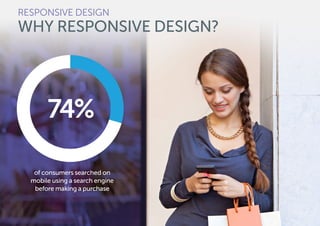
Mobile research starts with a
search. According to Google, 74%
of consumers searched on mobile
using a search engine before
making a purchase.
By having non-responsive design
on your web properties, you are at
a serious disadvantage compared
to your competitors.
Cost and Time Effective
Responsive design is actually
very cost effective. Because
your website and emails fluidly
change based on device and
screen resolution, you only have
to create a single option. In the
past, before responsive design,
you were required to create a
website for desktop, a website
for mobile, and so on.
RESPONSIVE DESIGN
WHY RESPONSIVE DESIGN?
By using responsive design, you
only create one version of each
property, therefore saving valuable
money and time.
The following sections describe
each type of responsive design
strategy—web, email, and
landing pages—to provide
best practices for effective
optimization and conversion.
RESPONSIVE DESIGN
WHY RESPONSIVE DESIGN?
of consumers searched on
mobile using a search engine
before making a purchase
74%
Katherine Griwert
Marketing Director, Brafton
What does a mobile algorithm—
and the broader shift toward
mobile adoption—mean for
your content strategy?
While apps and styling sheets
now take a more prominent seat
at the table, mobile also invites
a refreshed approach to
content that has traditionally
performed well.
•	 Mobile searches usually serve
a need for fast answers. Try
emphasizing short pieces;
white papers or long-form
blogs are (generally) not
what mobile users want.
•	 Your audiences are likely to
use smartphones at certain
points in the day (if you’re B2B,
this is often during personal
hours, business lunches,
or commutes). Distribute
content to strategically
to occupy those moments.
3 Ways To Optimize Your
Content Strategy for Mobile
Users: What makes sense for
customers on desktop won’t
always make sense when
they’re mobile— but don’t miss
opportunities to repurpose or
reinvigorate areas of your existing
strategy that can be put to work
across devices.
1.	Build an industry glossary.
Address on-the-go queries
with short, concise answers
about widely searched terms.
For a large B2B brand, Brafton
discovered over 7% of all
organic mobile traffic lands
on glossary pages compared
to 4% of desktop organic.
2.	Email timely topics—and
early. More than half of
Americans look for news
alerts on mobile, and email is
the No.1 smartphone web
activity. People check their
phones as part of their
morning rituals, so hit
subscribers before they even
reach a desktop. Brafton has
seen blogs with timely emails
garner up to 25% higher
mobile email referral traffic
when sent before 8am.
3.	Embrace video. 28% of
people watch video on
mobile devices daily, making
it mobile’s most popular
media. Use this format to
provide demonstrations or
trend analysis, then seed the
clips on social media during
peak mobile hours to stand
out as people skim newsfeeds
on their phones.
How to Create a Big Impact on Small Screens
THOUGHT LEADER ROUND TABLE
46
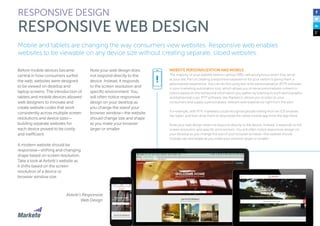
Mobile and tablets are changing the way consumers view websites. Responsive web enables
websites to be viewable on any device size without creating separate, siloed websites.
Before mobile devices became
central in how consumers surfed
the web, websites were designed
to be viewed on desktop and
laptop screens. The introduction of
tablets and mobile devices allowed
web designers to innovate and
create website codes that work
consistently across multiple screen
resolutions and device sizes—
building separate websites for
each device proved to be costly
and inefficient.
A modern website should be
responsive—shifting and changing
shape based on screen resolution.
Take a look at Airbnb’s website as
it shifts based on the screen
resolution of a device or
browser window size.
Note your web design does
not respond directly to the
device. Instead, it responds
to the screen resolution and
specific environment. You
will often notice responsive
design on your desktop as
you change the sizeof your
browser window—the website
should change size and shape
as you make your browser
larger or smaller.
RESPONSIVE DESIGN
RESPONSIVE WEB DESIGN
WEBSITE PERSONALIZATION AND MOBILE
The majority of your website visitors—almost 98%—are anonymous when they arrive
at your site. Part of creating a responsive experience for your visitors is giving them a
personalized experience. You can do this using real-time-personalization (RTP) software
in your marketing automation tool, which allows you to serve personalized content to
visitors based on the behavioral information you gather by listening to both demographic
and behavioral cues. RTP software, like Marketo’s, allows you to listen to your
consumers and supply a personalized, relevant web experience right from the start.
For example, with RTP, marketers could recognize people visiting from an iOS browser,
like Safari, and then drive them to download the native mobile app from the App Store.
Note your web design does not respond directly to the device. Instead, it responds to the
screen resolution and specific environment. You will often notice responsive design on
your desktop as you change the size of your browser window—the website should
change size and shape as you make your browser larger or smaller.
!
Airbnb’s Responsive
Web Design
48
The Three Elements of
Responsive Web Design
According to Nick Pettit from
Treehouse Blogs, a digital design
firm, three main principles make
up responsive web design:
1.	Fluid Grids
2.	Fluid Images
3.	Media Queries
Let’s describe each element
in more detail.
Fluid Grids
Prior to responsive web design,
websites were created using
a traditional pixel format. This
made sense because, in the
past, websites were created
to always be one size—there
was no variance. However,
responsive websites are
designed in percentages—
these are adaptive units, not
fixed like pixels.
According to 1st Web Designer,
a community and talent pool of
web designers, when working
with fluid grids you define a
maximum layout size for the
design. You can then divide the
grid into a specific number of
columns to keep the layout clean
and consistent. Next, you design
each column with proportional
widths and heights, so when the
screen or browser size changes
resolutions, the elements will
adjust their specific widths and
heights by the specified container
(browser) proportions.
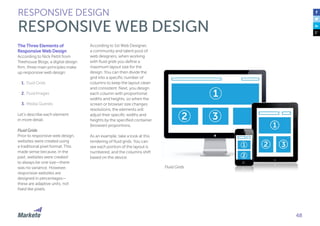
As an example, take a look at this
rendering of fluid grids. You can
see each portion of the layout is
numbered, and the columns shift
based on the device.
RESPONSIVE DESIGN
RESPONSIVE WEB DESIGN
Fluid Grids
49
Fluid Images
Like fluid grids, fluid images also
allow your images to change based
on your screen resolution and
grid size. You, or your web
development team, can easily
create code that ensures the
browser enlarges and shrinks
images when appropriate.
Responsive images, like your
website, increase your chances
of engagement. If your images
don’t resize based on your screen
resolution, you risk your website
visitors going elsewhere.
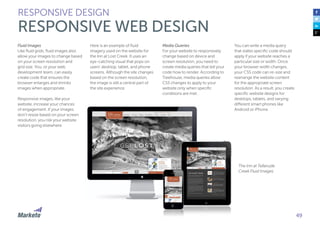
Here is an example of fluid
imagery used on the website for
the Inn at Lost Creek. It uses an
eye-catching visual that pops on
users’ desktop, tablet, and phone
screens. Although the site changes
based on the screen resolution,
the image is still a central part of
the site experience.
RESPONSIVE DESIGN
RESPONSIVE WEB DESIGN
Media Queries
For your website to responsively
change based on device and
screen resolution, you need to
create media queries that tell your
code how to render. According to
Treehouse, media queries allow
CSS changes to apply to your
website only when specific
conditions are met.
The Inn at Tellerude
Creek Fluid Images
You can write a media query
that states specific code should
apply if your website reaches a
particular size or width. Once
your browser width changes,
your CSS code can re-size and
rearrange the website content
for the appropriate screen
resolution. As a result, you create
specific website designs for
desktops, tablets, and varying
different smart phones like
Android or iPhone.
50
Key Design Considerations
Once you develop your responsive
site framework using the elements
listed on the previous pages, you
need to design effective content
and imagery that works for both
your desktop and mobile
environments.
According to WhoIsHostingThis,
the key responsive design
elements are:
•	 The Masthead
•	 The Image Gallery
•	 The Product Description
•	 The Footer
Let’s go over each element in
more detail.
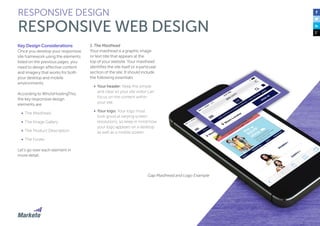
1. The Masthead
Your masthead is a graphic image
or text title that appears at the
top of your website. Your masthead
identifies the site itself or a particular
section of the site. It should include
the following essentials:
•	 Your header: Keep this simple
and clear so your site visitor can
focus on the content within
your site.
•	 Your logo: Your logo must
look good at varying screen
resolutions, so keep in mind how
your logo appears on a desktop
as well as a mobile screen.
RESPONSIVE DESIGN
RESPONSIVE WEB DESIGN
Gap Masthead and Logo Example
51
•	 Your navigation: When designing
to be responsive for mobile,
people will view your website
navigation on a much smaller
screen—so it can be tricky to
ensure your content is properly
consumed. WhoIsHostingThis
recommends:
•	 A simple menu anchor in the
header that toggles the main
navigation on small screens.
•	 A header anchor that jumps
users to the navigation, which
is then placed in the footer.
•	 A left-slide navigation
accessed by the menu’s icon,
revealing a tray that slides in
from the left and moves the
main content over to the right.
•	 A navigation that overlays the
main content of the page.
RESPONSIVE DESIGN
RESPONSIVE WEB DESIGN
Gap Navigation Example
52
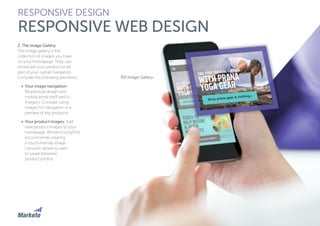
2. The Image Gallery
The image gallery is the
collection of images you have
on your homepage. They can
showcase your product or be
part of your overall navigation.
Consider the following elements:
•	 Your image navigation:
Responsive design and
mobile lends itself well to
imagery. Consider using
images for navigation or a
preview of key products.
•	 Your product images: Add
new product images to your
homepage. WhoIsHostingThis
recommends creating
a touch-friendly image
carousel, allowing users
to swipe between
product photos.
RESPONSIVE DESIGN
RESPONSIVE WEB DESIGN
REI Image Gallery
53
3. Product Description
This is the area of your website
that describes your product,
which is critical for engagement
and conversions. Your descriptions
should be short and concise, so
they render well and are catchy
for mobile visitors.
Consider including the
following elements:
•	 Product overview: This text
overview should appear above
an image and provide your
website visitors the name, price,
and rating of each product.
•	 Review count: Tell your visitors
how many reviews and what
the rating is for each product.
This is particularly handy for
ecommerce sites.
RESPONSIVE DESIGN
RESPONSIVE WEB DESIGN
Amazon Example Product Description
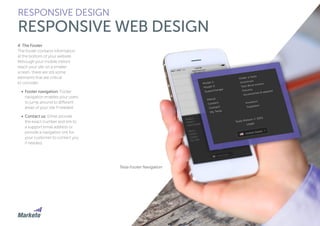
4. The Footer
The footer contains information
at the bottom of your website.
Although your mobile visitors
reach your site on a smaller
screen, there are still some
elements that are critical
to consider:
•	 Footer navigation: Footer
navigation enables your users
to jump around to different
areas of your site if needed.
•	 Contact us: Either provide
the exact number and link to
a support email address or
provide a navigation link for
your customer to contact you
if needed.
RESPONSIVE DESIGN
RESPONSIVE WEB DESIGN
Tesla Footer Navigation
55
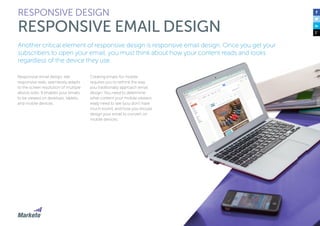
Another critical element of responsive design is responsive email design. Once you get your
subscribers to open your email, you must think about how your content reads and looks
regardless of the device they use.
Responsive email design, like
responsive web, seamlessly adapts
to the screen resolution of multiple
device sizes. It enables your emails
to be viewed on desktops, tablets,
and mobile devices.
Creating emails for mobile
requires you to rethink the way
you traditionally approach email
design. You need to determine
what content your mobile viewers
really need to see (you don’t have
much room), and how you should
design your email to convert on
mobile devices.
RESPONSIVE DESIGN
RESPONSIVE EMAIL DESIGN
56
Mobile Email Layouts
Designing for mobile is more than
just creating an email with mobile-
specific code. You need to think
more holistically about the layout
of your email. Make sure your email
is visually appealing, the text is
readable, and your calls-to-action
are clear.
Here are some best practices
to keep in mind:
•	 Your emails should be no wider
than 500-600 pixels, and they
should be in single column
layouts for easy reading and
quick consumption on a
mobile device.
•	 All critical design elements
should be in the top portion of
your email—above the fold.
Remember, on a mobile or
tablet device you have less
room, so be strategic.
•	 Your buttons should be a
minimum of 44 x 44 pixels so
your subscriber can read and
click. Additionally, this is the
guideline Apple recommends.
•	 Keep your text large for
readability. Readers won’t see
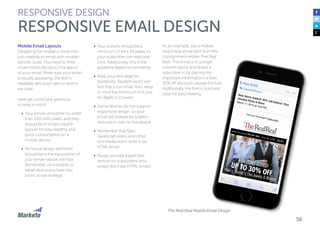
text that is too small. Also, keep
in mind the minimum font size
for Apple is 13 pixels.
•	 Some devices do not support
responsive design, so your
email will instead be scaled—
reduced in size—to the device.
•	 Remember that flash,
JavaScript video, and other
rich media won’t work in an
HTML email.
•	 Always provide a plain text
version for subscribers who
simply don’t like HTML emails.
RESPONSIVE DESIGN
RESPONSIVE EMAIL DESIGN
As an example, see a mobile
responsive email sent from the
consignment retailer The Real
Real. This email is in a single
column layout and draws a
subscriber in by placing the
important information—a new
30% off discount—above the fold.
Additionally, the font is bold and
clear for easy reading.
The Real Real Mobile Email Design
57
Images
Images are a critical part of how
your email appears on a mobile
phone. Not only is the viewing
screen much smaller, but your
subscribers might be multi-
tasking—so you need to grab
their attention. Images should
be colorful, bold, and on brand.
Your images, like the other
elements in your email, should
change size responsively.
Most email clients now block all
images by default, so users must
take initiative to unblock if they
want to see them. The good news
is that most consumers do, in
fact, want to see your images.
According to David Daniels of
The Relevancy Group, 55% of
consumers stated they turn on
the images in the emails they
receive, and 57% say they check
their emails on mobile devices.
Nonetheless, many recipients
will look at your emails without
images. Here are a few steps
you can take:
•	 Create bulletproof buttons:
You can create buttons that
look like images but are
actually cleverly formatted
HTML. The buttons ensure
subscribers see the important
points of your email, regardless
of whether or not they’ve
blocked images.
•	 Use image “alt” tags: You
want recipients who block
their images to know what
exactly they are not seeing.
For example, an image of red
high-heeled shoes can have
an alt tag that reads “red
high-heeled shoes”. If you are
offering 15% off those shoes,
the alt tag should read “15%
off red high-heeled shoes”.
RESPONSIVE DESIGN
RESPONSIVE EMAIL DESIGN
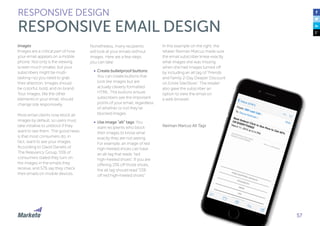
In this example on the right, the
retailer Neiman Marcus made sure
the email subscriber knew exactly
what images she was missing
when she had images turned off
by including an alt tag of “Friends
and Family 2-Day Deeper Discount
on Entire Site/Store”. The retailer
also gave the subscriber an
option to view the email on
a web browser.
Neiman Marcus Alt Tags
58
Content and Calls-to-Action
Pay attention to the text length in
your mobile emails. An email that
appears to be only a paragraph or
two on a desktop can look very
long on a mobile phone. Make sure
your mobile email content is
concise and engages your
readers immediately.
Creating content for mobile forces
you to be much more disciplined in
your messaging. Instead of having
a large surface area to convey
your message, you only have
a small screen.
Another critical element of your
mobile email copy is your call-to-
actions (CTAs). You need to ensure
your reader knows exactly what to
do with your email. Whether it is a
CTA to “buy now”, “subscribe to our
SMS messages now”, “download
content now”, and so on, you need
to make sure it is optimized for
responsive design and mobile.
Here are four tips to keep in mind
to create strong CTAs:
1.	Be specific: Avoid using
vague phrases like “click here”.
Make sure your subscriber
knows exactly where that
click will go. Instead, be
more specific with a better
description like “shop new
collection now” or “download
to learn more”.
2.	Keep your CTAs at least 44
pixels: Touch screens aren’t
as precise as desktop
computers, so you want to be
sure your subscriber is able to
effectively click on your CTA.
The larger you can make your
CTA button or link, the better
for conversion.
RESPONSIVE DESIGN
RESPONSIVE EMAIL DESIGN
3.	Place your CTA above the
fold: You don’t want your CTA
lurking way down below the
fold where your subscribers
never see it. Make sure your
CTA is obvious and near the
top of your mobile email.
4.	Use color for pop: Your CTA
must pop, especially if your
email has great photography
and engaging fonts. Your
CTA should be bold and in
high contrast to the rest of
your imagery.
As an example, the daily deal site
Ideel uses a black button for their
CTA of “Shop Now”. This CTA
works because the black is
a stark contrast to the white
background, and is in a
central location in the email.
Ideel CTA
59
Media Queries
Just like in your responsive web
design, your responsive email
design also has media queries.
Media queries allow you to control
the layout and display of your email
based on the mobile device used to
open it. However, it’s important to
know that not all mobile email
clients support media queries.
You can also use media queries to
fine-tune your code with designs
for specific devices and situations,
including horizontal versus vertical
layout, and tablet-specific design.
IPhone Native
IPad Native
Android 2.1 Native
Android 2.2 Native
Android 2.3 Native
Android 4.x Native
Gmail Mobile Apps
Mailbox IOS App
RESPONSIVE DESIGN
RESPONSIVE EMAIL DESIGN
Yahoo! Mobile Apps
Windows Mobile 7
Windows Mobile 7.5
Windows Mobile 8
BlackBerry OS 6
BlackBerry OS 7
BlackBerry Z10
Kindle Fire native
Media Queries Across Mobile Apps
What Can You Change with
Responsive Email Design?
With media queries, there are a
wide variety of design elements
that you can change and adapt
in your emails.
•	 Navigation: For your mobile
email design, consider
simplifying your navigation.
Rather than listing all of your
product categories, list
only the most important.
•	 Font size and style: You may
want to change the font size
and style, depending on the
device. Because mobile
devices are smaller than
desktops, make sure you
choose fonts that are bold
and readable.
•	 Images: If your email uses
horizontal images, instead of
scaling them down for mobile,
consider stacking them for
ease of viewing.
•	 Colors: Use high contrast
colors that are easy to view
on your phone—especially pay
attention to the colors of your
background and font. Your
subscribers will access their
emails in various situations and
light conditions, so the easier
to read, the better.
RESPONSIVE DESIGN
RESPONSIVE EMAIL DESIGN
•	 Layouts: Responsive design
enables you to change the
layout of your email depending
on the device your subscriber
uses. Two-column email
layouts should be changed
to one column for easy mobile
phone scrolling.
•	 Content: You can even change
the content of your email for
people viewing on a mobile
device. Maybe you want to
have different information that
relates to mobile, or maybe
you just want your mobile
emails to more concise copy.
Groupon Responsive Email Design DesktopEmail Design Mobile
61
You’ve successfully gotten someone to click on your CTA from a mobile email, what happens next?
To get real action, your landing pages need to be responsive as well, otherwise everyone who clicks
from their mobile device will fall off.
Responsive landing pages are
customized pages you direct
your customers to from a social
media page, email send, event
invitation, paid ad, or search engine.
Responsive landing pages are an
important part of providing a
seamless mobile experience for
your customers. They help you
collect data like email addresses,
phone numbers, locations, and
so on.
Responsive landing pages adapt
to the size of the browser or device
a customer uses for viewing.
Imagine a desktop landing page on
a mobile device. If there is a lot of
small text and a painfully long form,
all the work of getting a customer
to even click on your landing page
is gone as soon as she bounces.
Luckily, you can adapt landing
pages to mobile.
Goals for Mobile
Landing Pages
Before we dive into the nitty gritty
of designing mobile landing pages,
we want to take a few minutes to
go over challenges with mobile
landing pages and how your
goals might differ from desktop
landing pages.
People are often less likely to
convert on a mobile landing page.
Think about it—your customers are
on the go, might not be looking to
make a purchase decision right
away, and they don’t have the ease
of a regular desktop keyboard to
enter their information. Entering
information on a mobile keyboard
is simply more time consuming
(and annoying).
RESPONSIVE DESIGN
MOBILE LANDING PAGE DESIGN
As a result, adjust your
expectations, and of course
test and iterate. Because people
on their phones are less committal,
make your landing pages
accessible, and be cognizant of
your language, form, and CTA.
Consider your goals and optimize
for them. No matter how much
time or money you spend on a
campaign, if your landing page
doesn’t resonate with your mobile
audience, they will bounce—
potentially never to return.
Most of your customers will
take only a few seconds on their
devices to decide whether they
will continue to read your landing
page or leave.
When it comes to your mobile
landing pages, err on the side of
simplicity. Use your design layout
carefully—the wrong design for
your audience can immediately
detract from the offer and
conversion. Simply put: design
can have a polarizing effect.
Mobile Landing Page
Best Practices
Consider including the
following elements in your
mobile landing pages:
•	 Brand image or logo: In order
to establish trust, make sure
your visitor knows exactly who
you are. You want your brand
image or logo to be clear.
•	 Header or headline: Your
landing page header or
headline should match the ad
your visitor clicked on. You
don’t have much room on a
mobile device to convey your
message—so make it short and
sweet. Alternatively, you can
use an engaging image.
•	 Copy: Landing page copy
should also be concise. Explain
your offer and add an incentive
for visitors to click on or fill out
your form. Make your copy
scannable, with bullets and
short sentences.
•	 Interior imagery: Add imagery
that supports your offer. You
can also consider adding
videos or other types of
content. Your images should
be engaging and eye catching.
•	 Call-to-Action (CTA): Make
sure your CTA is obvious.
Mobile phone screens are
small, so make sure the CTA
stands out.
RESPONSIVE DESIGN
MOBILE LANDING PAGE DESIGN
•	 Social sharing buttons:
Consider asking your landing
page visitors to share your
content by providing social-
sharing buttons that are easy
to access on a mobile device.
•	 A form or way to collect
information: If you want to
collect information from your
visitor, provide a short form,
with fields designed for ease
of use.
Take a look at a mobile landing
page promoting Hyundai. The
landing page uses a clear logo,
has a catchy headline, includes
an appealing image of the new
Elantra, and has clear CTAs to
either find your local dealer
or go to the website for
more information.
Hyundai Mobile Landing Page
62
63
Mobile Landing Page
Call-to-Action
Your CTA is an important part of
your mobile landing page. Because
many of your viewers will view your
landing page on their phone, you
can get a bit more creative with
your CTAs.
While a regular desktop landing
page often has a CTA of “download
now”, “purchase now”, and so on,
marketers should take advantage of
mobile capabilities. For instance,
consider including a CTA for “call
now” and provide a phone number.
A mobile user can simply click on
your CTA and automatically dial
straight from his phone.
According to Alex Harris of Alex
Designs, here are some best
practices to keep in mind when
implementing a “dial now” CTA:
1.	Ensure your phone number
is in HTML, and it is “click-to-
call” ready, meaning you can
tap on the phone and it will
dial for you.
2.	Test a phone number versus
a “click-to-call” button. This
button functions the same
as a clickable phone number,
but it’s a button with CTA text
that says “Call Now—Click
Here”. Harris has seen a
10-20% increase in phone
calls when using this type
of button.
RESPONSIVE DESIGN
MOBILE LANDING PAGE DESIGN
Additionally, you can leverage
location-based CTAs on your
landing page to drive your
customers to an action near
their specific locations. In the
example to the right, you can see
a user searching for a Toyota
Tundra is taken to a mobile landing
page that prompts the user to find
an offer at a location near them.
Mobile Landing Page:
Toyota Location Based CTA
64
Mobile Landing Page Forms
Be wary of creating long forms with
type fields for your landing pages.
You don’t want to require your
customers to spend time using
their mobile keyboards to fill out
long forms. This will not only cause
drop off, but it will also irritate your
customers. There is nothing
worse than trying to complete
endless form fields with a small
mobile keyboard.
There are three good ways to deal
with this issue:
1.	Design your mobile landing
pages to include very short
forms: Only ask for the basic
information you need to
connect with the customer.
Consider only asking for
name, phone number, and
email address. You can test the
length of your forms, toggling
back and forth between
shorter and longer, to find
your sweet spot.
2.	Use drop down menus: This
technique is much easier for
your viewer. Drop down
menus enable you to collect
more information with less
effort. Instead of someone
having to diligently type in each
answer, they can choose from
a list.
3.	Consider a social login: Many
companies are opting to use
social logins instead of form
fills for ease of use. Consider
implementing a social sign-on
so you collect all of your
viewer’s information with
minimal effort on their part.
Berkeley College does a nice job
of keeping their forms short and
adding drop-down lists when
possible. This minimizes the
work for the landing page
visitor, resulting in higher
conversion rates.
RESPONSIVE DESIGN
MOBILE LANDING PAGE DESIGN
Berkeley College Mobile
Landing Page
MAKING MOBILE FORMS EASY
Jonathan Dane, President and Co-Founder of Disruptive Advertising, suggests that
for a really simple user experience with forms, make sure your different input fields
automatically switch the mobile keyboard to alphabetical versus numerical,
depending on if you are asking for a name, phone number, email, etc.
!
65
Mobile Landing Page Copy
Your landing page copy is the key
to conversion. Your copy should
be short, convincing, and provide
your visitor a clear explanation of
your offer.
As you write your landing page
copy, use these three steps as
a guide:
1.	Draw in your landing
page visitor
2.	Talk about your product
or solution
3.	Point out the WIIFM
(What’s In It For Me)
Scannable Content
People simply don’t read a
full landing page, especially on
mobile—so less is more. Marketo
studies have shown that, at most,
people read three pieces of your
landing page:
•	 The headline
•	 Bullet points
•	 Your CTA
Include a bold, captivating
headline and a few sentences
of engaging copy to show your
customer why they should fill
out your form or contact you.
Also consider using interactive
elements like a video or audio
clip to heighten interest.
Your landing page doesn’t need
to sell your product or company,
but it does need a very clear
and relevant offer.
RESPONSIVE DESIGN
MOBILE LANDING PAGE DESIGN
SEARCH ENGINE LAND’S 10 BEST PRACTICES
FOR MOBILE LANDING PAGE SUCCESS
1.	 Be accessible
2.	 Be fast
3.	 Be orderly
4.	 Be brief
5.	 Be legible
6.	 Be call-friendly
7.	 Be thumb-friendly
8.	 Be local
9.	 Be form-simple
10.	 Be action-compelling
!
66
Removing Navigation
You may be tempted to include
your main navigation links on your
landing pages (“If they don’t like
this offer, they’ll be able to find
something else!”). But this can
be distracting from your main
CTA. Eye-tracking studies have
found navigation panels draw
attention away from your offer
and conversion. Plus, it is a lot to
include for a mobile responsive
landing page.
Remember your main goal isn’t to
have your landing page viewer visit
your website—it’s conversion for a
particular CTA. After they convert,
feel free to send your customers
additional information—just don’t
muddy the waters during your
initial interaction.
Confirmation and
Thank You Pages
After a customer converts, take
time to thank them with an email
or send them to a confirmation
page. Confirmation and thank you
pages are an important way to
track conversion, plus they deliver
a better user experience.
Additionally, they provide an
opportunity to deepen the
relationship by making another
offer, promoting content, running
a poll, asking for a social share, or
directing attention to a mobile
app. In fact, more than 40% of
customers are willing to share
additional information after
they convert.
RESPONSIVE DESIGN
MOBILE LANDING PAGE DESIGN
67
Responsive Landing Pages
and Marketing Automation
While marketers have long been
able to design their own landing
pages, they have had to rely on
web development resources to
make those landing pages
responsive. Luckily, that’s changing
as marketers can now build their
own responsive landing pages.
Many marketing automation
platforms offer functionality to
help marketers easily create mobile
optimized landing pages within
their design editors.
In Marketo, you can easily create
mobile responsive landing pages
and preview what they look like on
your viewer’s mobile device.
In the landing page editor, Marketo
offers the option to choose which
elements you want to show on
a desktop landing page and
which you want on a mobile
landing page.
RESPONSIVE DESIGN
MOBILE LANDING PAGE DESIGN
Once you select the elements you
would like in each version of your
landing page, you can preview the
pages to ensure your design works
for both devices.
Mobile Page Elements Mobile and Desktop Landing Page Preview in Marketo
PART IV:
MARKETING WITH SMS
AND MMS MESSAGING
69
SMS and MMS are types of messages delivered directly to a mobile
phone that can be used with or without mobile app downloads.
Why Text Messaging?
Text messaging via SMS or MMS is
a quick and efficient way to grab
your audience’s attention so you
can be where they are—on their
devices. SMS/MMS messaging is
an essential part of any mobile
marketing strategy. Take a look
at these compelling statistics:
•	 The open rate of SMS is 98%
compared to 22% for emails
(Venturebeat)
•	 Text messages can be 8x
more effective at engaging
customers (Cellit)
•	 Approximately 50% of
consumers in the U.S.
make direct purchases after
receiving an SMS branded
text (Moto Message)
•	 Applying SMS marketing
techniques is predicted to
contribute a 40% growth rate
of revenues by 2017 (Search
Engine Land)
•	 Coupons delivered via SMS
have redemption rates 10x
higher than printed coupons
(Go Mobile)
And, we agree! According to
our Marketo Mobile Benchmark
Survey, 31% of customers receive
one to five SMS messages per
month from brands, and a
whopping 23% get more than
twenty! Clearly, people are
engaging (and enjoying) SMS
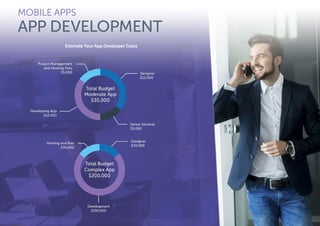
and MMS messages.
MARKETING WITH SMS AND MMS MESSAGING
DEFINING SMS AND MMS
MARKETING WITH SMS AND MMS MESSAGING
DEFINING SMS AND MMS
of consumers get
more than 20 SMS
messages a day
of consumers get
one to five SMS
messages a day23%
31%
71
A consumer must opt-into this
type of messaging either on
your website, through an email
subscription request, or through
your mobile application.
SMS can be a great technique
to get directly in front of your
consumer in a fast, effective,
and concise manner.
Here are some SMS specifics
to keep in mind:
•	 SMS is a fast and efficient way
to engage with your customer:
You can send SMS messages
at high volumes and they
can often be delivered to
your customers in less than
fifteen seconds.
•	 SMS enables you to reach
your customers: SMS is one
of the simplest forms of
mobile marketing, and most
cell phone carriers accept SMS
messages. If you are using
SMS, you have a greater
chance of getting through
to an opted-in customer.
•	 You have limited space:
A standard SMS text
message can fit up to 160
characters, so keep that
in mind for messaging!
MARKETING WITH SMS AND MMS MESSAGING
SMS MESSAGING
Here is an example of a simple
SMS text message from the retailer
Macy’s—it doesn’t look much
different than a personal text
message you might receive
from your friend.
SMS, or short message service, is a mobile text that can be sent peer-to-peer (like a standard
text message) or from a mobile messaging service provider (a marketing message).
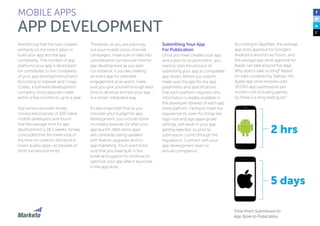
Macy’s Promo Alerts:
Extra 20% off + Specials end
tonight! Details: http://bit.ly/
SSDAY. Use Code SUPER:
http://bit.ly/SUSAT1. Reply
HELP=help.
Types of SMS Text
There are various types of SMS texts
you might want to include in your
marketing mix:
•	 Special offers, promotions,
or sales: Share specials with
your subscribers that are
exclusive to SMS and MMS. This
will encourage your subscribers
to stay subscribed.
•	 Order alerts: By using SMS,
you can alert your customers
to where their order is in your
processing. Send an alert
when an order has been
placed, when the order has
shipped, and when an order
has arrived.
•	 Appointment reminders: Send
your subscribers appointment
reminders right after they
schedule an appointment
and a few days prior. Flight
reminders are also an example
of this type of alert.
•	 Contest alerts: You want your
subscribers to feel special.
Consider creating contests
specifically for your SMS
alert subscribers.
BELLAGIO: Enjoy exclusive
rates on accommodations
& two buffets when
you stay by 6/4!
http://bit.ly/1i2DvVD. or
866.286.3821 and mention
code: BBPSMSM14
You have an appointment
with Main Street Hospital
on Fr Dec 16, 2011 at 12:30
pm. Reply CONFIRM to
confirm. Questions? Please
call(222) 555-1234.
Bellagio SMS Promotion Appointment Alerts
Your order (#1777) is now
processing. Visit http://
www.woothemes.com.
for more info.
Congratulations! You are
now entered into our raffle
for 2 tickets to the upcoming
concert! Winners will be
announced via SMS!
Order Alerts Contest Alert
MARKETING WITH SMS AND MMS MESSAGING
SMS MESSAGING
73
Best Practices for
SMS Messaging
Even though your SMS texts land
directly in consumers’ hands—they
are easy to forgot about and delete,
so you need to make sure your
messaging is engaging, interesting,
and appealing. You can test and
iterate different aspects of your SMS
texts, but there are certainly some
tips and tricks to consider.
According to Susan Gunelius from
Entrepreneur magazine, these are
some best practices to keep in
mind when composing your
SMS texts:
1.	Be brief and focused. You
only have 160 characters to
grab your reader’s attention,
so your text message should
be succinct and engaging.
Speak directly to your target
audience in your messages—
use the personas you created
earlier in this guide to help
shape your message. Be
sure to include how to take
advantage of your SMS
offer and its benefits.
2.	Avoid slang and
abbreviations. If your text
message looks like spam,
subscribers will delete it. If
they have no idea what you
are talking about, they will not
pay any attention to the
valuable offers you provide.
For maximum engagement,
be sure to leave out anything
that might seem too slick and
promotional. Slang and text
abbreviations can cheapen
the perception of your brand
and hinder your campaign.
3.	Offer something of value.
Don’t send an SMS text to
a subscriber unless you
have something to offer
and something to say. If
you don’t offer value, you risk
your customer opting out of
your SMS communication.
You should always include
a real-time offer and show
your subscriber the WIIFM
(What’s In In For Me). Whether
you provide information about
a sale or wwa new product,
the message should describe
the benefits of acting now.
MARKETING WITH SMS AND MMS MESSAGING
SMS MESSAGING
74
4.	Identify yourself. Make sure
you identify yourself in the text
so the consumer knows
exactly who you are.
Anonymous messages do
nothing for your brand or
your customer. Identifying
yourself clearly helps your
messages appear more
relevant and engaging.
5.	Make your customers feel
special. Your subscribers
opted into your SMS messages
for a reason, so make sure
they feel special and give
them exclusive offers that
aren’t available elsewhere.
Otherwise, consumers will
most likely opt out of receiving
future messages from you.
6.	Always include a clear call-
to-action. Make sure you
provide a clear CTA for your
customers and drive to a
mobile responsive landing
page. That way, you can track
engagement and deliverability
of your SMS.
MARKETING WITH SMS AND MMS MESSAGING
SMS MESSAGING
75
MMS, or multimedia messaging
service, is a multimedia message
that can be sent peer-to-peer,
from a mobile messaging service
provider, or from a website to a
mobile phone. MMS messages can
include text, photos, videos, audios,
or GIFs.
In contrast to an SMS, a MMS
message enables you to include a
larger variety of branding essentials
for a more engaging experience.
Here are some elements of a MMS
message to keep in mind:
•	 MMS messaging provides
great branding opportunities.
Because MMS messages
can include rich visuals, your
subscriber has a better user
experience. In fact, according
to the company Outspoken,
MMS has some pretty
impressive stats:
•	 MMS texts have a higher
customer engagement
with a 15% average CTR
(click-through-rate)
•	 MMS increases campaign
opt-ins by 20% over SMS
•	 Subscribers are eight times
more likely to share MMS
content on social networks
•	 You can fit more in a
MMS message.
In contrast to SMS messages,
where you can only fit 160
characters, MMS messages
have no limits. You can
include many characters
and images in your MMS
texts to create a more full
campaign experience.
Here is an example of an
MMS message from Starbucks:
Starbucks MMS Message
MMS, or multimedia messaging service, is a multimedia message that can be sent peer-to-peer,
from a mobile messaging service provider, or from a website to a mobile phone. MMS messages
can include text, photos, videos, audios, or GIFs.
MARKETING WITH SMS AND MMS MESSAGING
MMS MESSAGING
average CTR (click-through-
rate) with MMS messaging
increased campaign opt-ins
with MMS over SMS
more likely subscribers
will share MMS content
on social networks
MARKETING WITH SMS AND MMS MESSAGING
MMS MESSAGING
15%
8x
20%
77
Types of MMS Text
There are various types of
MMS texts you can send to
your audience:
•	 Special offers, promotions, or
sales: You can include links to
purchase or scannable codes.
•	 Video content: Send your
subscribers your newest
video content. This could
be a how-to video, a news
clip, viral content, or a
customer testimonial.
•	 New product images: Send
your subscriber images of your
newest products. This can be
based on behavioral data on
what your customer has
interacted with, or just your
new line of products. If you
go this route, don’t forget
to include a coupon code.
MARKETING WITH SMS AND MMS MESSAGING
MMS MESSAGING
78
How to Create Engaging
MMS Messaging
It may be easier to engage your
audience with MMS messaging
than SMS, but it is still critical to
follow a few cardinal rules. You
have the ability to add rich visuals to
your MMS texts, remember not to
go overboard!
Here are some important tips to
keep in mind when designing your
MMS messages:
•	 Use rich, engaging visuals.
Because your image is the
cornerstone of your MMS text,
make sure the visual you
include is rich, engaging, and
relevant to your subscriber. Use
imagery that is bright, eye
catching, and full of texture.
Steer clear of stock imagery
that lacks personality. You
want to grab the attention of
your subscriber right away.
•	 Consider including a
scannable code for
promotions.
Make it easy for your
subscriber to use your offer
right away. If it is a percentage
off of a new purchase, include
a scannable code so your
subscriber doesn’t need to
navigate away from the
message. Instead, he can
use it immediately in-store.
•	 Connect your MMS
message to a full campaign.
Make your subscriber’s
experience is cohesive
and in sync with the rest
of your marketing imagery
and messaging. If you are
running a particular campaign
on your website, through
email, in-store, and through
other channels, include
the same imagery in your
MMS messages.
•	 Include social
sharing buttons.
Because you are using rich
media, you can include
social sharing buttons. As
we mentioned previously,
a MMS message has a high
probability of being shared
through social, so make sure
your subscribers have a way to
share on Facebook or Twitter.
MARKETING WITH SMS AND MMS MESSAGING
MMS MESSAGING
79
Just like your email marketing, your subscribers must opt-in to your mobile marketing.
That means they must give you permission to market to them on their mobile devices.
Subscriber Consent
Because SMS and MMS marketing
has become increasingly popular,
in 2013, the Telephone Consumer
Protection Act (TCPA) expanded to
include regulations related to text
message opt-ins.
Essentially, the law states that
before a marketer sends a
consumer a text message in either
SMS or MMS form, they must have
expressed prior written consent in
the form of a text message back to
the marketing company or through
an online form. There are multiple
ways to achieve a mobile opt-in
from a subscriber:
•	 Text Message: A subscriber
can opt into your SMS or MMS
marketing via a text message.
This is considered a single
opt-in and works by asking the
consumer to text back by
writing “SUBSCRIBE” or
something similar. You then
can reply to the consumer
confirmation via text.
•	 Signage: If you are a retail
marketer, at an event, or have
a brick-and-mortar store, you
can create signage asking a
consumer to subscribe to your
text messaging. Simply ask
them to text “SUBSCRIBE” to
a specific short code or phone
number. To make these even
more effective, consider
offering a discount for
new subscribers.
MARKETING WITH SMS AND MMS MESSAGING
OPT-IN BEST PRACTICES
•	 Website Form: You can
create website forms that
opt website visitors in to your
text messages. This can be
done by having a visitor enter
his information into a form,
including phone number. You
can then text a confirmation
code to the user, allowing your
subscriber to opt-in to your
messages from his device. This
is considered a double opt-in.
•	 Social Media: Encourage
subscribers on social media to
opt-in to your text messages.
Offer discounts and let them
know what sort of offers they
can expect. Send out a code
and have them opt-in. You can
also create a Facebook tab or
widget so your subscribers can
opt-in without leaving the
social media interface.
•	 Email: Include your text
message subscription options
in upcoming marketing emails.
Just like asking your email
subscribers to follow you on
social channels, asking them
to opt into your SMS and MMS
messages is another way to
engage your audience.
80
Important Compliance
Guidelines
In addition to requiring subscribers
to opt-in to your text messaging,
there are also other guidelines
you must follow to comply with
the TCPA.
•	 Include instructions
on how to opt-out.
Your subscribers must
know how they can opt-out
of text communications
from your company. An
example would be to include
messaging in your text that
explains to your subscribers
they can “opt-out by texting
‘STOP’ to [short code]”. Your
short code is your shortened
text number.
•	 You must notify subscribers
if there is a cost to the service.
There may be a cost involved
with your text messaging,
depending on the service
plans of your recipients.
Additionally, if you provide
a link that goes to a website
browser page, your subscribers
that might have to pay for data.
Therefore, you must inform
your subscribers that “standard
message and data rates
may apply”.
•	 Provide subscribers with a
way to ask questions.
Your SMS and MMS
subscribers may want to
ask you questions. You must
provide them with a way to ask
for help. This can be done by
asking them to text “HELP” to
your short code.
MARKETING WITH SMS AND MMS MESSAGING
OPT-IN BEST PRACTICES
•	 Set expectations.
Your subscribers need to
know how many text
messages they will get from
you and how often they will
receive those messages.
Make sure you provide them
with that information up front
to set proper expectations
Take a look at this example from
Domino’s. They comply with
TCPA regulations by including
information on how to opt-out
of their communications, how
to ask for help, and that standard
data and message rates apply.
Domino’s Text Complying
with TCPA Laws
PART V:
MOBILE APPS
82
Mobile apps can support your business goal, whether that is to extend your product, drive
engagement, or support commerce. Mobile apps provide an opportunity to drive extremely
deep engagement with your customers. Evaluating how you can (and if you should) use an app
to support your business is a vital part of mobile marketing.
The introduction of a mobile
application into your marketing
planning is a critical and strategic
move. To fully integrate it as part
of a holistic marketing strategy, you
as the marketer need to be involved
in some of the more technical
aspects of mobile app creation and
implementation. This enables you
to include multiple engagement
touch-points throughout the
app as it is developed.
The following section includes
some technical details about app
creation and development.
However, for marketers to ensure
their apps create relationships
with customers in a personalized,
relevant way, participation is
a must!
MOBILE APPS
DEFINING YOUR MOBILE
APP STRATEGY
83
MOBILE APPS
DEFINING YOUR MOBILE
APP STRATEGY
Your App Development Team
App marketing starts with creating
a strategy that addresses and
supports your mobile and
organizational goals. The first
step is evaluating whether a
mobile app is right for your
business, but to do that, you need
to assemble a cross-functional
team ofstakeholders to determine
whether an app will deliver the
right type of value.
84
Selecting Your App Strategy Team
When assembling a team for your
app, you will not only have a large
committee of involved stakeholders
for key decisions, but you may also
want to split into sub-groups
focused on individual tasks.
For example, maybe your
engineering and user interface
teams act as a sub-committee to
project manage the development
of your app, while marketing and
sales works together to create an
effective launch plan for your app.
As you think about whom to
include in your committee, here is
a list of stakeholder groups you
should consider:
•	 Executive Leadership (CMO,
CEO): Supports the initiative
with vision and buy-in.
•	 Marketing: Supports
the initiative with go-to-
market planning, app
marketing strategy,
and customer insights.
•	 Sales: Supports the initiative
with customer knowledge
and requests.
•	 User Interface and User
Experience Experts: Supports
the initiative by providing
app flow guidance and
design expertise.
•	 Product: Supports
the initiative by sharing
data-based customer insights
and market data. They may
project manage the app build.
•	 Engineering: Supports the
initiative by either building the
app or helping source good
developers to build your app.
They may project manage
the app build.
MOBILE APPS
DEFINING YOUR MOBILE
APP STRATEGY
MARKETING’S ROLE IN APP DEVELOPMENT
While marketers tend to have a deep investment in app
development—as a critical way to reach their customers and potential
customers—it is important they act as part of the App Strategy Team
instead of the owner of the group or project.
App development requires the buy-in and investment of many
stakeholders across the organization, and while it might make sense
for marketing to own a portion of the project, there are highly
technical aspects of the project that are best served by being
managed by other stakeholders in the group.
This is not to diminish marketing’s role—marketing
can and should support the app development by:
•	 Participating in the stakeholder committee to
make key decisions
•	 Creating a comprehensive app launch plan
•	 Running in-app and external marketing
campaigns to support app goals
!
85
Determining Your App Strategy
Once you have your App Strategy
Team in place, you and your team
will need to create your roadmap
and define the app’s goals. Having
the goals in place is important as
you make key decisions that will
shape the outcome of your app.
To start, you and your team
need to understand why you
want someone to use your app.
What is she in the app to do? The
majority of apps boil down to trying
to achieve one of these three goals:
1.	Acquisition: Your app
provides useful functionality
in exchange for the user
providing contact
information. These types of
apps are typically promoted in
the app store and via paid
channels to drive downloads
and subsequent sign-up.
2.	Engagement: The activities
and associated actions in your
app drive the user to engage
with the app and your brand.
These types of apps build
relationships and loyalty.
3.	Conversion: The activities
and actions in this app may
have components of
engagement, but ultimately,
they drive to a conversion.
MOBILE APPS
DEFINING YOUR MOBILE
APP STRATEGY
Once you have determined the
primary goal for your app, you and
your stakeholder committee will
evaluate and decide:
•	 What type of app best fits
your organization?
•	 How should you price
your app?
•	 Will you design your app
in-house or through an app
design firm?
•	 What is your app
development timeline?
•	 How will you take your app
to market?
•	 How will you handle continued
feedback and development of
your app?
86
Creating Your App Roadmap
According to a study by comScore,
US mobile users spend the majority
of their time consuming digital
media—any type of entertainment,
news, or information in a digital
format—within a mobile
application. This is a significant
indicator of the amount of screen
time you get if you develop a
mobile app.
There are approximately 1.2 million
apps in the Apple App store and 1.3
million apps in the Android App
store, according to Statista—so it’s
absolutely conceivable that there
truly is an “app for everything”.
And because of the large amount
of apps that already exist, you need
to identify exactly what you want
to accomplish well before you
begin development.
This will both help you build an
app that achieves your goal and
competes against the massive
amount of apps that already exist.
In the previous section, we
covered the three different
goals that most often shape the
strategy for an app—acquisition,
engagement, or conversion.
Knowing that goal helps to shape
the rest of your decisions as you
and your team embark on creating
a comprehensive app strategy
and roadmap.
MOBILE APPS
DEFINING YOUR MOBILE
APP STRATEGY
The following sections identify key
aspects of app strategy that you
must think about and decide on
as you create your app.
87
While apps can be categorized in a
variety of ways—based on the
audience, activity, or utility—we
have distilled three main categories
that almost every app will fit into—
productivity apps, commerce apps,
and retained engagement apps.
In some cases, an app will
obviously fit into one category,
but have elements that lend
themselves to another category.
While the categories are here to
help you define what type of app
you are going to create, think of
the categories model as a Venn
Diagram with the ability to overlap.
MOBILE APPS
TYPES OF MOBILE APPS
Productivity
Apps
Retained Engagement
Apps
Mixed-Use
Case Apps
Commerce
Apps
As you can imagine based on the sheer volume of apps that exist,
there are a lot of different types of apps you can create.
88
Productivity Apps
Productivity apps help
consumers do exactly that—
be more productive. Some
productivity apps, such as Google
Maps, provide services that can
run independently on your mobile
device. Other productivity apps
are an “add-on” to a primarily
non-mobile service. These
include apps like Dropcam,
where the app augments the
in-home video recording
experience, or Dropbox, where
the app provides a mobile view
into a service primarily used
via a PC.
Productivity App: Dropcam
MOBILE APPS
TYPES OF MOBILE APPS
Productivity apps also host a
variety of enterprise business apps.
For example, Citrix GoToMeeting,
an online meeting provider,
provides a free app as an extension
of its software product.
The app gives users—often
business users—access to the
meeting tool on their platform
of choice. You can imagine how
useful this app might be when
a user is on the go.
Productivity App: Citrix GoToMeeting App
MOBILE APPS
TYPES OF MOBILE APPS
90
Retained Engagement App:
The New York Times
Retained Engagement Apps
Retained engagement apps have
the primary goal of achieving and
retaining the attention of their
users. Often, these apps support
businesses that have revenue
derived from advertising.
These applications aim to keep
users engaged with their content
for longer and longer periods
of time to show users more
advertising and build brand affinity
and awareness. Because retained
engagement apps rely on engaged
users, they must find a way to be
‘sticky’—a feature or set of features
that drive users to engage and
re-engage with a product—
to drive the desired result.
MOBILE APPS
TYPES OF MOBILE APPS
THE ACCELERATION OF
MOBILE ADVERTISING
According to Business Insider Intelligence
reporting, mobile programmatic ad
revenues, including ads sold through
real-time bidding (RTB), will account for
43% of US mobile display-related ad
revenue in 2018, up from only a 6% share
in 2013.
Mobile advertising is growing at a
faster rate than any other category
of advertising because advertisers are
expanding their budgets to catch up
with mobile growth.
!
MOBILE APPS
TYPES OF MOBILE APPS
Mobile Display-related Ad Revenue
92
Retained engagement app
examples include social
networking apps, like Facebook,
Instagram, and Twitter, and news
apps like The New York Times or
ESPN. Additionally, mobile game
apps—especially those that are
ad-supported—typically fit into the
retained engagement category and
represent the largest type of app in
the category. Those that offer
in-app purchases overlap with
the next category, commerce apps.
Retained Engagement App: ESPN
MOBILE APPS
TYPES OF MOBILE APPS
93
Commerce Apps
Commerce apps support
businesses looking to make a
sale through their mobile apps.
Success of the app is primarily
determined by driving revenue and
converting customers at checkout.
Examples of these types of apps
include most ecommerce apps,
such as Pizza Hut, Nordstrom,
Target, or even your local frozen
yogurt shop.
The ultimate goal of your
commerce app is determined
by you—the marketer—and so
are actions that help accelerate
your customers through their
lifecycle toward that goal.
An example of end goals for
commerce apps might include
a purchase, a recommendation,
or enrollment in a loyalty program.
Ultimately, you want to focus on
what drives commerce for your
business, both in-app and outside
of it.
In this Pizza Hut example, the
actions that a user can take in-app
are designed to drive conversion—
ordering their pizza—through
delivery, carry-out, or dine-in.
MOBILE PURCHASES ON THE RISE
Marketers looking to drive revenue through their mobile channels are in
good company. Customers are clearly using their mobile apps to make
purchases. According to a recent Skava report, growth in mobile shopping
revenue has climbed, especially on key dates like Cyber Monday, with 76%
growth from 2013-2014.
Additionally, based on Marketo’s Mobile Benchmark Survey of over 500
consumers, over 50% of consumers made a mobile purchase in-app within
the last month, and over 40% of those purchases were more than $20.
Commerce App: Pizza Hut
!
MOBILE APPS
TYPES OF MOBILE APPS
94
As we mentioned previously,
mobile actions in a commerce
app include more than just
driving in-app mobile purchases—
commerce apps can also
drive commerce activity in
another channel.
Take for example, the Yumi Yogurt
app—pictured here—supports a
brick-and-mortar store and does
not support mobile sales. But it still
drives commerce for the business
from the actions that it drives within
the app.
The Target Cartwheel app
almost exclusively drives in-store
commerce by engaging customers
with personalized coupons, where
the action is to “clip” them to use
later in store.
Commerce App: Yumi Yogurt Commerce App: Target’s Cartwheel
MOBILE APPS
TYPES OF MOBILE APPS
95
Mixed-Use Cases
As you saw in the diagram at the
beginning of this section, some
apps don’t fit neatly into only one
category. In this case, you will
choose which type of app you have
based on your goals, which may
shift as users take specific actions.
In some cases, retained
engagement apps can be a lead-in
to a productivity app. For example,
when a user first downloads the
Pandora app, he is offered free
music streaming if he will listen to
advertising. To avoid advertising,
users are offered the ability to
upgrade their accounts to a
premium membership. By
upgrading, the Pandora app
transitions from a retained
engagement app—that uses
advertising to drive revenue—
to a productivity app—an
extension of the product.
Mixed-Use Case App: Pandora
MOBILE APPS
TYPES OF MOBILE APPS
Another example is Marketo’s
event app for our Marketing Nation
Summit. This app was created with
the goal of both retaining a user’s
engagement—in this case using
the engagement to offer
promotions to events and booths
instead of paid advertising—and as
a productivity app—extending the
capabilities of the event.
The app offers attendees a place
to store their individual agenda and
activities for them to accomplish
within the app and in person to
drive engagement.
96
Mixed-Use Case App: Marketo’s Marketing Nation Summit App
MOBILE APPS
TYPES OF MOBILE APPS
97
First, consider the type of app you
have decided to create, and then
determine the pros and cons of
each pricing strategy. Remember
that revenue from your app is not
always your metric of choice! And
make sure that you continuously
test to discover which model
allows you to maintain a high
number of engaged users and
drive toward your goals.
This section will walk you through:
•	 How you should think about
pricing your app
•	 The different pricing strategies:
•	 Free
•	 Freemium
•	 Paid
•	 Paymium
MOBILE APPS
PAYMENT MODELS AND PRICING
Once you have decided what type of app makes the most sense for your business, you
need to decide how to price your app. There are a variety of pricing models and strategies
that are available as you think about how to achieve a return on your investment.
98
MOBILE APPS
PAYMENT MODELS AND PRICING
Pricing Your App
Once you have determined your
app type, it’s time to price your app.
Here are some traditional methods
to price your app. Use this pricing
worksheet to think through some
of the important aspects that you
need to consider as you price
your app:
•	 Your cost
•	 How much did it cost to
create your app?
•	 How much will it cost to
promote it?
•	 What is your break-
even amount?
•	 Your estimated demand
•	 What does your market
research show for volume
of users?
•	 What value does your app
provide to the customer?
•	 What does your market
research show for pricing?
•	 Your competition
•	 What is the price of
competitor apps?
•	 What is the volume of
competitor apps?
•	 What benefit does your
app provide your brand?
•	 Does the app drive
awareness? Conversions?
Customer retention?
•	 The cost to acquire mobile
app users
•	 Once you have an app,
how much will it cost you
to engage and retain users?
PRICING TIPS: DOS AND DON’TS:
Do: Be cautious of your own bias when evaluating the value
of your app to the user. You never know what you might
end up learning.
Don’t: Just use one method. Often the best way to find the right price for
your app is by considering different elements of each method and then
testing. You need to consider each element in the context of your app
goals and then balance your price accordingly.
!
99
MOBILE APPS
PAYMENT MODELS AND PRICING
Free
According to research by Flurry,
over the past five years, app prices
have dropped year over year, with
more and more apps offered as
“Free” or “Freemium”. The results of
Flurry’s research also illustrated that
price testing had a lot to do with
this change.
Developers have tested the price of
their apps against demand and saw
a clear trend—even at a low price
point of $0.99, there was a
decrease in demand. This
correlates directly with why more
apps are free. Of course, you can
offer a free app and still have other
ways to make money within the
app, which we will cover in the
following pricing strategies.
Giving your app away for free
can lead to a higher volume of
downloads, which gives you the
ability to look at other methods
of driving revenue—if that is
your goal—such as incorporating
mobile advertising to
drive revenue.
100
MOBILE APPS
PAYMENT MODELS AND PRICING
Freemium
The freemium pricing model
offers something of a blend
between the paid and free.
Essentially, users can download
your app for free, and then pay
extra for premium features. This
can include an in-app purchase
or an upgrade from a free account
to a premium account, with
enhanced features and benefits.
More apps are moving toward a
freemium model, as it offers app
developers much more flexibility in
how they monetize their apps. You
also have more room to test what
works and what doesn’t for your
particular personas.
Freemium does require some
effort and in-app marketing
(discussed later in this guide) to
drive free users to make purchases
in-app.
Apps employing this pricing
strategy need to spend more time
planning the different types of
in-app offers and how to get users
to engage with them. And then
later, they need to spend time
testing the effectiveness of
their offers.
101
An example of a freemium app
that uses in-app purchases to drive
revenue is the PopCap game,
Plants vs. Zombies. The game itself
is free in the iOS app store but uses
in-app purchases as players seek to
unlock different game capabilities.
101
MOBILE APPS
PAYMENT MODELS AND PRICING
IN-APP PURCHASES
In-app purchases are purchases that take place inside an app after
download. These purchases, according to Distimo research, result in
over 76% of app store revenue.
In-app purchases offer app developers a way to monetize
their apps in a variety of ways, often offering the customer something
new or exclusive to drive the purchase. These options can range from
an upgrade of a subscription to purchasing “points” or “tokens” in gaming.
!
Freemium App: Plants vs. Zombies 2
102
Another example of a freemium
app is The New York Times app,
which uses both ad revenue and
subscription upgrades to drive ROI.
The app is free to download but
offers a limited set of content,
unless a user upgrades to
a subscriber.
MOBILE APPS
PAYMENT MODELS AND PRICING
Freemium App: The New York Times
103
Paid
This strategy, also known as a
premium app, is the most obvious
way to monetize your app and
means simply charging your
customers up front. This is a safe,
straightforward pricing model—
your users know exactly what
they’ll be expected to pay, with no
hidden fees. This type of app is
similar to licensed software, with
updates and features included in
the original price.
Apps that choose to use a paid
strategy often offer a premium
service or product and are
targeting a very specific
audience—for example an
extension of a popular video
game, with premium graphics,
or a mobile version of a
business product.
MOBILE APPS
PAYMENT MODELS AND PRICING
THE DECLINE OF PAID APPS
According to Flurry research, paid apps account for just 10% of apps on
the App Store. Based on research from Lattice Labs, premium apps work
best when:
•	 There is strong demand for your app—this works particularly well in
niche areas
•	 You already have a strong brand and an established relationship with
users—this increases your chances that users are willing to pay for
your app
•	 There is not a lot of competition—this will drive the price down
•	 You are not focusing on reach as one of your goals—incorporating the
paid element into an app will limit your reach
•	 There are minimal ongoing maintenance costs to support a user
of your app—these ongoing costs make a paid app, with upfront
costs, unsustainable
!
104
Paymium
Paymium is a relatively new
pricing model, which involves
two revenue streams. Users
are charged up front for their
download and can then
subsequently make in-app
purchases to boost revenue further.
It’s particularly prominent in the
gaming world—though it can
leave users feeling irritated
by having to “pay twice”.
In the example below, you can see
that of the top eight paid apps in
Apple’s app store, four of them also
have in-app purchases. This allows
app developers to collect revenue
up front and then charge users for
additional features or upgrades
within the app—often a game.
Once you have determined the
type of app and the pricing model
that fits your business, it’s time to
get started and create your app.
There are a few things that are
important to think about as you
create your app:
•	 App functionality and flow
•	 Development
•	 Cost
•	 Time
MOBILE APPS
PAYMENT MODELS AND PRICING
Paymium Apps: Half of the top paid apps are paymium apps
105
There are a few things that are
important to think about as you
create your app:
•	 App functionality and flow
•	 Development
•	 Cost
•	 Time
MOBILE APPS
APP DESIGN
Once you have determined the type of app and the pricing model that fits your business,
it’s time to get started on app design.
106
MOBILE APPS
APP DESIGN
App Functionality
App functionality and flow
determines how a user actually
interacts with your app from initial
engagement, to taking an action, to
moving from screen to screen. Your
app functionality and flow is critical
to the success and sustainability of
your app efforts.
The first step for design is to lay
out the flow and features. Consider
mapping this out on a whiteboard
during a brainstorming session with
your stakeholder team.
Once you have a basic framework,
you can put your ideas into a more
structured wireframe (a visual
blueprint for what your app
structure will look like) and make
sure that it follows a logical flow.
A critical element of your app flow
is ensuring that when users first
download and open your app you
guide them to take specific actions
to set up the app properly, engage
them in the content, and make
them want to come back for more.
With this in mind, your app’s logical
flow should start with some type
of introduction and then, based on
your app strategy, lead a user to
take action—whether that is
engagement or conversion.
This is also an important time to
think about what app behaviors
will provide valuable insights to
your customer. For example, with
Marketo’s Mobile Engagement
product, you can listen in-app for
specific behaviors and respond
with relevant in-app or cross-
channel content.
5 REASONS TO CREATE A WIREFRAME
Creating a wireframe—an outline or diagram of your app’s flow
and functionality—offers many key benefits, including:
1.	 It can save you money: Handing off a fully formed idea to your
development team makes the process more streamlined.
2.	 It can help you expand your initial ideas: As you diagram your
app, you will discover ideas and uncover issues that weren’t
immediately obvious.
3.	 It gives you a structure to work with: Ideas are great, but at some
point, you need to put a boundary on the limits of your app.
4.	 It helps you assess your app functionality: You know there are
critical elements to include in your app, but until you map them out,
you don’t know if your initial flow makes sense.
5.	 It is a tool that helps you solicit feedback early in the process:
Having a fully fleshed-out diagram of how your app will flow for a
user allows you to get specific feedback that you can incorporate
early in the development process.
!
107
MOBILE APPS
APP DESIGN
With these behaviors in mind, you
can design your app to provide
indicators to your marketing
automation platform. For example,
if you provide an app introduction
for new customers, you should
decide whether a user must
proceed through that introduction
or listen for people who close that
introduction and target them
with relevant tips and tricks via
other channels.
It’s also important to consider
elements like:
•	 Asking for a review
•	 Sharing the app
•	 Giving users a place to
ask for help
•	 Giving users a place to
change their settings
It’s important to determine where
and when these elements should
be incorporated within your
app navigation. Based on how
important a specific section of
your app is, you may want to
make it accessible in multiple
ways, highlight it visually, or have
it be the page your users lands
on when they open the app.
An Example of a Wireframe in Progress
Account Navigation
108
Here is an example of the app
flow from Birchbox, a subscription
beauty product service and
commerce company. You can
see that its app launch screen
starts with an easily recognizable
logo and then takes the user
through the different offerings
and capabilities that the app offers.
Finally, it prompts the user to take
action by offering a coupon for
a mobile sale.
MOBILE APPS
APP DESIGN
Birchbox’s App Flow
109
Here is another example
from Hootsuite, a social media
management software that’s used
by businesses and consumers.
You can see that once user open
the app, Hootsuite’s initial screen
flow sequence educates them (in
an interactive way) about the
different elements of the app and
then prompts them to engage in
an action—associating one of the
user’s social media accounts with
the app to get started.
MOBILE APPS
APP DESIGN
Introductory Screen 2nd Screen 3rd Screen 4th Screen
5th ScreenPrompt Action
Hootsuite’s App Flow
110
App Engagement Flow
As a marketer on your app strategy
team, it is important that you
encourage the group to consider
the different aspects of your app
that will inspire user engagement.
One of the primary roles in the
development of the wireframe and
app flow is to ensure that your app
is sticky—that there are features that
keep users coming back for more.
There are a variety of ways that you
can do this, in the following pages
we’ll go over what to consider.
Utilize Social Proof
An effective way to get users to use
your app and continue to engage
is by incorporating their friends
and social networks into the app
experience. Social proof can be
defined as “herd behavior”, where
people follow an action or
participate in an activity because
they see their peers doing it.
In the example below, you can see
how Target’s Cartwheel app shows
this user how many of her friends
are using the app and saving
money at Target with the app’s
digital coupons.
Additionally, you can see that
MapMyRun is engaging the
benefits of social proof with this
in-app message calling on the user
to adopt a new feature and invite
her friends.
MOBILE APPS
APP DESIGN
Target: Social Proof MapMyRun: Social Proof
111
Solicit Feedback and Reviews
Another aspect to consider as you
try to create an engaging app is the
ability to iterate and provide
updates that are useful, helpful,
and address your users’ concerns.
An app that evolves over time is
more engaging than an app that,
for example, has a bug that is
never fixed, which can drive a
user to uninstall.
Feedback and reviews are an
important part of the engagement
flow cycle, and giving your users
opportunities to let you know
what they think about the app
experience is critical.
Try to incorporate ways to obtain
feedback from your users. In this
example, Birchbox has an app
review section that is part of
its menu and main flow.
MOBILE APPS
APP DESIGN
ENCOURAGE YOUR BEST CUSTOMERS
TO SHARE REVIEWS
To ensure that you get positive reviews and are found at the top of app
store rankings, encourage your best customers to submit reviews.
But how?
We recommend that you use in-app behavior to determine who to target
and ask for reviews. For example, in-app requests will apply to only those
customers who use the app, which is a great place to start. But you can
also listen for behaviors such as ongoing engagement (i.e. people
who open your app once a month, every month). They may not be
sophisticated mobile users, but because they keep coming back, you
may want to target those people with a review request via a non-mobile
channel, such as email.
Birchbox App Review
!
112
Personalized Content
Another way to engage your users
in-app and keep them coming back
for more is to deliver personalized
content that is specific to them and
their interests.
In this example, Netflix delivers
personalized movie picks based
on content that each user interacts
with. Even the featured spotlight
content is personalized based on
user preferences.
As you can see, Netflix offers
different profiles as a part of its
service. The streaming service
keeps track of content preferences;
including the option to continue
watching shows the user had
stopped watching.
MOBILE APPS
APP DESIGN
Netflix Personalized Content
113
Localization and Location-
Based Content
There are a variety of ways that
you can incorporate location
into your app to excite users and
provide relevant content. From
localization—providing specific
content often based on region—
to very specific location mapping,
accessing a users’ location to
deliver specific, location-based
calls to action helps the app feel
much more personalized.
For organizations looking to
achieve a global reach, the
investment to localize your app into
key markets’ native languages may
be worthwhile, as engagement is
higher when users engage in their
native languages.
Location-based app
communications can help an
app target a user with relevant
content, effectively driving sales.
For example, a restaurant delivery
app may have the ability to request
a user’s location to help him order
from only local restaurants.
Another example might be from
a shopping app that requests a
users’ location to offer her local
deals and information on product
stock in her local store.
By accessing users’ locations,
you can deliver tailored messages
and collect a data set that is
invaluable—insight into the
movement of your users.
MOBILE APPS
APP DESIGN
Pizza Hut Localization
SIMPLIFYING YOUR APP FLOW
Before you finalize your flow, be sure that you have simplified your app as much
as possible. Often, app creators make the mistake of including too many features
in their apps, which can confuse users attention and cause them to bounce out
of the app. Make sure your app has a clear, focused set of actions you want the
user to take and that it provides value.
Before finalizing your content and wireframe, go back through with an editor’s
lens and the lens of a new user, and make sure the design flow is simple and
straightforward, and that you have cut any extra ”fat”. This is a great time to put
on your marketing hat. A clear and concise flow and message helps to create
user engagement.
!
114
Your app development process
could take a few different paths:
it could be developed internally,
by an outsourced team with heavy
involvement and collaboration
from your team, or by a
development agency with only
approval required by your team.
Choosing How to
Develop Your App
There are pros and cons to
each of these choices, so it’s
important that you and your
stakeholder team carefully
evaluate which would be a fit
for your organization.
MOBILE APPS
APP DEVELOPMENT
After you have created your wireframe and flow,
you are ready for development.
FINDING THE RIGHT DEVELOPMENT PARTNER
According to Farhan Thawar, Vice President of Engineering at Pivotal Labs,
there are three things you need to consider when you are choosing an
app development partner.
1.	 Culture Fit: Does the firm share your values and goals? This is
important, as you will be working hand-in-hand with them on a large,
strategic project—if you have a goal-oriented culture and the firm
does not, that could be a red flag.
2.	 Communication Style: Can the firm offer you tight feedback
loops to make sure development stays on track?
3.	 Track Record: Have they developed successful and popular
apps before? If so, have they done it for a business like yours?
!
Time Cost Internal Resources
Internal Development
Set realistic milestones that take into
account other demands on your
development teams’ time.
Consider the cost of hiring developers
for your internal team.
Do you have the staff needed to
create this app in the timeframe
you’re looking at?
Outsourced w/ Team
Involvement
Identify your internal and outsourced
teams’ dependencies and chart
a realistic timeline.
Knowing your milestones or breaking
your project into phases will help you
achieve a realistic scope of work.
What resources will this require on
your team? Who will project manage
the project?
Outsourced
Evaluate your outsourced resource’s
timeline and make sure that you
have time for building revisions
into the process.
Understand the skill level of the team
you are hiring. How are they going
to distribute the work and bill you?
Be sure that you have a strong
internal project manager and meet
frequently with your stakeholder
team to update them.
115
To ask the right questions and evaluate which development plan can work
best for your app and organization, use this worksheet:
MOBILE APPS
APP DEVELOPMENT
116
THE IMPORTANCE OF APP STORE DEVELOPER RESOURCES
Before you start work designing your app, it’s important that you get developer
credentials from each of the platforms in which you want your app to reside.
These developer accounts are a critical and necessary step to successfully
create and publish your app.
Developer credentials provide access to important guidelines, community-
sourced answers to questions, and the platforms’ help centers for developers.
Each platform has its own set of guidelines and requirements, and offers
developers plenty of guidance and resources in its developer libraries. These
guidelines and resources are constantly evolving,so it is important that you utilize
these tools and stay current.
Here is an example of a menu from the iOS Developer Library. Each section
has pages of content with instruction, ensuring that you are on the right path
to app acceptance.
MOBILE APPS
APP DEVELOPMENT
!
Time and Cost
Your final wireframe will help your
development team assess the
length, time, and expertise it will
take to build your app—this will
help you determine the time
and cost.
How much does an app cost to
create? Well, the answer is—it
depends. The cost to create an app
is dependent on the complexity.
Business News Daily reported that
app development costs can run
between $5,000 and $250,000—
and that’s a huge range.
To be more helpful, the higher
end of this range is almost solely
dedicated to game development,
which requires a large amount
of graphics.
UI Design Basics
Designing for IOS
•	 IOS App Anatomy
•	 Adaptivity and Layout
•	 Starting and Stopping
•	 Navigation
•	 Modal Contexts
•	 Interactivity and Feedback
•	 Animation
•	 Branding
•	 Color and Typography
•	 Icons and Graphics
•	 Terminology and Wording
•	 Integrating with IOS
117
iPad app developer PadGadget
illustrates the variety in time and
cost by breaking down the costs
of a moderate app and a complex
app. The breakdown for a
moderate app, according to
PadGadget, includes:
•	 Total estimated budget:
$35,000
•	 One week with a designer:
$12,000
•	 Two weeks for the
developer to sort out server
services: $5,000
•	 Two weeks writing the app:
$12,000
•	 Project management and
hosting fees: $5,000
But then you can see how the
estimated costs jump for a high-
end game or more complex app:
•	 Total estimated budget:
$200,000
•	 Design: $30,000
•	 Development: $150,000
•	 Hosting and fees: $30,000
According to PadGadget, you can
estimate your developer costs
based on the average hourly rate
of a developer (approximately
$150/hr) and the complexity
of your wireframe.
MOBILE APPS
APP DEVELOPMENT
YOUR APP TIME BREAKDOWN:
Crispy Codes, a mobile software development company, breaks down the
average app completion time based on the complexity of the app, and the
resulting development work it will take to get the app to completion. Here’s
a quick guide to app creation timelines from this outsourced vendor data.
Simple Apps: This app takes, on average, two to three months
to complete.
Moderately Complex Apps: This app takes, on average, three to
four months to complete.
Complex Apps: This app takes, on average, six to twelve months
to complete.
!
MOBILE APPS
APP DEVELOPMENT
Estimate Your App Developer Costs
Submitting Your App
For Publication
Once you have created your app
and a plan for its promotion, you
need to start the process of
submitting your app to compatible
app stores. Before you submit,
make sure the app fits the app
parameters and specifications
that each platform requires—this
information is readily available in
the developer libraries of each app
store platform. Failing to meet the
requirements, even for things like
logo-size and age-appropriate
settings, will result in your app
getting rejected, so prior to
submission, comb through the
regulations. Connect with your
app development team to
ensure compliance.
According to AppMakr, the average
app store approval for Google’s
Android is around two hours, and
the average app store approval for
Apple can take around five days.
Why does it take so long? Based
on stats compiled by Statista, the
Apple app store receives over
30,000 app submissions per
month—not including games.
So there is a long waiting list!
MOBILE APPS
APP DEVELOPMENT
Reinforcing that the cost is based
primarily on the time it takes to
build your app and the app
complexity. The number of app
platforms your app is developed
for contributes to the complexity
of your app development project.
According to Adweek and Crispy
Codes, a software development
company, most apps are made
within a few months to up to a year.
App service provider Kinvey
conducted a survey of 100 native
mobile developers and found
that the average time for app
development is 18.5 weeks. Kinvey
concluded that the lower end of
the time-to-creation did result in
lower quality apps—so beware of
short turnaround times.
Therefore, as you are planning
out your mobile cross-channel
campaigns, make sure to take into
consideration turnaround time for
app development as you plan.
For instance, if you are creating
an event app for attendee
engagement at an event, make
sure you give yourself enough lead
time to develop and test your app
in a smart, integrated way.
It’s also important that as you
consider your budget for app
development, you include some
monetary reserves for after your
app launch. Well-done apps
are constantly being updated
with feature upgrades and in-
app marketing. You’ll want to be
sure that you have built in the
funds and support to continue to
optimize your app after it launches
in the app store.
2 hrs
5 days
Time From Submission to
App Store to Publication
120
After you have invested time and money to build an app, it’s vital that you set your app up for a
successful launch. Because you are reliant upon the various app stores’ approval turnaround times,
it’s important that you create a promotion plan to surround and support you app.
Cross-Channel Promotion
Promoting your app is critical to
its success—it can help you cut
through the app store noise and
generate demand for your app.
If you properly and strategically
market your app, you can expand
its reach, download volume, and
ultimately, its success.
To promote your app effectively,
you need to create a launch
promotion plan that spans all of
your marketing efforts. Evaluate
each of your marketing channels
to determine how you plan on
promoting your app. Note that not
all channels will be appropriate for
promoting your app, so make sure
you plan to test and iterate. But
most importantly, avoid the
common mistake of relying solely
on promotion inside the app store.
Like we mentioned earlier in this
guide, there are approximately 1.2
million apps in the Apple App store
and 1.3 million apps in the Android
App store, according to Statista.
Because competition inside the
app stores is so great, you must
use other channels to drive people
to download your mobile app.
MOBILE APPS
APP PROMOTION
121
App Promotion Checklist
As you think about creating your
marketing plan to launch your
mobile app, use this checklist
to evaluate the promotion
opportunities for your mobile
app across your existing
marketing activities:
☐☐ Events: How can you
drive app downloads at an
in-person event? Can you
offer an insider sneak-peek?
☐☐ In-Store: Utilize the different
spaces in your store to drive
downloads—can you
include messaging on
receipts, or give discounts
or giveaways based on
app downloads?
☐☐ Print: How can you
incorporate your app into
your already existing print
ads? Does it make sense to
run ads in publications
targeted at your audience?
☐☐ Television: How can you
showcase your app in a
TV advertisement?
Develop a strategy to
drive the attention of
your target audience.
☐☐ Website: Where on your
website does it make sense
to share your mobile app to
prospective customers and
how can you encourage
current customers to
download? Can you build a
landing page ahead of your
app publication for users to
sign up for notifications?
Can you detect web visitors
from mobile devices and
drive them to download
the app?
MOBILE APPS
APP PROMOTION
☐☐ Blog: Can you develop
a series of blogs that
showcase the benefits and
use cases of your app? Can
you get users to guest post
on your behalf?
☐☐ Email: How can you use
email to effectively drive
awareness and downloads?
Can you give your database
the “exclusive” info about
when your app launches so
they can be the first to get
it? Can you ask them to
share it or review it?
122
☐☐ SMS/MMS: Use SMS/MMS
messages to share your
app publication with your
subscribed contacts. This
gives them a real-time
update and call-to-action
to download.
☐☐ Paid Search: How can you
use paid search to support
the awareness and drive
demand for your app? Can
you incorporate it into any
of your existing efforts?
☐☐ Review Sites: Once your
app has launched, or if you
have allowed any users to
beta test your app, ask for
reviews. Social proof—the
psychology theory that
people act based on the
recommendation or
actions of others—is
a strong motivator.
☐☐ Social Media Sites—
Facebook, LinkedIn,
Twitter, Google+,
Instagram, Pinterest: How
can you strategically use
your posts to share aspects
of your app that will drive
user interest, download,
and feature adoption?
☐☐ Public Relations: Can
you identify specific
news outlets that your
app launch would be
interesting to? Can your
PR team do outreach to
bloggers and influencers
to announce the
publication of your app
or invite them to try it?
MOBILE APPS
APP PROMOTION
☐☐ Sales (if applicable):
Can your sales team
incorporate your app
into their sales process,
thereby introducing
potential and existing
customers to the app as
a benefit or value-add?
☐☐ Customer Advocacy
Platform: If you have
an existing customer
advocacy platform or
program, how can you
leverage your advocates
to adopt, review, and
spread the news about
your app?
123
Here are a few examples of
different ways apps are promoted
across marketing channels:
1.	Google Chrome invites users
on its website to download
its app after they have
downloaded the desktop
version. This is an example
of optimizing your web
experience to promote
your app download.
2.	Birchbox uses the footer of
its website to encourage
visitors to download its app.
It links directly to the app
store to get the user to
download immediately.
3.	Game of War, a popular
gaming app, uses social
media channels and television
to advertise its app. The app
makers also employed a
famous model, Kate Upton,
to star in a live action
reenactment of their
game and appear in their
game as a character.
MOBILE APPS
APP PROMOTION
Optimized Web Experience: Google Chrome Television App Promotion: Game of War
Social Media App Promotion: Game of WarWebsite Promotion: Birchbox
1 3
32
124
Optimizing Your App
Store Presence
One of the hardest parts of building
and promoting an app is actually
cutting through the noise to get
users to find and download your
app. To cut through the mass of
apps, in addition to your cross-
channel promotion plan, you’ll
need to use App Store Optimization
(ASO), which is similar to SEO for
the app store ecosystem.
According to Forrester, 63% of apps
are discovered through app store
searches—making the app store an
important method for discovering
and downloading new apps.
There are plenty of tools—App
Store Optimization Keyword
Volume estimators—that can give
you guidance on the volume of
terms searched in the mobile app
ecosystems. After you have
identified your keywords, it’s
critical to use them.
To increase your App Store
Optimization, you should monitor:
•	 Title: Similar to SEO, having
your primary keyword in
your title helps improve
your ranking.
•	 Description: Your app
description should support
your ASO keyword strategy,
so include your keywords in
the description.
•	 Keywords: Keyword volume
changes—this is an important
thing to monitor. Track the
volume and your competitors,
so you can choose better
keywords and maintain a high
ranking.
MOBILE APPS
APP PROMOTION
•	 Ratings and Reviews: Ratings
and reviews are critical to
supporting the success of
your app. In our Marketo
Mobile Benchmark Survey,
almost 60% of respondents
said they found the apps
they download by
recommendations of friends.
Reviews can be tricky because
you want as many positive
reviews as possible—the
best way to ensure this is to
solicit reviews from your most
engaged users, inside the app
(we’ll cover a couple examples
later in the guide).
Ultimately, App Store Optimization
is a whole industry in itself, and you
can hire firms to manage this
process for you, or you can
manage it yourself. Because of the
proliferation of apps, it’s more
critical than ever before that you
have a persistent, effective strategy
to break through the noise. ASO
and your cross-channel app
promotion efforts are not a one-
time effort.
125
A large part of your ongoing app promotion and user engagement is geared at keeping your users
active within the app and directing them toward specific actions. To keep them actively interested
you need to drive attention towards sticky features within your app and remind them with
notifications and messages to return.
Your App Communication
Preference Center
Like any outbound
communications (email for
example) that you send out to
your customer audience, you
need to have a preference center
that respects your customers’
communication preferences.
Ideally, your preference center will
span all of your customer’s
communication preferences, in
addition to ones that specifically
allow users to address their
mobile preferences.
In this example, you can see
the preference centers for a
Pandora user. The first image is
the preference center included
as part of the mobile app,
dealing specifically with mobile
communications, and the second
image is the preference center
that is a part of the user settings
on the website.
MOBILE APPS
IN-APP ENGAGEMENT
Pandora Preferences Center
126
Push Notifications
Push notifications are messages or
alerts delivered by your app to the
user. Marketers are responsible for
recognizing opportunities for
push notifications, composing
the message, and measuring
the impact.
A push notification is typically a
text that appears on a user’s home
screen of her mobile device. This
notification appears whether or not
the user is engaged with the app or
has it open. For a push notification
to work, the user needs to have
already downloaded your app,
and in most cases, agreed to allow
push notifications.
The text is often an alert about
an event, activity, discount, or
something actionable that prompts
the user to open the app or click
on the notification to complete
the action.
Push notifications can be a
fantastic way to engage users in
your app. There are six main ways
that you can think about using
push notifications:
1.	Reminders: Event reminders,
appointment reminders,
app-specific reminders (sync
your wearable fitness tracker).
2.	Utility Alerts: Safety alerts—
like weather advisories, smart
home alerts, for instance, if
you didn’t arm your alarm, or
public transportation alerts,
such as a notification that
your flight is delayed.
3.	Promotional Alerts: Alerts
about promotions such as
a sale.
4.	App Functionality: Alerts for
basic functions of the app;
for example, an alert that
you received a Twitter
direct message.
5.	Traffic Drivers: Alerts that
send users a clear call-to-
action to drive traffic—to a
survey, a sweepstakes, to a
partner app, and so on.
6.	Personalized: Alerts that are
tailored to specific users’
profile, offering him content
or deals that are specific to
his behaviors.
Push notifications are a key tool
for marketers to drive engagement
with their apps. Push notifications
help marketers avoid sending
costly SMS and MMS messages
and grab a user’s attention on his
personal device—ideally with a
compelling message.
MOBILE APPS
IN-APP ENGAGEMENT
127
Batch vs. Triggered Push
Notifications
There are two main ways to
deliver push notifications to your
customers: batch or triggered
delivery. Batch is when you send
notifications to a segment of
your subscribed customers at
a specific time, with a specific
message regardless of their
behavior; whereas triggered push
notifications are sent as a response
to a customer’s behavior in any of
your marketing channels (website,
social, mobile, etc.) While these
two types of deliveries are different,
they both allow the marketer to
send a personalized message,
which is important when you are
interrupting your customer with
your message.
According to Marketo’s Mobile
Benchmark Survey results, many
customers (more than half) are
wary of push notifications. But
almost 70% of mobile consumers
responded that they allow push
notifications—citing that the top
types of notifications they prefer
to receive are helpful (34%) or offer
a specific call-to-action (24%).
The value of push notifications
to the marketer is high, as they
have an extremely high view and
“tap” rate. So it’s very important
to have a notification strategy that
notifies users with the right type
of message.
MOBILE APPS
IN-APP ENGAGEMENT
Must have app downloaded
Must opt-in	
User sees notification on
home screen of device
User must have app open	
User must be in app	
Can include image
Can include URL
Must be included in the
development of the app
THE DIFFERENCE BETWEEN SMS/MMS, PUSH AND IN-APP MESSAGING
To clarify the differences between the different types of mobile messages that you
can deliver to your user, use this quick reference guide:
SMS/MMS
Push 
Rich-Push
In-App
Messaging
!
MOBILE APPS
IN-APP ENGAGEMENT
of mobile consumers said that
they allow push notifications
prefer to receive a specific
call-to-action
prefer to receive
notifications that
are helpful
129
Push Notification Strategy
To create a successful push
notification strategy and
campaigns, consider these
five things:
1.	Content Is King: Sending
meaningful content to the
right user is critical in creating
engaging push notifications.
Make sure that your content is
compelling and your copy
is interesting. For example,
if you have a travel
commerce app, use copy
that is convincing for your
audience—$5 Off Each Night
on a hotel is the same as an
Exclusive 10% off Valentine’s
Day Hotels, but they speak to
different motivations through
language. It’s important to
know your customer and
use your small amount of
text wisely.
2.	Make it as Compelling As
Possible: Copy is important,
but there is more to a
message than just a
persuasive CTA. Try to include
an image or link to the offer.
The more you can give your
user with rich notifications,
the more likely he is to interact
with your message.
3.	Drive Cross-Channel
Interactions: Use your push
notifications to drive your
customers to engage on
other platforms. Invite them
to participate in a TweetChat
that is relevant to them or to
join your Pin It to Win It
Contest. While notifications
typically drive engagement in
the app, it’s still valuable to
engage your user across all
platforms, as long as you are
continuing a conversation
that offers value to your user
as she completes her
customer journey.
4.	Know Your Customer: Track
insights from your app, such
as location, login peak times,
and page metrics, to know
where, when, and how to
send a message to your users.
Then, use your personas and
create segments to send
targeted offers and
campaigns to groups
segmented by interest, time
zone, and so on. This will
prevent you from sending
notifications in the middle of
the night for some users and
help you engage users with
the message that’s most
compelling to them.
5.	Don’t Overdo It: It’s critical
that you respect your users’
preferences and privacy. It’s
important that you develop a
privacy policy that covers
what data you collect and
how you plan to use it.
Transparency should rule
when it comes to
communicating with your
customers about their data.
MOBILE APPS
IN-APP ENGAGEMENT
130
Push Notification Cadence
Because users allow and pay
attention to push notifications, it’s
important that you ask your users
to accept them. This request often
occurs immediately after the user
launches the app for the first time,
otherwise the user has to enable
push notifications through the
settings feature of an app or in the
mobile device itself. Once you have
an opted-in user, be sure that you
are careful and strategic about
how often you send her a push
message and what type of
message you send—it’s hard
to get a user who opts out to
opt in again.
Results from the Marketo Mobile
Benchmark Survey highlighted that
users most often opt-out of push
notifications because they receive
them too often, followed by lack
of relevance.
MOBILE APPS
IN-APP ENGAGEMENT
Why do you turn off notifications
that you once allowed
Not applicable
to me
Not interested
in product
Other
Too many
notifications
0% 10% 20% 30% 40% 50% 60% 70% 80% 90%
131
In-App Messaging
In-app communications direct your
user’s attention to specific actions,
messages, and features within the
app. They are an important way for
you to engage your users and lead
them to complete actions that keep
them returning to your app.
Notifications allow the marketer
to communicate and engage with
users while they are actually using
the app—from introducing new
features, to offering coupons,
to notifying them of their usage,
and more.
You can also test features,
messages, and promotions within
the app to see what does best
and then optimize based on
user response.
In-app messaging enables
marketers to be more personal
and creative than with SMS or push
notifications because they already
have the user in-app and are not
limited by space constraints or
message volume issues.
MOBILE APPS
IN-APP ENGAGEMENT
THE CHALLENGE OF APP ADOPTION
Creating and publishing an app is only half of the challenge.
Once you have an app, you need to keep your audience engaged,
which can prove to be difficult. Recent stats by Localytics show
that 40% of people will open your app three times or fewer.
To keep people interested, use a mix of push notifications, a
personalized in-app experience, as well as web and email channels
to drive people to your app.
This can be done with the Marketo platform, which listens for
whether people are engaged on any channel and how they’re
engaged, and allows the marketer to drive them towards a specific
goal—in this case, app opens
!
132
Key Objectives for
In-App Notifications
In-app notifications can
accomplish many different
objectives for the marketer.
Here are a few examples:
1.	Introduce New Features
Within the App: The
MapMyRun app uses in-app
notifications to highlight new
features for users. It also uses
in-app notifications to drive
users to find friends that
also use the app. Using
notifications to drive social
connection and feature
adoption make the app
sticky for users.
In another example of feature
promotion, you can see that
Evernote’s app puts new
features front and center on
the home screen for users
when they log in to the app.
Not only is there an in-app
message that appears for
the product, but there is also
a button that users can tap.
MOBILE APPS
IN-APP ENGAGEMENT
New Features In-App:
MapMyRun’s App
New Features In-App:
Evernote’s app
133
2.	Engage with Specific
Content: In this example
from the Netflix app, in-app
notifications take the form of
an actual message. Similar to
how an inbox works, Netflix
sends messages to users
about specific content that
the user might be interested
in or is now available.
3.	Drive Conversion: The
New York Times app is a
freemium app that uses
in-app notifications to notify
their free app users how
much of their monthly
content allotment they
have consumed. This in-app
notification is both a courtesy
and a push toward converting
users to paid subscribers. You
can also see that instead of
an ad at the bottom of this
page, The New York Times
is running its own promotion,
requesting feedback from
their app users.
MOBILE APPS
IN-APP ENGAGEMENT
Content Engagement: Netflix
Drive Conversion:
The New York Times App
Nancy Hua, CEO, Apptimize
There is absolutely no correct
answer for this. At Apptimize,
we see a lot of data from our
customers’ apps and every app
is different. It also really depends
on what you’re trying to market
in-app. Are you trying to drive a
promotion of an item in your own
app or are you trying to monetize
your app through in-app ads? In
either case, A/B testing and
endless optimization is key
to success. 
We’ve also seen many customers
have a lot of success with more
targeted in-app marketing. For
example, HotelTonight recently
rolled out location-based
promotions with a lot of success. 
Additionally, look around at all the
different ways that you can
market in-app—for example,
video is still relatively more novel
than static banners, so definitely
test videos out for your campaign.
Do You Have Any Best Practices to Share About How and Where to Market In-App?
THOUGHT LEADER ROUND TABLE
134
Jeff Hasen, President and
Founder, Gotta Mobilize
Context and personal interest are
paramount when considering how
to market to app users. Do you
want me to rate your airline app
highly? Don’t ask me how much I
love you after you cancel my flight.
Instead, wait for the time when you
give me an upgrade and then
make your request.
Including mobile activities into
your marketing automation is
becoming more important.
This enables the marketer to get
a broad, multi-channel view of
a consumer and to act accordingly.
It makes all of the difference
to market one-to-one vs.
one-to-many.
Mike Reynolds, Senior Mobile
Executive, International
Advertising Bureau
There are plenty of studies
out there that show app usage
dominates mobile web in terms
of time spent, and you only have
to look at your own behavior on
mobile to quantify this. What this
means is the app ecosystem has a
massive role to play if brands want
to find their audience on mobile,
and to do this at scale they should
be using a combination of direct
and programmatic buys. One
major consideration when
advertising in app is that cookies
don’t work.
My advice to brands would be to
partner with a tracking company
to ensure that campaigns can
be measured and optimized
effectively. It’s also important
to understand that premium
publishers on mobile look
different to those on desktop.
Angry birds is a great example
of this, where the sheer extent
of their user base, and the data
that comes with it, makes the
app a premium environment 
for brands across all sectors
to advertise.
Do You Have Any Best Practices to Share About How and Where to Market In-App?
THOUGHT LEADER ROUND TABLE
PART VI:
TESTING, MEASUREMENT,
AND OPTIMIZATION
137
Measuring your mobile success enables you to continue to advance and progress.
Part of this process is running frequent tests on your mobile programs and activities.
In this guide, we’ve covered a
multitude of ways that you can
create marketing messages and
marketing experiences for your
mobile customers. And like any
other part of marketing, it is
important for marketers to
understand what is working well
and what needs improvement.
Testing is a vital part of any mobile
marketer’s toolbox and informs you
and your team as you continue to
evolve your mobile marketing.
Testing Basics
While we will cover mobile
strategy-specific tests—like testing
specifically for landing pages,
websites, and apps—let’s start with
the principles of testing that you
can use as your guide to shape
your thinking and processes.
Program Testing
First, use control groups. Apply
the program or treatment that
you want to measure to only one
subset of your target audience and
leave the rest of the group as-is
(this is your control group). All other
factors being equal, you’ll be able
to attribute any difference in buyer
behavior to the program.
You can test almost anything:
•	 Programs and Tactics: Did a
particular call-to-action have
an impact on driving actions?
•	 Messages: Which message
and/or copy resonated
the most with your
target audience?
•	 Contact Frequency: How
often should you send a
communication (push/in-app
/SMS/email)?
TESTING, MEASUREMENT, AND OPTIMIZATION
TEST AND OPTIMIZE
138
Testing Types
The two most common types of
tests are A/B and multivariate; you
can run either (or both) for your
mobile programs. There are many
testing tools and services that can
help you quickly implement tests
across your mobile marketing,
including your app.
A/B Testing
A/B testing, or split testing,
compares two elements such as
landing pages, app home screens,
or checkout CTAs by splitting the
traffic between both and then
comparing results. You can also
perform A/B/C tests and A/B/C/D
tests. By testing a single variable at
a time, you can form more
actionable conclusions.
You can use A/B testing to test
variables of each element such
as headlines on your landing page
or CTA button colors on an email.
Multivariate Testing
Multivariate testing compares a
much larger number of variables
and produces more complex
information. With multivariate
testing, you can compare a
combination of multiple designs,
CTAs, imagery, and copy choices.
To run a conclusive multivariate
test, you need to show statistically
significant numbers from each
of your different combinations.
It’s important to consider that
you need high traffic to run a
multivariate test to its full potential.
TESTING, MEASUREMENT, AND OPTIMIZATION
TEST AND OPTIMIZE
HOW LONG SHOULD YOU RUN AN A/B TEST?
According to Neil Patel at KISSmetrics, you should run A/B
tests for at least a week: “Even if you hit statistically significant
conversion rates, these will vary a lot during the first few days of
a test. Also, your variations should produce at least 100 actions
before you consider turning them off.”
!
139
The 5 Step Testing Process
According to Optimizely, an A/B
and multivariate testing platform,
these are the five steps every
company should take before
launching a test:
•	 Step 1: Define Success
Determine what you want
to achieve through testing.
What are your ultimate
success metrics? What will
you improve through testing
and optimization? For mobile
apps, consider the successes
that turn into actions,
conversions, and
engagement—think of these
as macroconversions. Next,
consider microconversions—
smaller steps you want
customers to take, such as
clicking a button, watching a
video, or adopting a new
feature.
•	 Step 2: Identify Bottlenecks
Identify what isn’t working.
Maybe you’re getting a lot of
users to follow the unique URL
on your SMS, but people aren’t
actually converting once they
reach the landing page.
Ultimately, it’s the bottleneck
that you want to test.
•	 Step 3: Construct a Hypothesis
Determine a possible solution.
If you have a very low rate of
completion for the checkout in
your mobile app, maybe you
need to offer better payment
options, streamline the form,
or change the final purchase
button color. Your first
hypothesis might be that your
checkout will work better if you
include a mobile wallet option
(like Paypal) instead of making
users enter their credit card
numbers directly. This
is only your starting place—
experiment, continually
validating or invalidating your
hypotheses to form new ones.
TESTING, MEASUREMENT, AND OPTIMIZATION
TEST AND OPTIMIZE
•	 Step 4: Prioritize
Prioritize your hypotheses
based on predicted impact.
For instance, you might predict
that moving your checkout
process in your app will have
more impact than shortening
your form, so test the new
location first. Depending on
your resources, you can
always run multiple tests.
•	 Step 5: Test
Time to test! Read on for
a series of best practices
for running accurate,
conclusive tests.
140
Testing Across All of Your
Mobile Marketing Activities
There are infinite opportunities
to test across your mobile
marketing activities, and we’re sure
that you already have some ideas.
Let’s now focus on tests that you
can run specifically to optimize
your mobile marketing efforts.
Note that these are suggestions
and certainly not an exhaustive
list of possibilities.
Testing Your SMS/MMS Messages
☐☐ Copy: Test your message
copy—see if a specific tone
or length offers you a
higher engagement rate.
☐☐ Call-to-Action: Your CTA
can be critical to your
success for SMS and MMS
messaging. Testing how
you phrase your call-to-
action and the offer itself
can help you optimize
future CTAs.
☐☐ Send Times: Testing
the time of day that you
send a message can
have an impact on
your engagement.
☐☐ Image: Test the impact of
whether or not you include
an image or which image
you include.
TESTING, MEASUREMENT, AND OPTIMIZATION
TEST AND OPTIMIZE
☐☐ Subscribers: Testing the
group of subscribers that
you send to can help you
optimize your messages
for your segments.
☐☐ Cross-Channel: Test how
you are including SMS/
MMS in cross-channel
marketing campaigns. Do
these types of messages
work for one audience and
not another? Do they work
better when combined
with a series of emails or
in-app push notifications?
141
Testing Your Mobile Landing
Pages and Web Pages
☐☐ Copy: Your landing page
and website copy helps
guide users through your
page—test the layout, tone,
and style.
☐☐ Offer: Like your copy,
testing your offer helps you
drive the largest amount of
people toward your desired
action.
☐☐ Images: Test images vs. no
images in your landing
pages. Also test between
two images to determine
what works best for mobile.
☐☐ Buttons: Test whether the
location, size, and color of a
button makes a difference
in how people engage with
your page.
☐☐ Call-to-Action: Your CTA
is critical to your landing
page success. Testing how
you phrase your CTA and
the offer itself can help
you optimize.
☐☐ Mobile-friendliness: You
can test the engagement
or conversion of users that
land on web pages or
landing pages that are
mobile optimized, versus
not mobile optimized.
Testing your Mobile Optimized Email
☐☐ Copy: Your copy helps guide
users through your email—
testing the layout, tone, and
style can help you optimize
for mobile.
☐☐ Offer: Like your copy, testing
your email offer helps to
ensure that you are driving
the largest amount of
people possible toward
your desired action.
☐☐ Images: Test which images
work best for mobile emails.
You can test between two
different images or the use
of images vs. no images.
☐☐ Buttons: This tests whether
the location, size, and
color of a button makes a
difference in how people
engage with your page.
☐☐ Call-to-Action: Your
CTA can be critical to
your success. Testing how
you phrase your CTA and
the offer itself can help
you optimize future calls
to action.
☐☐ Mobile-friendliness: You
can test the engagement
or conversion of users that
receive email responsive
versus static emails.
☐☐ Cross-Channel: How are
you combining your email
into your overall mobile
marketing strategy? Test
how your emails perform
when combined with
other mobile marketing
elements like in-app
messaging and SMS.
TESTING, MEASUREMENT, AND OPTIMIZATION
TEST AND OPTIMIZE
142
Testing in Your App
☐☐ Login Screen: What page
do users land on when they
open your app? Does
changing that page
increase the occurrence of
your desired activities?
☐☐ Order of Your Screen Flow:
Do you have a part of your
app where users stop
engaging or drop off? Test
the pages that come before
and after to see if you can
keep them engaged by
altering the flow.
☐☐ Checkout Process: There
are many elements in a
checkout process, for
example: whether your
forms are auto-filled or not,
whether your checkout is
on a single app page or
spans multiple windows.
All of these are aspects
that you can test to
optimize conversion.
☐☐ Menus: How are people
engaging with different
parts of your app? Your
menu can make important
app elements more or less
discoverable. Think about
testing to optimize the
discoverability and
engagement on your
key app pages.
☐☐ Layout: Each app page
has its own layout, and
similar to an email or
landing page, you can test
individual elements of that
page—from visuals to copy.
☐☐ Personalized Suggestions:
If your app offers
personalized suggestions
(like Netflix or a retail app)
you can think about testing
a change in how you offer
suggestions or what you
offer and see if that impacts
activity.
☐☐ Messages and Copy:
Messages and copy are
a critical way for you to
communicate with your
users—you can test copy
based on tone, message,
layout, and so on.
☐☐ Promotions and Offers:
You can test the different
type of promotions that
you offer in the app to see if
they increase engagement
or conversion. For example,
if you have a gaming app, a
sale on in-app purchases
might result in more time
in-app and therefore more
ad revenue. You can also
test these types of offers in
your in-app and push
notifications to see
what effectively drives
app engagement.
TESTING, MEASUREMENT, AND OPTIMIZATION
TEST AND OPTIMIZE
143
Understanding how to effectively measure and analyze your progress is fundamental
to creating a consistently great mobile presence, whether that’s in an app, on a mobile
optimized site, or through SMS messages.
This section discusses the metrics
that you should use to track your
mobile marketing initiatives and
then how those metrics support
your customer’s journey.
As we’ve covered in this guide,
mobile marketing is not a channel
in a silo, and neither are the results
that you will achieve. You need to
track metrics that deliver program
feedback specific to just mobile,
and you need to also consider
how your mobile efforts impact
your marketing strategy across
different channels.
TESTING, MEASUREMENT, AND OPTIMIZATION
MOBILE METRICS AND ROI
144
App Metrics
Your app is the most complex
aspect of any mobile marketing
activity that you can do. It is also
often the most time-consuming
and expensive mobile activity. As
such, you want to make sure you
have detailed metrics in place to
track your progress.
Here is an example of the metrics
that you want to consider tracking:
•	 Users: It’s important to know
about your users in terms of
quantity and demographics.
You can create a baseline from
which you can measure
improvements in engagement,
increases in user volume,
where and when a user
dropped out, and so on.
•	 Session Length: Knowing the
amount of time between an
app’s open and close or if an
app times out at a specific
interval indicates how much
time a user is spending in your
app per session.
•	 Session Interval: This tracks
the amount of time that occurs
between one user session and
the next. This shows you the
frequency that a user engages
with your app and can indicate
the value that the app provides
to the user.
•	 Time in-App: This tracks the
amount of time a user is in the
app over a period of time.
This is different from Session
Length because it is a set
amount of time. For example,
you may be tracking time
in-app over a week period.
This would track the total
amount of time a user was in
your app for the week time
TESTING, MEASUREMENT, AND OPTIMIZATION
MOBILE METRICS AND ROI
period regardless of individual
session lengths. This can help
you identify how users feel
about the value of your app.
•	 Attribution: This metric
identifies where a user
downloaded your app. It
can be helpful to know where
your users are coming from,
especially if a specific
demographic comes from
a specific source. If you run
paid ads to drive app
downloads, this metric
is especially important
in determining the cost
of acquisition.
•	 Screen Flow: This tracks the
progression through the
different screens of your apps.
Tracking this can help you
identify points in your app
that need improvement or
are performing really well in
taking a user through the
desired app journey.
•	 Actions: These are designated
activities that a user does
within your app. You can
designate actions based on
their significance or impact
on the customer’s journey.
Use behavioral data to
personalize and determine the
next set of communications
you will send to your customer.
•	 Retention: This tracks how
many users return to your
app after initial download
over a period of time. It helps
indicate the value of your
app and identify your most
engaged users.
145
Metrics For Responsive Design
The metrics for responsive design
are very similar to the metrics of
your traditional web, email, and
landing pages. However, it is
important to establish a benchmark
for responsive specifically because
comparing against traditional
design only skews your reporting
ability, and you won’t be able to
identify trends—like improvement—
in your responsive mobile metrics.
Responsive Email Metrics
For your mobile-optimized email,
you can use similar metrics to the
emails that you create for desktop
computers. It’s important to have
some level of standardization so
you are able to see how many
customers engage with mobile
email versus traditional, and how
your mobile-optimized emails
perform in contrast to those
opened on a personal computer.
Here are the seven most common
email metrics to track:
1.	Sent: Marketo defines Sent as
the number of valid contacts
who were sent an email. Your
Sent metric is the number of
emails that actually moved
through the sending mail
server. This may or may not
be the same as addresses on
your sending list; it depends
upon how your marketing
automation platform tracks
what’s been sent (whether
or not it includes “bad” email
addresses in the final count).
Remember, while some of
your emails are sent to bad
addresses, they certainly don’t
get received.
2.	Delivered: Marketo defines
Delivered as the number
of contacts who were
successfully delivered at least
one message. Delivered refers
to the number of emails that
were sent and not rejected
by a receiving server. It’s
important to understand that
Delivered does not mean it
landed in the recipient’s inbox.
TESTING, MEASUREMENT, AND OPTIMIZATION
MOBILE METRICS AND ROI
3.	Bounced: Bounced email is
the opposite of Delivered
email. Marketo defines
Bounced as the number of
people who were unable to
receive your message. There
are two types of bounces:
•	 Hard bounces are
messages that are
permanently rejected
(emails denied due to an
invalid email address or
because the recipient’s
server has blocked the
sender’s server).
•	 Soft bounces are
messages that are
temporarily rejected
because the recipient’s
mailbox is full, the server
is down, or the message
exceeds the size limit set by
the recipient or marketing
automation platform. Too
many soft bounces to one
address can eventually
result in a permanent
hard bounce.
146
4.	Opens/Open Rate: This refers
to how many recipients
opened (viewed) the email.
Marketo defines Opens as the
number of contacts who
opened the email at least once
and the Open Rate as the
number of opens/number
of contacts delivered. It’s
important to measure if
your open rate for mobile is
significantly different than
on desktop.
Opens are tracked by adding
a small, personalized image
(“pixel”) to the email. As soon
as the image renders, your
marketing automation
platform registers that the
email has been opened. Note
that this means Opens is a
difficult metric to track, and
there is also no guarantee that
an email opened was an email
read. The bottom line is, the
Open Rate is not 100%
accurate, but it does serve as
a good proxy for whether
emails are being read and as a
relative measure to compare
emails against each other.
5.	Clicks/Click Through Rate:
When a subscriber clicks on
a link, button, or image within
your message, a Click is
recorded. Marketo defines
total Clicks as the number of
people who click at least one
link in the email. In other
words, like the Open Rate,
no matter how many times
a recipient clicks on the link(s),
only one Click is recorded.
Counting in this way provides
a better measure of how
many subscribers are truly
engaged. This also ensures
the Click Rate cannot be
greater than 100%.
TESTING, MEASUREMENT, AND OPTIMIZATION
MOBILE METRICS AND ROI
Click Rate equals the total
number of Clicks divided by
the total number of emails
delivered (or, depending on
the measure used, sent). The
Click-to-Open (CTO) Rate is
the total number of Clicks per
subscriber divided by the total
number of Opens. This means
that Click Rate=Open Rate x
Click-to-Open Rate.
Marketers often pay more
attention to the CTO than the
Click Rate because the CTO
helps to separate the reasons
for opening from the reasons
for clicking. Pay special
attention to these metrics on
mobile so you know if your
emails are engaging your
subscribers.
6.	Unsubscribed: This is the
number of contacts who click
the “unsubscribe” link in an
email and then follow through
to successfully opt out.
7.	Marked as Spam: This metric
refers to the number of
subscribers who reported
your email as spam divided by
the number sent or delivered.
147
Responsive Landing Pages
and Web Metrics
Your mobile landing pages will also
have a similar set of metrics to your
traditional landing pages and
website. Here are the top metrics to
measure ROI with mobile landing
page optimization:
•	 Click-Through Rate: When a
person clicks on a link, button,
or image on your page, a Click
is recorded. Marketo defines
total Clicks as the number of
people who click at least one
link on the page.
•	 Page Views: This measures
the traffic on your page and
therefore allows you to
understand what ratio of your
traffic is engaging with your
page. It is important that you
establish benchmarks around
this ratio, especially for mobile.
•	 Cost-Per-Click: If you are
paying for ads to drive traffic to
you website or landing page,
it is important to understand
how much it costs you per
person or click. It is also
important to compare your
cost-per-click (CPC) for mobile
versus desktop and what the
percentage of your ad traffic is
coming from each device. This
can help you evaluate where
you invest your development
time and ad money.
•	 Conversion Rates: You want to
measure how effectively your
pages drive your customers or
potential buyers to take action
or convert, especially when
you consider that there are
often elements of your page
that you need to eliminate or
move around to provide a
mobile optimized experience.
TESTING, MEASUREMENT, AND OPTIMIZATION
MOBILE METRICS AND ROI
Cross-Channel Mobile Metrics
Your ROI will be discernible by the
impact of the different touch-points
with customers throughout their
journey. For example, if you are a
clothing retailer, your customer
might start her journey by clicking
on a Facebook ad that takes her to
a mobile landing page—that’s a
touch-point—where you learn more
about her and collect data. Then
your customer fills out a form to
subscribe to email alerts for a
coupon code—another touch-
point—where you gather more
information; this time it’s her email
address. Afterward, she may put
something in her cart and abandon
it—another touch-point—but she is
indicating purchase intent.
In the past, these touch-points
were not effectively linked—
marketers did not have the ability
to listen in one channel and
respond in another or have
a holistic view of all of their
customer’s activity. By using
marketing automation, you can
use the multiple touch-points
that you have with this customer
to engage with her and track
behavior. You send her a follow-up
email encouraging the completion
of a transaction and she does.
Your mobile influence in this
purchase is part of a cross-channel
approach, and your metrics for
each channel activity should
get attribution for their influence
on the customer journey.
TESTING, MEASUREMENT, AND OPTIMIZATION
MOBILE METRICS AND ROI
In a silo, you could not have
achieved this purchase or
acquisition as quickly, and you
may have overwhelmed your
customers and had them bounce
out or unsubscribe. Each of your
different tactical channels offers
you a new way to engage with your
customers and their journey and
push them toward a goal.
Marketing automation platforms,
like Marketo, make this particularly
easy because they provide a cross-
channel view of each customer
so that you can market to the
individual on his schedule
and across all channels.
Measure how long it takes to
move your customers from one
touch-point to the next. And what
is the average length of time of
a customer journey to reach
purchase? You should also look
at customers who have and
have not been touched by your
mobile programs. Is there an
acceleration pattern?
You can also use Marketo’s
Success Path Analyzer to measure
performance metrics for each
stage of the revenue cycle. You
can see how fast your customers
move from touchpoint to
touchpoint, where there are
bottlenecks, and where
engagement is high.
TESTING, MEASUREMENT, AND OPTIMIZATION
MOBILE METRICS AND ROI
Jeff Hasen, President and
Founder, Gotta Mobilize
A best practice is to not follow
shiny objects. Many marketers go
to South By Southwest, see the
latest in innovation, and want to
proceed quickly in spending
against something new and
exciting. But, I caution marketers
against that type of reactionary
behavior. We must follow the
data—in this case, mobile user
behaviors and interests.
Otherwise, we will foolishly
believe hype such as the notion
that cash will be gone by Tuesday
given the introduction of mobile
payment “solutions”.
A second best practice is to stay
current. In mobile, if you are
operating with stats or lessons
that are more than six months
old, you are operating with an
outdated playbook. That puts you
in position of losing the game.
What Are Some Best Practices to Test the Effectiveness of Your Mobile Marketing Campaigns?
THOUGHT LEADER ROUND TABLE
150
Aleyda Solis, International SEO
Consultant, Founder at Orainti
Campaign optimization decisions
should be based on internal and
external data: 
App analytics is the key and
measuring the different phases
of the mobile conversion funnel
across the customer journey
and the different marketing
channels is necessary. It’s
important to do for both mobile
apps and the web, in order to
identify campaigns and channel
effectiveness at each stage.
Doing this allows the marketer
to establish hypotheses to drive
tests: from doing A/B tests
for a call-to-action, to the
organization of information
and specific functionalities.  
I also think it’s important to
continuously monitor not only
your own, but also competitors’
app store rankings and
performance. This will help
you identify changing trends
and opportunities early.
Niko Nelissen, CEO
TapTarget
At TapTarget there’s two
important things that we
measure. First, how effective are
push notifications that we send
out, in terms of conversion. How
many people act on a push
notification that they receive? And
specifically for “brick  mortar”
businesses such as retailers or car
dealerships, what percentage
converts into an actual shop visit?
The great thing about mobile
marketing is that you can
measure these cross-channel
conversions. By using for example
geofences (the same technology
used for location targeting)
outdoors, and iBeacons inside a
shop or venue, we can measure
the actual conversion from an
“online” message on a
smartphone to an “offline” visit.
Second, we measure app
engagement and how that relates
to a user profile. App engagement
measures how actively people
use your mobile app. Measuring
the number of active users is not
difficult, putting app engagement
in relation to user profiles is
something else. Let’s take my
previous example of a car brand
app: users will typically use the
app during their car buying
decision period and not so much
afterwards, so it’s important we
measure the app engagement
based on two different segments:
people actively looking for a new
car (where we expect a high app
engagement level, and the
others. (where we focus less on
app engagement).
As a Consumer and a Marketer, What Do You See As The Future of Mobile Marketing?
THOUGHT LEADER ROUND TABLE
151
Nancy Hua, CEO, Apptimize
Specific best practices depend
on what activities your mobile
marketing campaign includes.
Are you running a campaign to
drive downloads of your app? Or
are you running ads on mobile
devices that will drive to a mobile
website? Or are you running an
in-app campaign to drive a new
promotion? The best practices
for different goals will vary but
here are a few common threads
we’ve seen: 
•	 Create more targeted
experiences when possible.
This targeting can be either
based on past behavior (if any)
or geography or demography. 
•	 Always A/B test. Test your
different campaign ideas
against each other to see
which one actually works
best (it’s much better than
guessing). Even if it takes a
lot of time for this campaign,
you’ll learn so much for future
campaigns that the time will
pay off. 
•	 Always question standard
practices. What works for
another marketer may not
work for you. Do not take
others’ experiences for
granted. Rather, use them as
a starting point for your own
testing and optimization. 
•	 Focus on the activities that
will have the biggest impact.
Work out some heuristics for
expected conversation rates
and number of eyeballs before
you start a campaign, then
concentrate on the activities
that will not only yield the
highest ROI but also make
the highest impact in the
time/with the resources
that you have. 
•	 Measure, measure,
measure. It’s the best way
to show your progress
and make adjustments.
152
THOUGHT LEADER ROUND TABLE
What Are Some Best Practices to Test the Effectiveness of Your Mobile Marketing Campaigns?
Mike Reynolds, Senior Mobile
Executive, International
Advertising Bureau
Having clear campaign objectives
is always key to a successful
mobile marketing campaign,
and these should be clearly
defined before a campaign
goes live. Given the fragmented
smartphone and tablet market
it’s also important to test the
campaign on different operating
systems, and screen sizes, to
ensure that the look and feel
of the creative is consistent on
whichever mobile touch-point
the consumer views it on.
Let’s also not forget that effective
mobile campaigns always start
with creative ideas, so I’d urge
brands to experiment with rich
media and build in unique
functionality, such as the touch
screen, to their mobile creatives. 
What Are Some Best Practices to Test the Effectiveness of Your Mobile Marketing Campaigns?
THOUGHT LEADER ROUND TABLE
CONCLUSION
By including mobile marketing as
a holistic part of your marketing
strategy, you can create a
cohesive experience with your
marketing across platforms and
devices. Plus, now with
innovations in mobile and
marketing automation, behavior
that occurs on one channel can
inform the other.
We hope that this guide provided
insight into how to create a mobile
marketing strategy and include
it as a component within your
overall marketing efforts.
Whether you are interacting
with buyers through text
messaging, responsive web
and email, or mobile applications,
organizations that deliver lasting
success are able to connect
with customers and prospects
on channels that resonate,
and increasingly, that channel
is mobile.
The rapid adoption of mobile has changed marketing forever. Consumers are now tied at the hip
to their smartphones and tablets, and as a result, marketers can now engage with buyers in a very
personalized, relevant, and always-connected way. Mobile has and will continue to create
tremendous opportunities for persistent engagement.
The ubiquity and proximity of the
mobile device in today’s modern
culture demonstrates why mobile
has become and will continue to
be indispensable to marketers.
Marketing via mobile devices is
about unlocking the potential of
a huge, expanding, captive, and
engaged audience. Mobile
marketing is modern marketing.
ABOUT THIS GUIDE
Written By:
Dayna Rothman
Senior Content Marketing Manager
Marketo
drothman@marketo.com
@dayroth
Ellen Gomes
Content Marketing Specialist
Marketo
egomes@marketo.com
@egomes1019
Additional Contributors:
David Cain
VP Global Marketing
Marketo
@jonmiller
Matt Zilli
Director, Product Marketing
Marketo
@MattZilli
Designed By:
Scorch Agency
info@scorchagency.com
About Marketo:
Marketo (NASDAQ: MKTO) provides the leading marketing
software and solutions designed to help marketers master the
art and science of digital marketing. Through a unique
combination of innovation and expertise, Marketo is focused
solely on helping marketers keep pace in an ever-changing
digital world. Spanning today’s digital, social, mobile and offline
channels, Marketo’s Engagement Marketing Platform powers a
set of breakthrough applications to help marketers tackle all
aspects of digital marketing from the planning and orchestration
of marketing activities to the delivery of personalized
interactions that can be optimized in real-time. Marketo’s
applications are known for their ease-of-use, and are
complemented by the Marketing Nation®, a thriving network of
400 third-party solutions through our LaunchPoint® ecosystem
and over 50,000 marketers who share and learn from each
other to grow their collective marketing expertise. The result for
modern marketers is unprecedented agility and superior results.
Headquartered in San Mateo, CA with offices in Europe, Australia
and Japan, Marketo serves as a strategic marketing partner to
more than 3,400 large enterprises and fast-growing small
companies across a wide variety of industries.
For more information, visit www.marketo.com.
155
© 2015 Marketo, Inc. All Rights Reserved
info@marketo.com
www.marketo.com

Guía de Mobile Marketing.

  • 2.
    TABLE OF CONTENTS INTRODUCTION WhyShould I Read the Definitive Guide to Mobile Marketing? PART I: WHAT IS MOBILE MARKETING AND WHY IS IT IMPORTANT? Defining Mobile Marketing Why Mobile Marketing Is Important Who Uses Mobile Marketing? How Has Mobile Marketing Evolved? Thought Leader Round Table PART II: CREATING YOUR CROSS-CHANNEL MOBILE MARKETING STRATEGY Strategic Thinking Consider Your Audience Define Your Goals Develop Your KPIs Mobile Marketing as Part of Your Cross-Channel Marketing Strategy Thought Leader Round Table PART III: RESPONSIVE DESIGN Why Responsive Design? Responsive Web Design Responsive Email Design Responsive Landing Pages 03 04 05 06 07 11 14 18 23 24 25 28 30 31 36 42 43 47 56 61 Mobile Landing Page Design PART IV: MARKETING VIA SMS AND MMS Defining SMS and MMS SMS Messaging MMS Messaging Opt-in Best Practices PART V: MOBILE APPS Defining Your Mobile App Strategy Types of Mobile Apps Payment Models and Pricing App Design App Development App Promotion In-App Engagement Thought Leader Round Table PART VI: TESTING, MEASUREMENT, AND OPTIMIZATION Test & Optimize Mobile Metrics and ROI Thought Leader Round Table CONCLUSION ABOUT THIS GUIDE 68 68 69 71 75 79 81 82 87 97 105 114 120 125 134 136 137 143 150 154 155
  • 3.
  • 4.
    Since the introductionof the iPhone in 2007, smart phones, tablets, and mobile devices have permeated all aspects of our lives. These devices allow for communication, commerce, and interaction on a level never previously seen. This creates tremendous opportunities for marketers. At the same time, marketing is undergoing a profound change as mass media is becoming increasingly fragmented into highly personalized content delivered directly to individuals. For marketers, the process of communicating with customers is evolving at break-neck speeds. New devices, methods of tracking, dynamic content, and multiple points of content consumption provide more opportunities than ever. But these new capabilities can create confusion; and when poorly executed, they can lead to low customer engagement. The goal of our Definitive Guide to Mobile Marketing is to provide a thorough overview of the mobile ecosystem and a framework for engaging your customers on a more personal level. As customers continue to shift their attention (and dollars) to mobile, successful marketers need to view mobile as a critical component of the overall customer experience. INTRODUCTION WHY SHOULD I READ THE DEFINITIVE GUIDE TO MOBILE MARKETING Although this guide is designed for marketers, we created it with the intention that it can be shared broadly across your organization. Successful marketers use mobile in conjunction with existing channels (web, email, social) to drive meaningful engagement with customers and prospects. This guide explains: • What is mobile marketing? • How to create a mobile marketing strategy • How to use SMS/MMS messaging • The benefits of using responsive design • Everything you need to know about apps • How to measure and optimize your mobile strategy 4
  • 5.
    PART I: WHAT ISMOBILE MARKETING AND WHY IS IT IMPORTANT?
  • 6.
    6 Mobile marketing ismarketing that targets users via mobile devices. It leverages mobile devices to communicate and engage with consumers at any point in the customer lifecycle and it drives brand-value and demand for your products or services. The possibilities for marketers have evolved tremendously since mobile debuted on the marketing scene. Today, you can reach your customers on mobile devices through SMS, email, websites, mobile apps, and mobile notifications. Because of the rapid introduction of mobile marketing capabilities, it will continue to evolve, creating even more pathways into a mobile device. Mobile marketing is the process, science, and art of reaching people via these pathways in order to drive your business forward. Marketers may feel like we’ve come a long way with mobile marketing, but we’re still in the early stages. With mobile continuing to gain momentum, it is more vital than ever before to make mobile an integral part of the marketing mix. Mobile marketing does not mean just one thing, it offers the ability to communicate and listen to consumers via a mobile device in a variety of ways—you can send SMS/MMS messages to your customers, create mobile-responsive websites and emails, develop apps to engage your customer base, and more. WHAT IS MOBILE MARKETING AND WHY IS IT IMPORTANT? DEFINING MOBILE MARKETING Plus, with new advancements in mobile and marketing automation, you can now collect mobile-specific insights, which helps you engage your users across channels.
  • 7.
    7 Mobile marketing unlockspowerful opportunities for marketers on a scale never before seen. Unlike any other engagement and communication channel, mobile allows marketers to reach larger audiences in a way that is real-time and personal. Today’s typical consumer owns at least one mobile device, and according to Marketo’s Mobile Benchmark Survey , 49% of those surveyed own two mobile devices. With the rise of smart phones and tablets, the number of mobile devices has outpaced the global population. In 2014 the number of devices hit 7.7 billion, while the population was 7.1 billion. According to data from Gartner, tablets alone outnumber personal computers, with all PC sales representing only 12% of worldwide device shipments in 2015. Because of the proliferation of mobile and tablet devices amongst consumers, marketers must adapt. Mobile marketing is much more than a trend—it is an increasingly important part of the market. WHAT IS MOBILE MARKETING AND WHY IS IT IMPORTANT? WHY MOBILE MARKETING IS IMPORTANT 12% PC sales fell to 12% of worldwide device shipments in 2015 49% 49% of those surveyed own two mobile devices 320,964 1,946,456 316,689 Tablets shipped in 2015 PC Market total in 2015 Mobile Phones shipped in 2015
  • 8.
    WHAT IS MOBILEMARKETING AND WHY IS IT IMPORTANT? WHY MOBILE MARKETING IS IMPORTANT 7.1Billion Number of Mobile Devices Human Population 7.7Billion
  • 9.
    9 As you considerthe journey that your customer takes, mobile interaction is now an integral part of it—meaning that it’s now vital to include mobile in your marketing mix. Consumers are attached to their mobile devices. According to research from IDC, the typical consumer uses his device consistently throughout his daily activities. In fact, 79% of smartphone users have their phone on, or near them, for all but two hours of their waking day. And four out of five smartphone users check their phones within the first 15 minutes of waking up. Plus, mobile marketing is universal. It takes many forms and applies to all kinds of businesses and marketers. The ubiquity and proximity of the mobile device in today’s modern culture demonstrates why mobile has become and will continue to be indispensable to marketers. Marketing via mobile devices is about unlocking the potential of a huge, expanding, captive, and engaged audience. Mobile marketing is modern marketing. WHAT IS MOBILE MARKETING AND WHY IS IT IMPORTANT? WHY MOBILE MARKETING IS IMPORTANT
  • 10.
    WHAT IS MOBILEMARKETING AND WHY IS IT IMPORTANT? WHY MOBILE MARKETING IS IMPORTANT of smartphone users have their phone on, or near them, for all but two hours of their waking day
  • 11.
    11 It is clearthat mobile marketing is a critical part of a holistic marketing mix for many organizations. But what types of businesses can benefit from mobile, and how are they using it today, and in the future? Mobile is now one of the most powerful ways to reach people, regardless of business type. If you want to reach your target audiences in a personal and relevant way, you should think about how you can engage with them on their mobile devices. Business Types Because of the diversity of audiences and the variety of use cases (both consumer and business) mobile devices serve, mobile marketing can work for most types of organizations. Just look at the overwhelming amount of mobile communication and apps that exist today, and you will see there truly is something for everyone. The application of mobile marketing can certainly differ based on the type of audience you try to engage with and the activity goals you have for them. For example, according to a 2015 study conducted by the Content Marketing Institute and Marketing Profs, 74% of B2C marketers are looking to create a better mobile strategy, while 58% of B2B marketers already have it in their plans. There is no question that B2C marketers lead the way in leveraging mobile, but with nearly 60% of B2B marketers diving into mobile marketing, and those numbers growing quickly, it clearly offers an opportunity for marketers of all types. Let’s dig into this further. WHAT IS MOBILE MARKETING AND WHY IS IT IMPORTANT? WHO USES MOBILE MARKETING?
  • 12.
    WHAT IS MOBILEMARKETING AND WHY IS IT IMPORTANT? WHO USES MOBILE MARKETING? According to a 2015 study conducted by the Content Marketing Institute and Marketing Profs: of B2C marketers are looking to create a better mobile strategy. of B2B marketers already have a better mobile strategy in their plans
  • 13.
    13 Business-to-Consumers (B2C) Marketers tryingto reach consumers can communicate through mobile devices in a wide range of modalities. The advancements and explosion of mobile technology allows consumer marketers more insight and flexibility to personalize their customers’ experiences. As further proof that mobile is expanding for B2C, YouTube CEO Susan Wojcicki confirmed at a conference in California, that half of all YouTube traffic comes from smartphones and tablets. Wojcicki even told the audience: “Mobile is super important. I think it’s important for every business right now”. In small—and medium—sized businesses (SMBs), we’ve seen consumer brands use mobile technology in some really creative ways—from higher education, to consumer packaged goods, and beyond. Even enterprise B2C companies, which have traditionally been more wary to adopt “trend” marketing, have started to integrate mobile and expand their overall presence in their organizations. According to CompTIA’s 2014 annual Trends in Enterprise Mobility study, more than 70% of organizations have made some level of investment to build out mobility solutions. WHAT IS MOBILE MARKETING AND WHY IS IT IMPORTANT? WHO USES MOBILE MARKETING? Business-to-Business (B2B) Whether you are an SMB or an enterprise organization, if you are a B2B marketer, it’s important to consider that although you sell to businesses, the people making those purchase decisions are still people, and they rely on their mobile devices just as much as any other consumer. As a result, it’s important you look at how you currently engage with your customers and see how you can optimize their experience by incorporating mobile marketing activities. For enterprise organizations specifically, not only have they started incorporating the use of different apps inside their organization, but they also have started to develop apps to support their customers. According to data from the Vision Mobile State of the Developer Nation 2015 Report, enterprise apps break down into five main categories: 1. Product extensions 2. Business and productivity 3. Utilities 4. Communication and social networking 5. Education and reference
  • 14.
    14 From its inception,using the introduction of the iPhone in 2007 as the starting point for the mobile revolution, mobile has caught fire. From smartphones to tablets—people have an almost insatiable capacity to adopt mobile technology into their lives and welcome mobile marketing. Just think about how quickly mobile has progressed over time. Remember your first cell phone? It doesn’t seem that long ago that you were playing snake and sending rudimentary text messages to friends. In just a short amount of time, mobile has evolved to be a central mode of communication for consumers. Being tied to a mobile device is now the norm and not the exception. The Rapid Evolution of Mobile Mobile has experienced a rapid adoption and transformation. In the previous section we saw how quickly mobile devices flourished in the short time since their creation. Not only have the devices themselves and our adoption of them evolved, but the capabilities have also advanced rapidly. We may joke about the early days of playing snake on our phones, but the game was introduced on all Nokia phones in 1998—less than 20 years ago. In that time, the standard mobile phone’s capabilities have expanded to replace almost every other peripheral device—from maps, to calendars, to desktop computers. WHAT IS MOBILE MARKETING AND WHY IS IT IMPORTANT? HOW HAS MOBILE MARKETING EVOLVED? In 2001 with the launch of the Blackberry by Research In Motion, the ability to text and use email on a mobile phone became ubiquitous and changed the way consumers perceived their mobile devices—consumers became increasingly reliant upon them. The launch of the iPhone in 2007 changed the way we did all kinds of activities, but even that launch did not introduce apps, which debuted with the introduction of the App Store in 2008. The launch of the app store introduced a new channel to marketers to communicate with consumers, expanding again in 2009 with the launch of the Push Notification Service. That service allowed marketers to take advantage of new ways to communicate with users. Then, Apple launched the first iPad in 2010, again increasing the variety of ways consumers access information and engage with brands.
  • 15.
    15 As mobile devicesevolved, the ways marketers can communicate with their customers multiplied. Mobile is a frontier that marketers and organizations quickly adopted—pushing the boundaries by creating marketing that leveraged the capabilities of mobile in entirely new ways. One example of this is the wave of businesses such as Uber or OpenTable that offer services based uniquely upon location. Mobile marketing has made great strides in a short time, shaping the way marketers engage with consumers and anticipating the next step of evolution. We know that this is only the beginning. WHAT IS MOBILE MARKETING AND WHY IS IT IMPORTANT? HOW HAS MOBILE MARKETING EVOLVED? nt (Thousands of Units) 2,981 5,381 7,645 PC Market Total Mobile Phones Other Ultramobiles (Hybrid and Clamshell) Tablets 2,000,0001,000,000250,000 317,648 308,472 316,689 206,807 256,308 320,964 1,806,964 1,862,766 1,946,456 Worldwide Device Shipments by Segment (Thousands of Units)
  • 16.
    19991983 GlobalUnitsShipped (MMs) 0 2000 2001 20022003 2004 2005 2006 2007 2008 2009 2010 2011 2012 2013 Global TV vs. PC (Desktop + Notebook) vs. Mobile (Smartphone + Tablet) Shipments, 1999-2013 3210 Nokia DynaTAC Motorla 7730 BlackBerry C2500 LG ZV50 Samsung Galaxy Note Samsung Galaxy S III Samsung RAZR2 Motorola iPhone Apple 1,200 900 600 300 TV PC (Desktop + Notebook) Mobile (Smartphone + Tablet) Smartphones Tablets Screen Density <100 pixels per inch 200 pixels per inch 300 pixels per inch 400 pixels per inch WHAT IS MOBILE MARKETING AND WHY IS IT IMPORTANT? HOW HAS MOBILE MARKETING EVOLVED?
  • 17.
    17 The Future ofMobile Marketing Looking forward, we see mobile marketing will not be mobile marketing; instead, it will be simply marketing. As we think about how marketers have adapted over time—from mass marketing, to digital, to personalized messaging—in this new era, engagement marketing is about creating relationships with your customers by delivering relevant, personal content. The future of mobile marketing will help marketers accomplish this. While marketers today think the rise of mobile has been meteoric, in truth, we haven’t even seen the tip of the iceberg yet. Mobile will become increasingly pervasive over time, especially as we consider the rise of the Internet of Things (IoT)—physical objects embedded with sensors and connectivity. Mobile connected devices that integrate seamlessly with each other offer valuable information to marketers. WHAT IS MOBILE MARKETING AND WHY IS IT IMPORTANT? HOW HAS MOBILE MARKETING EVOLVED? Predicting how swiftly mobile will change is a bit like fortune-telling; we know mobile leads the way today, and it will only become more central to customers’ lives and our marketing as time marches forward. Marketers will need to pay careful attention to incorporate advancements into their marketing, or they will be left behind. Mobile will drive the seamless continuation of your customers’ journeys, so it’s important to lay the foundation for success now.
  • 18.
    Nancy Hua, CEO,Apptimize As a consumer, it would be great to have more marketers understand the entire mobile customer journey and create great, targeted experiences from start to finish. I’d love to see ads with higher relevancy that land in great mobile experiences. Right now, most of the ads I see are not for me and when I do click on an ad, the landing experience is often disjointed or confusing so I don’t end up engaging anyway. As a marketer, we know that measurement has really come a long way. There are so many great tools for maximizing ROI. However, the problem with some of the existing approaches is it only tracks the ad click to an app download. In the case of mobile advertising landing in mobile web experiences, the tracking is much better, but it’s still pretty unsophisticated on native mobile right now. I can see if the clicked ad leads to a download, but I have no idea if that user ended up engaging with the app and ultimately became a valuable user or not. Marketers are still spending millions of dollars on high ROI activities that might actually be really low ROI. Marketers and tools need to collaborate and work hand-in-hand with mobile product optimization to get the most value out of every ad click and download. As a Consumer and a Marketer, What Do You See As The Future of Mobile Marketing? THOUGHT LEADER ROUND TABLE
  • 19.
    Niko Nelissen, CEO TapTarget Asa consumer I expect mobile apps to behave like a Swiss army knife, providing me with useful information, guidance and even tools, based on my current context. Apps support me throughout my customer journey, as I plan the purchase of a new product, during my visit to a shop and after my purchase when I require service or want to be rewarded as a loyal customer. For example look at the Carrefour app, it allows me to create a personal shopping list. When I run out of coffee— which is a bit of a disaster to me—I can quickly add coffee to my list or even scan the empty packaging with the app. The app recognizes the barcode and adds coffee to my shopping list. Then when I’m at the supermarket, I can use the app for “self-scanning”, so I don’t have to get in line at the cashier. Additionally, the app shows all my coupons and I’m able to check my loyalty points and redeem them for a gift. As a marketer, I believe that context-aware apps will allow us to interact with the “always- connected consumer” throughout their daily lives. Apps provide us with a unique opportunity to capture user interests and their context. What’s more important, the app is also a communication channel to close the loop. As a Consumer and a Marketer, What Do You See As The Future of Mobile Marketing? THOUGHT LEADER ROUND TABLE Let’s look at an example from the automotive world: car brand apps are very popular among people looking to buy a new car. As people compare various models, the app captures the user interest for each model, and allows us to apply lead scoring. Next, we can use location targeting to invite each person into a nearby dealer showroom. Based on the user profile, the invitation can be personalized, and sent at the right place and time: “Hi Annie, you’re welcome for a test drive of the Kia Sorento, 5 minutes from here, we’re open until 6PM !”. 19
  • 20.
    Jeff Hasen, Presidentand Founder, Gotta Mobilize As mobile users become more savvy, we will see larger numbers of consumers opting in to interact with brands. These interactions have started to become increasingly personal, with some consumers offering real-time, personal information, like their location, in exchange for perceived value. Will this happen across the board? Certainly not. There are no absolutes in mobile. For example, in mobile banking and payments we still see consumers using ATMs to deposit checks because they are uncomfortable or misunderstand how to use their mobile phones. Some consumers still want the human touch, so we have to be prepared for all scenarios. And then, as a marketer, I’m excited every day by the future of mobile marketing. It’s one more opportunity to engage with consumers that want to have a conversation with my brand. As a Consumer and a Marketer, What Do You See As The Future of Mobile Marketing? THOUGHT LEADER ROUND TABLE
  • 21.
    Helen Keegan, Founder, Heroesof Mobile  I am looking forward to seeing something new and would love the industry to get beyond the banner ad. There are some very big brains working in the sector and most seem to be focused on getting the last drop of value out of the banner ad in all its forms, rather than taking the opportunity to reinvent advertising. We know the banner ad is limited in its response rates so marketers really should be thinking of smarter ways to connect with customers —especially when the real estate on a mobile device is so small. I’d also like to see marketers remembering the basics. Marketing is as much about good service as it is about push messaging. And mobile marketing is a great way to offer good customer service—saying thank you to customers, sending reminders about repeat orders, confirming delivery times and locations by SMS may not be sexy, new, or exciting, but it’s still incredibly useful and often forgotten in favor of more complex applications. As a Consumer and a Marketer, What Do You See As The Future of Mobile Marketing? THOUGHT LEADER ROUND TABLE
  • 22.
    Mike Reynolds, SeniorMobile Executive, International Advertising Bureau For me, the future of mobile marketing lies in connecting the dots between online and offline media. Mobile is such a powerful tool when used in conjunction with other, more traditional, media and should be seen as the glue that binds everything together. As we head into the era of The Internet of Things (IoT) mobile’s role in connecting everything together becomes even more important. What I think we’ll see over the next few years is brands absorbing IoT technology into their products and using mobile as the remote control to make these products come to life. As a Consumer and a Marketer, What Do You See As The Future of Mobile Marketing? THOUGHT LEADER ROUND TABLE
  • 23.
    PART II: CREATING YOURCROSS-CHANNEL MOBILE MARKETING STRATEGY
  • 24.
    24 You don’t wantto jump into creating a mobile marketing strategy blindly. Before you engage in any mobile activities, you need a plan and goals. Not every mobile activity makes sense for your business, so it is critical to sit down and map out your plan of attack. You need to include stakeholders in your strategic mobile discussions— as mobile participation impacts the whole organization. Due to some of the technical aspects of mobile development, the marketing team alone can’t entirely own this function. Implementing a mobile marketing strategy requires collaboration across the organization. In your strategy planning sessions, consider including the following teams: • Marketing • Sales • IT/Engineering • Customer service • Finance • Product CREATING YOUR CROSS-CHANNEL MOBILE MARKETING STRATEGY STRATEGIC THINKING Together, determine your overall goals and strategy for mobile. The following part provides more detail on what to consider as you delve into mobile marketing.
  • 25.
    25 To create yourmobile strategy, first consider your audience. The make-up of your customers helps determine which mobile marketing activities and channels to use. What makes sense for one customer may not make sense for another, so keep this in mind as you plan. For instance, although your persona for a 34 year old female who shops three times a week exclusively on mobile applications may be a great fit for in-app promotions, your persona for a 54 year old male who has only downloaded five apps on his phone may be a better fit for push notifications. It’s important to keep these nuances in mind as you determine the best way to reach and engage with your audience. Creating Your Customer Personas The first step to determining which mobile strategy makes sense for your audience is to create customer personas. Personas should be developed for different types of customers, including your ideal customer— though most brands will have more than one. Personas are developed based on customer demographics and behavior, along with your own understanding of their motivations and challenges. Your personas should be developed with all of your marketing activities in mind, but there are questions you can ask to determine mobile preferences. CREATING YOUR CROSS-CHANNEL MOBILE MARKETING STRATEGY CONSIDER YOUR AUDIENCE When it comes to mobile, buyer personas help you: • Determine which mobile touch-points make sense for which personas • Decide what kind(s) of content you need to create • Set the tone, style, and delivery strategies for your mobile messages • Understand where your buyers get their information and how they want to consume it on a mobile platform
  • 26.
    Conducting Interviews and Research Tocreate your personas, you should conduct interviews with customers, customer service teams, and members of your sales team (if you have a one). You can also conduct consumer research through third-party firms. Focus on the following topics: • Background: Basic details about your ideal customer— including age, gender, location, and so on. • Main Sources of Information: How does your customer consume information? Where does she go? • Main Platforms for Gathering Information: Does one persona get information from her phone, while another gets information from a tablet or laptop? CREATING YOUR CROSS-CHANNEL MOBILE MARKETING STRATEGY CONSIDER YOUR AUDIENCE • Hobbies and Aspirations: What does your persona like to do for fun, and what are her goals and aspirations? • Preferred Products and Stores: What type of products has your customer purchased in the past, and from where? • App Usage: What applications does your customer currently have on his phone? How are they used? • Marketing Message: Write a sample marketing message for your persona(s)—this will help craft your website, applications, advertisements, and emails.
  • 27.
    27 Understand the Customer Lifecycle Nowthat you’ve identified your personas, you need to create a representation of their customer lifecycle. This includes understanding the stages each persona moves through during the time they’re engaged with your brand. Mapping this process allows you to: • Understand the progression your customers go through when engaging with your product or service • Develop a mobile strategy that speaks directly to customers, regardless of where they are in their lifecycle Your personas may have various stages in their journey, but here is an example of what each stage might look like: • Passive Awareness: Your buyer is aware of your company and product and may engage with your content, but in a passive, non-active way. As an example, say you are an automobile manufacturer— a buyer in this stage is aware of who you are, but has not formally reached out and engaged. • Active Research: Your buyer is getting ready to purchase a product that is similar to yours and is actively researching options. Using our example, a buyer in this stage has decided that she is ready to purchase a car and is researching available products. CREATING YOUR CROSS-CHANNEL MOBILE MARKETING STRATEGY CONSIDER YOUR AUDIENCE • Trigger to Buy: Your buyer has decided she is ready to make a purchase. For our car buyer, she is ready to make a purchase from your company. • Feedback: You have a new customer! But now you have to make sure you build a two-way dialogue with her so she becomes a repeat customer. • Existing Customers: Once your buyer has purchased your car, you want to ensure you maintain a relationship with her to develop brand allegiance. • Advocates: After engaging with your customer over time, you can develop advocacy and loyalty with your customer.
  • 28.
    28 Once you determineyour personas and map out their journeys, next you must define your goals. Creating a mobile strategy should be part of your overall company initiatives, so your mobile goals should relate to the business’ success. Set the Stage The key to designing an effective mobile strategy is to first determine what you are doing now for mobile engagement (if anything), and then ask yourself some important questions to determine your future goals for mobile. By asking the right questions, you can start to map out your plan. Invite key stakeholders into the room for the initial discovery process. Work with the teams listed earlier in this part to answer the following: 1. What are you currently doing for mobile? This question enables you to define your baseline. Some companies may already be conducting a variety of mobile marketing activities, while others may not have any mobile activity (yet). CREATING YOUR CROSS-CHANNEL MOBILE MARKETING STRATEGY DEFINE YOUR GOALS Ask yourself: • Are you currently using responsive design in your outbound emails? • Have you designed your website to engage mobile visitors? • Do you currently have a mobile app? Is it optimized for search in the app store? • Are you currently using push or multi-media notifications? • Is adding mobile marketing a large part of future company initiatives? 2. If you are conducting any of these mobile marketing initiatives today, how well are you performing? If you answered “yes” to any of the questions above, now is the time to evaluate how well you are doing. How are you measuring success? What are the areas that need improvement? Be sure to evaluate your current processes and strategies before moving forward.
  • 29.
    29 CREATING YOUR CROSS-CHANNEL MOBILEMARKETING STRATEGY DEFINE YOUR GOALS 3. What are your main objectives for including mobile marketing as part of your overall marketing strategy? Why has your company started to think about mobile and how do you think it will help you with your overall business objectives? Consider why you think mobile is a critical initiative for your organization. • Is brand building a key objective? • Is gaining new customers a key objective? • Is relationship building with current customers a key objective? 4. Who are the key audiences you want to target with mobile marketing? You may have one or multiple personas that you would like to target with your mobile marketing. How different is each persona in terms of demographics? To what extent will each persona need different messaging and mobile tactics? 5. How are you engaging your mobile audience cross-channel? As we mentioned, mobile should be a holistic part of your entire marketing strategy. Ask yourself: • What channels are you using to engage your audience today? • How are you including mobile into that mix? • Are you able to actively listen on each channel and respond on another channel?
  • 30.
    30 Once you havea good baseline regarding what you are doing now and why you want to engage in mobile marketing, you need to set your KPIs (key performance indicators) for success. While there are a wide range of possible KPIs for mobile, according to Kony, a mobile application development firm, you might consider the following: Customer Engagement One of the key reasons to embark on a mobile strategy is to engage your current customers. Your customers already spend a large amount of time on mobile, so you want to make sure your mobile presence is front and center. If done correctly, you can create relationships with your customers at any time, wherever they are. How is this measured? • Number of app downloads • Frequency of mobile activity • Duration of mobile activity • Participation in mobile loyalty programs • Customer satisfaction scores • Number of customers accessing your emails on a mobile device • Number of customers engaging with your website from a mobile device • Engagement with unique URLs from SMS/MMS campaigns • Opt-ins for mobile-specific communications CREATING YOUR CROSS-CHANNEL MOBILE MARKETING STRATEGY DEVELOP YOUR KPIS Contacts, User, and Sales Acquisition Gaining new customers is also likely an important KPI for your mobile marketing strategy. By creating an engaging mobile strategy, you can attract new users who convert to customers. How is this measured? • Total number of mobile users • Contacts and new customers attributed to mobile • Spend per new mobile customer • Mobile conversion rates • Closed sales connected to engaged mobile contacts • Customer lifetime value of mobile users • In-app purchases Service Quality Through your mobile app, you can create a personalized relationship with your customers over time. The 24/7 nature of mobile apps lets you become closer with your customers, plus, you can provide quick access to information in your app that can help answer customers’ questions without a call to customer service. How is this measured? • Improvement in the quality of service • Lower rate of non-mobile and in-person interactions • Customer retention rates • Customer referral rates
  • 31.
    31 When creating yourmobile marketing strategy, do not think about mobile in isolation. Consider how it fits with your other marketing initiatives. Mobile marketing can never exist in a vacuum. You need to look at your entire marketing calendar to determine what other communications your customers receive and from where. Examples of this include sending out emails, engaging with customers on social channels, and implementing other cross-channel communications. You also need to listen to your customers to determine what channels they interact with, and then create your communication plan based off those actions How do these interactions work in harmony? You want to deliver coordinated, relevant, customer experiences across all of the channels your buyers use. CREATING YOUR CROSS-CHANNEL MOBILE MARKETING STRATEGY MOBILE MARKETING AS PART OF YOUR CROSS-CHANNEL MARKETING STRATEGY
  • 32.
    32 To get started,build audiences across channels by following these two steps: 1. Listen: Using your marketing automation platform, listen to how people engage on one channel and use that to build up your other channels. For example, with web personalization, you can detect mobile web visitors and direct them to download your mobile app. This is similar to how most websites offer an easy way to sign up for an email subscription. 2. Leverage: Leverage your insights on cross- channel behaviors to engage audiences. Using a marketing automation platform, you can monitor key metrics that help you listen for indicators inside the mobile app. Then you can deliver relevant messages on other channels. Using this model, you can determine which channels people prefer and build your campaign strategy based on those preferences. For example, you can target people who aren’t opening your emails with push notifications. Or, for those who come to your website and your mobile app, you can “listen” to the type of information they engage with in your mobile app and “leverage” it to present similar, relevant information on your website. CREATING YOUR CROSS-CHANNEL MOBILE MARKETING STRATEGY MOBILE MARKETING AS PART OF YOUR CROSS-CHANNEL MARKETING STRATEGY
  • 33.
    33 Communication Timing: Frequency andRelevance How often you send customers communications, particularly email, needs to be reconciled with your mobile strategy—especially if you are engaging in mobile notifications of any kind. You want to ensure all communications are in sync. If a customer completes an action in your app, you want to be listening to that action and responding accordingly. This is where your marketing automation platform comes in handy. The first step is to determine your overall communication cadence. How often do you want to engage with your customers? Meet with stakeholders in your organization to decide what this number should be. Be sure to test and iterate to determine the optimal number of touches based on your results. Let’s take a look at a sample customer communication plan. Your own communication plans will vary based on your personas, and business goals. CREATING YOUR CROSS-CHANNEL MOBILE MARKETING STRATEGY MOBILE MARKETING AS PART OF YOUR CROSS-CHANNEL MARKETING STRATEGY • Day 1: Mobile application download • Day 1: An immediate push notification to prompt action • Day 1: A thank-you email is sent • Day 10: A push notification is sent to mobile device based on behavior • Day 15: Website personalization offer based on persona and app usage • Day 30: A check-in email is sent • Day 35: Social campaign on new app features • Day 45: An email is sent based on app usage • Day 55: An in-app message is delivered • Day 65: Personalized ad on Facebook is shown using re-targeting
  • 34.
    34 Marketing Calendar You needto see all of your campaigns in one place so you know exactly which marketing activities are taking place across all channels. You need to track database emails, social campaigns, and your mobile campaigns at any given time. A marketing calendar—whether it’s on a whiteboard, Google Calendar, or one purposefully built for marketers like in Marketo—is an ideal place to ensure you are not over-marketing to certain people. At Marketo, we use our platform’s marketing calendar to provide a holistic view of all communications with our database across every channel and across the entire marketing department. We include and can see event invites, social campaigns, mobile push notifications, and so on. With a holistic view, you can see exactly who you communicate with and when. CREATING YOUR CROSS-CHANNEL MOBILE MARKETING STRATEGY MOBILE MARKETING AS PART OF YOUR CROSS-CHANNEL MARKETING STRATEGY
  • 35.
    35 Combining Mobile and MarketingAutomation Connecting your mobile strategy and marketing automation platform enables you to improve the customer experience across all of your mobile channels through automation, personalization, data, and analytics. It can instantly change the customer experience by listening and analyzing behavior in real-time and delivering personalized experiences. By incorporating marketing automation capabilities, like those found in Marketo, you can increase engagement and create a scalable, cohesive, and automated engagement strategy that’s tailored to your customers’ needs. Marketing Automation Features That Matter for Mobile Integrating mobile into marketing automation creates multiple touch-points and chances for engaging your customers. While there is a range of mobile- focused marketing automation features available, at Marketo, we believe the most important are the following: CREATING YOUR CROSS-CHANNEL MOBILE MARKETING STRATEGY MOBILE MARKETING AS PART OF YOUR CROSS-CHANNEL MARKETING STRATEGY • SMS/MMS Campaigns: Sending SMS (Short Message Service) and MMS (Multi- Media Message Service) texts and notifications to a user’s mobile phone. • Push Notifications: Trigger- based notifications sent directly to a user’s mobile device after having installed an app. • A/B and Multivariate Testing: Testing multiple elements of a mobile message, campaign, or interface to identify optimal engagement. • Segment Targeting: Identify and target various segments based on mobile usage, personas, or behaviors. • In-App Messaging: Design and deliver customized messages that appear in-app to promote user engagement. • Coordinated Cross-Channel Campaigns: Ability to communicate on one channel informed by actions taken on another channel. For example, push messages based on actions taken in web, email, or social. • Listening to Key Mobile Behaviors: Listen and react to key mobile behaviors such as who is installing your mobile app, visiting your mobile website, opening emails on mobile devices, and performing other customer in-app activities.
  • 36.
    Aleyda Solis, InternationalSEO Consultant, Founder at Orainti I see five common mistakes occurring regularly as organizations get acquainted with mobile marketing: 1. Losing out on search: Overlooking mobile app indexing for their Android apps, which will drive cross- visibility from Google’s web search results.  2. Being overbearing: Being intrusive when asking for downloads, in-app purchases, and reviews is a major turn-off for consumers. 3. Forgetting marketing automation: Not implementing a complete marketing automation process can be detrimental— understanding how your consumers interact with all of your marketing is vital. 4. Focusing too much on downloads: There are other important aspects of your mobile strategy. Use your app as an opportunity to learn more about desirable features, from gathering feedback, to improving engagement.  5. Not optimizing an app store listing: From titles, to descriptions, to screenshots, optimizing your app store listing is how to become relevant to your user’s queries and improve your visibility. What are some Common Mistakes that Organizations Make with Mobile Marketing? THOUGHT LEADER ROUND TABLE
  • 37.
    Niko Nelissen, CEO TapTarget WhatI see is that many mobile agencies pitch a mobile app to their clients as the “corporate website equivalent” on a smaller screen”. A mobile app is like your website, with some added marketing advantages such as the ability to send push notifications”. But, I think our industry needs to shift its view, and start looking at mobile apps as being the equivalent of a landing page, not a website. Let me explain…as you know, a landing page is a single webpage, crafted very carefully for one specific goal within one specific vertical for one specific offering. I think this is how mobile apps should be perceived within the context of digital marketing. Companies need to stop thinking about the overall mobile app for their business; instead they should publish multiple niche mobile apps, with one specific purpose or functionality. A good example is event apps: corporations are increasingly using “niche” event apps as a way to communicate with customers and partners on their corporate events or tradeshows. The app acts as a personalized communication channel during the event, and captures customer interests, which is fed back into the CRM database or marketing automation platform of choice. What are some Common Mistakes that Organizations Make with Mobile Marketing? THOUGHT LEADER ROUND TABLE
  • 38.
    Jeff Hasen, Presidentand Founder, Gotta Mobilize I see 3 common mistakes in mobile marketing: 1. Thinking too short-term: Marketers often think short-term, wanting a consumer to click on an ad or to download an app. But it’s what happens after the click or install that’s most important, especially when you consider lifetime value and the cost of acquisition versus retention. 2. Not understanding your audience: A common mistake that some marketers make is becoming too mesmerized by new technology. These marketers often introduce new technology to buyers who aren’t ready to adopt or use the technology. It’s important to understand the use-case of your consumers and how your mobile strategy supports them. 3. Forgetting to include mobile across channels: Don’t forget to include prominent mobile calls-to-action in existing marketing channels. This makes your dollars work harder, become more measurable, and it considers the interests and activities of mobile users across channels. What are some Common Mistakes that Organizations Make with Mobile Marketing? THOUGHT LEADER ROUND TABLE
  • 39.
    Mike Reynolds, SeniorMobile Executive, International Advertising Bureau From a mobile advertising perspective, one of the biggest mistakes is trying it once, measuring it in isolation, at then not trying it again. Brands need to have an integrated approach to their marketing strategies, with mobile at the center of their media planning. Another mistake which really annoys me as a consumer is advertisers running mobile display campaigns without an optimized site. If I click on a mobile ad I expect to be directed to a destination that works on mobile, however all too often I’m horrified by the experience I’m presented with. The final mistake I see is brands advertising on mobile with creative that’s not fit for the purpose. The real estate on mobile is smaller than desktop which means shrinking a banner designed for a desktop campaign isn’t going to work when shoved into a 300x50 on a smartphone. What are some Common Mistakes that Organizations Make with Mobile Marketing? THOUGHT LEADER ROUND TABLE
  • 40.
    Jeff Hasen, Presidentand Founder, Gotta Mobilize Mobile can’t live on an island. It should be considered as an ingredient in integrated marketing initiatives. It has become crucial to look at a consumer as someone who lives on multiple devices, bouncing from one to the other from morning until night. Successful brands will take a holistic view of a customer, or prospects, and ensure that communications are personal and take into account known interests and disinterests. I think, from an inbound perspective, marketers must identify gaps and opportunities between the web and app and then determine how to leverage them. It’s important to understand that the customer journey happens across-channels and it’s key to compare, correlate and align your marketing activities that happen on each channel in order to maximize engagement.  Aleyda Solis, International SEO Consultant, Founder at Orainti What are some Common Mistakes that Organizations Make with Mobile Marketing? THOUGHT LEADER ROUND TABLE
  • 41.
    Mike Reynolds, SeniorMobile Executive, International Advertising Bureau For me, mobile and tablets are great companions to other forms of media and should be used in conjunction with a brands overall marketing strategy. An example of this could be a simple digital call-to-action on a TV campaign, or as advanced as using augmented reality to bring a print ad to life. The important thing for brands to remember is that consumers don’t draw a line between different media, which means, as marketers, neither should we. This means the high expectations of your customer need to be met on whichever touchpoint they choose to interact with your brand on and the dots need to be joined between digital and ‘real world’ experiences. What are some Common Mistakes that Organizations Make with Mobile Marketing? THOUGHT LEADER ROUND TABLE
  • 42.
  • 43.
    43 A great placeto start with your mobile marketing is responsive design for your website, emails, and landing pages. Responsive design is a modern approach to web, email, and landing page design that ensures your content is readable and consumable on any device, such as your desktop computer, tablet, or mobile phone. While some of the following section may be slightly technical, a modern marketer should have a solid understanding of how mobile responsive design works in order to better optimize campaigns and their customers’ experience. By understanding the nuances of what makes a website, email, or landing page responsive, you can better connect your mobile customers’ experience with your day-to-day marketing activities. Engaging User Experience The number one reason to include responsive design in your creative and marketing strategy is to create a consistent and engaging user experience. You want your customers to feel a connection with your brand on your website, across your email campaigns, and on your landing pages, no matter what device they use. RESPONSIVE DESIGN WHY RESPONSIVE DESIGN? Conversion Optimization Responsive design makes your marketing look good across all devices, and ensures your marketing messages remain front and center. In Marketo’s Mobile Benchmark Survey, we found 50% of mobile device users reported making a purchase in a browser on their mobile phone within the last month. Your website is a critical conversion channel even on a mobile device, so it is important to ensure your website is properly optimized. By designing your website to be responsive, you have control over how your conversion elements look on each device.
  • 44.
    44 Search Engine Preferred Mostsearch engines, particularly Google, prefer responsive design. Responsive design not only provides a better user experience, but it also makes it easier for Google to crawl, index, and organize your site. When you have a responsive website, your URL and code is the same across all devices. If you create a separate website with new code for your desktop, tablet, and mobile sites, Google has a difficult time properly indexing. Google is constantly updating its algorithm to be increasingly mobile-friendly, so as a marketer you must stay up-to-date and mobile-ready. Mobile research starts with a search. According to Google, 74% of consumers searched on mobile using a search engine before making a purchase. By having non-responsive design on your web properties, you are at a serious disadvantage compared to your competitors. Cost and Time Effective Responsive design is actually very cost effective. Because your website and emails fluidly change based on device and screen resolution, you only have to create a single option. In the past, before responsive design, you were required to create a website for desktop, a website for mobile, and so on. RESPONSIVE DESIGN WHY RESPONSIVE DESIGN? By using responsive design, you only create one version of each property, therefore saving valuable money and time. The following sections describe each type of responsive design strategy—web, email, and landing pages—to provide best practices for effective optimization and conversion.
  • 45.
    RESPONSIVE DESIGN WHY RESPONSIVEDESIGN? of consumers searched on mobile using a search engine before making a purchase 74%
  • 46.
    Katherine Griwert Marketing Director,Brafton What does a mobile algorithm— and the broader shift toward mobile adoption—mean for your content strategy? While apps and styling sheets now take a more prominent seat at the table, mobile also invites a refreshed approach to content that has traditionally performed well. • Mobile searches usually serve a need for fast answers. Try emphasizing short pieces; white papers or long-form blogs are (generally) not what mobile users want. • Your audiences are likely to use smartphones at certain points in the day (if you’re B2B, this is often during personal hours, business lunches, or commutes). Distribute content to strategically to occupy those moments. 3 Ways To Optimize Your Content Strategy for Mobile Users: What makes sense for customers on desktop won’t always make sense when they’re mobile— but don’t miss opportunities to repurpose or reinvigorate areas of your existing strategy that can be put to work across devices. 1. Build an industry glossary. Address on-the-go queries with short, concise answers about widely searched terms. For a large B2B brand, Brafton discovered over 7% of all organic mobile traffic lands on glossary pages compared to 4% of desktop organic. 2. Email timely topics—and early. More than half of Americans look for news alerts on mobile, and email is the No.1 smartphone web activity. People check their phones as part of their morning rituals, so hit subscribers before they even reach a desktop. Brafton has seen blogs with timely emails garner up to 25% higher mobile email referral traffic when sent before 8am. 3. Embrace video. 28% of people watch video on mobile devices daily, making it mobile’s most popular media. Use this format to provide demonstrations or trend analysis, then seed the clips on social media during peak mobile hours to stand out as people skim newsfeeds on their phones. How to Create a Big Impact on Small Screens THOUGHT LEADER ROUND TABLE 46
  • 47.
    Mobile and tabletsare changing the way consumers view websites. Responsive web enables websites to be viewable on any device size without creating separate, siloed websites. Before mobile devices became central in how consumers surfed the web, websites were designed to be viewed on desktop and laptop screens. The introduction of tablets and mobile devices allowed web designers to innovate and create website codes that work consistently across multiple screen resolutions and device sizes— building separate websites for each device proved to be costly and inefficient. A modern website should be responsive—shifting and changing shape based on screen resolution. Take a look at Airbnb’s website as it shifts based on the screen resolution of a device or browser window size. Note your web design does not respond directly to the device. Instead, it responds to the screen resolution and specific environment. You will often notice responsive design on your desktop as you change the sizeof your browser window—the website should change size and shape as you make your browser larger or smaller. RESPONSIVE DESIGN RESPONSIVE WEB DESIGN WEBSITE PERSONALIZATION AND MOBILE The majority of your website visitors—almost 98%—are anonymous when they arrive at your site. Part of creating a responsive experience for your visitors is giving them a personalized experience. You can do this using real-time-personalization (RTP) software in your marketing automation tool, which allows you to serve personalized content to visitors based on the behavioral information you gather by listening to both demographic and behavioral cues. RTP software, like Marketo’s, allows you to listen to your consumers and supply a personalized, relevant web experience right from the start. For example, with RTP, marketers could recognize people visiting from an iOS browser, like Safari, and then drive them to download the native mobile app from the App Store. Note your web design does not respond directly to the device. Instead, it responds to the screen resolution and specific environment. You will often notice responsive design on your desktop as you change the size of your browser window—the website should change size and shape as you make your browser larger or smaller. ! Airbnb’s Responsive Web Design
  • 48.
    48 The Three Elementsof Responsive Web Design According to Nick Pettit from Treehouse Blogs, a digital design firm, three main principles make up responsive web design: 1. Fluid Grids 2. Fluid Images 3. Media Queries Let’s describe each element in more detail. Fluid Grids Prior to responsive web design, websites were created using a traditional pixel format. This made sense because, in the past, websites were created to always be one size—there was no variance. However, responsive websites are designed in percentages— these are adaptive units, not fixed like pixels. According to 1st Web Designer, a community and talent pool of web designers, when working with fluid grids you define a maximum layout size for the design. You can then divide the grid into a specific number of columns to keep the layout clean and consistent. Next, you design each column with proportional widths and heights, so when the screen or browser size changes resolutions, the elements will adjust their specific widths and heights by the specified container (browser) proportions. As an example, take a look at this rendering of fluid grids. You can see each portion of the layout is numbered, and the columns shift based on the device. RESPONSIVE DESIGN RESPONSIVE WEB DESIGN Fluid Grids
  • 49.
    49 Fluid Images Like fluidgrids, fluid images also allow your images to change based on your screen resolution and grid size. You, or your web development team, can easily create code that ensures the browser enlarges and shrinks images when appropriate. Responsive images, like your website, increase your chances of engagement. If your images don’t resize based on your screen resolution, you risk your website visitors going elsewhere. Here is an example of fluid imagery used on the website for the Inn at Lost Creek. It uses an eye-catching visual that pops on users’ desktop, tablet, and phone screens. Although the site changes based on the screen resolution, the image is still a central part of the site experience. RESPONSIVE DESIGN RESPONSIVE WEB DESIGN Media Queries For your website to responsively change based on device and screen resolution, you need to create media queries that tell your code how to render. According to Treehouse, media queries allow CSS changes to apply to your website only when specific conditions are met. The Inn at Tellerude Creek Fluid Images You can write a media query that states specific code should apply if your website reaches a particular size or width. Once your browser width changes, your CSS code can re-size and rearrange the website content for the appropriate screen resolution. As a result, you create specific website designs for desktops, tablets, and varying different smart phones like Android or iPhone.
  • 50.
    50 Key Design Considerations Onceyou develop your responsive site framework using the elements listed on the previous pages, you need to design effective content and imagery that works for both your desktop and mobile environments. According to WhoIsHostingThis, the key responsive design elements are: • The Masthead • The Image Gallery • The Product Description • The Footer Let’s go over each element in more detail. 1. The Masthead Your masthead is a graphic image or text title that appears at the top of your website. Your masthead identifies the site itself or a particular section of the site. It should include the following essentials: • Your header: Keep this simple and clear so your site visitor can focus on the content within your site. • Your logo: Your logo must look good at varying screen resolutions, so keep in mind how your logo appears on a desktop as well as a mobile screen. RESPONSIVE DESIGN RESPONSIVE WEB DESIGN Gap Masthead and Logo Example
  • 51.
    51 • Your navigation:When designing to be responsive for mobile, people will view your website navigation on a much smaller screen—so it can be tricky to ensure your content is properly consumed. WhoIsHostingThis recommends: • A simple menu anchor in the header that toggles the main navigation on small screens. • A header anchor that jumps users to the navigation, which is then placed in the footer. • A left-slide navigation accessed by the menu’s icon, revealing a tray that slides in from the left and moves the main content over to the right. • A navigation that overlays the main content of the page. RESPONSIVE DESIGN RESPONSIVE WEB DESIGN Gap Navigation Example
  • 52.
    52 2. The ImageGallery The image gallery is the collection of images you have on your homepage. They can showcase your product or be part of your overall navigation. Consider the following elements: • Your image navigation: Responsive design and mobile lends itself well to imagery. Consider using images for navigation or a preview of key products. • Your product images: Add new product images to your homepage. WhoIsHostingThis recommends creating a touch-friendly image carousel, allowing users to swipe between product photos. RESPONSIVE DESIGN RESPONSIVE WEB DESIGN REI Image Gallery
  • 53.
    53 3. Product Description Thisis the area of your website that describes your product, which is critical for engagement and conversions. Your descriptions should be short and concise, so they render well and are catchy for mobile visitors. Consider including the following elements: • Product overview: This text overview should appear above an image and provide your website visitors the name, price, and rating of each product. • Review count: Tell your visitors how many reviews and what the rating is for each product. This is particularly handy for ecommerce sites. RESPONSIVE DESIGN RESPONSIVE WEB DESIGN Amazon Example Product Description
  • 54.
    4. The Footer Thefooter contains information at the bottom of your website. Although your mobile visitors reach your site on a smaller screen, there are still some elements that are critical to consider: • Footer navigation: Footer navigation enables your users to jump around to different areas of your site if needed. • Contact us: Either provide the exact number and link to a support email address or provide a navigation link for your customer to contact you if needed. RESPONSIVE DESIGN RESPONSIVE WEB DESIGN Tesla Footer Navigation
  • 55.
    55 Another critical elementof responsive design is responsive email design. Once you get your subscribers to open your email, you must think about how your content reads and looks regardless of the device they use. Responsive email design, like responsive web, seamlessly adapts to the screen resolution of multiple device sizes. It enables your emails to be viewed on desktops, tablets, and mobile devices. Creating emails for mobile requires you to rethink the way you traditionally approach email design. You need to determine what content your mobile viewers really need to see (you don’t have much room), and how you should design your email to convert on mobile devices. RESPONSIVE DESIGN RESPONSIVE EMAIL DESIGN
  • 56.
    56 Mobile Email Layouts Designingfor mobile is more than just creating an email with mobile- specific code. You need to think more holistically about the layout of your email. Make sure your email is visually appealing, the text is readable, and your calls-to-action are clear. Here are some best practices to keep in mind: • Your emails should be no wider than 500-600 pixels, and they should be in single column layouts for easy reading and quick consumption on a mobile device. • All critical design elements should be in the top portion of your email—above the fold. Remember, on a mobile or tablet device you have less room, so be strategic. • Your buttons should be a minimum of 44 x 44 pixels so your subscriber can read and click. Additionally, this is the guideline Apple recommends. • Keep your text large for readability. Readers won’t see text that is too small. Also, keep in mind the minimum font size for Apple is 13 pixels. • Some devices do not support responsive design, so your email will instead be scaled— reduced in size—to the device. • Remember that flash, JavaScript video, and other rich media won’t work in an HTML email. • Always provide a plain text version for subscribers who simply don’t like HTML emails. RESPONSIVE DESIGN RESPONSIVE EMAIL DESIGN As an example, see a mobile responsive email sent from the consignment retailer The Real Real. This email is in a single column layout and draws a subscriber in by placing the important information—a new 30% off discount—above the fold. Additionally, the font is bold and clear for easy reading. The Real Real Mobile Email Design
  • 57.
    57 Images Images are acritical part of how your email appears on a mobile phone. Not only is the viewing screen much smaller, but your subscribers might be multi- tasking—so you need to grab their attention. Images should be colorful, bold, and on brand. Your images, like the other elements in your email, should change size responsively. Most email clients now block all images by default, so users must take initiative to unblock if they want to see them. The good news is that most consumers do, in fact, want to see your images. According to David Daniels of The Relevancy Group, 55% of consumers stated they turn on the images in the emails they receive, and 57% say they check their emails on mobile devices. Nonetheless, many recipients will look at your emails without images. Here are a few steps you can take: • Create bulletproof buttons: You can create buttons that look like images but are actually cleverly formatted HTML. The buttons ensure subscribers see the important points of your email, regardless of whether or not they’ve blocked images. • Use image “alt” tags: You want recipients who block their images to know what exactly they are not seeing. For example, an image of red high-heeled shoes can have an alt tag that reads “red high-heeled shoes”. If you are offering 15% off those shoes, the alt tag should read “15% off red high-heeled shoes”. RESPONSIVE DESIGN RESPONSIVE EMAIL DESIGN In this example on the right, the retailer Neiman Marcus made sure the email subscriber knew exactly what images she was missing when she had images turned off by including an alt tag of “Friends and Family 2-Day Deeper Discount on Entire Site/Store”. The retailer also gave the subscriber an option to view the email on a web browser. Neiman Marcus Alt Tags
  • 58.
    58 Content and Calls-to-Action Payattention to the text length in your mobile emails. An email that appears to be only a paragraph or two on a desktop can look very long on a mobile phone. Make sure your mobile email content is concise and engages your readers immediately. Creating content for mobile forces you to be much more disciplined in your messaging. Instead of having a large surface area to convey your message, you only have a small screen. Another critical element of your mobile email copy is your call-to- actions (CTAs). You need to ensure your reader knows exactly what to do with your email. Whether it is a CTA to “buy now”, “subscribe to our SMS messages now”, “download content now”, and so on, you need to make sure it is optimized for responsive design and mobile. Here are four tips to keep in mind to create strong CTAs: 1. Be specific: Avoid using vague phrases like “click here”. Make sure your subscriber knows exactly where that click will go. Instead, be more specific with a better description like “shop new collection now” or “download to learn more”. 2. Keep your CTAs at least 44 pixels: Touch screens aren’t as precise as desktop computers, so you want to be sure your subscriber is able to effectively click on your CTA. The larger you can make your CTA button or link, the better for conversion. RESPONSIVE DESIGN RESPONSIVE EMAIL DESIGN 3. Place your CTA above the fold: You don’t want your CTA lurking way down below the fold where your subscribers never see it. Make sure your CTA is obvious and near the top of your mobile email. 4. Use color for pop: Your CTA must pop, especially if your email has great photography and engaging fonts. Your CTA should be bold and in high contrast to the rest of your imagery. As an example, the daily deal site Ideel uses a black button for their CTA of “Shop Now”. This CTA works because the black is a stark contrast to the white background, and is in a central location in the email. Ideel CTA
  • 59.
    59 Media Queries Just likein your responsive web design, your responsive email design also has media queries. Media queries allow you to control the layout and display of your email based on the mobile device used to open it. However, it’s important to know that not all mobile email clients support media queries. You can also use media queries to fine-tune your code with designs for specific devices and situations, including horizontal versus vertical layout, and tablet-specific design. IPhone Native IPad Native Android 2.1 Native Android 2.2 Native Android 2.3 Native Android 4.x Native Gmail Mobile Apps Mailbox IOS App RESPONSIVE DESIGN RESPONSIVE EMAIL DESIGN Yahoo! Mobile Apps Windows Mobile 7 Windows Mobile 7.5 Windows Mobile 8 BlackBerry OS 6 BlackBerry OS 7 BlackBerry Z10 Kindle Fire native Media Queries Across Mobile Apps
  • 60.
    What Can YouChange with Responsive Email Design? With media queries, there are a wide variety of design elements that you can change and adapt in your emails. • Navigation: For your mobile email design, consider simplifying your navigation. Rather than listing all of your product categories, list only the most important. • Font size and style: You may want to change the font size and style, depending on the device. Because mobile devices are smaller than desktops, make sure you choose fonts that are bold and readable. • Images: If your email uses horizontal images, instead of scaling them down for mobile, consider stacking them for ease of viewing. • Colors: Use high contrast colors that are easy to view on your phone—especially pay attention to the colors of your background and font. Your subscribers will access their emails in various situations and light conditions, so the easier to read, the better. RESPONSIVE DESIGN RESPONSIVE EMAIL DESIGN • Layouts: Responsive design enables you to change the layout of your email depending on the device your subscriber uses. Two-column email layouts should be changed to one column for easy mobile phone scrolling. • Content: You can even change the content of your email for people viewing on a mobile device. Maybe you want to have different information that relates to mobile, or maybe you just want your mobile emails to more concise copy. Groupon Responsive Email Design DesktopEmail Design Mobile
  • 61.
    61 You’ve successfully gottensomeone to click on your CTA from a mobile email, what happens next? To get real action, your landing pages need to be responsive as well, otherwise everyone who clicks from their mobile device will fall off. Responsive landing pages are customized pages you direct your customers to from a social media page, email send, event invitation, paid ad, or search engine. Responsive landing pages are an important part of providing a seamless mobile experience for your customers. They help you collect data like email addresses, phone numbers, locations, and so on. Responsive landing pages adapt to the size of the browser or device a customer uses for viewing. Imagine a desktop landing page on a mobile device. If there is a lot of small text and a painfully long form, all the work of getting a customer to even click on your landing page is gone as soon as she bounces. Luckily, you can adapt landing pages to mobile. Goals for Mobile Landing Pages Before we dive into the nitty gritty of designing mobile landing pages, we want to take a few minutes to go over challenges with mobile landing pages and how your goals might differ from desktop landing pages. People are often less likely to convert on a mobile landing page. Think about it—your customers are on the go, might not be looking to make a purchase decision right away, and they don’t have the ease of a regular desktop keyboard to enter their information. Entering information on a mobile keyboard is simply more time consuming (and annoying). RESPONSIVE DESIGN MOBILE LANDING PAGE DESIGN As a result, adjust your expectations, and of course test and iterate. Because people on their phones are less committal, make your landing pages accessible, and be cognizant of your language, form, and CTA. Consider your goals and optimize for them. No matter how much time or money you spend on a campaign, if your landing page doesn’t resonate with your mobile audience, they will bounce— potentially never to return. Most of your customers will take only a few seconds on their devices to decide whether they will continue to read your landing page or leave. When it comes to your mobile landing pages, err on the side of simplicity. Use your design layout carefully—the wrong design for your audience can immediately detract from the offer and conversion. Simply put: design can have a polarizing effect.
  • 62.
    Mobile Landing Page BestPractices Consider including the following elements in your mobile landing pages: • Brand image or logo: In order to establish trust, make sure your visitor knows exactly who you are. You want your brand image or logo to be clear. • Header or headline: Your landing page header or headline should match the ad your visitor clicked on. You don’t have much room on a mobile device to convey your message—so make it short and sweet. Alternatively, you can use an engaging image. • Copy: Landing page copy should also be concise. Explain your offer and add an incentive for visitors to click on or fill out your form. Make your copy scannable, with bullets and short sentences. • Interior imagery: Add imagery that supports your offer. You can also consider adding videos or other types of content. Your images should be engaging and eye catching. • Call-to-Action (CTA): Make sure your CTA is obvious. Mobile phone screens are small, so make sure the CTA stands out. RESPONSIVE DESIGN MOBILE LANDING PAGE DESIGN • Social sharing buttons: Consider asking your landing page visitors to share your content by providing social- sharing buttons that are easy to access on a mobile device. • A form or way to collect information: If you want to collect information from your visitor, provide a short form, with fields designed for ease of use. Take a look at a mobile landing page promoting Hyundai. The landing page uses a clear logo, has a catchy headline, includes an appealing image of the new Elantra, and has clear CTAs to either find your local dealer or go to the website for more information. Hyundai Mobile Landing Page 62
  • 63.
    63 Mobile Landing Page Call-to-Action YourCTA is an important part of your mobile landing page. Because many of your viewers will view your landing page on their phone, you can get a bit more creative with your CTAs. While a regular desktop landing page often has a CTA of “download now”, “purchase now”, and so on, marketers should take advantage of mobile capabilities. For instance, consider including a CTA for “call now” and provide a phone number. A mobile user can simply click on your CTA and automatically dial straight from his phone. According to Alex Harris of Alex Designs, here are some best practices to keep in mind when implementing a “dial now” CTA: 1. Ensure your phone number is in HTML, and it is “click-to- call” ready, meaning you can tap on the phone and it will dial for you. 2. Test a phone number versus a “click-to-call” button. This button functions the same as a clickable phone number, but it’s a button with CTA text that says “Call Now—Click Here”. Harris has seen a 10-20% increase in phone calls when using this type of button. RESPONSIVE DESIGN MOBILE LANDING PAGE DESIGN Additionally, you can leverage location-based CTAs on your landing page to drive your customers to an action near their specific locations. In the example to the right, you can see a user searching for a Toyota Tundra is taken to a mobile landing page that prompts the user to find an offer at a location near them. Mobile Landing Page: Toyota Location Based CTA
  • 64.
    64 Mobile Landing PageForms Be wary of creating long forms with type fields for your landing pages. You don’t want to require your customers to spend time using their mobile keyboards to fill out long forms. This will not only cause drop off, but it will also irritate your customers. There is nothing worse than trying to complete endless form fields with a small mobile keyboard. There are three good ways to deal with this issue: 1. Design your mobile landing pages to include very short forms: Only ask for the basic information you need to connect with the customer. Consider only asking for name, phone number, and email address. You can test the length of your forms, toggling back and forth between shorter and longer, to find your sweet spot. 2. Use drop down menus: This technique is much easier for your viewer. Drop down menus enable you to collect more information with less effort. Instead of someone having to diligently type in each answer, they can choose from a list. 3. Consider a social login: Many companies are opting to use social logins instead of form fills for ease of use. Consider implementing a social sign-on so you collect all of your viewer’s information with minimal effort on their part. Berkeley College does a nice job of keeping their forms short and adding drop-down lists when possible. This minimizes the work for the landing page visitor, resulting in higher conversion rates. RESPONSIVE DESIGN MOBILE LANDING PAGE DESIGN Berkeley College Mobile Landing Page MAKING MOBILE FORMS EASY Jonathan Dane, President and Co-Founder of Disruptive Advertising, suggests that for a really simple user experience with forms, make sure your different input fields automatically switch the mobile keyboard to alphabetical versus numerical, depending on if you are asking for a name, phone number, email, etc. !
  • 65.
    65 Mobile Landing PageCopy Your landing page copy is the key to conversion. Your copy should be short, convincing, and provide your visitor a clear explanation of your offer. As you write your landing page copy, use these three steps as a guide: 1. Draw in your landing page visitor 2. Talk about your product or solution 3. Point out the WIIFM (What’s In It For Me) Scannable Content People simply don’t read a full landing page, especially on mobile—so less is more. Marketo studies have shown that, at most, people read three pieces of your landing page: • The headline • Bullet points • Your CTA Include a bold, captivating headline and a few sentences of engaging copy to show your customer why they should fill out your form or contact you. Also consider using interactive elements like a video or audio clip to heighten interest. Your landing page doesn’t need to sell your product or company, but it does need a very clear and relevant offer. RESPONSIVE DESIGN MOBILE LANDING PAGE DESIGN SEARCH ENGINE LAND’S 10 BEST PRACTICES FOR MOBILE LANDING PAGE SUCCESS 1. Be accessible 2. Be fast 3. Be orderly 4. Be brief 5. Be legible 6. Be call-friendly 7. Be thumb-friendly 8. Be local 9. Be form-simple 10. Be action-compelling !
  • 66.
    66 Removing Navigation You maybe tempted to include your main navigation links on your landing pages (“If they don’t like this offer, they’ll be able to find something else!”). But this can be distracting from your main CTA. Eye-tracking studies have found navigation panels draw attention away from your offer and conversion. Plus, it is a lot to include for a mobile responsive landing page. Remember your main goal isn’t to have your landing page viewer visit your website—it’s conversion for a particular CTA. After they convert, feel free to send your customers additional information—just don’t muddy the waters during your initial interaction. Confirmation and Thank You Pages After a customer converts, take time to thank them with an email or send them to a confirmation page. Confirmation and thank you pages are an important way to track conversion, plus they deliver a better user experience. Additionally, they provide an opportunity to deepen the relationship by making another offer, promoting content, running a poll, asking for a social share, or directing attention to a mobile app. In fact, more than 40% of customers are willing to share additional information after they convert. RESPONSIVE DESIGN MOBILE LANDING PAGE DESIGN
  • 67.
    67 Responsive Landing Pages andMarketing Automation While marketers have long been able to design their own landing pages, they have had to rely on web development resources to make those landing pages responsive. Luckily, that’s changing as marketers can now build their own responsive landing pages. Many marketing automation platforms offer functionality to help marketers easily create mobile optimized landing pages within their design editors. In Marketo, you can easily create mobile responsive landing pages and preview what they look like on your viewer’s mobile device. In the landing page editor, Marketo offers the option to choose which elements you want to show on a desktop landing page and which you want on a mobile landing page. RESPONSIVE DESIGN MOBILE LANDING PAGE DESIGN Once you select the elements you would like in each version of your landing page, you can preview the pages to ensure your design works for both devices. Mobile Page Elements Mobile and Desktop Landing Page Preview in Marketo
  • 68.
    PART IV: MARKETING WITHSMS AND MMS MESSAGING
  • 69.
    69 SMS and MMSare types of messages delivered directly to a mobile phone that can be used with or without mobile app downloads. Why Text Messaging? Text messaging via SMS or MMS is a quick and efficient way to grab your audience’s attention so you can be where they are—on their devices. SMS/MMS messaging is an essential part of any mobile marketing strategy. Take a look at these compelling statistics: • The open rate of SMS is 98% compared to 22% for emails (Venturebeat) • Text messages can be 8x more effective at engaging customers (Cellit) • Approximately 50% of consumers in the U.S. make direct purchases after receiving an SMS branded text (Moto Message) • Applying SMS marketing techniques is predicted to contribute a 40% growth rate of revenues by 2017 (Search Engine Land) • Coupons delivered via SMS have redemption rates 10x higher than printed coupons (Go Mobile) And, we agree! According to our Marketo Mobile Benchmark Survey, 31% of customers receive one to five SMS messages per month from brands, and a whopping 23% get more than twenty! Clearly, people are engaging (and enjoying) SMS and MMS messages. MARKETING WITH SMS AND MMS MESSAGING DEFINING SMS AND MMS
  • 70.
    MARKETING WITH SMSAND MMS MESSAGING DEFINING SMS AND MMS of consumers get more than 20 SMS messages a day of consumers get one to five SMS messages a day23% 31%
  • 71.
    71 A consumer mustopt-into this type of messaging either on your website, through an email subscription request, or through your mobile application. SMS can be a great technique to get directly in front of your consumer in a fast, effective, and concise manner. Here are some SMS specifics to keep in mind: • SMS is a fast and efficient way to engage with your customer: You can send SMS messages at high volumes and they can often be delivered to your customers in less than fifteen seconds. • SMS enables you to reach your customers: SMS is one of the simplest forms of mobile marketing, and most cell phone carriers accept SMS messages. If you are using SMS, you have a greater chance of getting through to an opted-in customer. • You have limited space: A standard SMS text message can fit up to 160 characters, so keep that in mind for messaging! MARKETING WITH SMS AND MMS MESSAGING SMS MESSAGING Here is an example of a simple SMS text message from the retailer Macy’s—it doesn’t look much different than a personal text message you might receive from your friend. SMS, or short message service, is a mobile text that can be sent peer-to-peer (like a standard text message) or from a mobile messaging service provider (a marketing message). Macy’s Promo Alerts: Extra 20% off + Specials end tonight! Details: http://bit.ly/ SSDAY. Use Code SUPER: http://bit.ly/SUSAT1. Reply HELP=help.
  • 72.
    Types of SMSText There are various types of SMS texts you might want to include in your marketing mix: • Special offers, promotions, or sales: Share specials with your subscribers that are exclusive to SMS and MMS. This will encourage your subscribers to stay subscribed. • Order alerts: By using SMS, you can alert your customers to where their order is in your processing. Send an alert when an order has been placed, when the order has shipped, and when an order has arrived. • Appointment reminders: Send your subscribers appointment reminders right after they schedule an appointment and a few days prior. Flight reminders are also an example of this type of alert. • Contest alerts: You want your subscribers to feel special. Consider creating contests specifically for your SMS alert subscribers. BELLAGIO: Enjoy exclusive rates on accommodations & two buffets when you stay by 6/4! http://bit.ly/1i2DvVD. or 866.286.3821 and mention code: BBPSMSM14 You have an appointment with Main Street Hospital on Fr Dec 16, 2011 at 12:30 pm. Reply CONFIRM to confirm. Questions? Please call(222) 555-1234. Bellagio SMS Promotion Appointment Alerts Your order (#1777) is now processing. Visit http:// www.woothemes.com. for more info. Congratulations! You are now entered into our raffle for 2 tickets to the upcoming concert! Winners will be announced via SMS! Order Alerts Contest Alert MARKETING WITH SMS AND MMS MESSAGING SMS MESSAGING
  • 73.
    73 Best Practices for SMSMessaging Even though your SMS texts land directly in consumers’ hands—they are easy to forgot about and delete, so you need to make sure your messaging is engaging, interesting, and appealing. You can test and iterate different aspects of your SMS texts, but there are certainly some tips and tricks to consider. According to Susan Gunelius from Entrepreneur magazine, these are some best practices to keep in mind when composing your SMS texts: 1. Be brief and focused. You only have 160 characters to grab your reader’s attention, so your text message should be succinct and engaging. Speak directly to your target audience in your messages— use the personas you created earlier in this guide to help shape your message. Be sure to include how to take advantage of your SMS offer and its benefits. 2. Avoid slang and abbreviations. If your text message looks like spam, subscribers will delete it. If they have no idea what you are talking about, they will not pay any attention to the valuable offers you provide. For maximum engagement, be sure to leave out anything that might seem too slick and promotional. Slang and text abbreviations can cheapen the perception of your brand and hinder your campaign. 3. Offer something of value. Don’t send an SMS text to a subscriber unless you have something to offer and something to say. If you don’t offer value, you risk your customer opting out of your SMS communication. You should always include a real-time offer and show your subscriber the WIIFM (What’s In In For Me). Whether you provide information about a sale or wwa new product, the message should describe the benefits of acting now. MARKETING WITH SMS AND MMS MESSAGING SMS MESSAGING
  • 74.
    74 4. Identify yourself. Makesure you identify yourself in the text so the consumer knows exactly who you are. Anonymous messages do nothing for your brand or your customer. Identifying yourself clearly helps your messages appear more relevant and engaging. 5. Make your customers feel special. Your subscribers opted into your SMS messages for a reason, so make sure they feel special and give them exclusive offers that aren’t available elsewhere. Otherwise, consumers will most likely opt out of receiving future messages from you. 6. Always include a clear call- to-action. Make sure you provide a clear CTA for your customers and drive to a mobile responsive landing page. That way, you can track engagement and deliverability of your SMS. MARKETING WITH SMS AND MMS MESSAGING SMS MESSAGING
  • 75.
    75 MMS, or multimediamessaging service, is a multimedia message that can be sent peer-to-peer, from a mobile messaging service provider, or from a website to a mobile phone. MMS messages can include text, photos, videos, audios, or GIFs. In contrast to an SMS, a MMS message enables you to include a larger variety of branding essentials for a more engaging experience. Here are some elements of a MMS message to keep in mind: • MMS messaging provides great branding opportunities. Because MMS messages can include rich visuals, your subscriber has a better user experience. In fact, according to the company Outspoken, MMS has some pretty impressive stats: • MMS texts have a higher customer engagement with a 15% average CTR (click-through-rate) • MMS increases campaign opt-ins by 20% over SMS • Subscribers are eight times more likely to share MMS content on social networks • You can fit more in a MMS message. In contrast to SMS messages, where you can only fit 160 characters, MMS messages have no limits. You can include many characters and images in your MMS texts to create a more full campaign experience. Here is an example of an MMS message from Starbucks: Starbucks MMS Message MMS, or multimedia messaging service, is a multimedia message that can be sent peer-to-peer, from a mobile messaging service provider, or from a website to a mobile phone. MMS messages can include text, photos, videos, audios, or GIFs. MARKETING WITH SMS AND MMS MESSAGING MMS MESSAGING
  • 76.
    average CTR (click-through- rate)with MMS messaging increased campaign opt-ins with MMS over SMS more likely subscribers will share MMS content on social networks MARKETING WITH SMS AND MMS MESSAGING MMS MESSAGING 15% 8x 20%
  • 77.
    77 Types of MMSText There are various types of MMS texts you can send to your audience: • Special offers, promotions, or sales: You can include links to purchase or scannable codes. • Video content: Send your subscribers your newest video content. This could be a how-to video, a news clip, viral content, or a customer testimonial. • New product images: Send your subscriber images of your newest products. This can be based on behavioral data on what your customer has interacted with, or just your new line of products. If you go this route, don’t forget to include a coupon code. MARKETING WITH SMS AND MMS MESSAGING MMS MESSAGING
  • 78.
    78 How to CreateEngaging MMS Messaging It may be easier to engage your audience with MMS messaging than SMS, but it is still critical to follow a few cardinal rules. You have the ability to add rich visuals to your MMS texts, remember not to go overboard! Here are some important tips to keep in mind when designing your MMS messages: • Use rich, engaging visuals. Because your image is the cornerstone of your MMS text, make sure the visual you include is rich, engaging, and relevant to your subscriber. Use imagery that is bright, eye catching, and full of texture. Steer clear of stock imagery that lacks personality. You want to grab the attention of your subscriber right away. • Consider including a scannable code for promotions. Make it easy for your subscriber to use your offer right away. If it is a percentage off of a new purchase, include a scannable code so your subscriber doesn’t need to navigate away from the message. Instead, he can use it immediately in-store. • Connect your MMS message to a full campaign. Make your subscriber’s experience is cohesive and in sync with the rest of your marketing imagery and messaging. If you are running a particular campaign on your website, through email, in-store, and through other channels, include the same imagery in your MMS messages. • Include social sharing buttons. Because you are using rich media, you can include social sharing buttons. As we mentioned previously, a MMS message has a high probability of being shared through social, so make sure your subscribers have a way to share on Facebook or Twitter. MARKETING WITH SMS AND MMS MESSAGING MMS MESSAGING
  • 79.
    79 Just like youremail marketing, your subscribers must opt-in to your mobile marketing. That means they must give you permission to market to them on their mobile devices. Subscriber Consent Because SMS and MMS marketing has become increasingly popular, in 2013, the Telephone Consumer Protection Act (TCPA) expanded to include regulations related to text message opt-ins. Essentially, the law states that before a marketer sends a consumer a text message in either SMS or MMS form, they must have expressed prior written consent in the form of a text message back to the marketing company or through an online form. There are multiple ways to achieve a mobile opt-in from a subscriber: • Text Message: A subscriber can opt into your SMS or MMS marketing via a text message. This is considered a single opt-in and works by asking the consumer to text back by writing “SUBSCRIBE” or something similar. You then can reply to the consumer confirmation via text. • Signage: If you are a retail marketer, at an event, or have a brick-and-mortar store, you can create signage asking a consumer to subscribe to your text messaging. Simply ask them to text “SUBSCRIBE” to a specific short code or phone number. To make these even more effective, consider offering a discount for new subscribers. MARKETING WITH SMS AND MMS MESSAGING OPT-IN BEST PRACTICES • Website Form: You can create website forms that opt website visitors in to your text messages. This can be done by having a visitor enter his information into a form, including phone number. You can then text a confirmation code to the user, allowing your subscriber to opt-in to your messages from his device. This is considered a double opt-in. • Social Media: Encourage subscribers on social media to opt-in to your text messages. Offer discounts and let them know what sort of offers they can expect. Send out a code and have them opt-in. You can also create a Facebook tab or widget so your subscribers can opt-in without leaving the social media interface. • Email: Include your text message subscription options in upcoming marketing emails. Just like asking your email subscribers to follow you on social channels, asking them to opt into your SMS and MMS messages is another way to engage your audience.
  • 80.
    80 Important Compliance Guidelines In additionto requiring subscribers to opt-in to your text messaging, there are also other guidelines you must follow to comply with the TCPA. • Include instructions on how to opt-out. Your subscribers must know how they can opt-out of text communications from your company. An example would be to include messaging in your text that explains to your subscribers they can “opt-out by texting ‘STOP’ to [short code]”. Your short code is your shortened text number. • You must notify subscribers if there is a cost to the service. There may be a cost involved with your text messaging, depending on the service plans of your recipients. Additionally, if you provide a link that goes to a website browser page, your subscribers that might have to pay for data. Therefore, you must inform your subscribers that “standard message and data rates may apply”. • Provide subscribers with a way to ask questions. Your SMS and MMS subscribers may want to ask you questions. You must provide them with a way to ask for help. This can be done by asking them to text “HELP” to your short code. MARKETING WITH SMS AND MMS MESSAGING OPT-IN BEST PRACTICES • Set expectations. Your subscribers need to know how many text messages they will get from you and how often they will receive those messages. Make sure you provide them with that information up front to set proper expectations Take a look at this example from Domino’s. They comply with TCPA regulations by including information on how to opt-out of their communications, how to ask for help, and that standard data and message rates apply. Domino’s Text Complying with TCPA Laws
  • 81.
  • 82.
    82 Mobile apps cansupport your business goal, whether that is to extend your product, drive engagement, or support commerce. Mobile apps provide an opportunity to drive extremely deep engagement with your customers. Evaluating how you can (and if you should) use an app to support your business is a vital part of mobile marketing. The introduction of a mobile application into your marketing planning is a critical and strategic move. To fully integrate it as part of a holistic marketing strategy, you as the marketer need to be involved in some of the more technical aspects of mobile app creation and implementation. This enables you to include multiple engagement touch-points throughout the app as it is developed. The following section includes some technical details about app creation and development. However, for marketers to ensure their apps create relationships with customers in a personalized, relevant way, participation is a must! MOBILE APPS DEFINING YOUR MOBILE APP STRATEGY
  • 83.
    83 MOBILE APPS DEFINING YOURMOBILE APP STRATEGY Your App Development Team App marketing starts with creating a strategy that addresses and supports your mobile and organizational goals. The first step is evaluating whether a mobile app is right for your business, but to do that, you need to assemble a cross-functional team ofstakeholders to determine whether an app will deliver the right type of value.
  • 84.
    84 Selecting Your AppStrategy Team When assembling a team for your app, you will not only have a large committee of involved stakeholders for key decisions, but you may also want to split into sub-groups focused on individual tasks. For example, maybe your engineering and user interface teams act as a sub-committee to project manage the development of your app, while marketing and sales works together to create an effective launch plan for your app. As you think about whom to include in your committee, here is a list of stakeholder groups you should consider: • Executive Leadership (CMO, CEO): Supports the initiative with vision and buy-in. • Marketing: Supports the initiative with go-to- market planning, app marketing strategy, and customer insights. • Sales: Supports the initiative with customer knowledge and requests. • User Interface and User Experience Experts: Supports the initiative by providing app flow guidance and design expertise. • Product: Supports the initiative by sharing data-based customer insights and market data. They may project manage the app build. • Engineering: Supports the initiative by either building the app or helping source good developers to build your app. They may project manage the app build. MOBILE APPS DEFINING YOUR MOBILE APP STRATEGY MARKETING’S ROLE IN APP DEVELOPMENT While marketers tend to have a deep investment in app development—as a critical way to reach their customers and potential customers—it is important they act as part of the App Strategy Team instead of the owner of the group or project. App development requires the buy-in and investment of many stakeholders across the organization, and while it might make sense for marketing to own a portion of the project, there are highly technical aspects of the project that are best served by being managed by other stakeholders in the group. This is not to diminish marketing’s role—marketing can and should support the app development by: • Participating in the stakeholder committee to make key decisions • Creating a comprehensive app launch plan • Running in-app and external marketing campaigns to support app goals !
  • 85.
    85 Determining Your AppStrategy Once you have your App Strategy Team in place, you and your team will need to create your roadmap and define the app’s goals. Having the goals in place is important as you make key decisions that will shape the outcome of your app. To start, you and your team need to understand why you want someone to use your app. What is she in the app to do? The majority of apps boil down to trying to achieve one of these three goals: 1. Acquisition: Your app provides useful functionality in exchange for the user providing contact information. These types of apps are typically promoted in the app store and via paid channels to drive downloads and subsequent sign-up. 2. Engagement: The activities and associated actions in your app drive the user to engage with the app and your brand. These types of apps build relationships and loyalty. 3. Conversion: The activities and actions in this app may have components of engagement, but ultimately, they drive to a conversion. MOBILE APPS DEFINING YOUR MOBILE APP STRATEGY Once you have determined the primary goal for your app, you and your stakeholder committee will evaluate and decide: • What type of app best fits your organization? • How should you price your app? • Will you design your app in-house or through an app design firm? • What is your app development timeline? • How will you take your app to market? • How will you handle continued feedback and development of your app?
  • 86.
    86 Creating Your AppRoadmap According to a study by comScore, US mobile users spend the majority of their time consuming digital media—any type of entertainment, news, or information in a digital format—within a mobile application. This is a significant indicator of the amount of screen time you get if you develop a mobile app. There are approximately 1.2 million apps in the Apple App store and 1.3 million apps in the Android App store, according to Statista—so it’s absolutely conceivable that there truly is an “app for everything”. And because of the large amount of apps that already exist, you need to identify exactly what you want to accomplish well before you begin development. This will both help you build an app that achieves your goal and competes against the massive amount of apps that already exist. In the previous section, we covered the three different goals that most often shape the strategy for an app—acquisition, engagement, or conversion. Knowing that goal helps to shape the rest of your decisions as you and your team embark on creating a comprehensive app strategy and roadmap. MOBILE APPS DEFINING YOUR MOBILE APP STRATEGY The following sections identify key aspects of app strategy that you must think about and decide on as you create your app.
  • 87.
    87 While apps canbe categorized in a variety of ways—based on the audience, activity, or utility—we have distilled three main categories that almost every app will fit into— productivity apps, commerce apps, and retained engagement apps. In some cases, an app will obviously fit into one category, but have elements that lend themselves to another category. While the categories are here to help you define what type of app you are going to create, think of the categories model as a Venn Diagram with the ability to overlap. MOBILE APPS TYPES OF MOBILE APPS Productivity Apps Retained Engagement Apps Mixed-Use Case Apps Commerce Apps As you can imagine based on the sheer volume of apps that exist, there are a lot of different types of apps you can create.
  • 88.
    88 Productivity Apps Productivity appshelp consumers do exactly that— be more productive. Some productivity apps, such as Google Maps, provide services that can run independently on your mobile device. Other productivity apps are an “add-on” to a primarily non-mobile service. These include apps like Dropcam, where the app augments the in-home video recording experience, or Dropbox, where the app provides a mobile view into a service primarily used via a PC. Productivity App: Dropcam MOBILE APPS TYPES OF MOBILE APPS
  • 89.
    Productivity apps alsohost a variety of enterprise business apps. For example, Citrix GoToMeeting, an online meeting provider, provides a free app as an extension of its software product. The app gives users—often business users—access to the meeting tool on their platform of choice. You can imagine how useful this app might be when a user is on the go. Productivity App: Citrix GoToMeeting App MOBILE APPS TYPES OF MOBILE APPS
  • 90.
    90 Retained Engagement App: TheNew York Times Retained Engagement Apps Retained engagement apps have the primary goal of achieving and retaining the attention of their users. Often, these apps support businesses that have revenue derived from advertising. These applications aim to keep users engaged with their content for longer and longer periods of time to show users more advertising and build brand affinity and awareness. Because retained engagement apps rely on engaged users, they must find a way to be ‘sticky’—a feature or set of features that drive users to engage and re-engage with a product— to drive the desired result. MOBILE APPS TYPES OF MOBILE APPS
  • 91.
    THE ACCELERATION OF MOBILEADVERTISING According to Business Insider Intelligence reporting, mobile programmatic ad revenues, including ads sold through real-time bidding (RTB), will account for 43% of US mobile display-related ad revenue in 2018, up from only a 6% share in 2013. Mobile advertising is growing at a faster rate than any other category of advertising because advertisers are expanding their budgets to catch up with mobile growth. ! MOBILE APPS TYPES OF MOBILE APPS Mobile Display-related Ad Revenue
  • 92.
    92 Retained engagement app examplesinclude social networking apps, like Facebook, Instagram, and Twitter, and news apps like The New York Times or ESPN. Additionally, mobile game apps—especially those that are ad-supported—typically fit into the retained engagement category and represent the largest type of app in the category. Those that offer in-app purchases overlap with the next category, commerce apps. Retained Engagement App: ESPN MOBILE APPS TYPES OF MOBILE APPS
  • 93.
    93 Commerce Apps Commerce appssupport businesses looking to make a sale through their mobile apps. Success of the app is primarily determined by driving revenue and converting customers at checkout. Examples of these types of apps include most ecommerce apps, such as Pizza Hut, Nordstrom, Target, or even your local frozen yogurt shop. The ultimate goal of your commerce app is determined by you—the marketer—and so are actions that help accelerate your customers through their lifecycle toward that goal. An example of end goals for commerce apps might include a purchase, a recommendation, or enrollment in a loyalty program. Ultimately, you want to focus on what drives commerce for your business, both in-app and outside of it. In this Pizza Hut example, the actions that a user can take in-app are designed to drive conversion— ordering their pizza—through delivery, carry-out, or dine-in. MOBILE PURCHASES ON THE RISE Marketers looking to drive revenue through their mobile channels are in good company. Customers are clearly using their mobile apps to make purchases. According to a recent Skava report, growth in mobile shopping revenue has climbed, especially on key dates like Cyber Monday, with 76% growth from 2013-2014. Additionally, based on Marketo’s Mobile Benchmark Survey of over 500 consumers, over 50% of consumers made a mobile purchase in-app within the last month, and over 40% of those purchases were more than $20. Commerce App: Pizza Hut ! MOBILE APPS TYPES OF MOBILE APPS
  • 94.
    94 As we mentionedpreviously, mobile actions in a commerce app include more than just driving in-app mobile purchases— commerce apps can also drive commerce activity in another channel. Take for example, the Yumi Yogurt app—pictured here—supports a brick-and-mortar store and does not support mobile sales. But it still drives commerce for the business from the actions that it drives within the app. The Target Cartwheel app almost exclusively drives in-store commerce by engaging customers with personalized coupons, where the action is to “clip” them to use later in store. Commerce App: Yumi Yogurt Commerce App: Target’s Cartwheel MOBILE APPS TYPES OF MOBILE APPS
  • 95.
    95 Mixed-Use Cases As yousaw in the diagram at the beginning of this section, some apps don’t fit neatly into only one category. In this case, you will choose which type of app you have based on your goals, which may shift as users take specific actions. In some cases, retained engagement apps can be a lead-in to a productivity app. For example, when a user first downloads the Pandora app, he is offered free music streaming if he will listen to advertising. To avoid advertising, users are offered the ability to upgrade their accounts to a premium membership. By upgrading, the Pandora app transitions from a retained engagement app—that uses advertising to drive revenue— to a productivity app—an extension of the product. Mixed-Use Case App: Pandora MOBILE APPS TYPES OF MOBILE APPS
  • 96.
    Another example isMarketo’s event app for our Marketing Nation Summit. This app was created with the goal of both retaining a user’s engagement—in this case using the engagement to offer promotions to events and booths instead of paid advertising—and as a productivity app—extending the capabilities of the event. The app offers attendees a place to store their individual agenda and activities for them to accomplish within the app and in person to drive engagement. 96 Mixed-Use Case App: Marketo’s Marketing Nation Summit App MOBILE APPS TYPES OF MOBILE APPS
  • 97.
    97 First, consider thetype of app you have decided to create, and then determine the pros and cons of each pricing strategy. Remember that revenue from your app is not always your metric of choice! And make sure that you continuously test to discover which model allows you to maintain a high number of engaged users and drive toward your goals. This section will walk you through: • How you should think about pricing your app • The different pricing strategies: • Free • Freemium • Paid • Paymium MOBILE APPS PAYMENT MODELS AND PRICING Once you have decided what type of app makes the most sense for your business, you need to decide how to price your app. There are a variety of pricing models and strategies that are available as you think about how to achieve a return on your investment.
  • 98.
    98 MOBILE APPS PAYMENT MODELSAND PRICING Pricing Your App Once you have determined your app type, it’s time to price your app. Here are some traditional methods to price your app. Use this pricing worksheet to think through some of the important aspects that you need to consider as you price your app: • Your cost • How much did it cost to create your app? • How much will it cost to promote it? • What is your break- even amount? • Your estimated demand • What does your market research show for volume of users? • What value does your app provide to the customer? • What does your market research show for pricing? • Your competition • What is the price of competitor apps? • What is the volume of competitor apps? • What benefit does your app provide your brand? • Does the app drive awareness? Conversions? Customer retention? • The cost to acquire mobile app users • Once you have an app, how much will it cost you to engage and retain users? PRICING TIPS: DOS AND DON’TS: Do: Be cautious of your own bias when evaluating the value of your app to the user. You never know what you might end up learning. Don’t: Just use one method. Often the best way to find the right price for your app is by considering different elements of each method and then testing. You need to consider each element in the context of your app goals and then balance your price accordingly. !
  • 99.
    99 MOBILE APPS PAYMENT MODELSAND PRICING Free According to research by Flurry, over the past five years, app prices have dropped year over year, with more and more apps offered as “Free” or “Freemium”. The results of Flurry’s research also illustrated that price testing had a lot to do with this change. Developers have tested the price of their apps against demand and saw a clear trend—even at a low price point of $0.99, there was a decrease in demand. This correlates directly with why more apps are free. Of course, you can offer a free app and still have other ways to make money within the app, which we will cover in the following pricing strategies. Giving your app away for free can lead to a higher volume of downloads, which gives you the ability to look at other methods of driving revenue—if that is your goal—such as incorporating mobile advertising to drive revenue.
  • 100.
    100 MOBILE APPS PAYMENT MODELSAND PRICING Freemium The freemium pricing model offers something of a blend between the paid and free. Essentially, users can download your app for free, and then pay extra for premium features. This can include an in-app purchase or an upgrade from a free account to a premium account, with enhanced features and benefits. More apps are moving toward a freemium model, as it offers app developers much more flexibility in how they monetize their apps. You also have more room to test what works and what doesn’t for your particular personas. Freemium does require some effort and in-app marketing (discussed later in this guide) to drive free users to make purchases in-app. Apps employing this pricing strategy need to spend more time planning the different types of in-app offers and how to get users to engage with them. And then later, they need to spend time testing the effectiveness of their offers.
  • 101.
    101 An example ofa freemium app that uses in-app purchases to drive revenue is the PopCap game, Plants vs. Zombies. The game itself is free in the iOS app store but uses in-app purchases as players seek to unlock different game capabilities. 101 MOBILE APPS PAYMENT MODELS AND PRICING IN-APP PURCHASES In-app purchases are purchases that take place inside an app after download. These purchases, according to Distimo research, result in over 76% of app store revenue. In-app purchases offer app developers a way to monetize their apps in a variety of ways, often offering the customer something new or exclusive to drive the purchase. These options can range from an upgrade of a subscription to purchasing “points” or “tokens” in gaming. ! Freemium App: Plants vs. Zombies 2
  • 102.
    102 Another example ofa freemium app is The New York Times app, which uses both ad revenue and subscription upgrades to drive ROI. The app is free to download but offers a limited set of content, unless a user upgrades to a subscriber. MOBILE APPS PAYMENT MODELS AND PRICING Freemium App: The New York Times
  • 103.
    103 Paid This strategy, alsoknown as a premium app, is the most obvious way to monetize your app and means simply charging your customers up front. This is a safe, straightforward pricing model— your users know exactly what they’ll be expected to pay, with no hidden fees. This type of app is similar to licensed software, with updates and features included in the original price. Apps that choose to use a paid strategy often offer a premium service or product and are targeting a very specific audience—for example an extension of a popular video game, with premium graphics, or a mobile version of a business product. MOBILE APPS PAYMENT MODELS AND PRICING THE DECLINE OF PAID APPS According to Flurry research, paid apps account for just 10% of apps on the App Store. Based on research from Lattice Labs, premium apps work best when: • There is strong demand for your app—this works particularly well in niche areas • You already have a strong brand and an established relationship with users—this increases your chances that users are willing to pay for your app • There is not a lot of competition—this will drive the price down • You are not focusing on reach as one of your goals—incorporating the paid element into an app will limit your reach • There are minimal ongoing maintenance costs to support a user of your app—these ongoing costs make a paid app, with upfront costs, unsustainable !
  • 104.
    104 Paymium Paymium is arelatively new pricing model, which involves two revenue streams. Users are charged up front for their download and can then subsequently make in-app purchases to boost revenue further. It’s particularly prominent in the gaming world—though it can leave users feeling irritated by having to “pay twice”. In the example below, you can see that of the top eight paid apps in Apple’s app store, four of them also have in-app purchases. This allows app developers to collect revenue up front and then charge users for additional features or upgrades within the app—often a game. Once you have determined the type of app and the pricing model that fits your business, it’s time to get started and create your app. There are a few things that are important to think about as you create your app: • App functionality and flow • Development • Cost • Time MOBILE APPS PAYMENT MODELS AND PRICING Paymium Apps: Half of the top paid apps are paymium apps
  • 105.
    105 There are afew things that are important to think about as you create your app: • App functionality and flow • Development • Cost • Time MOBILE APPS APP DESIGN Once you have determined the type of app and the pricing model that fits your business, it’s time to get started on app design.
  • 106.
    106 MOBILE APPS APP DESIGN AppFunctionality App functionality and flow determines how a user actually interacts with your app from initial engagement, to taking an action, to moving from screen to screen. Your app functionality and flow is critical to the success and sustainability of your app efforts. The first step for design is to lay out the flow and features. Consider mapping this out on a whiteboard during a brainstorming session with your stakeholder team. Once you have a basic framework, you can put your ideas into a more structured wireframe (a visual blueprint for what your app structure will look like) and make sure that it follows a logical flow. A critical element of your app flow is ensuring that when users first download and open your app you guide them to take specific actions to set up the app properly, engage them in the content, and make them want to come back for more. With this in mind, your app’s logical flow should start with some type of introduction and then, based on your app strategy, lead a user to take action—whether that is engagement or conversion. This is also an important time to think about what app behaviors will provide valuable insights to your customer. For example, with Marketo’s Mobile Engagement product, you can listen in-app for specific behaviors and respond with relevant in-app or cross- channel content. 5 REASONS TO CREATE A WIREFRAME Creating a wireframe—an outline or diagram of your app’s flow and functionality—offers many key benefits, including: 1. It can save you money: Handing off a fully formed idea to your development team makes the process more streamlined. 2. It can help you expand your initial ideas: As you diagram your app, you will discover ideas and uncover issues that weren’t immediately obvious. 3. It gives you a structure to work with: Ideas are great, but at some point, you need to put a boundary on the limits of your app. 4. It helps you assess your app functionality: You know there are critical elements to include in your app, but until you map them out, you don’t know if your initial flow makes sense. 5. It is a tool that helps you solicit feedback early in the process: Having a fully fleshed-out diagram of how your app will flow for a user allows you to get specific feedback that you can incorporate early in the development process. !
  • 107.
    107 MOBILE APPS APP DESIGN Withthese behaviors in mind, you can design your app to provide indicators to your marketing automation platform. For example, if you provide an app introduction for new customers, you should decide whether a user must proceed through that introduction or listen for people who close that introduction and target them with relevant tips and tricks via other channels. It’s also important to consider elements like: • Asking for a review • Sharing the app • Giving users a place to ask for help • Giving users a place to change their settings It’s important to determine where and when these elements should be incorporated within your app navigation. Based on how important a specific section of your app is, you may want to make it accessible in multiple ways, highlight it visually, or have it be the page your users lands on when they open the app. An Example of a Wireframe in Progress Account Navigation
  • 108.
    108 Here is anexample of the app flow from Birchbox, a subscription beauty product service and commerce company. You can see that its app launch screen starts with an easily recognizable logo and then takes the user through the different offerings and capabilities that the app offers. Finally, it prompts the user to take action by offering a coupon for a mobile sale. MOBILE APPS APP DESIGN Birchbox’s App Flow
  • 109.
    109 Here is anotherexample from Hootsuite, a social media management software that’s used by businesses and consumers. You can see that once user open the app, Hootsuite’s initial screen flow sequence educates them (in an interactive way) about the different elements of the app and then prompts them to engage in an action—associating one of the user’s social media accounts with the app to get started. MOBILE APPS APP DESIGN Introductory Screen 2nd Screen 3rd Screen 4th Screen 5th ScreenPrompt Action Hootsuite’s App Flow
  • 110.
    110 App Engagement Flow Asa marketer on your app strategy team, it is important that you encourage the group to consider the different aspects of your app that will inspire user engagement. One of the primary roles in the development of the wireframe and app flow is to ensure that your app is sticky—that there are features that keep users coming back for more. There are a variety of ways that you can do this, in the following pages we’ll go over what to consider. Utilize Social Proof An effective way to get users to use your app and continue to engage is by incorporating their friends and social networks into the app experience. Social proof can be defined as “herd behavior”, where people follow an action or participate in an activity because they see their peers doing it. In the example below, you can see how Target’s Cartwheel app shows this user how many of her friends are using the app and saving money at Target with the app’s digital coupons. Additionally, you can see that MapMyRun is engaging the benefits of social proof with this in-app message calling on the user to adopt a new feature and invite her friends. MOBILE APPS APP DESIGN Target: Social Proof MapMyRun: Social Proof
  • 111.
    111 Solicit Feedback andReviews Another aspect to consider as you try to create an engaging app is the ability to iterate and provide updates that are useful, helpful, and address your users’ concerns. An app that evolves over time is more engaging than an app that, for example, has a bug that is never fixed, which can drive a user to uninstall. Feedback and reviews are an important part of the engagement flow cycle, and giving your users opportunities to let you know what they think about the app experience is critical. Try to incorporate ways to obtain feedback from your users. In this example, Birchbox has an app review section that is part of its menu and main flow. MOBILE APPS APP DESIGN ENCOURAGE YOUR BEST CUSTOMERS TO SHARE REVIEWS To ensure that you get positive reviews and are found at the top of app store rankings, encourage your best customers to submit reviews. But how? We recommend that you use in-app behavior to determine who to target and ask for reviews. For example, in-app requests will apply to only those customers who use the app, which is a great place to start. But you can also listen for behaviors such as ongoing engagement (i.e. people who open your app once a month, every month). They may not be sophisticated mobile users, but because they keep coming back, you may want to target those people with a review request via a non-mobile channel, such as email. Birchbox App Review !
  • 112.
    112 Personalized Content Another wayto engage your users in-app and keep them coming back for more is to deliver personalized content that is specific to them and their interests. In this example, Netflix delivers personalized movie picks based on content that each user interacts with. Even the featured spotlight content is personalized based on user preferences. As you can see, Netflix offers different profiles as a part of its service. The streaming service keeps track of content preferences; including the option to continue watching shows the user had stopped watching. MOBILE APPS APP DESIGN Netflix Personalized Content
  • 113.
    113 Localization and Location- BasedContent There are a variety of ways that you can incorporate location into your app to excite users and provide relevant content. From localization—providing specific content often based on region— to very specific location mapping, accessing a users’ location to deliver specific, location-based calls to action helps the app feel much more personalized. For organizations looking to achieve a global reach, the investment to localize your app into key markets’ native languages may be worthwhile, as engagement is higher when users engage in their native languages. Location-based app communications can help an app target a user with relevant content, effectively driving sales. For example, a restaurant delivery app may have the ability to request a user’s location to help him order from only local restaurants. Another example might be from a shopping app that requests a users’ location to offer her local deals and information on product stock in her local store. By accessing users’ locations, you can deliver tailored messages and collect a data set that is invaluable—insight into the movement of your users. MOBILE APPS APP DESIGN Pizza Hut Localization SIMPLIFYING YOUR APP FLOW Before you finalize your flow, be sure that you have simplified your app as much as possible. Often, app creators make the mistake of including too many features in their apps, which can confuse users attention and cause them to bounce out of the app. Make sure your app has a clear, focused set of actions you want the user to take and that it provides value. Before finalizing your content and wireframe, go back through with an editor’s lens and the lens of a new user, and make sure the design flow is simple and straightforward, and that you have cut any extra ”fat”. This is a great time to put on your marketing hat. A clear and concise flow and message helps to create user engagement. !
  • 114.
    114 Your app developmentprocess could take a few different paths: it could be developed internally, by an outsourced team with heavy involvement and collaboration from your team, or by a development agency with only approval required by your team. Choosing How to Develop Your App There are pros and cons to each of these choices, so it’s important that you and your stakeholder team carefully evaluate which would be a fit for your organization. MOBILE APPS APP DEVELOPMENT After you have created your wireframe and flow, you are ready for development. FINDING THE RIGHT DEVELOPMENT PARTNER According to Farhan Thawar, Vice President of Engineering at Pivotal Labs, there are three things you need to consider when you are choosing an app development partner. 1. Culture Fit: Does the firm share your values and goals? This is important, as you will be working hand-in-hand with them on a large, strategic project—if you have a goal-oriented culture and the firm does not, that could be a red flag. 2. Communication Style: Can the firm offer you tight feedback loops to make sure development stays on track? 3. Track Record: Have they developed successful and popular apps before? If so, have they done it for a business like yours? !
  • 115.
    Time Cost InternalResources Internal Development Set realistic milestones that take into account other demands on your development teams’ time. Consider the cost of hiring developers for your internal team. Do you have the staff needed to create this app in the timeframe you’re looking at? Outsourced w/ Team Involvement Identify your internal and outsourced teams’ dependencies and chart a realistic timeline. Knowing your milestones or breaking your project into phases will help you achieve a realistic scope of work. What resources will this require on your team? Who will project manage the project? Outsourced Evaluate your outsourced resource’s timeline and make sure that you have time for building revisions into the process. Understand the skill level of the team you are hiring. How are they going to distribute the work and bill you? Be sure that you have a strong internal project manager and meet frequently with your stakeholder team to update them. 115 To ask the right questions and evaluate which development plan can work best for your app and organization, use this worksheet: MOBILE APPS APP DEVELOPMENT
  • 116.
    116 THE IMPORTANCE OFAPP STORE DEVELOPER RESOURCES Before you start work designing your app, it’s important that you get developer credentials from each of the platforms in which you want your app to reside. These developer accounts are a critical and necessary step to successfully create and publish your app. Developer credentials provide access to important guidelines, community- sourced answers to questions, and the platforms’ help centers for developers. Each platform has its own set of guidelines and requirements, and offers developers plenty of guidance and resources in its developer libraries. These guidelines and resources are constantly evolving,so it is important that you utilize these tools and stay current. Here is an example of a menu from the iOS Developer Library. Each section has pages of content with instruction, ensuring that you are on the right path to app acceptance. MOBILE APPS APP DEVELOPMENT ! Time and Cost Your final wireframe will help your development team assess the length, time, and expertise it will take to build your app—this will help you determine the time and cost. How much does an app cost to create? Well, the answer is—it depends. The cost to create an app is dependent on the complexity. Business News Daily reported that app development costs can run between $5,000 and $250,000— and that’s a huge range. To be more helpful, the higher end of this range is almost solely dedicated to game development, which requires a large amount of graphics. UI Design Basics Designing for IOS • IOS App Anatomy • Adaptivity and Layout • Starting and Stopping • Navigation • Modal Contexts • Interactivity and Feedback • Animation • Branding • Color and Typography • Icons and Graphics • Terminology and Wording • Integrating with IOS
  • 117.
    117 iPad app developerPadGadget illustrates the variety in time and cost by breaking down the costs of a moderate app and a complex app. The breakdown for a moderate app, according to PadGadget, includes: • Total estimated budget: $35,000 • One week with a designer: $12,000 • Two weeks for the developer to sort out server services: $5,000 • Two weeks writing the app: $12,000 • Project management and hosting fees: $5,000 But then you can see how the estimated costs jump for a high- end game or more complex app: • Total estimated budget: $200,000 • Design: $30,000 • Development: $150,000 • Hosting and fees: $30,000 According to PadGadget, you can estimate your developer costs based on the average hourly rate of a developer (approximately $150/hr) and the complexity of your wireframe. MOBILE APPS APP DEVELOPMENT YOUR APP TIME BREAKDOWN: Crispy Codes, a mobile software development company, breaks down the average app completion time based on the complexity of the app, and the resulting development work it will take to get the app to completion. Here’s a quick guide to app creation timelines from this outsourced vendor data. Simple Apps: This app takes, on average, two to three months to complete. Moderately Complex Apps: This app takes, on average, three to four months to complete. Complex Apps: This app takes, on average, six to twelve months to complete. !
  • 118.
    MOBILE APPS APP DEVELOPMENT EstimateYour App Developer Costs
  • 119.
    Submitting Your App ForPublication Once you have created your app and a plan for its promotion, you need to start the process of submitting your app to compatible app stores. Before you submit, make sure the app fits the app parameters and specifications that each platform requires—this information is readily available in the developer libraries of each app store platform. Failing to meet the requirements, even for things like logo-size and age-appropriate settings, will result in your app getting rejected, so prior to submission, comb through the regulations. Connect with your app development team to ensure compliance. According to AppMakr, the average app store approval for Google’s Android is around two hours, and the average app store approval for Apple can take around five days. Why does it take so long? Based on stats compiled by Statista, the Apple app store receives over 30,000 app submissions per month—not including games. So there is a long waiting list! MOBILE APPS APP DEVELOPMENT Reinforcing that the cost is based primarily on the time it takes to build your app and the app complexity. The number of app platforms your app is developed for contributes to the complexity of your app development project. According to Adweek and Crispy Codes, a software development company, most apps are made within a few months to up to a year. App service provider Kinvey conducted a survey of 100 native mobile developers and found that the average time for app development is 18.5 weeks. Kinvey concluded that the lower end of the time-to-creation did result in lower quality apps—so beware of short turnaround times. Therefore, as you are planning out your mobile cross-channel campaigns, make sure to take into consideration turnaround time for app development as you plan. For instance, if you are creating an event app for attendee engagement at an event, make sure you give yourself enough lead time to develop and test your app in a smart, integrated way. It’s also important that as you consider your budget for app development, you include some monetary reserves for after your app launch. Well-done apps are constantly being updated with feature upgrades and in- app marketing. You’ll want to be sure that you have built in the funds and support to continue to optimize your app after it launches in the app store. 2 hrs 5 days Time From Submission to App Store to Publication
  • 120.
    120 After you haveinvested time and money to build an app, it’s vital that you set your app up for a successful launch. Because you are reliant upon the various app stores’ approval turnaround times, it’s important that you create a promotion plan to surround and support you app. Cross-Channel Promotion Promoting your app is critical to its success—it can help you cut through the app store noise and generate demand for your app. If you properly and strategically market your app, you can expand its reach, download volume, and ultimately, its success. To promote your app effectively, you need to create a launch promotion plan that spans all of your marketing efforts. Evaluate each of your marketing channels to determine how you plan on promoting your app. Note that not all channels will be appropriate for promoting your app, so make sure you plan to test and iterate. But most importantly, avoid the common mistake of relying solely on promotion inside the app store. Like we mentioned earlier in this guide, there are approximately 1.2 million apps in the Apple App store and 1.3 million apps in the Android App store, according to Statista. Because competition inside the app stores is so great, you must use other channels to drive people to download your mobile app. MOBILE APPS APP PROMOTION
  • 121.
    121 App Promotion Checklist Asyou think about creating your marketing plan to launch your mobile app, use this checklist to evaluate the promotion opportunities for your mobile app across your existing marketing activities: ☐☐ Events: How can you drive app downloads at an in-person event? Can you offer an insider sneak-peek? ☐☐ In-Store: Utilize the different spaces in your store to drive downloads—can you include messaging on receipts, or give discounts or giveaways based on app downloads? ☐☐ Print: How can you incorporate your app into your already existing print ads? Does it make sense to run ads in publications targeted at your audience? ☐☐ Television: How can you showcase your app in a TV advertisement? Develop a strategy to drive the attention of your target audience. ☐☐ Website: Where on your website does it make sense to share your mobile app to prospective customers and how can you encourage current customers to download? Can you build a landing page ahead of your app publication for users to sign up for notifications? Can you detect web visitors from mobile devices and drive them to download the app? MOBILE APPS APP PROMOTION ☐☐ Blog: Can you develop a series of blogs that showcase the benefits and use cases of your app? Can you get users to guest post on your behalf? ☐☐ Email: How can you use email to effectively drive awareness and downloads? Can you give your database the “exclusive” info about when your app launches so they can be the first to get it? Can you ask them to share it or review it?
  • 122.
    122 ☐☐ SMS/MMS: UseSMS/MMS messages to share your app publication with your subscribed contacts. This gives them a real-time update and call-to-action to download. ☐☐ Paid Search: How can you use paid search to support the awareness and drive demand for your app? Can you incorporate it into any of your existing efforts? ☐☐ Review Sites: Once your app has launched, or if you have allowed any users to beta test your app, ask for reviews. Social proof—the psychology theory that people act based on the recommendation or actions of others—is a strong motivator. ☐☐ Social Media Sites— Facebook, LinkedIn, Twitter, Google+, Instagram, Pinterest: How can you strategically use your posts to share aspects of your app that will drive user interest, download, and feature adoption? ☐☐ Public Relations: Can you identify specific news outlets that your app launch would be interesting to? Can your PR team do outreach to bloggers and influencers to announce the publication of your app or invite them to try it? MOBILE APPS APP PROMOTION ☐☐ Sales (if applicable): Can your sales team incorporate your app into their sales process, thereby introducing potential and existing customers to the app as a benefit or value-add? ☐☐ Customer Advocacy Platform: If you have an existing customer advocacy platform or program, how can you leverage your advocates to adopt, review, and spread the news about your app?
  • 123.
    123 Here are afew examples of different ways apps are promoted across marketing channels: 1. Google Chrome invites users on its website to download its app after they have downloaded the desktop version. This is an example of optimizing your web experience to promote your app download. 2. Birchbox uses the footer of its website to encourage visitors to download its app. It links directly to the app store to get the user to download immediately. 3. Game of War, a popular gaming app, uses social media channels and television to advertise its app. The app makers also employed a famous model, Kate Upton, to star in a live action reenactment of their game and appear in their game as a character. MOBILE APPS APP PROMOTION Optimized Web Experience: Google Chrome Television App Promotion: Game of War Social Media App Promotion: Game of WarWebsite Promotion: Birchbox 1 3 32
  • 124.
    124 Optimizing Your App StorePresence One of the hardest parts of building and promoting an app is actually cutting through the noise to get users to find and download your app. To cut through the mass of apps, in addition to your cross- channel promotion plan, you’ll need to use App Store Optimization (ASO), which is similar to SEO for the app store ecosystem. According to Forrester, 63% of apps are discovered through app store searches—making the app store an important method for discovering and downloading new apps. There are plenty of tools—App Store Optimization Keyword Volume estimators—that can give you guidance on the volume of terms searched in the mobile app ecosystems. After you have identified your keywords, it’s critical to use them. To increase your App Store Optimization, you should monitor: • Title: Similar to SEO, having your primary keyword in your title helps improve your ranking. • Description: Your app description should support your ASO keyword strategy, so include your keywords in the description. • Keywords: Keyword volume changes—this is an important thing to monitor. Track the volume and your competitors, so you can choose better keywords and maintain a high ranking. MOBILE APPS APP PROMOTION • Ratings and Reviews: Ratings and reviews are critical to supporting the success of your app. In our Marketo Mobile Benchmark Survey, almost 60% of respondents said they found the apps they download by recommendations of friends. Reviews can be tricky because you want as many positive reviews as possible—the best way to ensure this is to solicit reviews from your most engaged users, inside the app (we’ll cover a couple examples later in the guide). Ultimately, App Store Optimization is a whole industry in itself, and you can hire firms to manage this process for you, or you can manage it yourself. Because of the proliferation of apps, it’s more critical than ever before that you have a persistent, effective strategy to break through the noise. ASO and your cross-channel app promotion efforts are not a one- time effort.
  • 125.
    125 A large partof your ongoing app promotion and user engagement is geared at keeping your users active within the app and directing them toward specific actions. To keep them actively interested you need to drive attention towards sticky features within your app and remind them with notifications and messages to return. Your App Communication Preference Center Like any outbound communications (email for example) that you send out to your customer audience, you need to have a preference center that respects your customers’ communication preferences. Ideally, your preference center will span all of your customer’s communication preferences, in addition to ones that specifically allow users to address their mobile preferences. In this example, you can see the preference centers for a Pandora user. The first image is the preference center included as part of the mobile app, dealing specifically with mobile communications, and the second image is the preference center that is a part of the user settings on the website. MOBILE APPS IN-APP ENGAGEMENT Pandora Preferences Center
  • 126.
    126 Push Notifications Push notificationsare messages or alerts delivered by your app to the user. Marketers are responsible for recognizing opportunities for push notifications, composing the message, and measuring the impact. A push notification is typically a text that appears on a user’s home screen of her mobile device. This notification appears whether or not the user is engaged with the app or has it open. For a push notification to work, the user needs to have already downloaded your app, and in most cases, agreed to allow push notifications. The text is often an alert about an event, activity, discount, or something actionable that prompts the user to open the app or click on the notification to complete the action. Push notifications can be a fantastic way to engage users in your app. There are six main ways that you can think about using push notifications: 1. Reminders: Event reminders, appointment reminders, app-specific reminders (sync your wearable fitness tracker). 2. Utility Alerts: Safety alerts— like weather advisories, smart home alerts, for instance, if you didn’t arm your alarm, or public transportation alerts, such as a notification that your flight is delayed. 3. Promotional Alerts: Alerts about promotions such as a sale. 4. App Functionality: Alerts for basic functions of the app; for example, an alert that you received a Twitter direct message. 5. Traffic Drivers: Alerts that send users a clear call-to- action to drive traffic—to a survey, a sweepstakes, to a partner app, and so on. 6. Personalized: Alerts that are tailored to specific users’ profile, offering him content or deals that are specific to his behaviors. Push notifications are a key tool for marketers to drive engagement with their apps. Push notifications help marketers avoid sending costly SMS and MMS messages and grab a user’s attention on his personal device—ideally with a compelling message. MOBILE APPS IN-APP ENGAGEMENT
  • 127.
    127 Batch vs. TriggeredPush Notifications There are two main ways to deliver push notifications to your customers: batch or triggered delivery. Batch is when you send notifications to a segment of your subscribed customers at a specific time, with a specific message regardless of their behavior; whereas triggered push notifications are sent as a response to a customer’s behavior in any of your marketing channels (website, social, mobile, etc.) While these two types of deliveries are different, they both allow the marketer to send a personalized message, which is important when you are interrupting your customer with your message. According to Marketo’s Mobile Benchmark Survey results, many customers (more than half) are wary of push notifications. But almost 70% of mobile consumers responded that they allow push notifications—citing that the top types of notifications they prefer to receive are helpful (34%) or offer a specific call-to-action (24%). The value of push notifications to the marketer is high, as they have an extremely high view and “tap” rate. So it’s very important to have a notification strategy that notifies users with the right type of message. MOBILE APPS IN-APP ENGAGEMENT Must have app downloaded Must opt-in User sees notification on home screen of device User must have app open User must be in app Can include image Can include URL Must be included in the development of the app THE DIFFERENCE BETWEEN SMS/MMS, PUSH AND IN-APP MESSAGING To clarify the differences between the different types of mobile messages that you can deliver to your user, use this quick reference guide: SMS/MMS Push Rich-Push In-App Messaging !
  • 128.
    MOBILE APPS IN-APP ENGAGEMENT ofmobile consumers said that they allow push notifications prefer to receive a specific call-to-action prefer to receive notifications that are helpful
  • 129.
    129 Push Notification Strategy Tocreate a successful push notification strategy and campaigns, consider these five things: 1. Content Is King: Sending meaningful content to the right user is critical in creating engaging push notifications. Make sure that your content is compelling and your copy is interesting. For example, if you have a travel commerce app, use copy that is convincing for your audience—$5 Off Each Night on a hotel is the same as an Exclusive 10% off Valentine’s Day Hotels, but they speak to different motivations through language. It’s important to know your customer and use your small amount of text wisely. 2. Make it as Compelling As Possible: Copy is important, but there is more to a message than just a persuasive CTA. Try to include an image or link to the offer. The more you can give your user with rich notifications, the more likely he is to interact with your message. 3. Drive Cross-Channel Interactions: Use your push notifications to drive your customers to engage on other platforms. Invite them to participate in a TweetChat that is relevant to them or to join your Pin It to Win It Contest. While notifications typically drive engagement in the app, it’s still valuable to engage your user across all platforms, as long as you are continuing a conversation that offers value to your user as she completes her customer journey. 4. Know Your Customer: Track insights from your app, such as location, login peak times, and page metrics, to know where, when, and how to send a message to your users. Then, use your personas and create segments to send targeted offers and campaigns to groups segmented by interest, time zone, and so on. This will prevent you from sending notifications in the middle of the night for some users and help you engage users with the message that’s most compelling to them. 5. Don’t Overdo It: It’s critical that you respect your users’ preferences and privacy. It’s important that you develop a privacy policy that covers what data you collect and how you plan to use it. Transparency should rule when it comes to communicating with your customers about their data. MOBILE APPS IN-APP ENGAGEMENT
  • 130.
    130 Push Notification Cadence Becauseusers allow and pay attention to push notifications, it’s important that you ask your users to accept them. This request often occurs immediately after the user launches the app for the first time, otherwise the user has to enable push notifications through the settings feature of an app or in the mobile device itself. Once you have an opted-in user, be sure that you are careful and strategic about how often you send her a push message and what type of message you send—it’s hard to get a user who opts out to opt in again. Results from the Marketo Mobile Benchmark Survey highlighted that users most often opt-out of push notifications because they receive them too often, followed by lack of relevance. MOBILE APPS IN-APP ENGAGEMENT Why do you turn off notifications that you once allowed Not applicable to me Not interested in product Other Too many notifications 0% 10% 20% 30% 40% 50% 60% 70% 80% 90%
  • 131.
    131 In-App Messaging In-app communicationsdirect your user’s attention to specific actions, messages, and features within the app. They are an important way for you to engage your users and lead them to complete actions that keep them returning to your app. Notifications allow the marketer to communicate and engage with users while they are actually using the app—from introducing new features, to offering coupons, to notifying them of their usage, and more. You can also test features, messages, and promotions within the app to see what does best and then optimize based on user response. In-app messaging enables marketers to be more personal and creative than with SMS or push notifications because they already have the user in-app and are not limited by space constraints or message volume issues. MOBILE APPS IN-APP ENGAGEMENT THE CHALLENGE OF APP ADOPTION Creating and publishing an app is only half of the challenge. Once you have an app, you need to keep your audience engaged, which can prove to be difficult. Recent stats by Localytics show that 40% of people will open your app three times or fewer. To keep people interested, use a mix of push notifications, a personalized in-app experience, as well as web and email channels to drive people to your app. This can be done with the Marketo platform, which listens for whether people are engaged on any channel and how they’re engaged, and allows the marketer to drive them towards a specific goal—in this case, app opens !
  • 132.
    132 Key Objectives for In-AppNotifications In-app notifications can accomplish many different objectives for the marketer. Here are a few examples: 1. Introduce New Features Within the App: The MapMyRun app uses in-app notifications to highlight new features for users. It also uses in-app notifications to drive users to find friends that also use the app. Using notifications to drive social connection and feature adoption make the app sticky for users. In another example of feature promotion, you can see that Evernote’s app puts new features front and center on the home screen for users when they log in to the app. Not only is there an in-app message that appears for the product, but there is also a button that users can tap. MOBILE APPS IN-APP ENGAGEMENT New Features In-App: MapMyRun’s App New Features In-App: Evernote’s app
  • 133.
    133 2. Engage with Specific Content:In this example from the Netflix app, in-app notifications take the form of an actual message. Similar to how an inbox works, Netflix sends messages to users about specific content that the user might be interested in or is now available. 3. Drive Conversion: The New York Times app is a freemium app that uses in-app notifications to notify their free app users how much of their monthly content allotment they have consumed. This in-app notification is both a courtesy and a push toward converting users to paid subscribers. You can also see that instead of an ad at the bottom of this page, The New York Times is running its own promotion, requesting feedback from their app users. MOBILE APPS IN-APP ENGAGEMENT Content Engagement: Netflix Drive Conversion: The New York Times App
  • 134.
    Nancy Hua, CEO,Apptimize There is absolutely no correct answer for this. At Apptimize, we see a lot of data from our customers’ apps and every app is different. It also really depends on what you’re trying to market in-app. Are you trying to drive a promotion of an item in your own app or are you trying to monetize your app through in-app ads? In either case, A/B testing and endless optimization is key to success.  We’ve also seen many customers have a lot of success with more targeted in-app marketing. For example, HotelTonight recently rolled out location-based promotions with a lot of success.  Additionally, look around at all the different ways that you can market in-app—for example, video is still relatively more novel than static banners, so definitely test videos out for your campaign. Do You Have Any Best Practices to Share About How and Where to Market In-App? THOUGHT LEADER ROUND TABLE 134 Jeff Hasen, President and Founder, Gotta Mobilize Context and personal interest are paramount when considering how to market to app users. Do you want me to rate your airline app highly? Don’t ask me how much I love you after you cancel my flight. Instead, wait for the time when you give me an upgrade and then make your request. Including mobile activities into your marketing automation is becoming more important. This enables the marketer to get a broad, multi-channel view of a consumer and to act accordingly. It makes all of the difference to market one-to-one vs. one-to-many.
  • 135.
    Mike Reynolds, SeniorMobile Executive, International Advertising Bureau There are plenty of studies out there that show app usage dominates mobile web in terms of time spent, and you only have to look at your own behavior on mobile to quantify this. What this means is the app ecosystem has a massive role to play if brands want to find their audience on mobile, and to do this at scale they should be using a combination of direct and programmatic buys. One major consideration when advertising in app is that cookies don’t work. My advice to brands would be to partner with a tracking company to ensure that campaigns can be measured and optimized effectively. It’s also important to understand that premium publishers on mobile look different to those on desktop. Angry birds is a great example of this, where the sheer extent of their user base, and the data that comes with it, makes the app a premium environment  for brands across all sectors to advertise. Do You Have Any Best Practices to Share About How and Where to Market In-App? THOUGHT LEADER ROUND TABLE
  • 136.
  • 137.
    137 Measuring your mobilesuccess enables you to continue to advance and progress. Part of this process is running frequent tests on your mobile programs and activities. In this guide, we’ve covered a multitude of ways that you can create marketing messages and marketing experiences for your mobile customers. And like any other part of marketing, it is important for marketers to understand what is working well and what needs improvement. Testing is a vital part of any mobile marketer’s toolbox and informs you and your team as you continue to evolve your mobile marketing. Testing Basics While we will cover mobile strategy-specific tests—like testing specifically for landing pages, websites, and apps—let’s start with the principles of testing that you can use as your guide to shape your thinking and processes. Program Testing First, use control groups. Apply the program or treatment that you want to measure to only one subset of your target audience and leave the rest of the group as-is (this is your control group). All other factors being equal, you’ll be able to attribute any difference in buyer behavior to the program. You can test almost anything: • Programs and Tactics: Did a particular call-to-action have an impact on driving actions? • Messages: Which message and/or copy resonated the most with your target audience? • Contact Frequency: How often should you send a communication (push/in-app /SMS/email)? TESTING, MEASUREMENT, AND OPTIMIZATION TEST AND OPTIMIZE
  • 138.
    138 Testing Types The twomost common types of tests are A/B and multivariate; you can run either (or both) for your mobile programs. There are many testing tools and services that can help you quickly implement tests across your mobile marketing, including your app. A/B Testing A/B testing, or split testing, compares two elements such as landing pages, app home screens, or checkout CTAs by splitting the traffic between both and then comparing results. You can also perform A/B/C tests and A/B/C/D tests. By testing a single variable at a time, you can form more actionable conclusions. You can use A/B testing to test variables of each element such as headlines on your landing page or CTA button colors on an email. Multivariate Testing Multivariate testing compares a much larger number of variables and produces more complex information. With multivariate testing, you can compare a combination of multiple designs, CTAs, imagery, and copy choices. To run a conclusive multivariate test, you need to show statistically significant numbers from each of your different combinations. It’s important to consider that you need high traffic to run a multivariate test to its full potential. TESTING, MEASUREMENT, AND OPTIMIZATION TEST AND OPTIMIZE HOW LONG SHOULD YOU RUN AN A/B TEST? According to Neil Patel at KISSmetrics, you should run A/B tests for at least a week: “Even if you hit statistically significant conversion rates, these will vary a lot during the first few days of a test. Also, your variations should produce at least 100 actions before you consider turning them off.” !
  • 139.
    139 The 5 StepTesting Process According to Optimizely, an A/B and multivariate testing platform, these are the five steps every company should take before launching a test: • Step 1: Define Success Determine what you want to achieve through testing. What are your ultimate success metrics? What will you improve through testing and optimization? For mobile apps, consider the successes that turn into actions, conversions, and engagement—think of these as macroconversions. Next, consider microconversions— smaller steps you want customers to take, such as clicking a button, watching a video, or adopting a new feature. • Step 2: Identify Bottlenecks Identify what isn’t working. Maybe you’re getting a lot of users to follow the unique URL on your SMS, but people aren’t actually converting once they reach the landing page. Ultimately, it’s the bottleneck that you want to test. • Step 3: Construct a Hypothesis Determine a possible solution. If you have a very low rate of completion for the checkout in your mobile app, maybe you need to offer better payment options, streamline the form, or change the final purchase button color. Your first hypothesis might be that your checkout will work better if you include a mobile wallet option (like Paypal) instead of making users enter their credit card numbers directly. This is only your starting place— experiment, continually validating or invalidating your hypotheses to form new ones. TESTING, MEASUREMENT, AND OPTIMIZATION TEST AND OPTIMIZE • Step 4: Prioritize Prioritize your hypotheses based on predicted impact. For instance, you might predict that moving your checkout process in your app will have more impact than shortening your form, so test the new location first. Depending on your resources, you can always run multiple tests. • Step 5: Test Time to test! Read on for a series of best practices for running accurate, conclusive tests.
  • 140.
    140 Testing Across Allof Your Mobile Marketing Activities There are infinite opportunities to test across your mobile marketing activities, and we’re sure that you already have some ideas. Let’s now focus on tests that you can run specifically to optimize your mobile marketing efforts. Note that these are suggestions and certainly not an exhaustive list of possibilities. Testing Your SMS/MMS Messages ☐☐ Copy: Test your message copy—see if a specific tone or length offers you a higher engagement rate. ☐☐ Call-to-Action: Your CTA can be critical to your success for SMS and MMS messaging. Testing how you phrase your call-to- action and the offer itself can help you optimize future CTAs. ☐☐ Send Times: Testing the time of day that you send a message can have an impact on your engagement. ☐☐ Image: Test the impact of whether or not you include an image or which image you include. TESTING, MEASUREMENT, AND OPTIMIZATION TEST AND OPTIMIZE ☐☐ Subscribers: Testing the group of subscribers that you send to can help you optimize your messages for your segments. ☐☐ Cross-Channel: Test how you are including SMS/ MMS in cross-channel marketing campaigns. Do these types of messages work for one audience and not another? Do they work better when combined with a series of emails or in-app push notifications?
  • 141.
    141 Testing Your MobileLanding Pages and Web Pages ☐☐ Copy: Your landing page and website copy helps guide users through your page—test the layout, tone, and style. ☐☐ Offer: Like your copy, testing your offer helps you drive the largest amount of people toward your desired action. ☐☐ Images: Test images vs. no images in your landing pages. Also test between two images to determine what works best for mobile. ☐☐ Buttons: Test whether the location, size, and color of a button makes a difference in how people engage with your page. ☐☐ Call-to-Action: Your CTA is critical to your landing page success. Testing how you phrase your CTA and the offer itself can help you optimize. ☐☐ Mobile-friendliness: You can test the engagement or conversion of users that land on web pages or landing pages that are mobile optimized, versus not mobile optimized. Testing your Mobile Optimized Email ☐☐ Copy: Your copy helps guide users through your email— testing the layout, tone, and style can help you optimize for mobile. ☐☐ Offer: Like your copy, testing your email offer helps to ensure that you are driving the largest amount of people possible toward your desired action. ☐☐ Images: Test which images work best for mobile emails. You can test between two different images or the use of images vs. no images. ☐☐ Buttons: This tests whether the location, size, and color of a button makes a difference in how people engage with your page. ☐☐ Call-to-Action: Your CTA can be critical to your success. Testing how you phrase your CTA and the offer itself can help you optimize future calls to action. ☐☐ Mobile-friendliness: You can test the engagement or conversion of users that receive email responsive versus static emails. ☐☐ Cross-Channel: How are you combining your email into your overall mobile marketing strategy? Test how your emails perform when combined with other mobile marketing elements like in-app messaging and SMS. TESTING, MEASUREMENT, AND OPTIMIZATION TEST AND OPTIMIZE
  • 142.
    142 Testing in YourApp ☐☐ Login Screen: What page do users land on when they open your app? Does changing that page increase the occurrence of your desired activities? ☐☐ Order of Your Screen Flow: Do you have a part of your app where users stop engaging or drop off? Test the pages that come before and after to see if you can keep them engaged by altering the flow. ☐☐ Checkout Process: There are many elements in a checkout process, for example: whether your forms are auto-filled or not, whether your checkout is on a single app page or spans multiple windows. All of these are aspects that you can test to optimize conversion. ☐☐ Menus: How are people engaging with different parts of your app? Your menu can make important app elements more or less discoverable. Think about testing to optimize the discoverability and engagement on your key app pages. ☐☐ Layout: Each app page has its own layout, and similar to an email or landing page, you can test individual elements of that page—from visuals to copy. ☐☐ Personalized Suggestions: If your app offers personalized suggestions (like Netflix or a retail app) you can think about testing a change in how you offer suggestions or what you offer and see if that impacts activity. ☐☐ Messages and Copy: Messages and copy are a critical way for you to communicate with your users—you can test copy based on tone, message, layout, and so on. ☐☐ Promotions and Offers: You can test the different type of promotions that you offer in the app to see if they increase engagement or conversion. For example, if you have a gaming app, a sale on in-app purchases might result in more time in-app and therefore more ad revenue. You can also test these types of offers in your in-app and push notifications to see what effectively drives app engagement. TESTING, MEASUREMENT, AND OPTIMIZATION TEST AND OPTIMIZE
  • 143.
    143 Understanding how toeffectively measure and analyze your progress is fundamental to creating a consistently great mobile presence, whether that’s in an app, on a mobile optimized site, or through SMS messages. This section discusses the metrics that you should use to track your mobile marketing initiatives and then how those metrics support your customer’s journey. As we’ve covered in this guide, mobile marketing is not a channel in a silo, and neither are the results that you will achieve. You need to track metrics that deliver program feedback specific to just mobile, and you need to also consider how your mobile efforts impact your marketing strategy across different channels. TESTING, MEASUREMENT, AND OPTIMIZATION MOBILE METRICS AND ROI
  • 144.
    144 App Metrics Your appis the most complex aspect of any mobile marketing activity that you can do. It is also often the most time-consuming and expensive mobile activity. As such, you want to make sure you have detailed metrics in place to track your progress. Here is an example of the metrics that you want to consider tracking: • Users: It’s important to know about your users in terms of quantity and demographics. You can create a baseline from which you can measure improvements in engagement, increases in user volume, where and when a user dropped out, and so on. • Session Length: Knowing the amount of time between an app’s open and close or if an app times out at a specific interval indicates how much time a user is spending in your app per session. • Session Interval: This tracks the amount of time that occurs between one user session and the next. This shows you the frequency that a user engages with your app and can indicate the value that the app provides to the user. • Time in-App: This tracks the amount of time a user is in the app over a period of time. This is different from Session Length because it is a set amount of time. For example, you may be tracking time in-app over a week period. This would track the total amount of time a user was in your app for the week time TESTING, MEASUREMENT, AND OPTIMIZATION MOBILE METRICS AND ROI period regardless of individual session lengths. This can help you identify how users feel about the value of your app. • Attribution: This metric identifies where a user downloaded your app. It can be helpful to know where your users are coming from, especially if a specific demographic comes from a specific source. If you run paid ads to drive app downloads, this metric is especially important in determining the cost of acquisition. • Screen Flow: This tracks the progression through the different screens of your apps. Tracking this can help you identify points in your app that need improvement or are performing really well in taking a user through the desired app journey. • Actions: These are designated activities that a user does within your app. You can designate actions based on their significance or impact on the customer’s journey. Use behavioral data to personalize and determine the next set of communications you will send to your customer. • Retention: This tracks how many users return to your app after initial download over a period of time. It helps indicate the value of your app and identify your most engaged users.
  • 145.
    145 Metrics For ResponsiveDesign The metrics for responsive design are very similar to the metrics of your traditional web, email, and landing pages. However, it is important to establish a benchmark for responsive specifically because comparing against traditional design only skews your reporting ability, and you won’t be able to identify trends—like improvement— in your responsive mobile metrics. Responsive Email Metrics For your mobile-optimized email, you can use similar metrics to the emails that you create for desktop computers. It’s important to have some level of standardization so you are able to see how many customers engage with mobile email versus traditional, and how your mobile-optimized emails perform in contrast to those opened on a personal computer. Here are the seven most common email metrics to track: 1. Sent: Marketo defines Sent as the number of valid contacts who were sent an email. Your Sent metric is the number of emails that actually moved through the sending mail server. This may or may not be the same as addresses on your sending list; it depends upon how your marketing automation platform tracks what’s been sent (whether or not it includes “bad” email addresses in the final count). Remember, while some of your emails are sent to bad addresses, they certainly don’t get received. 2. Delivered: Marketo defines Delivered as the number of contacts who were successfully delivered at least one message. Delivered refers to the number of emails that were sent and not rejected by a receiving server. It’s important to understand that Delivered does not mean it landed in the recipient’s inbox. TESTING, MEASUREMENT, AND OPTIMIZATION MOBILE METRICS AND ROI 3. Bounced: Bounced email is the opposite of Delivered email. Marketo defines Bounced as the number of people who were unable to receive your message. There are two types of bounces: • Hard bounces are messages that are permanently rejected (emails denied due to an invalid email address or because the recipient’s server has blocked the sender’s server). • Soft bounces are messages that are temporarily rejected because the recipient’s mailbox is full, the server is down, or the message exceeds the size limit set by the recipient or marketing automation platform. Too many soft bounces to one address can eventually result in a permanent hard bounce.
  • 146.
    146 4. Opens/Open Rate: Thisrefers to how many recipients opened (viewed) the email. Marketo defines Opens as the number of contacts who opened the email at least once and the Open Rate as the number of opens/number of contacts delivered. It’s important to measure if your open rate for mobile is significantly different than on desktop. Opens are tracked by adding a small, personalized image (“pixel”) to the email. As soon as the image renders, your marketing automation platform registers that the email has been opened. Note that this means Opens is a difficult metric to track, and there is also no guarantee that an email opened was an email read. The bottom line is, the Open Rate is not 100% accurate, but it does serve as a good proxy for whether emails are being read and as a relative measure to compare emails against each other. 5. Clicks/Click Through Rate: When a subscriber clicks on a link, button, or image within your message, a Click is recorded. Marketo defines total Clicks as the number of people who click at least one link in the email. In other words, like the Open Rate, no matter how many times a recipient clicks on the link(s), only one Click is recorded. Counting in this way provides a better measure of how many subscribers are truly engaged. This also ensures the Click Rate cannot be greater than 100%. TESTING, MEASUREMENT, AND OPTIMIZATION MOBILE METRICS AND ROI Click Rate equals the total number of Clicks divided by the total number of emails delivered (or, depending on the measure used, sent). The Click-to-Open (CTO) Rate is the total number of Clicks per subscriber divided by the total number of Opens. This means that Click Rate=Open Rate x Click-to-Open Rate. Marketers often pay more attention to the CTO than the Click Rate because the CTO helps to separate the reasons for opening from the reasons for clicking. Pay special attention to these metrics on mobile so you know if your emails are engaging your subscribers. 6. Unsubscribed: This is the number of contacts who click the “unsubscribe” link in an email and then follow through to successfully opt out. 7. Marked as Spam: This metric refers to the number of subscribers who reported your email as spam divided by the number sent or delivered.
  • 147.
    147 Responsive Landing Pages andWeb Metrics Your mobile landing pages will also have a similar set of metrics to your traditional landing pages and website. Here are the top metrics to measure ROI with mobile landing page optimization: • Click-Through Rate: When a person clicks on a link, button, or image on your page, a Click is recorded. Marketo defines total Clicks as the number of people who click at least one link on the page. • Page Views: This measures the traffic on your page and therefore allows you to understand what ratio of your traffic is engaging with your page. It is important that you establish benchmarks around this ratio, especially for mobile. • Cost-Per-Click: If you are paying for ads to drive traffic to you website or landing page, it is important to understand how much it costs you per person or click. It is also important to compare your cost-per-click (CPC) for mobile versus desktop and what the percentage of your ad traffic is coming from each device. This can help you evaluate where you invest your development time and ad money. • Conversion Rates: You want to measure how effectively your pages drive your customers or potential buyers to take action or convert, especially when you consider that there are often elements of your page that you need to eliminate or move around to provide a mobile optimized experience. TESTING, MEASUREMENT, AND OPTIMIZATION MOBILE METRICS AND ROI
  • 148.
    Cross-Channel Mobile Metrics YourROI will be discernible by the impact of the different touch-points with customers throughout their journey. For example, if you are a clothing retailer, your customer might start her journey by clicking on a Facebook ad that takes her to a mobile landing page—that’s a touch-point—where you learn more about her and collect data. Then your customer fills out a form to subscribe to email alerts for a coupon code—another touch- point—where you gather more information; this time it’s her email address. Afterward, she may put something in her cart and abandon it—another touch-point—but she is indicating purchase intent. In the past, these touch-points were not effectively linked— marketers did not have the ability to listen in one channel and respond in another or have a holistic view of all of their customer’s activity. By using marketing automation, you can use the multiple touch-points that you have with this customer to engage with her and track behavior. You send her a follow-up email encouraging the completion of a transaction and she does. Your mobile influence in this purchase is part of a cross-channel approach, and your metrics for each channel activity should get attribution for their influence on the customer journey. TESTING, MEASUREMENT, AND OPTIMIZATION MOBILE METRICS AND ROI
  • 149.
    In a silo,you could not have achieved this purchase or acquisition as quickly, and you may have overwhelmed your customers and had them bounce out or unsubscribe. Each of your different tactical channels offers you a new way to engage with your customers and their journey and push them toward a goal. Marketing automation platforms, like Marketo, make this particularly easy because they provide a cross- channel view of each customer so that you can market to the individual on his schedule and across all channels. Measure how long it takes to move your customers from one touch-point to the next. And what is the average length of time of a customer journey to reach purchase? You should also look at customers who have and have not been touched by your mobile programs. Is there an acceleration pattern? You can also use Marketo’s Success Path Analyzer to measure performance metrics for each stage of the revenue cycle. You can see how fast your customers move from touchpoint to touchpoint, where there are bottlenecks, and where engagement is high. TESTING, MEASUREMENT, AND OPTIMIZATION MOBILE METRICS AND ROI
  • 150.
    Jeff Hasen, Presidentand Founder, Gotta Mobilize A best practice is to not follow shiny objects. Many marketers go to South By Southwest, see the latest in innovation, and want to proceed quickly in spending against something new and exciting. But, I caution marketers against that type of reactionary behavior. We must follow the data—in this case, mobile user behaviors and interests. Otherwise, we will foolishly believe hype such as the notion that cash will be gone by Tuesday given the introduction of mobile payment “solutions”. A second best practice is to stay current. In mobile, if you are operating with stats or lessons that are more than six months old, you are operating with an outdated playbook. That puts you in position of losing the game. What Are Some Best Practices to Test the Effectiveness of Your Mobile Marketing Campaigns? THOUGHT LEADER ROUND TABLE 150 Aleyda Solis, International SEO Consultant, Founder at Orainti Campaign optimization decisions should be based on internal and external data:  App analytics is the key and measuring the different phases of the mobile conversion funnel across the customer journey and the different marketing channels is necessary. It’s important to do for both mobile apps and the web, in order to identify campaigns and channel effectiveness at each stage. Doing this allows the marketer to establish hypotheses to drive tests: from doing A/B tests for a call-to-action, to the organization of information and specific functionalities.   I also think it’s important to continuously monitor not only your own, but also competitors’ app store rankings and performance. This will help you identify changing trends and opportunities early.
  • 151.
    Niko Nelissen, CEO TapTarget AtTapTarget there’s two important things that we measure. First, how effective are push notifications that we send out, in terms of conversion. How many people act on a push notification that they receive? And specifically for “brick mortar” businesses such as retailers or car dealerships, what percentage converts into an actual shop visit? The great thing about mobile marketing is that you can measure these cross-channel conversions. By using for example geofences (the same technology used for location targeting) outdoors, and iBeacons inside a shop or venue, we can measure the actual conversion from an “online” message on a smartphone to an “offline” visit. Second, we measure app engagement and how that relates to a user profile. App engagement measures how actively people use your mobile app. Measuring the number of active users is not difficult, putting app engagement in relation to user profiles is something else. Let’s take my previous example of a car brand app: users will typically use the app during their car buying decision period and not so much afterwards, so it’s important we measure the app engagement based on two different segments: people actively looking for a new car (where we expect a high app engagement level, and the others. (where we focus less on app engagement). As a Consumer and a Marketer, What Do You See As The Future of Mobile Marketing? THOUGHT LEADER ROUND TABLE 151
  • 152.
    Nancy Hua, CEO,Apptimize Specific best practices depend on what activities your mobile marketing campaign includes. Are you running a campaign to drive downloads of your app? Or are you running ads on mobile devices that will drive to a mobile website? Or are you running an in-app campaign to drive a new promotion? The best practices for different goals will vary but here are a few common threads we’ve seen:  • Create more targeted experiences when possible. This targeting can be either based on past behavior (if any) or geography or demography.  • Always A/B test. Test your different campaign ideas against each other to see which one actually works best (it’s much better than guessing). Even if it takes a lot of time for this campaign, you’ll learn so much for future campaigns that the time will pay off.  • Always question standard practices. What works for another marketer may not work for you. Do not take others’ experiences for granted. Rather, use them as a starting point for your own testing and optimization.  • Focus on the activities that will have the biggest impact. Work out some heuristics for expected conversation rates and number of eyeballs before you start a campaign, then concentrate on the activities that will not only yield the highest ROI but also make the highest impact in the time/with the resources that you have.  • Measure, measure, measure. It’s the best way to show your progress and make adjustments. 152 THOUGHT LEADER ROUND TABLE What Are Some Best Practices to Test the Effectiveness of Your Mobile Marketing Campaigns?
  • 153.
    Mike Reynolds, SeniorMobile Executive, International Advertising Bureau Having clear campaign objectives is always key to a successful mobile marketing campaign, and these should be clearly defined before a campaign goes live. Given the fragmented smartphone and tablet market it’s also important to test the campaign on different operating systems, and screen sizes, to ensure that the look and feel of the creative is consistent on whichever mobile touch-point the consumer views it on. Let’s also not forget that effective mobile campaigns always start with creative ideas, so I’d urge brands to experiment with rich media and build in unique functionality, such as the touch screen, to their mobile creatives.  What Are Some Best Practices to Test the Effectiveness of Your Mobile Marketing Campaigns? THOUGHT LEADER ROUND TABLE
  • 154.
    CONCLUSION By including mobilemarketing as a holistic part of your marketing strategy, you can create a cohesive experience with your marketing across platforms and devices. Plus, now with innovations in mobile and marketing automation, behavior that occurs on one channel can inform the other. We hope that this guide provided insight into how to create a mobile marketing strategy and include it as a component within your overall marketing efforts. Whether you are interacting with buyers through text messaging, responsive web and email, or mobile applications, organizations that deliver lasting success are able to connect with customers and prospects on channels that resonate, and increasingly, that channel is mobile. The rapid adoption of mobile has changed marketing forever. Consumers are now tied at the hip to their smartphones and tablets, and as a result, marketers can now engage with buyers in a very personalized, relevant, and always-connected way. Mobile has and will continue to create tremendous opportunities for persistent engagement. The ubiquity and proximity of the mobile device in today’s modern culture demonstrates why mobile has become and will continue to be indispensable to marketers. Marketing via mobile devices is about unlocking the potential of a huge, expanding, captive, and engaged audience. Mobile marketing is modern marketing.
  • 155.
    ABOUT THIS GUIDE WrittenBy: Dayna Rothman Senior Content Marketing Manager Marketo drothman@marketo.com @dayroth Ellen Gomes Content Marketing Specialist Marketo egomes@marketo.com @egomes1019 Additional Contributors: David Cain VP Global Marketing Marketo @jonmiller Matt Zilli Director, Product Marketing Marketo @MattZilli Designed By: Scorch Agency info@scorchagency.com About Marketo: Marketo (NASDAQ: MKTO) provides the leading marketing software and solutions designed to help marketers master the art and science of digital marketing. Through a unique combination of innovation and expertise, Marketo is focused solely on helping marketers keep pace in an ever-changing digital world. Spanning today’s digital, social, mobile and offline channels, Marketo’s Engagement Marketing Platform powers a set of breakthrough applications to help marketers tackle all aspects of digital marketing from the planning and orchestration of marketing activities to the delivery of personalized interactions that can be optimized in real-time. Marketo’s applications are known for their ease-of-use, and are complemented by the Marketing Nation®, a thriving network of 400 third-party solutions through our LaunchPoint® ecosystem and over 50,000 marketers who share and learn from each other to grow their collective marketing expertise. The result for modern marketers is unprecedented agility and superior results. Headquartered in San Mateo, CA with offices in Europe, Australia and Japan, Marketo serves as a strategic marketing partner to more than 3,400 large enterprises and fast-growing small companies across a wide variety of industries. For more information, visit www.marketo.com. 155
  • 156.
    © 2015 Marketo,Inc. All Rights Reserved info@marketo.com www.marketo.com