Great Plains ERP System
TABLE NAMES – THE LEGACY LINGERS
- - - - - - - - - - - - - - - - - - - - - - - -
Great Plains Table Names
1. Ugly Table Names
2. Legacy
3. Some Logic
4. Common Table Prefixes
5. Table Number - Range Logic
6. Dex_Row Id
7. Tools
8. Table Descriptions
9. Table Import
10. Entity Relationship Diagrams (ERD)
11. Smartlist Builder Views
12. Trial Balance
Copyright © 2007 Prentice-Hall. All rights reserved
3
Ugly Table Names in GP
• Other Systems
– Chart of Accounts
• Chart, COA, Accounts
– Inventory
• Inventory, Inv, Inven
• Great Big Pains (Panes) Plains
– Chart of Accounts
• GL00100, GL00105
– Inventory
• IV00101, IV00102
Copyright © 2007 Prentice-Hall. All rights reserved
4
Legacy
• Great Plains -> Microsoft Dynamics GP
• GP table names go all the way back to
Btrieve
• Tables names are part of the legacy
Copyright © 2007 Prentice-Hall. All rights reserved
5
Some – only some - Logic
• Plus there is some logic to the numeric ID
• Dynamics DB holds system wide settings
• Company DB holds company specific
settings and transactions
• Table names have an Alpha prefix and
numeric ID (usually 5 digits)
• Alpha prefix identifies the module
(Example: PM=Payables Management)
Copyright © 2007 Prentice-Hall. All rights reserved
6
Common Table Prefixes
• GL – General Ledger
• PM – Payables Management
• RM – Receivables Management
• POP – Purchase Order Processing
• SOP – Sales Order Processing
• IV – Inventory
• CM – Cash Management (Banking)
• PA – Project Accounting
Copyright © 2007 Prentice-Hall. All rights reserved
7
Table Number Range Logic
• ‘00000’ –
Master tables contain all the permanent data about your business. Accounts,
vendors, customers, items, etc.
• ‘10000’ –
Work tables contain unposted batches of transactions entered using windows that
can be opened using the Transactions button on the toolbar. = Temporary
transactions that can be changed or deleted until they are posted to an open table.
• ‘20000’ –
Open tables contain posted transactions for the current year, of which some may be
unpaid. Information in open tables is moved to history tables when the transactions
are paid.
• ‘30000’ –
History tables contain paid transactions, or transactions from a previous year.
• ‘40000’ –
Setup tables contain all the default settings and module options you’ve specified in
the setup windows for each series.
• ‘50000’ -
Temp tables used by GP to hold temporary data.
Copyright © 2007 Prentice-Hall. All rights reserved
8
Tip – Dex_Row_ID
• A unique identifier within a table
• DOES NOT cross table boundaries - is of
little or no use for reporting.
• CANNOT be used to link tables
Copyright © 2007 Prentice-Hall. All rights reserved
9
Tools
• There are different tools for figuring out the
tables and fields that you need
• There is no single magic tool
• Start with comprehensive but slow tools
and move to faster tools with experience
• GP is NOT highly normalized. The
application is balanced between entry and
reporting. This might make reporting
easier.
Copyright © 2007 Prentice-Hall. All rights reserved
10
Table Descriptions inside GP
• Dynamics GP>>Tools>>Resource
Descriptions >> Tables
• Table Descriptions, Fields, Windows
Available
• Comprehensive but clunky and slow
• Requires a GP login
• Demo
Copyright © 2007 Prentice-Hall. All rights reserved
11
Table Import
• Instructions
– Open Window
– Select Tools>>Integrate>>Table Import
• Window opens with all the tables tied to that
entry window with friendly names.
• Use Table Descriptions to get SQL Names.
• Demo
Copyright © 2007 Prentice-Hall. All rights reserved
12
Entity Relationship Diagrams (ERD)
• Use SQL Server Database Diagrams
• Free – comes with SQL Server
• Have fun with the ERD’s, GP is a beast of
an app with an ERD to match
• Demo
Copyright © 2007 Prentice-Hall. All rights reserved
13
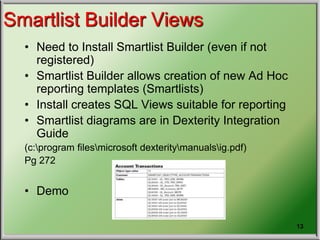
Smartlist Builder Views
• Need to Install Smartlist Builder (even if not
registered)
• Smartlist Builder allows creation of new Ad Hoc
reporting templates (Smartlists)
• Install creates SQL Views suitable for reporting
• Smartlist diagrams are in Dexterity Integration
Guide
(c:program filesmicrosoft dexteritymanualsig.pdf)
Pg 272
• Demo
Copyright © 2007 Prentice-Hall. All rights reserved
14
Desperation Tools
• SQL Script to search for Column name
across tables
• SQL Script/Stored Proc to search for a
piece of data across tables
Copyright © 2007 Prentice-Hall. All rights reserved
15
Caveat
• Modifier
– Modify a form to see tables and fields
• Pre-built SSRS files
– Use these as building blocks
• Report Writer
– Temp tables can cause problems
Copyright © 2007 Prentice-Hall. All rights reserved
16
Cliff’s Silver Bullet (one of them anyway)
SELECT sysobjects.name,
syscolumns.name
FROM syscolumns
INNER JOIN sysobjects
ON sysobjects.id = syscolumns.id
WHERE sysobjects.type = 'U'
AND sysobjects.name LIKE 'GL%'
ORDER BY sysobjects.name
Copyright © 2007 Prentice-Hall. All rights reserved
17
Additional interesting point 1
• Account numbers are made up of segments
• EG 10-40-00-0150-0200
• Table GL00100 has columns for each segment
and relates (maps) these to an internal sequential
number that is called ACTINDX which is used
internally in the database.
This is how GP cuts down the complexity of the
account numbers and still use a unique number
to access GL accounts.
ACTINDX
ACT
NUMBR_1
ACT
NUMBR_2
ACT
NUMBR_3
ACT
NUMBR_4
ACT
NUMBR_5
1 10 40 00 0010 0000
2 10 40 00 0150 0200
3 10 40 00 0150 0300
Copyright © 2007 Prentice-Hall. All rights reserved
18
Additional interesting point 2
• Also included in table GL00100 are columns for
Description and Account category
This is how it looks:
ACTDESCR ACCATNUM
Checking Acct 51
Fd 2 Stock 72
Fd 2 Stock - MVA 72
Fd 3 Stock 72
Fd 3 Stock - MVA 72
So this is how you access Account Categories and account
descriptions for reports
Copyright © 2007 Prentice-Hall. All rights reserved
19
Trial Balance
• Table GL00110 has columns for Dr and Cr and
PerdBlnc (which is the calculated net)
When you close a year the balances are recorded
in this table with a PeriodID of 0 so the 0 period
has the cumm totals from the previous period
If you do not close the previous year then you get the
cumm from the previous year as well as the current
year – so the trick is to close the previous year.
To calc a YTD, T/Bal sum the PerdBlnc for each
Account
IS YOUR LIFE
NOW CHANGED?
The End
Questions?
22
CliffB

Great Plains Tablenames

  • 1.
    Great Plains ERPSystem TABLE NAMES – THE LEGACY LINGERS - - - - - - - - - - - - - - - - - - - - - - - -
  • 2.
    Great Plains TableNames 1. Ugly Table Names 2. Legacy 3. Some Logic 4. Common Table Prefixes 5. Table Number - Range Logic 6. Dex_Row Id 7. Tools 8. Table Descriptions 9. Table Import 10. Entity Relationship Diagrams (ERD) 11. Smartlist Builder Views 12. Trial Balance
  • 3.
    Copyright © 2007Prentice-Hall. All rights reserved 3 Ugly Table Names in GP • Other Systems – Chart of Accounts • Chart, COA, Accounts – Inventory • Inventory, Inv, Inven • Great Big Pains (Panes) Plains – Chart of Accounts • GL00100, GL00105 – Inventory • IV00101, IV00102
  • 4.
    Copyright © 2007Prentice-Hall. All rights reserved 4 Legacy • Great Plains -> Microsoft Dynamics GP • GP table names go all the way back to Btrieve • Tables names are part of the legacy
  • 5.
    Copyright © 2007Prentice-Hall. All rights reserved 5 Some – only some - Logic • Plus there is some logic to the numeric ID • Dynamics DB holds system wide settings • Company DB holds company specific settings and transactions • Table names have an Alpha prefix and numeric ID (usually 5 digits) • Alpha prefix identifies the module (Example: PM=Payables Management)
  • 6.
    Copyright © 2007Prentice-Hall. All rights reserved 6 Common Table Prefixes • GL – General Ledger • PM – Payables Management • RM – Receivables Management • POP – Purchase Order Processing • SOP – Sales Order Processing • IV – Inventory • CM – Cash Management (Banking) • PA – Project Accounting
  • 7.
    Copyright © 2007Prentice-Hall. All rights reserved 7 Table Number Range Logic • ‘00000’ – Master tables contain all the permanent data about your business. Accounts, vendors, customers, items, etc. • ‘10000’ – Work tables contain unposted batches of transactions entered using windows that can be opened using the Transactions button on the toolbar. = Temporary transactions that can be changed or deleted until they are posted to an open table. • ‘20000’ – Open tables contain posted transactions for the current year, of which some may be unpaid. Information in open tables is moved to history tables when the transactions are paid. • ‘30000’ – History tables contain paid transactions, or transactions from a previous year. • ‘40000’ – Setup tables contain all the default settings and module options you’ve specified in the setup windows for each series. • ‘50000’ - Temp tables used by GP to hold temporary data.
  • 8.
    Copyright © 2007Prentice-Hall. All rights reserved 8 Tip – Dex_Row_ID • A unique identifier within a table • DOES NOT cross table boundaries - is of little or no use for reporting. • CANNOT be used to link tables
  • 9.
    Copyright © 2007Prentice-Hall. All rights reserved 9 Tools • There are different tools for figuring out the tables and fields that you need • There is no single magic tool • Start with comprehensive but slow tools and move to faster tools with experience • GP is NOT highly normalized. The application is balanced between entry and reporting. This might make reporting easier.
  • 10.
    Copyright © 2007Prentice-Hall. All rights reserved 10 Table Descriptions inside GP • Dynamics GP>>Tools>>Resource Descriptions >> Tables • Table Descriptions, Fields, Windows Available • Comprehensive but clunky and slow • Requires a GP login • Demo
  • 11.
    Copyright © 2007Prentice-Hall. All rights reserved 11 Table Import • Instructions – Open Window – Select Tools>>Integrate>>Table Import • Window opens with all the tables tied to that entry window with friendly names. • Use Table Descriptions to get SQL Names. • Demo
  • 12.
    Copyright © 2007Prentice-Hall. All rights reserved 12 Entity Relationship Diagrams (ERD) • Use SQL Server Database Diagrams • Free – comes with SQL Server • Have fun with the ERD’s, GP is a beast of an app with an ERD to match • Demo
  • 13.
    Copyright © 2007Prentice-Hall. All rights reserved 13 Smartlist Builder Views • Need to Install Smartlist Builder (even if not registered) • Smartlist Builder allows creation of new Ad Hoc reporting templates (Smartlists) • Install creates SQL Views suitable for reporting • Smartlist diagrams are in Dexterity Integration Guide (c:program filesmicrosoft dexteritymanualsig.pdf) Pg 272 • Demo
  • 14.
    Copyright © 2007Prentice-Hall. All rights reserved 14 Desperation Tools • SQL Script to search for Column name across tables • SQL Script/Stored Proc to search for a piece of data across tables
  • 15.
    Copyright © 2007Prentice-Hall. All rights reserved 15 Caveat • Modifier – Modify a form to see tables and fields • Pre-built SSRS files – Use these as building blocks • Report Writer – Temp tables can cause problems
  • 16.
    Copyright © 2007Prentice-Hall. All rights reserved 16 Cliff’s Silver Bullet (one of them anyway) SELECT sysobjects.name, syscolumns.name FROM syscolumns INNER JOIN sysobjects ON sysobjects.id = syscolumns.id WHERE sysobjects.type = 'U' AND sysobjects.name LIKE 'GL%' ORDER BY sysobjects.name
  • 17.
    Copyright © 2007Prentice-Hall. All rights reserved 17 Additional interesting point 1 • Account numbers are made up of segments • EG 10-40-00-0150-0200 • Table GL00100 has columns for each segment and relates (maps) these to an internal sequential number that is called ACTINDX which is used internally in the database. This is how GP cuts down the complexity of the account numbers and still use a unique number to access GL accounts. ACTINDX ACT NUMBR_1 ACT NUMBR_2 ACT NUMBR_3 ACT NUMBR_4 ACT NUMBR_5 1 10 40 00 0010 0000 2 10 40 00 0150 0200 3 10 40 00 0150 0300
  • 18.
    Copyright © 2007Prentice-Hall. All rights reserved 18 Additional interesting point 2 • Also included in table GL00100 are columns for Description and Account category This is how it looks: ACTDESCR ACCATNUM Checking Acct 51 Fd 2 Stock 72 Fd 2 Stock - MVA 72 Fd 3 Stock 72 Fd 3 Stock - MVA 72 So this is how you access Account Categories and account descriptions for reports
  • 19.
    Copyright © 2007Prentice-Hall. All rights reserved 19 Trial Balance • Table GL00110 has columns for Dr and Cr and PerdBlnc (which is the calculated net) When you close a year the balances are recorded in this table with a PeriodID of 0 so the 0 period has the cumm totals from the previous period If you do not close the previous year then you get the cumm from the previous year as well as the current year – so the trick is to close the previous year. To calc a YTD, T/Bal sum the PerdBlnc for each Account
  • 20.
    IS YOUR LIFE NOWCHANGED? The End
  • 21.
  • 22.

Editor's Notes

  • #2 Please note: For IFRS the headings are Grey background for US GAAP comments and comparisons, headings are Blue background and US GAAP will appear in the heading
  • #8 If you change the 0xxxx tables you will not affect balances because they only contain informational and not transaction values 1XXXX tables can be changed but ensure that the transaction still balances 2XXXX, 3XXXX NEVER CHANGE 4XXXX setup information – change through screens 5XXX are only temp tables to be used during processing as work tables so hold no data
  • #9 The Dex_Row_ID is used to ensure uniqueness (rather than the data) It is of no use whatsoever for reporting and is NOT a key (cannot be used to join tables)
  • #10 No Silver Bullet – except Cliff’s Silver Bullet – will tell you later
  • #11 Demo’s open: Dynamics GP with Table Import DynamicAccounting.net Excel Sheet DDB ERD (diagrams) from SDK SQL Management Studio (Smartlist Builder Views)
  • #13 You can choose tables to diagram but you might find you have you know what tables to include – which sorta makes it somewhat redundant
  • #14 Because Smartlists contain only 1 table you might have to create a view an use the view as the basis for a Smartlist report
  • #15 You can use an SQL query to research the DB to find the keys and which tables contain the required fields Build a warchest of queries – the underlying tables tend to never change structure
  • #17 Here is some code that I wrote back in the 90’s – it returns a useful list of tables and their columns: SELECT sysobjects.name, syscolumns.name FROM syscolumns INNER JOIN sysobjects ON sysobjects.id = syscolumns.id WHERE sysobjects.type = 'U' AND sysobjects.name LIKE 'GL%' ORDER BY sysobjects.name
  • #20 Before you close the year there is no PeriodID = 0 Caveat: When you Post a JE to a closed year the Ret Inc is amended but only for 1 previous year. Closed period bals are stored on Table GL10111 Caveat: The default Trial Balance report in GP uses this logic for generating a Trial Balnce THEREFORE you have to close the previous period to get correct Profit/Loss totals
  • #21 Remember Life is a Journey not a Destination