Fundamentals of Multimedia
Lecture 2
Graphics & Image Data Representation
Mahmoud El-Gayyar
elgayyar@ci.suez.edu.eg
Mahmoud El-Gayyar / Fundamentals of Multimedia 3
 Black & white imags
 1 bit images
 8-bit gray-level images
 Image histogram
 Dithering
 Color imags
 24-bit color images
 8-bit color images
 Popular File Formats
 GIF (Graphics Interchange Format)
 JPEG (Joint Photography Expert Group)
 Others
Outline
Mahmoud El-Gayyar / Fundamentals of Multimedia 4
 Black & white imags
 1 bit images
 8-bit gray-level images
 Dithering
 Color imags
 24-bit color images
 8-bit color images
 Popular File Formats
 GIF (Graphics Interchange Format)
 JPEG (Joint Photography Expert Group)
 Others
Outline
Mahmoud El-Gayyar / Fundamentals of Multimedia 5
Images can Represent?!
 Photographs
 Paintings
 Drawings
 Symbols
 Corporate logos
 Flags
 Maps
 Diagrams
 Graphs
 ...
Mahmoud El-Gayyar / Fundamentals of Multimedia 6
Image Representation
 Bit map techniques
 Pixel-by-pixel representation of the color : short for “picture element”
 Pixel: the smallest discrete component of an image on the screen
 Wide range of colors and shades in complex images
 Vector techniques
 comprise mathematical representations
 Scalable
 Small file size
Mahmoud El-Gayyar / Fundamentals of Multimedia 7
Digitization
 An image is broken into thousands of pixels.
 An image stored in this way is called a bitmap.
 In color images Pixels are represented by three numbers:
 Red 0-255
 Blue 0-255
 Green 0-255
Mahmoud El-Gayyar / Fundamentals of Multimedia 8
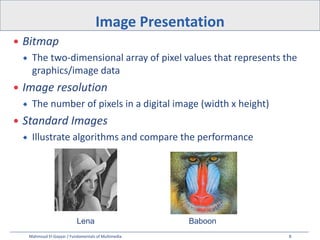
 Bitmap
 The two-dimensional array of pixel values that represents the
graphics/image data
 Image resolution
 The number of pixels in a digital image (width x height)
 Standard Images
 Illustrate algorithms and compare the performance
Image Presentation
Lena Baboon
Mahmoud El-Gayyar / Fundamentals of Multimedia 9
 Frame buffer:
 Hardware used to store bitmap.
 A graphics card is used for this purpose.
 but if not enough video card memory is available then the data
has to be shifted around in RAM for display.
 File size = ?
 width x height x #ofBytesPerPixel
Image Presentation
Mahmoud El-Gayyar / Fundamentals of Multimedia 10
 Each pixel is stored as a single bit (0 or 1), so also referred to as binary image.
 Such an image is also called a 1-bit monochrome image since it contains no
color.
 For pictures containing simple graphics / text
1-bit Images
Mahmoud El-Gayyar / Fundamentals of Multimedia 11
 File size calculation
 Resolution: 640 x 480
 File size = 640 x 480 x 1/8 = 38.4 kB
1-bit Images
Mahmoud El-Gayyar / Fundamentals of Multimedia 12
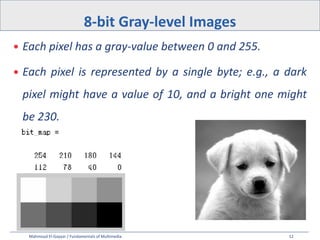
 Each pixel has a gray-value between 0 and 255.
 Each pixel is represented by a single byte; e.g., a dark
pixel might have a value of 10, and a bright one might
be 230.
8-bit Gray-level Images
Mahmoud El-Gayyar / Fundamentals of Multimedia 13
 File size calculation
 Resolution: 640 x 480
 File size = 640 x 480 x 1 = 300 kB
8-bit Gray-level Images
Mahmoud El-Gayyar / Fundamentals of Multimedia 14
Image Histogram
36
36
22
Image 16x14 = 224 pixels
130
0 1 2 3 level
pixels
Mahmoud El-Gayyar / Fundamentals of Multimedia 15
Histogram Equalization
Mahmoud El-Gayyar / Fundamentals of Multimedia 16
 Black & white imags
 1 bit images
 8-bit gray-level images
 Dithering
 Color imags
 24-bit color images
 8-bit color images
 Popular File Formats
 GIF (Graphics Interchange Format)
 JPEG (Joint Photography Expert Group)
 Others
Outline
Mahmoud El-Gayyar / Fundamentals of Multimedia 17
 Dot is the smallest discrete component of an image on
the paper
 Dot is generally much smaller than pixel
Dot & Pixel
Mahmoud El-Gayyar / Fundamentals of Multimedia 18
 When an image is printed, the basic strategy of
dithering is used,
 print multi-level images (8) on 2-level (1-bit) printers (laser).
 Dithering is used to calculate patterns of dots such that
values from 0 to 255 correspond to patterns that are
more and more filled at darker pixel values, for printing
on a 1-bit printer.
Dithering
Mahmoud El-Gayyar / Fundamentals of Multimedia 19
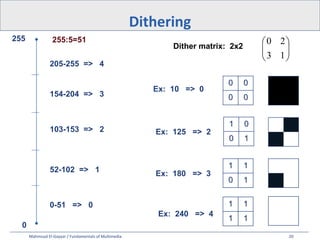
 The main strategy is to replace a pixel value by a larger pattern, say 2×2 or
4×4, such that the number of printed dots approximates the varying-sized disks
of ink used in analog, in halftone printing (e.g., for newspaper photos).
 Half-tone printing is an analog process that uses smaller or larger filled circles of
black ink to represent shading, for newspaper printing.
Dithering
Mahmoud El-Gayyar / Fundamentals of Multimedia 20
Dithering
0
255 255:5=51
0-51 => 0
52-102 => 1
103-153 => 2
154-204 => 3
205-255 => 4








1
3
2
0
Ex: 125 => 2
Dither matrix: 2x2
Ex: 180 => 3
Ex: 10 => 0
Ex: 240 => 4
0 0
0 0
1 0
0 1
1 1
0 1
1 1
1 1
Mahmoud El-Gayyar / Fundamentals of Multimedia 21
 Problem:
 Image size is much larger: since replacing each pixel by a 2×2
array of dots, makes an image 4 times as large.
 In case of a 4×4 dither matrix, the image is 16 times as large.
Dithering
Mahmoud El-Gayyar / Fundamentals of Multimedia 22
 Solution:
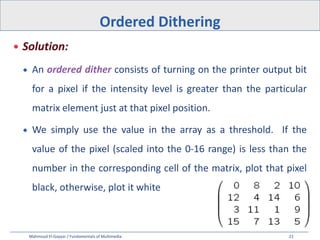
 An ordered dither consists of turning on the printer output bit
for a pixel if the intensity level is greater than the particular
matrix element just at that pixel position.
 We simply use the value in the array as a threshold. If the
value of the pixel (scaled into the 0-16 range) is less than the
number in the corresponding cell of the matrix, plot that pixel
black, otherwise, plot it white
Ordered Dithering
Mahmoud El-Gayyar / Fundamentals of Multimedia 23
Dithering
a grayscale image
of “Lena".
The ordered-
dither version
a detail of Lena's
right eye
Mahmoud El-Gayyar / Fundamentals of Multimedia 24
 Black & white imags
 1 bit images
 8-bit gray-level images
 Dithering
 Color imags
 24-bit color images
 8-bit color images
 Popular File Formats
 GIF (Graphics Interchange Format)
 JPEG (Joint Photography Expert Group)
 Others
Outline
Mahmoud El-Gayyar / Fundamentals of Multimedia 25
 The most common data types for graphics and image file formats
- 24-bit color and 8-bit color.
 Most image formats incorporate some variation of a compression
technique due to the large storage size of image files.
Compression techniques can be classified into either lossless or
lossy.
Color Image Data Types
Mahmoud El-Gayyar / Fundamentals of Multimedia 26
 In a color 24-bit image, each pixel is represented by three bytes,
usually representing RGB.
 This format supports 256x256x256 possible combined colors, or a total of
16,777,216 possible colors.
 Storage penalty: 24-bit color image would require 921.6 kB of storage
without any compression (640x480).
 An important point: many 24-bit color images are actually stored
as 32-bit images, with the extra byte of data for each pixel used
to store an alpha value representing special effect information
(e.g., transparency).
24-bit Color Images
Mahmoud El-Gayyar / Fundamentals of Multimedia 27
Histogram of Color Images
Mahmoud El-Gayyar / Fundamentals of Multimedia 28
 Many systems can make use of
8 bits of color information (the
so-called “256 colors") in
producing a screen image.
 Such image files use the
concept of a Color Lookup
Table to store color
information.
8-bit Color Images
Mahmoud El-Gayyar / Fundamentals of Multimedia 29
8-bit Color Images
Great savings in space:
o 640x480 8-bit color image : 300 kB
o Color image: 921.6 kB
Mahmoud El-Gayyar / Fundamentals of Multimedia 30
 Straightforward way : divide the RGB cube into equal
slices in each dimension.
 Humans are more sensitive to R and G than to B,
 Shrink the R range and G range 0..255 into the 3-bit
range 0..7 and
 shrink the B range down to the 2-bit range 0..3, thus
making up a total of 8 bits.
 So that 8 * 8 * 4 = 256 colors are uniformly spread over the
color space are available.
How to Devise a Color Look-up Table
Mahmoud El-Gayyar / Fundamentals of Multimedia 31
 Black & white imags
 1 bit images
 8-bit gray-level images
 Dithering
 Color imags
 24-bit color images
 8-bit color images
 Popular File Formats
 GIF (Graphics Interchange Format)
 JPEG (Joint Photography Expert Group)
 Others
Outline
Mahmoud El-Gayyar / Fundamentals of Multimedia 32
 8-bit GIF: one of the most important format because of
its historical connection to the WWW and HTML markup
language as the first image type recognized by net
browsers.
 JPEG: currently the most important common file format.
Popular File Formats
Mahmoud El-Gayyar / Fundamentals of Multimedia 33
 Originally developed for platform-independent image exchange
via modem
 Limited to 8-bit (256) color images
 best suited for images with few distinctive colors (e.g., graphics or drawing)
 Lossless compression using the Lempel-Ziv-Welch (LZW)
algorithm
 Well suited for image sequences (can have multiple images in a
file)
GIF (Graphics Interchange Format)
Mahmoud El-Gayyar / Fundamentals of Multimedia 34
GIF
GIF Signature (6 Bytes)
GIF87a
attributes that belong to every
image in the file. (screen
height, width, and background
color)
termination character 0x3B
hex or ';'
Mahmoud El-Gayyar / Fundamentals of Multimedia 35
 JPEG: The most important current standard for image compression.
 The human vision system has some specific limitations and JPEG takes
advantage of these to achieve high rates of compression.
 JPEG allows the user to set a desired level of quality, or compression ratio
(input divided by output).
 Image, with a quality factor Q=10%,
 1.5% of the original size.
 Q=75%
 5.6% of the original, whereas a GIF version of this image compresses down
to 23.0% of uncompressed image size.
JPEG (Joint Photographic Experts Group)
Mahmoud El-Gayyar / Fundamentals of Multimedia 36
 Postscript is an important language for typesetting, and many high-end
printers have a Postscript interpreter built into them.
 Postscript is a vector-based picture language, rather than pixel-based:
page element definitions are essentially in terms of vectors.
 Postscript includes text as well as vector/structured graphics.
 Several popular graphics programs, such as Illustrator and FreeHand, use PostScript.
 Postscript language itself does not provide compression; (stored as ASCII).
 Another text + figures language.
 Adobe Systems Inc. includes LZW compression in its Portable Document
Format (PDF) file format.
PS &PDF (Portable Document Format)
Mahmoud El-Gayyar / Fundamentals of Multimedia 37
 The major system standard graphics file format for
Microsoft Windows, used in Microsoft Paint and other
programs.
 It makes use of run-length encoding compression
 can fairly efficiently store 24-bit bitmap images
BMP
Mahmoud El-Gayyar / Fundamentals of Multimedia 38
 Black & white imags
 1 bit images, 8-bit gray-level images
 Image histogram
 Dithering
 Printing (ordered dithering)
 Color imags
 24-bit color images
 Quantization and compression (8-bit color images)
 Color Tables
 Popular File Formats
 GIF , JPEG , PDF, BMP
Summary

Graphics and image data representtion l3

  • 1.
    Fundamentals of Multimedia Lecture2 Graphics & Image Data Representation Mahmoud El-Gayyar elgayyar@ci.suez.edu.eg
  • 2.
    Mahmoud El-Gayyar /Fundamentals of Multimedia 3  Black & white imags  1 bit images  8-bit gray-level images  Image histogram  Dithering  Color imags  24-bit color images  8-bit color images  Popular File Formats  GIF (Graphics Interchange Format)  JPEG (Joint Photography Expert Group)  Others Outline
  • 3.
    Mahmoud El-Gayyar /Fundamentals of Multimedia 4  Black & white imags  1 bit images  8-bit gray-level images  Dithering  Color imags  24-bit color images  8-bit color images  Popular File Formats  GIF (Graphics Interchange Format)  JPEG (Joint Photography Expert Group)  Others Outline
  • 4.
    Mahmoud El-Gayyar /Fundamentals of Multimedia 5 Images can Represent?!  Photographs  Paintings  Drawings  Symbols  Corporate logos  Flags  Maps  Diagrams  Graphs  ...
  • 5.
    Mahmoud El-Gayyar /Fundamentals of Multimedia 6 Image Representation  Bit map techniques  Pixel-by-pixel representation of the color : short for “picture element”  Pixel: the smallest discrete component of an image on the screen  Wide range of colors and shades in complex images  Vector techniques  comprise mathematical representations  Scalable  Small file size
  • 6.
    Mahmoud El-Gayyar /Fundamentals of Multimedia 7 Digitization  An image is broken into thousands of pixels.  An image stored in this way is called a bitmap.  In color images Pixels are represented by three numbers:  Red 0-255  Blue 0-255  Green 0-255
  • 7.
    Mahmoud El-Gayyar /Fundamentals of Multimedia 8  Bitmap  The two-dimensional array of pixel values that represents the graphics/image data  Image resolution  The number of pixels in a digital image (width x height)  Standard Images  Illustrate algorithms and compare the performance Image Presentation Lena Baboon
  • 8.
    Mahmoud El-Gayyar /Fundamentals of Multimedia 9  Frame buffer:  Hardware used to store bitmap.  A graphics card is used for this purpose.  but if not enough video card memory is available then the data has to be shifted around in RAM for display.  File size = ?  width x height x #ofBytesPerPixel Image Presentation
  • 9.
    Mahmoud El-Gayyar /Fundamentals of Multimedia 10  Each pixel is stored as a single bit (0 or 1), so also referred to as binary image.  Such an image is also called a 1-bit monochrome image since it contains no color.  For pictures containing simple graphics / text 1-bit Images
  • 10.
    Mahmoud El-Gayyar /Fundamentals of Multimedia 11  File size calculation  Resolution: 640 x 480  File size = 640 x 480 x 1/8 = 38.4 kB 1-bit Images
  • 11.
    Mahmoud El-Gayyar /Fundamentals of Multimedia 12  Each pixel has a gray-value between 0 and 255.  Each pixel is represented by a single byte; e.g., a dark pixel might have a value of 10, and a bright one might be 230. 8-bit Gray-level Images
  • 12.
    Mahmoud El-Gayyar /Fundamentals of Multimedia 13  File size calculation  Resolution: 640 x 480  File size = 640 x 480 x 1 = 300 kB 8-bit Gray-level Images
  • 13.
    Mahmoud El-Gayyar /Fundamentals of Multimedia 14 Image Histogram 36 36 22 Image 16x14 = 224 pixels 130 0 1 2 3 level pixels
  • 14.
    Mahmoud El-Gayyar /Fundamentals of Multimedia 15 Histogram Equalization
  • 15.
    Mahmoud El-Gayyar /Fundamentals of Multimedia 16  Black & white imags  1 bit images  8-bit gray-level images  Dithering  Color imags  24-bit color images  8-bit color images  Popular File Formats  GIF (Graphics Interchange Format)  JPEG (Joint Photography Expert Group)  Others Outline
  • 16.
    Mahmoud El-Gayyar /Fundamentals of Multimedia 17  Dot is the smallest discrete component of an image on the paper  Dot is generally much smaller than pixel Dot & Pixel
  • 17.
    Mahmoud El-Gayyar /Fundamentals of Multimedia 18  When an image is printed, the basic strategy of dithering is used,  print multi-level images (8) on 2-level (1-bit) printers (laser).  Dithering is used to calculate patterns of dots such that values from 0 to 255 correspond to patterns that are more and more filled at darker pixel values, for printing on a 1-bit printer. Dithering
  • 18.
    Mahmoud El-Gayyar /Fundamentals of Multimedia 19  The main strategy is to replace a pixel value by a larger pattern, say 2×2 or 4×4, such that the number of printed dots approximates the varying-sized disks of ink used in analog, in halftone printing (e.g., for newspaper photos).  Half-tone printing is an analog process that uses smaller or larger filled circles of black ink to represent shading, for newspaper printing. Dithering
  • 19.
    Mahmoud El-Gayyar /Fundamentals of Multimedia 20 Dithering 0 255 255:5=51 0-51 => 0 52-102 => 1 103-153 => 2 154-204 => 3 205-255 => 4         1 3 2 0 Ex: 125 => 2 Dither matrix: 2x2 Ex: 180 => 3 Ex: 10 => 0 Ex: 240 => 4 0 0 0 0 1 0 0 1 1 1 0 1 1 1 1 1
  • 20.
    Mahmoud El-Gayyar /Fundamentals of Multimedia 21  Problem:  Image size is much larger: since replacing each pixel by a 2×2 array of dots, makes an image 4 times as large.  In case of a 4×4 dither matrix, the image is 16 times as large. Dithering
  • 21.
    Mahmoud El-Gayyar /Fundamentals of Multimedia 22  Solution:  An ordered dither consists of turning on the printer output bit for a pixel if the intensity level is greater than the particular matrix element just at that pixel position.  We simply use the value in the array as a threshold. If the value of the pixel (scaled into the 0-16 range) is less than the number in the corresponding cell of the matrix, plot that pixel black, otherwise, plot it white Ordered Dithering
  • 22.
    Mahmoud El-Gayyar /Fundamentals of Multimedia 23 Dithering a grayscale image of “Lena". The ordered- dither version a detail of Lena's right eye
  • 23.
    Mahmoud El-Gayyar /Fundamentals of Multimedia 24  Black & white imags  1 bit images  8-bit gray-level images  Dithering  Color imags  24-bit color images  8-bit color images  Popular File Formats  GIF (Graphics Interchange Format)  JPEG (Joint Photography Expert Group)  Others Outline
  • 24.
    Mahmoud El-Gayyar /Fundamentals of Multimedia 25  The most common data types for graphics and image file formats - 24-bit color and 8-bit color.  Most image formats incorporate some variation of a compression technique due to the large storage size of image files. Compression techniques can be classified into either lossless or lossy. Color Image Data Types
  • 25.
    Mahmoud El-Gayyar /Fundamentals of Multimedia 26  In a color 24-bit image, each pixel is represented by three bytes, usually representing RGB.  This format supports 256x256x256 possible combined colors, or a total of 16,777,216 possible colors.  Storage penalty: 24-bit color image would require 921.6 kB of storage without any compression (640x480).  An important point: many 24-bit color images are actually stored as 32-bit images, with the extra byte of data for each pixel used to store an alpha value representing special effect information (e.g., transparency). 24-bit Color Images
  • 26.
    Mahmoud El-Gayyar /Fundamentals of Multimedia 27 Histogram of Color Images
  • 27.
    Mahmoud El-Gayyar /Fundamentals of Multimedia 28  Many systems can make use of 8 bits of color information (the so-called “256 colors") in producing a screen image.  Such image files use the concept of a Color Lookup Table to store color information. 8-bit Color Images
  • 28.
    Mahmoud El-Gayyar /Fundamentals of Multimedia 29 8-bit Color Images Great savings in space: o 640x480 8-bit color image : 300 kB o Color image: 921.6 kB
  • 29.
    Mahmoud El-Gayyar /Fundamentals of Multimedia 30  Straightforward way : divide the RGB cube into equal slices in each dimension.  Humans are more sensitive to R and G than to B,  Shrink the R range and G range 0..255 into the 3-bit range 0..7 and  shrink the B range down to the 2-bit range 0..3, thus making up a total of 8 bits.  So that 8 * 8 * 4 = 256 colors are uniformly spread over the color space are available. How to Devise a Color Look-up Table
  • 30.
    Mahmoud El-Gayyar /Fundamentals of Multimedia 31  Black & white imags  1 bit images  8-bit gray-level images  Dithering  Color imags  24-bit color images  8-bit color images  Popular File Formats  GIF (Graphics Interchange Format)  JPEG (Joint Photography Expert Group)  Others Outline
  • 31.
    Mahmoud El-Gayyar /Fundamentals of Multimedia 32  8-bit GIF: one of the most important format because of its historical connection to the WWW and HTML markup language as the first image type recognized by net browsers.  JPEG: currently the most important common file format. Popular File Formats
  • 32.
    Mahmoud El-Gayyar /Fundamentals of Multimedia 33  Originally developed for platform-independent image exchange via modem  Limited to 8-bit (256) color images  best suited for images with few distinctive colors (e.g., graphics or drawing)  Lossless compression using the Lempel-Ziv-Welch (LZW) algorithm  Well suited for image sequences (can have multiple images in a file) GIF (Graphics Interchange Format)
  • 33.
    Mahmoud El-Gayyar /Fundamentals of Multimedia 34 GIF GIF Signature (6 Bytes) GIF87a attributes that belong to every image in the file. (screen height, width, and background color) termination character 0x3B hex or ';'
  • 34.
    Mahmoud El-Gayyar /Fundamentals of Multimedia 35  JPEG: The most important current standard for image compression.  The human vision system has some specific limitations and JPEG takes advantage of these to achieve high rates of compression.  JPEG allows the user to set a desired level of quality, or compression ratio (input divided by output).  Image, with a quality factor Q=10%,  1.5% of the original size.  Q=75%  5.6% of the original, whereas a GIF version of this image compresses down to 23.0% of uncompressed image size. JPEG (Joint Photographic Experts Group)
  • 35.
    Mahmoud El-Gayyar /Fundamentals of Multimedia 36  Postscript is an important language for typesetting, and many high-end printers have a Postscript interpreter built into them.  Postscript is a vector-based picture language, rather than pixel-based: page element definitions are essentially in terms of vectors.  Postscript includes text as well as vector/structured graphics.  Several popular graphics programs, such as Illustrator and FreeHand, use PostScript.  Postscript language itself does not provide compression; (stored as ASCII).  Another text + figures language.  Adobe Systems Inc. includes LZW compression in its Portable Document Format (PDF) file format. PS &PDF (Portable Document Format)
  • 36.
    Mahmoud El-Gayyar /Fundamentals of Multimedia 37  The major system standard graphics file format for Microsoft Windows, used in Microsoft Paint and other programs.  It makes use of run-length encoding compression  can fairly efficiently store 24-bit bitmap images BMP
  • 37.
    Mahmoud El-Gayyar /Fundamentals of Multimedia 38  Black & white imags  1 bit images, 8-bit gray-level images  Image histogram  Dithering  Printing (ordered dithering)  Color imags  24-bit color images  Quantization and compression (8-bit color images)  Color Tables  Popular File Formats  GIF , JPEG , PDF, BMP Summary