Lesson 4: Basic Design PrinciplesLines, Patterns and TexturesM.5 Graphic DesignAjarn Jamie
What are the basics?Basic design principles means:The building blocks of composition.ShapesLinesMassTextureFontsColorsImagesTextPhotosBalance and harmony
LinesAdjectives of lines:StraightCurvedThickDottedHorizontal Vertical
Using LinesOrganize, connect, separateCreate movementProvide textureConvey a mood or emotionDefine shapesProvide emphasisProvide a framework
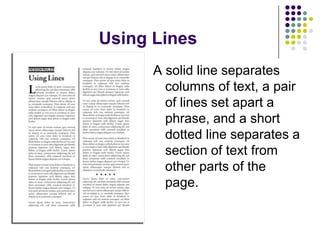
Using LinesA solid line separates columns of text, a pair of lines set apart a phrase, and a short dotted line separates a section of text from other parts of the page.
PatternsA pattern is something that repeats in a design.In some cases it can be lines.Patterns can be:	Repetitive but STILL interesting!
Patterns: Kristen NikoseyKristen Nikosey is a graphic designer whose work has been hugely influenced by textile design, pattern designs and impressionist paintings. Kristen works both traditionally in acrylic on canvas, as well as in a digital format utilizing software such as Illustrator and Photoshop.
TexturesYou can use texture in:Type of paperVisual designType of printingWe are going to focus on visual design.
Texture in Photographs
Texture in Photo Editing Software
Texture in Actual Texture
Texture in Line or Shape
Photoshop TutorialToday, we are going to talk about:CroppingCreating:ShapesLinesPatternsTextures
Saving FilesThe file format for Photoshop is .psdSaves layersSaves all information about the fileYou can open it up and keep working on a projectYou usually want to save your image as a:.jpg file (good for photographs).gif file (good if you need a small image; use if you want a transparent background)
ToolsYou need tools to make changes to an image:Marquee toolsMove toolLasso toolMagic wand toolCrop toolSlice toolsCorrection tools…etc.
FiltersFilters are different ways to alter an image:Make an image look like painted artBlur an imageAdd light to an imageAdd texture to an image
CroppingDefinition: to select part of a shot in order to take out part of a picture.
The focus is nowon the castle.
What do you thinkof the balance?
What about here?Where is thefocus?
Cropping and Filter toolsGo online and download a picture of people to your computerOpen PhotoshopWatch my example as I go through….First – Open Photoshop
Filter GalleryFilter – Filter GalleryYou can adjust the zoom of the picture, and edit the settings for each filter in the filter gallery.
Task TodaySelect a photograph from the internet, or use one of your own. Download the photograph to your computer.Crop if necessary. Then use filters to modify your picture. Add an interesting title to your picture.The picture should be interesting and tell a story. I want you to Photoshop a picture, then you must upload it to the course website. Tell the rest of the class what you changed about the pictures, why, and how the picture makes you feel.Please make sure the image is .jpg or .gif format.

Graphic Design - Lines

  • 1.
    Lesson 4: BasicDesign PrinciplesLines, Patterns and TexturesM.5 Graphic DesignAjarn Jamie
  • 2.
    What are thebasics?Basic design principles means:The building blocks of composition.ShapesLinesMassTextureFontsColorsImagesTextPhotosBalance and harmony
  • 3.
  • 4.
    Using LinesOrganize, connect,separateCreate movementProvide textureConvey a mood or emotionDefine shapesProvide emphasisProvide a framework
  • 5.
    Using LinesA solidline separates columns of text, a pair of lines set apart a phrase, and a short dotted line separates a section of text from other parts of the page.
  • 6.
    PatternsA pattern issomething that repeats in a design.In some cases it can be lines.Patterns can be: Repetitive but STILL interesting!
  • 7.
    Patterns: Kristen NikoseyKristenNikosey is a graphic designer whose work has been hugely influenced by textile design, pattern designs and impressionist paintings. Kristen works both traditionally in acrylic on canvas, as well as in a digital format utilizing software such as Illustrator and Photoshop.
  • 8.
    TexturesYou can usetexture in:Type of paperVisual designType of printingWe are going to focus on visual design.
  • 9.
  • 10.
    Texture in PhotoEditing Software
  • 11.
  • 12.
  • 13.
    Photoshop TutorialToday, weare going to talk about:CroppingCreating:ShapesLinesPatternsTextures
  • 14.
    Saving FilesThe fileformat for Photoshop is .psdSaves layersSaves all information about the fileYou can open it up and keep working on a projectYou usually want to save your image as a:.jpg file (good for photographs).gif file (good if you need a small image; use if you want a transparent background)
  • 15.
    ToolsYou need toolsto make changes to an image:Marquee toolsMove toolLasso toolMagic wand toolCrop toolSlice toolsCorrection tools…etc.
  • 16.
    FiltersFilters are differentways to alter an image:Make an image look like painted artBlur an imageAdd light to an imageAdd texture to an image
  • 17.
    CroppingDefinition: to selectpart of a shot in order to take out part of a picture.
  • 18.
    The focus isnowon the castle.
  • 19.
    What do youthinkof the balance?
  • 20.
  • 21.
    Cropping and FiltertoolsGo online and download a picture of people to your computerOpen PhotoshopWatch my example as I go through….First – Open Photoshop
  • 22.
    Filter GalleryFilter –Filter GalleryYou can adjust the zoom of the picture, and edit the settings for each filter in the filter gallery.
  • 23.
    Task TodaySelect aphotograph from the internet, or use one of your own. Download the photograph to your computer.Crop if necessary. Then use filters to modify your picture. Add an interesting title to your picture.The picture should be interesting and tell a story. I want you to Photoshop a picture, then you must upload it to the course website. Tell the rest of the class what you changed about the pictures, why, and how the picture makes you feel.Please make sure the image is .jpg or .gif format.