Google+ 
for 
Real Estate Agents 
Why & How-To Use Google+
Why Are You Here?
Why are you here? 
Real estate agents struggle with online marketing & gaining 
google ranking. 
Google+ is the second most visited social site with the 
majority of uploads being images. 
AND Google+ is highly correlated with search engine 
results. 
Today… we will learn the How & Why to use Google+.
THE GOAL 
Eyes on your website (Online Presence) 
Search Engine Results
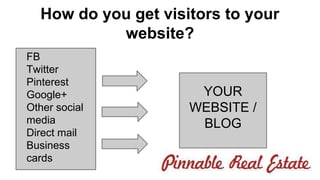
How do you get visitors to your 
website? 
YOUR 
WEBSITE / 
BLOG 
FB 
Twitter 
Pinterest 
Google+ 
Other social 
media 
Direct mail 
Business 
cards
Why Do You Need Google+? 
Online Visibility 
SEO Benefit
Google+ 
Social media platform owned by google (this is 
why YOU should care) 
Today: 
● Google+ (Why & How)
What this is about 
Perfect for agents looking to increase your: 
● following 
● transactions 
● web traffic 
● search results (in google)
Who is this for? 
● Top Producers 
● Buyer’s Agents 
● Listing Agents 
● Mortgage Professionals
Social Media (Google+) isn’t going 
anywhere 
● It’s GOOGLE! 
● Once you add your link to google+ it is 
instantly indexed in google 
● Google+ has 540 million active monthly 
users 
● 1 billion registered users 
● 800,000 users join monthly
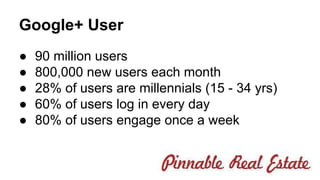
Google+ User 
● 90 million users 
● 800,000 new users each month 
● 28% of users are millennials (15 - 34 yrs) 
● 60% of users log in every day 
● 80% of users engage once a week
Benefits of Google+ for You 
the Real Estate Agent 
1. Increase your search results 
2. Have your content shared (by others) 
3. Grow your following
About me 
Real Estate Broker from Scottsdale, AZ. 
Worked Short Sales hard for 5 years. 
Author of Pinnable Real Estate 
Tested, tested & tested some more. 
I love Pinterest! My other social media site is 
google+ (because it has to be)
Pinnable Real Estate - the book
The Challenge - Using Google+ 
Are you avoiding social media / internet 
marketing? (google+) 
1. Do you think Google+ is a waste of time? 
2. Do you think Google+ is a fad? 
3. Do you think Google+ is hard?
Web Traffic = More Leads 
What other options do you have for leads?
Now… You aren’t using Google+ 
● Most REALTORS I meet don’t know how to 
get visitors to their site. 
● 997,148 Realtors in the US - May of 2013 
(NAR) 
● 15,000 Realtors on Google+ (my count) 
the goal: 
Use Google+ to increase your search results / 
online brand
Shift in Thinking | Commit to Online 
Marketing 
● Commit to 1-2 social sites 
● Commit to your Website 
● Commit to always improving your brand
Today: Steps Necessary 
Overview 
1. Preview Google+ 
2. Your Profile 
3. Circles 
4. Communities 
5. Hangouts (briefly)
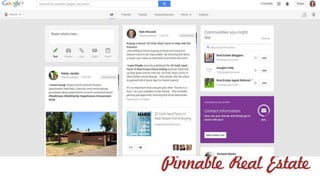
Google+ Basics 
Let’s go to Google+
What to Share 
● Images 
● Other’s links 
● Your Ideas (articles, links, small tid bits) 
● Educational Information 
○ Market updates 
○ Area info 
○ Your interests
Your Ideas to Post to Google+? 
Categories (same as in Pinterest): 
● Your Interests 
● Real Estate - Direct (Screams “i sell r.e.) 
● Home related (i.e. home decor, storage, etc) 
● Community (Scottsdale, Mesa, Gilbert)
What to do on Google+ 
● Think of it as a magazine 
● Not all content has to be yours 
● Sharing is key, share other’s links, articles 
○ Goal: Educating & Entertaining Your Following 
● Interact with your followers & communities 
○ +1 comments, +people
Your Profile 
● Name 
● Links 
● Social links 
● Information about yourself 
● Cover photo & photo
Circles 
● Categorize groups of people 
○ Real Estate Bloggers 
○ Friends 
○ Family 
○ Leads 
○ Etc
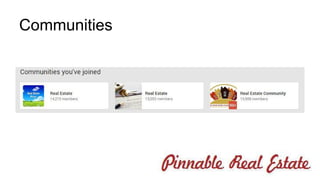
Communities
Your Blog Cycle 
4 Topics for your blog 
Ideas: 
1. Real estate in your city 
2. Home decor 
3. Home Storage 
4. Your interests 
5. Your community
What to do 
● Choose blog categories 
● Blog regularly (1x week) 
● Use Keywords 
● Post blogs to Google+, Pinterest, FB 
● Be engaging (comment in the communities, 
post to the communities)
Your Site - Where are you sending 
traffic 
Options: 
● Self Hosted Blog 
● Other Blog 
● Google+ Page 
● FB profile 
● Other mini-blogs
Your Site - Things to Consider 
1. What do you want your potential client to see 
when they click your pin? 
2. Do you want to own where you are sending 
potential clients? 
3. What is the next step when they get there?
Resources 
● Pinnable Real Estate - Amazon.com 
● Follow us on Pinterest (Pinterest for real 
estate) & (Charlie Allred) 
● Follow me on Google+: google. 
com/+CharlotteAllred 
● If you’re local, join the monthly mastermind 
(email me at charlie@srephoenix.com) 
● 5 week Pinnable Training
Q & A 
www.charlieallred.com

Google+ for real estate agents

  • 1.
    Google+ for RealEstate Agents Why & How-To Use Google+
  • 2.
  • 3.
    Why are youhere? Real estate agents struggle with online marketing & gaining google ranking. Google+ is the second most visited social site with the majority of uploads being images. AND Google+ is highly correlated with search engine results. Today… we will learn the How & Why to use Google+.
  • 4.
    THE GOAL Eyeson your website (Online Presence) Search Engine Results
  • 5.
    How do youget visitors to your website? YOUR WEBSITE / BLOG FB Twitter Pinterest Google+ Other social media Direct mail Business cards
  • 6.
    Why Do YouNeed Google+? Online Visibility SEO Benefit
  • 7.
    Google+ Social mediaplatform owned by google (this is why YOU should care) Today: ● Google+ (Why & How)
  • 8.
    What this isabout Perfect for agents looking to increase your: ● following ● transactions ● web traffic ● search results (in google)
  • 9.
    Who is thisfor? ● Top Producers ● Buyer’s Agents ● Listing Agents ● Mortgage Professionals
  • 10.
    Social Media (Google+)isn’t going anywhere ● It’s GOOGLE! ● Once you add your link to google+ it is instantly indexed in google ● Google+ has 540 million active monthly users ● 1 billion registered users ● 800,000 users join monthly
  • 11.
    Google+ User ●90 million users ● 800,000 new users each month ● 28% of users are millennials (15 - 34 yrs) ● 60% of users log in every day ● 80% of users engage once a week
  • 12.
    Benefits of Google+for You the Real Estate Agent 1. Increase your search results 2. Have your content shared (by others) 3. Grow your following
  • 13.
    About me RealEstate Broker from Scottsdale, AZ. Worked Short Sales hard for 5 years. Author of Pinnable Real Estate Tested, tested & tested some more. I love Pinterest! My other social media site is google+ (because it has to be)
  • 14.
  • 15.
    The Challenge -Using Google+ Are you avoiding social media / internet marketing? (google+) 1. Do you think Google+ is a waste of time? 2. Do you think Google+ is a fad? 3. Do you think Google+ is hard?
  • 16.
    Web Traffic =More Leads What other options do you have for leads?
  • 17.
    Now… You aren’tusing Google+ ● Most REALTORS I meet don’t know how to get visitors to their site. ● 997,148 Realtors in the US - May of 2013 (NAR) ● 15,000 Realtors on Google+ (my count) the goal: Use Google+ to increase your search results / online brand
  • 18.
    Shift in Thinking| Commit to Online Marketing ● Commit to 1-2 social sites ● Commit to your Website ● Commit to always improving your brand
  • 19.
    Today: Steps Necessary Overview 1. Preview Google+ 2. Your Profile 3. Circles 4. Communities 5. Hangouts (briefly)
  • 20.
  • 22.
    What to Share ● Images ● Other’s links ● Your Ideas (articles, links, small tid bits) ● Educational Information ○ Market updates ○ Area info ○ Your interests
  • 23.
    Your Ideas toPost to Google+? Categories (same as in Pinterest): ● Your Interests ● Real Estate - Direct (Screams “i sell r.e.) ● Home related (i.e. home decor, storage, etc) ● Community (Scottsdale, Mesa, Gilbert)
  • 24.
    What to doon Google+ ● Think of it as a magazine ● Not all content has to be yours ● Sharing is key, share other’s links, articles ○ Goal: Educating & Entertaining Your Following ● Interact with your followers & communities ○ +1 comments, +people
  • 25.
    Your Profile ●Name ● Links ● Social links ● Information about yourself ● Cover photo & photo
  • 26.
    Circles ● Categorizegroups of people ○ Real Estate Bloggers ○ Friends ○ Family ○ Leads ○ Etc
  • 27.
  • 28.
    Your Blog Cycle 4 Topics for your blog Ideas: 1. Real estate in your city 2. Home decor 3. Home Storage 4. Your interests 5. Your community
  • 29.
    What to do ● Choose blog categories ● Blog regularly (1x week) ● Use Keywords ● Post blogs to Google+, Pinterest, FB ● Be engaging (comment in the communities, post to the communities)
  • 30.
    Your Site -Where are you sending traffic Options: ● Self Hosted Blog ● Other Blog ● Google+ Page ● FB profile ● Other mini-blogs
  • 31.
    Your Site -Things to Consider 1. What do you want your potential client to see when they click your pin? 2. Do you want to own where you are sending potential clients? 3. What is the next step when they get there?
  • 32.
    Resources ● PinnableReal Estate - Amazon.com ● Follow us on Pinterest (Pinterest for real estate) & (Charlie Allred) ● Follow me on Google+: google. com/+CharlotteAllred ● If you’re local, join the monthly mastermind (email me at charlie@srephoenix.com) ● 5 week Pinnable Training
  • 33.
    Q & A www.charlieallred.com