Google docs
                                                     What is it?

                                            Why should I use it?

                                                How do I use it?


Use the arrows or click anywhere on the slides to go to the next slide.
What is Google docs?
Google docs is an easy-to-use online
      word processor, spreadsheet and presentation editor
that enables you to create, store and share instantly and securely,
               and collaborate* online in real time.

 You can create new documents from scratch or upload existing
         documents, spreadsheets and presentations.

There's no software to download, and all your work is stored safely
         online and can be accessed from any computer.


                 * to collaborate means to work together
Why should I use Google docs?
It's free! You don't have to buy expensive software like Microsoft
Word, Power Point and Excel.

You can create and edit your documents from any computer with
internet access. You can work on them at home and at school.

You can share your documents and presentations with teachers
and other students.
How do I use Google docs?
Your student account has already been set up on Google docs.

                Go to http://docs.cftigers.org.

   Use the same user name (UN) and password (PW) that
     you use at school to log into the Windows network.
The first time you log in you will have to
         agree to Google's terms of use.

             It's always a good idea to
  read the terms of use before you agree to them.

The terms of use are the rules that Google wants all
      of us to follow when using Google docs.
Google docs is very easy to use.

It's similar to Microsoft Word, Power Point and Excel.

This presentation used many of the features available on
Google docs.

•   images
•   shapes
•   links
•   backgrounds
•   bullets

Be creative with your presentations!
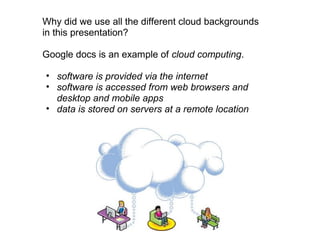
Why did we use all the different cloud backgrounds
in this presentation?

Google docs is an example of cloud computing.

• software is provided via the internet
• software is accessed from web browsers and
  desktop and mobile apps
• data is stored on servers at a remote location
Watch this short video from Teacher Tube.

      Google Docs in Plain English

           http://bit.ly/pVjkY4
Thanks for watching our presentation.

 If you need help using Google docs, ask your
teachers or Ms. Murphy, our media specialist.

Google docs multimedia presentation

  • 1.
    Google docs What is it? Why should I use it? How do I use it? Use the arrows or click anywhere on the slides to go to the next slide.
  • 2.
  • 3.
    Google docs isan easy-to-use online word processor, spreadsheet and presentation editor that enables you to create, store and share instantly and securely, and collaborate* online in real time. You can create new documents from scratch or upload existing documents, spreadsheets and presentations. There's no software to download, and all your work is stored safely online and can be accessed from any computer. * to collaborate means to work together
  • 4.
    Why should Iuse Google docs?
  • 5.
    It's free! Youdon't have to buy expensive software like Microsoft Word, Power Point and Excel. You can create and edit your documents from any computer with internet access. You can work on them at home and at school. You can share your documents and presentations with teachers and other students.
  • 6.
    How do Iuse Google docs?
  • 7.
    Your student accounthas already been set up on Google docs. Go to http://docs.cftigers.org. Use the same user name (UN) and password (PW) that you use at school to log into the Windows network.
  • 8.
    The first timeyou log in you will have to agree to Google's terms of use. It's always a good idea to read the terms of use before you agree to them. The terms of use are the rules that Google wants all of us to follow when using Google docs.
  • 9.
    Google docs isvery easy to use. It's similar to Microsoft Word, Power Point and Excel. This presentation used many of the features available on Google docs. • images • shapes • links • backgrounds • bullets Be creative with your presentations!
  • 10.
    Why did weuse all the different cloud backgrounds in this presentation? Google docs is an example of cloud computing. • software is provided via the internet • software is accessed from web browsers and desktop and mobile apps • data is stored on servers at a remote location
  • 11.
    Watch this shortvideo from Teacher Tube. Google Docs in Plain English http://bit.ly/pVjkY4
  • 12.
    Thanks for watching ourpresentation. If you need help using Google docs, ask your teachers or Ms. Murphy, our media specialist.