More Related Content

PDF

PDF
openFrameworks Workshop in Kanazawa v001 
KEY
Core Graphicsでつくる自作UIコンポーネント入門 
KEY

PDF

PDF

PPTX

PPTX
【Unity道場スペシャル 2017博多】クォータニオン完全マスター What's hot

PDF
【Unite Tokyo 2018】誘導ミサイル完全マスター 
PDF
Media Art II 2013 第7回 : openFrameworks 3Dグラフィクス、OpenGL 
KEY
iOSプログラマへ。HTML5 Canvasがおもしろい! 
PPTX
How to make Inn-fighting dice 
PPTX

PDF

PDF

PDF
メディア・アートII 第2回 openFrameworks基礎 配列、くりかえし、乱数 ベクトルを使用したアニメーション 
PDF
【Unity道場 2月】シェーダを書けるプログラマになろう 
PDF

PDF

PDF
【Unity道場】ゲーム制作に使う数学を学習しよう 
PDF

PDF
openFrameworks基礎 たくさんの図形を動かす 静的配列と動的配列 - 芸大グラフィックスプログラミング演習B 
PPTX

PDF

PPT

PDF
【Unite 2018 Tokyo】60fpsのその先へ!スマホの物量限界に挑んだSTG「アカとブルー」の開発設計 
PDF

PDF
Interactive Music II Processingによるアニメーション Similar to Gocon2013

PPTX

PDF

PDF
Android上での3D(OpenGL)描画の基礎とNDKによる実践的高速化手法 
PDF

PDF

PDF

PDF
【TechBuzz】第9回cocos2d-x勉強会「シェーダ書いてますか?」 
PDF
3DCG(3Dコンピュータグラフィック)をWebGLで始めよう 
PDF
簡単!OpenGL ES 2.0フラグメントシェーダー 
KEY

PPTX

PDF
Cocos2dshader devcon jp_20120621_en 
PPTX
Shadow gunのサンプルから学べるモバイル最適化 
PDF
coma Creators session vol.2 
PPT
Shape morphing (swfstudy) 
PDF

PPTX
Delphi で超高速 OpenGL 2D/3D 描画 
PDF

PDF
More from Moriyoshi Koizumi

PPTX

PPTX
Authentication, Authorization, OAuth, OpenID Connect and Pyramid 
PDF
All I know about rsc.io/c2go 
PPTX

PPTX
Pyramidのrendererをカスタマイズする 
PPTX
Hacking Go Compiler Internals / GoCon 2014 Autumn 
PDF

PDF

PDF

PDF

PDF

PDF
PHP language update 201211 
PDF

PDF

PDF

PDF

PDF

PDF

PDF

PDF
Gocon2013
- 1.
- 2.
- 3.
- 4.
- 5.
- 6.
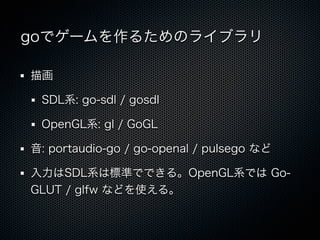
独断と偏見
GoGL https://github.com/chsc/GoGL
go-glfw https://github.com/go-gl/glfw
この組み合わせがよさそう
- 7.
- 8.
- 9.
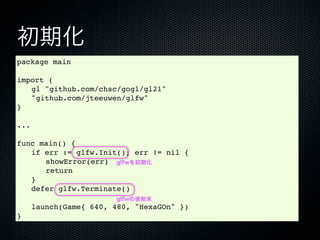
初期化
package main
import (
!gl "github.com/chsc/gogl/gl21"
! "github.com/jteeuwen/glfw"
}
...
func main() {
! if err := glfw.Init(); err != nil {
! ! showError(err) glfwを初期化
! ! return
! }
! defer glfw.Terminate()
glfwの後始末
! launch(Game{ 640, 480, "HexaGOn" })
}
- 10.
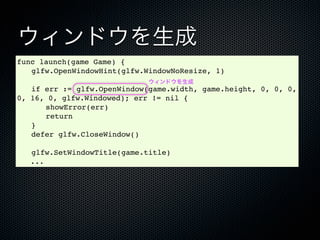
ウィンドウを生成
func launch(game Game){
! glfw.OpenWindowHint(glfw.WindowNoResize, 1)
ウィンドウを生成
! if err := glfw.OpenWindow(game.width, game.height, 0, 0, 0,
0, 16, 0, glfw.Windowed); err != nil {
! ! showError(err)
! ! return
! }
! defer glfw.CloseWindow()
! glfw.SetWindowTitle(game.title)
...
- 11.
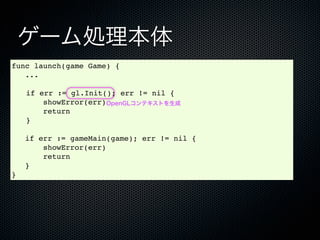
ゲーム処理本体
func launch(game Game){
...
! if err := gl.Init(); err != nil {
showError(err)OpenGLコンテキストを生成
return
! }
if err := gameMain(game); err != nil {
showError(err)
return
}
}
- 12.
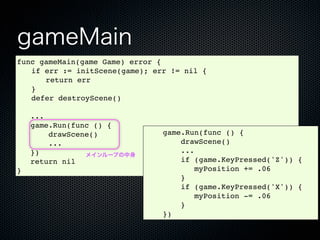
gameMain
func gameMain(game Game)error {
! if err := initScene(game); err != nil {
! ! return err
! }
! defer destroyScene()
...
game.Run(func () {
drawScene() game.Run(func () {
... drawScene()
}) ...
メインループの中身
return nil if (game.KeyPressed('Z')) {
} myPosition += .06
}
if (game.KeyPressed('X')) {
myPosition -= .06
}
})
- 13.
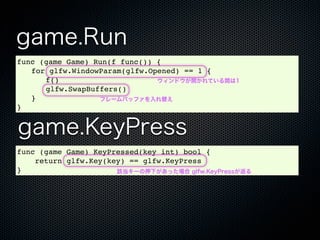
game.Run
func (game Game)Run(f func()) {
! for glfw.WindowParam(glfw.Opened) == 1 {
! ! f() ウィンドウが開かれている間は1
! ! glfw.SwapBuffers()
! } フレームバッファを入れ替え
}
game.KeyPress
func (game Game) KeyPressed(key int) bool {
return glfw.Key(key) == glfw.KeyPress
} 該当キーの押下があった場合 glfw.KeyPressが返る
- 14.
initScene / destroyScene/ drawScene
package main
import ( 1フレーム分の描画処理
"math"
"math/rand"
)
gl "github.com/chsc/gogl/gl21"
func drawScene() {
type Wall struct {
segment int
! gl.Clear(gl.COLOR_BUFFER_BIT |
position float64
width float64 gl.DEPTH_BUFFER_BIT)
}
var (
rotz
rotSpeed
float64
float64
bgdivision int
= math.Pi * 0.02
= 6
! gl.MatrixMode(gl.MODELVIEW)
bgcolor
bgradius
[]gl.Float = []gl.Float{1, 1, 0}
float64 = 20 ! gl.LoadIdentity()
hexradius float64 = .5
perturbation float64
walls []Wall
= .04
= nil
! gl.Rotatef(gl.Float(rotz), 0, 0,
pog float64
myPosition float64
= 0.
= 0. 1)
myDistance float64 = .1
)
! gl.Translatef(0, 0, gl.Float(-3. +
func initScene(game Game) (err error) {
gl.Enable(gl.TEXTURE_2D)
gl.Enable(gl.DEPTH_TEST)
rand.Float64() * perturbation))
gl.ClearColor(0., 0., 0., 0.)
gl.ClearDepth(1)
gl.DepthFunc(gl.LEQUAL)
! rotz += rotSpeed * 180 / math.Pi
gl.Viewport(0, 0, gl.Sizei(game.width), gl.Sizei(game.height))
gl.MatrixMode(gl.PROJECTION)
gl.LoadIdentity()
pog += .02
gl.Frustum(-1, 1, -1, 1, 1.0, 10.0)
gl.MatrixMode(gl.MODELVIEW)
gl.LoadIdentity()
return
drawBackground()
何もGoらしいことは
}
func destroyScene() {
drawCentralHexagon()
}
drawWalls()
func drawBackground() {
! gl.Begin(gl.TRIANGLES)
defer gl.End()
drawMyTriangle()
}
ありません
for i := 0; i < bgdivision; i += 1 {
x1, y1 := gl.Float(math.Cos(float64(i) * math.Pi * 2 / float64(bgdivision)) * bgradius),
gl.Float(math.Sin(float64(i) * math.Pi * 2 / float64(bgdivision)) * bgradius)
x2, y2 := gl.Float(math.Cos(float64(i + 1) * math.Pi * 2/ float64(bgdivision)) * bgradius),
gl.Float(math.Sin(float64(i + 1) * math.Pi * 2 / float64(bgdivision)) * bgradius)
{
- 15.


![http://d.hatena.ne.jp/moriyoshi/20091114/1258204128
<?php
function sub($i, $ch) {
for (;;) {
$a = <- [$ch];
printf("%d:", $i);
var_dump($a);
}
}
$ch = thread_message_queue_create();
for ($i = 0; $i < 10; $i++) {
thread_create('sub', $i, $ch);
}
$i = 0;
for (;;) {
[$ch] <- $i++;
usleep(50000);
}
?>](https://image.slidesharecdn.com/gocon2013-130413090704-phpapp02/85/Gocon2013-3-320.jpg)


![initScene / destroyScene / drawScene
package main
import ( 1フレーム分の描画処理
"math"
"math/rand"
)
gl "github.com/chsc/gogl/gl21"
func drawScene() {
type Wall struct {
segment int
! gl.Clear(gl.COLOR_BUFFER_BIT |
position float64
width float64 gl.DEPTH_BUFFER_BIT)
}
var (
rotz
rotSpeed
float64
float64
bgdivision int
= math.Pi * 0.02
= 6
! gl.MatrixMode(gl.MODELVIEW)
bgcolor
bgradius
[]gl.Float = []gl.Float{1, 1, 0}
float64 = 20 ! gl.LoadIdentity()
hexradius float64 = .5
perturbation float64
walls []Wall
= .04
= nil
! gl.Rotatef(gl.Float(rotz), 0, 0,
pog float64
myPosition float64
= 0.
= 0. 1)
myDistance float64 = .1
)
! gl.Translatef(0, 0, gl.Float(-3. +
func initScene(game Game) (err error) {
gl.Enable(gl.TEXTURE_2D)
gl.Enable(gl.DEPTH_TEST)
rand.Float64() * perturbation))
gl.ClearColor(0., 0., 0., 0.)
gl.ClearDepth(1)
gl.DepthFunc(gl.LEQUAL)
! rotz += rotSpeed * 180 / math.Pi
gl.Viewport(0, 0, gl.Sizei(game.width), gl.Sizei(game.height))
gl.MatrixMode(gl.PROJECTION)
gl.LoadIdentity()
pog += .02
gl.Frustum(-1, 1, -1, 1, 1.0, 10.0)
gl.MatrixMode(gl.MODELVIEW)
gl.LoadIdentity()
return
drawBackground()
何もGoらしいことは
}
func destroyScene() {
drawCentralHexagon()
}
drawWalls()
func drawBackground() {
! gl.Begin(gl.TRIANGLES)
defer gl.End()
drawMyTriangle()
}
ありません
for i := 0; i < bgdivision; i += 1 {
x1, y1 := gl.Float(math.Cos(float64(i) * math.Pi * 2 / float64(bgdivision)) * bgradius),
gl.Float(math.Sin(float64(i) * math.Pi * 2 / float64(bgdivision)) * bgradius)
x2, y2 := gl.Float(math.Cos(float64(i + 1) * math.Pi * 2/ float64(bgdivision)) * bgradius),
gl.Float(math.Sin(float64(i + 1) * math.Pi * 2 / float64(bgdivision)) * bgradius)
{](https://image.slidesharecdn.com/gocon2013-130413090704-phpapp02/85/Gocon2013-14-320.jpg)