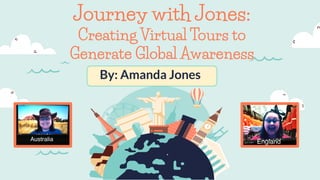
Journey with Jones:
Creating Virtual Tours to
Generate Global Awareness
By: Amanda Jones
Amanda Jones
Teacher-Librarian at Live Oak Middle School
➔ 2020 Louisiana School
Librarian of the Year
➔ 20 Year Educator
➔ Teacher-Librarian at Live
Oak Middle School in
Watson, LA
● Post links to trips and articles
for Ss to travel on their own
● Set up “menus” with virtual
tours and coordinating
activities
● Stream live, while acting as
host, and Ss can post
questions and comments
Different Types
Of Trips
● Make promotional displays& videos
○ Share on social media
○ Email to parents
○ Have teachers send out notices in Remind and Google
Classroom
● Prepare your presentation
● Create a website to post your promos, presentations,
and videos
● Extras--buy some cool hats!
Getting Ready!
Using Zoom For Streaming Live On
Facebook & YouTube
● I am the only one in the Zoom
meeting. You must have the $16 per
month paid Zoom account to stream
live.
● StreamYard is a FREE option.
● Stream for a few minutes before
starting the actual presentation.
● Share computer sound & screen.
● Record (to upload later)
● Complete a live test run!
Tips & Tricks
Tips for Streaming Live On
Facebook & YouTube
● Use a green screen and virtual background
● Have any links from the presentation loaded on
other tabs and ready to go. Put these in order from
left to right in your browser for easy navigation.
● I use 3 devices:
○ Laptop for presentation
○ Device for monitoring FB comments and questions
○ Device for notes
● Use a $5 earbud/microphone set
● Promote your next trip and other programming.
More tips
iPad for Notes
Laptop for Zoom & to
Present
Laptop to monitor FB
Live Questions
Presentation For My Trips
Slides Mania
Slides Go
Slides Carnival
Presentation Go
Places For Creative Slide Decks
My Favorite Tools & Websites
For Creating Virtual Trips
Create a project and start
at your school
Google Earth
Stock 360° panoramic
images & video
360Cities.net
Online community with
user travel stories with
photos, videos, and
augmented content
360° Stories
Virtual journeys using
360° photos and video
Air Pano
Find images labeled for
reuse
Google Images
Stories, collections, and
virtual reality
Google Arts & Culture
Pre-made virtual tours
using Google Maps and
Street View
Google Trek
Pre-made virtual tours
or build your own
Google Tour Builder
Curate a collection of
tours, examples, and
articles
Wakelet
Learn how to pronounce
the names during your
trip
Google Translate
Search for your own
resources
Google Searches
VR Videos and a place to
upload your own trips to
share
YouTube
My Favorite Tools & Websites
For Creating Virtual Trips (cont.)
3D Pre-made virtual tours
AND build your own
Google Poly
Examples From Other Schools
Bryson Middle School
Kilmer Middle Library
“Travel Tuesdays”
Librarians:
Gretchen Hazlin (Twitter: @libraryms)
Susanna Carey
“Virtual Spring Break Adventures”
Librarian:
Patti Barker
(Twitter: @TeachrLibrarian)
Autrey Mill Middle
“Wanderlust
Wednesdays”
Librarian:
Martha Bongiorno
(Twitter: @Mrs_bongi)
Wauconda #118
“Virtual Spring Break”
Librarian:
Sarah Curran
St. Dominic High School
“Virtual Spring Break”
Director of Communications
and Marketing:
Megan Gilmore
You Don’t Have To Reinvent The Wheel!
Use tours already
created--it never hurts
to email another librarian
and ask to use their
resources. Make sure to
give attribution!
You are welcome to any
of my presentations and
videos on my website.
Resources
KQ Blog on Journey with Jones
Guide to Using Google Arts & Culture
How to Live Stream on Facebook with Zoom
Guide to Usage Rights and Google Images
Educators’ Guide to Using Wakelet
Using Google Tour Builder
CREDITS: This presentation
template was created by
Slidesgo, including icons by
Flaticon, and infographics &
images by Freepik
Thanks!
Do you have any questions?
Feel free to email me.
➔ Website: lomlibrary.org
➔ Twitter: @abmack33 &
@LOMiddleLibrary
➔ Instagram: lom_library
➔ Facebook: LOM Library
➔ Wakelet: @abmack33
➔ Email:
librarianjones03@gmail.com
Virtual Trip Wakelet
Webinars
Fonts & colors used
This presentation has been made using the following fonts:
Live Savers
(https://fonts.google.com/specimen/Life+Savers)
Lato
(https://fonts.google.com/specimen/Lato)
#daeeeb #fe7950 #ff9076#7eccc6

Journey with Jones: Creating Virtual Tours to Generate Global Awareness

  • 1.
    Journey with Jones: CreatingVirtual Tours to Generate Global Awareness By: Amanda Jones
  • 2.
    Amanda Jones Teacher-Librarian atLive Oak Middle School ➔ 2020 Louisiana School Librarian of the Year ➔ 20 Year Educator ➔ Teacher-Librarian at Live Oak Middle School in Watson, LA
  • 3.
    ● Post linksto trips and articles for Ss to travel on their own ● Set up “menus” with virtual tours and coordinating activities ● Stream live, while acting as host, and Ss can post questions and comments Different Types Of Trips
  • 4.
    ● Make promotionaldisplays& videos ○ Share on social media ○ Email to parents ○ Have teachers send out notices in Remind and Google Classroom ● Prepare your presentation ● Create a website to post your promos, presentations, and videos ● Extras--buy some cool hats! Getting Ready!
  • 5.
    Using Zoom ForStreaming Live On Facebook & YouTube ● I am the only one in the Zoom meeting. You must have the $16 per month paid Zoom account to stream live. ● StreamYard is a FREE option. ● Stream for a few minutes before starting the actual presentation. ● Share computer sound & screen. ● Record (to upload later) ● Complete a live test run! Tips & Tricks
  • 6.
    Tips for StreamingLive On Facebook & YouTube ● Use a green screen and virtual background ● Have any links from the presentation loaded on other tabs and ready to go. Put these in order from left to right in your browser for easy navigation. ● I use 3 devices: ○ Laptop for presentation ○ Device for monitoring FB comments and questions ○ Device for notes ● Use a $5 earbud/microphone set ● Promote your next trip and other programming. More tips iPad for Notes Laptop for Zoom & to Present Laptop to monitor FB Live Questions
  • 7.
  • 8.
    Slides Mania Slides Go SlidesCarnival Presentation Go Places For Creative Slide Decks
  • 9.
    My Favorite Tools& Websites For Creating Virtual Trips Create a project and start at your school Google Earth Stock 360° panoramic images & video 360Cities.net Online community with user travel stories with photos, videos, and augmented content 360° Stories Virtual journeys using 360° photos and video Air Pano Find images labeled for reuse Google Images Stories, collections, and virtual reality Google Arts & Culture
  • 10.
    Pre-made virtual tours usingGoogle Maps and Street View Google Trek Pre-made virtual tours or build your own Google Tour Builder Curate a collection of tours, examples, and articles Wakelet Learn how to pronounce the names during your trip Google Translate Search for your own resources Google Searches VR Videos and a place to upload your own trips to share YouTube My Favorite Tools & Websites For Creating Virtual Trips (cont.) 3D Pre-made virtual tours AND build your own Google Poly
  • 11.
    Examples From OtherSchools Bryson Middle School Kilmer Middle Library “Travel Tuesdays” Librarians: Gretchen Hazlin (Twitter: @libraryms) Susanna Carey “Virtual Spring Break Adventures” Librarian: Patti Barker (Twitter: @TeachrLibrarian) Autrey Mill Middle “Wanderlust Wednesdays” Librarian: Martha Bongiorno (Twitter: @Mrs_bongi) Wauconda #118 “Virtual Spring Break” Librarian: Sarah Curran St. Dominic High School “Virtual Spring Break” Director of Communications and Marketing: Megan Gilmore
  • 12.
    You Don’t HaveTo Reinvent The Wheel! Use tours already created--it never hurts to email another librarian and ask to use their resources. Make sure to give attribution! You are welcome to any of my presentations and videos on my website.
  • 13.
    Resources KQ Blog onJourney with Jones Guide to Using Google Arts & Culture How to Live Stream on Facebook with Zoom Guide to Usage Rights and Google Images Educators’ Guide to Using Wakelet Using Google Tour Builder
  • 14.
    CREDITS: This presentation templatewas created by Slidesgo, including icons by Flaticon, and infographics & images by Freepik Thanks! Do you have any questions? Feel free to email me.
  • 15.
    ➔ Website: lomlibrary.org ➔Twitter: @abmack33 & @LOMiddleLibrary ➔ Instagram: lom_library ➔ Facebook: LOM Library ➔ Wakelet: @abmack33 ➔ Email: librarianjones03@gmail.com Virtual Trip Wakelet Webinars
  • 16.
    Fonts & colorsused This presentation has been made using the following fonts: Live Savers (https://fonts.google.com/specimen/Life+Savers) Lato (https://fonts.google.com/specimen/Lato) #daeeeb #fe7950 #ff9076#7eccc6