Git
Outline
❖ What’s Git?
❖ Why Git?
❖ Basic Operation
➢ Setup
➢ Status Transformation
➢ GitLab & Cooperation
❖ Branch
❖ Branch Management
2
What’s Git?
Distributed Version Control
「教授今天給了回家作業,題目放在講桌,下課離開前記得拿
回家寫,下次上課一起交到講桌」
3
What’s Git?
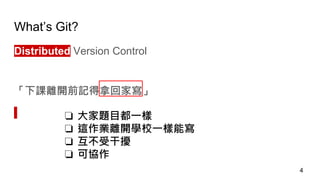
Distributed Version Control
「下課離開前記得拿回家寫」
4
❏ 大家題目都一樣
❏ 這作業離開學校一樣能寫
❏ 互不受干擾
❏ 可協作
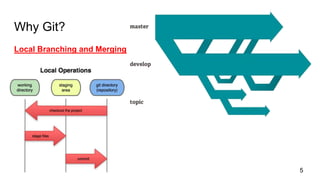
Why Git?
Local Branching and Merging
5
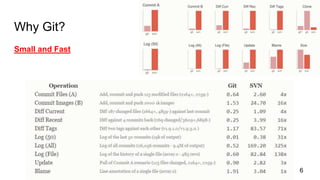
Why Git?
Small and Fast
6
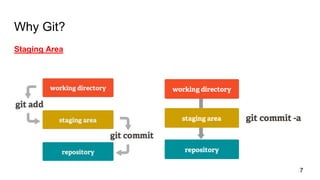
Why Git?
Staging Area
7
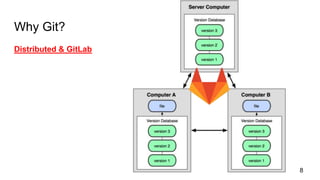
Why Git?
Distributed & GitLab
8
Basic Operation
❖ Setup
❖ Status Transformation
❖ GitLab & Cooperation
9
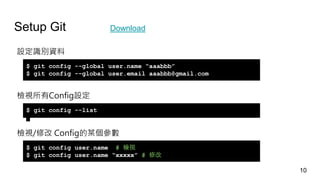
Setup Git Download
設定識別資料
檢視所有Config設定
檢視/修改 Config的某個參數
$ git config --global user.name “aaabbb”
$ git config --global user.email aaabbb@gmail.com
$ git config --list
$ git config user.name # 檢視
$ git config user.name “xxxxx” # 修改
10
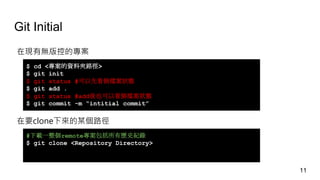
Git Initial
在現有無版控的專案
$ cd <專案的資料夾路徑>
$ git init
$ git status #可以先看個檔案狀態
$ git add .
$ git status #add後也可以看個檔案狀態
$ git commit -m “intitial commit”
在要clone下來的某個路徑
#下載一整個remote專案包括所有歷史紀錄
$ git clone <Repository Directory>
11
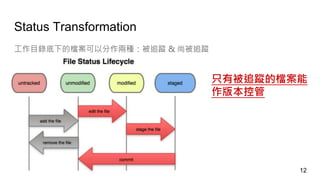
Status Transformation
工作目錄底下的檔案可以分作兩種:被追蹤 & 尚被追蹤
只有被追蹤的檔案能
作版本控管
12
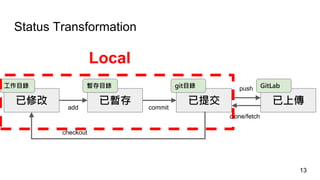
Status Transformation
已修改 已暫存 已提交 已上傳
工作目錄 暫存目錄 git目錄 GitLab
add commit
clone/fetch
push
checkout
Local
13
14
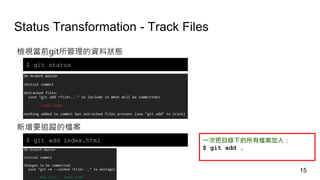
Status Transformation - Track Files
檢視當前git所管理的資料狀態
$ git status
新增要追蹤的檔案
$ git add index.html 一次把目錄下的所有檔案加入:
$ git add .
15
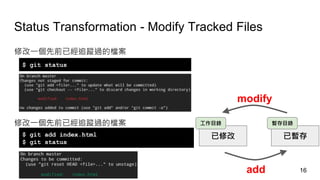
Status Transformation - Modify Tracked Files
已修改 已暫存
工作目錄 暫存目錄
add
modify
修改一個先前已經追蹤過的檔案
修改一個先前已經追蹤過的檔案
$ git status
$ git add index.html
$ git status
16
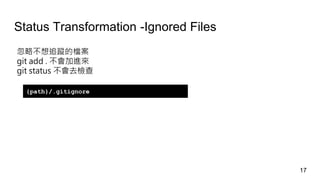
Status Transformation -Ignored Files
忽略不想追蹤的檔案
git add . 不會加進來
git status 不會去檢查
{path}/.gitignore
17
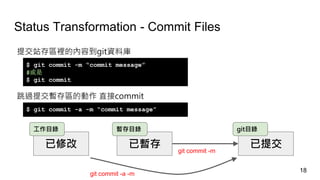
Status Transformation - Commit Files
提交站存區裡的內容到git資料庫
$ git commit -m “commit message”
#或是
$ git commit
跳過提交暫存區的動作 直接commit
$ git commit -a -m “commit message”
已修改 已暫存 已提交
工作目錄 暫存目錄 git目錄
git commit -m
git commit -a -m
18
GitLab & Cooperation - SSH Key
Generate SSH Key & Add it to GitLab:
https://gitlab.com/help/ssh/README
19
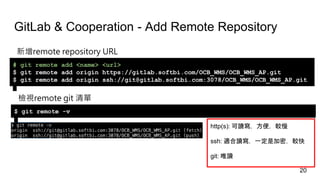
GitLab & Cooperation - Add Remote Repository
新增remote repository URL
# git remote add <name> <url>
$ git remote add origin https://gitlab.softbi.com/OCB_WMS/OCB_WMS_AP.git
$ git remote add origin ssh://git@gitlab.softbi.com:3078/OCB_WMS/OCB_WMS_AP.git
檢視remote git 清單
$ git remote -v
http(s): 可讀寫,方便,較慢
ssh: 適合讀寫,一定是加密,較快
git: 唯讀
20
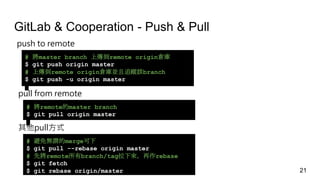
GitLab & Cooperation - Push & Pull
push to remote
# 將master branch 上傳到remote origin倉庫
$ git push origin master
# 上傳到remote origin倉庫並且追蹤該branch
$ git push -u origin master
pull from remote
# 將remote的master branch
$ git pull origin master
其他pull方式
# 避免無謂的merge可下
$ git pull --rebase origin master
# 先將remote所有branch/tag拉下來,再作rebase
$ git fetch
$ git rebase origin/master 21
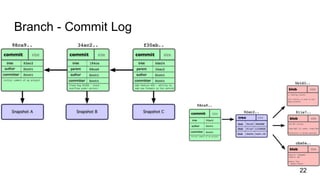
Branch - Commit Log
22
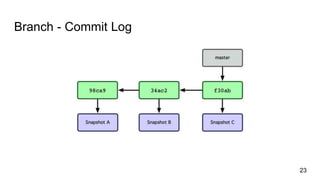
Branch - Commit Log
23
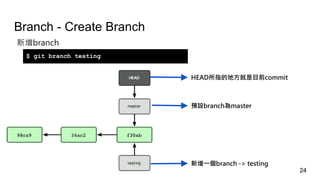
Branch - Create Branch
新增branch
$ git branch testing
HEAD所指的地方就是目前commit
預設branch為master
新增一個branch -> testing
24
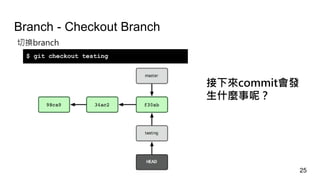
Branch - Checkout Branch
切換branch
$ git checkout testing
接下來commit會發
生什麼事呢?
25
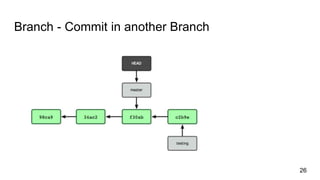
Branch - Commit in another Branch
26
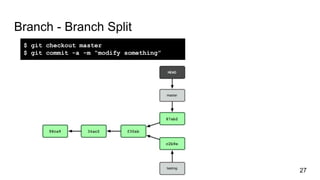
Branch - Branch Split
$ git checkout master
$ git commit -a -m “modify something”
27
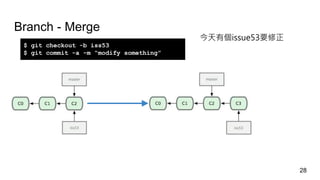
Branch - Merge
$ git checkout -b iss53
$ git commit -a -m “modify something”
28
今天有個issue53要修正
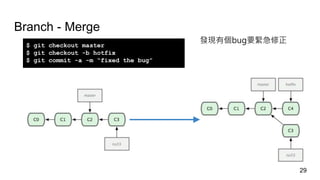
Branch - Merge
$ git checkout master
$ git checkout -b hotfix
$ git commit -a -m “fixed the bug”
29
發現有個bug要緊急修正
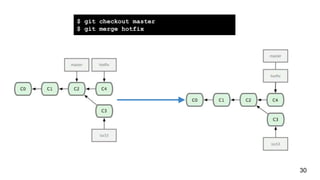
$ git checkout master
$ git merge hotfix
30
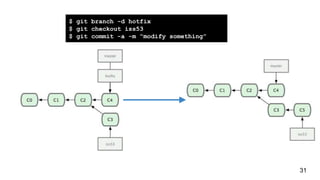
$ git branch -d hotfix
$ git checkout iss53
$ git commit -a -m “modify something”
31
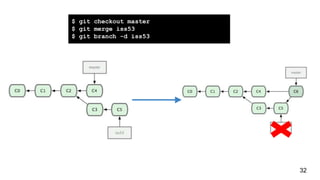
$ git checkout master
$ git merge iss53
$ git branch -d iss53
32
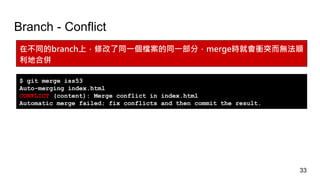
Branch - Conflict
在不同的branch上,修改了同一個檔案的同一部分,merge時就會衝突而無法順
利地合併
$ git merge iss53
Auto-merging index.html
CONFLICT (content): Merge conflict in index.html
Automatic merge failed; fix conflicts and then commit the result.
33
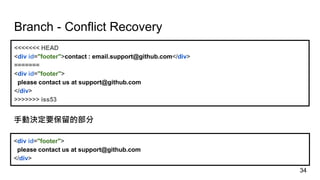
Branch - Conflict Recovery
<<<<<<< HEAD
<div id="footer">contact : email.support@github.com</div>
=======
<div id="footer">
please contact us at support@github.com
</div>
>>>>>>> iss53
<div id="footer">
please contact us at support@github.com
</div>
手動決定要保留的部分
34
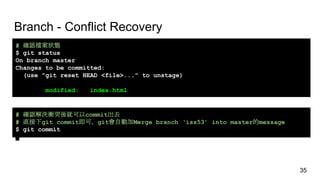
Branch - Conflict Recovery
# 確認檔案狀態
$ git status
On branch master
Changes to be committed:
(use "git reset HEAD <file>..." to unstage)
modified: index.html
# 確認解決衝突後就可以commit出去
# 直接下git commit即可,git會自動加Merge branch ‘iss53’ into master的message
$ git commit
35
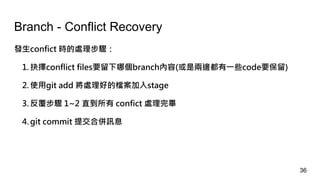
Branch - Conflict Recovery
發生confict 時的處理步驟:
1. 抉擇conflict files要留下哪個branch內容(或是兩邊都有一些code要保留)
2. 使用git add 將處理好的檔案加入stage
3. 反覆步驟 1~2 直到所有 confict 處理完畢
4. git commit 提交合併訊息
36
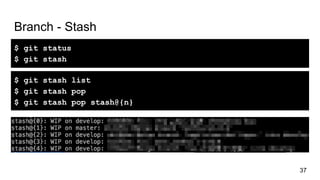
Branch - Stash
37
$ git status
$ git stash
$ git stash list
$ git stash pop
$ git stash pop stash@{n}
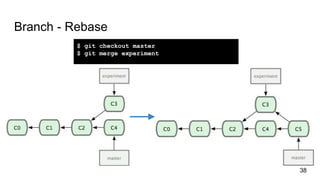
Branch - Rebase
38
$ git checkout master
$ git merge experiment
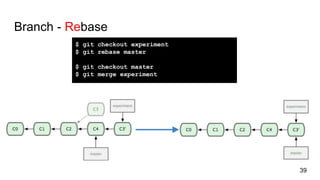
Branch - Rebase
39
$ git checkout experiment
$ git rebase master
$ git checkout master
$ git merge experiment
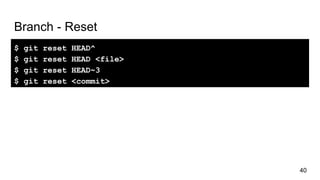
Branch - Reset
$ git reset HEAD^
$ git reset HEAD <file>
$ git reset HEAD~3
$ git reset <commit>
40
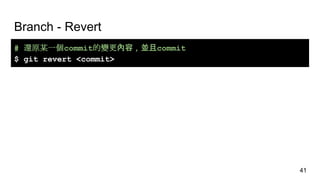
Branch - Revert
41
# 還原某一個commit的變更內容,並且commit
$ git revert <commit>
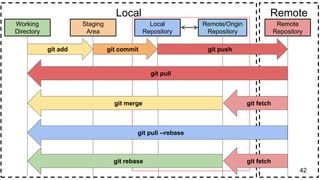
42
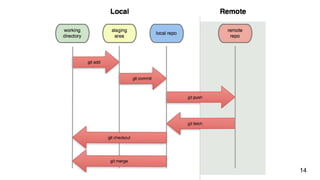
Working
Directory
Staging
Area
Local
Repository
Remote/Origin
Repository
Remote
Repository
Local Remote
git add git commit git push
git pull
git merge git fetch
git fetchgit rebase
git pull --rebase
Branch Management
Git/Github Flow
GUI Tool - SourceTree
43
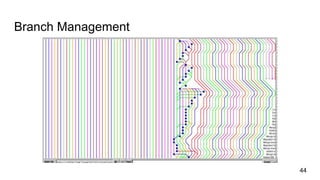
Branch Management
44
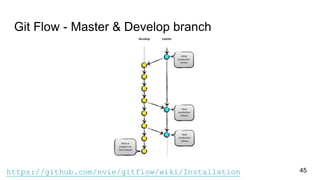
Git Flow - Master & Develop branch
45https://github.com/nvie/gitflow/wiki/Installation
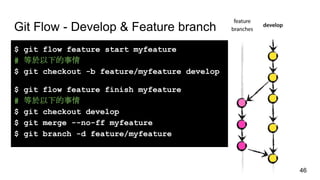
Git Flow - Develop & Feature branch
$ git flow feature start myfeature
# 等於以下的事情
$ git checkout -b feature/myfeature develop
$ git flow feature finish myfeature
# 等於以下的事情
$ git checkout develop
$ git merge --no-ff myfeature
$ git branch -d feature/myfeature
46
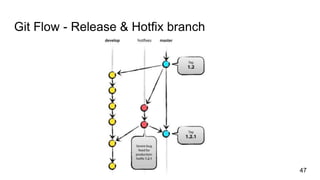
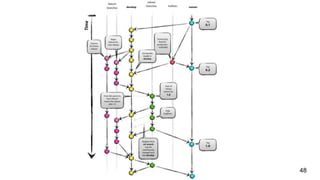
Git Flow - Release & Hotfix branch
47
48
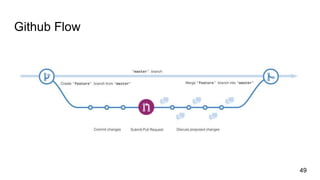
Github Flow
49
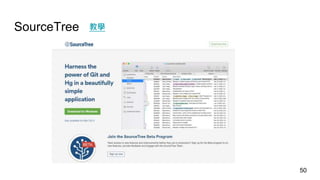
SourceTree
50
教學
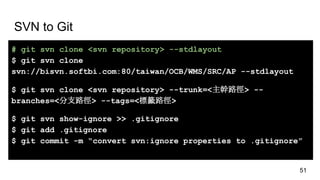
SVN to Git
# git svn clone <svn repository> --stdlayout
$ git svn clone
svn://bisvn.softbi.com:80/taiwan/OCB/WMS/SRC/AP --stdlayout
$ git svn clone <svn repository> --trunk=<主幹路徑> --
branches=<分支路徑> --tags=<標籤路徑>
$ git svn show-ignore >> .gitignore
$ git add .gitignore
$ git commit -m “convert svn:ignore properties to .gitignore”
51
Practice : 連結
52
53
博客來
Q&A
54

Git基礎介紹

  • 1.
  • 2.
    Outline ❖ What’s Git? ❖Why Git? ❖ Basic Operation ➢ Setup ➢ Status Transformation ➢ GitLab & Cooperation ❖ Branch ❖ Branch Management 2
  • 3.
    What’s Git? Distributed VersionControl 「教授今天給了回家作業,題目放在講桌,下課離開前記得拿 回家寫,下次上課一起交到講桌」 3
  • 4.
    What’s Git? Distributed VersionControl 「下課離開前記得拿回家寫」 4 ❏ 大家題目都一樣 ❏ 這作業離開學校一樣能寫 ❏ 互不受干擾 ❏ 可協作
  • 5.
  • 6.
  • 7.
  • 8.
  • 9.
    Basic Operation ❖ Setup ❖Status Transformation ❖ GitLab & Cooperation 9
  • 10.
    Setup Git Download 設定識別資料 檢視所有Config設定 檢視/修改Config的某個參數 $ git config --global user.name “aaabbb” $ git config --global user.email aaabbb@gmail.com $ git config --list $ git config user.name # 檢視 $ git config user.name “xxxxx” # 修改 10
  • 11.
    Git Initial 在現有無版控的專案 $ cd<專案的資料夾路徑> $ git init $ git status #可以先看個檔案狀態 $ git add . $ git status #add後也可以看個檔案狀態 $ git commit -m “intitial commit” 在要clone下來的某個路徑 #下載一整個remote專案包括所有歷史紀錄 $ git clone <Repository Directory> 11
  • 12.
    Status Transformation 工作目錄底下的檔案可以分作兩種:被追蹤 &尚被追蹤 只有被追蹤的檔案能 作版本控管 12
  • 13.
    Status Transformation 已修改 已暫存已提交 已上傳 工作目錄 暫存目錄 git目錄 GitLab add commit clone/fetch push checkout Local 13
  • 14.
  • 15.
    Status Transformation -Track Files 檢視當前git所管理的資料狀態 $ git status 新增要追蹤的檔案 $ git add index.html 一次把目錄下的所有檔案加入: $ git add . 15
  • 16.
    Status Transformation -Modify Tracked Files 已修改 已暫存 工作目錄 暫存目錄 add modify 修改一個先前已經追蹤過的檔案 修改一個先前已經追蹤過的檔案 $ git status $ git add index.html $ git status 16
  • 17.
    Status Transformation -IgnoredFiles 忽略不想追蹤的檔案 git add . 不會加進來 git status 不會去檢查 {path}/.gitignore 17
  • 18.
    Status Transformation -Commit Files 提交站存區裡的內容到git資料庫 $ git commit -m “commit message” #或是 $ git commit 跳過提交暫存區的動作 直接commit $ git commit -a -m “commit message” 已修改 已暫存 已提交 工作目錄 暫存目錄 git目錄 git commit -m git commit -a -m 18
  • 19.
    GitLab & Cooperation- SSH Key Generate SSH Key & Add it to GitLab: https://gitlab.com/help/ssh/README 19
  • 20.
    GitLab & Cooperation- Add Remote Repository 新增remote repository URL # git remote add <name> <url> $ git remote add origin https://gitlab.softbi.com/OCB_WMS/OCB_WMS_AP.git $ git remote add origin ssh://git@gitlab.softbi.com:3078/OCB_WMS/OCB_WMS_AP.git 檢視remote git 清單 $ git remote -v http(s): 可讀寫,方便,較慢 ssh: 適合讀寫,一定是加密,較快 git: 唯讀 20
  • 21.
    GitLab & Cooperation- Push & Pull push to remote # 將master branch 上傳到remote origin倉庫 $ git push origin master # 上傳到remote origin倉庫並且追蹤該branch $ git push -u origin master pull from remote # 將remote的master branch $ git pull origin master 其他pull方式 # 避免無謂的merge可下 $ git pull --rebase origin master # 先將remote所有branch/tag拉下來,再作rebase $ git fetch $ git rebase origin/master 21
  • 22.
  • 23.
  • 24.
    Branch - CreateBranch 新增branch $ git branch testing HEAD所指的地方就是目前commit 預設branch為master 新增一個branch -> testing 24
  • 25.
    Branch - CheckoutBranch 切換branch $ git checkout testing 接下來commit會發 生什麼事呢? 25
  • 26.
    Branch - Commitin another Branch 26
  • 27.
    Branch - BranchSplit $ git checkout master $ git commit -a -m “modify something” 27
  • 28.
    Branch - Merge $git checkout -b iss53 $ git commit -a -m “modify something” 28 今天有個issue53要修正
  • 29.
    Branch - Merge $git checkout master $ git checkout -b hotfix $ git commit -a -m “fixed the bug” 29 發現有個bug要緊急修正
  • 30.
    $ git checkoutmaster $ git merge hotfix 30
  • 31.
    $ git branch-d hotfix $ git checkout iss53 $ git commit -a -m “modify something” 31
  • 32.
    $ git checkoutmaster $ git merge iss53 $ git branch -d iss53 32
  • 33.
    Branch - Conflict 在不同的branch上,修改了同一個檔案的同一部分,merge時就會衝突而無法順 利地合併 $git merge iss53 Auto-merging index.html CONFLICT (content): Merge conflict in index.html Automatic merge failed; fix conflicts and then commit the result. 33
  • 34.
    Branch - ConflictRecovery <<<<<<< HEAD <div id="footer">contact : email.support@github.com</div> ======= <div id="footer"> please contact us at support@github.com </div> >>>>>>> iss53 <div id="footer"> please contact us at support@github.com </div> 手動決定要保留的部分 34
  • 35.
    Branch - ConflictRecovery # 確認檔案狀態 $ git status On branch master Changes to be committed: (use "git reset HEAD <file>..." to unstage) modified: index.html # 確認解決衝突後就可以commit出去 # 直接下git commit即可,git會自動加Merge branch ‘iss53’ into master的message $ git commit 35
  • 36.
    Branch - ConflictRecovery 發生confict 時的處理步驟: 1. 抉擇conflict files要留下哪個branch內容(或是兩邊都有一些code要保留) 2. 使用git add 將處理好的檔案加入stage 3. 反覆步驟 1~2 直到所有 confict 處理完畢 4. git commit 提交合併訊息 36
  • 37.
    Branch - Stash 37 $git status $ git stash $ git stash list $ git stash pop $ git stash pop stash@{n}
  • 38.
    Branch - Rebase 38 $git checkout master $ git merge experiment
  • 39.
    Branch - Rebase 39 $git checkout experiment $ git rebase master $ git checkout master $ git merge experiment
  • 40.
    Branch - Reset $git reset HEAD^ $ git reset HEAD <file> $ git reset HEAD~3 $ git reset <commit> 40
  • 41.
    Branch - Revert 41 #還原某一個commit的變更內容,並且commit $ git revert <commit>
  • 42.
    42 Working Directory Staging Area Local Repository Remote/Origin Repository Remote Repository Local Remote git addgit commit git push git pull git merge git fetch git fetchgit rebase git pull --rebase
  • 43.
  • 44.
  • 45.
    Git Flow -Master & Develop branch 45https://github.com/nvie/gitflow/wiki/Installation
  • 46.
    Git Flow -Develop & Feature branch $ git flow feature start myfeature # 等於以下的事情 $ git checkout -b feature/myfeature develop $ git flow feature finish myfeature # 等於以下的事情 $ git checkout develop $ git merge --no-ff myfeature $ git branch -d feature/myfeature 46
  • 47.
    Git Flow -Release & Hotfix branch 47
  • 48.
  • 49.
  • 50.
  • 51.
    SVN to Git #git svn clone <svn repository> --stdlayout $ git svn clone svn://bisvn.softbi.com:80/taiwan/OCB/WMS/SRC/AP --stdlayout $ git svn clone <svn repository> --trunk=<主幹路徑> -- branches=<分支路徑> --tags=<標籤路徑> $ git svn show-ignore >> .gitignore $ git add .gitignore $ git commit -m “convert svn:ignore properties to .gitignore” 51
  • 52.
  • 53.
  • 54.

Editor's Notes

  • #55 資料來源 https://git-scm.com/book/zh-tw/v1 http://zoomq.qiniudn.com/ZQScrapBook/ZqFLOSS/data/20081210180347/