Presenting GINESYS Retail Supply
Chain Software for

Strengthening your Retail System
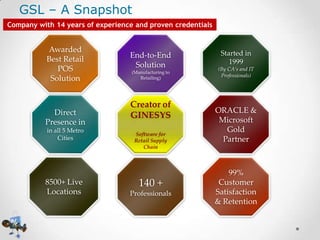
GSL – A Snapshot
Company with 14 years of experience and proven credentials

Awarded
Best Retail
POS
Solution

Direct
Presence in
in all 5 Metro
Cities

8500+ Live
Locations

End-to-End
Solution
(Manufacturing to
Retailing)

Creator of
GINESYS
Software for
Retail Supply
Chain

140 +
Professionals

Started in
1999
(By CA’s and IT
Professionals)

ORACLE &
Microsoft
Gold
Partner

99%
Customer
Satisfaction
& Retention
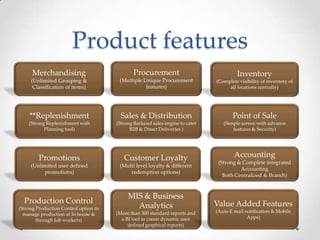
Product features
Merchandising

Procurement

(Unlimited Grouping &
Classification of items)

(Multiple Unique Procurement
features)

(Complete visibility of inventory of
all locations centrally)

**Replenishment

Sales & Distribution

Point of Sale

(Strong Replenishment with
Planning tool)

(Strong Backend sales engine to cater
B2B & Direct Deliveries )

(Simple screen with advance
features & Security)

Promotions

Customer Loyalty

(Unlimited user defined
promotions)

(Multi level loyalty & different
redemption options)

Production Control

MIS & Business
Analytics

(Strong Production Control option to
manage production at In house &
through Job workers)

(More than 300 standard reports and
a BI tool to create dynamic user
defined graphical reports)

Inventory

Accounting
(Strong & Complete integrated
Accounting
Both Centralized & Branch)

Value Added Features
(Auto E mail notification & Mobile
Apps)
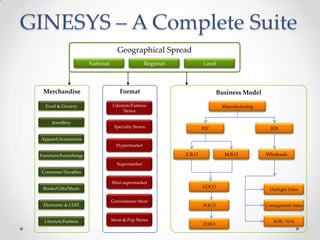
Geographical Spread
National

Regional

Local

Merchandise

Format

Business Model

Food & Grocery

Lifestyle/Fashion
Stores

Manufacturing

Jewellery

Specialty Stores

B2C

B2B

Apparel/Accessories
Hypermarket

E.B.O

Furniture/Furnishings

M.B.O

Wholesale

Supermarket
Consumer Durables
Mini supermarket
Books/Gifts/Music

Electronic & CDIT

Lifestyle/Fashion

Convenience Store

Mom & Pop Stores

COCO

FOCO

FOFO

Outright Sales

Consignment Sales

SOR / SNS
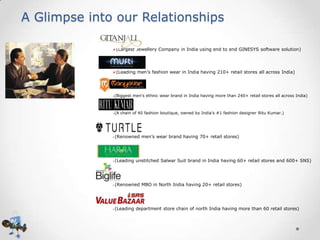
A Glimpse into our Relationships
(Largest Jewellery Company in India using end to end GINESYS software solution)

(Leading men’s fashion wear in India having 210+ retail stores all across India)

(Biggest men’s ethnic wear brand in India having more than 240+ retail stores all across India)



(A chain of 40 fashion boutique, owned by India’s #1 fashion designer Ritu Kumar.)





(Renowned men’s wear brand having 70+ retail stores)



(Leading unstitched Salwar Suit brand in India having 60+ retail stores and 600+ SNS)



(Renowned MBO in North India having 20+ retail stores)



(Leading department store chain of north India having more than 60 retail stores)
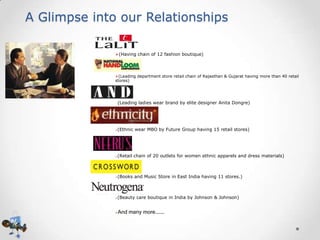
A Glimpse into our Relationships
(Having chain of 12 fashion boutique)

(Leading department store retail chain of Rajasthan & Gujarat having more than 40 retail
stores)

(Leading ladies wear brand by elite designer Anita Dongre)



(Ethnic wear MBO by Future Group having 15 retail stores)



(Retail chain of 20 outlets for women ethnic apparels and dress materials)



(Books and Music Store in East India having 11 stores.)



(Beauty care boutique in India by Johnson & Johnson)



And many more………
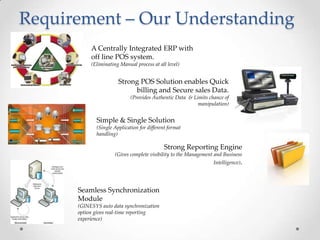
Requirement – Our Understanding
A Centrally Integrated ERP with
off line POS system.
(Eliminating Manual process at all level)

Strong POS Solution enables Quick
billing and Secure sales Data.
(Provides Authentic Data & Limits chance of
manipulation)

Simple & Single Solution
(Single Application for different format
handling)

Strong Reporting Engine
(Gives complete visibility to the Management and Business
Intelligence).

Seamless Synchronization
Module
(GINESYS auto data synchronization
option gives real-time reporting
experience)
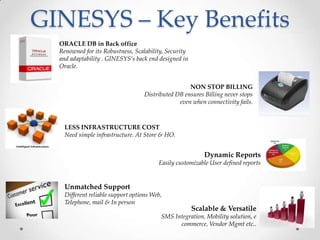
GINESYS – Key Benefits
ORACLE DB in Back office
Renowned for its Robustness, Scalability, Security
and adaptability . GINESYS’s back end designed in
Oracle.
NON STOP BILLING
Distributed DB ensures Billing never stops
even when connectivity fails.
LESS INFRASTRUCTURE COST
Need simple infrastructure. At Store & HO.
Dynamic Reports
Easily customizable User defined reports

Unmatched Support
Different reliable support options Web,
Telephone, mail & In person

Scalable & Versatile

SMS Integration, Mobility solution, e
commerce, Vendor Mgmt etc..
Technology Details of GIENSYS
• Back Office:
o 2 tier Client/Server based application
o Developed with Oracle Developer (Forms 6 and Report 4.5)
o Retail Module is developed on C# (C Sharp) with .Net framework 3.5 (Shall be upgraded
to version 4.0/4.5 soon)
o Certified for Oracle 10g Database Server (10.2.0.4)
o Distributed Architecture
o Centralized Data Management and Consolidate Reporting
o Designed for scalability and performance
o Database Server Supported Microsoft Windows Server, Sun Solaris, Red Hat
Enterprise Linux.
o Application / Workstation Supported with Windows 7 and Above operating system.

• POS:
o 2 tier Client/Server based application
o Developed with C# (C Sharp) with .Net framework 3.5. (Shall be upgraded to version
4.0/4.5 soon)
o SQL Server 2008 R2 Express
o Database Server Supported Microsoft Windows Server
o Application / Workstation Supported with Windows 7 and Above operating system.
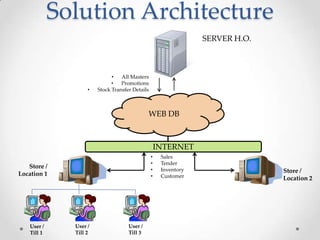
Solution Architecture
SERVER H.O.

•

•
All Masters
•
Promotions
Stock Transfer Details

WEB DB

INTERNET
•
•
•
•

Store /
Location 1

User /
Till 1

User /
Till 2

User /
Till 3

Sales
Tender
Inventory
Customer

Store /
Location 2
Application Process
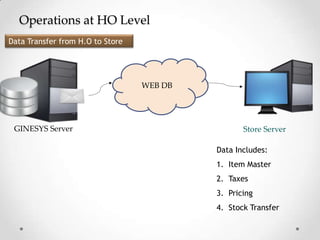
Operations at HO Level
Data Transfer from H.O to Store

WEB DB

GINESYS Server

Store Server
Data Includes:
1. Item Master
2. Taxes
3. Pricing
4. Stock Transfer
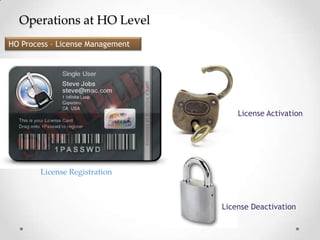
Operations at HO Level
HO Process – License Management

License Activation

License Registration

License Deactivation
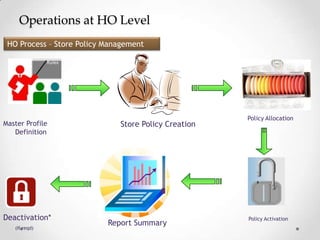
Operations at HO Level
HO Process – Store Policy Management

Master Profile
Definition

Deactivation*
(If reqd)

Store Policy Creation

Report Summary

Policy Allocation

Policy Activation
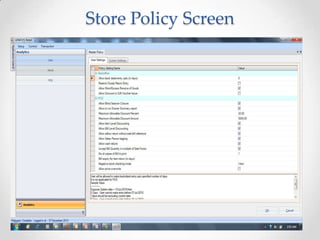
Store Policy Screen
Operations at HO Level
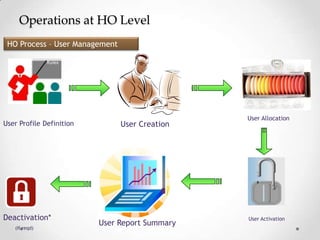
HO Process – User Management

User Profile Definition

Deactivation*
(If reqd)

User Creation

User Report Summary

User Allocation

User Activation
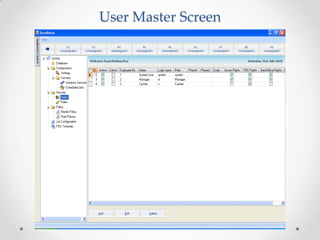
User Master Screen
Operations at HO Level
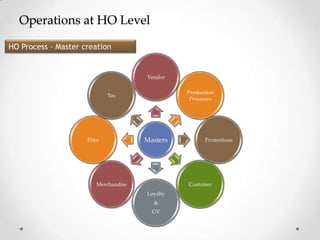
HO Process – Master creation

Vendor

Production
Processes

Tax

Price

Masters

Merchandise

Promotions

Customer
Loyalty
&

GV
Operations at HO Level
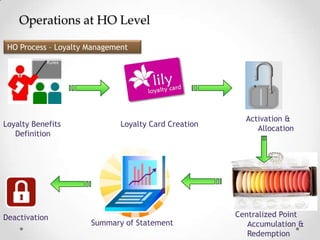
HO Process – Loyalty Management

Loyalty Benefits
Definition

Deactivation

Loyalty Card Creation

Summary of Statement

Activation &
Allocation

Centralized Point
Accumulation &
Redemption
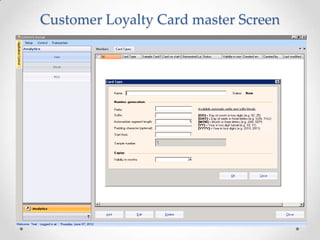
Customer Loyalty Card master Screen
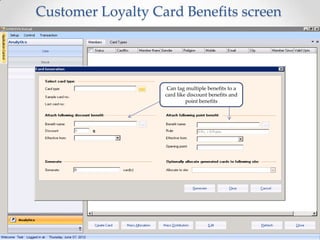
Customer Loyalty Card Benefits screen

Can tag multiple benefits to a
card like discount benefits and
point benefits
Operations at HO Level
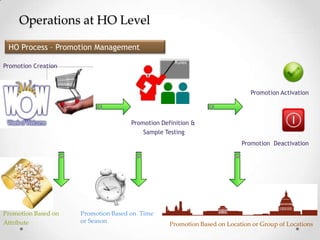
HO Process – Promotion Management
Promotion Creation

Promotion Activation

Promotion Definition &
Sample Testing
Promotion Deactivation

Promotion Based on
Attribute

Promotion Based on Time
or Season

Promotion Based on Location or Group of Locations
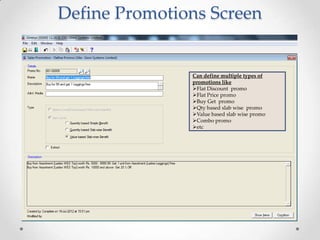
Define Promotions Screen

Can define multiple types of
promotions like
Flat Discount promo
Flat Price promo
Buy Get promo
Qty based slab wise promo
Value based slab wise promo
Combo promo
etc
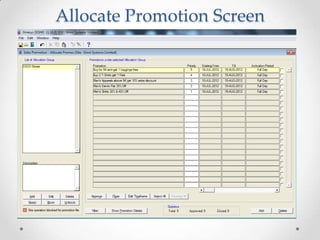
Allocate Promotion Screen
Operations at Store Level
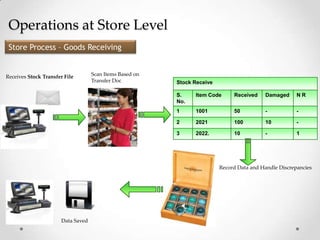
Store Process – Goods Receiving

Receives Stock Transfer File

Scan Items Based on
Transfer Doc

Stock Receive
S.
No.

Item Code

Received

Damaged

NR

1

1001

50

-

-

2

2021

100

10

-

3

2022.

10

-

1

Record Data and Handle Discrepancies

Data Saved
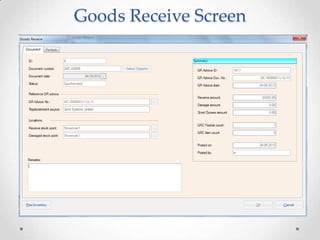
Goods Receive Screen
Operations at Store Level
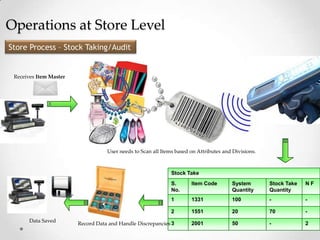
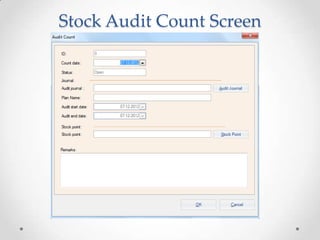
Store Process – Stock Taking/Audit

Receives Item Master

User needs to Scan all Items based on Attributes and Divisions.

Stock Take
S.
No.

System
Quantity

Stock Take
Quantity

NF

1

1331

100

-

-

2
Data Saved

Item Code

1551

20

70

-

Record Data and Handle Discrepancies 3

2001

50

-

2
Stock Audit Count Screen
Operations at Store Level
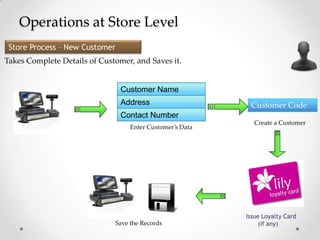
Store Process – New Customer
Takes Complete Details of Customer, and Saves it.

Customer Name
Address

Customer Code

Contact Number
Enter Customer’s Data

Save the Records

Create a Customer

Issue Loyalty Card
(if any)
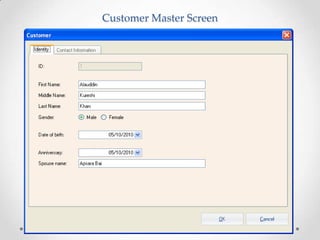
Customer Master Screen
Operations at Store Level
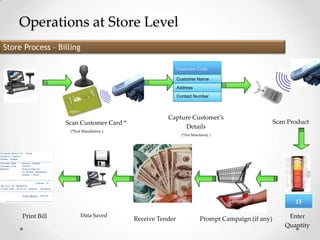
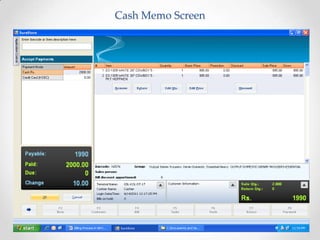
Store Process – Billing
Customer Code
Customer Name
Address
Contact Number

Scan Customer Card *
(*Not Mandatory )

Capture Customer’s
Details

Scan Product

(*Not Mandatory )

15
Print Bill

Data Saved

Receive Tender

Prompt Campaign (if any)

Enter
Quantity
Cash Memo Screen
Operations at Store Level
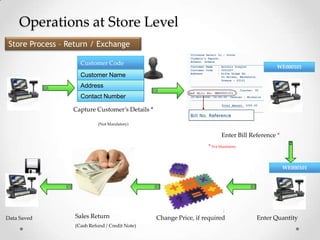
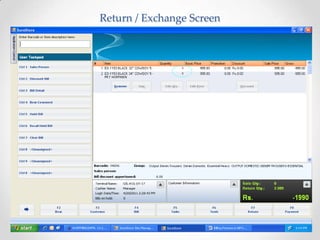
Store Process – Return / Exchange
Customer Code

WE000101

Customer Name
Address
Contact Number
Capture Customer’s Details *
(Not Mandatory)

Enter Bill Reference *
* Not Mandatory

WE000101

Data Saved

Sales Return
(Cash Refund / Credit Note)

Change Price, if required

Enter Quantity
Return / Exchange Screen
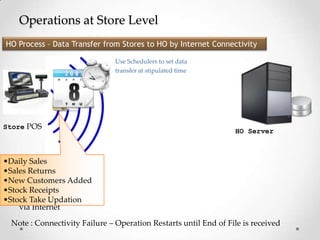
Operations at Store Level
HO Process – Data Transfer from Stores to HO by Internet Connectivity
Use Schedulers to set data
transfer at stipulated time

Store POS

HO Server

•Daily Sales
•Sales Returns
•New Customers Added
Send Updated
•Stock Receipts
Data to Updation
•Stock Take HO,
via Internet
Note : Connectivity Failure – Operation Restarts until End of File is received
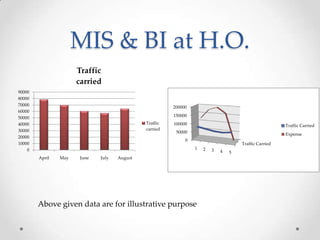
MIS & BI at H.O.
Traffic
carried
90000
80000
70000
60000
50000
40000
30000
20000
10000
0

200000
150000
Traffic
carried

100000

Traffic Carried

50000

Expense

0

Traffic Carried
1

April

May

June

July

August

Above given data are for illustrative purpose

2

3

4

5
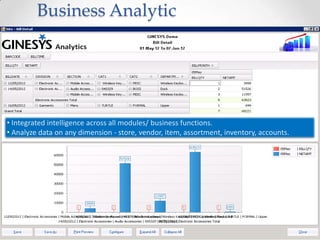
Business Analytic

• Integrated intelligence across all modules/ business functions.
• Analyze data on any dimension - store, vendor, item, assortment, inventory, accounts.
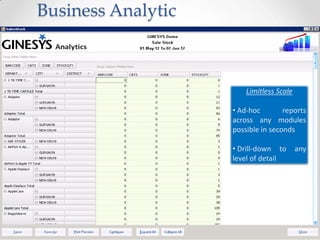
Business Analytic

Limitless Scale
• Ad-hoc
reports
across any modules
possible in seconds

• Drill-down to
level of detail

any
Business Analytic

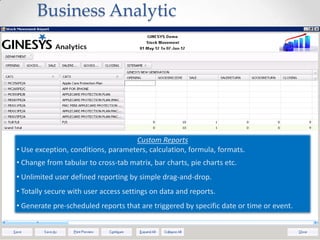
Custom Reports
• Use exception, conditions, parameters, calculation, formula, formats.
• Change from tabular to cross-tab matrix, bar charts, pie charts etc.
• Unlimited user defined reporting by simple drag-and-drop.

• Totally secure with user access settings on data and reports.
• Generate pre-scheduled reports that are triggered by specific date or time or event.
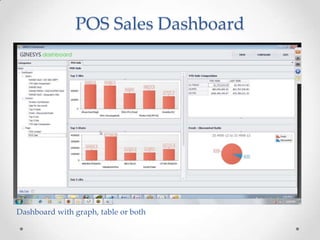
POS Sales Dashboard

Dashboard with graph, table or both
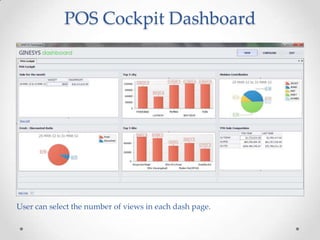
POS Cockpit Dashboard

User can select the number of views in each dash page.
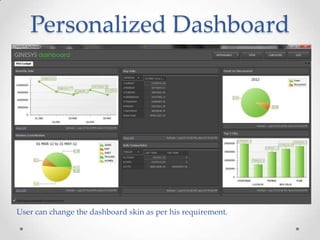
Personalized Dashboard

User can change the dashboard skin as per his requirement.
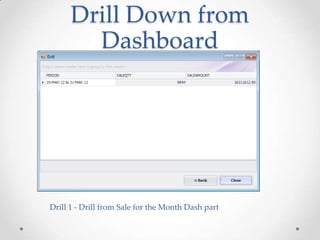
Drill Down from
Dashboard

Drill 1 - Drill from Sale for the Month Dash part
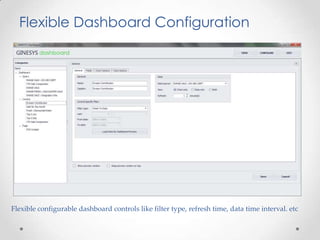
Flexible Dashboard Configuration

Flexible configurable dashboard controls like filter type, refresh time, data time interval. etc
GINESYS Customers in EBO Format
Other GINESYS Customer
Thank You

Ginesys Retail ERP Presentations

  • 1.
    Presenting GINESYS RetailSupply Chain Software for Strengthening your Retail System
  • 2.
    GSL – ASnapshot Company with 14 years of experience and proven credentials Awarded Best Retail POS Solution Direct Presence in in all 5 Metro Cities 8500+ Live Locations End-to-End Solution (Manufacturing to Retailing) Creator of GINESYS Software for Retail Supply Chain 140 + Professionals Started in 1999 (By CA’s and IT Professionals) ORACLE & Microsoft Gold Partner 99% Customer Satisfaction & Retention
  • 3.
    Product features Merchandising Procurement (Unlimited Grouping& Classification of items) (Multiple Unique Procurement features) (Complete visibility of inventory of all locations centrally) **Replenishment Sales & Distribution Point of Sale (Strong Replenishment with Planning tool) (Strong Backend sales engine to cater B2B & Direct Deliveries ) (Simple screen with advance features & Security) Promotions Customer Loyalty (Unlimited user defined promotions) (Multi level loyalty & different redemption options) Production Control MIS & Business Analytics (Strong Production Control option to manage production at In house & through Job workers) (More than 300 standard reports and a BI tool to create dynamic user defined graphical reports) Inventory Accounting (Strong & Complete integrated Accounting Both Centralized & Branch) Value Added Features (Auto E mail notification & Mobile Apps)
  • 4.
    Geographical Spread National Regional Local Merchandise Format Business Model Food& Grocery Lifestyle/Fashion Stores Manufacturing Jewellery Specialty Stores B2C B2B Apparel/Accessories Hypermarket E.B.O Furniture/Furnishings M.B.O Wholesale Supermarket Consumer Durables Mini supermarket Books/Gifts/Music Electronic & CDIT Lifestyle/Fashion Convenience Store Mom & Pop Stores COCO FOCO FOFO Outright Sales Consignment Sales SOR / SNS
  • 5.
    A Glimpse intoour Relationships (Largest Jewellery Company in India using end to end GINESYS software solution) (Leading men’s fashion wear in India having 210+ retail stores all across India) (Biggest men’s ethnic wear brand in India having more than 240+ retail stores all across India)  (A chain of 40 fashion boutique, owned by India’s #1 fashion designer Ritu Kumar.)   (Renowned men’s wear brand having 70+ retail stores)  (Leading unstitched Salwar Suit brand in India having 60+ retail stores and 600+ SNS)  (Renowned MBO in North India having 20+ retail stores)  (Leading department store chain of north India having more than 60 retail stores)
  • 6.
    A Glimpse intoour Relationships (Having chain of 12 fashion boutique) (Leading department store retail chain of Rajasthan & Gujarat having more than 40 retail stores) (Leading ladies wear brand by elite designer Anita Dongre)  (Ethnic wear MBO by Future Group having 15 retail stores)  (Retail chain of 20 outlets for women ethnic apparels and dress materials)  (Books and Music Store in East India having 11 stores.)  (Beauty care boutique in India by Johnson & Johnson)  And many more………
  • 7.
    Requirement – OurUnderstanding A Centrally Integrated ERP with off line POS system. (Eliminating Manual process at all level) Strong POS Solution enables Quick billing and Secure sales Data. (Provides Authentic Data & Limits chance of manipulation) Simple & Single Solution (Single Application for different format handling) Strong Reporting Engine (Gives complete visibility to the Management and Business Intelligence). Seamless Synchronization Module (GINESYS auto data synchronization option gives real-time reporting experience)
  • 8.
    GINESYS – KeyBenefits ORACLE DB in Back office Renowned for its Robustness, Scalability, Security and adaptability . GINESYS’s back end designed in Oracle. NON STOP BILLING Distributed DB ensures Billing never stops even when connectivity fails. LESS INFRASTRUCTURE COST Need simple infrastructure. At Store & HO. Dynamic Reports Easily customizable User defined reports Unmatched Support Different reliable support options Web, Telephone, mail & In person Scalable & Versatile SMS Integration, Mobility solution, e commerce, Vendor Mgmt etc..
  • 9.
    Technology Details ofGIENSYS • Back Office: o 2 tier Client/Server based application o Developed with Oracle Developer (Forms 6 and Report 4.5) o Retail Module is developed on C# (C Sharp) with .Net framework 3.5 (Shall be upgraded to version 4.0/4.5 soon) o Certified for Oracle 10g Database Server (10.2.0.4) o Distributed Architecture o Centralized Data Management and Consolidate Reporting o Designed for scalability and performance o Database Server Supported Microsoft Windows Server, Sun Solaris, Red Hat Enterprise Linux. o Application / Workstation Supported with Windows 7 and Above operating system. • POS: o 2 tier Client/Server based application o Developed with C# (C Sharp) with .Net framework 3.5. (Shall be upgraded to version 4.0/4.5 soon) o SQL Server 2008 R2 Express o Database Server Supported Microsoft Windows Server o Application / Workstation Supported with Windows 7 and Above operating system.
  • 10.
    Solution Architecture SERVER H.O. • • AllMasters • Promotions Stock Transfer Details WEB DB INTERNET • • • • Store / Location 1 User / Till 1 User / Till 2 User / Till 3 Sales Tender Inventory Customer Store / Location 2
  • 11.
  • 12.
    Operations at HOLevel Data Transfer from H.O to Store WEB DB GINESYS Server Store Server Data Includes: 1. Item Master 2. Taxes 3. Pricing 4. Stock Transfer
  • 13.
    Operations at HOLevel HO Process – License Management License Activation License Registration License Deactivation
  • 14.
    Operations at HOLevel HO Process – Store Policy Management Master Profile Definition Deactivation* (If reqd) Store Policy Creation Report Summary Policy Allocation Policy Activation
  • 15.
  • 16.
    Operations at HOLevel HO Process – User Management User Profile Definition Deactivation* (If reqd) User Creation User Report Summary User Allocation User Activation
  • 17.
  • 18.
    Operations at HOLevel HO Process – Master creation Vendor Production Processes Tax Price Masters Merchandise Promotions Customer Loyalty & GV
  • 19.
    Operations at HOLevel HO Process – Loyalty Management Loyalty Benefits Definition Deactivation Loyalty Card Creation Summary of Statement Activation & Allocation Centralized Point Accumulation & Redemption
  • 20.
    Customer Loyalty Cardmaster Screen
  • 21.
    Customer Loyalty CardBenefits screen Can tag multiple benefits to a card like discount benefits and point benefits
  • 22.
    Operations at HOLevel HO Process – Promotion Management Promotion Creation Promotion Activation Promotion Definition & Sample Testing Promotion Deactivation Promotion Based on Attribute Promotion Based on Time or Season Promotion Based on Location or Group of Locations
  • 23.
    Define Promotions Screen Candefine multiple types of promotions like Flat Discount promo Flat Price promo Buy Get promo Qty based slab wise promo Value based slab wise promo Combo promo etc
  • 24.
  • 25.
    Operations at StoreLevel Store Process – Goods Receiving Receives Stock Transfer File Scan Items Based on Transfer Doc Stock Receive S. No. Item Code Received Damaged NR 1 1001 50 - - 2 2021 100 10 - 3 2022. 10 - 1 Record Data and Handle Discrepancies Data Saved
  • 26.
  • 27.
    Operations at StoreLevel Store Process – Stock Taking/Audit Receives Item Master User needs to Scan all Items based on Attributes and Divisions. Stock Take S. No. System Quantity Stock Take Quantity NF 1 1331 100 - - 2 Data Saved Item Code 1551 20 70 - Record Data and Handle Discrepancies 3 2001 50 - 2
  • 28.
  • 29.
    Operations at StoreLevel Store Process – New Customer Takes Complete Details of Customer, and Saves it. Customer Name Address Customer Code Contact Number Enter Customer’s Data Save the Records Create a Customer Issue Loyalty Card (if any)
  • 30.
  • 31.
    Operations at StoreLevel Store Process – Billing Customer Code Customer Name Address Contact Number Scan Customer Card * (*Not Mandatory ) Capture Customer’s Details Scan Product (*Not Mandatory ) 15 Print Bill Data Saved Receive Tender Prompt Campaign (if any) Enter Quantity
  • 32.
  • 33.
    Operations at StoreLevel Store Process – Return / Exchange Customer Code WE000101 Customer Name Address Contact Number Capture Customer’s Details * (Not Mandatory) Enter Bill Reference * * Not Mandatory WE000101 Data Saved Sales Return (Cash Refund / Credit Note) Change Price, if required Enter Quantity
  • 34.
  • 35.
    Operations at StoreLevel HO Process – Data Transfer from Stores to HO by Internet Connectivity Use Schedulers to set data transfer at stipulated time Store POS HO Server •Daily Sales •Sales Returns •New Customers Added Send Updated •Stock Receipts Data to Updation •Stock Take HO, via Internet Note : Connectivity Failure – Operation Restarts until End of File is received
  • 36.
    MIS & BIat H.O. Traffic carried 90000 80000 70000 60000 50000 40000 30000 20000 10000 0 200000 150000 Traffic carried 100000 Traffic Carried 50000 Expense 0 Traffic Carried 1 April May June July August Above given data are for illustrative purpose 2 3 4 5
  • 37.
    Business Analytic • Integratedintelligence across all modules/ business functions. • Analyze data on any dimension - store, vendor, item, assortment, inventory, accounts.
  • 38.
    Business Analytic Limitless Scale •Ad-hoc reports across any modules possible in seconds • Drill-down to level of detail any
  • 39.
    Business Analytic Custom Reports •Use exception, conditions, parameters, calculation, formula, formats. • Change from tabular to cross-tab matrix, bar charts, pie charts etc. • Unlimited user defined reporting by simple drag-and-drop. • Totally secure with user access settings on data and reports. • Generate pre-scheduled reports that are triggered by specific date or time or event.
  • 40.
    POS Sales Dashboard Dashboardwith graph, table or both
  • 41.
    POS Cockpit Dashboard Usercan select the number of views in each dash page.
  • 42.
    Personalized Dashboard User canchange the dashboard skin as per his requirement.
  • 43.
    Drill Down from Dashboard Drill1 - Drill from Sale for the Month Dash part
  • 44.
    Flexible Dashboard Configuration Flexibleconfigurable dashboard controls like filter type, refresh time, data time interval. etc
  • 45.
  • 46.
  • 47.
  • 48.
  • 49.