RoR to RubyMotion
Writing Your First iOS App
With RubyMotion
Michael Denomy
BostonMotion User Group
June 25, 2013
About Me
• Tech Lead at Cyrus Innovation
- Agile web consultancy with offices in New
York and Boston
- http://www.cyrusinnovation.com
• Agile and XP practitioner since 2004
- Passionate about TDD and pairing
• mdenomy on twitter and github
• Blog at www.mdenomy.wordpress.com
Goals
• Capture my experiences getting started
with RubyMotion
- Help someone else along
- Get ideas for where to go next
• Target Audience
- Developers familiar with Ruby on Rails
- Little to no previous experience with iOS
- Desire to learn
• Some talk, some code
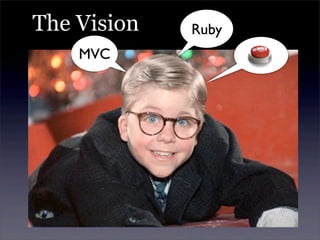
The Vision
MVC
Ruby
The Reality initWithNibName?
UIControlEventTouchUpInside?
What’s a Nib?
More Cold Hard Facts
• RubyMotion is not free
- $199.99
- No trial, but 30 day money back
- There is a student discount program
• iOS Developer Program is not free
- $99 / year
- Required to deploy to devices and distribute
via AppStore
• You will need to understand iOS SDK
- iOS documentation is difficult to navigate
It Gets Better
It Gets Better
Good Stuff
• Growing community with lots of online
resources
• More and more gems appearing that
provide a Rails-like experience
• Free to use the tools you like
- Sublime plug in for RubyMotion has code
completion and rake shortcuts
https://github.com/haraken3/
SublimeRubyMotionBuilder
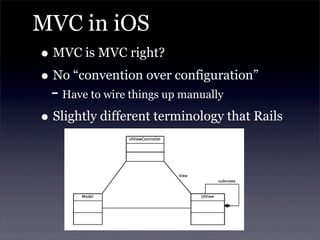
MVC in iOS
• MVC is MVC right?
• No “convention over configuration”
- Have to wire things up manually
• Slightly different terminology that Rails
UIViewControllers
• Controller receives actions from the
framework (e.g. view loaded) and the
user (e.g. button pressed)
- Interacts with Models and View
• UIViewControllers you need to know
- UINavigationController
- UITabBarController
- UIViewController
- UITableViewController
Models
• Models are PORO’s in RubyMotion
• Support built-in for
- attr_accessor
- attr_reader
- attr_writer
• Possible to serialize/deserialize data
using NSCoder and NSKeyedArchiver
- Looked for other options to support storage
and relationships
Views
• UIView is a base class
• Buttons, labels, date pickers, etc., all
inherit from UIView
• Views can have subviews
- Simplifies screen layout and allows re-use
Let’s Look at Some Code
• Basic Navigation
- Application Delegate
- Root View Controller
- UITabBarController
- UIViewControllers
MyWines App
• I enjoy the occasional glass of wine.
• I would like to have a way to track the
wines I like and prices I've paid for them
- Record tasting notes
- Record purchases and price info
- Search for wine by name/producer
- Save to Favorites
- Save label picture
• Spoiler alert
- I have done next to nothing to style the app
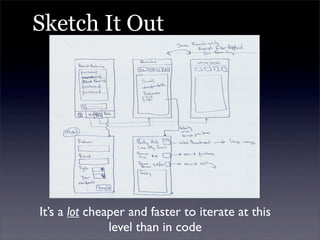
Sketch It Out
It’s a lot cheaper and faster to iterate at this
level than in code
What Tools Did I Choose
• Bundler - Simplify dependencies
• ProMotion - Screen development and workflow
• Formotion - Entry/edit forms
• MotionModel - Models and relations
• Teacup - Styling DSL
• Sugarcube - UI extensions
• BubbleWrap - I used it for camera, but lots more
(JSON, HTTP, RSS, Location, Audio, Video)
• MotionAwesome - Buttons and icons
More at http://rubymotion-wrappers.com/
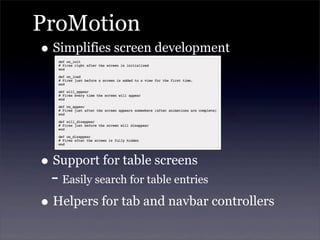
ProMotion
• Simplifies screen development
• Support for table screens
- Easily search for table entries
• Helpers for tab and navbar controllers
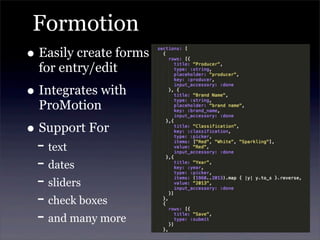
Formotion
• Easily create forms
for entry/edit
• Integrates with
ProMotion
• Support For
- text
- dates
- sliders
- check boxes
- and many more
MotionModel
• Wanted something like ActiveRecord
• Chose MotionModel gem
- Lightweight
- Feels Railsy
‣ Validations
‣ ActiveRecord-like syntax
‣ Relations
- Serialization / deserialization support
- Actively maintained
- Formotion support(turned out not to matter)
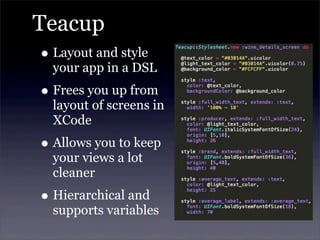
Teacup
• Layout and style
your app in a DSL
• Frees you up from
layout of screens in
XCode
• Allows you to keep
your views a lot
cleaner
• Hierarchical and
supports variables
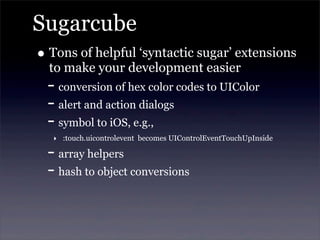
Sugarcube
• Tons of helpful ‘syntactic sugar’ extensions
to make your development easier
- conversion of hex color codes to UIColor
- alert and action dialogs
- symbol to iOS, e.g.,
‣ :touch.uicontrolevent becomes UIControlEventTouchUpInside
- array helpers
- hash to object conversions
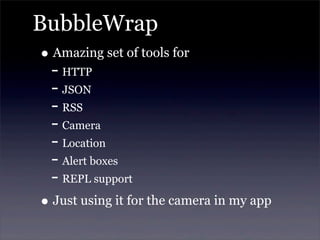
BubbleWrap
• Amazing set of tools for
- HTTP
- JSON
- RSS
- Camera
- Location
- Alert boxes
- REPL support
• Just using it for the camera in my app
MotionAwesome
• Great set of icons and buttons
• Based on FontAwesome
• So far only used it to create a camera
button using a camera icon
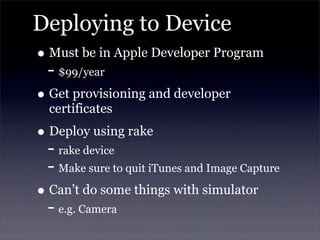
Deploying to Device
• Must be in Apple Developer Program
- $99/year
• Get provisioning and developer
certificates
• Deploy using rake
- rake device
- Make sure to quit iTunes and Image Capture
• Can’t do some things with simulator
- e.g. Camera
Where Do I Go Next
• Better use of views and subviews
- As app evolves will have more common
controls/groups -> re-use
- Easier to lay out due to relative positioning
used in subviews
• Better/more styling
- Will require more understanding of iOS
• Persist images to file system
• Do more with models
- Averages, filtering, etc
Where Do I Go Next
• Testing
- This was very much a spike, but as the app
evolves want to incorporate more automated
testing
- Tested the models, especially persistence and
validation since these were areas of risk
- Want to look at more integration testing
‣ motion-frank (maintained by Cyrus Innovation)
‣ motion-calabash
Questions I Still Have
• ProMotion is awesome, but I wonder if
down the road this paints me into a
corner
• Wild West of gems
- Will be interesting to see what ideas and
tools rise to the top
• How much iOS should I learn
- Interface Builder
- CoreData
Resources
• RubyMotion Developer Center
- http://www.rubymotion.com/developer-center/
• RubyMotion by Clay Allsop
- http://pragprog.com/book/carubym/rubymotion
• iOS Dev Center
- Tons of useful info, navigation is horrible
- https://developer.apple.com/devcenter/ios/index.action
- https://developer.apple.com/library/ios/#featuredarticles/
ViewControllerPGforiPhoneOS
• RubyMotion Wrappers and Libraries
- http://rubymotion-wrappers.com/
Questions
• Q&A
RoR to RubyMotion
Writing Your First iOS App
Michael Denomy
BostonMotion User Group
June 25, 2013

From Ruby on Rails to RubyMotion - Writing your First iOS App with RubyMotion

  • 1.
    RoR to RubyMotion WritingYour First iOS App With RubyMotion Michael Denomy BostonMotion User Group June 25, 2013
  • 2.
    About Me • TechLead at Cyrus Innovation - Agile web consultancy with offices in New York and Boston - http://www.cyrusinnovation.com • Agile and XP practitioner since 2004 - Passionate about TDD and pairing • mdenomy on twitter and github • Blog at www.mdenomy.wordpress.com
  • 3.
    Goals • Capture myexperiences getting started with RubyMotion - Help someone else along - Get ideas for where to go next • Target Audience - Developers familiar with Ruby on Rails - Little to no previous experience with iOS - Desire to learn • Some talk, some code
  • 4.
  • 5.
  • 6.
    More Cold HardFacts • RubyMotion is not free - $199.99 - No trial, but 30 day money back - There is a student discount program • iOS Developer Program is not free - $99 / year - Required to deploy to devices and distribute via AppStore • You will need to understand iOS SDK - iOS documentation is difficult to navigate
  • 7.
  • 8.
  • 9.
    Good Stuff • Growingcommunity with lots of online resources • More and more gems appearing that provide a Rails-like experience • Free to use the tools you like - Sublime plug in for RubyMotion has code completion and rake shortcuts https://github.com/haraken3/ SublimeRubyMotionBuilder
  • 10.
    MVC in iOS •MVC is MVC right? • No “convention over configuration” - Have to wire things up manually • Slightly different terminology that Rails
  • 11.
    UIViewControllers • Controller receivesactions from the framework (e.g. view loaded) and the user (e.g. button pressed) - Interacts with Models and View • UIViewControllers you need to know - UINavigationController - UITabBarController - UIViewController - UITableViewController
  • 12.
    Models • Models arePORO’s in RubyMotion • Support built-in for - attr_accessor - attr_reader - attr_writer • Possible to serialize/deserialize data using NSCoder and NSKeyedArchiver - Looked for other options to support storage and relationships
  • 13.
    Views • UIView isa base class • Buttons, labels, date pickers, etc., all inherit from UIView • Views can have subviews - Simplifies screen layout and allows re-use
  • 14.
    Let’s Look atSome Code • Basic Navigation - Application Delegate - Root View Controller - UITabBarController - UIViewControllers
  • 15.
    MyWines App • Ienjoy the occasional glass of wine. • I would like to have a way to track the wines I like and prices I've paid for them - Record tasting notes - Record purchases and price info - Search for wine by name/producer - Save to Favorites - Save label picture • Spoiler alert - I have done next to nothing to style the app
  • 16.
    Sketch It Out It’sa lot cheaper and faster to iterate at this level than in code
  • 17.
    What Tools DidI Choose • Bundler - Simplify dependencies • ProMotion - Screen development and workflow • Formotion - Entry/edit forms • MotionModel - Models and relations • Teacup - Styling DSL • Sugarcube - UI extensions • BubbleWrap - I used it for camera, but lots more (JSON, HTTP, RSS, Location, Audio, Video) • MotionAwesome - Buttons and icons More at http://rubymotion-wrappers.com/
  • 18.
    ProMotion • Simplifies screendevelopment • Support for table screens - Easily search for table entries • Helpers for tab and navbar controllers
  • 19.
    Formotion • Easily createforms for entry/edit • Integrates with ProMotion • Support For - text - dates - sliders - check boxes - and many more
  • 20.
    MotionModel • Wanted somethinglike ActiveRecord • Chose MotionModel gem - Lightweight - Feels Railsy ‣ Validations ‣ ActiveRecord-like syntax ‣ Relations - Serialization / deserialization support - Actively maintained - Formotion support(turned out not to matter)
  • 21.
    Teacup • Layout andstyle your app in a DSL • Frees you up from layout of screens in XCode • Allows you to keep your views a lot cleaner • Hierarchical and supports variables
  • 22.
    Sugarcube • Tons ofhelpful ‘syntactic sugar’ extensions to make your development easier - conversion of hex color codes to UIColor - alert and action dialogs - symbol to iOS, e.g., ‣ :touch.uicontrolevent becomes UIControlEventTouchUpInside - array helpers - hash to object conversions
  • 23.
    BubbleWrap • Amazing setof tools for - HTTP - JSON - RSS - Camera - Location - Alert boxes - REPL support • Just using it for the camera in my app
  • 24.
    MotionAwesome • Great setof icons and buttons • Based on FontAwesome • So far only used it to create a camera button using a camera icon
  • 25.
    Deploying to Device •Must be in Apple Developer Program - $99/year • Get provisioning and developer certificates • Deploy using rake - rake device - Make sure to quit iTunes and Image Capture • Can’t do some things with simulator - e.g. Camera
  • 26.
    Where Do IGo Next • Better use of views and subviews - As app evolves will have more common controls/groups -> re-use - Easier to lay out due to relative positioning used in subviews • Better/more styling - Will require more understanding of iOS • Persist images to file system • Do more with models - Averages, filtering, etc
  • 27.
    Where Do IGo Next • Testing - This was very much a spike, but as the app evolves want to incorporate more automated testing - Tested the models, especially persistence and validation since these were areas of risk - Want to look at more integration testing ‣ motion-frank (maintained by Cyrus Innovation) ‣ motion-calabash
  • 28.
    Questions I StillHave • ProMotion is awesome, but I wonder if down the road this paints me into a corner • Wild West of gems - Will be interesting to see what ideas and tools rise to the top • How much iOS should I learn - Interface Builder - CoreData
  • 29.
    Resources • RubyMotion DeveloperCenter - http://www.rubymotion.com/developer-center/ • RubyMotion by Clay Allsop - http://pragprog.com/book/carubym/rubymotion • iOS Dev Center - Tons of useful info, navigation is horrible - https://developer.apple.com/devcenter/ios/index.action - https://developer.apple.com/library/ios/#featuredarticles/ ViewControllerPGforiPhoneOS • RubyMotion Wrappers and Libraries - http://rubymotion-wrappers.com/
  • 30.
  • 31.
    RoR to RubyMotion WritingYour First iOS App Michael Denomy BostonMotion User Group June 25, 2013