Debugging Rails


Michael Denomy
Boston Ruby Project Night
March 5, 2013
Agenda
• Introduction to Rails Debugging
 - Role of testing
 - Examining the log files
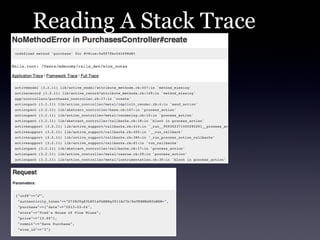
 - Interpreting the stack trace
 - The better_errors gem
 - Rails console
 - Using pry gem to debug
Testing
• First line of defense
   - Avoid defects in the first place
• Since adopting TDD, time spent
     ‣ using a debugger
     ‣ writing log messages
     ‣ triaging defects

have all dropped significantly
• Find a defect?
   - First step: write a test to reproduce it
General Debugging Tips
• Reproduce the problem
 - Under what conditions does it occur
   ‣ data, configuration, environment

 - Write a unit/integration test if possible
• Divide and Conquer
 - Reduce the places you have to look
   ‣ Logging statements
   ‣ Simplest conditions to reproduce
   ‣ Any recent changes?
General Debugging Tips
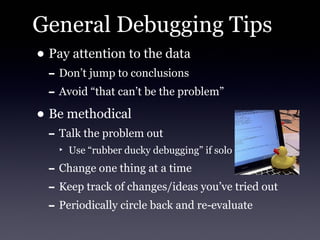
• Pay attention to the data
 - Don’t jump to conclusions
 - Avoid “that can’t be the problem”
• Be methodical
 - Talk the problem out
   ‣ Use “rubber ducky debugging” if solo

 - Change one thing at a time
 - Keep track of changes/ideas you’ve tried out
 - Periodically circle back and re-evaluate
Rails Log Files
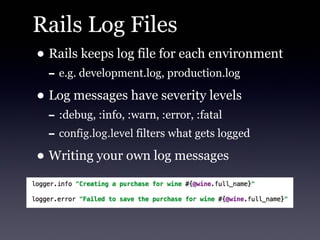
• Rails keeps log file for each environment
  - e.g. development.log, production.log
• Log messages have severity levels
  - :debug, :info, :warn, :error, :fatal
  - config.log.level filters what gets logged
• Writing your own log messages
Asset Pipeline Log Messages
• Lots of messages related to asset pipeline
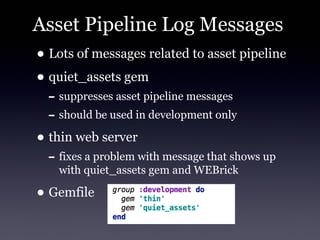
• quiet_assets gem
  - suppresses asset pipeline messages
  - should be used in development only
• thin web server
  - fixes a problem with message that shows up
    with quiet_assets gem and WEBrick

• Gemfile
Reading A Stack Trace
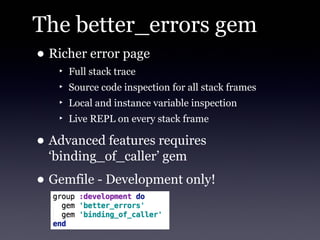
The better_errors gem
• Richer error page
   ‣ Full stack trace
   ‣ Source code inspection for all stack frames
   ‣ Local and instance variable inspection
   ‣ Live REPL on every stack frame

• Advanced features requires
  ‘binding_of_caller’ gem
• Gemfile - Development only!
Using the Rails Console
• Great playground to experiment
  - Especially handy for model access
• Danger!!!
  - Good idea to run in sandbox to prevent
    changing data
      rails console --sandbox
pry gem
• pry is an IRB replacement
  - live help
  - syntax highlighting
  - navigate scope
  - and much, much, more
• pry also supports plugins...lots of them
  - check out www.rubygems.org for full list
• pry-debugger gem
  - step, next, continue
Debug Using an IDE
• If you come from a background where
  you have used an IDE, e.g. Java or C#, an
  IDE is an option
• RubyMine has an integrated debugger
  - Does not play well with pry-debug or other
    debuggers
Summary
• Divide and Conquer Strategy
• Be methodical
• Check the logs for clues
• Testing is the best defense
• Questions?
References
http://gipsysoft.com/articles/debug-rules/
http://pryrepl.org/screencasts.html
http://railscasts.com/episodes/86-logging-variables
http://railscasts.com/episodes/24-the-stack-trace
http://railscasts.com/episodes/280-pry-with-rails
http://samuelmullen.com/2012/07/getting-more-out-of-the-rails-console/
Debugging Rails


Michael Denomy
Boston Ruby Project Night
March 5, 2013

Debugging rails

  • 1.
    Debugging Rails Michael Denomy BostonRuby Project Night March 5, 2013
  • 2.
    Agenda • Introduction toRails Debugging - Role of testing - Examining the log files - Interpreting the stack trace - The better_errors gem - Rails console - Using pry gem to debug
  • 3.
    Testing • First lineof defense - Avoid defects in the first place • Since adopting TDD, time spent ‣ using a debugger ‣ writing log messages ‣ triaging defects have all dropped significantly • Find a defect? - First step: write a test to reproduce it
  • 4.
    General Debugging Tips •Reproduce the problem - Under what conditions does it occur ‣ data, configuration, environment - Write a unit/integration test if possible • Divide and Conquer - Reduce the places you have to look ‣ Logging statements ‣ Simplest conditions to reproduce ‣ Any recent changes?
  • 5.
    General Debugging Tips •Pay attention to the data - Don’t jump to conclusions - Avoid “that can’t be the problem” • Be methodical - Talk the problem out ‣ Use “rubber ducky debugging” if solo - Change one thing at a time - Keep track of changes/ideas you’ve tried out - Periodically circle back and re-evaluate
  • 6.
    Rails Log Files •Rails keeps log file for each environment - e.g. development.log, production.log • Log messages have severity levels - :debug, :info, :warn, :error, :fatal - config.log.level filters what gets logged • Writing your own log messages
  • 7.
    Asset Pipeline LogMessages • Lots of messages related to asset pipeline • quiet_assets gem - suppresses asset pipeline messages - should be used in development only • thin web server - fixes a problem with message that shows up with quiet_assets gem and WEBrick • Gemfile
  • 8.
  • 9.
    The better_errors gem •Richer error page ‣ Full stack trace ‣ Source code inspection for all stack frames ‣ Local and instance variable inspection ‣ Live REPL on every stack frame • Advanced features requires ‘binding_of_caller’ gem • Gemfile - Development only!
  • 10.
    Using the RailsConsole • Great playground to experiment - Especially handy for model access • Danger!!! - Good idea to run in sandbox to prevent changing data rails console --sandbox
  • 11.
    pry gem • pryis an IRB replacement - live help - syntax highlighting - navigate scope - and much, much, more • pry also supports plugins...lots of them - check out www.rubygems.org for full list • pry-debugger gem - step, next, continue
  • 12.
    Debug Using anIDE • If you come from a background where you have used an IDE, e.g. Java or C#, an IDE is an option • RubyMine has an integrated debugger - Does not play well with pry-debug or other debuggers
  • 13.
    Summary • Divide andConquer Strategy • Be methodical • Check the logs for clues • Testing is the best defense • Questions?
  • 14.
  • 15.
    Debugging Rails Michael Denomy BostonRuby Project Night March 5, 2013