



DOCKER SANDBOXES FOR MARIADB
IVAN ZLATOUSTOV
Senior Engineer
MariaDB Corporation
AGENDA
● Brief introduction Docker
● MariaDB Supported Docker Images
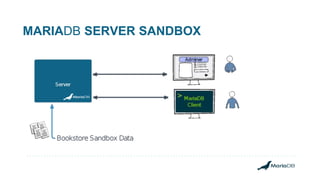
● MariaDB Server Sandbox
● MariaDB Analytics Sandbox
DOCKER
Docker performs operating-system-level virtualization
also known as "containerization".
Makes it easier to create, deploy, and run applications by using containers.
It allows a developer to package up an application with all of the parts it
needs.
DOCKER
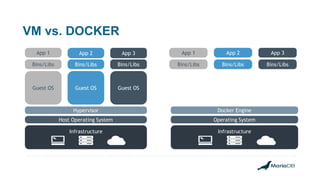
In a way it is very similar to the a virtual machine.
But there are key differences.
VM vs. DOCKER
App 1 App 2 App 3
Bins/Libs Bins/Libs Bins/Libs
Guest OS Guest OS Guest OS
Hypervisor
Host Operating System
Infrastructure
Docker Engine
Operating System
Infrastructure
App 1 App 2 App 3
Bins/Libs Bins/Libs Bins/Libs
DOCKER
The main benefits of containerization.
● Portable deployment of applications as a single file;
● Supports for automatic container builds;
● Public registry for sharing containers;
● Built-in version tracking;
● Reusable components;
DOCKER COMPOSE
Docker Compose is a tool for defining and running multi-container
Docker applications on a single host.
With Compose, you can:
● Use a single file to configure your application's services.
● Use a single command, to create and start all the services from your
configuration.
MARIADB DOCKER CONTAINERS
There are many platforms for containerization like RKT, LXD, OpenVZ and
others.
For MariaDB we chose docker because it is:
● Mature
● Open
● Popular
MARIADB DOCKER CONTAINERS
MariaDB provides supported container images for our products on
Docker Hub
https://hub.docker.com/u/mariadb
MariaDB Server - mariadb/server
MariaDB MaxScale - mariadb/maxscale
MariaDB Columnstore - mariadb/columnstore
MariaDB X3 Platform - mariadb/x3inabox
MARIADB DOCKER CONTAINERS
MariaDB X3 Platform in a Box
Single container: mariadb/x3inabox
Combines all of the elements of MariaDB platform into a single container.
Easy configuration
Does not require manual setup of the various components.
Creates the whole setup with a single docker command.
Place Image Here
MARIADB SANDBOX
Easy way to try MariaDB.
Easy to deploy.
Publicly available.
MARIA SANDBOXES
● Provide an easy way to get your familiar with the MariaDB
● Provide tools and data to get you start with Relational Databases,
SQL, Analytics and ML;
MARIA SANDBOXES
● Server Sandbox
● Analytical Sandbox
● Analytical Sandbox Kubernetes (preview)
More to come trough the year.
MARIADB SANDBOX PREREQUISITES
Install docker following this link:
https://docs.docker.com/engine/installation/
Install docker compose following this link:
https://docs.docker.com/compose/install/
Install Minikube following this link
https://kubernetes.io/docs/tasks/tools/install-minikube/
MariaDB Server
Sandbox
MARIADB SERVER SANDBOX
Prerequisites:
Docker version: 2.0
Docker Compose: 1.23.2
RAM: 2GB minimum 4GB is recommended.
Place Image HereHANDS-ON SESSION
MARIADB SERVER SANDBOX
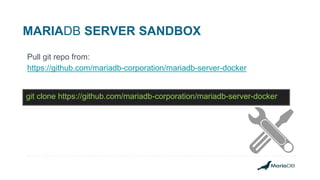
Pull git repo from:
https://github.com/mariadb-corporation/mariadb-server-docker
git clone https://github.com/mariadb-corporation/mariadb-server-docker
MARIADB SERVER SANDBOX
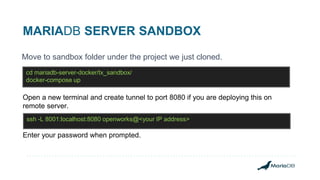
Move to sandbox folder under the project we just cloned.
cd mariadb-server-docker/tx_sandbox/
docker-compose up
Open a new terminal and create tunnel to port 8080 if you are deploying this on
remote server.
ssh -L 8001:localhost:8080 openworks@<your IP address>
Enter your password when prompted.
MARIADB SERVER SANDBOX
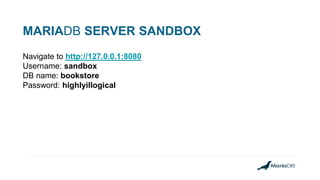
Navigate to http://127.0.0.1:8080
Username: sandbox
DB name: bookstore
Password: highlyillogical
MARIADB SERVER SANDBOX
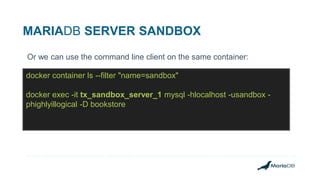
Or we can use the command line client on the same container:
docker container ls --filter "name=sandbox"
docker exec -it tx_sandbox_server_1 mysql -hlocalhost -usandbox -
phighlyillogical -D bookstore
MARIADB SERVER SANDBOX
Additional lab instructions for the sandbox can be found in the same folder as
labs.md:
https://github.com/mariadb-corporation/mariadb-server-
docker/blob/master/tx_sandbox/labs.md
MARIADB SERVER SANDBOX
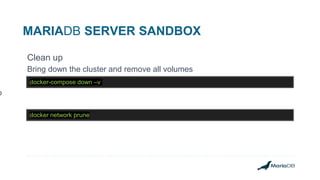
Clean up
Bring down the cluster and remove all volumes
docker network prune
docker-compose down –v
p
MariaDB Analytics
Sandbox
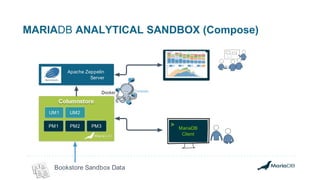
MARIADB ANALYTICAL SANDBOX (Compose)
MariaDB
Client
>
Bookstore Sandbox Data
UM1 UM2
PM1 PM2
Columnstore
PM3
Apache Zeppelin
Server
MARIADB ANALYTICS SANDBOX
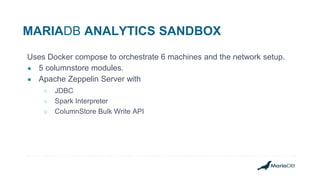
Uses Docker compose to orchestrate 6 machines and the network setup.
● 5 columnstore modules.
● Apache Zeppelin Server with
○ JDBC
○ Spark Interpreter
○ ColumnStore Bulk Write API
MARIADB ANALYTICS SANDBOX
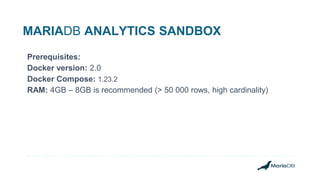
Prerequisites:
Docker version: 2.0
Docker Compose: 1.23.2
RAM: 4GB – 8GB is recommended (> 50 000 rows, high cardinality)
MARIADB ANALYTICS SANDBOX
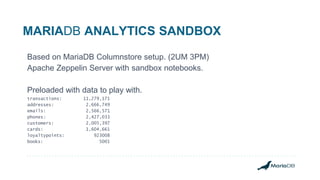
Based on MariaDB Columnstore setup. (2UM 3PM)
Apache Zeppelin Server with sandbox notebooks.
Preloaded with data to play with.
transactions: 11,279,171
addresses: 2,666,749
emails: 2,566,571
phones: 2,427,033
customers: 2,005,397
cards: 1,604,661
loyaltypoints: 923008
books: 5001
Place Image HereHANDS ON SESSION
MARIADB ANALYTICAL SANDBOX
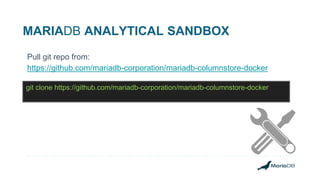
Pull git repo from:
https://github.com/mariadb-corporation/mariadb-columnstore-docker
git clone https://github.com/mariadb-corporation/mariadb-columnstore-docker
MARIADB ANALYTICAL SANDBOX
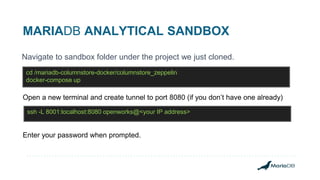
Navigate to sandbox folder under the project we just cloned.
cd /mariadb-columnstore-docker/columnstore_zeppelin
docker-compose up
Open a new terminal and create tunnel to port 8080 (if you don’t have one already)
ssh -L 8001:localhost:8080 openworks@<your IP address>
Enter your password when prompted.
MARIADB ANALYTICS SANDBOX
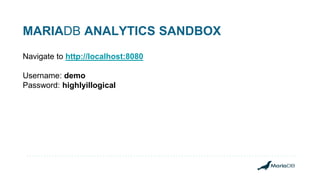
Navigate to http://localhost:8080
Username: demo
Password: highlyillogical
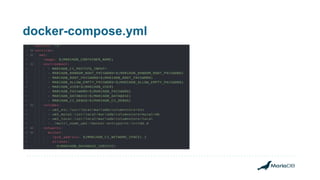
docker-compose.yml
MARIADB COLUMNSTORE SANDBOX
We can also use the command line client:
mysql -h127.0.0.1 -uzeppelin_user -pzeppelin_pass bookstore
Welcome to the MariaDB monitor. Commands end with ; or g.
Your MariaDB connection id is 46
Server version: 10.3.11-MariaDB-log Columnstore 1.2.2-1
Copyright (c) 2000, 2018, Oracle, MariaDB Corporation Ab and others.
Type 'help;' or 'h' for help. Type 'c' to clear the current input statement.
MariaDB [bookstore]>
MARIADB COLUMNSTORE SANDBOX
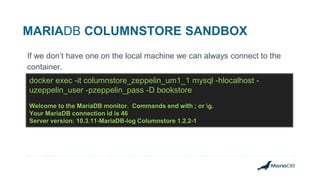
If we don’t have one on the local machine we can always connect to the
container.
docker exec -it columnstore_zeppelin_um1_1 mysql -hlocalhost -
uzeppelin_user -pzeppelin_pass -D bookstore
Welcome to the MariaDB monitor. Commands end with ; or g.
Your MariaDB connection id is 46
Server version: 10.3.11-MariaDB-log Columnstore 1.2.2-1
MARIADB COLUMNSTORE SANDBOX
Additional instructions for the sandbox can be found here:
https://github.com/mariadb-corporation/mariadb-columnstore-
docker/tree/master/columnstore_zeppelin
MARIADB SERVER SANDBOX
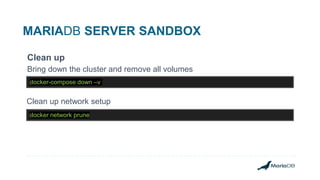
Clean up
Bring down the cluster and remove all volumes
docker network prune
docker-compose down –v
Clean up network setup
MariaDB Analytics
Sandbox in Kubernetes
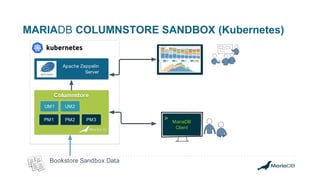
MARIADB COLUMNSTORE SANDBOX (Kubernetes)
Database Management Tool
MariaDB
Client
>
Bookstore Sandbox Data
UM1 UM2
PM1 PM2
Columnstore
PM3
Apache Zeppelin
Server
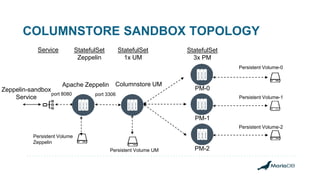
COLUMNSTORE SANDBOX TOPOLOGY
port 3306
Zeppelin-sandbox
Service
Columnstore UM
PM-0
Persistent Volume-0
PM-1
PM-2
Service StatefulSet
1x UM
StatefulSet
3x PM
Persistent Volume-1
Persistent Volume-2
Persistent Volume UM
Apache Zeppelin
StatefulSet
Zeppelin
Persistent Volume
Zeppelin
port 8080
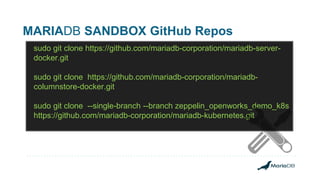
MARIADB SANDBOX GitHub Repos
sudo git clone https://github.com/mariadb-corporation/mariadb-server-
docker.git
sudo git clone https://github.com/mariadb-corporation/mariadb-
columnstore-docker.git
sudo git clone --single-branch --branch zeppelin_openworks_demo_k8s
https://github.com/mariadb-corporation/mariadb-kubernetes.git
THANK YOU!

Getting started with Docker sandboxes for MariaDB

  • 1.
    DOCKER SANDBOXES FORMARIADB IVAN ZLATOUSTOV Senior Engineer MariaDB Corporation
  • 2.
    AGENDA ● Brief introductionDocker ● MariaDB Supported Docker Images ● MariaDB Server Sandbox ● MariaDB Analytics Sandbox
  • 3.
    DOCKER Docker performs operating-system-levelvirtualization also known as "containerization". Makes it easier to create, deploy, and run applications by using containers. It allows a developer to package up an application with all of the parts it needs.
  • 4.
    DOCKER In a wayit is very similar to the a virtual machine. But there are key differences.
  • 5.
    VM vs. DOCKER App1 App 2 App 3 Bins/Libs Bins/Libs Bins/Libs Guest OS Guest OS Guest OS Hypervisor Host Operating System Infrastructure Docker Engine Operating System Infrastructure App 1 App 2 App 3 Bins/Libs Bins/Libs Bins/Libs
  • 6.
    DOCKER The main benefitsof containerization. ● Portable deployment of applications as a single file; ● Supports for automatic container builds; ● Public registry for sharing containers; ● Built-in version tracking; ● Reusable components;
  • 7.
    DOCKER COMPOSE Docker Composeis a tool for defining and running multi-container Docker applications on a single host. With Compose, you can: ● Use a single file to configure your application's services. ● Use a single command, to create and start all the services from your configuration.
  • 8.
    MARIADB DOCKER CONTAINERS Thereare many platforms for containerization like RKT, LXD, OpenVZ and others. For MariaDB we chose docker because it is: ● Mature ● Open ● Popular
  • 9.
    MARIADB DOCKER CONTAINERS MariaDBprovides supported container images for our products on Docker Hub https://hub.docker.com/u/mariadb MariaDB Server - mariadb/server MariaDB MaxScale - mariadb/maxscale MariaDB Columnstore - mariadb/columnstore MariaDB X3 Platform - mariadb/x3inabox
  • 10.
    MARIADB DOCKER CONTAINERS MariaDBX3 Platform in a Box Single container: mariadb/x3inabox Combines all of the elements of MariaDB platform into a single container. Easy configuration Does not require manual setup of the various components. Creates the whole setup with a single docker command.
  • 11.
    Place Image Here MARIADBSANDBOX Easy way to try MariaDB. Easy to deploy. Publicly available.
  • 12.
    MARIA SANDBOXES ● Providean easy way to get your familiar with the MariaDB ● Provide tools and data to get you start with Relational Databases, SQL, Analytics and ML;
  • 13.
    MARIA SANDBOXES ● ServerSandbox ● Analytical Sandbox ● Analytical Sandbox Kubernetes (preview) More to come trough the year.
  • 14.
    MARIADB SANDBOX PREREQUISITES Installdocker following this link: https://docs.docker.com/engine/installation/ Install docker compose following this link: https://docs.docker.com/compose/install/ Install Minikube following this link https://kubernetes.io/docs/tasks/tools/install-minikube/
  • 15.
  • 16.
  • 17.
    MARIADB SERVER SANDBOX Prerequisites: Dockerversion: 2.0 Docker Compose: 1.23.2 RAM: 2GB minimum 4GB is recommended.
  • 18.
    Place Image HereHANDS-ONSESSION MARIADB SERVER SANDBOX
  • 19.
    MARIADB SERVER SANDBOX Pullgit repo from: https://github.com/mariadb-corporation/mariadb-server-docker git clone https://github.com/mariadb-corporation/mariadb-server-docker
  • 20.
    MARIADB SERVER SANDBOX Moveto sandbox folder under the project we just cloned. cd mariadb-server-docker/tx_sandbox/ docker-compose up Open a new terminal and create tunnel to port 8080 if you are deploying this on remote server. ssh -L 8001:localhost:8080 openworks@<your IP address> Enter your password when prompted.
  • 21.
    MARIADB SERVER SANDBOX Navigateto http://127.0.0.1:8080 Username: sandbox DB name: bookstore Password: highlyillogical
  • 22.
    MARIADB SERVER SANDBOX Orwe can use the command line client on the same container: docker container ls --filter "name=sandbox" docker exec -it tx_sandbox_server_1 mysql -hlocalhost -usandbox - phighlyillogical -D bookstore
  • 23.
    MARIADB SERVER SANDBOX Additionallab instructions for the sandbox can be found in the same folder as labs.md: https://github.com/mariadb-corporation/mariadb-server- docker/blob/master/tx_sandbox/labs.md
  • 24.
    MARIADB SERVER SANDBOX Cleanup Bring down the cluster and remove all volumes docker network prune docker-compose down –v p
  • 25.
  • 26.
    MARIADB ANALYTICAL SANDBOX(Compose) MariaDB Client > Bookstore Sandbox Data UM1 UM2 PM1 PM2 Columnstore PM3 Apache Zeppelin Server
  • 27.
    MARIADB ANALYTICS SANDBOX UsesDocker compose to orchestrate 6 machines and the network setup. ● 5 columnstore modules. ● Apache Zeppelin Server with ○ JDBC ○ Spark Interpreter ○ ColumnStore Bulk Write API
  • 28.
    MARIADB ANALYTICS SANDBOX Prerequisites: Dockerversion: 2.0 Docker Compose: 1.23.2 RAM: 4GB – 8GB is recommended (> 50 000 rows, high cardinality)
  • 29.
    MARIADB ANALYTICS SANDBOX Basedon MariaDB Columnstore setup. (2UM 3PM) Apache Zeppelin Server with sandbox notebooks. Preloaded with data to play with. transactions: 11,279,171 addresses: 2,666,749 emails: 2,566,571 phones: 2,427,033 customers: 2,005,397 cards: 1,604,661 loyaltypoints: 923008 books: 5001
  • 30.
    Place Image HereHANDSON SESSION MARIADB ANALYTICAL SANDBOX
  • 31.
    MARIADB ANALYTICAL SANDBOX Pullgit repo from: https://github.com/mariadb-corporation/mariadb-columnstore-docker git clone https://github.com/mariadb-corporation/mariadb-columnstore-docker
  • 32.
    MARIADB ANALYTICAL SANDBOX Navigateto sandbox folder under the project we just cloned. cd /mariadb-columnstore-docker/columnstore_zeppelin docker-compose up Open a new terminal and create tunnel to port 8080 (if you don’t have one already) ssh -L 8001:localhost:8080 openworks@<your IP address> Enter your password when prompted.
  • 33.
    MARIADB ANALYTICS SANDBOX Navigateto http://localhost:8080 Username: demo Password: highlyillogical
  • 34.
  • 35.
    MARIADB COLUMNSTORE SANDBOX Wecan also use the command line client: mysql -h127.0.0.1 -uzeppelin_user -pzeppelin_pass bookstore Welcome to the MariaDB monitor. Commands end with ; or g. Your MariaDB connection id is 46 Server version: 10.3.11-MariaDB-log Columnstore 1.2.2-1 Copyright (c) 2000, 2018, Oracle, MariaDB Corporation Ab and others. Type 'help;' or 'h' for help. Type 'c' to clear the current input statement. MariaDB [bookstore]>
  • 36.
    MARIADB COLUMNSTORE SANDBOX Ifwe don’t have one on the local machine we can always connect to the container. docker exec -it columnstore_zeppelin_um1_1 mysql -hlocalhost - uzeppelin_user -pzeppelin_pass -D bookstore Welcome to the MariaDB monitor. Commands end with ; or g. Your MariaDB connection id is 46 Server version: 10.3.11-MariaDB-log Columnstore 1.2.2-1
  • 37.
    MARIADB COLUMNSTORE SANDBOX Additionalinstructions for the sandbox can be found here: https://github.com/mariadb-corporation/mariadb-columnstore- docker/tree/master/columnstore_zeppelin
  • 38.
    MARIADB SERVER SANDBOX Cleanup Bring down the cluster and remove all volumes docker network prune docker-compose down –v Clean up network setup
  • 39.
  • 40.
    MARIADB COLUMNSTORE SANDBOX(Kubernetes) Database Management Tool MariaDB Client > Bookstore Sandbox Data UM1 UM2 PM1 PM2 Columnstore PM3 Apache Zeppelin Server
  • 41.
    COLUMNSTORE SANDBOX TOPOLOGY port3306 Zeppelin-sandbox Service Columnstore UM PM-0 Persistent Volume-0 PM-1 PM-2 Service StatefulSet 1x UM StatefulSet 3x PM Persistent Volume-1 Persistent Volume-2 Persistent Volume UM Apache Zeppelin StatefulSet Zeppelin Persistent Volume Zeppelin port 8080
  • 42.
    MARIADB SANDBOX GitHubRepos sudo git clone https://github.com/mariadb-corporation/mariadb-server- docker.git sudo git clone https://github.com/mariadb-corporation/mariadb- columnstore-docker.git sudo git clone --single-branch --branch zeppelin_openworks_demo_k8s https://github.com/mariadb-corporation/mariadb-kubernetes.git
  • 43.

Editor's Notes

  • #2  Welcome to OPENWORKS, This is the docker sandboxes workshop. My name ... years experience in software development focus on databases. Technical Sales Engineer for quite some time. Currently part of the DBaaS team.
  • #3 Sample Content
  • #4  … such as libraries and other dependencies, and ship it all out as one package.
  • #6 The main benefits of containerization. Portable deployment of applications as a single file; Efficient Supports for automatic container builds; Built-in version tracking; Reusable components; Public registry for sharing containers;
  • #9 Docker is not the only containerisation platform out there. RKT (pronounced 'rocket') from the Linux distributor, CoreOS LXD (pronounced “lexdi”) from Canonical Ltd., the company behind Ubuntu Open VZ Linux Vserver Marure Betas 2013 – 1.0 in 2014 Open Apache Popular 83%
  • #10 You can use those images as a base for your database applications. Maintained. Latest versions. Those are the images used in the sandboxes and the helm charts as well.
  • #11 - This provides an easy way to get your familiar with the parts of Platform - No manually setup and configure - Test and development environments - Can get you started on production deployments.
  • #13 Sample Content
  • #15 Sample Content
  • #16 Sample Content
  • #17 Sample Content
  • #18 Sample Content
  • #20 Sample Content
  • #21 Sample Content
  • #23 Sample Content
  • #24 Sample Content
  • #25 Sample Content
  • #26 docker exec -it tx_sandbox_server_1 mysql -hlocalhost -usandbox -phighlyillogical -D bookstore
  • #27 Sample Content
  • #28 docker rmi tx_sandbox_server:latest docker rmi adminer:latest
  • #29 Sample Content
  • #30 User modules – process queries and aggregate results The User Modules (ExeMgr) process queries from the application into instructions that are sent to the Performance Module(PrimProc). PM executes these instructions as block oriented I/O operations to perform predicate filtering, join processing, and the initial aggregation of data, after which PM sends the data back to the User Module for final aggregation of the results.
  • #31 Starting with MariaDB ColumnStore 1.1 a C++ SDK is available which supports bulk write into ColumnStore. Conceptually this is an API version of cpimport. The SDK is intended to be integrated by custom code and adapters to enable easier publishing of data into ColumnStore.
  • #32 Sample Content
  • #33 Sample Content
  • #35 Sample Content
  • #36 Sample Content
  • #37 Sample Content
  • #39 docker exec -it columnstore_zeppelin_um1_1 mysql -hlocalhost -uzeppelin_user -pzeppelin_pass -D bookstore
  • #40 docker exec -it columnstore_zeppelin_um1_1 mysql -hlocalhost -uzeppelin_user -pzeppelin_pass -D bookstore
  • #41 Sample Content
  • #42 docker rmi mariadb/columnstore:1.2 docker rmi mariadb/sandboxzeppelin:latest
  • #43 Sample Content
  • #44 User modules – process queries and aggregate results The User Modules (ExeMgr) process queries from the application into instructions that are sent to the Performance Module(PrimProc). PM executes these instructions as block oriented I/O operations to perform predicate filtering, join processing, and the initial aggregation of data, after which PM sends the data back to the User Module for final aggregation of the results.
  • #46 Sample Content
  • #47 Specific slide for use on presentations used at OpenWorks 2019