Getting started with BigQuery
Pradeep Bhadani
Founder, Cloud Native Technologies
cntek.io
pbhadani.com
linkedin.com/in/pradeepbhadani
linkedin.com/company/cloudnativetech
22nd August 2020, Google Next OnAir Extended
About Me
IT Consultant with 9 years of experience in Big Data, Cloud & DevOps
GDE (Google Developers Expert) - Cloud
Google Cloud Authorized Trainer
HashiCorp Ambassador
Blog: pbhadani.com
Cloud Native Technologiescntek.io
Services
● Big Data Consultancy
● Cloud & DevOps Consultancy
● Tailored Training and Workshops
Cloud Native Technologiescntek.io
Agenda
● Overview
○ What is a Data Warehouse?
○ Choosing a Data Warehouse Option?
● Introduction to BigQuery
○ What is BigQuery?
○ Why BigQuery?
○ Concepts
● Best Practices
● Interacting with BigQuery
● Demo
Cloud Native Technologiescntek.io
Data Warehouse
Cloud Native Technologiescntek.io
What is a Data Warehouse?
A data warehouse is a critical component in Business Intelligence
solution which enables an organization to make a better decision.
Data warehouse offers:
● Scheduled & ad-hoc reporting
● Ad-hoc analysis
● Integrates with Visualization tools
Cloud Native Technologiescntek.io
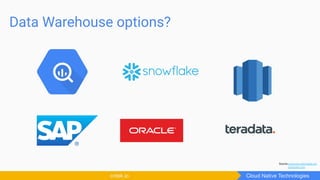
Data Warehouse options?
Cloud Native Technologiescntek.io
Source:commons.wikimedia.org
iconfinder.com
Choosing a Data Warehouse?
Cloud Native Technologiescntek.io
BigQuery
Cloud Native Technologiescntek.io
What is BigQuery?
BigQuery is a fully-managed enterprise-grade modern data warehouse
offering on Google Cloud Platform.
cloud.google.com/bigquery
Cloud Native Technologiescntek.io
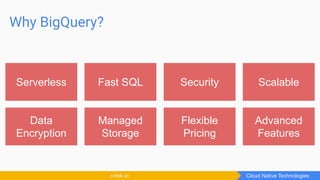
Why BigQuery?
Cloud Native Technologiescntek.io
Serverless Fast SQL Security Scalable
Data
Encryption
Managed
Storage
Flexible
Pricing
Advanced
Features
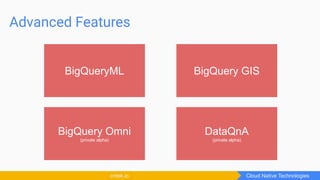
Advanced Features
Cloud Native Technologiescntek.io
BigQueryML BigQuery GIS
BigQuery Omni
(private alpha)
DataQnA
(private alpha)
Architecture
Cloud Native Technologiescntek.io
Columnar based storage
Cloud Native Technologiescntek.io
Row based Storage Column based Storage
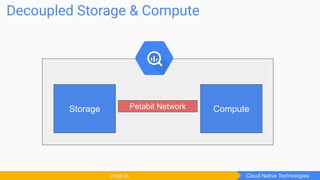
Decoupled Storage & Compute
Cloud Native Technologiescntek.io
Storage ComputePetabit Network
Resources
Cloud Native Technologiescntek.io
● An Inside Look at Google BigQuery
https://cloud.google.com/files/BigQueryTechnicalWP.pdf
● Dremel
static.googleusercontent.com/media/research.google.com/en//pubs/archive/36632.pdf
Concepts
Cloud Native Technologiescntek.io
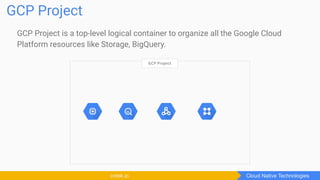
GCP Project is a top-level logical container to organize all the Google Cloud
Platform resources like Storage, BigQuery.
GCP Project
Cloud Native Technologiescntek.io
GCP Project
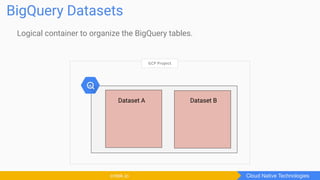
Logical container to organize the BigQuery tables.
BigQuery Datasets
Cloud Native Technologiescntek.io
GCP Project
Dataset A Dataset B
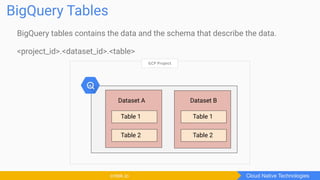
BigQuery tables contains the data and the schema that describe the data.
<project_id>.<dataset_id>.<table>
BigQuery Tables
Cloud Native Technologiescntek.io
Table 2
GCP Project
Dataset A Dataset B
Table 1
Table 2
Table 1
Table 2
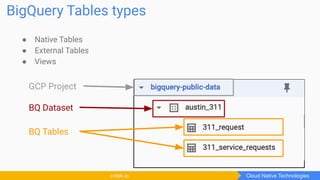
● Native Tables
● External Tables
● Views
BigQuery Tables types
Cloud Native Technologiescntek.io
GCP Project
BQ Dataset
BQ Tables
A BigQuery slot is a combination of CPU, memory and network resources.
BigQuery automatically calculates the number of slots required to execute a
query based on query size and complexity.
Slots
Cloud Native Technologiescntek.io
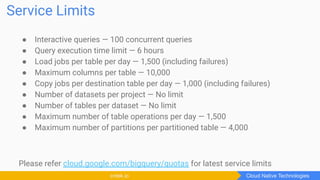
● Interactive queries — 100 concurrent queries
● Query execution time limit — 6 hours
● Load jobs per table per day — 1,500 (including failures)
● Maximum columns per table — 10,000
● Copy jobs per destination table per day — 1,000 (including failures)
● Number of datasets per project — No limit
● Number of tables per dataset — No limit
● Maximum number of table operations per day — 1,500
● Maximum number of partitions per partitioned table — 4,000
Please refer cloud.google.com/bigquery/quotas for latest service limits
Service Limits
Cloud Native Technologiescntek.io
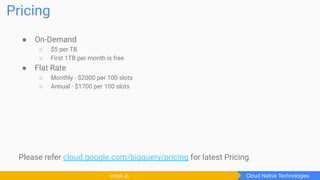
● On-Demand
○ $5 per TB
○ First 1TB per month is free
● Flat Rate
○ Monthly - $2000 per 100 slots
○ Annual - $1700 per 100 slots
Please refer cloud.google.com/bigquery/pricing for latest Pricing
Pricing
Cloud Native Technologiescntek.io
Interacting with
BigQuery
Cloud Native Technologiescntek.io
Ways to interact with BigQuery
● Web UI - Cloud Console, Classic UI
● Command Line - bq
● Client Libraries - Go, Python, Java, etc.
● Third-party tools
Cloud Native Technologiescntek.io
Web UI
Cloud Native Technologiescntek.io
Command Line tool
Cloud Native Technologiescntek.io
Client Libraries
Cloud Native Technologiescntek.io
Best Practices
Cloud Native Technologiescntek.io
● Avoid “SELECT *”
● Use of Partitions
● Denormalization
● Use wildcards on tables appropriately
● Use external data source appropriately
● Reduce the amount of data before JOIN
● Avoid repetitive data transformation using SQL Queries
● Use Nested and Repeated fields
Query Performance
Cloud Native Technologiescntek.io
● Use table expiration
● Avoid data duplication
● Avoid full table scan
● Only scan required columns
● Use caching feature
● Use of Partitions
● Use of Clustering
Cost Optimization
Cloud Native Technologiescntek.io
Demo
Photo by Markus Spiske on UnsplashPhoto by Alex Litvin on Unsplash
Image by TeroVesalainen from Pixabay
pbhadani.com
pradeepbhadani
pradeepbhadani
bhadanipradeep
bit.ly/cntek-youtube
cntek.io
CloudNativeTech
CloudNativeTech
cntekio
bit.ly/cntek-youtube

Getting started with BigQuery

  • 1.
    Getting started withBigQuery Pradeep Bhadani Founder, Cloud Native Technologies cntek.io pbhadani.com linkedin.com/in/pradeepbhadani linkedin.com/company/cloudnativetech 22nd August 2020, Google Next OnAir Extended
  • 2.
    About Me IT Consultantwith 9 years of experience in Big Data, Cloud & DevOps GDE (Google Developers Expert) - Cloud Google Cloud Authorized Trainer HashiCorp Ambassador Blog: pbhadani.com Cloud Native Technologiescntek.io
  • 3.
    Services ● Big DataConsultancy ● Cloud & DevOps Consultancy ● Tailored Training and Workshops Cloud Native Technologiescntek.io
  • 4.
    Agenda ● Overview ○ Whatis a Data Warehouse? ○ Choosing a Data Warehouse Option? ● Introduction to BigQuery ○ What is BigQuery? ○ Why BigQuery? ○ Concepts ● Best Practices ● Interacting with BigQuery ● Demo Cloud Native Technologiescntek.io
  • 5.
    Data Warehouse Cloud NativeTechnologiescntek.io
  • 6.
    What is aData Warehouse? A data warehouse is a critical component in Business Intelligence solution which enables an organization to make a better decision. Data warehouse offers: ● Scheduled & ad-hoc reporting ● Ad-hoc analysis ● Integrates with Visualization tools Cloud Native Technologiescntek.io
  • 7.
    Data Warehouse options? CloudNative Technologiescntek.io Source:commons.wikimedia.org iconfinder.com
  • 8.
    Choosing a DataWarehouse? Cloud Native Technologiescntek.io
  • 9.
  • 10.
    What is BigQuery? BigQueryis a fully-managed enterprise-grade modern data warehouse offering on Google Cloud Platform. cloud.google.com/bigquery Cloud Native Technologiescntek.io
  • 11.
    Why BigQuery? Cloud NativeTechnologiescntek.io Serverless Fast SQL Security Scalable Data Encryption Managed Storage Flexible Pricing Advanced Features
  • 12.
    Advanced Features Cloud NativeTechnologiescntek.io BigQueryML BigQuery GIS BigQuery Omni (private alpha) DataQnA (private alpha)
  • 13.
  • 14.
    Columnar based storage CloudNative Technologiescntek.io Row based Storage Column based Storage
  • 15.
    Decoupled Storage &Compute Cloud Native Technologiescntek.io Storage ComputePetabit Network
  • 16.
    Resources Cloud Native Technologiescntek.io ●An Inside Look at Google BigQuery https://cloud.google.com/files/BigQueryTechnicalWP.pdf ● Dremel static.googleusercontent.com/media/research.google.com/en//pubs/archive/36632.pdf
  • 17.
  • 18.
    GCP Project isa top-level logical container to organize all the Google Cloud Platform resources like Storage, BigQuery. GCP Project Cloud Native Technologiescntek.io GCP Project
  • 19.
    Logical container toorganize the BigQuery tables. BigQuery Datasets Cloud Native Technologiescntek.io GCP Project Dataset A Dataset B
  • 20.
    BigQuery tables containsthe data and the schema that describe the data. <project_id>.<dataset_id>.<table> BigQuery Tables Cloud Native Technologiescntek.io Table 2 GCP Project Dataset A Dataset B Table 1 Table 2 Table 1 Table 2
  • 21.
    ● Native Tables ●External Tables ● Views BigQuery Tables types Cloud Native Technologiescntek.io GCP Project BQ Dataset BQ Tables
  • 22.
    A BigQuery slotis a combination of CPU, memory and network resources. BigQuery automatically calculates the number of slots required to execute a query based on query size and complexity. Slots Cloud Native Technologiescntek.io
  • 23.
    ● Interactive queries— 100 concurrent queries ● Query execution time limit — 6 hours ● Load jobs per table per day — 1,500 (including failures) ● Maximum columns per table — 10,000 ● Copy jobs per destination table per day — 1,000 (including failures) ● Number of datasets per project — No limit ● Number of tables per dataset — No limit ● Maximum number of table operations per day — 1,500 ● Maximum number of partitions per partitioned table — 4,000 Please refer cloud.google.com/bigquery/quotas for latest service limits Service Limits Cloud Native Technologiescntek.io
  • 24.
    ● On-Demand ○ $5per TB ○ First 1TB per month is free ● Flat Rate ○ Monthly - $2000 per 100 slots ○ Annual - $1700 per 100 slots Please refer cloud.google.com/bigquery/pricing for latest Pricing Pricing Cloud Native Technologiescntek.io
  • 25.
  • 26.
    Ways to interactwith BigQuery ● Web UI - Cloud Console, Classic UI ● Command Line - bq ● Client Libraries - Go, Python, Java, etc. ● Third-party tools Cloud Native Technologiescntek.io
  • 27.
    Web UI Cloud NativeTechnologiescntek.io
  • 28.
    Command Line tool CloudNative Technologiescntek.io
  • 29.
    Client Libraries Cloud NativeTechnologiescntek.io
  • 30.
    Best Practices Cloud NativeTechnologiescntek.io
  • 31.
    ● Avoid “SELECT*” ● Use of Partitions ● Denormalization ● Use wildcards on tables appropriately ● Use external data source appropriately ● Reduce the amount of data before JOIN ● Avoid repetitive data transformation using SQL Queries ● Use Nested and Repeated fields Query Performance Cloud Native Technologiescntek.io
  • 32.
    ● Use tableexpiration ● Avoid data duplication ● Avoid full table scan ● Only scan required columns ● Use caching feature ● Use of Partitions ● Use of Clustering Cost Optimization Cloud Native Technologiescntek.io
  • 33.
    Demo Photo by MarkusSpiske on UnsplashPhoto by Alex Litvin on Unsplash
  • 34.
    Image by TeroVesalainenfrom Pixabay pbhadani.com pradeepbhadani pradeepbhadani bhadanipradeep bit.ly/cntek-youtube
  • 35.