Getting Modern With MySQL
Who am I and why do I think I know about it?
Jakob Lorberblatt
Open source database consultant and enthusiast
- Teaches for a triangle area (here) girls coding club (shameless plug)
- Has a 20 year long obsession with open source technology.
- Loves to talk about software and linux
- Works as a database consultant for Pythian a top global provider for
database management services and cloud enablement that totally
loves your data!
The confusion with versions
Major Versions:
Surprise! They aren’t all that logical!
5.1 - no longer supported
5.5 - Oldest version still officially supported
5.6 - Current Stable (most common)
5.7 - First in the newer series, less
compatible with older usage.
8.0 - Latest Release, great feature set,
complete redesign, not all tools work here
yet.
MariaDB versions do not
directly correspond to
MySQL versions.
10.0 - is 5.5 with some extras
10.1 - is 5.6 ish for most
considerations.
10.2 - has some 5.7 in it.
10.3 - 5.7 and 8.0 as well as
mariadb specific functionality
beyond the scope of this
document
Percona Server versions correspond
directly to MySQL Versions
The types of dangers you may encounter
Deprecated / changed
Configuration parameters
-
Will prevent server startup
New reserved keywords
-
Errors on execution
Deprecated Syntax
-
Warnings
Eliminated Syntax
-
Failed statements
Performance Issues with specific
queries
New configuration required
Old configuration no longer valid
in new version
Removed functionality or storage
types referenced (myisam
support is removed in 8.0!)
-
What did we start with to get in this mess?
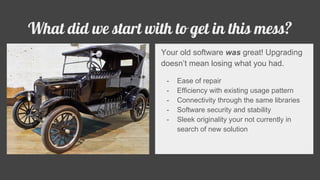
Your old software was great! Upgrading
doesn’t mean losing what you had.
- Ease of repair
- Efficiency with existing usage pattern
- Connectivity through the same libraries
- Software security and stability
- Sleek originality your not currently in
search of new solution
What are you trying to get too?
- Modern Feature Set
- Current patches and update cycle
- Efficiency gains and improvements
- Specific features and enablements
- Support for modern hardware or
cloud based hosting
- Continued odds of finding your
problem’s solution on stackoverflow
or at least a group of others to rant
about it with online
The Basics, how do you get there?
ALWAYS BACKUP YOUR DATA FIRST!!
1) Remove or unlink your existing
mysql install.
2) Install Upgraded packages, at this
point you may only advance 1 version
eg: 5.1 to 5.5 or 5.5 to 5.6
3) Start mysql, examine the error log as
some my.cnf options may have been
deprecated or changed, preventing
system startup.
4) Adjust until fixed
5) Run
‘mysql_upgrade -u root_like_user -p’
6) Although not absolutely required for
all versions it is needed for some so I
recommend restarting mysql again at
this point.
What’s Stopping you?
- Version Compatibility
- Infrastructure Compatibility
- Replication Compatibility
- Business Process Changes
- Development cycles
- Confusion about any of the above
- Inability to resolve issues with any of
the above
- Difficulty in testing any of the above.
- Pt-upgrade
- proxySQL
- Pt-query-digest
- Higher version replicas
- Lower testing environments for
applications
- PMM or other time series analysis
- Black hole relays, in special
circumstances.
How to bridge the gap to address these issues?
pt-upgrade fundamentals
- Create a clone of your existing data.
- Setup clone server with a newer
version of mysql
- Run mysql_upgrade on clone
- Set long_query_time set to 0
- Collect a slow query log
- Transfer the slow log to the clone
- Run pt-upgrade on the clone
- Keep in mind the queries are run in
serial, this will take some time
- Analyze the differences.
Additional Information:
Official Site:
https://www.percona.com/doc/percona-toolkit/LATEST/pt-upgrade.html
Required Configuration:
https://dev.mysql.com/doc/refman/5.6/en/slow-query-log.html
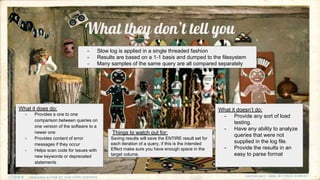
What they don’t tell you
What it does do:
- Provides a one to one
comparison between queries on
one version of the software to a
newer one
- Provides content of error
messages if they occur
- Helps scan code for issues with
new keywords or deprecated
statements
What it doesn’t do:
- Provide any sort of load
testing.
- Have any ability to analyze
queries that were not
supplied in the log file.
- Provide the results in an
easy to parse format
- Slow log is applied in a single threaded fashion
- Results are based on a 1-1 basis and dumped to the filesystem
- Many samples of the same query are all compared separately
Things to watch out for:
Saving results will save the ENTIRE result set for
each iteration of a query, if this is the intended
Effect make sure you have enough space in the
target volume.
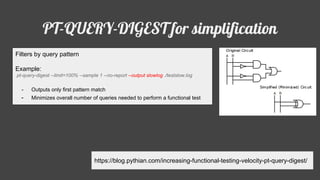
PT-QUERY-DIGEST for simplification
https://blog.pythian.com/increasing-functional-testing-velocity-pt-query-digest/
Filters by query pattern
Example:
pt-query-digest --limit=100% --sample 1 --no-report --output slowlog ./testslow.log
- Outputs only first pattern match
- Minimizes overall number of queries needed to perform a functional test
Interpreting the Results
Where do I look for the results of
pt-query-digest?
All of the output is dumped into a
directory, the lines are mapped one for
one, statement executed to result.
“grep ERROR results” should give you
a lot of feedback.
What do I do with what went
wrong?
- Sql_mode is a powerful
variable, it can revert
behaviors.
- Rewrite queries
- Remove deprecated
syntax usage
- quote in backticks any
usages of newly
introduced reserved
keywords.
ProxySQL
- Amazing Mirror functionality, allows a complete copy of traffic in real time to be applied to a second
server, real life load testing!
- Dynamic routing of traffic based on custom rule sets allowing read to be directed to a newer version
- New and cool ways to test and move upgrades into production.
http://proxysql.com
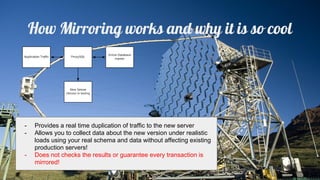
How Mirroring works and why it is so cool
- Provides a real time duplication of traffic to the new server
- Allows you to collect data about the new version under realistic
loads using your real schema and data without affecting existing
production servers!
- Does not checks the results or guarantee every transaction is
mirrored!
Half way betwixt and testing environments
And through the drifts the snowy clifts
Did send a dismal sheen:
Nor shapes of men nor beasts we ken—
The ice was all between.
- Samuel Taylor Coleridge
Things to remember:
- You can always replicate from an older version to the next
newest version, this is a fully supported behavior.
-
- Data formats may change, once upgraded there is no going
back for the physical data, it would require a logical dump.
-
- Replication format can strongly affect behavior, MIXED or ROW
format replication is STRONGLY recommended
-
- Tables without primary keys in combination with ROW based
replication can result in high lag on the slave server
-
Black Hole Relays
What is a black hole relay? Why would you want
to blackhole your data
- A black hole table will allow insert but
contains no data (like /dev/null)
- The black hole insert will still get written to
the binary log, allowing a slave to duplicate
the transaction.
- The binary log is read and written by the
version of the server hosting the black hole
tables.
- Version to version replication is officially
supported only to the next major version. If
you are intending to jump from 5.1 to 5.7
you would have a “blackhole” instance for
5.5. And 5.6 inbetween.
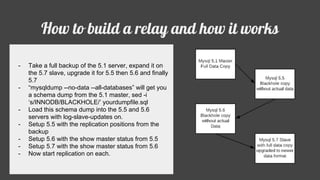
How to build a relay and how it works
- Take a full backup of the 5.1 server, expand it on
the 5.7 slave, upgrade it for 5.5 then 5.6 and finally
5.7
- “mysqldump --no-data --all-databases” will get you
a schema dump from the 5.1 master, sed -i
‘s/INNODB/BLACKHOLE/’ yourdumpfile.sql
- Load this schema dump into the 5.5 and 5.6
servers with log-slave-updates on.
- Setup 5.5 with the replication positions from the
backup
- Setup 5.6 with the show master status from 5.5
- Setup 5.7 with the show master status from 5.6
- Now start replication on each.
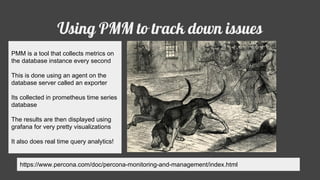
Using PMM to track down issues
https://www.percona.com/doc/percona-monitoring-and-management/index.html
PMM is a tool that collects metrics on
the database instance every second
This is done using an agent on the
database server called an exporter
Its collected in prometheus time series
database
The results are then displayed using
grafana for very pretty visualizations
It also does real time query analytics!
Somethings are going to break, what do I do?
Sql_mode - many things that are “deprecated” are
actually just disabled by a flag here.
Keywords can be wrapped in backticks
Default values can be changed
Queries can be restructured
FORCE INDEX can be a way to reverse optimizer
plan changes
Indexes can be added / removed
Performance can be tuned through configuration

Getting modern with my sql

  • 1.
  • 2.
    Who am Iand why do I think I know about it? Jakob Lorberblatt Open source database consultant and enthusiast - Teaches for a triangle area (here) girls coding club (shameless plug) - Has a 20 year long obsession with open source technology. - Loves to talk about software and linux - Works as a database consultant for Pythian a top global provider for database management services and cloud enablement that totally loves your data!
  • 3.
    The confusion withversions Major Versions: Surprise! They aren’t all that logical! 5.1 - no longer supported 5.5 - Oldest version still officially supported 5.6 - Current Stable (most common) 5.7 - First in the newer series, less compatible with older usage. 8.0 - Latest Release, great feature set, complete redesign, not all tools work here yet. MariaDB versions do not directly correspond to MySQL versions. 10.0 - is 5.5 with some extras 10.1 - is 5.6 ish for most considerations. 10.2 - has some 5.7 in it. 10.3 - 5.7 and 8.0 as well as mariadb specific functionality beyond the scope of this document Percona Server versions correspond directly to MySQL Versions
  • 4.
    The types ofdangers you may encounter Deprecated / changed Configuration parameters - Will prevent server startup New reserved keywords - Errors on execution Deprecated Syntax - Warnings Eliminated Syntax - Failed statements Performance Issues with specific queries New configuration required Old configuration no longer valid in new version Removed functionality or storage types referenced (myisam support is removed in 8.0!)
  • 5.
    - What did westart with to get in this mess? Your old software was great! Upgrading doesn’t mean losing what you had. - Ease of repair - Efficiency with existing usage pattern - Connectivity through the same libraries - Software security and stability - Sleek originality your not currently in search of new solution
  • 6.
    What are youtrying to get too? - Modern Feature Set - Current patches and update cycle - Efficiency gains and improvements - Specific features and enablements - Support for modern hardware or cloud based hosting - Continued odds of finding your problem’s solution on stackoverflow or at least a group of others to rant about it with online
  • 7.
    The Basics, howdo you get there? ALWAYS BACKUP YOUR DATA FIRST!! 1) Remove or unlink your existing mysql install. 2) Install Upgraded packages, at this point you may only advance 1 version eg: 5.1 to 5.5 or 5.5 to 5.6 3) Start mysql, examine the error log as some my.cnf options may have been deprecated or changed, preventing system startup. 4) Adjust until fixed 5) Run ‘mysql_upgrade -u root_like_user -p’ 6) Although not absolutely required for all versions it is needed for some so I recommend restarting mysql again at this point.
  • 8.
    What’s Stopping you? -Version Compatibility - Infrastructure Compatibility - Replication Compatibility - Business Process Changes - Development cycles - Confusion about any of the above - Inability to resolve issues with any of the above - Difficulty in testing any of the above.
  • 9.
    - Pt-upgrade - proxySQL -Pt-query-digest - Higher version replicas - Lower testing environments for applications - PMM or other time series analysis - Black hole relays, in special circumstances. How to bridge the gap to address these issues?
  • 10.
    pt-upgrade fundamentals - Createa clone of your existing data. - Setup clone server with a newer version of mysql - Run mysql_upgrade on clone - Set long_query_time set to 0 - Collect a slow query log - Transfer the slow log to the clone - Run pt-upgrade on the clone - Keep in mind the queries are run in serial, this will take some time - Analyze the differences. Additional Information: Official Site: https://www.percona.com/doc/percona-toolkit/LATEST/pt-upgrade.html Required Configuration: https://dev.mysql.com/doc/refman/5.6/en/slow-query-log.html
  • 11.
    What they don’ttell you What it does do: - Provides a one to one comparison between queries on one version of the software to a newer one - Provides content of error messages if they occur - Helps scan code for issues with new keywords or deprecated statements What it doesn’t do: - Provide any sort of load testing. - Have any ability to analyze queries that were not supplied in the log file. - Provide the results in an easy to parse format - Slow log is applied in a single threaded fashion - Results are based on a 1-1 basis and dumped to the filesystem - Many samples of the same query are all compared separately Things to watch out for: Saving results will save the ENTIRE result set for each iteration of a query, if this is the intended Effect make sure you have enough space in the target volume.
  • 12.
    PT-QUERY-DIGEST for simplification https://blog.pythian.com/increasing-functional-testing-velocity-pt-query-digest/ Filtersby query pattern Example: pt-query-digest --limit=100% --sample 1 --no-report --output slowlog ./testslow.log - Outputs only first pattern match - Minimizes overall number of queries needed to perform a functional test
  • 13.
    Interpreting the Results Wheredo I look for the results of pt-query-digest? All of the output is dumped into a directory, the lines are mapped one for one, statement executed to result. “grep ERROR results” should give you a lot of feedback. What do I do with what went wrong? - Sql_mode is a powerful variable, it can revert behaviors. - Rewrite queries - Remove deprecated syntax usage - quote in backticks any usages of newly introduced reserved keywords.
  • 14.
    ProxySQL - Amazing Mirrorfunctionality, allows a complete copy of traffic in real time to be applied to a second server, real life load testing! - Dynamic routing of traffic based on custom rule sets allowing read to be directed to a newer version - New and cool ways to test and move upgrades into production. http://proxysql.com
  • 15.
    How Mirroring worksand why it is so cool - Provides a real time duplication of traffic to the new server - Allows you to collect data about the new version under realistic loads using your real schema and data without affecting existing production servers! - Does not checks the results or guarantee every transaction is mirrored!
  • 16.
    Half way betwixtand testing environments And through the drifts the snowy clifts Did send a dismal sheen: Nor shapes of men nor beasts we ken— The ice was all between. - Samuel Taylor Coleridge Things to remember: - You can always replicate from an older version to the next newest version, this is a fully supported behavior. - - Data formats may change, once upgraded there is no going back for the physical data, it would require a logical dump. - - Replication format can strongly affect behavior, MIXED or ROW format replication is STRONGLY recommended - - Tables without primary keys in combination with ROW based replication can result in high lag on the slave server -
  • 17.
    Black Hole Relays Whatis a black hole relay? Why would you want to blackhole your data - A black hole table will allow insert but contains no data (like /dev/null) - The black hole insert will still get written to the binary log, allowing a slave to duplicate the transaction. - The binary log is read and written by the version of the server hosting the black hole tables. - Version to version replication is officially supported only to the next major version. If you are intending to jump from 5.1 to 5.7 you would have a “blackhole” instance for 5.5. And 5.6 inbetween.
  • 18.
    How to builda relay and how it works - Take a full backup of the 5.1 server, expand it on the 5.7 slave, upgrade it for 5.5 then 5.6 and finally 5.7 - “mysqldump --no-data --all-databases” will get you a schema dump from the 5.1 master, sed -i ‘s/INNODB/BLACKHOLE/’ yourdumpfile.sql - Load this schema dump into the 5.5 and 5.6 servers with log-slave-updates on. - Setup 5.5 with the replication positions from the backup - Setup 5.6 with the show master status from 5.5 - Setup 5.7 with the show master status from 5.6 - Now start replication on each.
  • 19.
    Using PMM totrack down issues https://www.percona.com/doc/percona-monitoring-and-management/index.html PMM is a tool that collects metrics on the database instance every second This is done using an agent on the database server called an exporter Its collected in prometheus time series database The results are then displayed using grafana for very pretty visualizations It also does real time query analytics!
  • 20.
    Somethings are goingto break, what do I do? Sql_mode - many things that are “deprecated” are actually just disabled by a flag here. Keywords can be wrapped in backticks Default values can be changed Queries can be restructured FORCE INDEX can be a way to reverse optimizer plan changes Indexes can be added / removed Performance can be tuned through configuration