GeoKettle: A powerful open
 source spatial ETL tool

               FOSS4G 2010

               Dr. Thierry Badard, CTO
               Spatialytics inc.
               Quebec, Canada
               tbadard@spatialytics.com


                                   Barcelona, Spain – Sept 9th, 2010
What is GeoKettle?
●
    It is part of the geospatial BI software stack
    developed initially by the GeoSOA research group at
    Laval University in Quebec …
         –   GeoKettle
         –   GeoMondrian
         –   SOLAPLayers

●
    But are now developed and supported by Spatialytics
         –   http://www.spatialytics.org (open source community)
         –   http://www.spatialytics.com (professional support, training)
●
    OK but … what is geospatial BI? ;-)
As you probably know …
●
    Business Intelligence applications are usually used to
    better understand historical, current and future
    aspects of business operations in a company.
●
    The applications typically offer ways to mine
    database- and spreadsheet-centric data, and
    produce graphical, table-based and other types of
    analytics regarding business operations.
●
    They support the decision process and allow to take
    more informed decision!
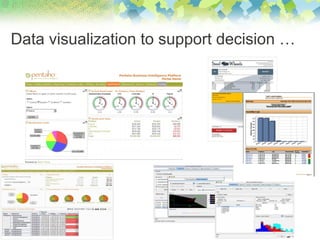
Data visualization to support decision …
As you probably know …
●   Business Intelligence applications are usually used to better
    understand historical, current and future aspects of business
    operations in a company.
●   The applications typically offer ways to mine database- and
    spreadsheet-centric data, and produce graphical, table-based and
    other types of analytics regarding business operations.
●   They support the decision process and allow to take more informed
    decision!
●   Rely on an architecture with robust components and applications:
    −   ETL tools & data warehousing (DW)
    −   On-line Analytical Processing (OLAP) servers and clients
    −   Reporting tools & dashboards
    −   Data mining
So, an ETL tool is …
●   A type of software used to populate databases or data
    warehouses from heterogeneous data sources.
●   ETL stands for:
    −   Extract – Extract data from data sources
    −   Transform – Transformation of data in order to correct errors, make
        some data cleansing, change the data structure, make them compliant
        to defined standards, etc.
    −   Load – Load transformed data into the target DBMS
●   An ETL tool should manage the insertion of new data and the
    updating of existing data.
●   Should be able to perform transformations from :
    −   An OLTP system to another OLTP system
    −   An OLTP system to an analytical data warehouse
Why use an ETL tool?
●   Automation of complex and repetitive data
    processing without producing any specific code
●   Conversion between various data formats
●   Migration of data from a DBMS to another
●   Data feeding into various DBMS
●   Population of analytical data warehouses for
    decision support purposes
●   etc.
GeoKettle
●   GeoKettle is a "spatially-enabled" version of Pentaho Data
    Integration (Kettle)
●   Kettle is a metadata-driven ETL with direct execution of
    transformations
    −   No intermediate code generation!
●   Support of several DBMS and file formats
    −   DBMS support: MySQL, PostgreSQL, Oracle, DB2, MS SQL
        Server, ... (total of 37)
    −   Read/write support of various data file formats: text, Excel, Access,
        DBF, XML, ...
●   Numerous transformation steps
●   Support of methods for the updating of DW
GeoKettle
●   GeoKettle provides a true and consistent integration of the spatial
    component
    −   All steps provided by Kettle are able to deal with geospatial data types
    −   Some geospatial dedicated steps have been added
●   First release in May 2008: 2.5.2-20080531
●   Current stable version: 3.2.0-r188-20090706
●   To be released shortly: GeoKettle 2.0 with many new features!
●   Released under LGPL at http://www.geokettle.org
●   Used in different organizations and countries:
    −   Some ministries, bank, insurance, integrators, …
    −   E.g. GeoETL from Inova is in fact GeoKettle! :-)
●   A growing community of users and developers
GeoKettle
●   Transformations vs. Jobs:
    −   Running in parallel vs. running sequentially
●   All can be stored in a central repository (database)
    −   But each transformation or job could also be saved in a simple XML
        file!
●   Offers different interfaces:
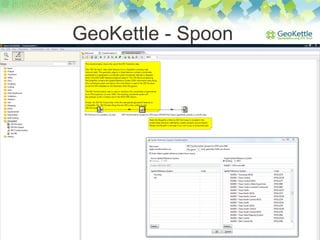
    −   Spoon: GUI for the edition of transformations and jobs
    −   Pan: command line interface for running transformations
    −   Kitchen: command line interface for running jobs
    −   Carte: Web service for the remote execution of transformations and
        jobs
GeoKettle - Spoon
●   Provides support for:
                                 GeoKettle
    −   Handling geometry data types (based on JTS)
    −   Accessing Geometry objects in JavaScript
    −   It allows the definition of custom transformation steps by the user (“Modified
        JavaScript Value” step)
    −   Topological predicates (Intersects, crosses, etc.) and aggregation operators
        (envelope, union, geometry collection, ...)
    −   SRS definition and transformations
    −   Input / Output with some spatial DBMS
          - Native support for Oracle, PostGIS and MySQL
          - MS SQL Server 2008 and IBM DB2 can be used but it
            requires some tricks
    −   GIS file Input / Output: Shapefile, GML 3, KML 2.2 and OGR support (~33
        vector data formats and DBMS)
    −   Cartographic preview
GeoKettle
●
    GeoKettle releases are aligned with the ones of Pentaho
    Data Integration (Kettle),
    −   GeoKettle then benefits all new features provided by
        PDI (Kettle).
●
    Kettle is natively designed to be deployed in cluster and
    web service environments.
    −   It makes GeoKettle a perfect software component to be deployed
        as a service (SaaS) in cloud computing environments as those
        provided by Amazon EC2.
    −   It enables then the scalable, distributed and on demand processing
        of large and complex volumes of geospatial data in minutes for
        critical applications and without requiring a company to invest in an
        expensive IT infrastructure of servers, networks and software.
GeoKettle – Requirements and install
●
    Very simple installation procedure
●
    All you need is a Java Runtime Environment
         –   Version 5 or higher

●
    Just unzip the binary archive of GeoKettle ...
●
    And let’s go !
         –   Run spoon.sh (UNIX/Linux/Mac)
              or spoon.bat (Windows)

●
    Need help, please visit our wiki:
        – http://wiki.spatialytics.org
GeoKettle


- Demo -
GeoKettle
●
    Upcoming features:
    −   Implementation of data matching and conflation steps/jobs in order to
        allow geometric data cleansing and comparison of geospatial datasets
        (results of a Google Summer of Code, should be available in version 2.x)
    −   Read/write support for other DBMS, GIS file formats and services
         −   LAS (LiDAR), ...
         −   Native support for MS SQL Server 2008, ...
         −   WFS-T, Sensor Web (TML, SensorML, SOS, ...), ...
         −   GIS metadata and CSW
    −   Implementation of a “Spatial analysis” step with a GUI
    −   Dedicated steps for social media (Twitter, ...), OSM, generalization, ...
    −   Support of the third dimension
    −   Raster support: development in progress of a plugin to integrate all
        capabilities provided by the Sextante library (BeETLe)
Questions?
●   Thanks for your attention and do not hesitate to ask for more
    demos!
●   Contact:
    Dr. Thierry Badard, CTO
    Spatialytics inc.
    Quebec, Canada
    Email: tbadard@spatialytics.com
    Web: http://www.spatialytics.org
          http://www.spatialytics.com
    Twitter: tbadard & spatialytics


                      http://www.geokettle.org      Twitter : geokettle

                      http://www.geo-mondrian.org   Twitter : geomondrian

                      http://www.solaplayers.org    Twitter : solaplayers

GeoKettle: A powerful open source spatial ETL tool

  • 1.
    GeoKettle: A powerfulopen source spatial ETL tool FOSS4G 2010 Dr. Thierry Badard, CTO Spatialytics inc. Quebec, Canada tbadard@spatialytics.com Barcelona, Spain – Sept 9th, 2010
  • 2.
    What is GeoKettle? ● It is part of the geospatial BI software stack developed initially by the GeoSOA research group at Laval University in Quebec … – GeoKettle – GeoMondrian – SOLAPLayers ● But are now developed and supported by Spatialytics – http://www.spatialytics.org (open source community) – http://www.spatialytics.com (professional support, training) ● OK but … what is geospatial BI? ;-)
  • 3.
    As you probablyknow … ● Business Intelligence applications are usually used to better understand historical, current and future aspects of business operations in a company. ● The applications typically offer ways to mine database- and spreadsheet-centric data, and produce graphical, table-based and other types of analytics regarding business operations. ● They support the decision process and allow to take more informed decision!
  • 4.
    Data visualization tosupport decision …
  • 5.
    As you probablyknow … ● Business Intelligence applications are usually used to better understand historical, current and future aspects of business operations in a company. ● The applications typically offer ways to mine database- and spreadsheet-centric data, and produce graphical, table-based and other types of analytics regarding business operations. ● They support the decision process and allow to take more informed decision! ● Rely on an architecture with robust components and applications: − ETL tools & data warehousing (DW) − On-line Analytical Processing (OLAP) servers and clients − Reporting tools & dashboards − Data mining
  • 6.
    So, an ETLtool is … ● A type of software used to populate databases or data warehouses from heterogeneous data sources. ● ETL stands for: − Extract – Extract data from data sources − Transform – Transformation of data in order to correct errors, make some data cleansing, change the data structure, make them compliant to defined standards, etc. − Load – Load transformed data into the target DBMS ● An ETL tool should manage the insertion of new data and the updating of existing data. ● Should be able to perform transformations from : − An OLTP system to another OLTP system − An OLTP system to an analytical data warehouse
  • 7.
    Why use anETL tool? ● Automation of complex and repetitive data processing without producing any specific code ● Conversion between various data formats ● Migration of data from a DBMS to another ● Data feeding into various DBMS ● Population of analytical data warehouses for decision support purposes ● etc.
  • 8.
    GeoKettle ● GeoKettle is a "spatially-enabled" version of Pentaho Data Integration (Kettle) ● Kettle is a metadata-driven ETL with direct execution of transformations − No intermediate code generation! ● Support of several DBMS and file formats − DBMS support: MySQL, PostgreSQL, Oracle, DB2, MS SQL Server, ... (total of 37) − Read/write support of various data file formats: text, Excel, Access, DBF, XML, ... ● Numerous transformation steps ● Support of methods for the updating of DW
  • 9.
    GeoKettle ● GeoKettle provides a true and consistent integration of the spatial component − All steps provided by Kettle are able to deal with geospatial data types − Some geospatial dedicated steps have been added ● First release in May 2008: 2.5.2-20080531 ● Current stable version: 3.2.0-r188-20090706 ● To be released shortly: GeoKettle 2.0 with many new features! ● Released under LGPL at http://www.geokettle.org ● Used in different organizations and countries: − Some ministries, bank, insurance, integrators, … − E.g. GeoETL from Inova is in fact GeoKettle! :-) ● A growing community of users and developers
  • 10.
    GeoKettle ● Transformations vs. Jobs: − Running in parallel vs. running sequentially ● All can be stored in a central repository (database) − But each transformation or job could also be saved in a simple XML file! ● Offers different interfaces: − Spoon: GUI for the edition of transformations and jobs − Pan: command line interface for running transformations − Kitchen: command line interface for running jobs − Carte: Web service for the remote execution of transformations and jobs
  • 11.
  • 12.
    Provides support for: GeoKettle − Handling geometry data types (based on JTS) − Accessing Geometry objects in JavaScript − It allows the definition of custom transformation steps by the user (“Modified JavaScript Value” step) − Topological predicates (Intersects, crosses, etc.) and aggregation operators (envelope, union, geometry collection, ...) − SRS definition and transformations − Input / Output with some spatial DBMS - Native support for Oracle, PostGIS and MySQL - MS SQL Server 2008 and IBM DB2 can be used but it requires some tricks − GIS file Input / Output: Shapefile, GML 3, KML 2.2 and OGR support (~33 vector data formats and DBMS) − Cartographic preview
  • 13.
    GeoKettle ● GeoKettle releases are aligned with the ones of Pentaho Data Integration (Kettle), − GeoKettle then benefits all new features provided by PDI (Kettle). ● Kettle is natively designed to be deployed in cluster and web service environments. − It makes GeoKettle a perfect software component to be deployed as a service (SaaS) in cloud computing environments as those provided by Amazon EC2. − It enables then the scalable, distributed and on demand processing of large and complex volumes of geospatial data in minutes for critical applications and without requiring a company to invest in an expensive IT infrastructure of servers, networks and software.
  • 14.
    GeoKettle – Requirementsand install ● Very simple installation procedure ● All you need is a Java Runtime Environment – Version 5 or higher ● Just unzip the binary archive of GeoKettle ... ● And let’s go ! – Run spoon.sh (UNIX/Linux/Mac) or spoon.bat (Windows) ● Need help, please visit our wiki: – http://wiki.spatialytics.org
  • 15.
  • 16.
    GeoKettle ● Upcoming features: − Implementation of data matching and conflation steps/jobs in order to allow geometric data cleansing and comparison of geospatial datasets (results of a Google Summer of Code, should be available in version 2.x) − Read/write support for other DBMS, GIS file formats and services − LAS (LiDAR), ... − Native support for MS SQL Server 2008, ... − WFS-T, Sensor Web (TML, SensorML, SOS, ...), ... − GIS metadata and CSW − Implementation of a “Spatial analysis” step with a GUI − Dedicated steps for social media (Twitter, ...), OSM, generalization, ... − Support of the third dimension − Raster support: development in progress of a plugin to integrate all capabilities provided by the Sextante library (BeETLe)
  • 17.
    Questions? ● Thanks for your attention and do not hesitate to ask for more demos! ● Contact: Dr. Thierry Badard, CTO Spatialytics inc. Quebec, Canada Email: tbadard@spatialytics.com Web: http://www.spatialytics.org http://www.spatialytics.com Twitter: tbadard & spatialytics http://www.geokettle.org Twitter : geokettle http://www.geo-mondrian.org Twitter : geomondrian http://www.solaplayers.org Twitter : solaplayers